instrument panel NISSAN FRONTIER 2021 Owner's Manual
[x] Cancel search | Manufacturer: NISSAN, Model Year: 2021, Model line: FRONTIER, Model: NISSAN FRONTIER 2021Pages: 492, PDF Size: 2.86 MB
Page 343 of 492
The VDC system uses various sensors to
monitor driver inputs and vehicle motion.
Under certain driving conditions, the VDC
system helps to perform the following
functions:
• Controls brake pressure to reduce wheelslip on one slipping drive wheel so power
is transferred to a non-slipping drive
wheel on the same axle.
• Controls brake pressure and engine out- put to reduce drive wheel slip based on
vehicle speed (traction control function).
• If the 4WD transfer case is shif ted into 4LO the
indicator light will come on and
the VDC system will be turned off. For
additional information, refer to “Using
4–Wheel Drive (4WD)” in this section.
• Controls brake pressure at individual wheels and engine output to help the
driver maintain control of the vehicle in
the following conditions:– Understeer (vehicle tends to not follow the steered path despite increased
steering input)
– Oversteer (vehicle tends to spin due to certain road or driving conditions)
The VDC system can help the driver to
maintain control of the vehicle, but it can-
not prevent loss of vehicle control in all driv-
ing situations. When the VDC system operates, the
indicator light in the instrument panel
flashes so note the following:
• The road may be slippery or the system
may determine some action is required
to help keep the vehicle on the steered
path.
• You may feel a pulsation in the brake pedal and hear a noise or vibration from
under the hood. This is normal and indi-
cates that the VDC system is working
properly.
• Adjust your speed and driving to the road conditions.
For additional information, refer to “Slip in-
dicator light” and ”Vehicle Dynamic Control
(VDC) OFF indicator light” in the ”Instru-
ments and controls” section of this manual.
If a malfunction occurs in the system, the
indicator light will come on in the in-
strument panel. The VDC system auto-
matically turns off when these indicator
lights are off.
The VDC OFF switch is used to turn off the
VDC system. The
indicator light illumi-
nates to indicate the VDC system is off. When the VDC OFF switch is used to turn off
the system, the VDC system still operates
to prevent one drive wheel from slipping by
transferring power to a non-slipping drive
wheel. The
indicator light flashes if this
occurs. All other VDC functions are off and
the
indicator light will not flash.
The VDC system is automatically reset to
on when the ignition switch is placed in the
OFF position then back to the ON position.
The computer has a built-in diagnostic fea-
ture that tests the system each time you
start the engine and move the vehicle for-
ward or in reverse at a slow speed. When
the self-test occurs, you may hear a clunk
noise and/or feel a pulsation in the brake
pedal. This is normal and is not an indica-
tion of a malfunction.
VEHICLE DYNAMIC CONTROL (VDC)
SYSTEM
Starting and driving5-35
Page 346 of 492
vehicle speed allowing the driver to con-
centrate on steering while reducing the
burden of brake and accelerator operation.
• When additional braking is required onsteep downhill roads, activate the hill de-
scent control system by pushing the
switch on. For additional information, re-
fer to “Hill descent control switch” in the
“Instruments and controls” section of this
manual.
• Once the system is activated, the indica- tor light will remain on in the instrument
panel. For additional information, refer to
“Hill descent control system ON indicator
light” in the “Instruments and controls”
section of this manual.
If the accelerator or brake pedal is de-
pressed while the hill descent control sys-
tem is on, the system will stop operating
temporarily. As soon as the accelerator or
brake pedal is released, the hill descent
control system begins to function again if
the hill descent control operating condi-
tions are fulfilled.
For the best results, when descending
steep downhill grades, the hill descent con-
trol switch should be on and the shif t lever
in 2 (Second gear) or 1 (Low gear) for engine
braking.
Page 347 of 492
WARNING
• Always turn and look back before
backing up. The RSS is not a substi-
tute for proper backing procedures.
• Read and understand the limitations
of the RSS as contained in this sec-
tion. Inclement weather may affect
the function of the RSS; this may in-
clude reduced performance or a false
activation.
• This system is not designed to pre-
vent contact with small or moving
objects. •
The system is designed as an aid to
the driver in detecting large station-
ary objects to help avoid damaging
the vehicle. The system will not de-
tect small objects below the bumper,
and may not detect objects close to
the bumper or on the ground.
• If your vehicle sustains damage to
the rear bumper fascia, leaving it
misaligned or bent, the sensing zone
may be altered causing inaccurate
measurement of obstacles or false
alarms.
The RSS sounds a tone to warn the driver of
obstacles near the rear bumper when the
shif t lever is in R (Reverse). The system may
not detect objects at speeds above 3 mph
(5 km/h) and may not detect certain angu-
lar or moving objects.
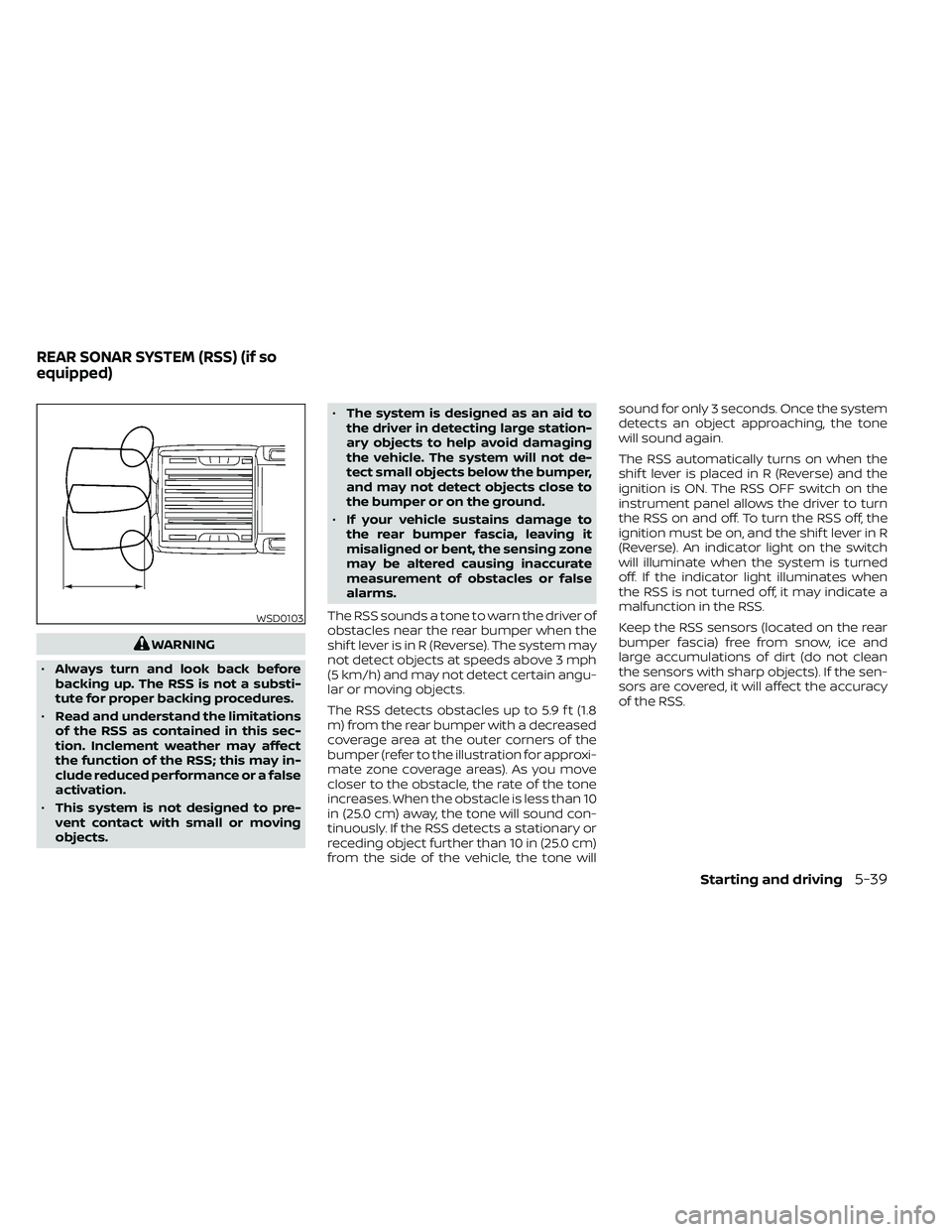
The RSS detects obstacles up to 5.9 f t (1.8
m) from the rear bumper with a decreased
coverage area at the outer corners of the
bumper (refer to the illustration for approxi-
mate zone coverage areas). As you move
closer to the obstacle, the rate of the tone
increases. When the obstacle is less than 10
in (25.0 cm) away, the tone will sound con-
tinuously. If the RSS detects a stationary or
receding object further than 10 in (25.0 cm)
from the side of the vehicle, the tone will sound for only 3 seconds. Once the system
detects an object approaching, the tone
will sound again.
The RSS automatically turns on when the
shif t lever is placed in R (Reverse) and the
ignition is ON. The RSS OFF switch on the
instrument panel allows the driver to turn
the RSS on and off. To turn the RSS off, the
ignition must be on, and the shif t lever in R
(Reverse). An indicator light on the switch
will illuminate when the system is turned
off. If the indicator light illuminates when
the RSS is not turned off, it may indicate a
malfunction in the RSS.
Keep the RSS sensors (located on the rear
bumper fascia) free from snow, ice and
large accumulations of dirt (do not clean
the sensors with sharp objects). If the sen-
sors are covered, it will affect the accuracy
of the RSS.
WSD0103
REAR SONAR SYSTEM (RSS) (if so
equipped)
Starting and driving5-39
Page 478 of 492
Parking brake operation.........5-19Self-adjusting brakes...........8-20Brake fluid....................8-11Brake system.................5-32Brakes......................8-20Break-in schedule...............5-21Brightness control
Instrument panel.............2-33Brightness/contrast button......4-9, 4-15Bulb check/instrument panel........2-15Bulb replacement...............8-28
C
C.M.V.S.S. certification label.........10-12Capacities and recommended
fuel/lubricants................ .10-2Car phone or CB radio............4-79Cargo
(See vehicle loading information).....10-14Cargo lamp switch..............2-34CD care and cleaning.............4-70CD player (See audio system).......4-54Child restraint with top tether strap. . . .1-32Child restraints.......1-25,1-26,1-28, 1-30Precautions on child
restraints.........1-39, 1-42, 1-54, 1-65Top tether strap anchor point
locations.................. .1-33Child safety rear door lock..........3-7Cleaning exterior and interior......7-2,7-4Clock set/adjustment..........4-7,4-13
Clock setting
(models with Navigation System).....4-13Cold weather driving.............5-40Compact disc (CD) player..........4-54Compass....................2-11Compass and outside temperature
display......................2-10Compass display...............2-10Connect phone................4-72Console box..................2-45Control panel buttons.........4-5, 4-10Back button.................4-13Brightness/contrast button. . . .4-9, 4-15Enter button..............4-5, 4-10Setting button...............4-13With navigation system.......4-10,4-11Controls
Audio controls (steering wheel).....4-71Heater and air conditioner controls. .4-34Heater and air conditioner controls
(manual)...................4-22CoolantCapacities and recommended
fuel/lubricants
...............10-2Changing engine coolant.........8-5Checking engine coolant level......8-5Engine coolant temperature gauge. . .2-7Corrosion protection..............7-7Cruise control.................5-19Cup holders................. .2-46Curtain side-impact and rollover
air bag..................... .1-82
D
Daytime Running Lights (DRL) system. .2-32Defroster switch
Rear window and outside mirror
defroster switch
..............2-29Rear window defroster switch.....2-29Dimensions and weights..........10-10Dimmer switch for instrument panel. . .2-33Display controls (see control panel
buttons)................. .4-5, 4-10Door locks................... .3-4Door open warning light...........2-17Drive belt....................8-15Driving
Cold weather driving...........5-40Driving with automatic
transmission................5-14Precautions when starting and
driving.....................5-2Driving the vehicle...............5-14
E
Economy - fuel.................5-23Electronic locking rear differential (E-Lock)
system.....................5-29Electronic locking rear differential (E-Lock)
system switch................ .2-37Emergency engine shutoff.......5-12,6-3Emission control information label. . . .10-12Emission control system warranty. . . .10-38
11-2
Page 480 of 492
Hood release..................3-13Horn.......................2-34
I
Ignition switch
Push-button ignition switch.......5-10Immobilizer system..........2-27,5-13In-cabin microfilter..............8-17Increasing fuel economy..........5-23IndicatorNISSAN Intelligent Key® battery
discharge indicator
............5-12Indicator lights and audible reminders
(See warning/indicator lights and audible
reminders)
...................2-21Inside automatic anti-glare mirror.....3-18Instrument brightness control.......2-33Instrument panel.............0-6, 2-2Instrument panel dimmer switch.....2-33Intelligent Key systemMechanical key................3-3Remote keyless entry operation.....3-9Troubleshooting guide..........3-12Warning signals...............3-12Interior light................. .2-54iPod® Player...............4-60, 4-63
J
Jump seat.....................1-7Jump starting..............6-11,8-14
K
Key.........................3-2Key fob battery replacement........8-24Keyless entry
With Intelligent Key system
(See Intelligent Key system)
........3-9KeysNISSAN Intelligent Key®........3-2,3-8NISSAN Vehicle Immobilizer System
keys..................... .3-4
L
Labels
Air conditioner specification label. . .10-13C.M.V.S.S. certification label.......10-12Emission control information label. .10-12Engine serial number...........10-11Tire and Loading Information label. .10-13Vehicle identification number (VIN). .10-11Vehicle identification number (VIN)
plate.................... .10-11Warning labels (for SRS)..........1-85Launch bar menu...............4-9License plate
Installing the license plate........10-14LightAir bag warning light........1-85, 2-20Brake light (See stop light)........8-28Bulb check/instrument panel......2-15Bulb replacement.............8-28
Charge warning light...........2-17Exterior and Interior lights........8-28Fog light switch..............2-33Fog lights..................8-27Headlight and turn signal switch. . . .2-30Headlight control switch.........2-30Headlights..................8-26Interior light................ .2-54Light bulbs.................8-26Low tire pressure warning light.....2-18Low windshield-washer fluid
warning light................2-19Passenger air bag and status light. . .1-79Security indicator light..........2-23Warning/indicator lights and audible
reminders..................2-21Lights......................8-26Map lights................. .2-55Lock
Child safety rear door lock.........3-7Door locks................. .3-4Power door locks...........3-5, 3-6Loose fuel cap warning............2-6Low fuel warning light............2-18Low tire pressure warning light.......2-18Low windshield-washer fluid
warning light..................2-19Luggage (See vehicle loading
information)..................10-14Luggage rack (see roof rack)........2-48
11-4