USB port NISSAN FRONTIER 2021 Owners Manual
[x] Cancel search | Manufacturer: NISSAN, Model Year: 2021, Model line: FRONTIER, Model: NISSAN FRONTIER 2021Pages: 492, PDF Size: 2.86 MB
Page 16 of 492
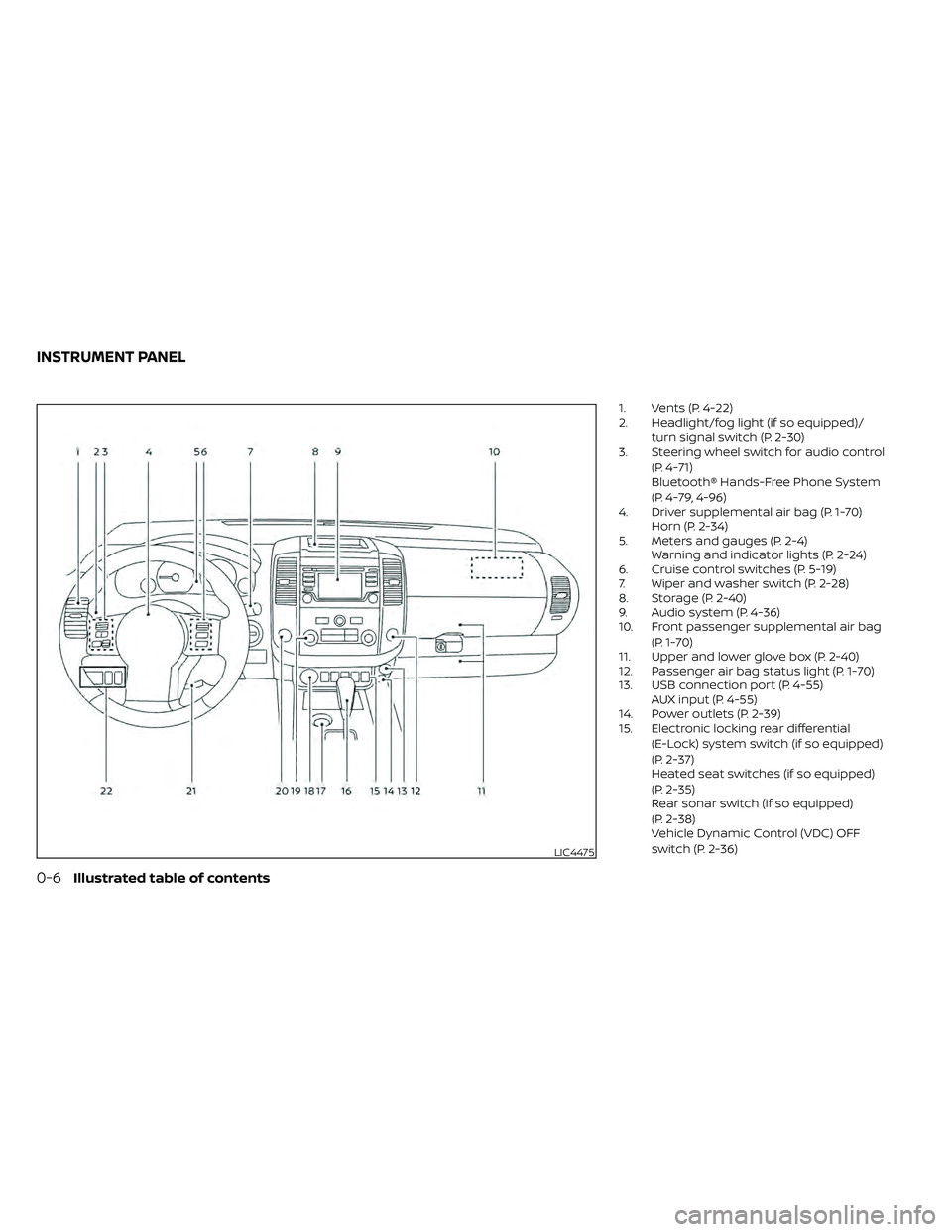
1. Vents (P. 4-22)
2. Headlight/fog light (if so equipped)/turn signal switch (P. 2-30)
3. Steering wheel switch for audio control
(P. 4-71)
Bluetooth® Hands-Free Phone System
(P. 4-79, 4-96)
4. Driver supplemental air bag (P. 1-70) Horn (P. 2-34)
5. Meters and gauges (P. 2-4) Warning and indicator lights (P. 2-24)
6. Cruise control switches (P. 5-19)
7. Wiper and washer switch (P. 2-28)
8. Storage (P. 2-40)
9. Audio system (P. 4-36)
10. Front passenger supplemental air bag
(P. 1-70)
11. Upper and lower glove box (P. 2-40)
12. Passenger air bag status light (P. 1-70)
13. USB connection port (P. 4-55) AUX input (P. 4-55)
14. Power outlets (P. 2-39)
15. Electronic locking rear differential
(E-Lock) system switch (if so equipped)
(P. 2-37)
Heated seat switches (if so equipped)
(P. 2-35)
Rear sonar switch (if so equipped)
(P. 2-38)
Vehicle Dynamic Control (VDC) OFF
switch (P. 2-36)
LIC4475
INSTRUMENT PANEL
Page 112 of 492
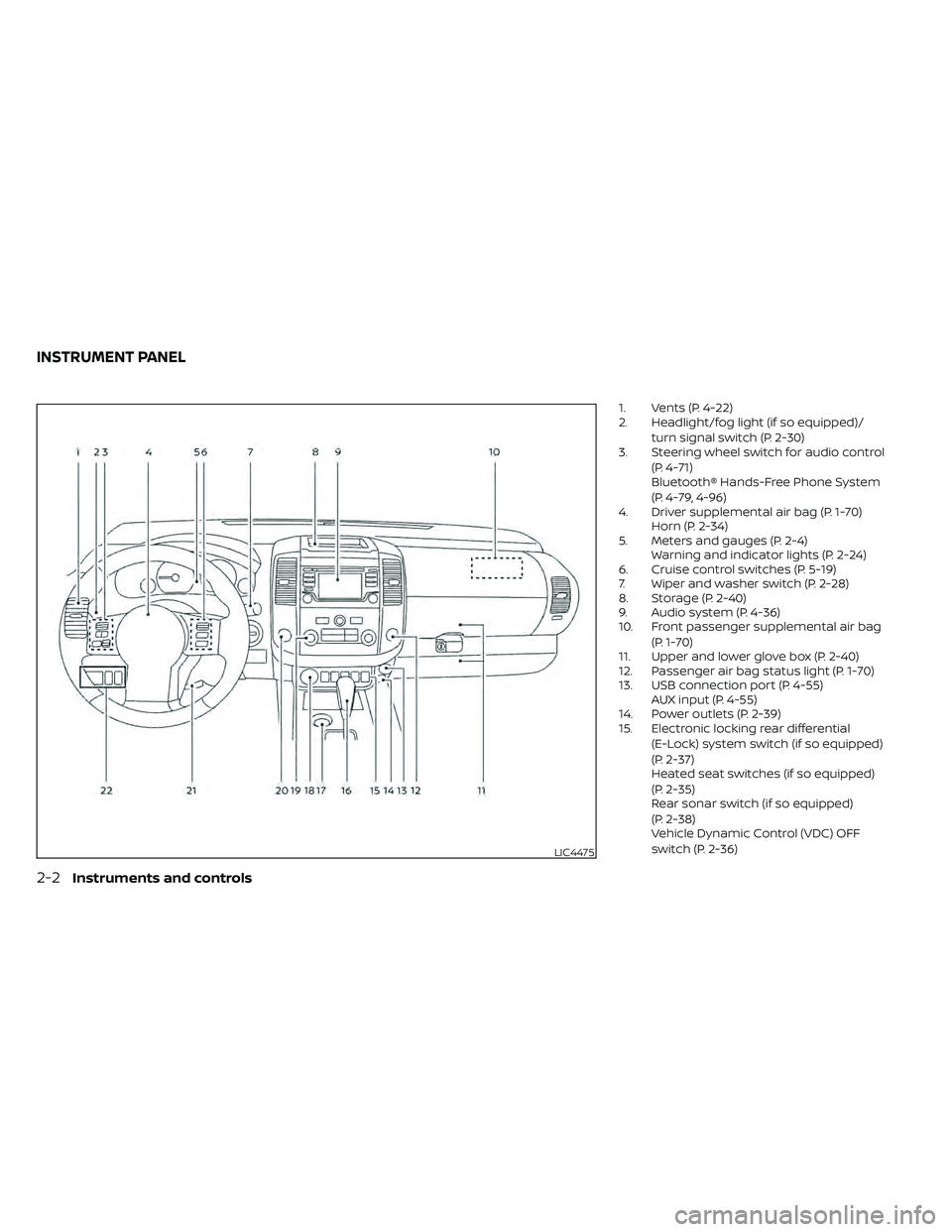
1. Vents (P. 4-22)
2. Headlight/fog light (if so equipped)/turn signal switch (P. 2-30)
3. Steering wheel switch for audio control
(P. 4-71)
Bluetooth® Hands-Free Phone System
(P. 4-79, 4-96)
4. Driver supplemental air bag (P. 1-70) Horn (P. 2-34)
5. Meters and gauges (P. 2-4) Warning and indicator lights (P. 2-24)
6. Cruise control switches (P. 5-19)
7. Wiper and washer switch (P. 2-28)
8. Storage (P. 2-40)
9. Audio system (P. 4-36)
10. Front passenger supplemental air bag
(P. 1-70)
11. Upper and lower glove box (P. 2-40)
12. Passenger air bag status light (P. 1-70)
13. USB connection port (P. 4-55) AUX input (P. 4-55)
14. Power outlets (P. 2-39)
15. Electronic locking rear differential
(E-Lock) system switch (if so equipped)
(P. 2-37)
Heated seat switches (if so equipped)
(P. 2-35)
Rear sonar switch (if so equipped)
(P. 2-38)
Vehicle Dynamic Control (VDC) OFF
switch (P. 2-36)
LIC4475
INSTRUMENT PANEL
Page 198 of 492
FM/AM radio (if so equipped)................4-44
FM/AM/SAT radio with Compact Disc
(CD) player (if so equipped) ..................4-49
USB (Universal Serial Bus) connection
port (models without Navigation
System) (if so equipped) .....................4-55
USB (Universal Serial Bus) connection
port (models with Navigation System)
(if so equipped) .............................. 4-58
iPod®* player operation without
Navigation System (if so equipped) ..........4-60
iPod®* player operation with Navigation
System (if so equipped) .....................4-63
Bluetooth® streaming audio without
Navigation System (if so equipped) ..........4-66
Bluetooth® streaming audio with
Navigation System (if so equipped) ..........4-69
CD care and cleaning .......................4-70
Steering wheel switch for audio control .....4-71
Antenna ..................................... 4-72
NissanConnect® Mobile Apps (if so equipped) . . 4-72 Registering with NissanConnect®
Mobile Apps ................................. 4-72
Connect Phone ............................. 4-72
Application download .......................4-73Siri® Eyes Free (models without Navigation
System) (if so equipped)
........................4-73
Requirements ............................... 4-73
Operating Siri® Eyes Free ....................4-74
Troubleshooting guide ......................4-75
Siri® Eyes Free (models with Navigation
System) (if so equipped) ........................4-76
Requirements ............................... 4-76
Siri® Activation .............................. 4-76
Operating Siri® Eyes Free ....................4-77
Changing Siri® Eyes Free settings ...........4-77
Troubleshooting guide ......................4-78
Car phone or CB radio .......................... 4-79
Bluetooth® Hands-Free Phone System
without Navigation System (if so equipped) ....4-79
Regulatory information ......................4-81
Using the system ........................... 4-81
Indicators ................................... 4-83
Control buttons ............................. 4-83
Connecting procedure ......................4-84
Voice commands ........................... 4-85
Phone display screen .......................
4-87
Making
a call ................................ 4-88
Receiving a call .............................. 4-88
Page 238 of 492
USB (Universal Serial Bus)
connection port
CAUTION
• Do not force the USB device into the
USB port. Inserting the USB device
tilted or up-side-down into the port
may damage the port. Make sure
that the USB device is connected cor-
rectly into the USB port.
• Do not grab the USB port cover (if so
equipped) when pulling the USB de-
vice out of the port. This could dam-
age the port and the cover.
• Do not leave the USB cable in a place
where it can be pulled unintention-
ally. Pulling the cable may damage
the port. The vehicle is not equipped with a USB de-
vice. USB devices should be purchased
separately as necessary.
This system cannot be used to format USB
memory devices. To format a USB device,
use a personal computer.
In some jurisdictions, the USB device for the
front seats plays only sound without im-
ages for regulatory reasons, even when the
vehicle is parked.
This system supports various USB
memory devices, USB hard drives and
iPod® players. Some USB devices may not
be supported by this system.
• Partitioned USB devices may not play
correctly.
• Some characters used in other lan- guages (Chinese, Japanese, etc.) may not
appear properly in the display. Using Eng-
lish language characters with a USB de-
vice is recommended.
General notes for USB use
• For additional information, refer to your device manufacturer's owner informa-
tion regarding the proper use and care of
the device. Notes for iPod® use
iPod® is a trademark of Apple Inc., regis-
tered in the U.S. and other countries.
• Improperly plugging in the iPod® may
cause a check mark to be displayed on
and off (flickering). Always make sure that
the iPod® is connected properly.
• An iPod® nano (1st Generation) may re- main in fast forward or rewind mode if it is
connected during a seek operation. In
this case, please manually reset the
iPod®.
• An iPod® nano (2nd Generation) will con- tinue to fast-forward or rewind if it is dis-
connected during a seek operation.
• An incorrect song title may appear when the Play Mode is changed while using an
iPod® nano (2nd Generation).
• Audiobooks may not play in the same order as they appear on an iPod®.
• Large video files cause slow responses in an iPod®. The vehicle center display may
momentarily black out, but will soon re-
cover.
• If an iPod® automatically selects large video files while in the shuffle mode, the
vehicle center display may momentarily
black out, but will soon recover.
4-42Monitor, climate, audio, phone and voice recognition systems
Page 244 of 492
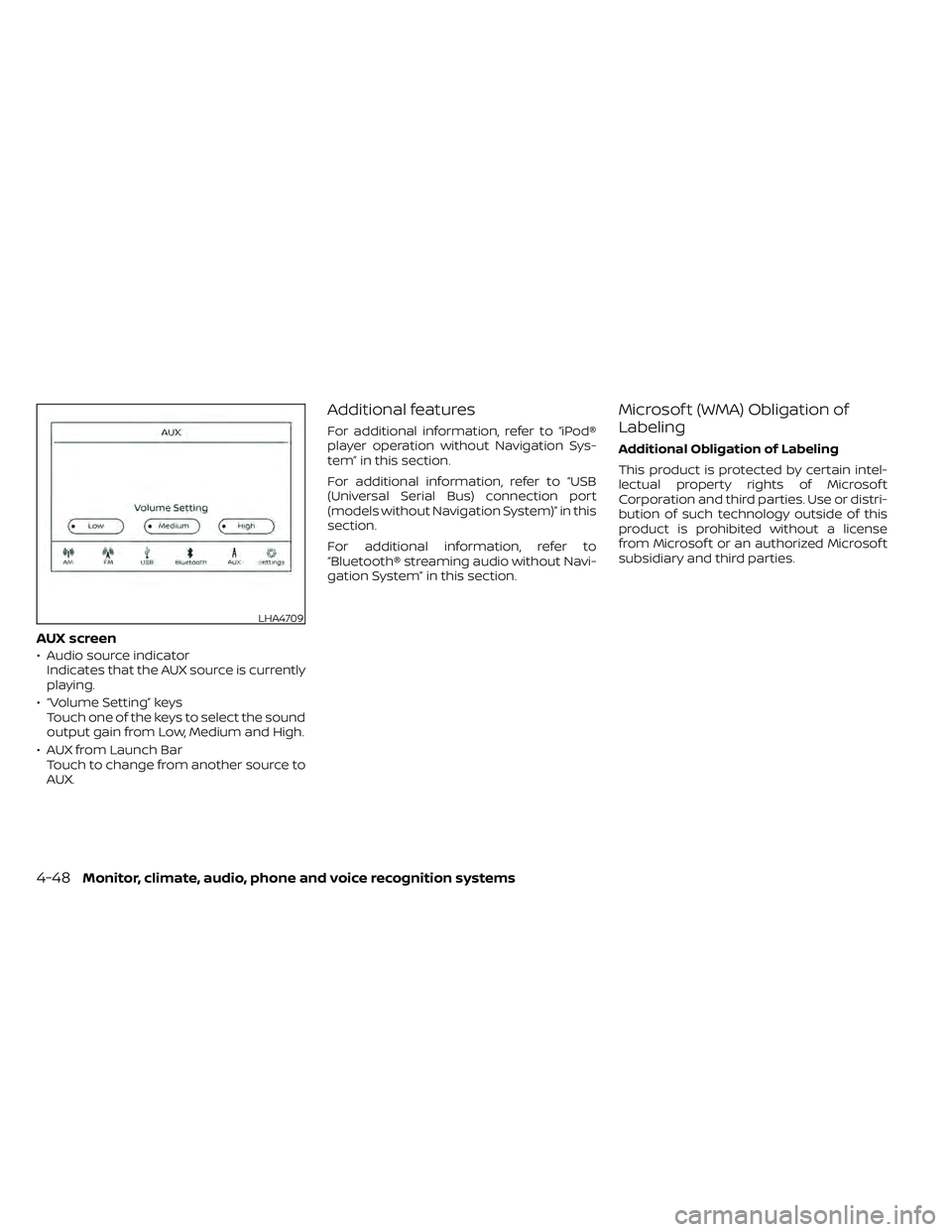
AUX screen
• Audio source indicatorIndicates that the AUX source is currently
playing.
• “Volume Setting” keys Touch one of the keys to select the sound
output gain from Low, Medium and High.
• AUX from Launch Bar Touch to change from another source to
AUX.
Additional features
For additional information, refer to “iPod®
player operation without Navigation Sys-
tem” in this section.
For additional information, refer to “USB
(Universal Serial Bus) connection port
(models without Navigation System)” in this
section.
For additional information, refer to
“Bluetooth® streaming audio without Navi-
gation System” in this section.
Microsof t (WMA) Obligation of
Labeling
Additional Obligation of Labeling
This product is protected by certain intel-
lectual property rights of Microsof t
Corporation and third parties. Use or distri-
bution of such technology outside of this
product is prohibited without a license
from Microsof t or an authorized Microsof t
subsidiary and third parties.
LHA4709
4-48Monitor, climate, audio, phone and voice recognition systems
Page 251 of 492
SEEK (Reverse or Fast
Forward) buttons
Press and hold theorseek but-
tons for 1.5 seconds while the compact disc
is playing to reverse or fast forward the
track being played. The compact disc plays
at an increased speed while reversing or
fast forwarding. When the button is re-
leased, the compact disc returns to normal
play speed.
seek button while a CD or
MP3/WMA CD is playing to return to the
beginning of the current track. Press the
seek button several times to skip
backward several tracks.
Press the
seek button while a CD or
MP3/WMA CD is playing to advance one
track. Press the
seek button several
times to skip forward several tracks. If the
last track on a CD is skipped, the first track
on the disc is played. If the last track in a
folder of an MP3/WMA CD is skipped, the
first track of the next folder is played.
AUX button
The AUX IN audio input port accepts any
standard analog audio input such as from
a portable cassette tape/CD player, MP3
player or a laptop computer. Press the AUX
button to play a compatible device
plugged into the AUX IN port.
CD EJECT button is pressed
with a compact disc loaded, the compact
disc will eject and the last source will be
played.
If the disc is not removed within 10 seconds,
the disc will reload.
Additional features
For additional information, refer to “iPod®
player operation with Navigation System”
in this section.
For additional information, refer to “USB
(Universal Serial Bus) connection port
(models with Navigation System)” in this
section.
For additional information, refer to
“Bluetooth® streaming audio with Naviga-
tion System” in this section.
USB (Universal Serial Bus)
CONNECTION PORT (models
without Navigation System) (if so
equipped)
Connecting a device to the USB
connection port
Page 252 of 492
CAUTION
• To avoid damage and loss of function
when using a USB device, note the
following precautions.
• Do not force the USB device into the
USB port. Inserting the USB device
tilted or up-side-down into the port
may damage the port. Make sure
that the USB device is connected cor-
rectly into the USB port.
• Do not grab the USB port cover (if so
equipped) when pulling the USB de-
vice out of the port. This could dam-
age the port and the cover.
• Do not leave the USB cable in a place
where it can be pulled unintention-
ally. Pulling the cable may damage
the port.
For additional information, refer to your de-
vice manufacturer's owner information re-
garding the proper use and care of the
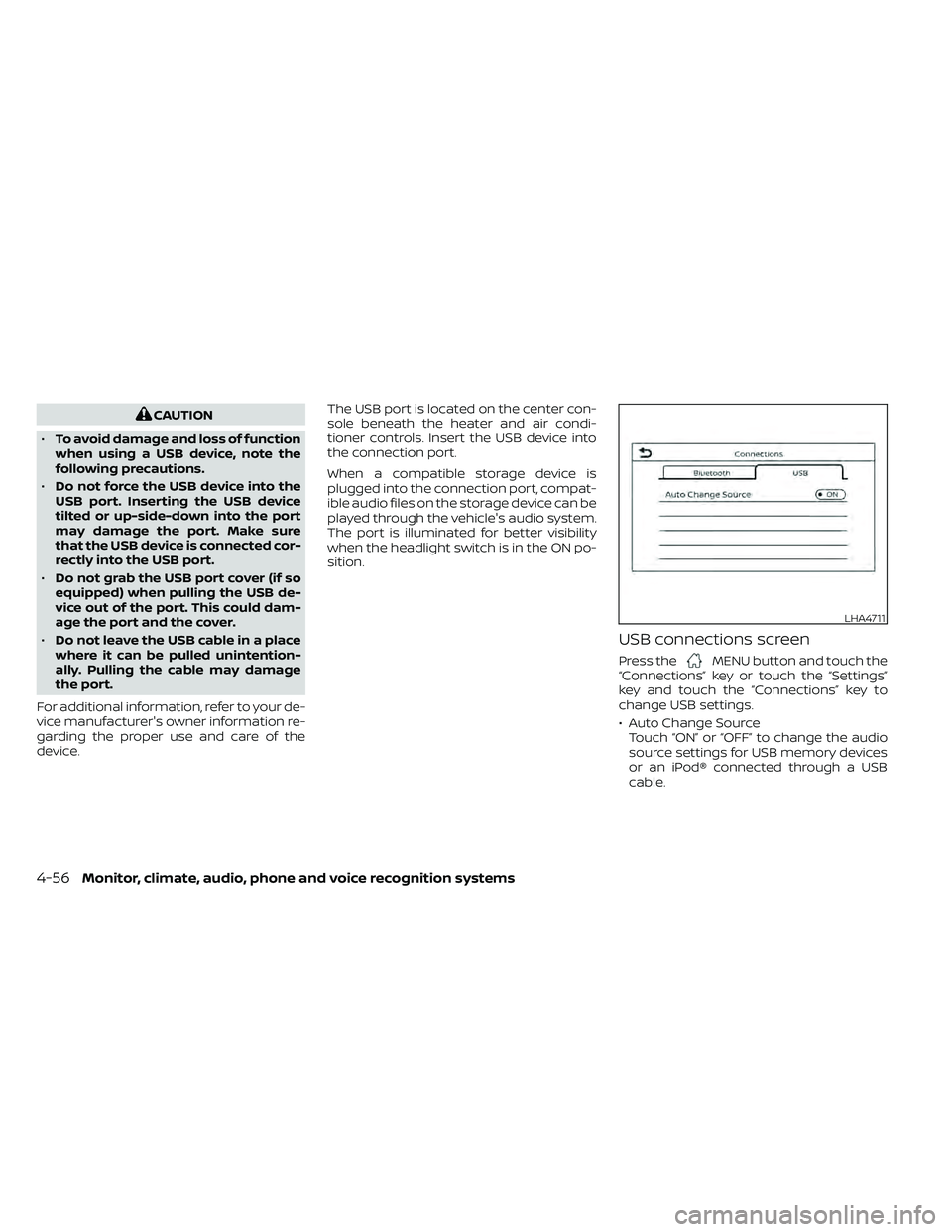
device. The USB port is located on the center con-
sole beneath the heater and air condi-
tioner controls. Insert the USB device into
the connection port.
When a compatible storage device is
plugged into the connection port, compat-
ible audio files on the storage device can be
played through the vehicle's audio system.
The port is illuminated for better visibility
when the headlight switch is in the ON po-
sition.
USB connections screen
Press theMENU button and touch the
“Connections” key or touch the “Settings”
key and touch the “Connections” key to
change USB settings.
• Auto Change Source Touch “ON” or “OFF” to change the audio
source settings for USB memory devices
or an iPod® connected through a USB
cable.
LHA4711
4-56Monitor, climate, audio, phone and voice recognition systems
Page 253 of 492
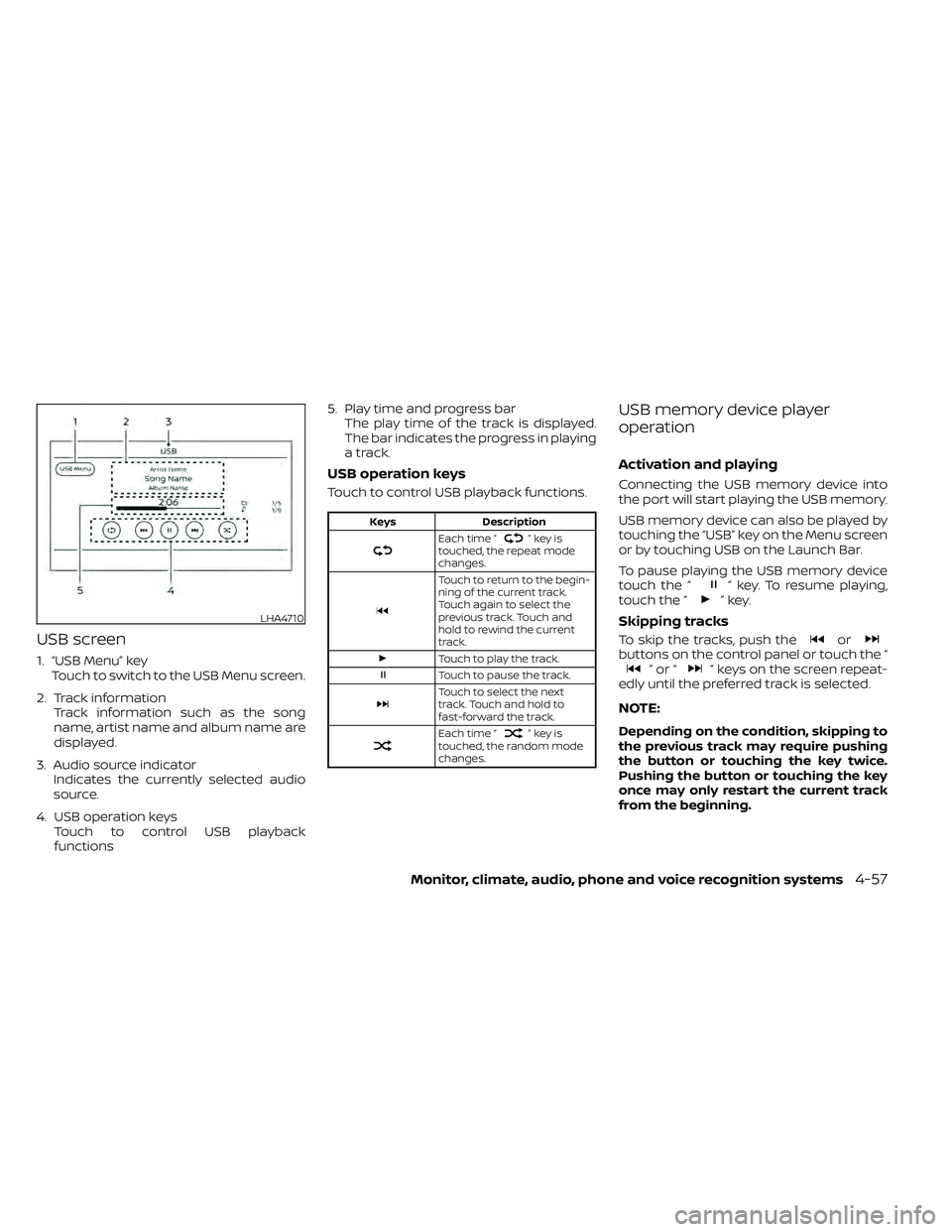
USB screen
1. “USB Menu” keyTouch to switch to the USB Menu screen.
2. Track information Track information such as the song
name, artist name and album name are
displayed.
3. Audio source indicator Indicates the currently selected audio
source.
4. USB operation keys Touch to control USB playback
functions 5. Play time and progress bar
The play time of the track is displayed.
The bar indicates the progress in playing
a track.
USB operation keys
Touch to control USB playback functions.
”keyis
touched, the repeat mode
changes.
Touch to return to the begin-
ning of the current track.
Touch again to select the
previous track. Touch and
hold to rewind the current
track.
Touch to play the track.
Touch to pause the track.
Touch to select the next
track. Touch and hold to
fast-forward the track.
Each time “”keyis
touched, the random mode
changes.
USB memory device player
operation
Activation and playing
Connecting the USB memory device into
the port will start playing the USB memory.
USB memory device can also be played by
touching the “USB” key on the Menu screen
or by touching USB on the Launch Bar.
To pause playing the USB memory device
touch the “
” key. To resume playing,
touch the “”key.
Skipping tracks
To skip the tracks, push theorbuttons on the control panel or touch the “”or“” keys on the screen repeat-
edly until the preferred track is selected.
NOTE:
Depending on the condition, skipping to
the previous track may require pushing
the button or touching the key twice.
Pushing the button or touching the key
once may only restart the current track
from the beginning.
Page 254 of 492
Fast-forwarding/rewinding
To rewind or fast-forward the track, push
and hold theorbuttons on the
control panel or touch and hold the “”
or “” keys on the screen.
Changing play mode
Repeat mode
Touch the “
” key on the USB screen to
change the repeat mode.
The following modes are available:
No text displayed: Repeat off
All: Repeat all
1 Folder: Repeat folder/sub-folder
1 Track: Repeat track
Random mode
Touch the “
” key on the screen to
change the random mode as follows:
No text displayed: Random off
Random: Random play
All: Repeat all
1 Folder: Repeat folder/sub-folder
USB menu
Touch the “USB Menu” key on the USB
screen to display the USB Menu screen.
“Now Playing” key Touch to display the USB
screen.
“Folder List” key Touch to display the folder list. Touch an item on the list to
select the folder. The sub-
folder or track list will be dis-
played. Select a sub-folder or
track from the list.
“Album Artwork” Touch to run on/off the album artwork display on the USB
screen.
USB (Universal Serial Bus)
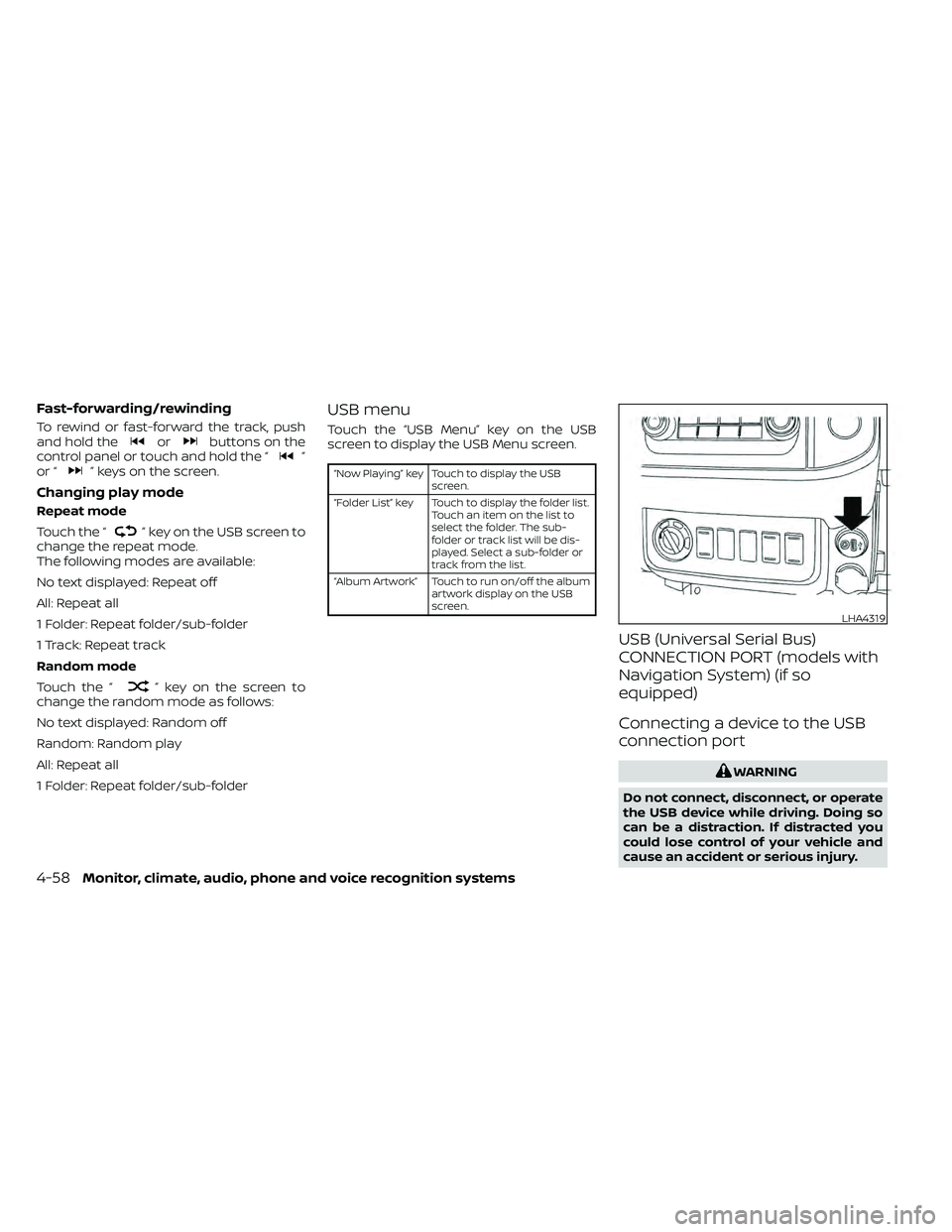
CONNECTION PORT (models with
Navigation System) (if so
equipped)
Connecting a device to the USB
connection port
4-58Monitor, climate, audio, phone and voice recognition systems
Page 255 of 492
CAUTION
• Do not force the USB device into the
USB port. Inserting the USB device
tilted or up-side-down into the port
may damage the port. Make sure
that the USB device is connected cor-
rectly into the USB port.
• Do not grab the USB port cover (if so
equipped) when pulling the USB de-
vice out of the port. This could dam-
age the port and the cover.
• Do not leave the USB cable in a place
where it can be pulled unintention-
ally. Pulling the cable may damage
the port.
For additional information, refer to your de-
vice manufacturer’s owner information re-
garding the proper use and care of the
device.
The USB port is located on the instrument
panel. Insert the USB device into the instru-
ment panel.
When a compatible storage device is
plugged into the connection port, compat-
ible audio files on the storage device can be
played through the vehicle's audio system.Audio file operation
AUX (auxiliary) button
Place the ignition switch in the ON or ACC
position and press the AUX button to
switch to the USB input mode. If another
audio source is playing and a USB connec-
tion port device is inserted, press the AUX
button until the center display changes to
the USB memory mode.
If the system has been turned off while the
USB memory was playing, press the ON-
OFF button to restart the USB memory.
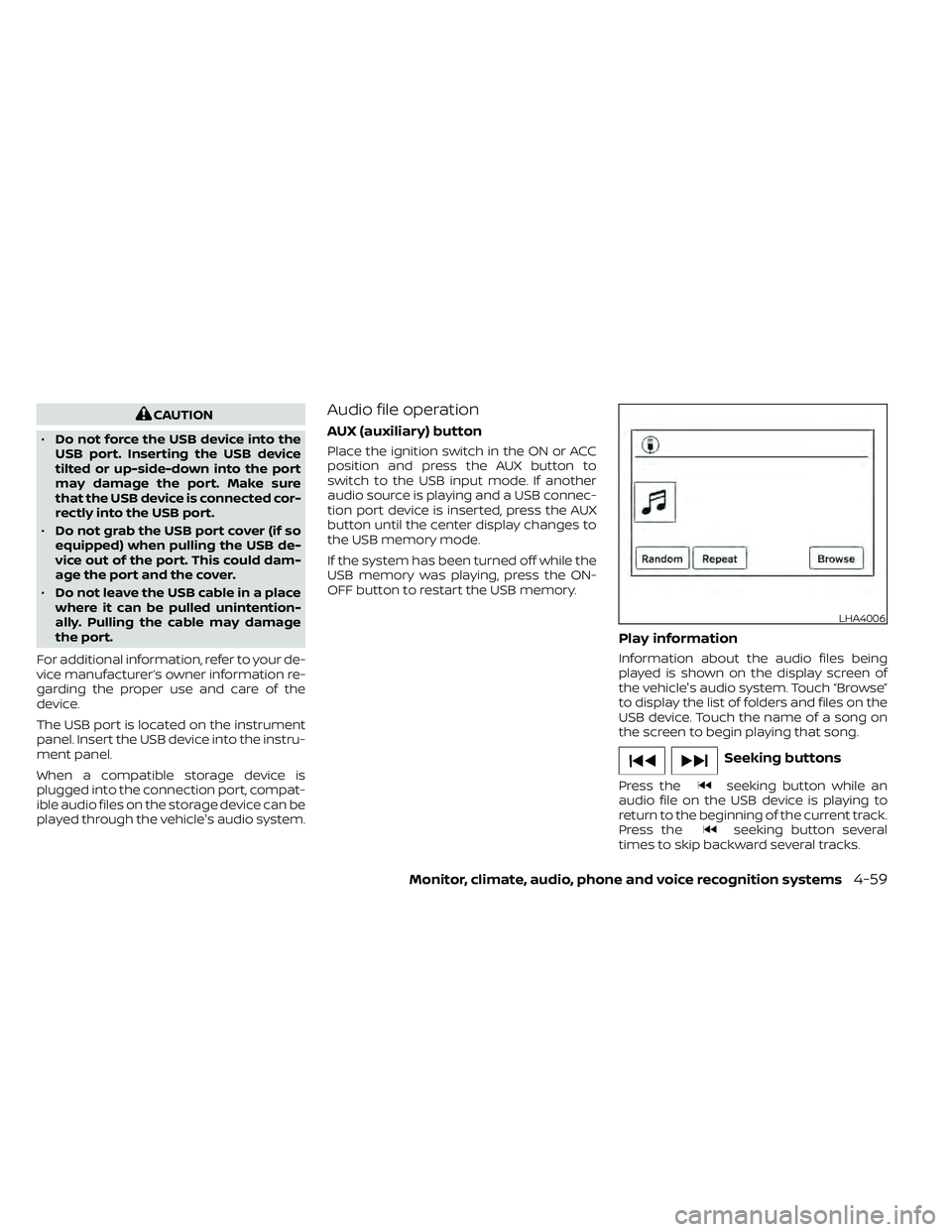
Play information
Information about the audio files being
played is shown on the display screen of
the vehicle's audio system. Touch “Browse”
to display the list of folders and files on the
USB device. Touch the name of a song on
the screen to begin playing that song.
seeking button while an
audio file on the USB device is playing to
return to the beginning of the current track.
Press the
seeking button several
times to skip backward several tracks.
LHA4006