ignition NISSAN FRONTIER 2022 Owner´s Manual
[x] Cancel search | Manufacturer: NISSAN, Model Year: 2022, Model line: FRONTIER, Model: NISSAN FRONTIER 2022Pages: 556, PDF Size: 6.11 MB
Page 531 of 556
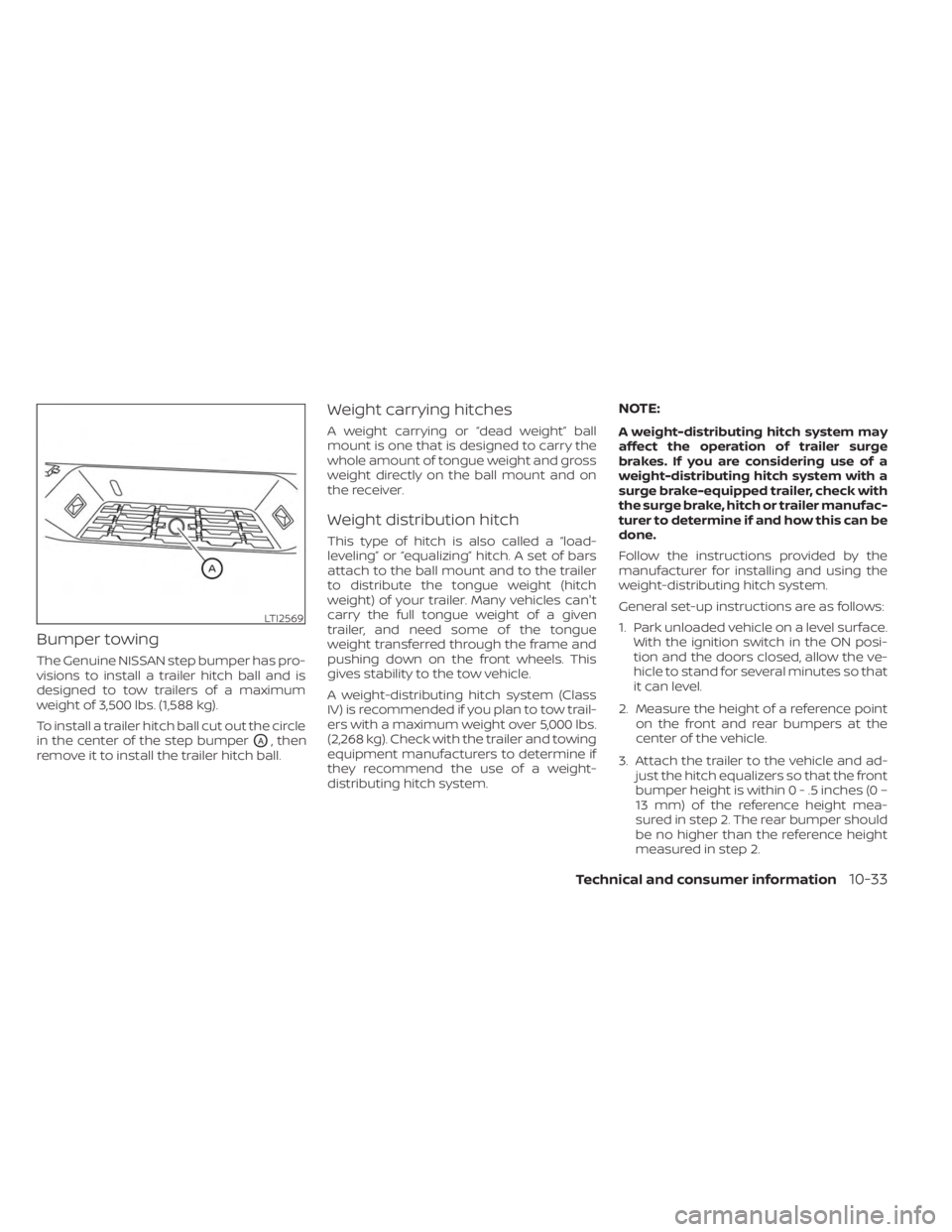
Bumper towing
The Genuine NISSAN step bumper has pro-
visions to install a trailer hitch ball and is
designed to tow trailers of a maximum
weight of 3,500 lbs. (1,588 kg).
To install a trailer hitch ball cut out the circle
in the center of the step bumper
OA, then
remove it to install the trailer hitch ball.
Weight carrying hitches
A weight carrying or “dead weight” ball
mount is one that is designed to carry the
whole amount of tongue weight and gross
weight directly on the ball mount and on
the receiver.
Weight distribution hitch
This type of hitch is also called a “load-
leveling” or “equalizing” hitch. A set of bars
attach to the ball mount and to the trailer
to distribute the tongue weight (hitch
weight) of your trailer. Many vehicles can't
carry the full tongue weight of a given
trailer, and need some of the tongue
weight transferred through the frame and
pushing down on the front wheels. This
gives stability to the tow vehicle.
A weight-distributing hitch system (Class
IV) is recommended if you plan to tow trail-
ers with a maximum weight over 5,000 lbs.
(2,268 kg). Check with the trailer and towing
equipment manufacturers to determine if
they recommend the use of a weight-
distributing hitch system.
NOTE:
A weight-distributing hitch system may
affect the operation of trailer surge
brakes. If you are considering use of a
weight-distributing hitch system with a
surge brake-equipped trailer, check with
the surge brake, hitch or trailer manufac-
turer to determine if and how this can be
done.
Follow the instructions provided by the
manufacturer for installing and using the
weight-distributing hitch system.
General set-up instructions are as follows:
1. Park unloaded vehicle on a level surface. With the ignition switch in the ON posi-
tion and the doors closed, allow the ve-
hicle to stand for several minutes so that
it can level.
2. Measure the height of a reference point on the front and rear bumpers at the
center of the vehicle.
3. Attach the trailer to the vehicle and ad- just the hitch equalizers so that the front
bumper height is within0-.5inches (0 –
13 mm) of the reference height mea-
sured in step 2. The rear bumper should
be no higher than the reference height
measured in step 2.
LTI2569
Technical and consumer information10-33
Page 536 of 556
• Have your vehicle serviced more of tenthan at intervals specified. For additional
information, see the “Maintenance and
schedules” section of this manual.
• When making a turn, your trailer wheels will be closer to the inside of the turn than
your vehicle wheels. To compensate for
this, make a larger than normal turning
radius during the turn.
• Crosswinds and rough roads will ad- versely affect vehicle/trailer handling,
possibly causing vehicle sway. When be-
ing passed by larger vehicles, be pre-
pared for possible changes in crosswinds
that could affect vehicle handling.
Do the following if the trailer begins to
sway:
1. Take your foot off the accelerator pedal to allow the vehicle to coast and steer as
straight ahead as the road conditions
allow. This combination will help stabilize
the vehicle
– Do not correct trailer sway by steering or applying the brakes.
2. When the trailer sway stops, gently apply the brakes and pull to the side of the
road in a safe area. 3. Try to rearrange the trailer load so it is
balanced as described in this section.
• Be careful when passing other vehicles. Passing while towing a trailer requires
considerably more distance than normal
passing. Remember, the length of the
trailer must also pass the other vehicle
before you can safely change lanes.
• Downshif t the transmission to a lower gear for engine braking when driving
down steep or long hills. This will help
slow the vehicle without applying the
brakes.
• Avoid holding the brake pedal down too long or too frequently. This could cause
the brakes to overheat, resulting in re-
duced braking efficiency.
• Increase your following distance to allow for greater stopping distances while tow-
ing a trailer. Anticipate stops and brake
gradually.
• NISSAN recommends that the cruise control not be used while towing a trailer.
• Some states or provinces have specific regulations and speed limits for vehicles
that are towing trailers. Obey the local
speed limits. • Check your hitch, trailer wiring harness
connections, and trailer wheel lug nuts
af ter 50 miles (80 km) of travel and at
every break.
• When launching a boat, don't allow the water level to go over the exhaust tail
pipe or rear bumper.
• Make sure you disconnect the trailer lights before backing the trailer into the
water or the trailer lights may burn out.
When towing a trailer, final drive gear oil
should be replaced and transmission oil/
fluid should be changed more fre-
quently. For additional information, refer
to the “Do-it-yourself ” section in this
manual.
Tow mode (if so equipped)
Using tow mode is recommended when
pulling a heavy trailer or hauling a heavy
load. Press the TOW MODE switch to acti-
vate tow mode. The indicator light on the
TOW MODE switch illuminates when tow
mode is selected. Press the TOW MODE
switch again to turn tow mode off. Tow
mode is automatically canceled when the
ignition switch is turned off.
10-38Technical and consumer information
Page 541 of 556
If a powertrain system component is re-
paired or the battery is disconnected, the
vehicle may be reset to a “not ready” condi-
tion. Before taking the I/M test, check the
vehicle's inspection/maintenance test
readiness condition. Place the ignition
switch in the ON position without starting
the engine. If the Malfunction Indicator
Light (MIL) comes on steady for 20 seconds
and then blinks for 10 seconds, the I/M test
condition is “not ready”. If the MIL does not
blink af ter 20 seconds, the I/M test condi-
tion is “ready”. It is recommended that you
visit a NISSAN dealer to set the “ready con-
dition” or to prepare the vehicle for testing.This vehicle is equipped with an Event Data
Recorder (EDR). The main purpose of an
EDR is to record, in certain crash or near
crash-like situations, such as an air bag
deployment or hitting a road obstacle, data
that will assist in understanding how a ve-
hicle's systems performed. The EDR is de-
signed to record data related to vehicle dy-
namics and safety systems for a short
period of time, typically 30 seconds or less.
The EDR in this vehicle is designed to re-
cord such data as:
• How various systems in your vehicle were
operating;
• Whether or not the driver and passenger safety belts were buckled/fastened;
• How far (if at all) the driver was depress- ing the accelerator and/or brake pedal;
and,
• How fast the vehicle was traveling.
• Sounds are not recorded. These data can help provide a better un-
derstanding of the circumstances in which
crashes and injuries occur. NOTE: EDR data
are recorded by your vehicle only if a non-
trivial crash situation occurs; no data are
recorded by the EDR under normal driving
conditions and no personal data (e.g.,
name, gender, age, and crash location) are
recorded. However, other parties, such as
law enforcement, could combine the EDR
data with the type of personally identif ying
data routinely acquired during a crash
investigation.
To read data recorded by an EDR, special
equipment is required, and access to the
vehicle or the EDR is needed. In addition to
the vehicle manufacturer and NISSAN
dealer, other parties, such as law enforce-
ment, that have the special equipment, can
read the information if they have access to
the vehicle or the EDR.
EDR data will only be accessed with the
consent of the vehicle owner or lessee or
as otherwise required or permitted by law.
EVENT DATA RECORDERS (EDR)
Technical and consumer information10-43
Page 545 of 556
Windshield-washer fluid.........8-13Fog light switch................2-45Forward Driving AidsSystem Temporarily
Unavailable
......2-33, 5-68, 5-88, 5-101Four-Wheel Drive...............5-109Front air bag system (See supplemental
restraint system)................1-78Front power seat adjustment........1-5Front seats....................1-2Front-door pocket..............2-62FuelCapacities and recommended
fuel/lubricants
...............10-2Fuel economy...............5-109Fuel gauge..................2-7Fuel octane rating.............10-6Fuel recommendation..........10-4Fuel-filler cap................3-21Fuel-filler lid.................3-21Loose fuel cap warning..........2-28Fuel efficient driving tips..........5-108Fuel gauge....................2-7Fuel-filler door.................3-21Fuses.......................8-21Fusible links..................8-22
G
Garage door opener, HomeLink® Universal
Transceiver.....2-76,2-77,2-78,2-79, 2-80Gas cap.....................3-21
Gauge
Automatic transmission fluid temperature
gauge
.................... .2-8Engine coolant temperature gauge. . .2-6Engine oil pressure gauge.........2-8Fuel gauge..................2-7Odometer...................2-5Speedometer................2-5Tachometer.................2-6Trip odometer................2-5Voltmeter.................. .2-8General maintenance.............9-2Glove box................... .2-66
H
Hazard warning flasher switch........6-2Head restraints.................1-10Headlight and turn signal switch.....2-38Headlight control switch..........2-38Headlights...................8-25Heated seat switches............2-46Heated steering wheel switch.......2-47Heater
Heater and air conditioner (automatic)
(if so equipped)
...............4-35Heater and air conditioner controls. .4-36Heater operation..........4-28, 4-37Heater and air conditioner
(automatic).................. .4-35Hill descent control switch.........2-49Hill descent control system........5-123Hill start assist system...........5-124
HomeLink® Universal
Transceiver.....2-76,2-77,2-78,2-79,2-80Hood release..................3-20Horn...................... .2-45
I
Ignition switch
Push-button ignition switch.......5-13Immobilizer system..........2-36, 5-16In-cabin microfilter..............8-18Increasing fuel economy..........5-109Indicator lights and audible reminders
(See warning/indicator lights and audible
reminders)
....................2-11Inside automatic anti-glare mirror. . . .3-25Instrument brightness control.......2-44Instrument panel.............0-6, 2-2Instrument panel dimmer switch.....2-44Intelligent Around View Monitor......4-10Intelligent Cruise Control (ICC).......5-53Intelligent Driver Alertness (I-DA).....5-104Intelligent Forward Collision Warning
(I-FCW)..................... .5-92Intelligent Key system
Key operating range............3-9Key operation................3-10Mechanical key................3-3Remote keyless entry operation. . . .3-13Troubleshooting guide..........3-16Warning signals...............3-16Interior light...................2-74
11-3