warning NISSAN FRONTIER 2022 Owner´s Manual
[x] Cancel search | Manufacturer: NISSAN, Model Year: 2022, Model line: FRONTIER, Model: NISSAN FRONTIER 2022Pages: 556, PDF Size: 6.11 MB
Page 300 of 556
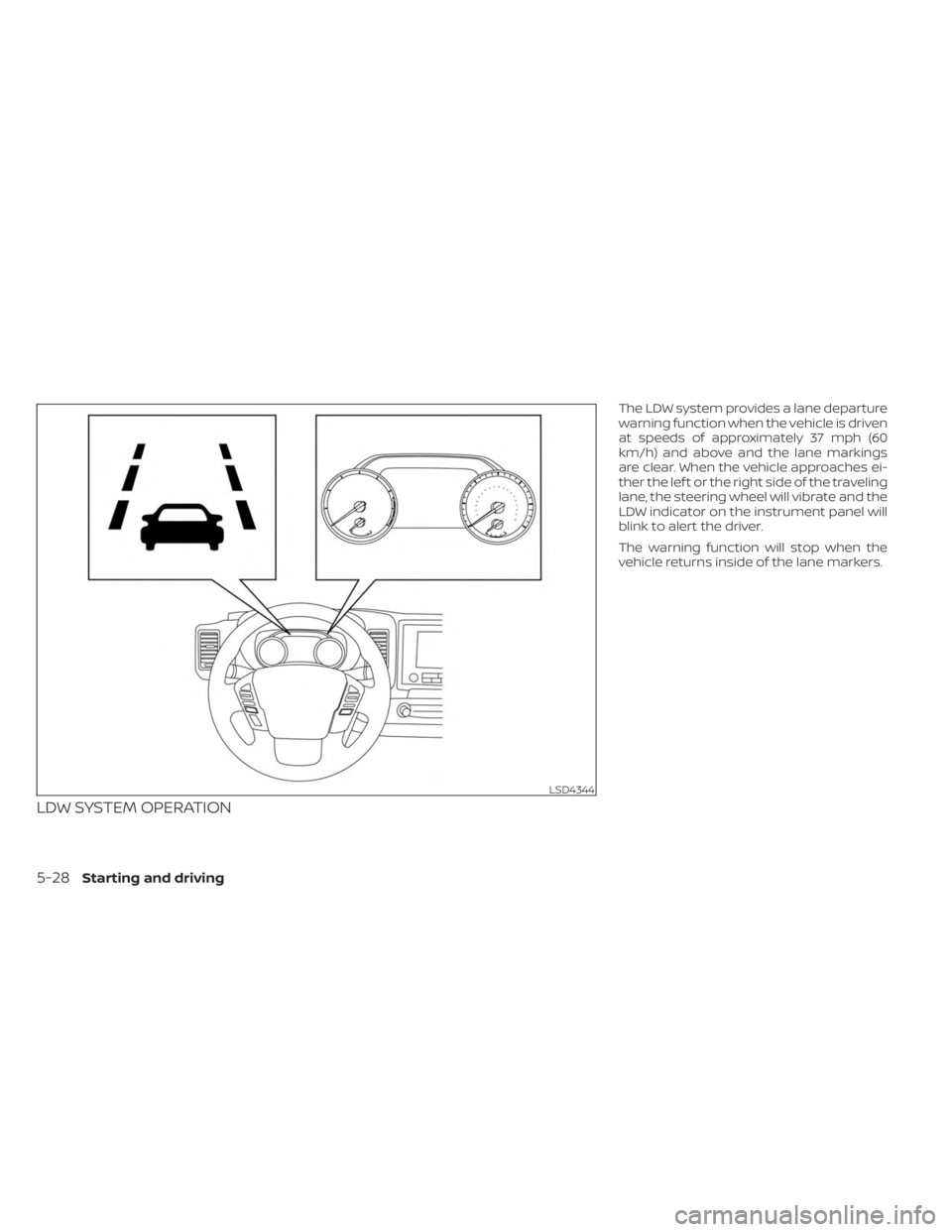
LDW SYSTEM OPERATION
The LDW system provides a lane departure
warning function when the vehicle is driven
at speeds of approximately 37 mph (60
km/h) and above and the lane markings
are clear. When the vehicle approaches ei-
ther the lef t or the right side of the traveling
lane, the steering wheel will vibrate and the
LDW indicator on the instrument panel will
blink to alert the driver.
The warning function will stop when the
vehicle returns inside of the lane markers.
LSD4344
5-28Starting and driving
Page 301 of 556
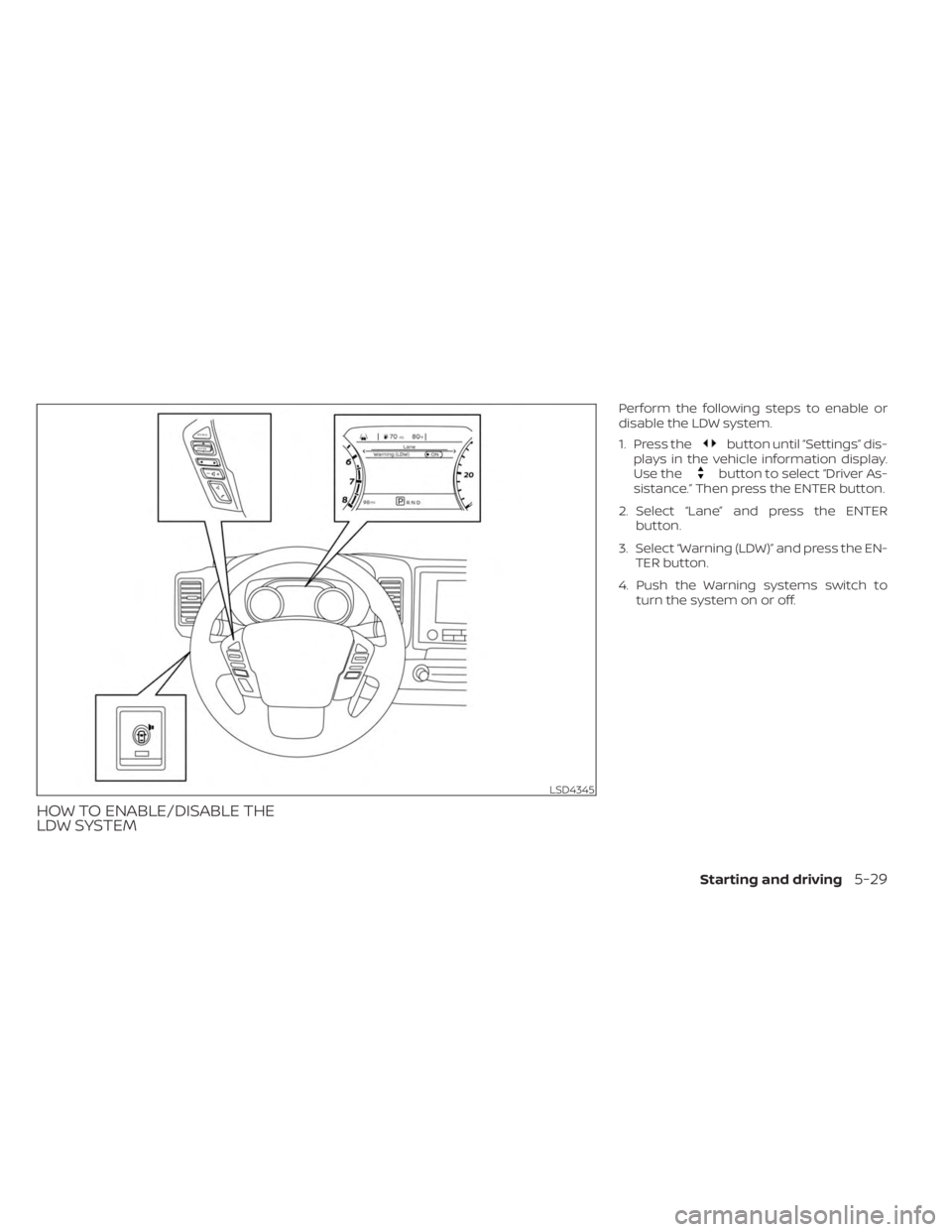
HOW TO ENABLE/DISABLE THE
LDW SYSTEM
Perform the following steps to enable or
disable the LDW system.
1. Press the
button until “Settings” dis-
plays in the vehicle information display.
Use the
button to select “Driver As-
sistance.” Then press the ENTER button.
2. Select “Lane” and press the ENTER button.
3. Select “Warning (LDW)” and press the EN- TER button.
4. Push the Warning systems switch to turn the system on or off.
LSD4345
Starting and driving5-29
Page 302 of 556
LDW SYSTEM LIMITATIONS
WARNING
Listed below are the system limitations
for the LDW system. Failure to follow
the warnings and instructions for
proper use of the LDW system could re-
sult in serious injury or death.
• The system will not operate at
speeds below approximately 37 mph
(60 km/h) or if it cannot detect lane
markers.
• Do not use the LDW system under the
following conditions as it may not
function properly:
– During bad weather (rain, fog,
snow, etc.).
– When driving on slippery roads,
such as on ice or snow.
– When driving on winding or un-
even roads.
– When there is a lane closure due to
road repairs.
– When driving in a makeshif t or
temporary lane.
– When driving on roads where the
lane width is too narrow. –
When driving without normal tire
conditions (for example, tire wear,
low tire pressure, installation of
spare tire, tire chains, nonstan-
dard wheels).
– When the vehicle is equipped with
non-original brake parts or sus-
pension parts.
– When you are towing a trailer or
other vehicle.
• The system may not function prop-
erly under the following conditions:
– On roads where there are multiple
parallel lane markers; lane mark-
ers that are faded or not painted
clearly; yellow painted lane mark-
ers; non-standard lane markers;
or lane markers covered with wa-
ter, dirt, snow, etc.
– On roads where the discontinued
lane markers are still detectable.
– On roads where there are sharp
curves.
–
On roads where there are sharply contrasting objects, such as shad-
ows, snow, water, wheel ruts, seams
or lines remaining af ter road re-
pairs. (The LDW system could detect
these items as lane markers.)
– On roads where the traveling lane
merges or separates.
– When the vehicle’s traveling direc-
tion does not align with the lane
marker.
– When traveling close to the ve-
hicle in front of you, which ob-
structs the lane camera unit de-
tection range.
– When rain, snow, dirt or an object
adheres to the windshield in front
of the lane camera unit.
– When the headlights are not
bright due to dirt on the lens or if
the aiming is not adjusted
properly.
– When strong light enters the lane
camera unit. (For example, the
light directly shines on the front of
the vehicle at sunrise or sunset.)
– When a sudden change in bright-
ness occurs. (For example, when
the vehicle enters or exits a tunnel
or under a bridge.)
5-30Starting and driving
Page 304 of 556
• Do not place reflective materials, such aswhite paper or a mirror, on the instru-
ment panel. The reflection of sunlight
may adversely affect the camera unit’s
capability of detecting the lane markers.
• Do not strike or damage the areas around the camera unit. Do not touch the
camera lens or remove the screw located
on the camera unit. If the camera unit is
damaged due to an accident, it is recom-
mended that you visit a NISSAN dealer.WARNING
Failure to follow the warnings and in-
structions for proper use of the BSW
system could result in serious injury or
death.
• The BSW system is not a replacement
for proper driving procedures and is
not designed to prevent contact with
vehicles or objects. When changing
lanes, always use the side and rear
mirrors and turn and look in the di-
rection your vehicle will move to en-
sure it is safe to change lanes. Never
rely solely on the BSW system.
• Do not use the BSW system when
towing a trailer. The system may not
function properly.
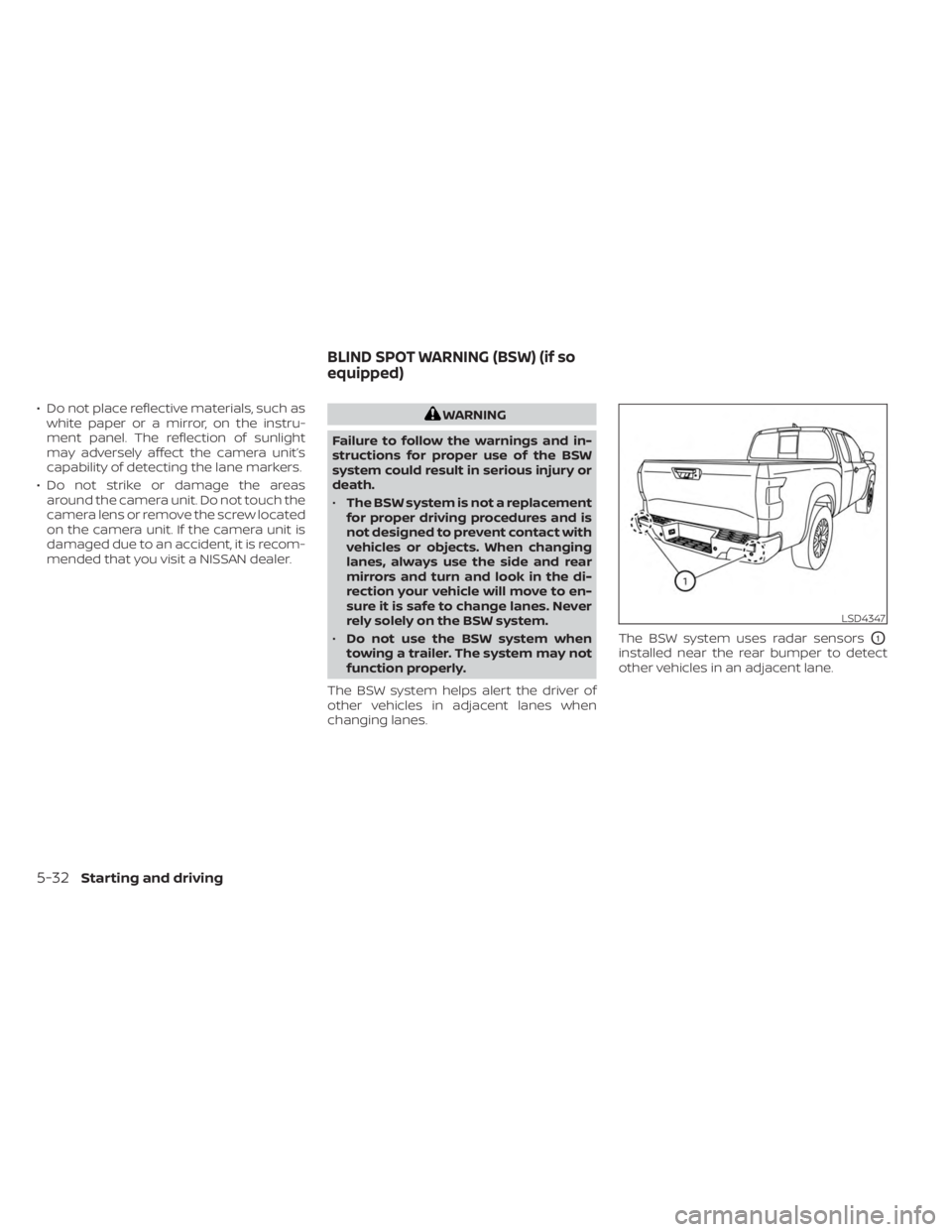
The BSW system helps alert the driver of
other vehicles in adjacent lanes when
changing lanes. The BSW system uses radar sensors
O1
installed near the rear bumper to detect
other vehicles in an adjacent lane.
LSD4347
BLIND SPOT WARNING (BSW) (if so
equipped)
5-32Starting and driving
Page 307 of 556
warning systems switch. For additional in-
formation, see “Warning systems switch”
(P. 2-48).
Perform the following steps to enable or
disable the BSW system:
1. Press the
button until “Settings” dis-
plays in the vehicle information display.
Use the
button to select “Driver As-
sistance” and press ENTER.
2. Select “Blind Spot” and press ENTER.
3. Select “Warning (BSW)” and press ENTER.
4. Push the Warning systems switch to turn the system on or off.
NOTE:
• When enabling/disabling the system,the system will retain current settings
even if the engine is restarted.
• When the BSW system is turned on, the BSW/RCTA indicator (white) in the ve-
hicle information display illuminates.
BSW SYSTEM LIMITATIONS
WARNING
Listed below are the system limitations
for the BSW system. Failure to operate
the vehicle in accordance with these
system limitations could result in seri-
ous injury or death.
• The BSW system cannot detect all ve-
hicles under all conditions.
• The radar sensors may not be able to
detect and activate BSW when cer-
tain objects are present such as:
– Pedestrian, bicycles, animals.
– Vehicles such as motorcycles, low
height vehicles, or high ground
clearance vehicles.
– Oncoming vehicles.
– Vehicles remaining in the detec-
tion zone when you accelerate
from a stop.
– A vehicle merging into an adjacent
lane at a speed approximately the
same as your vehicle.
– A vehicle approaching rapidly
from behind.
– A vehicle which your vehicle over-
takes rapidly. –
A vehicle that passes through the
detection zone quickly.
– When overtaking several vehicles
in a row, the vehicles af ter the first
vehicle may not be detected if
they are traveling close together.
• The radar sensor’s detection zone is
designed based on a standard lane
width. When driving in a wider lane,
the radar sensors may not detect ve-
hicles in an adjacent lane. When driv-
ing in a narrow lane, the radar sen-
sors may detect vehicles driving two
lanes away.
• The radar sensors are designed to ig-
nore most stationary objects; how-
ever, objects such as guardrails,
walls, foliage and parked vehicles
may occasionally be detected. This is
a normal operation condition.
• The following conditions may reduce
the ability of the radar to detect other
vehicles:
– Severe weather
– Road spray
– Ice/frost/snow/dirt build-up on
the vehicle
Starting and driving5-35
Page 312 of 556
SYSTEM TEMPORARILY
UNAVAILABLE
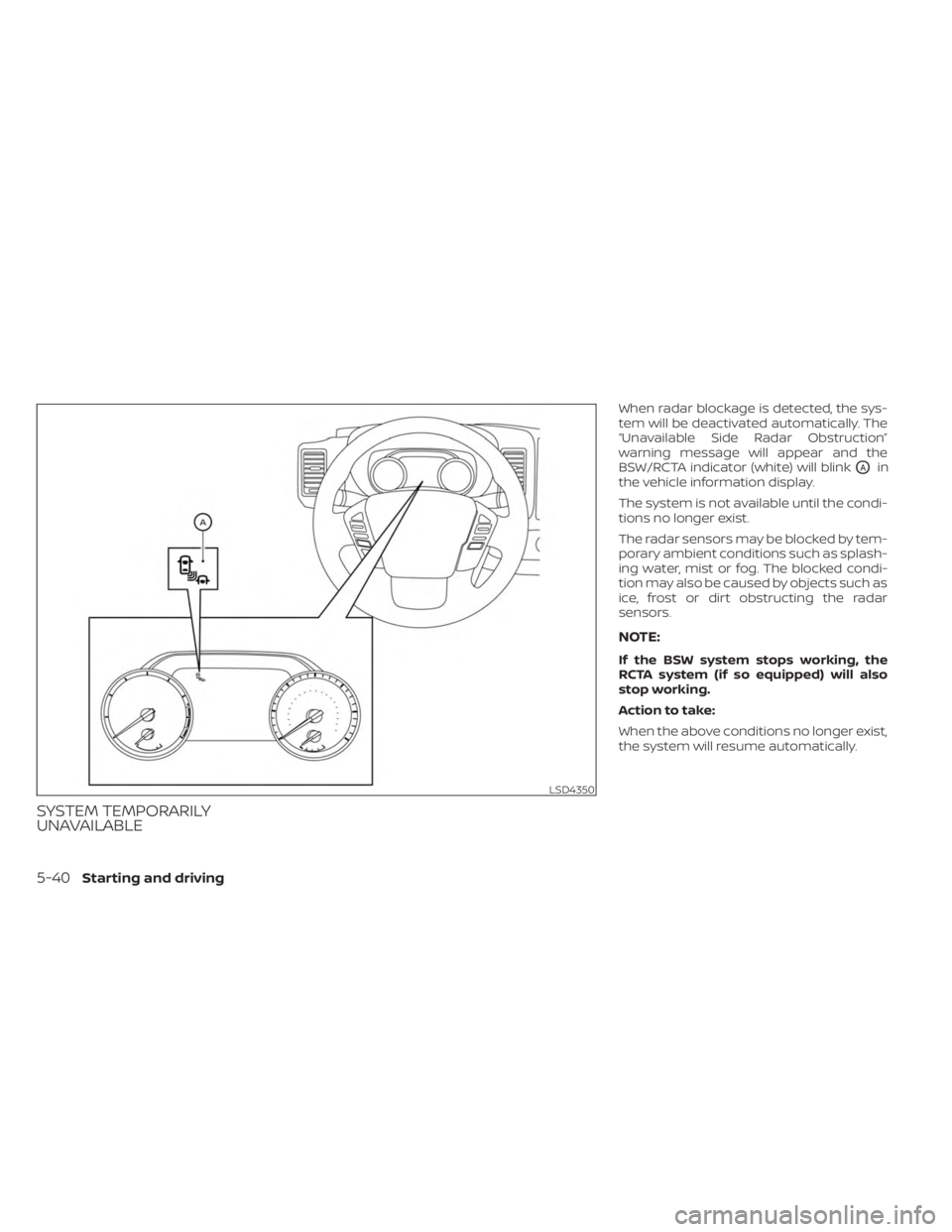
When radar blockage is detected, the sys-
tem will be deactivated automatically. The
“Unavailable Side Radar Obstruction”
warning message will appear and the
BSW/RCTA indicator (white) will blink
OAin
the vehicle information display.
The system is not available until the condi-
tions no longer exist.
The radar sensors may be blocked by tem-
porary ambient conditions such as splash-
ing water, mist or fog. The blocked condi-
tion may also be caused by objects such as
ice, frost or dirt obstructing the radar
sensors.
NOTE:
If the BSW system stops working, the
RCTA system (if so equipped) will also
stop working.
Action to take:
When the above conditions no longer exist,
the system will resume automatically.
LSD4350
5-40Starting and driving
Page 313 of 556
Malfunction
If the BSW system malfunctions, it will turn
off automatically. The system malfunction
warning message with the BSW/RCTA indi-
cator (orange) will appear in the vehicle in-
formation display.
NOTE:
If the BSW system stops working, the
RCTA system will also stop working.
Action to take:
Stop the vehicle in a safe location, place the
vehicle in the P (Park) position, turn the en-
gine off and restart the engine. If the mes-
sage continues to appear, have the system
checked. It is recommended that you visit
an NISSAN dealer for this service.
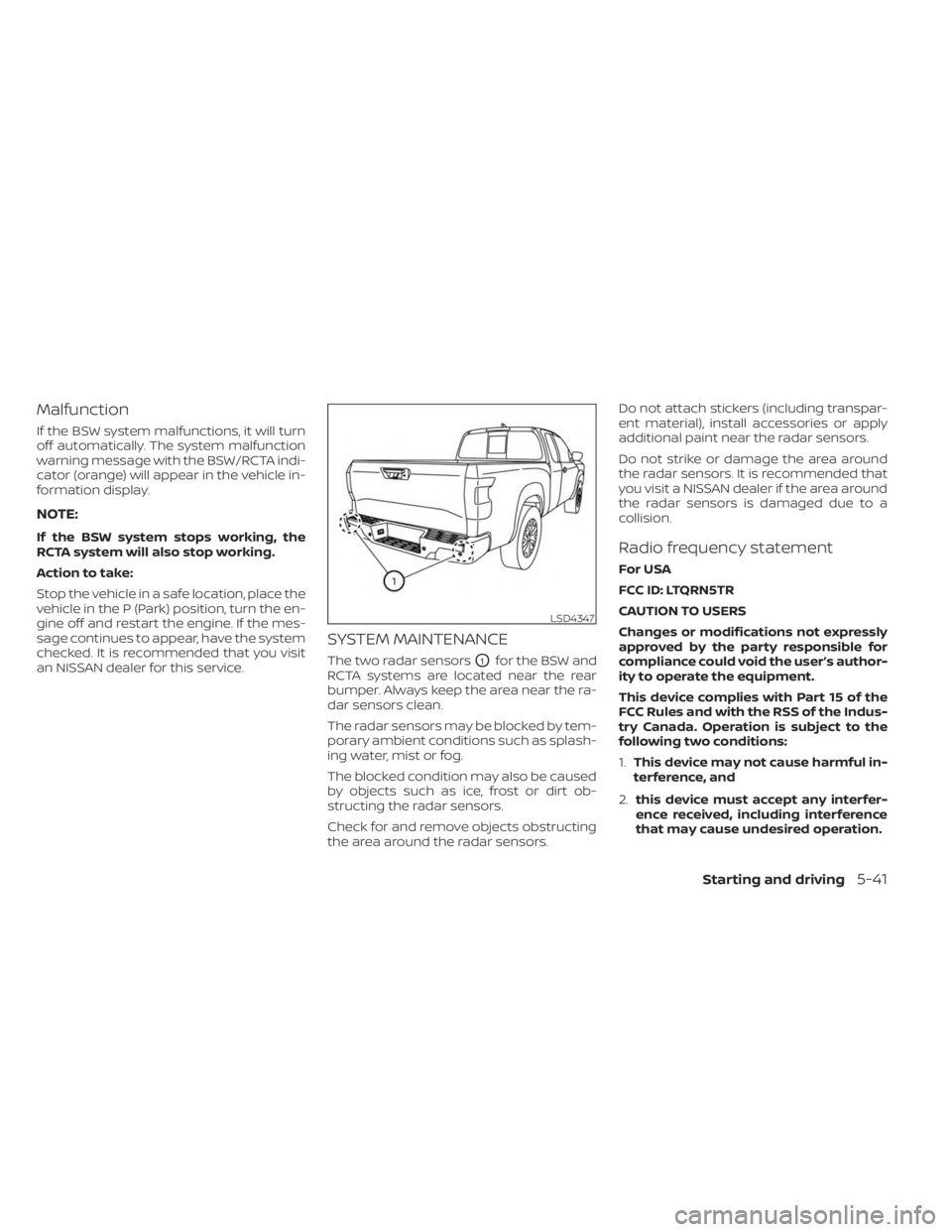
SYSTEM MAINTENANCE
The two radar sensorsO1for the BSW and
RCTA systems are located near the rear
bumper. Always keep the area near the ra-
dar sensors clean.
The radar sensors may be blocked by tem-
porary ambient conditions such as splash-
ing water, mist or fog.
The blocked condition may also be caused
by objects such as ice, frost or dirt ob-
structing the radar sensors.
Check for and remove objects obstructing
the area around the radar sensors. Do not attach stickers (including transpar-
ent material), install accessories or apply
additional paint near the radar sensors.
Do not strike or damage the area around
the radar sensors. It is recommended that
you visit a NISSAN dealer if the area around
the radar sensors is damaged due to a
collision.
Radio frequency statement
For USA
FCC ID: LTQRN5TR
CAUTION TO USERS
Changes or modifications not expressly
approved by the party responsible for
compliance could void the user’s author-
ity to operate the equipment.
This device complies with Part 15 of the
FCC Rules and with the RSS of the Indus-
try Canada. Operation is subject to the
following two conditions:
1.
This device may not cause harmful in-
terference, and
2. this device must accept any interfer-
ence received, including interference
that may cause undesired operation.
LSD4347
Starting and driving5-41
Page 315 of 556
WARNING
Failure to follow the warnings and in-
structions for proper use of the RCTA
system could result in serious injury or
death.
• The RCTA system is not a replace-
ment for proper driving procedures
and is not designed to prevent con-
tact with vehicles or objects. When
backing out of a parking space, al-
ways use the side and rear mirrors
and turn and look in the direction
your vehicle will move. Never rely
solely on the RCTA system.
The RCTA system will assist you when
backing out from a parking space. When
the vehicle is in reverse, the system is de-
signed to detect other vehicles approach-
ing from the right or lef t of the vehicle. If the
system detects cross traffic, it will alert you.
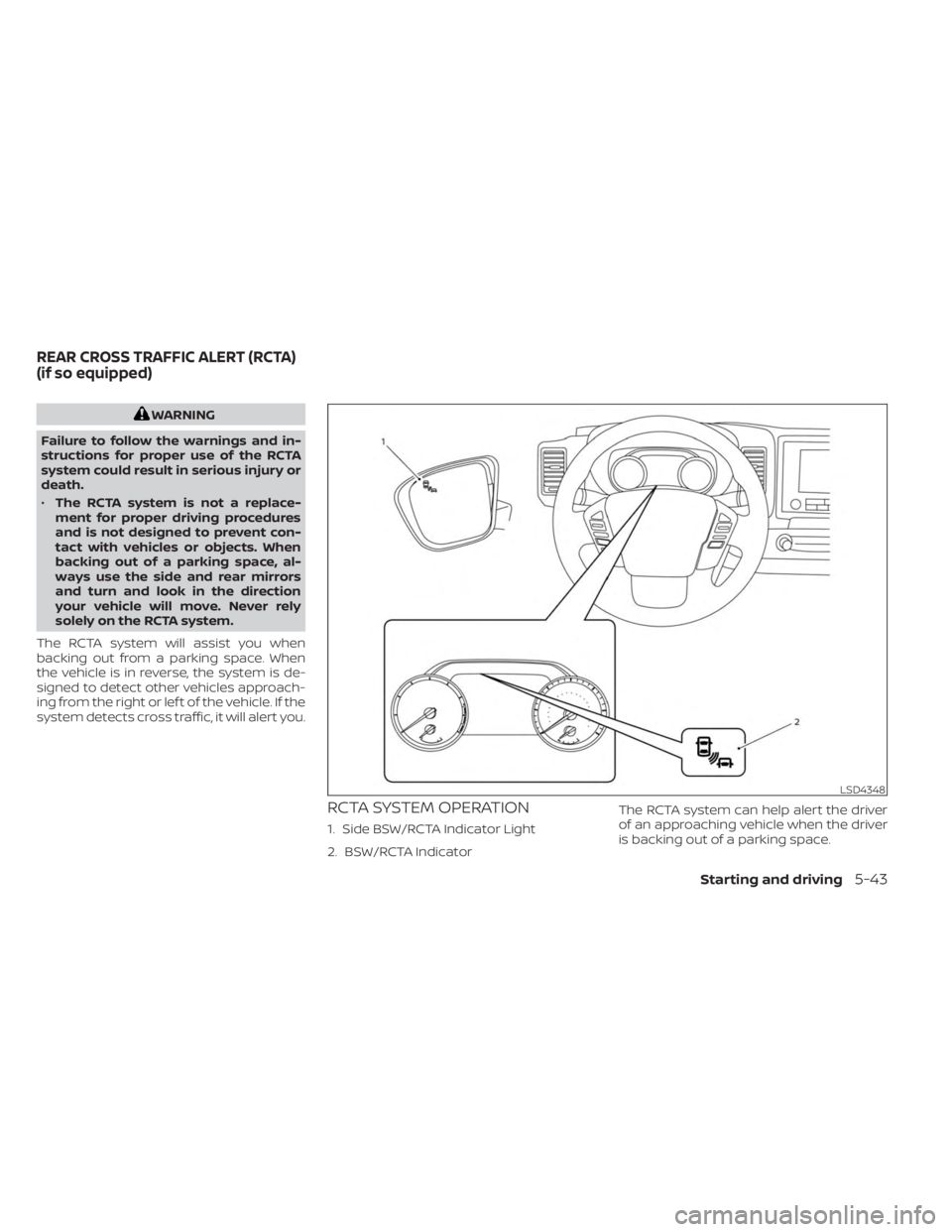
RCTA SYSTEM OPERATION
1. Side BSW/RCTA Indicator Light
2. BSW/RCTA Indicator The RCTA system can help alert the driver
of an approaching vehicle when the driver
is backing out of a parking space.
LSD4348
REAR CROSS TRAFFIC ALERT (RCTA)
(if so equipped)
Starting and driving5-43
Page 318 of 556
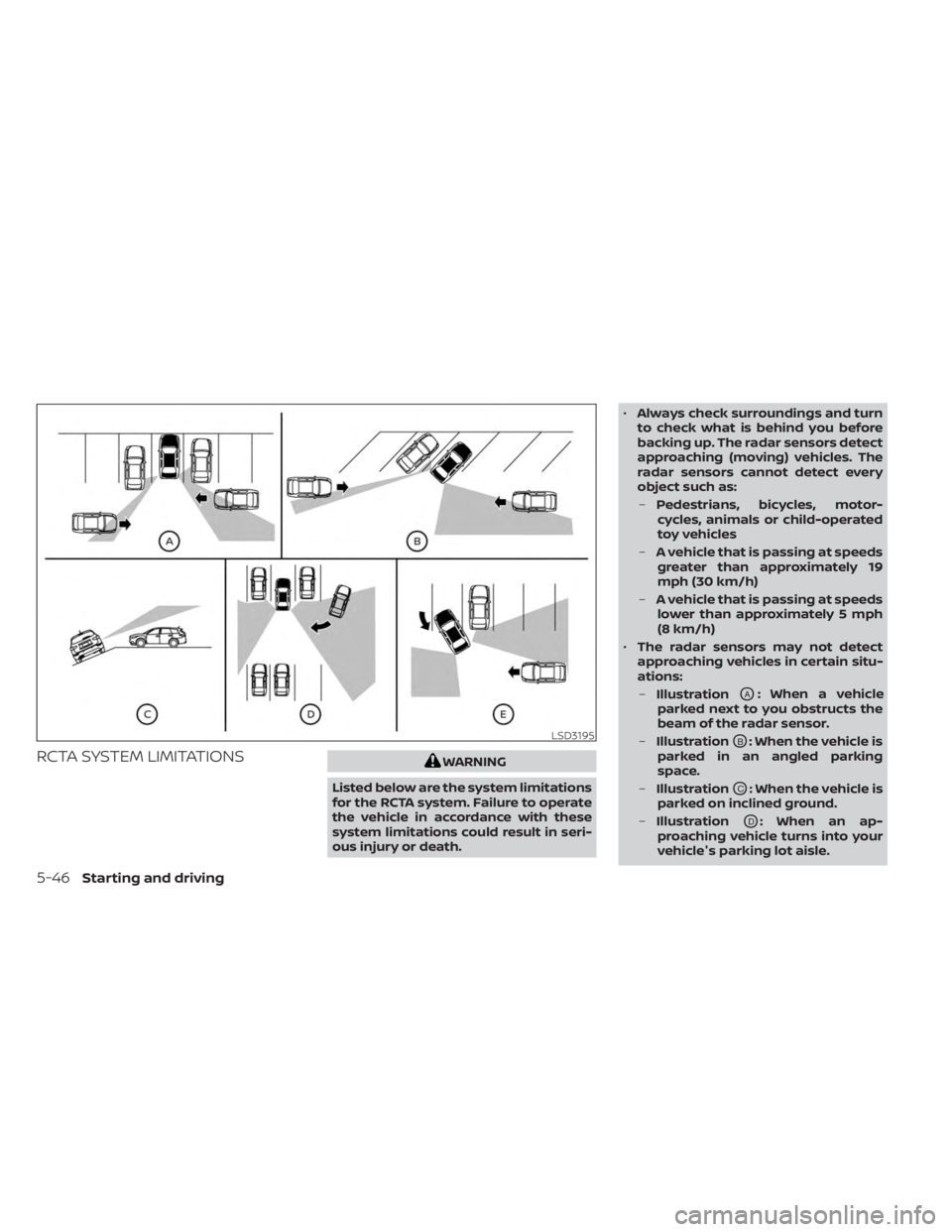
RCTA SYSTEM LIMITATIONSWARNING
Listed below are the system limitations
for the RCTA system. Failure to operate
the vehicle in accordance with these
system limitations could result in seri-
ous injury or death. •
Always check surroundings and turn
to check what is behind you before
backing up. The radar sensors detect
approaching (moving) vehicles. The
radar sensors cannot detect every
object such as:
– Pedestrians, bicycles, motor-
cycles, animals or child-operated
toy vehicles
– A vehicle that is passing at speeds
greater than approximately 19
mph (30 km/h)
– A vehicle that is passing at speeds
lower than approximately 5 mph
(8 km/h)
• The radar sensors may not detect
approaching vehicles in certain situ-
ations:
– Illustration
OA: When a vehicle
parked next to you obstructs the
beam of the radar sensor.
– Illustration
OB: When the vehicle is
parked in an angled parking
space.
– Illustration
OC: When the vehicle is
parked on inclined ground.
– Illustration
OD: When an ap-
proaching vehicle turns into your
vehicle's parking lot aisle.
LSD3195
5-46Starting and driving
Page 320 of 556
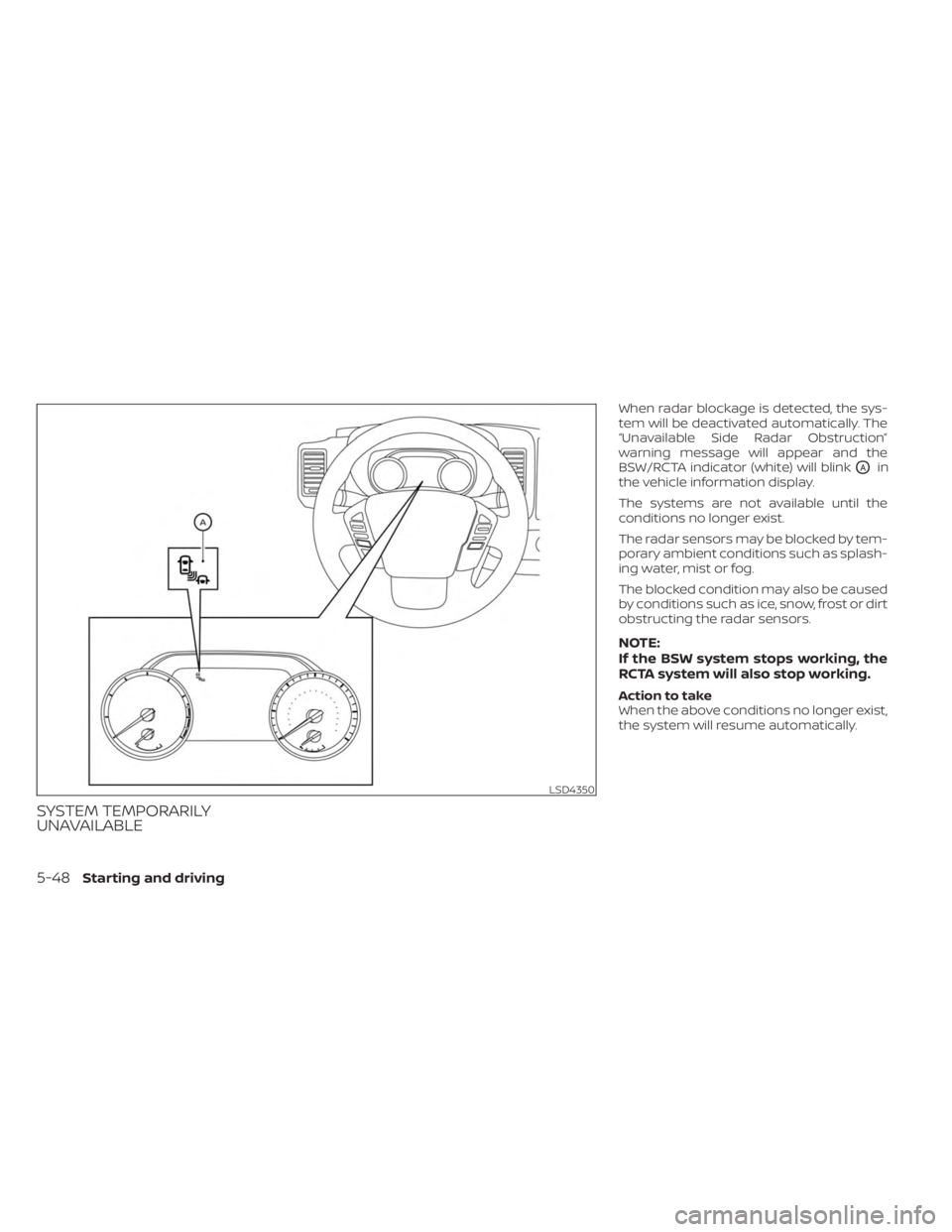
SYSTEM TEMPORARILY
UNAVAILABLE
When radar blockage is detected, the sys-
tem will be deactivated automatically. The
“Unavailable Side Radar Obstruction”
warning message will appear and the
BSW/RCTA indicator (white) will blink
OAin
the vehicle information display.
The systems are not available until the
conditions no longer exist.
The radar sensors may be blocked by tem-
porary ambient conditions such as splash-
ing water, mist or fog.
The blocked condition may also be caused
by conditions such as ice, snow, frost or dirt
obstructing the radar sensors.
NOTE:
If the BSW system stops working, the
RCTA system will also stop working.
Action to take
When the above conditions no longer exist,
the system will resume automatically.
LSD4350
5-48Starting and driving