drive mode NISSAN FRONTIER 2022 Owner´s Manual
[x] Cancel search | Manufacturer: NISSAN, Model Year: 2022, Model line: FRONTIER, Model: NISSAN FRONTIER 2022Pages: 556, PDF Size: 6.11 MB
Page 256 of 556
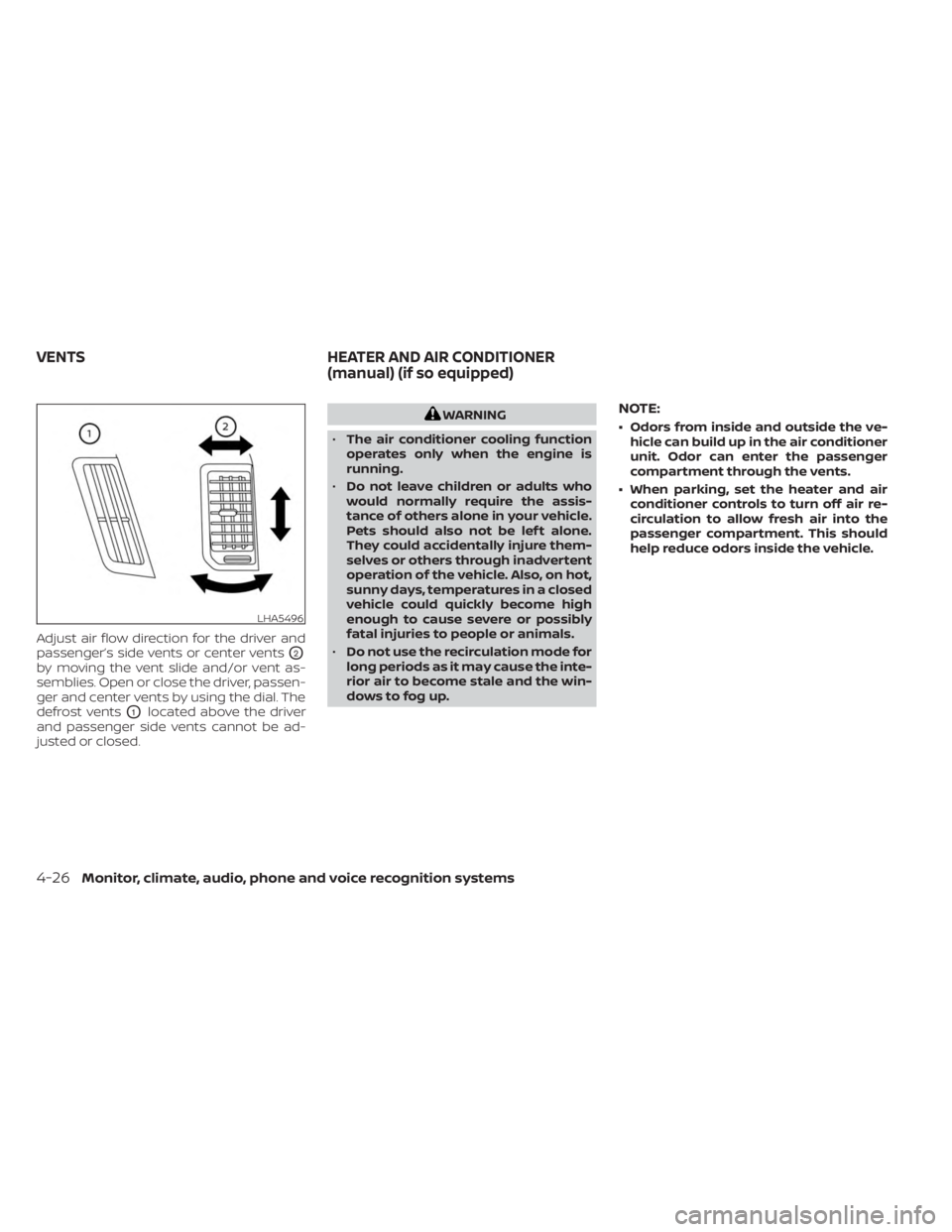
Adjust air flow direction for the driver and
passenger’s side vents or center vents
O2
by moving the vent slide and/or vent as-
semblies. Open or close the driver, passen-
ger and center vents by using the dial. The
defrost vents
O1located above the driver
and passenger side vents cannot be ad-
justed or closed.
WARNING
• The air conditioner cooling function
operates only when the engine is
running.
• Do not leave children or adults who
would normally require the assis-
tance of others alone in your vehicle.
Pets should also not be lef t alone.
They could accidentally injure them-
selves or others through inadvertent
operation of the vehicle. Also, on hot,
sunny days, temperatures in a closed
vehicle could quickly become high
enough to cause severe or possibly
fatal injuries to people or animals.
• Do not use the recirculation mode for
long periods as it may cause the inte-
rior air to become stale and the win-
dows to fog up.NOTE:
• Odors from inside and outside the ve- hicle can build up in the air conditioner
unit. Odor can enter the passenger
compartment through the vents.
• When parking, set the heater and air conditioner controls to turn off air re-
circulation to allow fresh air into the
passenger compartment. This should
help reduce odors inside the vehicle.
LHA5496
VENTS HEATER AND AIR CONDITIONER
(manual) (if so equipped)
4-26Monitor, climate, audio, phone and voice recognition systems
Page 265 of 556
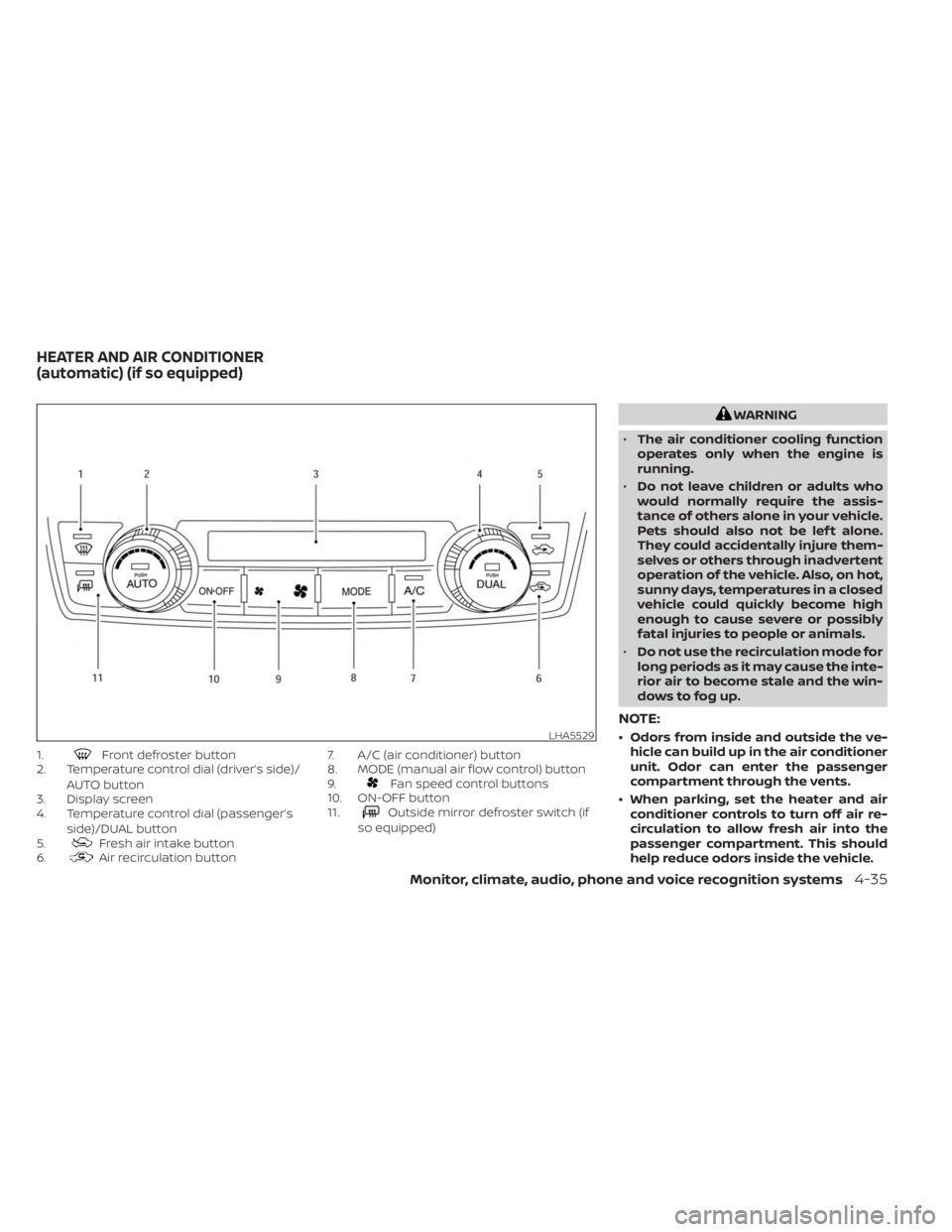
1.Front defroster button
2. Temperature control dial (driver’s side)/
AUTO button
3. Display screen
4. Temperature control dial (passenger’s
side)/DUAL button
5.
Fresh air intake button
6.Air recirculation button 7. A/C (air conditioner) button
8. MODE (manual air flow control) button
9.
Fan speed control buttons
10. ON-OFF button
11.
Outside mirror defroster switch (if
so equipped)
WARNING
• The air conditioner cooling function
operates only when the engine is
running.
• Do not leave children or adults who
would normally require the assis-
tance of others alone in your vehicle.
Pets should also not be lef t alone.
They could accidentally injure them-
selves or others through inadvertent
operation of the vehicle. Also, on hot,
sunny days, temperatures in a closed
vehicle could quickly become high
enough to cause severe or possibly
fatal injuries to people or animals.
• Do not use the recirculation mode for
long periods as it may cause the inte-
rior air to become stale and the win-
dows to fog up.
NOTE:
• Odors from inside and outside the ve- hicle can build up in the air conditioner
unit. Odor can enter the passenger
compartment through the vents.
• When parking, set the heater and air conditioner controls to turn off air re-
circulation to allow fresh air into the
passenger compartment. This should
help reduce odors inside the vehicle.LHA5529
HEATER AND AIR CONDITIONER
(automatic) (if so equipped)
Monitor, climate, audio, phone and voice recognition systems4-35
Page 266 of 556
AUTOMATIC OPERATION
Cooling or heating (auto)
This mode may be normally used all year
round as the system automatically works
to keep a constant temperature. Air flow
distribution and fan speed are also con-
trolled automatically.
1. Press the AUTO button on.
2. Turn the temperature dial to the lef t orright to set the desired temperature.
Driver and passenger temperatures can
be set independently. Press the DUAL
button to activate dual climate control
functions. Turn the passenger's side
temperature control dial to the lef t or
right to set the desired passenger's
temperature.
• Adjust the temperature dial to about 75°F (24°C) for normal operation. • The temperature of the passenger com-
partment will be maintained automati-
cally. Air flow distribution, fan speed and
A/C on/off are also controlled automati-
cally. The A/C button indicator will remain
in the last user setting. Under this condi-
tion, the indicator light on the A/C button
indicator will not turn on if the user had
not selected the A/C button off. If the A/C
button is selected in this mode, the A/C
button indicator will turn off, but the A/C
compressor will still be automatically en-
abled. For additional information, see “Air
flow control” (P. 4-38).
• A visible mist may be seen coming from the vents in hot, humid conditions as the
air is cooled rapidly. This does not indicate
a malfunction.
Heating
When you need to heat only, use this mode.
1. Press the AUTO button. 2. Turn the temperature control dial to the
lef t or the right to set the desired tem-
perature. Driver and passenger tem-
peratures can be set independently.
Press the DUAL button to activate dual
climate control functions. Turn the pas-
senger’s side temperature control dial
to the lef t or right to set the desired
passenger’s temperature.
• The temperature of the passenger com- partment will be maintained automati-
cally. Air flow distribution and fan speed
are also controlled automatically.
• Do not set the temperature lower than the outside air temperature. Otherwise,
the system may not work properly.
• Not recommended if windows fog up.
Dehumidified defrosting or
defogging
1. Press thedefroster control button
to turn the system on. The indicator light
in the button will illuminate.
2. The fan will automatically change to blower speed 5. Blower speed can be
changed by pressing the
fan speed
control button. Increase the fan to 6 or 7
for more aggressive defogging
performance.
4-36Monitor, climate, audio, phone and voice recognition systems
Page 267 of 556
3. Turn the temperature dial to the lef t orright to set the desired temperature.
• To quickly remove ice from the outside of the windows, press the
fan speed
control button to the maximum position.
• As soon as possible af ter the windshield is clean, press the AUTO button to return
to the auto mode.
• When the
control is activated, the air
conditioner will automatically be turned
on at outside temperatures approxi-
mately at or below freezing. This dehu-
midifies the air which helps defog the
windshield. Under this condition, the indi-
cator light on the A/C button indicator will
not turn on if the user had selected A/C
off prior to entering this mode. Turning off
the air condition via the A/C button is not
allowed in this mode. If the A/C button
indicator was on when entering this
mode, and the A/C button is selected in
this mode, the A/C compressor will still be
automatically enabled. The air recircula-
tion mode automatically turns off, allow-
ing outside air to be drawn into the pas-
senger compartment to further improve
the defogging performance.
Remote Engine Start with
Intelligent Climate Control (if so
equipped)
Vehicles equipped with automatic climate
controls and Remote Engine Start function
may go into automatic heating or cooling
mode when Remote Engine Start is acti-
vated depending on outside and cabin
temperatures. During this period, the cli-
mate control display and buttons will be
inoperable until the ignition switch is
turned on. In Remote Engine Start defrost-
ing mode, the outside mirror defroster (if so
equipped) and heated steering wheel (if so
equipped) may be activated automatically.
Voice Recognition logic (if so
equipped)
When the climate control system is on, the
front and rear (if so equipped) fan speeds
may be automatically lowered so that
commands are more easily recognized.
Fan speed can be adjusted using the fan
speed
decrease andincrease
buttons, if desired.
MANUAL OPERATION
Fan speed control
Press thefan speed control buttons
to manually control the fan speed.
Press the AUTO button to return to auto-
matic control of the fan speed.
When adjusting the manual fan from auto
mode, the outlet direction (floor, floor/
defrost, vent, bi-level) will still automatically
change. To fix the outlet to a manual mode,
select the desired air flow location using
the MODE button.
Temperature control dial
The temperature control dial allows you to
adjust the temperature of the outlet air. To
lower the temperature, turn the dial to the
lef t. To increase the temperature, turn the
dial to the right. Temperature can be ad-
justed on the driver’s and passenger’s side.
Air recirculation
Press theair recirculation button to
recirculate interior air inside the vehicle
when:
• driving on a dusty road
• to prevent traffic fumes from entering passenger compartment.
Monitor, climate, audio, phone and voice recognition systems4-37
Page 274 of 556
System temporarily unavailable.............5-48
System maintenance .......................5-49
Cruise control (if so equipped) ..................5-51
Precautions on cruise control ...............5-51
Cruise control operations ...................5-51
Intelligent Cruise Control (if so equipped) .......5-53
How to select the cruise control mode ......5-55
Vehicle-to-vehicle distance control
mode ....................................... 5-55
Vehicle-to-vehicle distance control
mode operation ............................. 5-56
Vehicle-to-vehicle distance control
mode switches ............................. 5-58
Vehicle-to-vehicle distance control
mode limitations ............................ 5-64
System temporarily unavailable .............5-68
System maintenance .......................5-70
Conventional (fixed speed) cruise
control mode ............................... 5-72
Rear Automatic Braking (RAB) (if so equipped) . . 5-76 RAB system operation ....................... 5-77
Turning the RAB system on/off ..............5-78
RAB system limitations ......................5-79
System malfunction ......................... 5-80System maintenance
....................... 5-81
Automatic Emergency Braking (AEB) with
Pedestrian Detection ........................... 5-81
AEB with Pedestrian Detection system
operation ................................... 5-82
Turning the AEB with Pedestrian
Detection system ON/OFF ..................5-84
AEB with Pedestrian Detection system
limitations .................................. 5-85
System temporarily unavailable .............5-88
System malfunction ......................... 5-90
System maintenance .......................5-90
Intelligent Forward Collision Warning (I-FCW) . . . 5-92 I-FCW system operation .....................5-94
Turning the I-FCW system on/off ............5-95
I-FCW system limitations ....................5-96
System temporarily unavailable ............5-101
System malfunction ........................ 5-102
System maintenance ......................5-103
Intelligent Driver Alertness (I-DA) ...............
5-104
Intelligent
Driver Alertness system
operation .................................. 5-105
How to enable/disable the Intelligent
Driver Alertness (I-DA) system ..............5-106
Page 283 of 556
DRINKING ALCOHOL/DRUGS AND
DRIVING
WARNING
Never drive under the influence of alco-
hol or drugs. Alcohol in the blood-
stream reduces coordination, delays
reaction time and impairs judgement.
Driving af ter drinking alcohol increases
the likelihood of being involved in an
accident injuring yourself and others.
Additionally, if you are injured in an ac-
cident, alcohol can increase the sever-
ity of the injury.
NISSAN is committed to safe driving. How-
ever, you must choose not to drive under
the influence of alcohol. Every year thou-
sands of people are injured or killed in
alcohol-related collisions. Although the lo-
cal laws vary on what is considered to be
legally intoxicated, the fact is that alcohol
affects all people differently and most
people underestimate the effects of
alcohol. Remember, drinking and driving don't mix!
That is true for drugs (over-the-counter,
prescription) and illegal drugs, too. Don't
drive if your ability to operate your vehicle is
impaired by alcohol, drugs, or some other
physical condition.
DRIVING SAFETY PRECAUTIONS
Your NISSAN is designed for both normal
and off-road use. However, avoid driving in
deep water or mud as your NISSAN is
mainly designed for leisure use, unlike a
conventional off-road vehicle.
Remember that 2-Wheel Drive models are
less capable than 4-Wheel Drive (4WD)
models for rough road driving and extrica-
tion when stuck in deep snow or mud, or
the like.
Please observe the following precautions:
WARNING
• Drive carefully when off the road and
avoid dangerous areas. Every person
who drives or rides in this vehicle
should be seated with their seat belt
fastened. This will keep you and your
passengers in position when driving
over rough terrain. •
Do not drive across steep slopes. In-
stead drive either straight up or
straight down the slopes. Off-road
vehicles can tip over sideways much
more easily than they can forward or
backward.
• Many hills are too steep for any ve-
hicle. If you drive up them, you may
stall. If you drive down them, you may
not be able to control your speed. If
you drive across them, you may roll
over.
• Do not shif t gears while driving on
downhill grades as this could cause
loss of control of the vehicle.
• Stay alert when driving to the top of a
hill. At the top there could be a drop-
off or other hazard that could cause
an accident.
• If your engine stalls or you cannot
make it to the top of a steep hill,
never attempt to turn around. Your
vehicle could tip or roll over. Always
back straight down in R (Reverse)
gear. Never back down in N (Neutral),
using only the brake, as this could
cause loss of control.
Starting and driving5-11
Page 289 of 556
• Make sure the area around the vehicle isclear.
• Check fluid levels such as engine oil, cool- ant, brake, and windshield-washer fluid
as frequently as possible, or at least
whenever you refuel.
• Check that all windows and lights are clean.
• Visually inspect tires for their appearance and condition. Also check tires for proper
inflation.
• Check that all doors are closed.
• Position seat and adjust head restraints/headrests.
• Adjust inside and outside mirrors.
• Fasten the seat belt and ask all passen- gers to do likewise.
• Check the operation of warning lights when the ignition switch is placed in the
ON position. For additional information,
see “Warning lights, indicator lights and
audible reminders” (P. 2-10). 1. Apply the parking brake.
2. Move the shif t lever to P (Park) or N (Neu-
tral). P (Park) is recommended.
The starter is designed not to operate
unless the shif t lever is in either P
(Park) or N (Neutral).
3. Push the ignition switch to the ON posi- tion. Depress the brake pedal and push
the ignition switch to start the engine.
To start the engine immediately, push
and release the ignition switch while de-
pressing the brake pedal with the igni-
tion switch in any position.
• If the engine is very hard to start in extremely cold weather or when re-
starting, depress the accelerator
pedal a little (approximately 1/3 to the
floor) and while holding, crank the en-
gine. Release the accelerator pedal
when the engine starts.
• If the engine is very hard to start be- cause it is flooded, depress the accel-
erator pedal all the way to the floor
and hold it. Push the ignition switch to
the ON position to start cranking the
engine. Af ter 5 or 6 seconds, stop
cranking by pushing the ignition
switch to the LOCK position. Af ter
cranking the engine, release the accel- erator pedal. Crank the engine with
your foot off the accelerator pedal by
depressing the brake pedal and push-
ing the ignition switch to start the en-
gine. If the engine starts, but fails to
run, repeat the above procedure.
CAUTION
Do not operate the starter for more
than 15 seconds at a time. If the engine
does not start, push the ignition switch
to the OFF position and wait 10 seconds
before cranking again, otherwise the
starter could be damaged.
4. Warm-up
Allow the engine to idle for at least 30
seconds af ter starting. Do not race the
engine while warming it up. Drive at a
moderate speed for a short distance
first, especially in cold weather. In cold
weather, keep the engine running for a
minimum of 2 to 3 minutes before shut-
ting it off. Starting and stopping the en-
gine over a short period of time may
make the vehicle more difficult to start.
5. To stop the engine, move the shif t lever to the P (Park) position and push the
ignition switch to the OFF position.
BEFORE STARTING THE ENGINE STARTING THE ENGINE
Starting and driving5-17
Page 294 of 556
M3 (Third)
Use for hill climbing or engine braking on
downhill grades.
Shif t ranges up or down one by one as
follows:
M1↔M2 ↔M3
M3 will be displayed on the position indica-
tor in the meter.
M2 (Second)
Use for hill climbing or engine braking on
downhill grades.
Shif t ranges up or down one by one as
follows:
M1 ↔M2
M2 will be displayed on the position indica-
tor in the meter.
M1 (First)
Use this position when climbing steep hills
slowly or driving slowly through deep snow,
sand or mud, or for maximum engine brak-
ing on steep downhill grades.
M1 will be displayed on the position indica-
tor on the meter. • Remember not to drive at high speeds for
extended periods of time in lower than
M4 range. This reduces fuel economy.
When shif ting up
Move the shif t lever to the + (up) side. (Shif ts
to higher range.)
When shif ting down
Move the shif t lever to the − (down) side.
(Shif ts to lower range.)
• The transmission will automatically downshif t the gears. (For example, if you
select the 3rd range, the transmission will
shif t down between the 3rd and 1st
gears.)
• Moving the shif t lever rapidly to the same side twice will shif t the ranges in
succession.
When canceling the manual shif t mode
Return the shif t lever to the D (Drive) posi-
tion to return the transmission to the nor-
mal driving mode. •
In the manual shif t mode, the trans-
mission may not shif t to the selected
gear immediately because of vehicle
speed. The transmission will upshif t or
downshif t when vehicle speed
matches the programmed transmis-
sion shif t points. This helps maintain
driving performance and reduces the
chance of vehicle damage or loss of
control.
• In the manual shif t mode, the trans-
mission will not upshif t to a higher
gear than is manually selected. When
the vehicle speed decreases, the trans-
mission automatically shif ts down and
shif ts to 1st gear before the vehicle
comes to a stop.
Accelerator downshif t
— in D (Drive) position —
For passing or hill climbing, depress the
accelerator pedal to the floor. This shif ts
the transmission down into a lower gear,
depending on the vehicle speed.
5-22Starting and driving
Page 295 of 556
High fluid temperature protection
mode
This transmission has a high fluid tem-
perature protection mode. If the fluid tem-
perature becomes too high (for example,
when climbing steep grades in high tem-
peratures with heavy loads, such as when
towing a trailer), engine power and, under
some conditions, vehicle speed will be de-
creased automatically to reduce the
chance of transmission damage. Vehicle
speed can be controlled with the accelera-
tor pedal, but the engine and vehicle speed
may be limited.
Fail-safe
If the vehicle is driven under extreme
conditions, such as excessive wheel
spinning and subsequent hard braking,
the fail-safe system may be activated.
The Malfunction Indicator Light (MIL)
may come on to indicate the fail-safe
mode is activated. For additional infor-
mation, see “Malfunction Indicator Light
(MIL)” (P. 2-17). This will occur even if all
electrical circuits are functioning prop-
erly. In this case, place the ignition switch
in the OFF position and wait for 10 sec-
onds. Then push the switch back to the
ON position. The vehicle should return toits normal operating condition. If it does
not return to its normal operating condi-
tion, have the transmission checked and
repaired, if necessary. It is recommended
that you visit a NISSAN dealer for this
service.
WARNING
When the high fluid temperature pro-
tection mode or fail-safe operation oc-
curs, vehicle speed may be gradually
reduced. The reduced speed may be
lower than other traffic, which could in-
crease the chance of a collision. Be es-
pecially careful when driving. If neces-
sary, pull to the side of the road at a safe
place and allow the transmission to re-
turn to normal operation, or have it re-
paired if necessary.
WARNING
• Be sure the parking brake is fully re-
leased before driving. Failure to do so
can cause brake failure and lead to
an accident.
• Do not release the parking brake
from outside the vehicle.
• Do not use the shif t lever in place of
the parking brake. When parking, be
sure the parking brake is fully
engaged.
• To help avoid risk of injury or death
through unintended operation of the
vehicle and/or its systems, do not
leave children, people who require
the assistance of others or pets unat-
tended in your vehicle. Additionally,
the temperature inside a closed ve-
hicle on a warm day can quickly be-
come high enough to cause a signifi-
cant risk of injury or death to people
and pets.
PARKING BRAKE
Starting and driving5-23
Page 326 of 556
•In the conventional (fixed speed)
cruise control mode, a warning
chime will not sound to warn you if
you are too close to the vehicle
ahead. Pay special attention to the
distance between your vehicle and
the vehicle ahead of you or a collision
could occur.
The ICC system maintains a selected dis-
tance from the vehicle in front of you within
the speed range of 0 to 90 mph (0 to 144
km/h) up to the set speed. The set speed
can be selected by the driver between 20 to
90 mph (30 to 144 km/h).
The vehicle travels at a set speed when the
road ahead is clear.
The ICC system can be set to one of two
cruise control modes:
• Vehicle-to-vehicle distance control
mode: For maintaining a selected dis-
tance between your vehicle and the ve-
hicle in front of you up to the preset speed
• Conventional (fixed speed) cruise con-
trol mode: For cruising at a preset speed Push the ICC switchOAto choose the
cruise control mode between the vehicle-
to-vehicle distance control mode and the
conventional (fixed speed) cruise control
mode.
Once a control mode is activated, it cannot
be changed to the other cruise control
mode. To change the mode, push the ICC
switch
OAonce to turn the system off. Then
push the ICC switch
OAagain to turn the
system back on and select the desired
cruise control mode.
Always confirm the setting in the ICC sys-
tem display.
For the vehicle-to-vehicle distance control
mode, see “Vehicle-to-vehicle distance
control mode” (P. 5-55).
For the conventional (fixed speed) cruise
control mode, see “Conventional (fixed
speed) cruise control mode” (P. 5-72).
5-54Starting and driving