check engine light NISSAN FRONTIER 2023 Owner's Guide
[x] Cancel search | Manufacturer: NISSAN, Model Year: 2023, Model line: FRONTIER, Model: NISSAN FRONTIER 2023Pages: 572, PDF Size: 6.58 MB
Page 391 of 572
*1: Before moving the shif t lever from N
(Neutral), wait until the 4LO indicator stays
on steady. This indicates that the 4WD shif t
procedure is completed and the transfer
gear is correctly set in the 4LO position. If
the vehicle is shif ted into gear before the
indicator is on steady, the transfer gear
may grind, not engage correctly or stay in
the N (Neutral) position.
- If the 4WD vehicle information display
warning message illuminates, perform the
following procedure to return the transfer
case to correct operating condition.
1. Turn off the engine by placing the ignition
switch in the OFF position.
2. Start the engine.
- Check that the 4WD vehicle information
display warning message turns off. If the
warning message in the vehicle informa-
tion display stays on, have the system
checked. It is recommended that you visit a
NISSAN dealer for this service.
3. Apply the parking brake, depress the
brake pedal and move the shif t lever to the
N (Neutral) position.
4. With the brake pedal depressed, move
the 4WD shif t switch to the desired mode.- Be sure to wait until the transfer gear
change completes before shif ting the shif t
lever from the N (Neutral) position.
*2: While changing in and out of 4LO, the
ignition switch must be in the ON position
and the vehicle's engine must be running
for a shif t to take place and for the 4WD
shif t and 4LO position indicators to be op-
erable. Otherwise, the shif t will not take
place and no indicators will be on or
flashing.
*3: Make sure the transfer 4LO position in-
dicator turns on when you shif t the 4WD
shif t switch to 4LO. The
indicator light
will also turn on when 4LO is selected. For
additional information, see “Vehicle Dy-
namic Control (VDC) system” (P. 5-121).
When the 4LO position is selected, the VDC
system is disabled and the VDC off indica-
tor light illuminates, see “Vehicle Dynamic
Control (VDC) OFF indicator light”(P. 2-20).
The transfer case 4WD shif t switch is used
to select either 2WD or 4WD depending on
the driving conditions. There are three
types of drive modes available, 2WD, 4H and
4LO. The 4WD shif t switch electronically controls
the transfer case operation. Rotate the
switch to move between each mode, 2WD,
4H and 4LO.
To change into or out of 4LO, the vehicle
MUST be stationary, move the shif t lever
to N (Neutral), and depress the brake
pedal. The switch must be pushed and
turned to select 4LO.
WARNING
• When parking, apply the parking
brake before stopping the engine
and make sure that the 4WD shif t
indicator is on and the Automatic
Transmission Park (ATP) warning
light goes off. Otherwise, the vehicle
could unexpectedly move even if the
A/T is in the P (Park) position.
• The 4LO indicator must stop blinking
and remain illuminated or turn off
before shif ting the transmission
into gear. If the shif t lever is shif ted
from the N (Neutral) position to any
other gear when the 4LO indicator is
blinking, the vehicle may move
unexpectedly.
Starting and driving5-111
Page 399 of 572
–When installing a spare tire, makesure that it is the proper size and
type as specified on the Tire and
Loading Information label. For addi-
tional information, see “Tire and
Loading Information label” (P. 10-14).
– For additional information, see
“Wheels and tires” (P. 8-32).
The ABS controls the brakes so the wheels
do not lock during hard braking or when
braking on slippery surfaces. The system
detects the rotation speed at each wheel
and varies the brake fluid pressure to pre-
vent each wheel from locking and sliding.
By preventing each wheel from locking, the
system helps the driver maintain steering
control and helps to minimize swerving
and spinning on slippery surfaces.
Using the system
Depress the brake pedal and hold it down.
Depress the brake pedal with firm steady
pressure, but do not pump the brakes. The
Anti-lock Braking System will operate to
prevent the wheels from locking up. Steer
the vehicle to avoid obstacles.
WARNING
Do not pump the brake pedal. Doing so
may result in increased stopping
distances.
Self-test feature
The Anti-lock Braking System (ABS) in-
cludes electronic sensors, electric pumps,
hydraulic solenoids and a computer. The
computer has a built-in diagnostic feature
that tests the system each time you start
the engine and move the vehicle at a low
speed in forward or reverse. When the self-
test occurs, you may hear a “clunk” noise
and/or feel a pulsation in the brake pedal.
This is normal and does not indicate a mal-
function. If the computer senses a mal-
function, it switches the ABS off and illumi-
nates the ABS warning light on the
instrument panel. The brake system then
operates normally but without anti-lock
assistance.
If the ABS warning light illuminates during
the self-test or while driving, have the ve-
hicle checked. It is recommended that you
visit a NISSAN dealer for this service.
Normal operation
The Anti-lock Braking System (ABS) oper-
ates at speeds abov e3-6mph(5-10
km/h). The speed varies according to road
conditions.
When the ABS senses that one or more
wheels are close to locking up, the actuator
rapidly applies and releases hydraulic pres-
sure. This action is similar to pumping the
brakes very quickly. You may feel a pulsa-
tion in the brake pedal and hear a noise
from under the hood or feel a vibration
from the actuator when it is operating. This
is normal and indicates that the ABS is op-
erating properly. However, the pulsation
may indicate that road conditions are haz-
ardous and extra care is required while
driving.
Starting and driving5-119
Page 410 of 572
•When the driver’s door is open.
• When the steering wheel is operated.
• When the Idling Stop System indicator
blinks at a low speed.
(When the Idling Stop System indica-
tor blinks at a high speed (twice ap-
proximately every 1 second), be sure to
check if the engine hood is open. When
the engine hood is opened the engine
will be in the normal stopped state. In
this case, restart the engine with the
ignition switch).
(When the Idling Stop System indicator
blinks at a low speed (once approxi-
mately every 2 seconds), have the sys-
tem checked, and if necessary repaired,
by a NISSAN dealer promptly).
• When the fan speed control is in any
position other than “OFF,” (0) while the
air flow control is in the front defroster
position.
• When the front defroster switch is on.
• When the rear window defroster switch
is on.
• When the temperature inside the ve-
hicle is lower than approximately 68°F
(20°C). •
When the temperature inside the ve-
hicle is higher than approximately 86°F
(30°C). (When the air conditioner is off,
the Idling Stop System will operate.)
• When the fan speed of the air condi-
tioner is set to the maximum speed.
• When the Idling Stop OFF switch is
turned on.
• When the power consumption is large.
• When the altitude is high.
• When the accelerator pedal is
depressed.
• When the shif t lever is any range other
than D (Drive).
• When the brake pedal is not firmly
depressed.
• When stopping the vehicle on steep
sloping roads.
NOTE:
The engine will not restart even if the
brake pedal is released while the Idling
Stop System is activated under the fol-
lowing conditions:
• When the engine hood is opened.
NOTE:
It may take some time until the Idling
Stop System activates under the follow-
ing conditions:
•When the battery is discharged.
• When the outside temperature is low or
high.
•
When the battery is replaced or the bat-
tery terminal is disconnected for ex-
tended periods and then reconnected.
NOTE:
When the Idling Stop System indicator
illuminates, the engine starts running
automatically under at least one of the
following conditions:
• The driver’s seat belt is unfastened, or
the driver’s door is open.
• The battery voltage becomes low (due
to electrical load from other vehicle
systems like headlights, heaters, etc.,
or auxiliary devices connected to the
12 volt socket inside the vehicle).
• The vehicle speed is above about 1 mph
(2 km/h).
• When the rear window defroster is
operated.
5-130Starting and driving
Page 411 of 572
•When the temperature inside the ve-
hicle is lower than approximately 68°F
(20°C).
• When the temperature inside the ve-
hicle is higher than approximately 86°C
(30°F). (When the air conditioner is off,
the Idling Stop System will operate.)
• When the front defroster is turned on.
• When more than 3 minutes have
elapsed since the Idling Stop System
was active.
• When the accelerator pedal is
depressed.
• When the steering wheel is operated.
(The steering wheel operation may be-
come heavy, but this is not a
malfunction.)
• When the battery capacity is low.
• When the power consumption is high.
• When the shif t lever is any range other
than D (Drive).
• When the Idling Stop OFF switch is
pushed.NOTE:
The following condition will prevent the
Idling Stop System from automatically
restarting the engine. Starting the en-
gine with the ignition switch operation is
then necessary:
• The hood is open.
Use this system while waiting at a stop
light, etc. When the vehicle is stopped for
long periods of time, turn off the engine.
When the engine is stopped by the Idling
Stop System, heating, cooling and dehu-
midif ying functions will be deactivated. To
avoid the air conditioning functions from
being deactivated, turn off the Idling Stop
System by pushing the Idling Stop OFF
switch.
RETROGRADE MOVEMENT
CONTROL FUNCTION
This system is designed to reduce the ret-
rograde movement that occurs while the
driver’s foot changes from depressing the
brake pedal to the accelerator pedal when
moving the vehicle while the Idling Stop
System is active on a hilly road.
IDLING STOP SYSTEM DISPLAY
The status of the Idling Stop System can be
checked in the vehicle information display.
Starting and driving5-131
Page 443 of 572
8 Do-it-yourself
Maintenance precautions.......................8-2
Engine compartment check locations ...........8-4
Engine cooling system ..........................8-6
Checking engine coolant level ................8-7
Changing engine coolant ....................8-7
Engine oil .......................................8-8
Checking engine oil level .....................8-8
Changing engine oil and oil filter ..............8-8
Automatic Transmission Fluid (ATF) .............8-13
Power Steering Fluid (PSF) ......................8-14
Brake fluid ...................................... 8-14
Brake fluid ................................... 8-15
Windshield-washer fluid ........................8-15
Windshield-washer fluid reservoir ...........8-15
Battery......................................... 8-16
Jump starting ............................... 8-18
Variable voltage control system ................8-18
Drive belt ....................................... 8-19
Spark plugs .................................... 8-19
Replacing spark plugs ....................... 8-19Air cleaner
..................................... 8-20
In-cabin microfilter .......................... 8-20
Windshield wiper blades ........................8-21
Cleaning .................................... 8-21
Replacing ................................... 8-21
Brakes ......................................... 8-22
Fuses .......................................... 8-23
Engine compartment .......................8-24
Passenger compartment ...................8-25
Battery replacement ........................... 8-26
NISSAN Intelligent Key® ......................8-26
Lights .......................................... 8-28
Headlights .................................. 8-28
Fog lights (if so equipped) ...................8-28
Exterior and interior lights ...................8-29
Wheels and tires ............................... 8-32
Tire pressure ................................ 8-32
Tire labeling ................................. 8-36
T
ypes of tires ................................ 8-39
Tire chains .................................. 8-40
Changing wheels and tires ..................8-41
Page 457 of 572
BRAKE FLUID
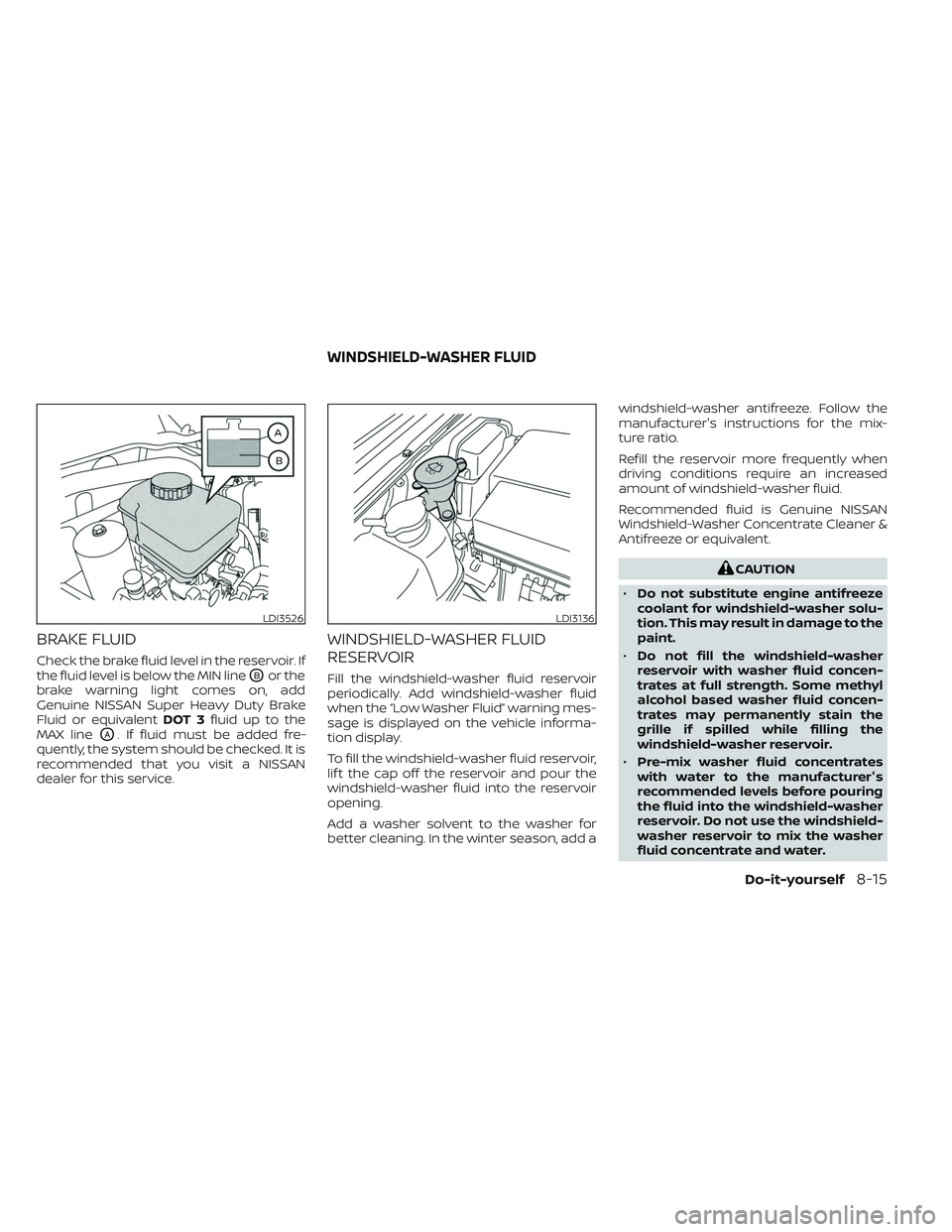
Check the brake fluid level in the reservoir. If
the fluid level is below the MIN line
OBor the
brake warning light comes on, add
Genuine NISSAN Super Heavy Duty Brake
Fluid or equivalent DOT 3fluid up to the
MAX line
OA. If fluid must be added fre-
quently, the system should be checked. It is
recommended that you visit a NISSAN
dealer for this service.
WINDSHIELD-WASHER FLUID
RESERVOIR
Fill the windshield-washer fluid reservoir
periodically. Add windshield-washer fluid
when the “Low Washer Fluid” warning mes-
sage is displayed on the vehicle informa-
tion display.
To fill the windshield-washer fluid reservoir,
lif t the cap off the reservoir and pour the
windshield-washer fluid into the reservoir
opening.
Add a washer solvent to the washer for
better cleaning. In the winter season, add a windshield-washer antifreeze. Follow the
manufacturer's instructions for the mix-
ture ratio.
Refill the reservoir more frequently when
driving conditions require an increased
amount of windshield-washer fluid.
Recommended fluid is Genuine NISSAN
Windshield-Washer Concentrate Cleaner &
Antifreeze or equivalent.
CAUTION
• Do not substitute engine antifreeze
coolant for windshield-washer solu-
tion. This may result in damage to the
paint.
• Do not fill the windshield-washer
reservoir with washer fluid concen-
trates at full strength. Some methyl
alcohol based washer fluid concen-
trates may permanently stain the
grille if spilled while filling the
windshield-washer reservoir.
• Pre-mix washer fluid concentrates
with water to the manufacturer's
recommended levels before pouring
the fluid into the windshield-washer
reservoir. Do not use the windshield-
washer reservoir to mix the washer
fluid concentrate and water.
LDI3526LDI3136
WINDSHIELD-WASHER FLUID
Do-it-yourself8-15
Page 466 of 572
ENGINE COMPARTMENT
WARNING
Never use a fuse of a higher or lower
amperage rating than that specified on
the fuse box cover. This could damage
the electrical system or electronic con-
trol units or cause a fire. If any electrical equipment does not come
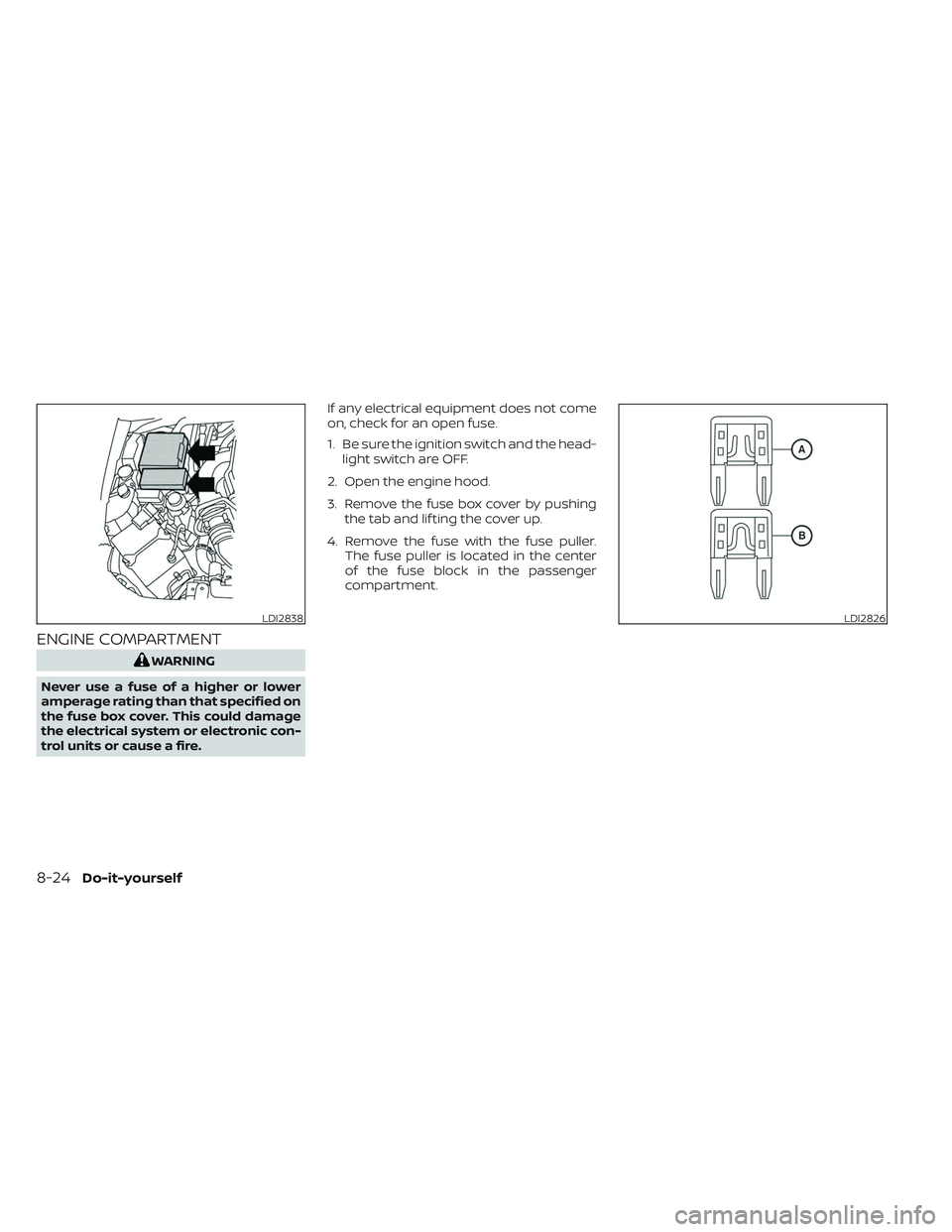
on, check for an open fuse.
1. Be sure the ignition switch and the head-
light switch are OFF.
2. Open the engine hood.
3. Remove the fuse box cover by pushing the tab and lif ting the cover up.
4. Remove the fuse with the fuse puller. The fuse puller is located in the center
of the fuse block in the passenger
compartment.
LDI2838LDI2826
8-24Do-it-yourself
Page 491 of 572
Doors and engine hood:Check that the
doors and engine hood operate properly.
Also ensure that all latches lock securely.
Lubricate hinges, latches, latch pins, rollers
and links if necessary. Make sure that the
secondary latch keeps the hood from
opening when the primary latch is
released.
When driving in areas using road salt or
other corrosive materials, check lubrica-
tion frequently.
Check that the gas stays or struts properly
and securely hold the hood, trunk, or rear
hatch fully open. If the hood, trunk, or rear
hatch is not held open, have the gas stays
or struts replaced.
Lights*: Clean the headlights on a regular
basis. Make sure that the headlights, stop
lights, tail lights, turn signal lights, and other
lights are all operating properly and in-
stalled securely. Also check headlight aim.
Road wheel nuts (lug nuts)*: When check-
ing the tires, make sure no wheel nuts are
missing, and check for any loose wheel
nuts. Tighten if necessary. Tire rotation*:
Rotate tires at the specified
interval shown in the maintenance
schedule.
Tires*: Check the pressure with a gauge
of ten and always prior to long distance
trips. If necessary, adjust the pressure in all
tires, including the spare, to the pressure
specified. Check carefully for damage, cuts
or excessive wear.
Tire Pressure Monitoring System (TPMS)
tire pressure sensor: It is recommended
that you replace the tire pressure sensor
assembly when the tires are replaced due
to wear or age.
Wheel alignment and balance: If the ve-
hicle should pull to either side while driving
on a straight and level road, or if you detect
uneven or abnormal tire wear, there may
be a need for wheel alignment. If the steer-
ing wheel or seat vibrates at normal high-
way speeds, wheel balancing may be
needed.
For additional information regarding tires,
refer to “Important Tire Safety Information”
(US) or “Tire Safety Information” (Canada) in
the Warranty Information Booklet. Windshield:
Clean the windshield on a
regular basis. Check the windshield at least
every six months for cracks or other dam-
age. Have a damaged windshield repaired
by a qualified repair facility. It is recom-
mended that you have a damaged wind-
shield repaired by a NISSAN dealer, or a
NISSAN Certified Collision Center. To locate
a collision center in your area, refer to
http://collision.nissanusa.com.
Windshield wiper blades*: Check for
cracks or wear if they do not wipe properly.
Inside the vehicle
The maintenance items listed here should
be checked on a regular basis, such as
when performing scheduled maintenance,
cleaning the vehicle, etc.
Accelerator pedal:
Check the pedal for
smooth operation and make sure the pedal
does not catch or require uneven effort.
Keep the floor mat away from the pedal.
Automatic transmission P (Park) mecha-
nism: On a fairly steep hill check that the
vehicle is held securely with the shif t lever
in the P (Park) position without applying any
brakes.
Maintenance and schedules9-3
Page 492 of 572
Brake pedal:Check the pedal for smooth
operation. If the brake pedal suddenly goes
down further than normal, the pedal feels
spongy or the vehicle seems to take longer
to stop, have your vehicle checked imme-
diately. It is recommended that you visit a
NISSAN dealer for this service. Keep the
floor mat away from the pedal.
Brakes: Check that the brakes do not pull
the vehicle to one side when applied.
Parking brake: Check the parking brake
operation regularly. The vehicle should be
securely held on a fairly steep hill with only
the parking brake applied. If the parking
brake needs adjustment, it is recom-
mended that you visit a NISSAN dealer for
this service.
Seats: Check seat position controls such
as seat adjusters, seatback recliner, etc., to
ensure they operate smoothly and all
latches lock securely in every position.
Check that the head restraints/headrests
move up and down smoothly and the locks
(if so equipped) hold securely in all latched
positions.
Seat belts: Check that all parts of the seat
belt system (for example, buckles, anchors,
adjusters and retractors) operate properly
and smoothly, and are installed securely. Check the belt webbing for cuts, fraying,
wear or damage.
Steering wheel:
Check for changes in the
steering system, such as excessive free
play, hard steering or strange noises.
Warning lights and chimes: Make sure all
warning lights and chimes are operating
properly.
Windshield defroster: Check that the air
comes out of the defroster outlets properly
and in sufficient quantity when operating
the heater or air conditioner.
Windshield wiper and washer*: Check
that the wipers and washer operate prop-
erly and that the wipers do not streak.
Under the hood and vehicle
The maintenance items listed here should
be checked periodically (for example, each
time you check the engine oil or refuel).
Battery (for maintenance free batter-
ies)*: This vehicle is equipped with a sealed
maintenance free battery. It is recom-
mended that you visit a NISSAN dealer for
service.
NOTE:
Care should be taken to avoid situations
that can lead to potential battery dis-
charge and potential no-start conditions
such as:
1. Installation or extended use of elec- tronic accessories that consume bat-
tery power when the engine is not
running (Phone chargers, GPS, DVD
players, etc.).
2. Vehicle is not driven regularly and/or only driven short distances.
In these cases, the battery may need to
be charged to maintain battery health.
Brake fluid level*: Make sure that the fluid
level is between the MAX and MIN lines on
the reservoir.
Engine coolant level*: Check the coolant
level when the engine is cold.
Engine drive belts*: Check engine drive
belts for wear, fraying or cracking and for
proper tension. Replace any damaged
drive belts.
9-4Maintenance and schedules
Page 520 of 572
Fuel containing MMT
MMT, or methylcyclopentadienyl manga-
nese tricarbonyl, is an octane boosting ad-
ditive. NISSAN does not recommend the
use of fuel containing MMT. Such fuel may
adversely affect vehicle performance, in-
cluding the emissions control system. Note
that while some fuel pumps label MMT
content, not all do, so you may have to
consult your gasoline retailer for more
details.
Af termarket fuel additives
NISSAN does not recommend the use of
any af termarket fuel additives (for ex-
ample, fuel injector cleaner, octane
booster, intake valve deposit removers,
etc.) which are sold commercially. Many of
these additives intended for gum, varnish
or deposit removal may contain active sol-
vents or similar ingredients that can be
harmful to the fuel system and engine.
Octane rating tips
Using unleaded gasoline with an octane
rating lower than recommended can
cause persistent, heavy “spark knock.”
(“Spark knock” is a metallic rapping
noise.) If severe, this can lead to engine
damage. If you detect a persistent heavy
spark knock even when using gasoline
of the stated octane rating, or if you hear
steady spark knock while holding a
steady speed on level roads, it is recom-
mended that you have a NISSAN dealer
correct the condition. Failure to correct
the condition is misuse of the vehicle, for
which NISSAN is not responsible.
Incorrect ignition timing may result in
spark knock, af ter-run and/or overheating,
which may cause excessive fuel consump-
tion or engine damage. If any of the above
symptoms are encountered, have your ve-
hicle checked. It is recommended that you
visit a NISSAN dealer for servicing.However, now and then you may notice
light spark knock for a short time while
accelerating or driving up hills. This is not
a cause for concern, because you get the
greatest fuel benefit when there is light
spark knock for a short time under heavy
engine load.
10-6Technical and consumer information