audio NISSAN FRONTIER 2023 Service Manual
[x] Cancel search | Manufacturer: NISSAN, Model Year: 2023, Model line: FRONTIER, Model: NISSAN FRONTIER 2023Pages: 572, PDF Size: 6.58 MB
Page 268 of 572
Operating tips
• Keep the windows closed while the airconditioner is in operation.
• Af ter parking in the sun, drive for 2 or 3 minutes with the windows open to vent
hot air from the passenger compart-
ment. Then, close the windows. This al-
lows the air conditioner to cool the inte-
rior more quickly.
• The air conditioning system should be
operated for approximately 10 minutes
at least once a month. This helps pre-
vent damage to the system due to lack
of lubrication.
• A visible mist may be seen coming from the ventilators in hot, humid conditions
as the air is cooled rapidly. This does not
indicate a malfunction.
• If the engine coolant temperature
gauge indicates engine coolant tem-
perature over the normal range, turn
the air conditioner off. For additional
information, see “If your vehicle over-
heats” (P. 6-13).
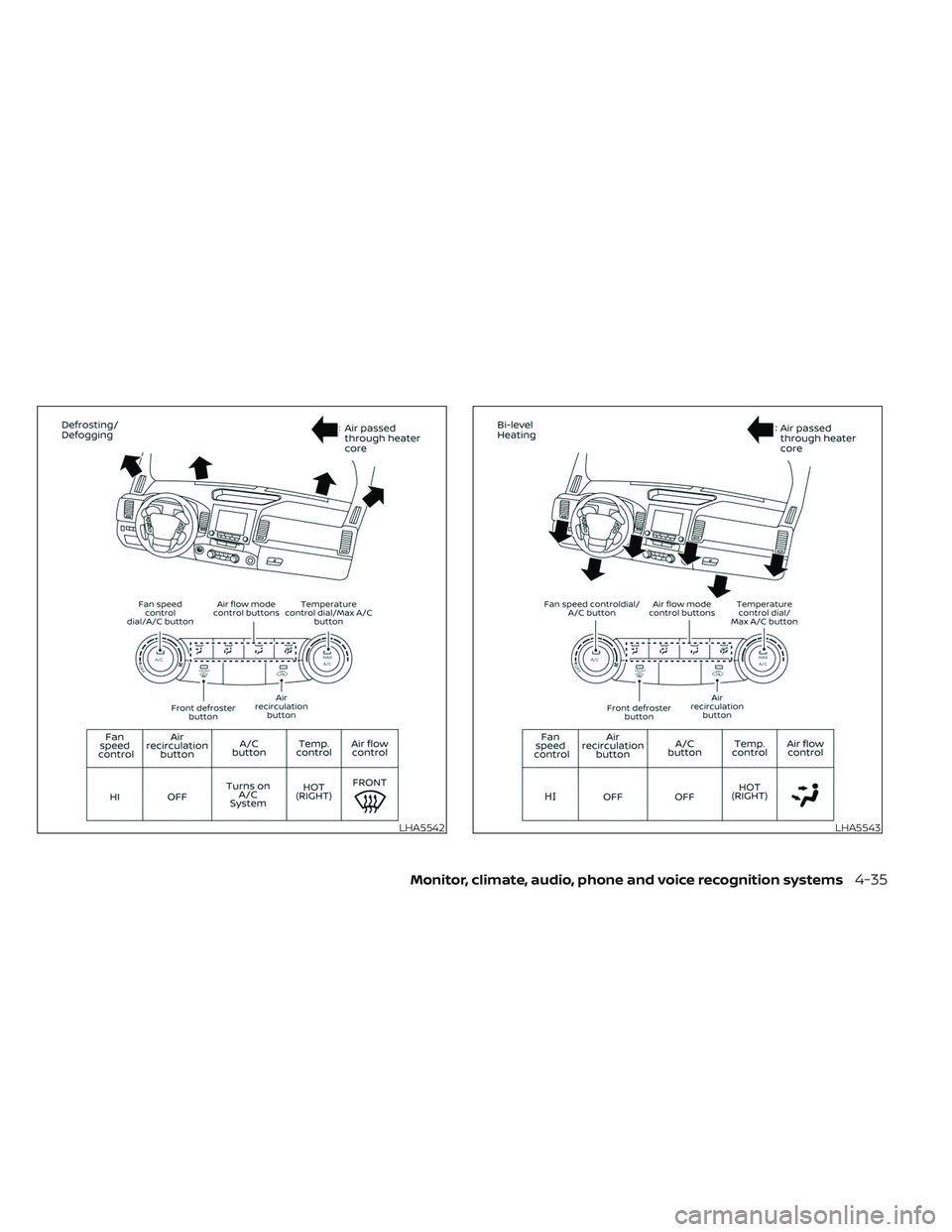
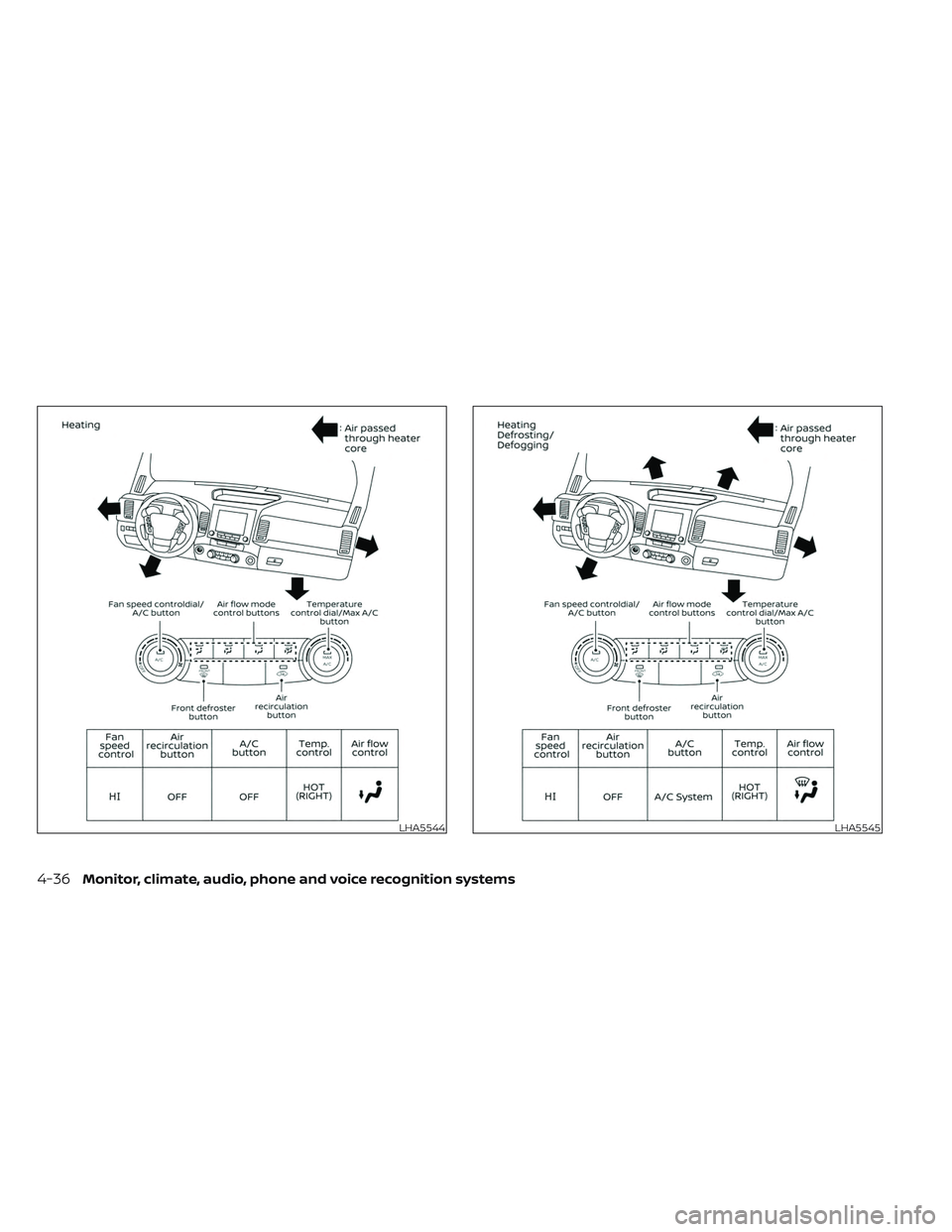
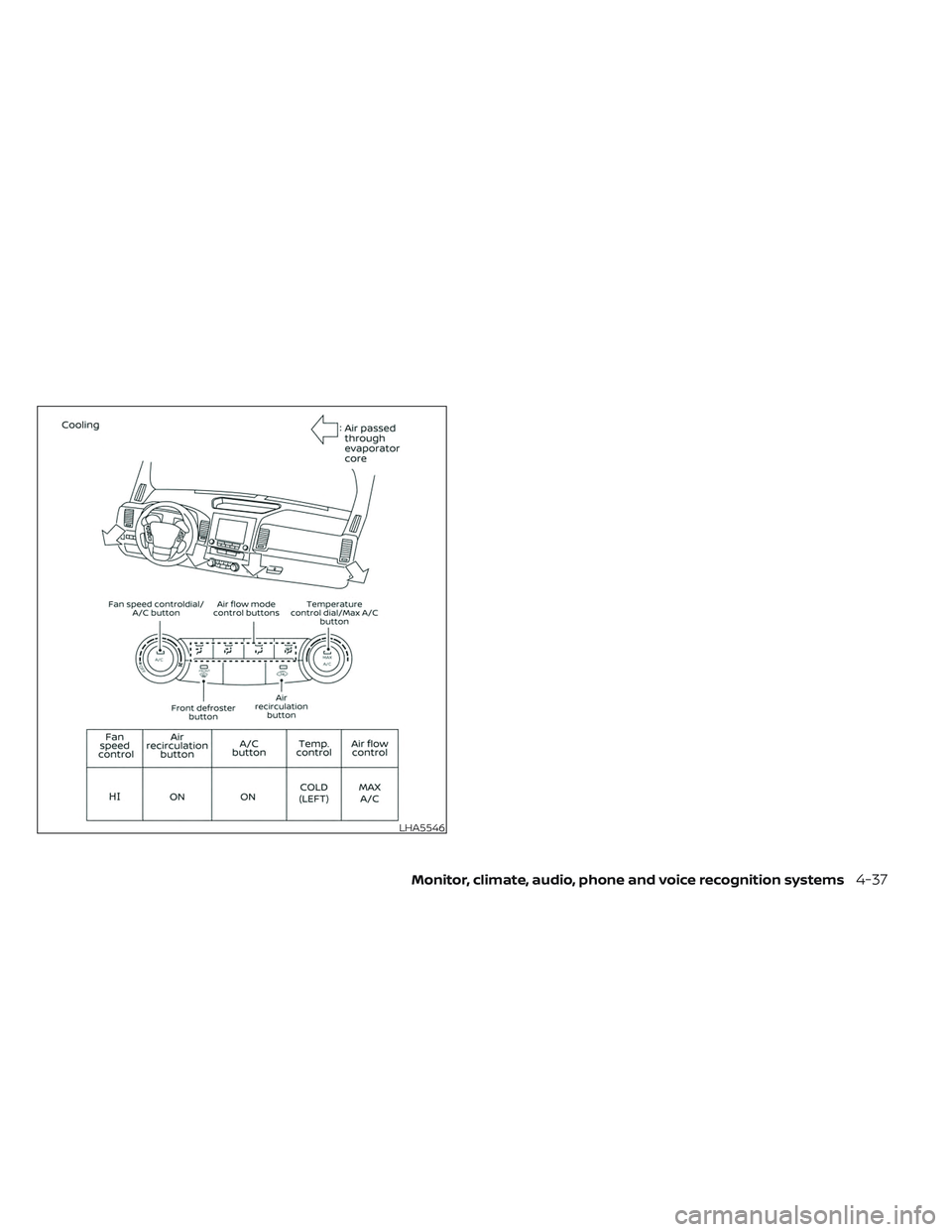
AIR FLOW CHARTS
The following charts show the button and
dial positions for MAXIMUM AND QUICK
heating, cooling or defrosting. For addi-
tional information on heating and cooling,
see “Heater and air conditioner (manual)”
(P. 4-29). The air recirculation (
) but-
ton should always be in the OFF position
for heating and defrosting.
4-34Monitor, climate, audio, phone and voice recognition systems
Page 269 of 572
LHA5542LHA5543
Monitor, climate, audio, phone and voice recognition systems4-35
Page 270 of 572
LHA5544LHA5545
4-36Monitor, climate, audio, phone and voice recognition systems
Page 271 of 572
LHA5546
Monitor, climate, audio, phone and voice recognition systems4-37
Page 272 of 572
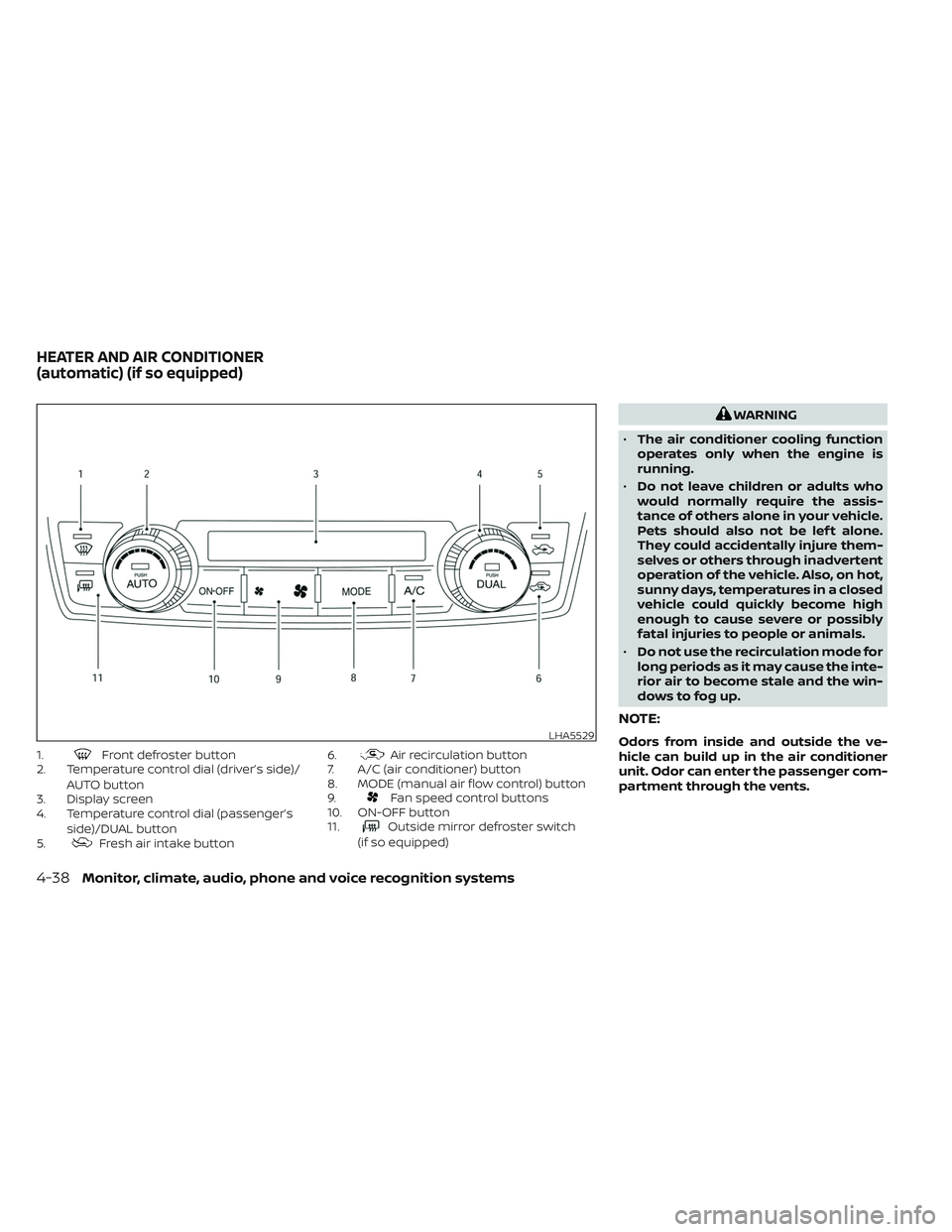
1.Front defroster button
2. Temperature control dial (driver’s side)/
AUTO button
3. Display screen
4. Temperature control dial (passenger’s
side)/DUAL button
5.
Fresh air intake button 6.
Air recirculation button
7. A/C (air conditioner) button
8. MODE (manual air flow control) button
9.
Fan speed control buttons
10. ON-OFF button
11.
Outside mirror defroster switch
(if so equipped)
WARNING
• The air conditioner cooling function
operates only when the engine is
running.
• Do not leave children or adults who
would normally require the assis-
tance of others alone in your vehicle.
Pets should also not be lef t alone.
They could accidentally injure them-
selves or others through inadvertent
operation of the vehicle. Also, on hot,
sunny days, temperatures in a closed
vehicle could quickly become high
enough to cause severe or possibly
fatal injuries to people or animals.
• Do not use the recirculation mode for
long periods as it may cause the inte-
rior air to become stale and the win-
dows to fog up.
NOTE:
Odors from inside and outside the ve-
hicle can build up in the air conditioner
unit. Odor can enter the passenger com-
partment through the vents.LHA5529
HEATER AND AIR CONDITIONER
(automatic) (if so equipped)
4-38Monitor, climate, audio, phone and voice recognition systems
Page 273 of 572
While the engine is stopped by the Idling
Stop System, activating the front defroster
will cause the engine to automatically re-
start. While the engine is running, activating
the front defroster or the outside mirror
defroster will prevent the Idling Stop Sys-
tem from automatically stopping the
engine.
When the temperature inside the vehicle is
higher than approximately 86 °F (30 °C) ISS
engine off will be prohibited. (When the air
conditioner is off, the Idling Stop System will
operate).
When the engine is stopped by the Idling
Stop System, heater and air conditioner
performance may be reduced. To keep full
heater and air conditioner performance,
restart the engine by pushing the Idling
Stop OFF switch.
The blower may reduce to avoid excess
hot/cold air under some conditions. When
engine on resumes, the blower setting will
be restored. For additional information, see
“Idling Stop System” (P. 5-129).AUTOMATIC OPERATION
Cooling or heating (auto)
This mode may be normally used all year
round as the system automatically works
to keep a constant temperature. Air flow
distribution and fan speed are also con-
trolled automatically.
1. Press the AUTO button.
2. Turn the temperature dial to the lef t orright to set the desired temperature.
Driver and passenger temperatures can
be set independently. Press the DUAL
button to activate dual climate control
functions. Turn the passenger's side
temperature control dial to the lef t or
right to set the desired passenger's
temperature.
• Adjust the temperature dial to about 75°F (24°C) for normal operation. • The temperature of the passenger com-
partment will be maintained automati-
cally. Air flow distribution, fan speed and
A/C on/off are also controlled automati-
cally. The A/C button indicator will remain
in the last user setting. Under this condi-
tion, the indicator light on the A/C button
indicator will not turn on if the user had
not selected the A/C button off. If the A/C
button is selected in this mode, the A/C
button indicator will turn off, but the A/C
compressor will still be automatically en-
abled. For additional information, see “Air
flow control” (P. 4-42).
• A visible mist may be seen coming from the vents in hot, humid conditions as the
air is cooled rapidly. This does not indicate
a malfunction.
Heating
When you need to heat only, use this mode.
1. Press the AUTO button.
Monitor, climate, audio, phone and voice recognition systems4-39
Page 274 of 572
2. Turn the temperature control dial to thelef t or the right to set the desired tem-
perature. Driver and passenger tem-
peratures can be set independently.
Press the DUAL button to activate dual
climate control functions. Turn the pas-
senger’s side temperature control dial
to the lef t or right to set the desired
passenger’s temperature.
• The temperature of the passenger com- partment will be maintained automati-
cally. Air flow distribution and fan speed
are also controlled automatically.
• Do not set the temperature lower than the outside air temperature. Otherwise,
the system may not work properly.
• Not recommended if windows fog up.
Dehumidified defrosting or
defogging
1. Press thedefroster control button
to turn the system on. The indicator light
in the button will illuminate.
2. The fan will automatically change to blower speed 5. Blower speed can be
changed by pressing the
fan speed
control button. Increase the fan to 6
or 7 for more aggressive defogging
performance. 3. Turn the temperature dial to the lef t or
right to set the desired temperature.
• To quickly remove ice from the outside of the windows, press the
fan speed
control button to the maximum position.
• As soon as possible af ter the windshield is clean, press the AUTO button to return
to the auto mode.
• When the
control is activated, the air
conditioner will automatically be turned
on. This dehumidifies the air which helps
defog the windshield. Under this condi-
tion, the indicator light on the A/C button
indicator will not turn on if the user had
selected A/C off prior to entering this
mode. Turning off the air condition via the
A/C button is not allowed in this mode.
If the A/C button indicator was on when
entering this mode, and the A/C button is
selected in this mode, the A/C compres-
sor will still be automatically enabled.
The air recirculation mode automatically
turns off, allowing outside air to be drawn
into the passenger compartment to
further improve the defogging perfor-
mance.
Remote Engine Start with
Intelligent Climate Control (if so
equipped)
Vehicles equipped with automatic climate
controls and Remote Engine Start function
may go into automatic heating or cooling
mode when Remote Engine Start is acti-
vated depending on outside and cabin
temperatures. During this period, the cli-
mate control display and buttons will be
inoperable until the ignition switch is
placed in the ON position. In Remote
Engine Start defrosting mode, the outside
mirror defroster (if so equipped) and
heated steering wheel (if so equipped) may
be activated automatically.
Voice Recognition logic (if so
equipped)
When the climate control system is on, the
front and rear (if so equipped) fan speeds
may be automatically lowered so that
commands are more easily recognized.
Fan speed can be adjusted using the
fan speed
decrease andin-
crease buttons, if desired.
4-40Monitor, climate, audio, phone and voice recognition systems
Page 275 of 572
MANUAL OPERATION
Fan speed control
Press thefan speed control buttons
to manually control the fan speed.
Press the AUTO button to return to auto-
matic control of the fan speed.
When adjusting the manual fan from auto
mode, the outlet direction (floor, floor/
defrost, vent, bi-level) will still automatically
change. To fix the outlet to a manual mode,
select the desired air flow location using
the MODE button.
Temperature control dial
The temperature control dial allows you to
adjust the temperature of the outlet air. To
lower the temperature, turn the dial to the
lef t. To increase the temperature, turn the
dial to the right. Temperature can be ad-
justed on the driver’s and passenger’s side.
Air recirculation
Press theair recirculation button to
recirculate interior air inside the vehicle
when:
• driving on a dusty road
• to prevent traffic fumes from entering passenger compartment. • for maximum cooling when using the air
conditioning system.
Press the AUTO button to return to auto-
matic mode.
The air recirculation button will not be acti-
vated or allowed when the air conditioner
is in
mode.
When the outside temperature exceeds
approximately 70°F (21°C), the air condition-
ing system may default to air recirculation
mode automatically to reduce overall
power consumption. To exit air recircula-
tion mode, select the fresh air intake but-
ton to enter fresh air mode.
In Floor/Defrost mode, the recirculation
button can be selected to block outside
odors. However, for maximum defogging in
this mode, it is recommended to turn recir-
culation off when possible.
Fresh air intake
Press thefresh air intake button to
draw outside air into the passenger
compartment.
Automatic intake air control
In the AUTO mode, the intake air will be
controlled automatically. When the outside
temperature exceeds approximately 70°F
(21°C), the air conditioning system may de-
fault to air recirculation mode automati-
cally to reduce overall power consumption.
To exit air recirculation mode, select the
fresh air intake button to enter fresh air
mode. The air recirculation indicator will
turn off, the fresh air indicator will turn on.
To manually control the intake air, press the
fresh air intake button. To return to the
automatic control mode if thefresh
air indicator is illuminated, press and hold
the
fresh air intake button for about 2
seconds. The fresh air indicator and air re-
circulation indicator lights will flash twice,
and then the intake air will be controlled
automatically. To return to the automatic
control mode if the
air recirculation
icon is illuminated, press and hold the
air recirculation or the AUTO button for
about 2 seconds. Theair recirculation
indicator andfresh air intake indicator
lights will flash twice and the intake air will
be controlled automatically. When OFF is
selected, the intake door is automatically
forced to recirculate. To get fresh air in OFF
Monitor, climate, audio, phone and voice recognition systems4-41
Page 276 of 572
mode, select thefresh air intake but-
ton. The MODE can be changed in OFF
mode to direct the flow of incoming air if
intake is set to
fresh.
A/C (air conditioner) button
Start the engine, turn thefan speed
control buttons to the desired position and
press the
button to turn on the air
conditioner. To turn off the air conditioner,
press the
button again. In auto
mode, the air conditioner will be on even
if the
button indicator is off at tem-
peratures approximately at or above
freezing.
The air conditioner cooling function op-
erates only when the engine is running.
Air flow control
Press the MODE button to manually control
air flow and select the air outlet.
— Air flows from center and side
vents.
— Air flows from center and sidevents and foot outlets.
— Air flows mainly from foot out-lets.
— Air flows from defroster and footoutlets.
To turn system off
Press the ON-OFF button.
Outside mirror defroster switch
(if so equipped)
For additional information, see “Outside
mirror defroster switch” (P. 2-43).
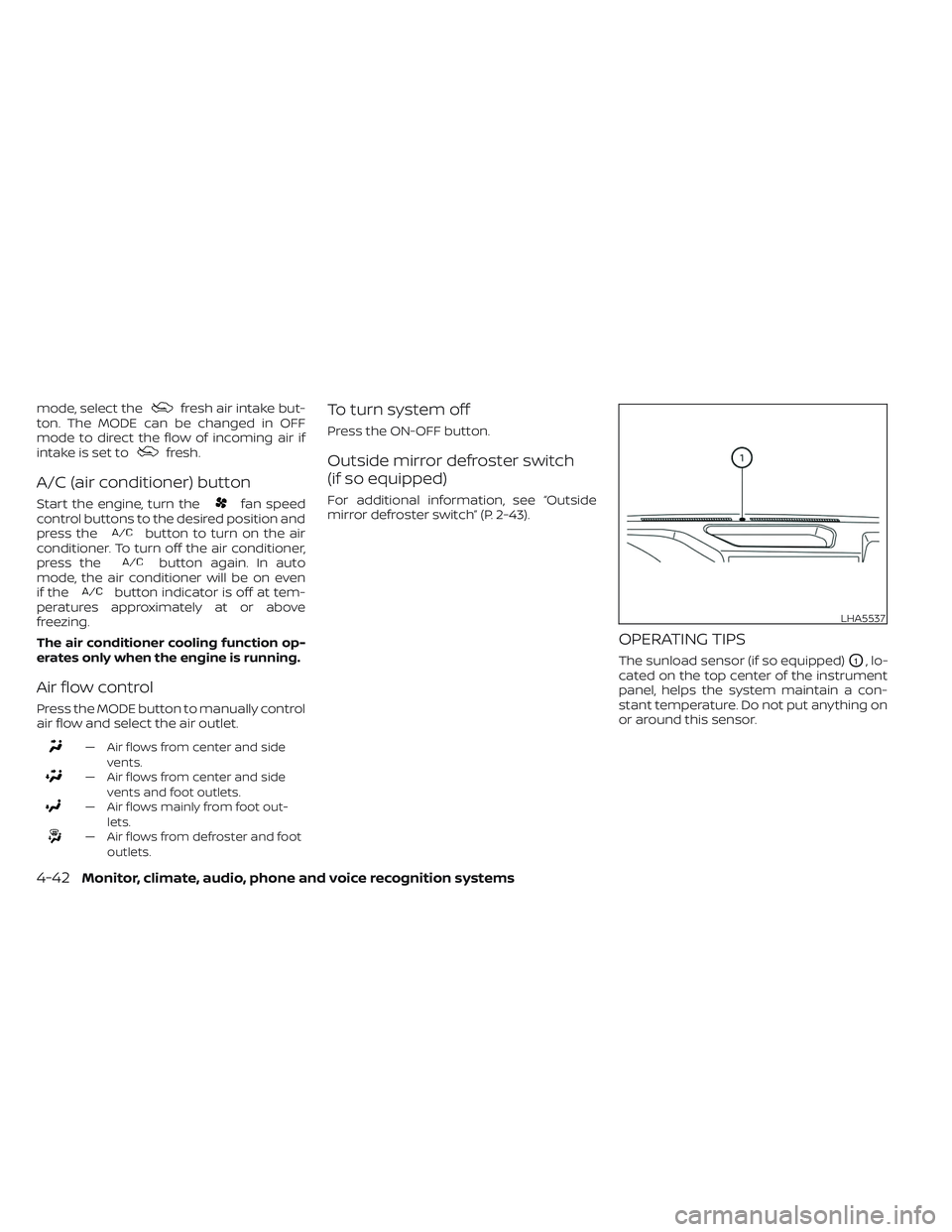
OPERATING TIPS
The sunload sensor (if so equipped)O1, lo-
cated on the top center of the instrument
panel, helps the system maintain a con-
stant temperature. Do not put anything on
or around this sensor.
LHA5537
4-42Monitor, climate, audio, phone and voice recognition systems
Page 277 of 572
• When the climate system is in automaticoperation and the engine coolant tem-
perature and outside air temperature
are low, the air flow outlet may default to
defroster mode for approximately 2 min-
utes 30 seconds. This is not a malfunc-
tion. Af ter the engine coolant tempera-
ture warms up, the air flow outlet will
return to foot mode and operation will
continue normally.
• When the outside and interior cabin tem- peratures are moderate to high, the in-
take setting may default to turn off air
recirculation to allow fresh air into the
passenger compartment. You may no-
tice air flow from the foot mode, bi-level
mode, or side demist vent outlets for a
maximum of 15 seconds. This may occur
when previous climate setting was sys-
tem off. This is not a malfunction. Af ter
the initial warm air is expelled, the intake
will return to automatic control, air flow
outlet will return to previous settings, and
operation will continue normally. To exit,
press any climate control button.
• Keep the windows closed while the air conditioner is in operation. • If you feel that the air flow mode you have
selected and the outlets the air is coming
out do not match, select the
mode.
• When you change the air flow mode, you may feel air flow from the foot outlets for
just a moment. This is not a malfunction.
• When the ignition is placed in the ON po- sition, in some fogging or high cabin
temp conditions, air may flow automati-
cally to the foot outlets for 3 to 7 seconds
to purge the hot air in the system. The air conditioner system in your NISSAN
vehicle is charged with a refrigerant de-
signed with the environment in mind.
This refrigerant does not harm the
earth's ozone layer.
Special charging equipment and lubricant
is required when servicing your NISSAN air
conditioner. Using improper refrigerants or
lubricants will cause severe damage to
your air conditioner system. For additional
information, see “Air conditioner system
refrigerant and oil recommendations”
(P. 10-8).
It is recommended that you visit a NISSAN
dealer to service your “environmentally
friendly” air conditioning system.
WARNING
The
air conditioner system contains re-
frigerant under high pressure. To avoid
personal injury, any air conditioner ser-
vice should be done only by an experi-
enced technician with proper equipment.
SERVICING AIR CONDITIONER
Monitor, climate, audio, phone and voice recognition systems4-43