warning NISSAN GT-R 2011 Owner's Guide
[x] Cancel search | Manufacturer: NISSAN, Model Year: 2011, Model line: GT-R, Model: NISSAN GT-R 2011Pages: 312, PDF Size: 13.07 MB
Page 262 of 312
Black plate (268,1)
Model "R35-N" EDITED: 2009/ 10/ 30
ACCELERATION SCREENThe acceleration screen displays the results of
how the vehicle behaves based on the manner in
which you operate the vehicle. The information
displayed is for confirmation purposes. The
results of how you use the accelerator pedal
can be displayed as an acceleration g-force
timeline. You can use this information to improve
your operation of the accelerator pedal.
WARNING
.Use the information from the multi
function meter strictly as a refer-
ence to make your driving more
comfortable. The readings are not
meant to prevent accidents caused
by reckless driving or poor driving
conditions (due to weather, road
condition, etc.) . Always obey all
traffic regulations and posted speed
limits.
. Red zone readings are configured to
function only as a guide for smooth
driving. The readings are not in-
tended to prevent accidents caused
by reckless driving.
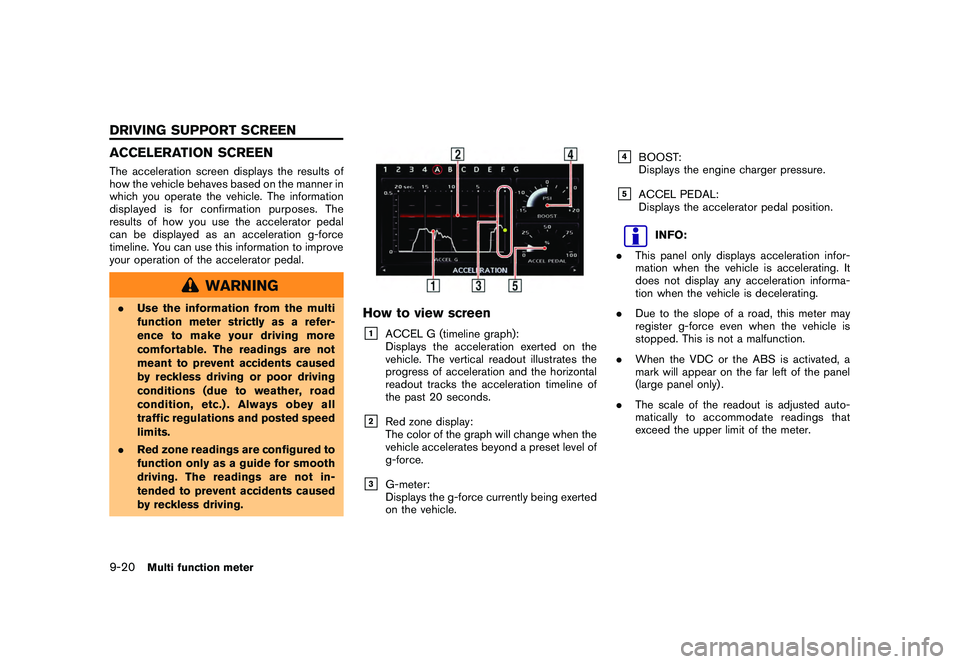
How to view screen&1
ACCEL G (timeline graph):
Displays the acceleration exerted on the
vehicle. The vertical readout illustrates the
progress of acceleration and the horizontal
readout tracks the acceleration timeline of
the past 20 seconds.
&2
Red zone display:
The color of the graph will change when the
vehicle accelerates beyond a preset level of
g-force.
&3
G-meter:
Displays the g-force currently being exerted
on the vehicle.
&4
BOOST:
Displays the engine charger pressure.
&5
ACCEL PEDAL:
Displays the accelerator pedal position.
INFO:
. This panel only displays acceleration infor-
mation when the vehicle is accelerating. It
does not display any acceleration informa-
tion when the vehicle is decelerating.
. Due to the slope of a road, this meter may
register g-force even when the vehicle is
stopped. This is not a malfunction.
. When the VDC or the ABS is activated, a
mark will appear on the far left of the panel
(large panel only) .
. The scale of the readout is adjusted auto-
matically to accommodate readings that
exceed the upper limit of the meter.
9-20
Multi function meter
DRIVING SUPPORT SCREEN
Page 264 of 312
Black plate (270,1)
Model "R35-N" EDITED: 2009/ 10/ 30
BRAKING SCREENThe braking screen displays the results of how
the vehicle behaves based on the manner in
which the driver operates the vehicle. The
information displayed is for confirmation pur-
poses. The results of how the brake pedal is
used are displayed as a timeline of g-force
exerted on the vehicle during deceleration. Use
the information to improve your operation of the
brake pedal.
WARNING
.Use the information from the multi
function meter strictly as a refer-
ence to make your driving more
comfortable. The readings are not
meant to prevent accidents caused
by reckless driving or poor driving
conditions (due to weather, road
condition, etc.) . Always obey all
traffic regulations and posted speed
limits.
. Red zone readings are configured to
function only as a guide for smooth
driving. The readings are not in-
tended to prevent accidents caused
by reckless driving.
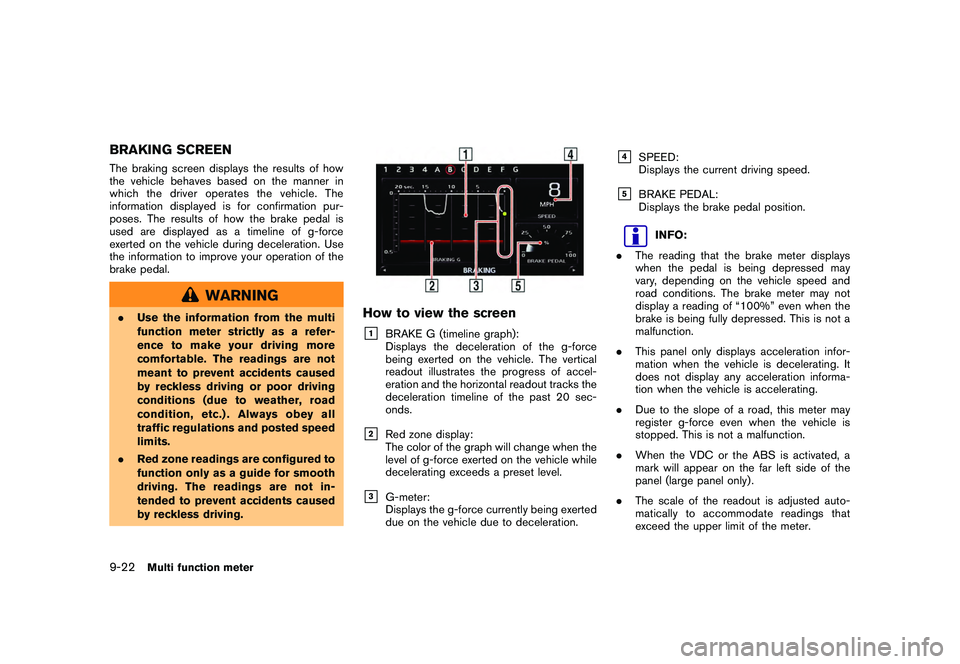
How to view the screen&1
BRAKE G (timeline graph):
Displays the deceleration of the g-force
being exerted on the vehicle. The vertical
readout illustrates the progress of accel-
eration and the horizontal readout tracks the
deceleration timeline of the past 20 sec-
onds.
&2
Red zone display:
The color of the graph will change when the
level of g-force exerted on the vehicle while
decelerating exceeds a preset level.
&3
G-meter:
Displays the g-force currently being exerted
due on the vehicle due to deceleration.
&4
SPEED:
Displays the current driving speed.
&5
BRAKE PEDAL:
Displays the brake pedal position.
INFO:
. The reading that the brake meter displays
when the pedal is being depressed may
vary, depending on the vehicle speed and
road conditions. The brake meter may not
display a reading of “100%” even when the
brake is being fully depressed. This is not a
malfunction.
. This panel only displays acceleration infor-
mation when the vehicle is decelerating. It
does not display any acceleration informa-
tion when the vehicle is accelerating.
. Due to the slope of a road, this meter may
register g-force even when the vehicle is
stopped. This is not a malfunction.
. When the VDC or the ABS is activated, a
mark will appear on the far left side of the
panel (large panel only) .
. The scale of the readout is adjusted auto-
matically to accommodate readings that
exceed the upper limit of the meter.
9-22
Multi function meter
Page 266 of 312
Black plate (272,1)
Model "R35-N" EDITED: 2009/ 10/ 30
STEERING SCREENThe steering screen allows you to confirm how
the vehicle responds to your driving by display-
ing the results of how you operate the vehicle.
The results of your driving are displayed as a
timeline of the g-force exerted on the vehicle.
Use the displayed information to improve your
steering smoothness.
WARNING
.Use the information from the multi
function meter strictly as a refer-
ence to make your driving more
comfortable. The readings are not
meant to prevent accidents caused
by reckless driving or poor driving
conditions (due to weather, road
condition, etc.) . Always obey all
traffic regulations and posted speed
limits.
. Red zone readings are configured to
function only as a guide for smooth
driving. The readings are not in-
tended to prevent accidents caused
by reckless driving.
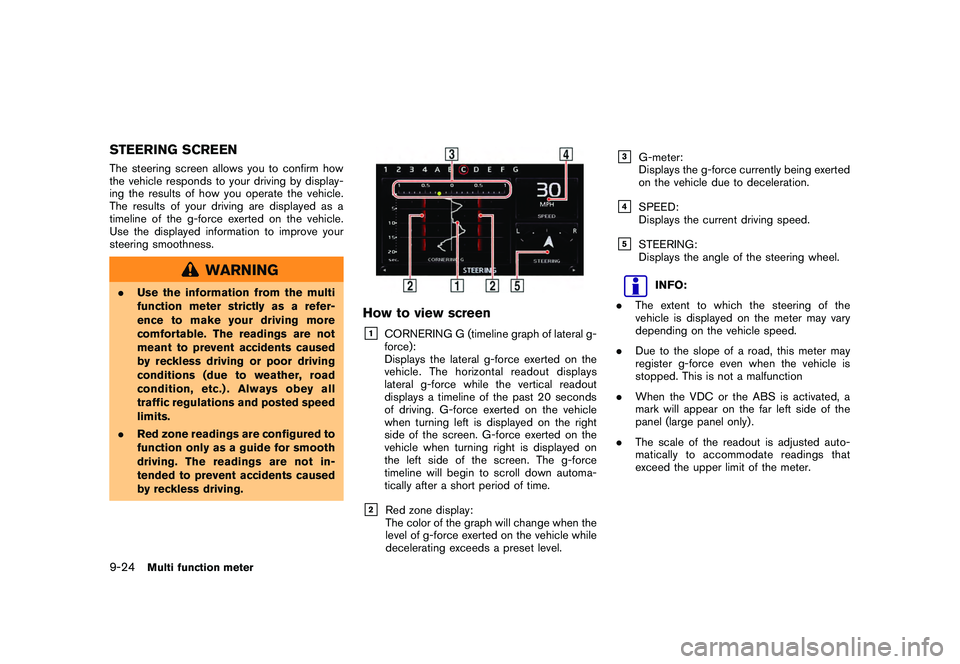
How to view screen&1
CORNERING G (timeline graph of lateral g-
force):
Displays the lateral g-force exerted on the
vehicle. The horizontal readout displays
lateral g-force while the vertical readout
displays a timeline of the past 20 seconds
of driving. G-force exerted on the vehicle
when turning left is displayed on the right
side of the screen. G-force exerted on the
vehicle when turning right is displayed on
the left side of the screen. The g-force
timeline will begin to scroll down automa-
tically after a short period of time.
&2
Red zone display:
The color of the graph will change when the
level of g-force exerted on the vehicle while
decelerating exceeds a preset level.
&3
G-meter:
Displays the g-force currently being exerted
on the vehicle due to deceleration.
&4
SPEED:
Displays the current driving speed.
&5
STEERING:
Displays the angle of the steering wheel.
INFO:
. The extent to which the steering of the
vehicle is displayed on the meter may vary
depending on the vehicle speed.
. Due to the slope of a road, this meter may
register g-force even when the vehicle is
stopped. This is not a malfunction
. When the VDC or the ABS is activated, a
mark will appear on the far left side of the
panel (large panel only) .
. The scale of the readout is adjusted auto-
matically to accommodate readings that
exceed the upper limit of the meter.
9-24
Multi function meter
Page 274 of 312
![NISSAN GT-R 2011 Owners Guide Black plate (280,1)
Model "R35-N" EDITED: 2009/ 10/ 30
3. Select [Delete Stop Watch Times]. Themessage screen will be displayed.4. Select [YES]. The time record will bedeleted.
INFO:
. You cannot reco](/img/5/58175/w960_58175-273.png "NISSAN GT-R 2011 Owners Guide Black plate (280,1)
Model \"R35-N\" EDITED: 2009/ 10/ 30
3. Select [Delete Stop Watch Times]. Themessage screen will be displayed.4. Select [YES]. The time record will bedeleted.
INFO:
. You cannot reco")
Black plate (280,1)
Model "R35-N" EDITED: 2009/ 10/ 30
3. Select [Delete Stop Watch Times]. Themessage screen will be displayed.4. Select [YES]. The time record will bedeleted.
INFO:
. You cannot recover deleted records.
. To delete all records select [Delete All Stop
Watch Times].
DRIVER’S NOTES SCREENYou can record the waypoints that you pass
using the DRIVER’S NOTES screen.How to view screen&1
MARK LIST (waypoint list):
Displays a list of waypoints saved auto-
matically or manually.
&2
Timer indicator:
Flashes while the timer is operating.
&3
FUEL/RANGE:
Displays the amount of fuel and the
distance the vehicle can travel on the
remaining fuel
&4
TRIP DISTANCE:
Displays the driving time measured starting
from when the Driver’s notes function was
activated.
NOTICE
Even when the cruising distance dis-
plays that the vehicle has a sufficient
amount of fuel to travel a given dis-
tance, when the fuel indicator ap-
proachesE(empty),orthefuel
warning light illuminates, be sure to
fuel your vehicle.
9-32
Multi function meter
Page 291 of 312
Black plate (297,1)
Model "R35-N" EDITED: 2009/ 10/ 30
HOW TO ORDER MAP DATA UP-
DATESTo order updated map data, contact the
NISSAN NAVIGATION SYSTEM HELPDESK.
See the contact information on the inside front
cover of this manual.ABOUT MAP DATA1. This map data has been prepared byHITACHI, LTD. under licence from ZENRIN
CO., LTD. and NAVTEQ. ZENRIN CO., LTD.
has added, processed and digitized data
based on the digital road map data of
Navigation Technologies Corporation. Due
to the production timing of the map data,
some new roads may not be included in this
map data or some of the names or roads
may be different from those at the time you
use this map data.
2. Traffic control and regulation data used in this map data may be different from those at
the time you use this map data due to the
data production timing. When driving your
vehicle, follow the actual traffic control signs
and notices on the roads.
3. Reproducing or copying this map software is strictly prohibited by law.
Published by Nissan North America, Inc.*C
2006 Navigation Technologies. All rights reserved.
Certain business data provided by infoUSA, Inc.,
Omaha, NE, Copyright
*C1993-2008 NAVTEQ. All Rights Reserved.
*C2008, All Rights Reserved.
*CZENRIN CO., LTD. 2009. All rights reserved.
*CZENRIN USA, INC. 2008. All rights reserved.
*C2008 Zagat Survey, LLC.
WARNING
.
This navigation system should not
be used to replace your own judge-
ment. No itinerary suggested by this
navigation system should ever over-
ride any highway regulations, your
own judgement, or a knowledge of
safe driving practices. Do not follow
the navigation system’s suggested
itinerary if it would cause you to
perform a dangerous or illegal act,
place you in a dangerous situation,
or take you into an area you con-
sider unsafe.
. The advice provided by the naviga-
tion system is to be regarded as a
suggestion only. There may be times when the navigation system
displays the vehicle’s location in-
correctly, fails to suggest the short-
est route, or fails to direct you to the
your desired destination. In such
instances, rely on your own driving
judgement, taking into account the
driving conditions at the time.
. Do not use the navigation system to
locate emergency services. The da-
tabase does not contain a complete
listing of emergency services such
as police stations, fire halls, hospi-
tals and walk-in clinics. Please
show discretion and ask for direc-
tions in such instances.
. As the driver, you alone are respon-
sible for your driving safety.
— In order to avoid a traffic acci-
dent, do not operate the system
while driving.
— In order to avoid a traffic acci- dent, operate the system only
when the vehicle is stopped at a
safe place and the parking
brake is on.
— In order to avoid a traffic acci- dent or traffic offence, remem-
General system information
10-13
MAP DATA
Page 293 of 312
Black plate (299,1)
Model "R35-N" EDITED: 2009/ 10/ 30
systems, or applications installed or otherwise
connected to or in communication with vehicles,
capable of vehicle navigation, positioning, dis-
patch, real time route guidance, fleet manage-
ment or similar applications; or (b) with or in
communication with any positioning devices or
any mobile or wireless-connected electronic or
computer devices, including without limitation
cellular phones, palmtop and handheld compu-
ters, pagers, and personal digital assistants or
PDAs.Warning.The Data may contain inaccurate or
incomplete information due to the passage of
time, changing circumstances, sources used
and the nature of collecting comprehensive
geographic data, any of which may lead to
incorrect results.No Warranty. This Data is provided to you “as
is,” and you agree to use it at your own risk.
HITACHI and its licensors (and their licensors
and suppliers) make no guarantees, representa-
tions or warranties of any kind, express or
implied, arising by law or otherwise, including
but not limited to, content, quality, accuracy,
completeness, effectiveness, reliability, fitness
for a particular purpose, usefulness, use or
results to be obtained from this Data, or that the
Data or server will be uninterrupted or error-free.Disclaimer of Warranty: HITACHI AND ITS
LICENSORS (INCLUDING THEIR LICENSORS
AND SUPPLIERS) DISCLAIM ANY WARRAN- TIES, EXPRESS OR IMPLIED, OF QUALITY,
PERFORMANCE, MERCHANTABILITY, FIT-
NESS FOR A PARTICULAR PURPOSE OR
NONINFRINGEMENT. Some States, Territories
and Countries do not allow certain warranty
exclusions, so to that extent the above exclusion
may not apply to you.
Disclaimer of Liability:
HITACHI AND ITS
LICENSORS (INCLUDING THEIR LICENSORS
AND SUPPLIERS) SHALL NOT BE LIABLE TO
YOU: IN RESPECT OF ANY CLAIM, DEMAND
OR ACTION, IRRESPECTIVE OF THE NATURE
OF THE CAUSE OF THE CLAIM, DEMAND OR
ACTION ALLEGING ANY LOSS, INJURY OR
DAMAGES, DIRECT OR INDIRECT, WHICH
MAY RESULT FROM THE USE OR POSSES-
SION OF THE INFORMATION; OR FOR ANY
LOSS OF PROFIT, REVENUE, CONTRACTS
OR SAVINGS, OR ANY OTHER DIRECT,
INDIRECT, INCIDENTAL, SPECIAL OR CON-
SEQUENTIAL DAMAGES ARISING OUT OF
YOUR USE OF OR INABILITY TO USE THIS
INFORMATION, ANY DEFECT IN THE INFOR-
MATION, OR THE BREACH OF THESE
TERMS OR CONDITIONS, WHETHER IN AN
ACTION IN CONTRACT OR TORT OR BASED
ON A WARRANTY, EVEN IF HITACHI OR ITS
LICENSORS HAVE BEEN ADVISED OF THE
POSSIBILITY OF SUCH DAMAGES. Some
States, Territories and Countries do not allow
certain liability exclusions or damages limita-
tions, so to that extent the above may not apply to you.
Export Control.
You agree not to export from
anywhere any part of the Data provided to you or
any direct product thereof except in compliance
with, and with all licenses and approvals
required under, applicable export laws, rules
and regulations.Entire Agreement. These terms and condi-
tions constitute the entire agreement between
HITACHI (and its licensors, including their
licensors and suppliers) and you pertaining to
the subject matter hereof, and supersedes in
their entirety any and all written or oral agree-
ments previously existing between us with
respect to such subject matter.Governing Law. The above terms and condi-
tions shall be governed by the laws of the State
of Illinois, without giving effect to (i) its conflict of
laws provisions, or (ii) the United Nations
Convention for Contracts for the International
Sale of Goods, which is explicitly excluded. You
agree to submit to the jurisdiction of the State of
Illinois for any and all disputes, claims and
actions arising from or in connection with the
Data provided to you hereunder.Government End Users. If the Data is being
acquired by or on behalf of the United States
government or any other entity seeking or
applying rights similar to those customarily
claimed by the United States government,
General system information
10-15
Page 294 of 312
Black plate (300,1)
Model "R35-N" EDITED: 2009/ 10/ 30
NAVTEQ Data (hereinafter “Data”) is a “com-
mercial item” as that term is defined at 48 C.F.R.
(“FAR”) 2.101, is licensed in accordance with
ENDUSER TERMS, and each copy of the Data
delivered or otherwise furnished shall be marked
and embedded as appropriate with the following
“Notice of Use,” and shall be treated in
accordance with such Notice:
NOTICE OF USE
CONTRACTOR (MANUFACTURER/SUPPLIER) NAME: NAVTEQ
CONTRACTOR (MANUFACTURER/SUPPLIER)
ADDRESS: 425 West Randolph St., Chicago, Illinois 60606
This Data is a commercial item as defined in FAR
2.101 and is subject to END-USER TERMS under which this Data was provided.
*C2008 NAVTEQ - All rights reserved.
If the Contracting Officer, federal government
agency, or any federal official refuses to use the
legend provided herein, the Contracting Officer,
federal government agency, or any federal
official must notify NAVTEQ prior to seeking
additional or alternative rights in the Data.
The display is a liquid crystal display and should
be handled with care.
WARNING
Never disassemble the display. Some
parts utilize extremely high voltage.
Touching them may result in serious
personal injury.CHARACTERISTICS OF LIQUID
CRYSTAL DISPLAY.If the temperature inside the vehicle is
especially low, the display will stay relatively
dim or the movement of the images may be
slow. These conditions are normal. The
display will function normally when the
interior of the vehicle has warmed up.
. Some pixels in the display are darker or
brighter than others. This condition is an
inherent characteristic of liquid crystal dis-
plays, and it is not a malfunction.
. A remnant of the previous display image may
remain on the screen. This screen burn is
inherent in displays, and it is not a malfunc-
tion.
INFO:
The screen may become distorted by strong
magnetic fields.
MAINTENANCE OF DISPLAY
CAUTION
. To clean the display, never use a
rough cloth, alcohol, benzine, thin-
ner and any kind of solvent or paper
towel with a chemical cleaning
agent. They will scratch or deterio-
rate the panel.
. Do not splash any liquid such as
water or car fragrance on the dis-
play. Contact with liquid will cause
the system to malfunction.
To clean the display screen, use a dry, soft cloth.
If additional cleaning is necessary, use a small
amount of neutral detergent with a soft cloth.
Never spray the screen with water or detergent.
Dampen the cloth first, then wipe the screen.
10-16
General system information
HOW TO HANDLE DISPLAY
Page 309 of 312
Black plate (1,1)
12 Index
A
About map data ................................... 10-13
About multi function meter .......................... 9-2
About route guidance ............................. 2-47
Acceleration screen ................................ 9-20
Address book ........................................ 2-2
Air flow control ....................................... 5-6
Air recirculation ...................................... 5-5
Alternate command mode ......................... 8-13
Antenna ............................................. 3-12
Audio operation precautions ........................ 3-2
Audio settings ........................................ 7-3
Audio system ................................ 3-2, 11-10
Automatic air intake control ......................... 5-5
Automatic operation ................................. 5-2
Automatic reroute .................................... 2-2
Automatically display warnings/watches ......... 6-21
Avoid area ............................................ 2-2
B
Basic operations ................................... 11-3
Basics of voice guidance ......................... 10-7
Before starting ................................ 8-4, 8-21
Birdview
TM............................................ 2-3
BirdviewTM
(3D) map ................................ 2-5
Bluetooth streaming audio ........................ 3-21
Bluetooth®Hands-Free Phone System . . . 4-2, 11-11
Braking screen ..................................... 9-22
Building graphics .................................... 2-5 C
Car phone or CB radio ............................ 3-32
CD/DVD/USB memory care and cleaning ....... 3-31
Changing map view ............................... 2-11
Changing scale of map .............................. 2-9
Character (letters and numbers) input screen . . . 1-16
Characteristics of liquid crystal display ......... 10-16
Clock settings ........................................ 7-7
Comfort & conv. settings ............................ 7-8
Confirming how to use voice commands . . . 8-2, 8-19
Connecting procedure .............................. 4-4
Control buttons ...................................... 4-4
Control buttons and functions ...................... 1-6
Control panel ......................................... 1-6
Cooling and/or dehumidified heating (AUTO) ..... 5-2
Current vehicle location ........................... 10-2
Custom view screen ................................. 9-7
Customer assistance .............................. 11-2
D
Dehumidified defrosting or defogging .............. 5-4
Delete destination .................................. 2-42
Delete stored items ................................ 2-98
Deleting stored item ............................... 2-88
Destination screen ................................. 2-23
Destination weather on suggested route
screen .............................................. 6-20
Detailed Map Coverage Areas (MCA) for
navigation system .................................. 10-5
Detour ................................................ 2-3
Digital media slots ................................... 1-9 Directions provided and distances to guide
points
............................................... 10-8
Display adjustment ................................... 7-4
Display of current vehicle location ................ 10-2
Display settings ...................................... 7-4
Display urgent traffic information ................. 6-10
Displaying current vehicle location ................. 2-6
Displaying how to operate Voice Recognition
System .............................................. 8-13
Displaying weather information screen ........... 6-14
Driver’s notes screen .............................. 9-32
Driving record screen .............................. 9-28
Driving support screen ............................ 9-20
During a call .......................................... 4-7
DVD (DIGITAL VERSATILE DISC) player
operation ........................................... 3-16
E
Editing address book .............................. 2-77
End-user terms .................................... 10-14
Example of touch panel operation ................ 1-15
F
Fan speed control ................................... 5-5
Features of multi function display system .......... 1-2
Features of this navigation system ................. 2-2
Finding address .................................... 2-25
Finding place ....................................... 2-26
FM-AM-SAT radio with Compact Disc (CD)
player ............................................... 3-12
Fuel economy information ........................... 6-4
Fuel economy screen .............................. 9-27
Model "R35-N" EDITED: 2009/ 12/ 7