warning NISSAN GT-R 2011 User Guide
[x] Cancel search | Manufacturer: NISSAN, Model Year: 2011, Model line: GT-R, Model: NISSAN GT-R 2011Pages: 312, PDF Size: 13.07 MB
Page 168 of 312
Black plate (172,1)
Model "R35-N" EDITED: 2009/ 10/ 30
WARNING
.The air conditioner cooling function
operates only when the engine is
running.
. Do not leave children or adults who
would normally require the support
of others alone in your vehicle. Pets
should not be left alone either. On
hot, sunny days, temperatures in a
closed vehicle could quickly become
high enough to cause severe or
possibly fatal injuries to people or
animals.
. Do not use the recirculation mode
for long periods as it may cause the
interior air to become stale and the
windows to fog up.
Start the engine and operate the heater and air
conditioner system.
You can individually set the driver and front
passenger side temperature using each tem-
perature control button.
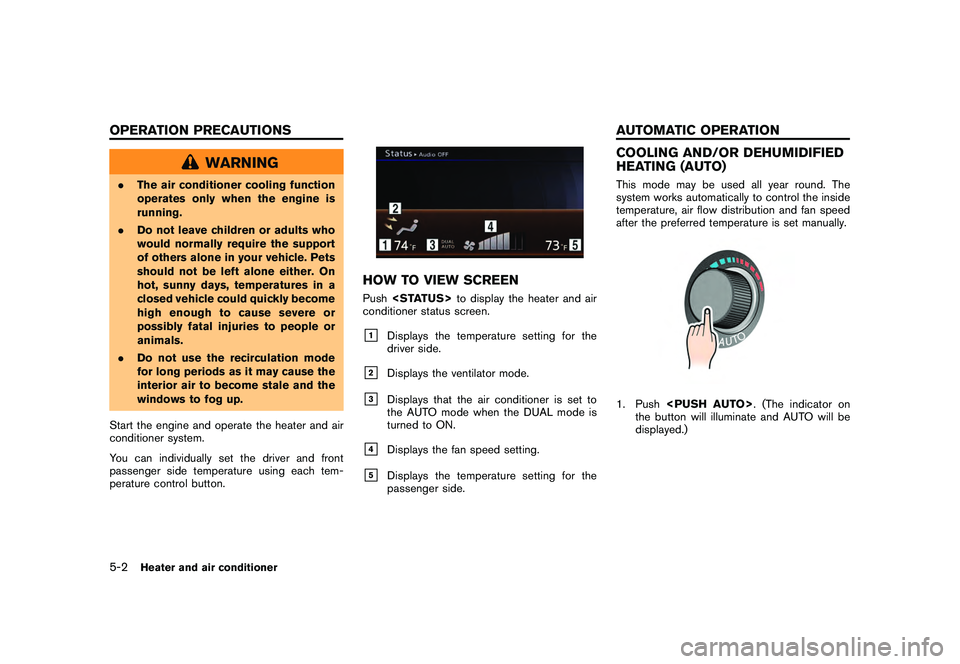
HOW TO VIEW SCREENPush
conditioner status screen.&1
Displays the temperature setting for the
driver side.
&2
Displays the ventilator mode.
&3
Displays that the air conditioner is set to
the AUTO mode when the DUAL mode is
turned to ON.
&4
Displays the fan speed setting.
&5
Displays the temperature setting for the
passenger side.
COOLING AND/OR DEHUMIDIFIED
HEATING (AUTO)This mode may be used all year round. The
system works automatically to control the inside
temperature, air flow distribution and fan speed
after the preferred temperature is set manually.1. Push
the button will illuminate and AUTO will be
displayed.)
5-2
Heater and air conditioner
OPERATION PRECAUTIONS AUTOMATIC OPERATION
Page 173 of 312
Black plate (177,1)
Model "R35-N" EDITED: 2009/ 11/ 13
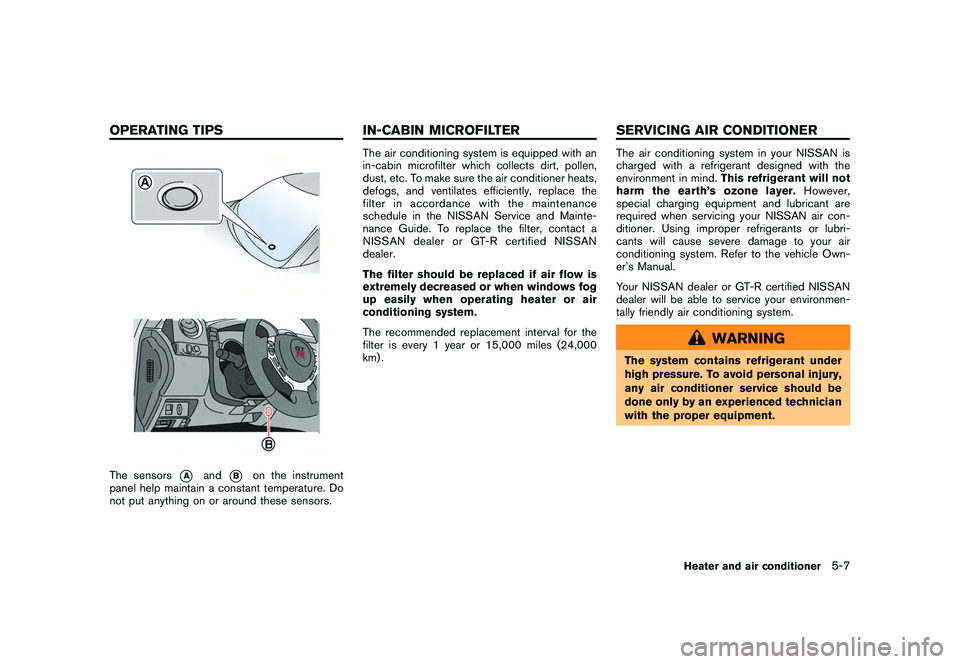
The sensors
*A
and
*B
on the instrument
panel help maintain a constant temperature. Do
not put anything on or around these sensors.
The air conditioning system is equipped with an
in-cabin microfilter which collects dirt, pollen,
dust, etc. To make sure the air conditioner heats,
defogs, and ventilates efficiently, replace the
filter in accordance with the maintenance
schedule in the NISSAN Service and Mainte-
nance Guide. To replace the filter, contact a
NISSAN dealer or GT-R certified NISSAN
dealer.
The filter should be replaced if air flow is
extremely decreased or when windows fog
up easily when operating heater or air
conditioning system.
The recommended replacement interval for the
filter is every 1 year or 15,000 miles (24,000
km) .
The air conditioning system in your NISSAN is
charged with a refrigerant designed with the
environment in mind. This refrigerant will not
harm the earth’s ozone layer. However,
special charging equipment and lubricant are
required when servicing your NISSAN air con-
ditioner. Using improper refrigerants or lubri-
cants will cause severe damage to your air
conditioning system. Refer to the vehicle Own-
er’s Manual.
Your NISSAN dealer or GT-R certified NISSAN
dealer will be able to service your environmen-
tally friendly air conditioning system.
WARNING
The system contains refrigerant under
high pressure. To avoid personal injury,
any air conditioner service should be
done only by an experienced technician
with the proper equipment.
Heater and air conditioner
5-7
OPERATING TIPS IN-CABIN MICROFILTER SERVICING AIR CONDITIONER
Page 175 of 312
Black plate (19,1)
6 Viewing technical information
Model "R35-N" EDITED: 2009/ 10/ 30
Status screen.................................................... 6-2
Information screen .............................................. 6-2
Basic operation ............................................. 6-2
Viewing information about current vehicle location ...... 6-3
Basic operation ............................................. 6-3
Vehicle information display .................................... 6-4
Fuel economy information ................................. 6-4
Tire pressure information .................................. 6-5
Maintenance information .................................. 6-6
Viewing available traffic information ........................ 6-7
Basic operation ............................................. 6-8
Info on route ................................................. 6-9
Nearby traffic info. .......................................... 6-9 Display urgent traffic information
...................... 6-10
Traffic information on map .............................. 6-10
Traffic information settings .............................. 6-12
Viewing available weather information ................... 6-13
Displaying weather information screen ............... 6-14
Destination weather on suggested route
screen ....................................................... 6-20
Automatically display warnings/watches ............. 6-21
Map update .................................................... 6-23
Viewing navigation system version information ......... 6-24
Basic operation ........................................... 6-24
Viewing GPS current location information .............. 6-24
Basic operation ........................................... 6-24
Page 179 of 312

Black plate (183,1)
Model "R35-N" EDITED: 2009/ 10/ 30
TIRE PRESSURE INFORMATIONThe tire pressure will be displayed for reference.The pressure indication “** psi” on the screen
means that the tire pressure is being measured.
After a few driving trips, the pressure for each
tire will be displayed.
In case of low tire pressure, LOW PRESSURE
information will be displayed on the screen.
Check the pressure for all tires.
Tire pressure rises and falls depending on the
heat caused by the vehicle’s traveling condition
and the temperature.
To change the measurement units, highlight
[Select Units] and press
“UNIT SETTINGS” page 7-10
WARNING
.When a wheel is replaced, tire
pressure will not be indicated, the
TPMS will not function and the low
tire pressure warning light will flash
for approximately 1 minute. The
light will remain on after 1 minute.
Contact your NISSAN dealer or GT-R
certified NISSAN dealer as soon as
possible for tire replacement and/or
system resetting.
. Replacing tires with those not ori-
ginally specified by NISSAN could
affect the proper operation of the
TPMS.
Tire malfunctionWhen the system detects a tire malfunction, the
following message is displayed.
.Low pressureThe low-pressure tire is displayed in orange, and
a warning message appears.
.Flat tireWhen the system detects a puncture, the
punctured tire is displayed in red, and a warning
message appears.
Viewing technical information
6-5
Page 180 of 312
Black plate (184,1)
Model "R35-N" EDITED: 2009/ 10/ 30
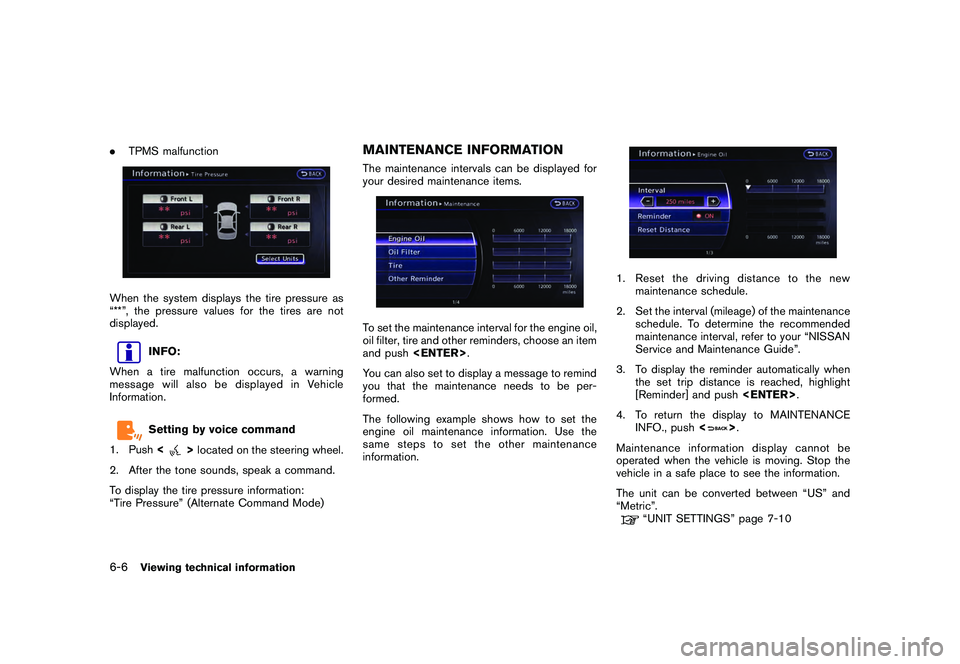
.TPMS malfunctionWhen the system displays the tire pressure as
“**”, the pressure values for the tires are not
displayed.
INFO:
When a tire malfunction occurs, a warning
message will also be displayed in Vehicle
Information.Setting by voice command
1. Push <
>located on the steering wheel.
2. After the tone sounds, speak a command.
To display the tire pressure information:
“Tire Pressure” (Alternate Command Mode)
MAINTENANCE INFORMATIONThe maintenance intervals can be displayed for
your desired maintenance items.To set the maintenance interval for the engine oil,
oil filter, tire and other reminders, choose an item
and push
You can also set to display a message to remind
you that the maintenance needs to be per-
formed.
The following example shows how to set the
engine oil maintenance information. Use the
same steps to set the other maintenance
information.
1. Reset the driving distance to the new maintenance schedule.
2. Set the interval (mileage) of the maintenance schedule. To determine the recommended
maintenance interval, refer to your “NISSAN
Service and Maintenance Guide”.
3. To display the reminder automatically when the set trip distance is reached, highlight
[Reminder] and push
4. To return the display to MAINTENANCE INFO., push <
>.
Maintenance information display cannot be
operated when the vehicle is moving. Stop the
vehicle in a safe place to see the information.
The unit can be converted between “US” and
“Metric”.
“UNIT SETTINGS” page 7-10
6-6
Viewing technical information
Page 181 of 312
Black plate (185,1)
Model "R35-N" EDITED: 2009/ 10/ 30
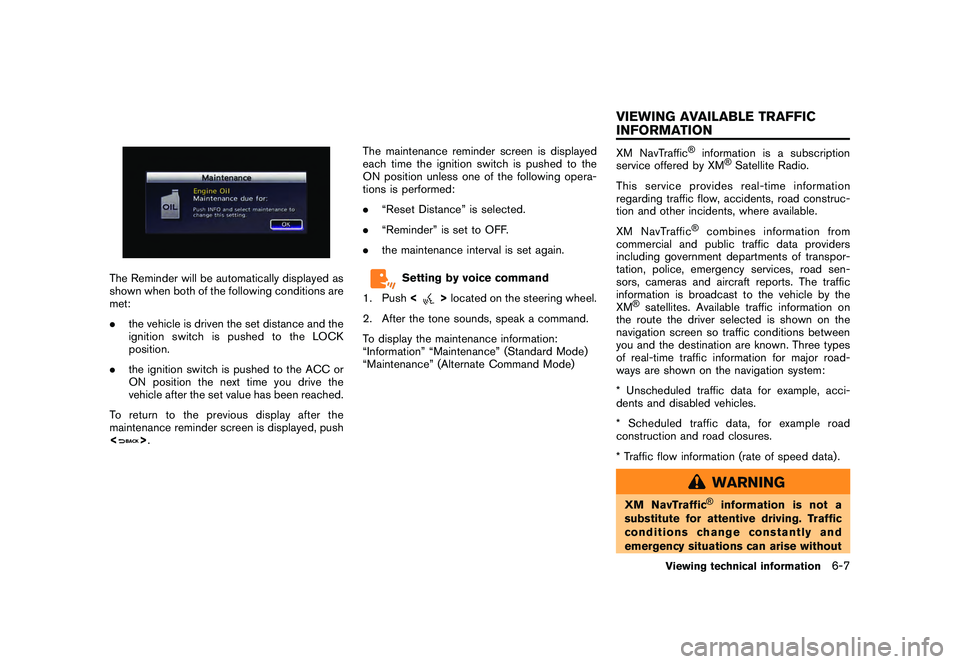
The Reminder will be automatically displayed as
shown when both of the following conditions are
met:
.the vehicle is driven the set distance and the
ignition switch is pushed to the LOCK
position.
. the ignition switch is pushed to the ACC or
ON position the next time you drive the
vehicle after the set value has been reached.
To return to the previous display after the
maintenance reminder screen is displayed, push
<
> . The maintenance reminder screen is displayed
each time the ignition switch is pushed to the
ON position unless one of the following opera-
tions is performed:
.
“Reset Distance” is selected.
. “Reminder” is set to OFF.
. the maintenance interval is set again.
Setting by voice command
1. Push <
>located on the steering wheel.
2. After the tone sounds, speak a command.
To display the maintenance information:
“Information” “Maintenance” (Standard Mode)
“Maintenance” (Alternate Command Mode)
XM NavTraffic
®
information is a subscription
service offered by XM
®Satellite Radio.
This service provides real-time information
regarding traffic flow, accidents, road construc-
tion and other incidents, where available.
XM NavTraffic
®
combines information from
commercial and public traffic data providers
including government departments of transpor-
tation, police, emergency services, road sen-
sors, cameras and aircraft reports. The traffic
information is broadcast to the vehicle by the
XM
®satellites. Available traffic information on
the route the driver selected is shown on the
navigation screen so traffic conditions between
you and the destination are known. Three types
of real-time traffic information for major road-
ways are shown on the navigation system:
* Unscheduled traffic data for example, acci-
dents and disabled vehicles.
* Scheduled traffic data, for example road
construction and road closures.
* Traffic flow information (rate of speed data) .
WARNING
XM NavTraffic
®
information is not a
substitute for attentive driving. Traffic
conditions change constantly and
emergency situations can arise without
Viewing technical information
6-7
VIEWING AVAILABLE TRAFFIC
INFORMATION
Page 182 of 312
Black plate (186,1)
Model "R35-N" EDITED: 2009/ 10/ 30
warning. Relying only on XM NavTraf-
fic®information may lead to a collision
and could result in serious personal
injury.
NOTICE
Flow information is provided only for
roads equipped with traffic sensors and
is not available in all markets covered
by the service. Flow data may not be
available on portions of a road that is
under construction.
XM NavTraffic
®information is available in limited
markets. To subscribe or to check if this service
is available in the area:
call 1-800-XM-RADIO (1-800-967-2346) or
see www.xmradio.com/navtraffic
INFO:
If a contract is not completed for XM NavTraffic
®
traffic information service, a message appears,
and it will not be possible to check the
information on the traffic information system.
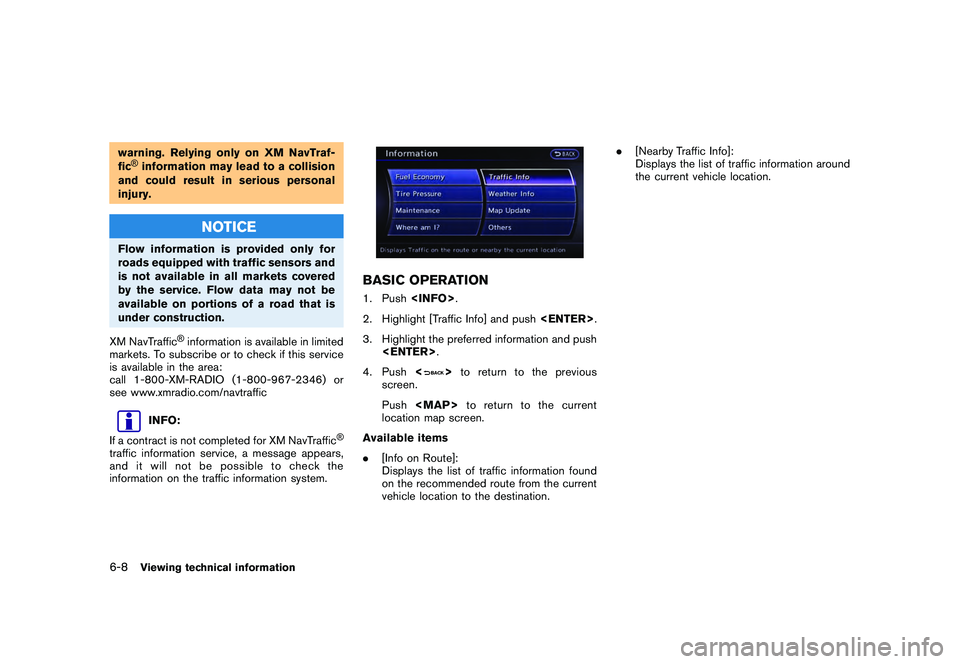
BASIC OPERATION1. Push
2. Highlight [Traffic Info] and push
3. Highlight the preferred information and push
4. Push <
>to return to the previous
screen.
Push
Page 187 of 312
Black plate (191,1)
Model "R35-N" EDITED: 2009/ 10/ 30
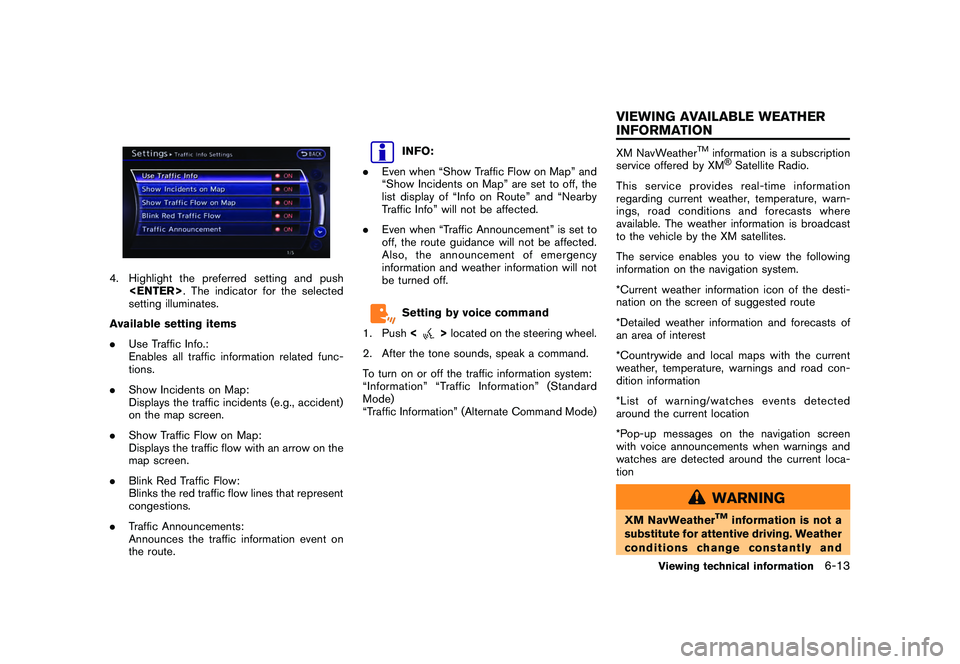
4. Highlight the preferred setting and push
setting illuminates.
Available setting items
. Use Traffic Info.:
Enables all traffic information related func-
tions.
. Show Incidents on Map:
Displays the traffic incidents (e.g., accident)
on the map screen.
. Show Traffic Flow on Map:
Displays the traffic flow with an arrow on the
map screen.
. Blink Red Traffic Flow:
Blinks the red traffic flow lines that represent
congestions.
. Traffic Announcements:
Announces the traffic information event on
the route.
INFO:
. Even when “Show Traffic Flow on Map” and
“Show Incidents on Map” are set to off, the
list display of “Info on Route” and “Nearby
Traffic Info” will not be affected.
. Even when “Traffic Announcement” is set to
off, the route guidance will not be affected.
Also, the announcement of emergency
information and weather information will not
be turned off.Setting by voice command
1. Push <
>located on the steering wheel.
2. After the tone sounds, speak a command.
To turn on or off the traffic information system:
“Information” “Traffic Information” (Standard
Mode)
“Traffic Information” (Alternate Command Mode)
XM NavWeather
TM
information is a subscription
service offered by XM®Satellite Radio.
This service provides real-time information
regarding current weather, temperature, warn-
ings, road conditions and forecasts where
available. The weather information is broadcast
to the vehicle by the XM satellites.
The service enables you to view the following
information on the navigation system.
*Current weather information icon of the desti-
nation on the screen of suggested route
*Detailed weather information and forecasts of
an area of interest
*Countrywide and local maps with the current
weather, temperature, warnings and road con-
dition information
*List of warning/watches events detected
around the current location
*Pop-up messages on the navigation screen
with voice announcements when warnings and
watches are detected around the current loca-
tion
WARNING
XM NavWeather
TM
information is not a
substitute for attentive driving. Weather
conditions change constantly and
Viewing technical information
6-13
VIEWING AVAILABLE WEATHER
INFORMATION
Page 188 of 312
Black plate (192,1)
Model "R35-N" EDITED: 2009/ 10/ 30
emergency situations can arise without
warning. Relying only on XM Nav-
Weather
TM
information could result in
serious personal injury.
XM NavWeatherTM
information is available in
limited markets. To subscribe to or check if this
service is available in the area, call 1-800-XM-
RADIO (1-800-967-2346) or access www.
xmradio.com/navweather.
INFO:
. If a contract is not completed for the XM
NavWeather
TM
information service, a mes-
sage appears and it will not be possible to
check the information on the traffic informa-
tion system.
. The weather information is available only for
areas that provide weather information to
XM NavWeatherTM.
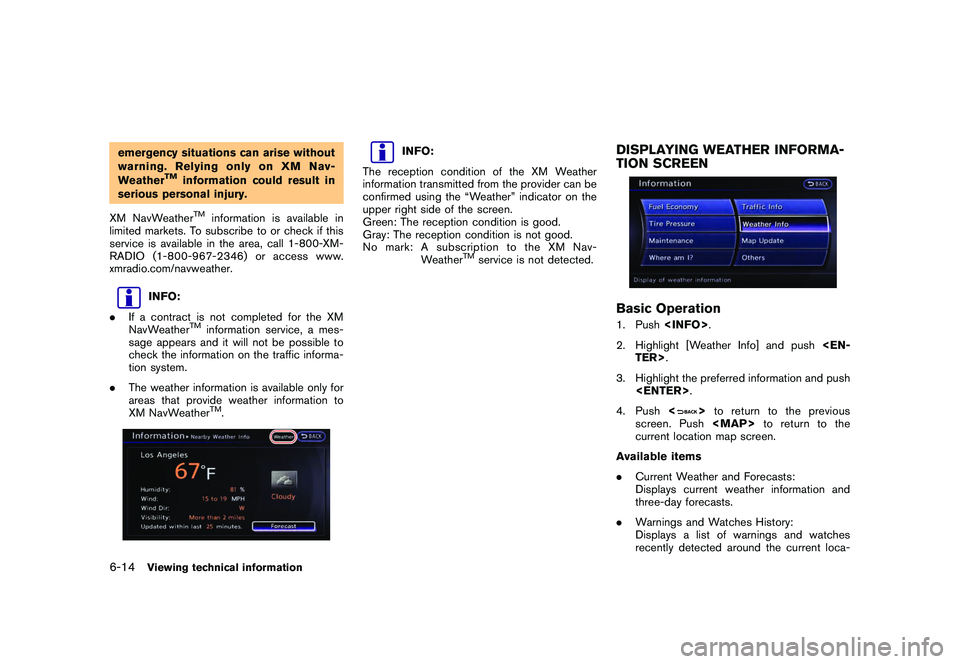
INFO:
The reception condition of the XM Weather
information transmitted from the provider can be
confirmed using the “Weather” indicator on the
upper right side of the screen.
Green: The reception condition is good.
Gray: The reception condition is not good.
No mark: A subscription to the XM Nav- Weather
TM
service is not detected.
DISPLAYING WEATHER INFORMA-
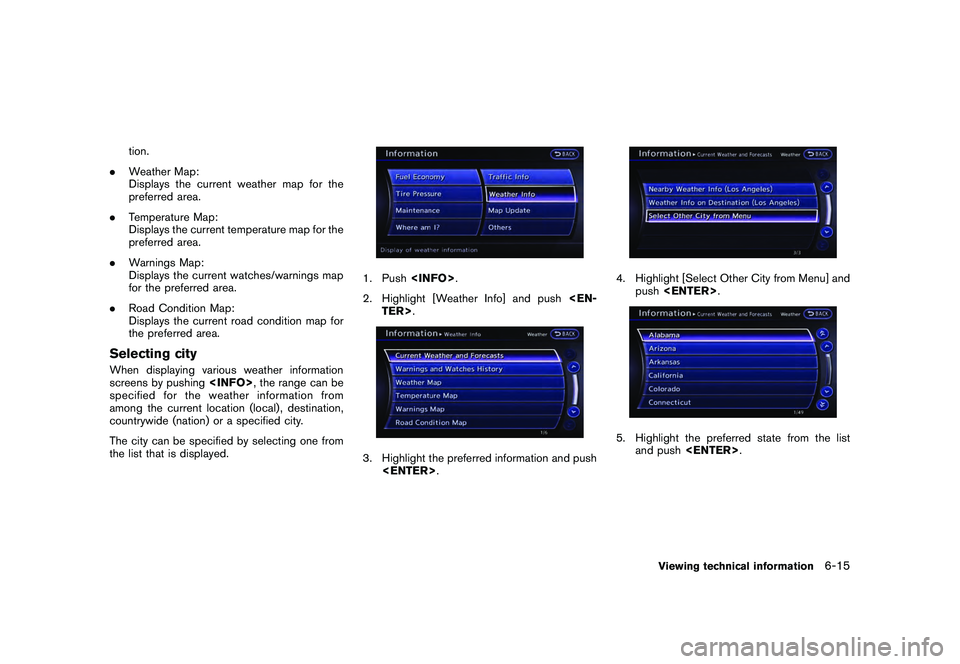
TION SCREENBasic Operation1. Push
2. Highlight [Weather Info] and push
3. Highlight the preferred information and push
4. Push <
>to return to the previous
screen. Push
Page 189 of 312
Black plate (193,1)
Model "R35-N" EDITED: 2009/ 10/ 30
tion.
. Weather Map:
Displays the current weather map for the
preferred area.
. Temperature Map:
Displays the current temperature map for the
preferred area.
. Warnings Map:
Displays the current watches/warnings map
for the preferred area.
. Road Condition Map:
Displays the current road condition map for
the preferred area.
Selecting cityWhen displaying various weather information
screens by pushing
specified for the weather information from
among the current location (local) , destination,
countrywide (nation) or a specified city.
The city can be specified by selecting one from
the list that is displayed.
1. Push
2. Highlight [Weather Info] and push
4. Highlight [Select Other City from Menu] and
push
and push
Viewing technical information
6-15