wheel NISSAN GT-R 2011 Owner's Guide
[x] Cancel search | Manufacturer: NISSAN, Model Year: 2011, Model line: GT-R, Model: NISSAN GT-R 2011Pages: 312, PDF Size: 13.07 MB
Page 238 of 312
Black plate (244,1)
Model "R35-N" EDITED: 2009/ 10/ 30
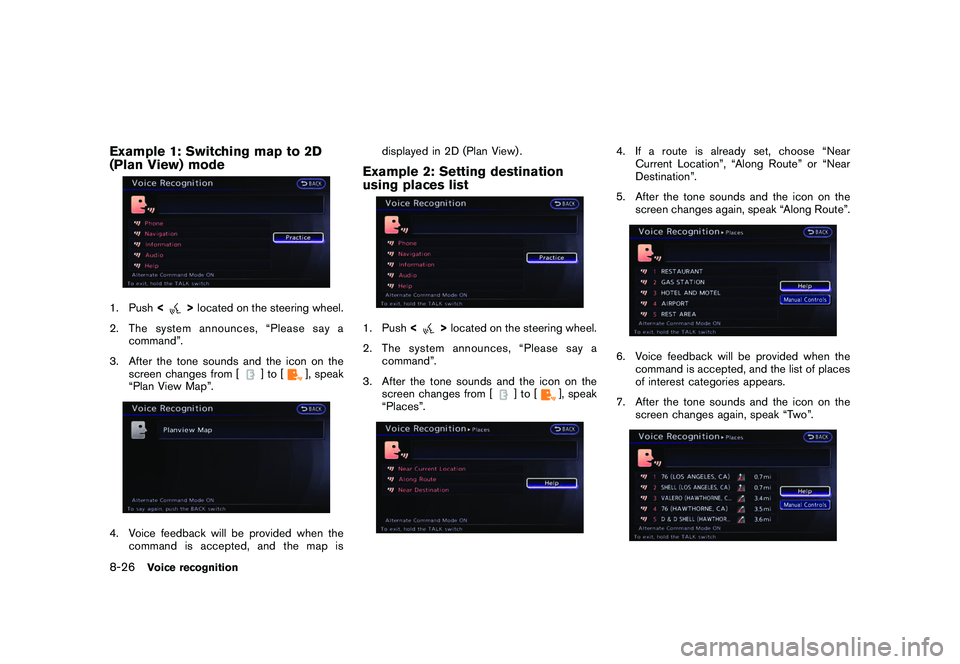
Example 1: Switching map to 2D
(Plan View) mode1. Push<
>located on the steering wheel.
2. The system announces, “Please say a command”.
3. After the tone sounds and the icon on the screen changes from [
]to[
], speak
“Plan View Map”.
4. Voice feedback will be provided when the command is accepted, and the map is displayed in 2D (Plan View) .
Example 2: Setting destination
using places list1. Push
<
>located on the steering wheel.
2. The system announces, “Please say a command”.
3. After the tone sounds and the icon on the screen changes from [
]to[
], speak
“Places”.
4. If a route is already set, choose “Near Current Location”, “Along Route” or “Near
Destination”.
5. After the tone sounds and the icon on the screen changes again, speak “Along Route”.6. Voice feedback will be provided when thecommand is accepted, and the list of places
of interest categories appears.
7. After the tone sounds and the icon on the screen changes again, speak “Two”.
8-26
Voice recognition
Page 239 of 312
Black plate (245,1)
Model "R35-N" EDITED: 2009/ 10/ 30
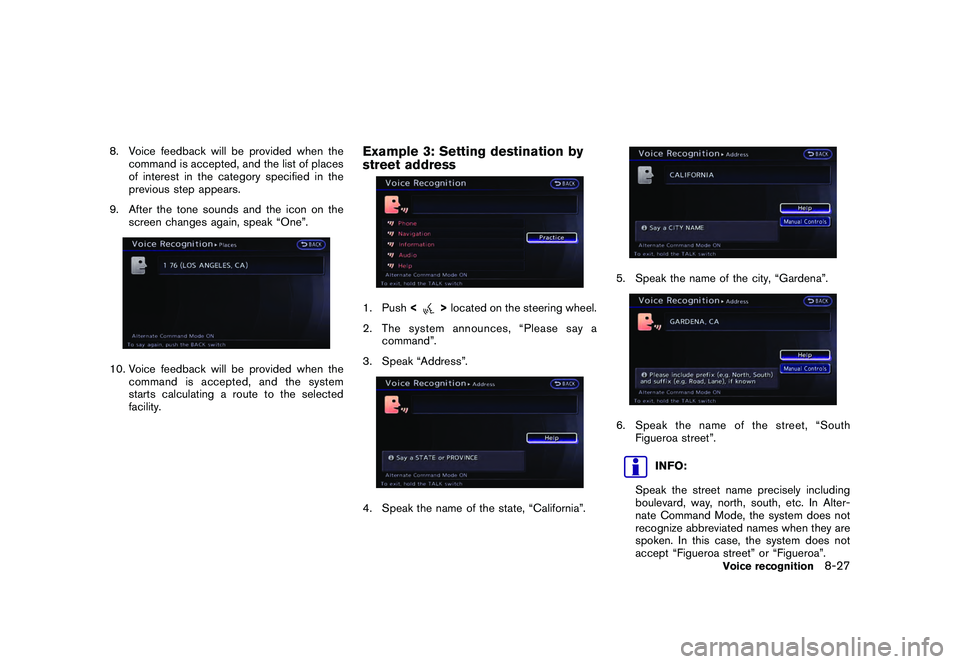
8. Voice feedback will be provided when thecommand is accepted, and the list of places
of interest in the category specified in the
previous step appears.
9. After the tone sounds and the icon on the screen changes again, speak “One”.10. Voice feedback will be provided when the
command is accepted, and the system
starts calculating a route to the selected
facility.
Example 3: Setting destination by
street address1. Push <
>located on the steering wheel.
2. The system announces, “Please say a command”.
3. Speak “Address”.
4. Speak the name of the state, “California”.
5. Speak the name of the city, “Gardena”.6. Speak the name of the street, “South Figueroa street”.
INFO:
Speak the street name precisely including
boulevard, way, north, south, etc. In Alter-
nate Command Mode, the system does not
recognize abbreviated names when they are
spoken. In this case, the system does not
accept “Figueroa street” or “Figueroa”.
Voice recognition
8-27
Page 266 of 312
Black plate (272,1)
Model "R35-N" EDITED: 2009/ 10/ 30
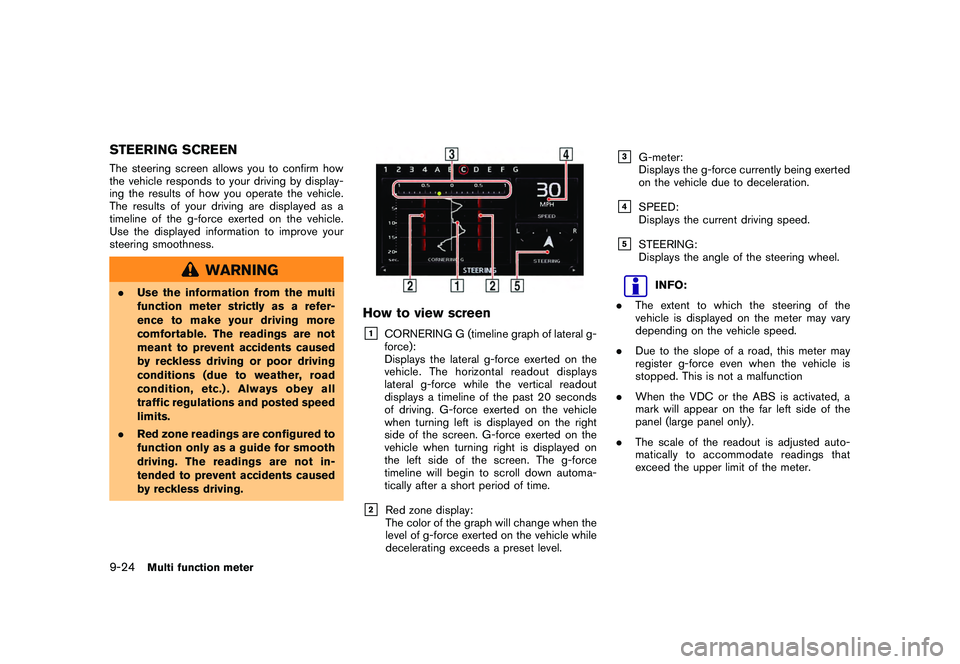
STEERING SCREENThe steering screen allows you to confirm how
the vehicle responds to your driving by display-
ing the results of how you operate the vehicle.
The results of your driving are displayed as a
timeline of the g-force exerted on the vehicle.
Use the displayed information to improve your
steering smoothness.
WARNING
.Use the information from the multi
function meter strictly as a refer-
ence to make your driving more
comfortable. The readings are not
meant to prevent accidents caused
by reckless driving or poor driving
conditions (due to weather, road
condition, etc.) . Always obey all
traffic regulations and posted speed
limits.
. Red zone readings are configured to
function only as a guide for smooth
driving. The readings are not in-
tended to prevent accidents caused
by reckless driving.
How to view screen&1
CORNERING G (timeline graph of lateral g-
force):
Displays the lateral g-force exerted on the
vehicle. The horizontal readout displays
lateral g-force while the vertical readout
displays a timeline of the past 20 seconds
of driving. G-force exerted on the vehicle
when turning left is displayed on the right
side of the screen. G-force exerted on the
vehicle when turning right is displayed on
the left side of the screen. The g-force
timeline will begin to scroll down automa-
tically after a short period of time.
&2
Red zone display:
The color of the graph will change when the
level of g-force exerted on the vehicle while
decelerating exceeds a preset level.
&3
G-meter:
Displays the g-force currently being exerted
on the vehicle due to deceleration.
&4
SPEED:
Displays the current driving speed.
&5
STEERING:
Displays the angle of the steering wheel.
INFO:
. The extent to which the steering of the
vehicle is displayed on the meter may vary
depending on the vehicle speed.
. Due to the slope of a road, this meter may
register g-force even when the vehicle is
stopped. This is not a malfunction
. When the VDC or the ABS is activated, a
mark will appear on the far left side of the
panel (large panel only) .
. The scale of the readout is adjusted auto-
matically to accommodate readings that
exceed the upper limit of the meter.
9-24
Multi function meter
Page 267 of 312
Black plate (273,1)
Model "R35-N" EDITED: 2009/ 10/ 30
Using result screens to improve
drivingThis section explains how to use the driving
timeline screens. Use this information to make
your driving smoother.
INFO:
The criteria for smooth driving may vary depend-
ing on road conditions. Use this information for
reference purposes only.
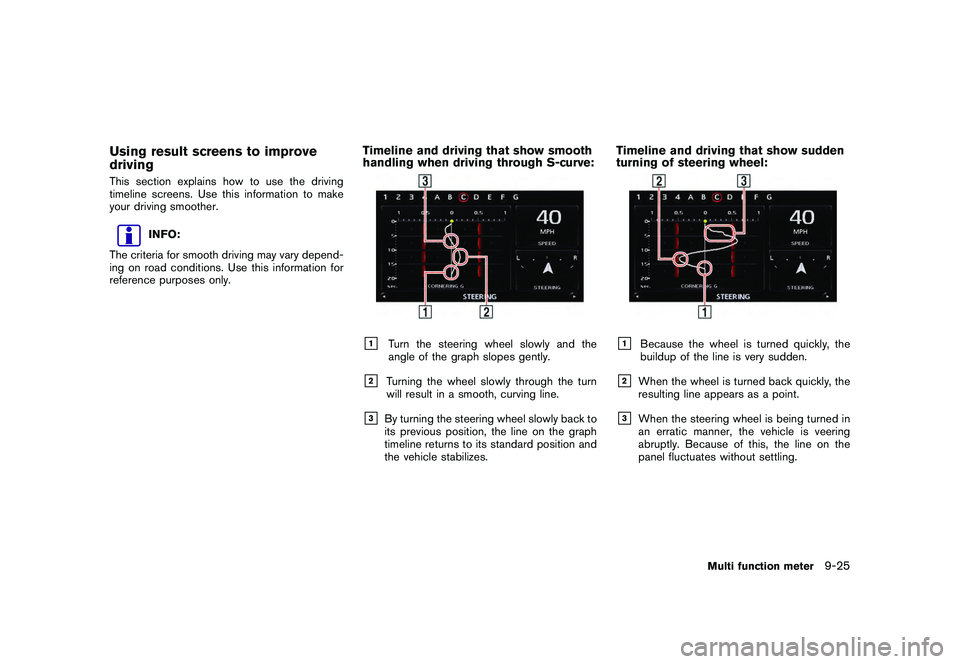
Timeline and driving that show smooth
handling when driving through S-curve:&1
Turn the steering wheel slowly and the
angle of the graph slopes gently.
&2
Turning the wheel slowly through the turn
will result in a smooth, curving line.
&3
By turning the steering wheel slowly back to
its previous position, the line on the graph
timeline returns to its standard position and
the vehicle stabilizes.
Timeline and driving that show sudden
turning of steering wheel:&1
Because the wheel is turned quickly, the
buildup of the line is very sudden.
&2
When the wheel is turned back quickly, the
resulting line appears as a point.
&3
When the steering wheel is being turned in
an erratic manner, the vehicle is veering
abruptly. Because of this, the line on the
panel fluctuates without settling.
Multi function meter
9-25
Page 308 of 312
Black plate (314,1)
Model "R35-N" EDITED: 2009/ 10/ 30
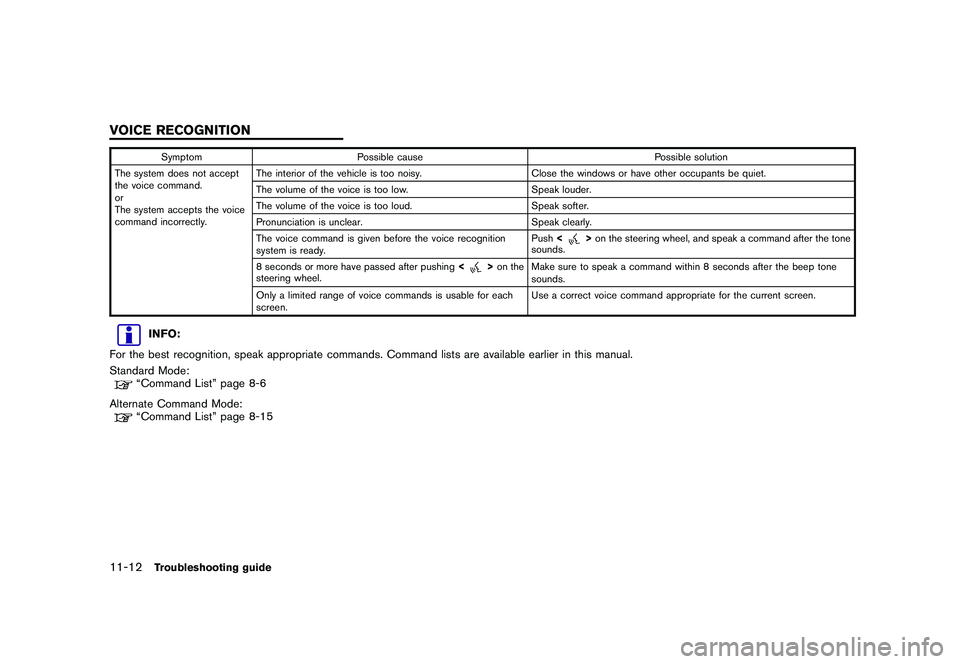
SymptomPossible cause Possible solution
The system does not accept
the voice command.
or
The system accepts the voice
command incorrectly. The interior of the vehicle is too noisy.
Close the windows or have other occupants be quiet.
The volume of the voice is too low. Speak louder.
The volume of the voice is too loud. Speak softer.
Pronunciation is unclear. Speak clearly.
The voice command is given before the voice recognition
system is ready. Push
<
>on the steering wheel, and speak a command after the tone
sounds.
8 seconds or more have passed after pushing <
>on the
steering wheel. Make sure to speak a command within 8 seconds after the beep tone
sounds.
Only a limited range of voice commands is usable for each
screen. Use a correct voice command appropriate for the current screen.
INFO:
For the best recognition, speak appropriate commands. Command lists are available earlier in this manual.
Standard Mode:“Command List” page 8-6
Alternate Command Mode:“Command List” page 8-15
11-12
Troubleshooting guide
VOICE RECOGNITION