ignition NISSAN GT-R 2013 R35 Repair Manual
[x] Cancel search | Manufacturer: NISSAN, Model Year: 2013, Model line: GT-R, Model: NISSAN GT-R 2013 R35Pages: 346, PDF Size: 4.19 MB
Page 212 of 346
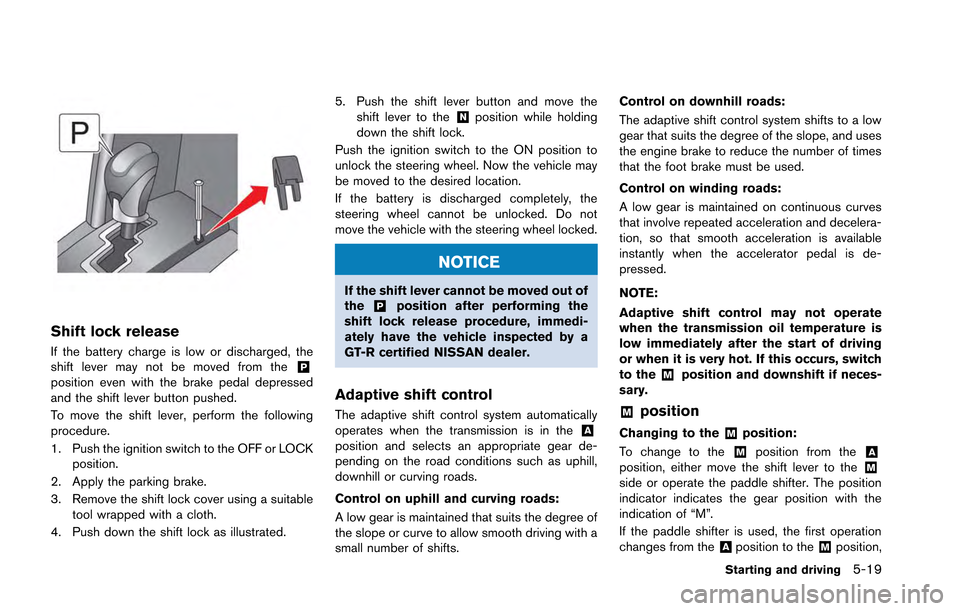
Shift lock release
If the battery charge is low or discharged, the
shift lever may not be moved from the&Pposition even with the brake pedal depressed
and the shift lever button pushed.
To move the shift lever, perform the following
procedure.
1. Push the ignition switch to the OFF or LOCKposition.
2. Apply the parking brake.
3. Remove the shift lock cover using a suitable tool wrapped with a cloth.
4. Push down the shift lock as illustrated. 5. Push the shift lever button and move the
shift lever to the
&Nposition while holding
down the shift lock.
Push the ignition switch to the ON position to
unlock the steering wheel. Now the vehicle may
be moved to the desired location.
If the battery is discharged completely, the
steering wheel cannot be unlocked. Do not
move the vehicle with the steering wheel locked.
NOTICE
If the shift lever cannot be moved out of
the&Pposition after performing the
shift lock release procedure, immedi-
ately have the vehicle inspected by a
GT-R certified NISSAN dealer.
Adaptive shift control
The adaptive shift control system automatically
operates when the transmission is in the&Aposition and selects an appropriate gear de-
pending on the road conditions such as uphill,
downhill or curving roads.
Control on uphill and curving roads:
A low gear is maintained that suits the degree of
the slope or curve to allow smooth driving with a
small number of shifts. Control on downhill roads:
The adaptive shift control system shifts to a low
gear that suits the degree of the slope, and uses
the engine brake to reduce the number of times
that the foot brake must be used.
Control on winding roads:
A low gear is maintained on continuous curves
that involve repeated acceleration and decelera-
tion, so that smooth acceleration is available
instantly when the accelerator pedal is de-
pressed.
NOTE:
Adaptive shift control may not operate
when the transmission oil temperature is
low immediately after the start of driving
or when it is very hot. If this occurs, switch
to the
&Mposition and downshift if neces-
sary.
&Mposition
Changing to the&Mposition:
To change to the
&Mposition from the&Aposition, either move the shift lever to the&Mside or operate the paddle shifter. The position
indicator indicates the gear position with the
indication of “M”.
If the paddle shifter is used, the first operation
changes from the
&Aposition to the&Mposition,
Starting and driving5-19
Page 214 of 346
.Fifth gear:
Use this position for all normal forward
driving at highway speeds. Engine braking
is weaker in this position.
. Sixth gear:
Use this position for all normal forward
driving at highway speeds. Engine braking
is weakest in this position.
Suggested maximum speed in each gear:
Downshift to a lower gear if the engine is not
running smoothly, or if you need to accelerate.
Do not exceed the maximum suggested speed
(shown below) in any gear. For level road
driving, use the highest gear suggested for that
speed. Always observe posted speed limits, and
drive according to the road conditions that will
ensure safe operation. Do not over-rev the
engine when shifting to a lower gear as it may
cause engine damage or loss of vehicle control.
Gear MPH (km/h)
1st 36 (58)
2nd 63 (102)
3rd 91 (148)
4th —
5th —
6th —
NOTE:
The paddle shifters are made from magne-
sium alloy. Only clear coating is applied to
their surfaces to utilize the unique casting
patterns and the texture of the material
itself.
DRIVING TIPS
After starting the engine, fully depress the foot
brake pedal and push the shift lever button
before shifting the shift lever from the
&Pposition
to the&R,&N,or&A↔&Mposition. Be sure the
vehicle is fully stopped before attempting to shift
the shift lever.
The transmission is designed so that the foot
brake pedal must be depressed before shifting
from
&Pto any other position.
The shift lever cannot be moved out of the
&Pposition and into any other position with the
ignition switch other in the LOCK, OFF or ACC
position.
When accelerating from a stop
Keep the foot brake pedal depressed and push
the shift lever button to shift into a driving gear
as following:
. To drive forward, move the shift lever to the
&A↔&Mposition. .
To back up, move the shift lever to the
&Rposition.
Starting on level ground or an uphill:
1. Check the shift lever position indicator on the instrument panel to confirm that the
driving gear is selected.
2. Release the parking brake.
3. Release the foot brake pedal gradually, then slowly depress the accelerator pedal to start
the vehicle in motion.
(
“R mode start function” page 5-32)
NOTE:
. To prevent the clutch from overheating
when the parking brake is applied,
engine output is limited when the
accelerator pedal is depressed. In par-
ticular, the vehicle may not start
smoothly when the accelerator pedal
is depressed with the parking brake
applied on an uphill grade. To enable
smooth starting, release the parking
brake before moving the vehicle.
. The hill start assist function operates
when the vehicle is accelerating from a
stop on an uphill. (
“Hill Start
Assist” page 5-38)
Starting and driving5-21
Page 217 of 346
5-24Starting and driving
the brakes normally based on traffic and road
conditions.
The metallic brake pads and brake disc rotor
may rust together when the brakes are not
applied:
.If the vehicle is not idled for 20 seconds
without the brakes applied, or if the brakes
are applied when the vehicle is shut off, the
rotor and pads can rust together, even when
the brake pads are dry.
. If the brakes are wet when the vehicle is
parked and the parking brake is applied for a
long time.
Contact a GT-R certified NISSAN dealer if the
brake pads and brake rotor have rusted
together.
1. Bring the vehicle to a complete stop.
2. With the foot brake pedal depressed, apply the parking brake.
3. Move the shift lever to the
&Pposition.
4. Check the shift lever position indicator on the instrument panel to confirm that the
&Pposition is selected.
5. Push the ignition switch to stop the engine.
WARNING
Before exiting the vehicle, be sure to
move the shift lever to the&Pposition
and stop the engine. If the engine is
running and the shift lever is not in the
&Pposition, the vehicle may start mov-
ing due to partial engagement of the
clutch or to the effects of gravity on a
slope, or the vehicle may suddenly
accelerate due to accidental operation
of the accelerator pedal, possibly caus-
ing an accident.
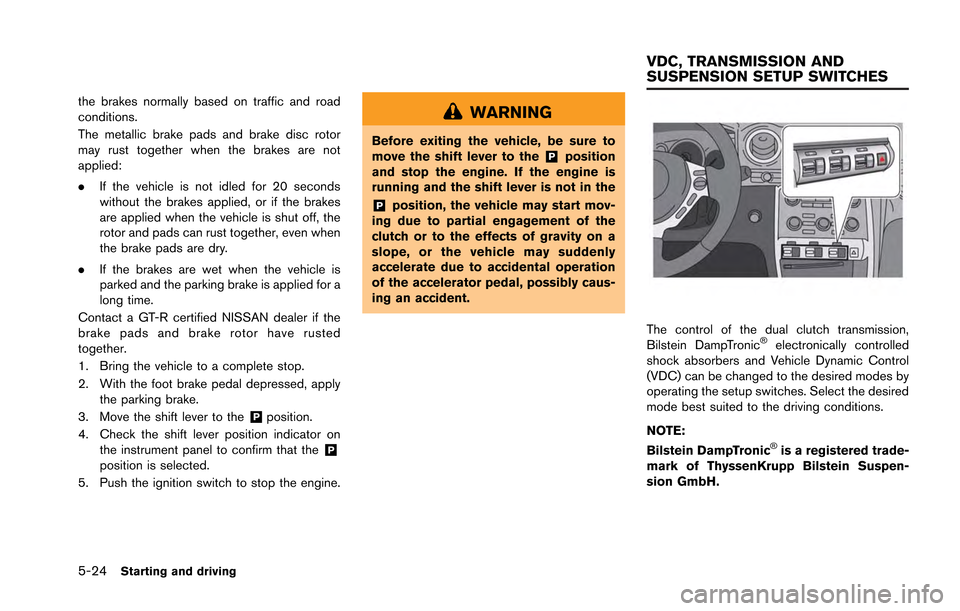
The control of the dual clutch transmission,
Bilstein DampTronic®electronically controlled
shock absorbers and Vehicle Dynamic Control
(VDC) can be changed to the desired modes by
operating the setup switches. Select the desired
mode best suited to the driving conditions.
NOTE:
Bilstein DampTronic
®is a registered trade-
mark of ThyssenKrupp Bilstein Suspen-
sion GmbH.
VDC, TRANSMISSION AND
SUSPENSION SETUP SWITCHES
Page 219 of 346
5-26Starting and driving
NOTICE
.“ESC (Electronic Stability Control)
OFF” indicated on the VDC setup
switch stands for “VDC OFF”.
. When the ignition switch is pushed
to the “ON” position, the indicators
on the setup switches may illumi-
nate briefly, however this is not a
malfunction.
Page 234 of 346
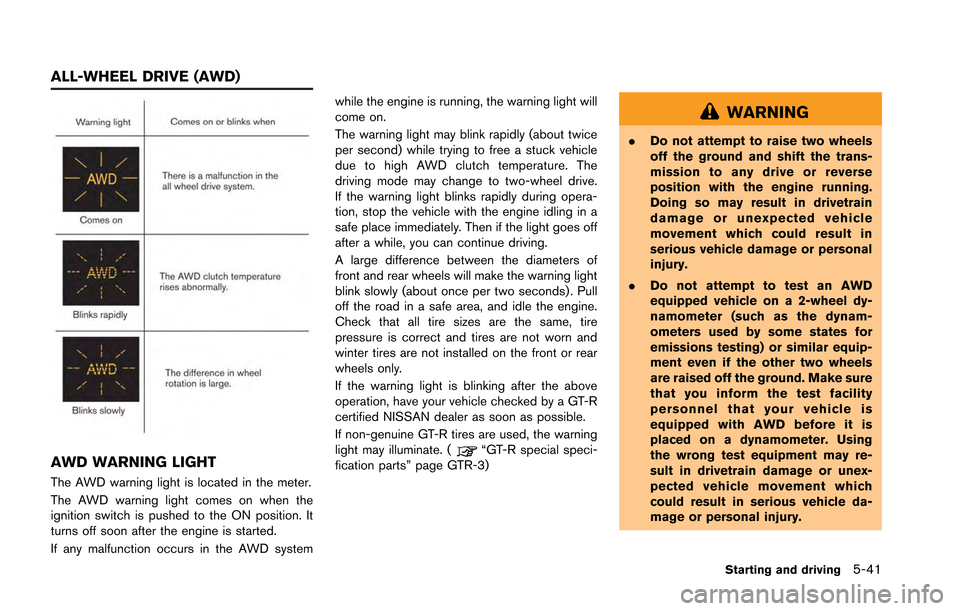
AWD WARNING LIGHT
The AWD warning light is located in the meter.
The AWD warning light comes on when the
ignition switch is pushed to the ON position. It
turns off soon after the engine is started.
If any malfunction occurs in the AWD systemwhile the engine is running, the warning light will
come on.
The warning light may blink rapidly (about twice
per second) while trying to free a stuck vehicle
due to high AWD clutch temperature. The
driving mode may change to two-wheel drive.
If the warning light blinks rapidly during opera-
tion, stop the vehicle with the engine idling in a
safe place immediately. Then if the light goes off
after a while, you can continue driving.
A large difference between the diameters of
front and rear wheels will make the warning light
blink slowly (about once per two seconds) . Pull
off the road in a safe area, and idle the engine.
Check that all tire sizes are the same, tire
pressure is correct and tires are not worn and
winter tires are not installed on the front or rear
wheels only.
If the warning light is blinking after the above
operation, have your vehicle checked by a GT-R
certified NISSAN dealer as soon as possible.
If non-genuine GT-R tires are used, the warning
light may illuminate. (
“GT-R special speci-
fication parts” page GTR-3)
WARNING
. Do not attempt to raise two wheels
off the ground and shift the trans-
mission to any drive or reverse
position with the engine running.
Doing so may result in drivetrain
damage or unexpected vehicle
movement which could result in
serious vehicle damage or personal
injury.
. Do not attempt to test an AWD
equipped vehicle on a 2-wheel dy-
namometer (such as the dynam-
ometers used by some states for
emissions testing) or similar equip-
ment even if the other two wheels
are raised off the ground. Make sure
that you inform the test facility
personnel that your vehicle is
equipped with AWD before it is
placed on a dynamometer. Using
the wrong test equipment may re-
sult in drivetrain damage or unex-
pected vehicle movement which
could result in serious vehicle da-
mage or personal injury.
Starting and driving5-41
ALL-WHEEL DRIVE (AWD)
Page 236 of 346
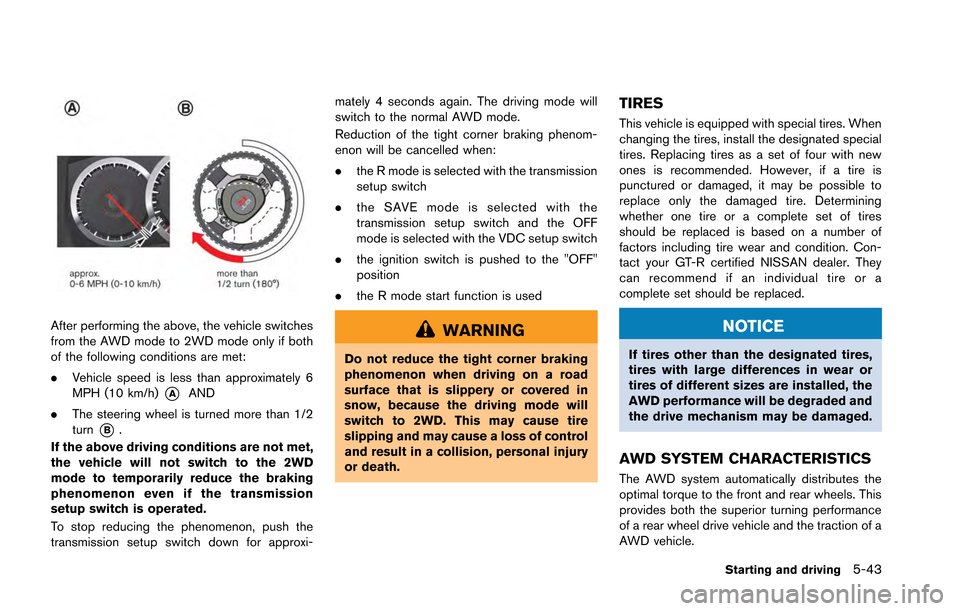
After performing the above, the vehicle switches
from the AWD mode to 2WD mode only if both
of the following conditions are met:
.Vehicle speed is less than approximately 6
MPH (10 km/h)
*AAND
. The steering wheel is turned more than 1/2
turn
*B.
If the above driving conditions are not met,
the vehicle will not switch to the 2WD
mode to temporarily reduce the braking
phenomenon even if the transmission
setup switch is operated.
To stop reducing the phenomenon, push the
transmission setup switch down for approxi- mately 4 seconds again. The driving mode will
switch to the normal AWD mode.
Reduction of the tight corner braking phenom-
enon will be cancelled when:
.
the R mode is selected with the transmission
setup switch
. the SAVE mode is selected with the
transmission setup switch and the OFF
mode is selected with the VDC setup switch
. the ignition switch is pushed to the "OFF"
position
. the R mode start function is used
WARNING
Do not reduce the tight corner braking
phenomenon when driving on a road
surface that is slippery or covered in
snow, because the driving mode will
switch to 2WD. This may cause tire
slipping and may cause a loss of control
and result in a collision, personal injury
or death.
TIRES
This vehicle is equipped with special tires. When
changing the tires, install the designated special
tires. Replacing tires as a set of four with new
ones is recommended. However, if a tire is
punctured or damaged, it may be possible to
replace only the damaged tire. Determining
whether one tire or a complete set of tires
should be replaced is based on a number of
factors including tire wear and condition. Con-
tact your GT-R certified NISSAN dealer. They
can recommend if an individual tire or a
complete set should be replaced.
NOTICE
If tires other than the designated tires,
tires with large differences in wear or
tires of different sizes are installed, the
AWD performance will be degraded and
the drive mechanism may be damaged.
AWD SYSTEM CHARACTERISTICS
The AWD system automatically distributes the
optimal torque to the front and rear wheels. This
provides both the superior turning performance
of a rear wheel drive vehicle and the traction of a
AWD vehicle.
Starting and driving5-43
Page 239 of 346
5-46Starting and driving
.HEADED UPHILL OR DOWNHILL, NO
CURB:
*3Turn the wheels toward the side of the
road so the vehicle will move away from
the center of the road if it moves.
4. Push the ignition switch to the LOCK position.
The GT-R uses brake pad materials that have
high metallic content. The brake pad material
helps maintain braking performance in a wide
range of weather and driving conditions.
For the first 3,000 - 6,000 miles (5,000 -
10,000 km) of the vehicle’s service life, and for
the first 3,000 - 6,000 miles (5,000 - 10,000
km) after a brake replacement, the brake pad to
brake rotor clearance is very small. When
parking, apply the parking brake and move the
shift lever to the
&Pposition. Idle the engine for
more than 20 seconds without depressing the
brake pedal. This allows the brake pads to move
away from the rotor so the pad does not contact
the rotor.
Additionally, the brakes must be dry before
parking the vehicle after driving on wet roads or
after washing the vehicle. If the roads are wet,
lightly apply the brakes for a short distance
before parking the vehicle to dry the brakes.
After washing the vehicle, dry the brakes by
driving on a dry road for a few miles and apply the brakes normally based on traffic and road
conditions.
The metallic brake pads and brake disc rotor
may rust together when the brakes are not
applied:
.
If the vehicle is not idled for 20 seconds
without the brakes applied, or if the brakes
are applied when the vehicle is shut off, the
rotor and pads can rust together, even when
the brake pads are dry.
. If the brakes are wet when the vehicle is
parked and the parking brake is applied for a
long time.
Contact a GT-R certified NISSAN dealer if the
brake pads and brake rotor have rusted
together.
WARNING
If the engine is not running or is turned
off while driving, the power assist for
the steering will not work. Steering will
be harder to operate.
The power assisted steering uses a hydraulic
pump, driven by the engine, to assist steering.
If the engine stops or the drive belt breaks, you
will still have control of the vehicle. However,
much greater steering effort is needed, espe-
cially in sharp turns and at low speeds.
POWER STEERING
Page 242 of 346
The Vehicle Dynamic Control (VDC) system
uses various sensors to monitor driver inputs
and vehicle motion. Under certain driving con-
ditions, the VDC system helps to perform the
following functions.
.Controls brake pressure to reduce wheel
slip on one slipping drive wheel so power is
transferred to a non slipping drive wheel on
the same axle.
. Controls brake pressure and engine output
to reduce drive wheel slip based on vehicle
speed (traction control function) .
. Controls brake pressure at individual wheels
and engine output to help the driver maintain
control of the vehicle in the following
conditions:
— understeer (vehicle tends to not follow
the steered path despite increased
steering input)
— oversteer (vehicle tends to spin due to certain road or driving conditions) .
The VDC system can help the driver to maintain
control of the vehicle, but it cannot prevent loss
of vehicle control in all driving situations.
When the VDC system operates, the VDC
warning light
in the instrument panel flashes
so note the following: .
The road may be slippery or the system may
determine some action is required to help
keep the vehicle on the steered path.
. You may feel a pulsation in the brake pedal
and hear a noise or vibration from under the
hood. This is normal and indicates that the
VDC system is working properly.
. Adjust your speed and driving to the road
conditions.
. The VDC mode can be changed using the
VDC setup switch. (
“VDC, transmis-
sion and suspension setup switches” page
5-24)
(
“Vehicle Dynamic Control (VDC) warning
light” page 2-30,“Vehicle Dynamic Con-
trol (VDC) off indicator light” page 2-31)
If a malfunction occurs in the system, the VDC
warning light
illuminates in the instrument
panel. The VDC system automatically turns off.
The VDC setup switch is used to turn off the
VDC system. The VDC off indicator
illuminates to indicate the VDC system is off.
When the VDC setup switch is used to turn off
the system, the VDC system still operates to
prevent one drive wheel from slipping by
transferring power to a non slipping drive wheel.
The VDC warning light
flashes if this
occurs. All other VDC functions are off and the VDC warning light
will not flash. The VDC
system is automatically reset to on when the
ignition switch is placed in the off position then
back to the on position.
(
“Vehicle Dynamic Control (VDC) warning
light” page 2-30,“Vehicle Dynamic Con-
trol (VDC) off indicator light” page 2-31)
The computer has a built-in diagnostic feature
that tests the system each time you start the
engine and move the vehicle forward or in
reverse at a slow speed. When the self-test
occurs, you may hear a “clunk” noise and/or feel
a pulsation in the brake pedal. This is normal and
is not an indication of a malfunction.
WARNING
. The VDC system is designed to help
the driver maintain stability but
does not prevent accidents due to
abrupt steering operation at high
speeds or by careless or dangerous
driving techniques. Reduce vehicle
speed and be especially careful
when driving and cornering on slip-
pery surfaces and always drive care-
fully.
. Do not modify the vehicle’s suspen-
sion. If suspension parts such as
Starting and driving5-49
VEHICLE DYNAMIC CONTROL (VDC)
SYSTEM
Page 249 of 346
6-2In case of emergency
In the event of a roadside emergency, Roadside
Assistance Service is available to you. Please
refer to your Warranty Information Booklet (U.S.)
or Warranty & Roadside Assistance Information
Booklet (Canada) for details.To shut off the engine in an emergency situation
while driving, perform the following procedure:
.Rapidly push the push-button ignition switch
3 consecutive times in less than 1.5
seconds, or
. Push and hold the push-button ignition
switch for more than 2 seconds.TIRE PRESSURE MONITORING
SYSTEM (TPMS)
This vehicle is equipped with the Tire Pressure
Monitoring System (TPMS) . It monitors tire
pressure of all tires. When the low tire pressure
warning light is lit, one or more of your tires is
significantly under-inflated. If the vehicle is being
driven with low tire pressure, the TPMS will
activate and warn you of it by the low tire
pressure warning light (in the instrument panel)
or the LOW PRESSURE information screen (on
the display) . This system will activate only when
the vehicle is driven at speeds above 16 MPH
(25 km/h). (
“Low tire pressure warning
light” page 2-26) (“Tire Pressure Monitor-
ing System (TPMS)” page 5-4)
WARNING
. If the low tire pressure warning light
illuminates or LOW PRESSURE in-
formation is displayed on the moni-
tor screen while driving, avoid
sudden steering maneuvers or
abrupt braking, reduce vehicle
speed, pull off the road to a safe
location and stop the vehicle as
soon as possible. Driving with un-
der-inflated tires may permanently
ROADSIDE ASSISTANCE
PROGRAM EMERGENCY ENGINE SHUT OFF FLAT TIRE
Page 253 of 346
6-6In case of emergency
WARNING
Always follow the instructions below.
Failure to do so could result in damage
to the charging system and cause
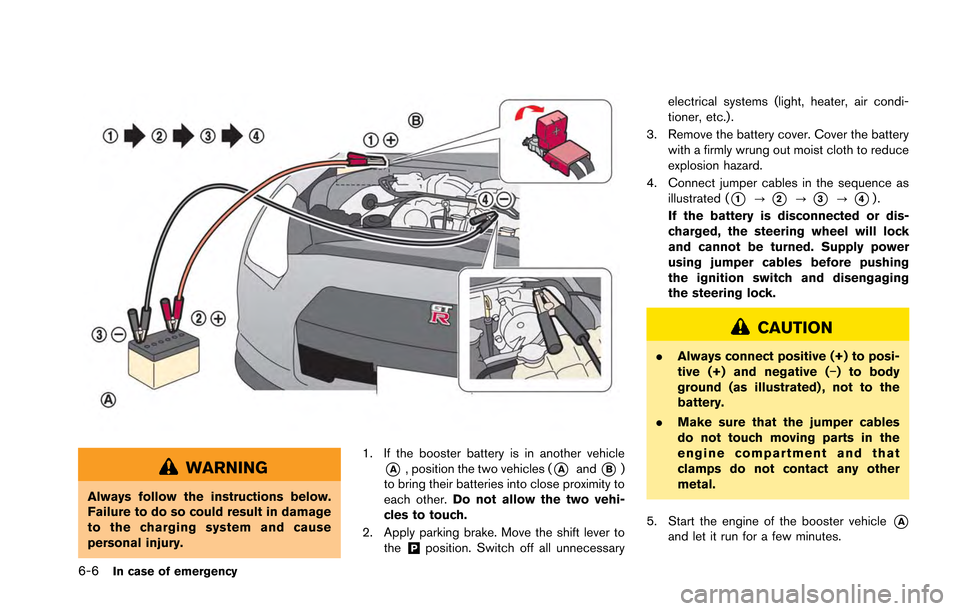
personal injury.1. If the booster battery is in another vehicle
*A, position the two vehicles (*Aand*B)
to bring their batteries into close proximity to
each other. Do not allow the two vehi-
cles to touch.
2. Apply parking brake. Move the shift lever to the
&Pposition. Switch off all unnecessary electrical systems (light, heater, air condi-
tioner, etc.).
3. Remove the battery cover. Cover the battery with a firmly wrung out moist cloth to reduce
explosion hazard.
4. Connect jumper cables in the sequence as illustrated (
*1?*2?*3?*4).
If the battery is disconnected or dis-
charged, the steering wheel will lock
and cannot be turned. Supply power
using jumper cables before pushing
the ignition switch and disengaging
the steering lock.
CAUTION
. Always connect positive (+) to posi-
tive (+) and negative (−) to body
ground (as illustrated) , not to the
battery.
. Make sure that the jumper cables
do not touch moving parts in the
engine compartment and that
clamps do not contact any other
metal.
5. Start the engine of the booster vehicle
*Aand let it run for a few minutes.