engine NISSAN GT-R 2014 R35 Owners Manual
[x] Cancel search | Manufacturer: NISSAN, Model Year: 2014, Model line: GT-R, Model: NISSAN GT-R 2014 R35Pages: 354, PDF Size: 5.08 MB
Page 235 of 354
5-38Starting and driving
hill start assist will stop operating completely.
Hill start assist will not operate when the shift
lever is moved to the
&Nor&Pposition or on a
flat and level road.
NOTE:
This system does not function when the
Vehicle Dynamic Control VDC) system
warning appears on the vehicle informa-
tion display located in the tachometer.
(
“Vehicle Dynamic Control (VDC) sys-
tem warning” page 2-37)
NOTICE
Follow these recommendations to ob-
tain maximum engine performance and
ensure the future reliability and econo-
my of your new vehicle. Failure to
follow these recommendations may
result in shortened engine life and
reduced vehicle performance.
Please observe the following types of driving
until the mileage shown below has been
reached.
Until 300 miles (500 km):
. Do not depress the accelerator pedal more
than halfway and avoid rapid acceleration.
. Drive with the engine speed kept at less
than 3,500 RPM.
. Avoid unnecessary quick steering, abrupt
braking and driving on poor roads.
300 to 600 miles (500 to 1,000 km)
. Avoid rapid acceleration in a low gear (1st to
3rd gears) with the accelerator pedal fully
depressed. Depress the pedal slowly.
. Avoid unnecessary quick steering and
abrupt braking. .
Drive with the suspension setup switch in
the COMF mode to allow more suspension
stroke.
600 to 1,200 miles (1,000 to 2,000 km)
. Drive with the engine speed kept relatively
high with the shift lever in the
&Mposition.
Shifting is recommended between 1st and
4th gears.
. Avoid unnecessary quick steering and
abrupt braking.
. Drive with the suspension setup switch in
the COMF mode to allow more suspension
stroke.
Even though the mileage reaches over 1,200
miles (2,000 km) , the clutch may take longer to
properly engage if the vehicle is mainly driven in
town at a low speed. NISSAN recommends
breaking in the clutch at a GT-R certified
NISSAN dealer.
WHEEL ALIGNMENT
Do not adjust the wheel alignment until the
mileage reaches 1,000 miles (1,600 km). Until
then, the suspension may not engage enough
and the height may be higher.
However, make sure to adjust the alignment
after 1,000 miles (1,600 km) .
The wheel alignment can be adjusted by a GT-R
BREAK-IN SCHEDULE
Page 236 of 354
certified NISSAN dealer in accordance with
specifications for city driving to high perfor-
mance driving.
The tires on the GT-R may have different wear
rates and wear patterns in comparison to
conventional passenger vehicles. Contact a
GT-R certified NISSAN dealer to confirm that
the alignment is within specifications.Follow these easy-to-use Fuel Efficient Driving
Tips to help you achieve the most fuel economy
from your vehicle.
1. Use smooth accelerator and brake pedalapplication.
.Avoid rapid starts and stops..Use smooth, gentle accelerator and
brake application whenever possible.
.Maintain constant speed while commut-
ing and coast whenever possible.
2. Maintain constant speed.
.Look ahead to try and anticipate and
minimize stops.
.Synchronizing your speed with traffic
lights allows you to reduce your number
of stops.
.Maintaining a steady speed can minimize
red light stops and improve fuel effi-
ciency.
3. Use air conditioning (A/C) at higher vehicle speeds.
.Below 40 MPH (64 km/h), it is more
efficient to open windows to cool the
vehicle due to reduced engine load.
.Above 40 MPH (64 km/h), it is more
efficient to use A/C to cool the vehicle
due to increased aerodynamic drag.
.Recirculating the cool air in the cabin when the A/C is on reduces cooling load.
4. Drive at economical speeds and distances.
.Observing the speed limit and not
exceeding 60 MPH (97 km/h) (where
legally allowed) can improve fuel effi-
ciency due to reduced aerodynamic
drag.
.Maintaining a safe following distance
behind other vehicles reduces unneces-
sary braking.
.Safely monitoring traffic to anticipate
changes in speed permits reduced brak-
ing and smooth acceleration changes.
.Select a gear range suitable to road
conditions.
5. Use cruise control.
.Using cruise control during highway
driving helps maintain a steady speed.
.Cruise control is particularly effective in
providing fuel savings when driving on
flat terrains.
6. Plan for the shortest route.
.Utilize a map or navigation system to
determine the best route to save time.
7. Avoid idling.
.Shutting off your engine when safe for
stops exceeding 30-60 seconds saves
fuel and reduces emissions.
Starting and driving5-39
FUEL EFFICIENT DRIVING TIPS
Page 237 of 354
5-40Starting and driving
8. Buy an automated pass for toll roads..Automated passes permit drivers to use
special lanes to maintain cruising speed
through the toll and avoid stopping and
starting.
9. Winter warm up.
.Limit idling time to minimize impact to
fuel economy.
.Vehicles typically need no more than 30
seconds of idling at start-up to effectively
circulate the engine oil before driving.
.Your vehicle will reach its ideal operating
temperature more quickly while driving
versus idling.
10. Keeping your vehicle cool.
.Park your vehicle in a covered parking
area or in the shade whenever possible.
.When entering a hot vehicle, opening the
windows will help to reduce the inside
temperature faster, resulting in reduced
demand on your A/C system.
. Keep your engine tuned up.
. Follow the recommended scheduled main-
tenance.
. Keep the tires inflated to the correct
pressure. Low tire pressure increases tire
wear and lowers fuel economy.
. Keep the wheels in correct alignment.
Improper alignment increases tire wear and
lowers fuel economy.
. Use the recommended viscosity engine oil.
(
“Oil viscosity” page 9-6)
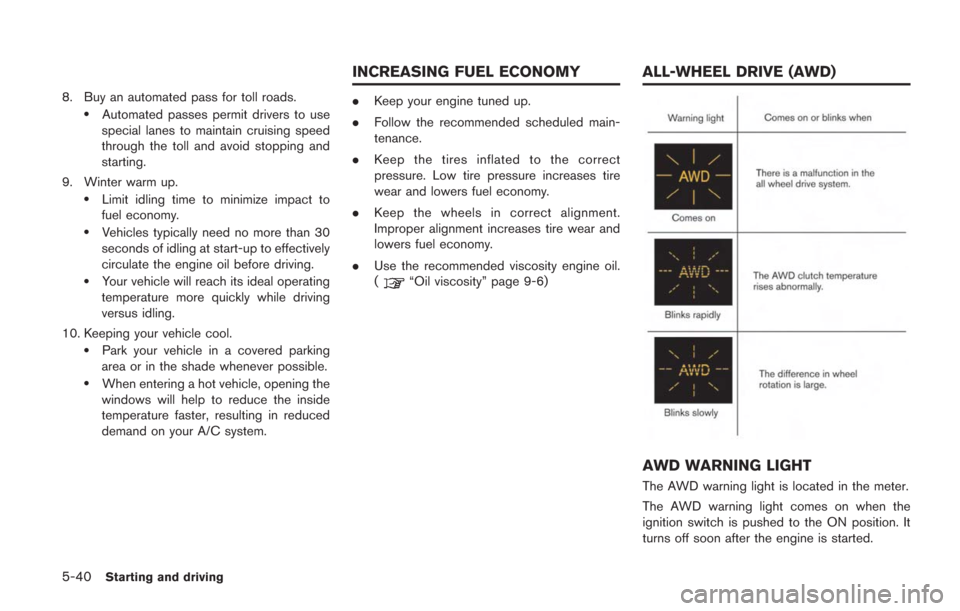
AWD WARNING LIGHT
The AWD warning light is located in the meter.
The AWD warning light comes on when the
ignition switch is pushed to the ON position. It
turns off soon after the engine is started.
INCREASING FUEL ECONOMY ALL-WHEEL DRIVE (AWD)
Page 238 of 354
If any malfunction occurs in the AWD system
while the engine is running, the warning light will
come on.
The warning light may blink rapidly (about twice
per second) while trying to free a stuck vehicle
due to high AWD clutch temperature. The
driving mode may change to two-wheel drive.
If the warning light blinks rapidly during opera-
tion, stop the vehicle with the engine idling in a
safe place immediately. Then if the light goes off
after a while, you can continue driving.
A large difference between the diameters of
front and rear wheels will make the warning light
blink slowly (about once per two seconds) . Pull
off the road in a safe area, and idle the engine.
Check that all tire sizes are the same, tire
pressure is correct and tires are not worn and
winter tires are not installed on the front or rear
wheels only.
If the warning light is blinking after the above
operation, have your vehicle checked by a GT-R
certified NISSAN dealer as soon as possible.
If non-genuine GT-R tires are used, the warning
light may illuminate. (
“GT-R special speci-
fication parts” page GTR-4)
WARNING
. Do not attempt to raise two wheels
off the ground and shift the trans-
mission to any drive or reverse
position with the engine running.
Doing so may result in drivetrain
damage or unexpected vehicle
movement which could result in
serious vehicle damage or personal
injury.
. Do not attempt to test an AWD
equipped vehicle on a 2-wheel dy-
namometer (such as the dynam-
ometers used by some states for
emissions testing) or similar equip-
ment even if the other two wheels
are raised off the ground. Make sure
that you inform the test facility
personnel that your vehicle is
equipped with AWD before it is
placed on a dynamometer. Using
the wrong test equipment may re-
sult in drivetrain damage or unex-
pected vehicle movement which
could result in serious vehicle da-
mage or personal injury.
NOTICE
.If the warning light comes on while
driving there may be a malfunction
in the AWD system. Reduce the
vehicle speed and have your vehicle
checked by a GT-R certified NISSAN
dealer as soon as possible.
. If the warning light remains on after
the above operation, have your
vehicle checked by a GT-R certified
NISSAN dealer as soon as possible.
. The powertrain may be damaged if
you continue driving with the warn-
ing light blinking.
. Do not spin the rear wheels while
driving. Spinning the rear wheels
may increase the temperatures of
the AWD clutch system and damage
the system. Adjust the accelerator
pedal position to stop wheel spin.
Starting and driving5-41
Page 239 of 354
5-42Starting and driving
TIGHT CORNER BRAKING PHE-
NOMENON
If the steering wheel is turned more than half a
turn when the vehicle is started when it is cold, it
may be harder to move the vehicle forward and
backward. This phenomenon is known as the
“tight corner braking phenomenon”.
This phenomenon is unique to AWD vehicles,
and occurs due to a difference in speeds
between the front and rear wheels while the
vehicle is turning. This does not indicate that
there is a malfunction.
NOTE:
If the tight corner braking phenomenon
occurs, a slipping sound may be heard
from the tires, or a squeaking sound may
be heard from the drive system.
Reducing tight corner braking phe-
nomenon
The tight corner braking phenomenon can be
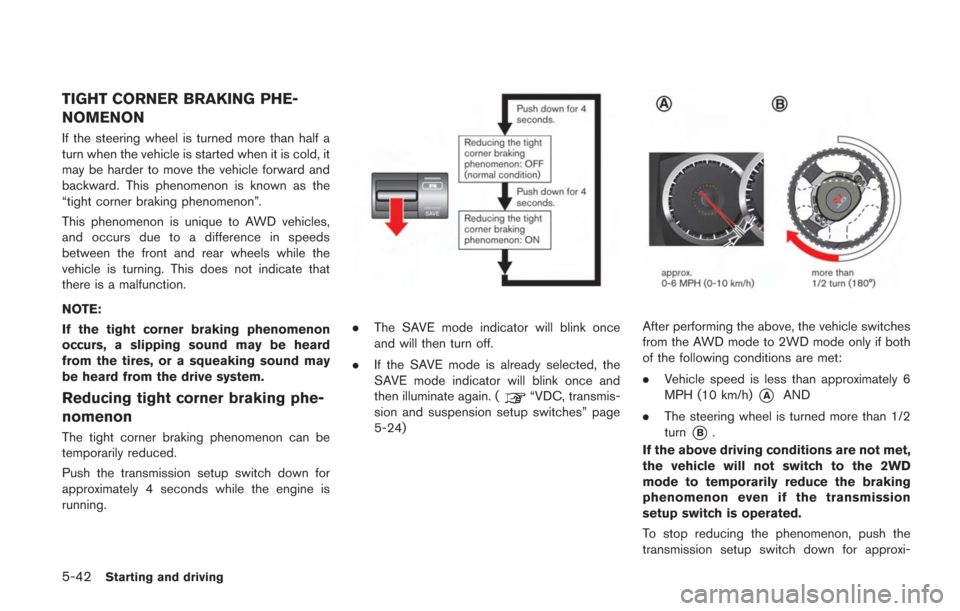
temporarily reduced.
Push the transmission setup switch down for
approximately 4 seconds while the engine is
running.
.The SAVE mode indicator will blink once
and will then turn off.
. If the SAVE mode is already selected, the
SAVE mode indicator will blink once and
then illuminate again. (
“VDC, transmis-
sion and suspension setup switches” page
5-24)
After performing the above, the vehicle switches
from the AWD mode to 2WD mode only if both
of the following conditions are met:
. Vehicle speed is less than approximately 6
MPH (10 km/h)
*AAND
. The steering wheel is turned more than 1/2
turn
*B.
If the above driving conditions are not met,
the vehicle will not switch to the 2WD
mode to temporarily reduce the braking
phenomenon even if the transmission
setup switch is operated.
To stop reducing the phenomenon, push the
transmission setup switch down for approxi-
Page 240 of 354
mately 4 seconds again. The driving mode will
switch to the normal AWD mode.
Reduction of the tight corner braking phenom-
enon will be cancelled when:
.the R mode is selected with the transmission
setup switch
. the SAVE mode is selected with the
transmission setup switch and the OFF
mode is selected with the VDC setup switch
. the ignition switch is pushed to the "OFF"
position
. the R mode start function is used
WARNING
Do not reduce the tight corner braking
phenomenon when driving on a road
surface that is slippery or covered in
snow, because the driving mode will
switch to 2WD. This may cause tire
slipping and may cause a loss of control
and result in a collision, personal injury
or death.
TIRES
This vehicle is equipped with special tires. When
changing the tires, install the designated special
tires. Replacing tires as a set of four with new
ones is recommended. However, if a tire is
punctured or damaged, it may be possible to
replace only the damaged tire. Determining
whether one tire or a complete set of tires
should be replaced is based on a number of
factors including tire wear and condition. Con-
tact your GT-R certified NISSAN dealer. They
can recommend if an individual tire or a
complete set should be replaced.
NOTICE
If tires other than the designated tires,
tires with large differences in wear or
tires of different sizes are installed, the
AWD performance will be degraded and
the drive mechanism may be damaged.
AWD SYSTEM CHARACTERISTICS
The AWD system automatically distributes the
optimal torque to the front and rear wheels. This
provides both the superior turning performance
of a rear wheel drive vehicle and the traction of a
AWD vehicle. Electronic control continuously distributes tor-
que to the front and rear wheels in the range
from 0:100 (rear-wheel drive mode) to 50:50
(all-wheel drive mode) to match the driving
conditions and road conditions. This allows the
engine output (torque) to be effectively trans-
mitted to the road surface.
Starting and driving5-43
Page 242 of 354
WARNING
.Do not stop or park the vehicle over
flammable materials such as dry
grass, waste paper or rags. They
may ignite and cause a fire.
. Never leave the engine running
while the vehicle is unattended.
. Do not leave children unattended
inside the vehicle. They could un-
knowingly activate switches or con-
trols. Unattended children could
become involved in serious acci- dents.
. Safe parking procedures require
that both the parking brake be
applied and the transmission placed
into the
&Pposition. Failure to do so
could cause the vehicle to move
unexpectedly or roll away and result
in an accident.
. Make sure the shift lever has been
pushed as far forward as it can go
and cannot be moved without de-
pressing the foot brake pedal.
. Follow the instructions below when parking the vehicle to help prevent
the brake rotor and brake pads from
rusting together. Failure to follow
the instructions could cause the
rotor and pads to rust together. If
the rotor and pads rust together,
there may be a popping noise and
some vibration when the vehicle is
driven, a wheel may not roll cor-
rectly, or the brake pads could be
damaged. If the pads are damaged,
this may reduce the effectiveness of
the brake system which could cause
a collision, serious personal injury
or death.
1. Firmly apply the parking brake.
2. Move the shift lever to the
&Pposition.
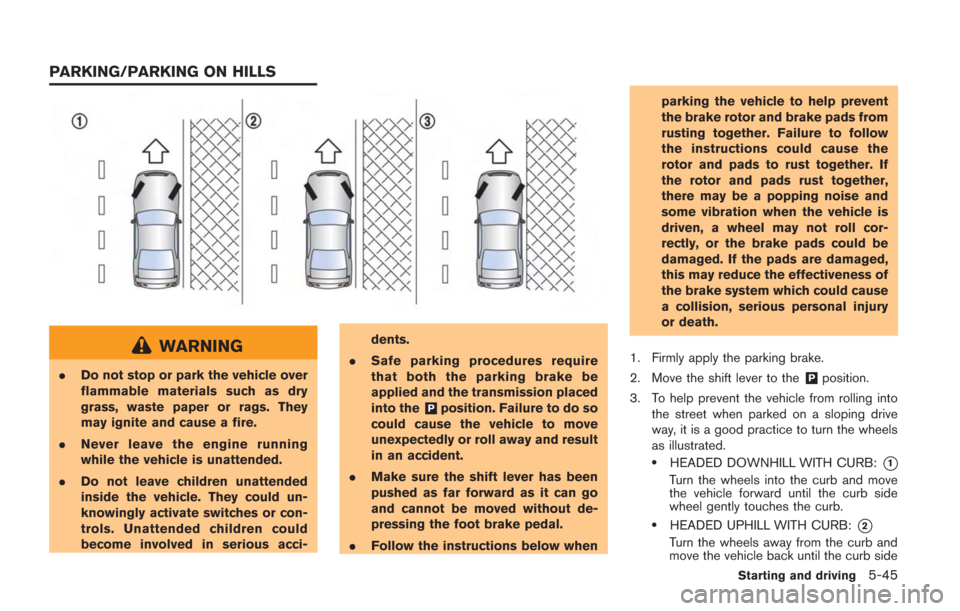
3. To help prevent the vehicle from rolling into the street when parked on a sloping drive
way, it is a good practice to turn the wheels
as illustrated.
.HEADED DOWNHILL WITH CURB:*1
Turn the wheels into the curb and move
the vehicle forward until the curb side
wheel gently touches the curb.
.HEADED UPHILL WITH CURB:*2
Turn the wheels away from the curb and
move the vehicle back until the curb side
Starting and driving5-45
PARKING/PARKING ON HILLS
Page 243 of 354
5-46Starting and driving
wheel gently touches the curb.
.HEADED UPHILL OR DOWNHILL, NO
CURB:
*3
Turn the wheels toward the side of the
road so the vehicle will move away from
the center of the road if it moves.
4. Push the ignition switch to the LOCK position.
The GT-R uses brake pad materials that have
high metallic content. The brake pad material
helps maintain braking performance in a wide
range of weather and driving conditions.
For the first 3,000 - 6,000 miles (5,000 -
10,000 km) of the vehicle’s service life, and for
the first 3,000 - 6,000 miles (5,000 - 10,000
km) after a brake replacement, the brake pad to
brake rotor clearance is very small. When
parking, apply the parking brake and move the
shift lever to the
&Pposition. Idle the engine for
more than 20 seconds without depressing the
brake pedal. This allows the brake pads to move
away from the rotor so the pad does not contact
the rotor.
Additionally, the brakes must be dry before
parking the vehicle after driving on wet roads or
after washing the vehicle. If the roads are wet,
lightly apply the brakes for a short distance
before parking the vehicle to dry the brakes.
After washing the vehicle, dry the brakes by driving on a dry road for a few miles and apply
the brakes normally based on traffic and road
conditions.
The metallic brake pads and brake disc rotor
may rust together when the brakes are not
applied:
.
If the vehicle is not idled for 20 seconds
without the brakes applied, or if the brakes
are applied when the vehicle is shut off, the
rotor and pads can rust together, even when
the brake pads are dry.
. If the brakes are wet when the vehicle is
parked and the parking brake is applied for a
long time.
Contact a GT-R certified NISSAN dealer if the
brake pads and brake rotor have rusted
together.
WARNING
If the engine is not running or is turned
off while driving, the power assist for
the steering will not work. Steering will
be harder to operate.
The power assisted steering uses a hydraulic
pump, driven by the engine, to assist steering.
If the engine stops or the drive belt breaks, you
will still have control of the vehicle. However,
much greater steering effort is needed, espe-
cially in sharp turns and at low speeds.
POWER STEERING
Page 244 of 354
BRAKING PRECAUTIONS
The brake system has two separate hydraulic
circuits. If one circuit malfunctions, you will still
have braking at two wheels.
You may feel a small click and hear a sound
when the brake pedal is fully depressed slowly.
This is not a malfunction and indicates that the
brake assist mechanism is operating properly.
Vacuum assisted brakes
The brake booster aids braking by using engine
vacuum. If the engine stops, you can stop the
vehicle by depressing the brake pedal. However,
greater foot pressure on the brake pedal will be
required to stop the vehicle and the stopping
distance will be longer.
Wet brakes
When the vehicle is washed or driven through
water, the brakes may get wet. As a result, your
braking distance will be longer and the vehicle
may pull to one side during braking.
To dry brakes, drive the vehicle at a safe speed
while lightly tapping the brake pedal to heat-up
the brakes. Do this until the brakes return to
normal. Avoid driving the vehicle at high speeds
until the brakes function correctly.
Using the brakes
Avoid resting your foot on the brake pedal while
driving. This will cause overheating of the
brakes, wearing out the brake and pads faster
and reduce gas mileage.
To help reduce brake wear and to prevent the
brakes from overheating, reduce speed and
downshift to a lower gear before going down a
slope or long grade. Overheated brakes may
reduce braking performance and could result in
loss of vehicle control.
WARNING
.While driving on a slippery surface,
be careful when braking, accelerat-
ing or downshifting. Abrupt braking
or accelerating could cause the
wheels to skid and result in an
accident.
. If the engine is not running or is
turned off while driving, the power
assist for the brakes will not work.
Braking will be harder.
PARKING BRAKE BREAK-IN
Break in the parking brake shoes whenever the
stopping effect of the parking brake is weakened
or whenever the parking brake shoes and/or
drums/rotors are replaced, in order to assure the
best braking performance.
This procedure is described in the vehicle
service manual and can be performed by a
GT-R certified NISSAN dealer.
Starting and driving5-47
BRAKE SYSTEM
Page 245 of 354
5-48Starting and driving
ANTI-LOCK BRAKING SYSTEM
(ABS)
WARNING
.The Anti-lock Braking System (ABS)
is a sophisticated device, but it
cannot prevent accidents resulting
from careless or dangerous driving
techniques. It can help maintain
vehicle control during braking on
slippery surfaces. Remember that
stopping distances on slippery sur-
faces will be longer than on normal
surfaces even with ABS. Stopping
distances may also be longer on
rough, gravel or snow covered
roads, or if you are using tire chains.
Always maintain a safe distance
from the vehicle in front of you.
Ultimately, the driver is responsible
for safety.
. Tire type and condition may also
affect braking effectiveness. When
replacing tires, install the specified
size of tires on all four wheels.
The Anti-lock Braking System (ABS) controls the brakes so the wheels do not lock during hard
braking or when braking on slippery surfaces.
The system detects the rotation speed at each
wheel and varies the brake fluid pressure to
prevent each wheel from locking and sliding. By
preventing each wheel from locking, the system
helps the driver maintain steering control and
helps to minimize swerving and spinning on
slippery surfaces.
Using the system
Depress the brake pedal and hold it down.
Depress the brake pedal with firm steady
pressure, but do not pump the brakes. The
ABS will operate to prevent the wheels from
locking up. Steer the vehicle to avoid obstacles.
WARNING
Do not pump the brake pedal. Doing so
may result in increased stopping dis-
tances.
Self-test feature
The ABS includes electronic sensors, electric
pumps, hydraulic solenoids and a computer. The
computer has a built-in diagnostic feature that
tests the system each time you start the engine
and move the vehicle at a low speed in forwardor reverse. When the self-test occurs, you may
hear a “clunk” noise and/or feel a pulsation in the
brake pedal. This does not indicate that there is
a malfunction. If the computer senses a mal-
function, it switches the ABS off and illuminates
the ABS warning light on the instrument panel.
The brake system then operates normally, but
without anti-lock assistance.
If the ABS warning light illuminates during the
self-test or while driving, have the vehicle
checked by a GT-R certified NISSAN dealer.
Normal operation
The ABS operates at speeds above 3 to 6 MPH
(5 to 10 km/h). The speed varies according to
road conditions.
When the ABS senses that one or more wheels
are close to locking up, the actuator rapidly
applies and releases hydraulic pressure. This
action is similar to pumping the brakes very
quickly. You may feel a pulsation in the brake
pedal and hear a noise from under the hood or
feel a vibration from the actuator when it is
operating. This is normal and indicates that the
ABS is operating properly. However, the pulsa-
tion may indicate that road conditions are
hazardous and extra care is required while
driving.
BRAKE ASSIST