sport NISSAN KICKS 2020 Owner´s Manual
[x] Cancel search | Manufacturer: NISSAN, Model Year: 2020, Model line: KICKS, Model: NISSAN KICKS 2020Pages: 500, PDF Size: 3.43 MB
Page 18 of 500
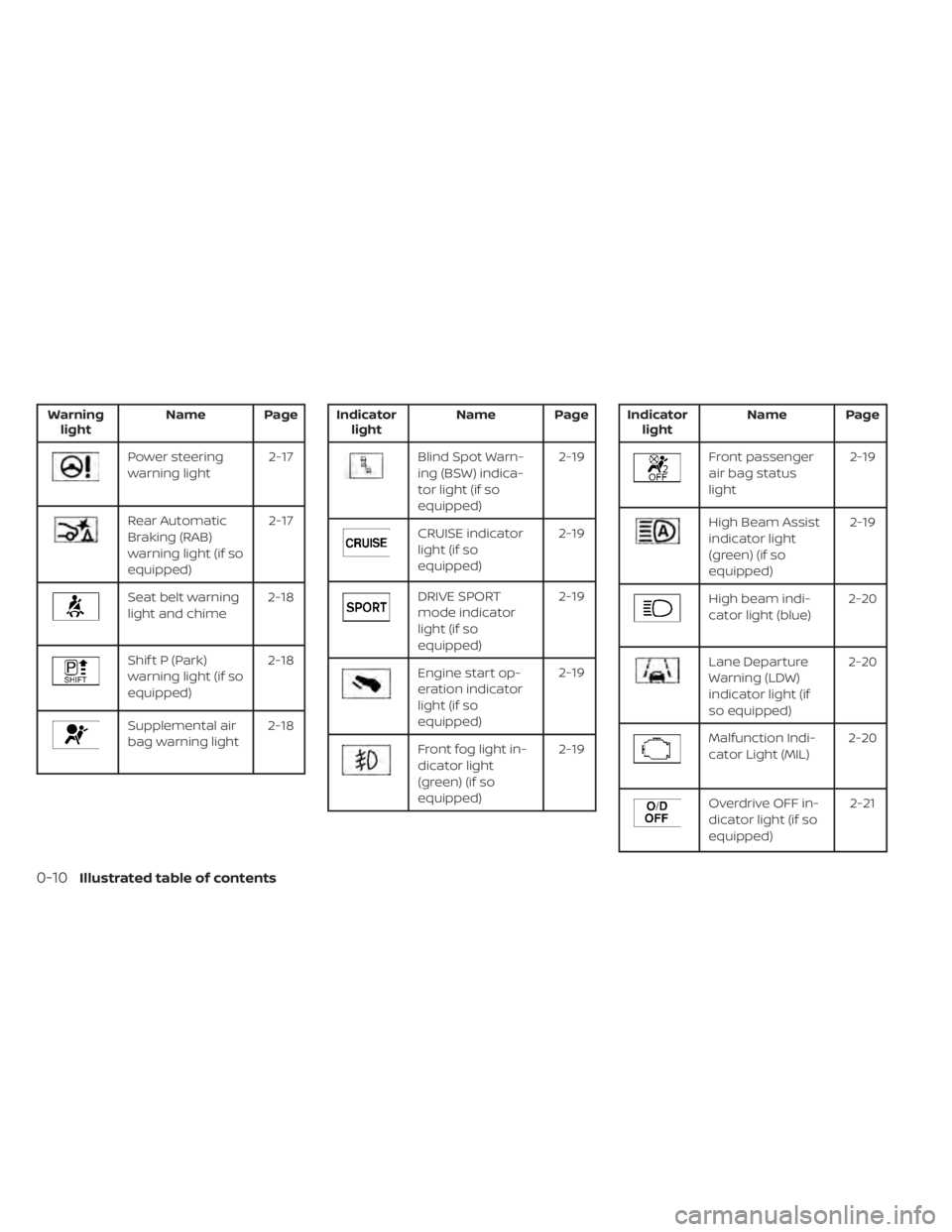
Warninglight Name Page
Power steering
warning light 2-17
Rear Automatic
Braking (RAB)
warning light (if so
equipped)2-17
Seat belt warning
light and chime
2-18
Shif t P (Park)
warning light (if so
equipped)2-18
Supplemental air
bag warning light
2-18
Indicator
light Name Page
Blind Spot Warn-
ing (BSW) indica-
tor light (if so
equipped) 2-19
CRUISE indicator
light (if so
equipped)
2-19
DRIVE SPORT
mode indicator
light (if so
equipped)2-19
Engine start op-
eration indicator
light (if so
equipped)2-19
Front fog light in-
dicator light
(green) (if so
equipped)2-19
Indicator
light Name Page
Front passenger
air bag status
light 2-19
High Beam Assist
indicator light
(green) (if so
equipped)2-19
High beam indi-
cator light (blue)
2-20
Lane Departure
Warning (LDW)
indicator light (if
so equipped)2-20
Malfunction Indi-
cator Light (MIL)
2-20
Overdrive OFF in-
dicator light (if so
equipped) 2-21
0-10Illustrated table of contents
Page 38 of 500
•If dirt builds up in the shoulder belt
guide of the seat belt anchors, the seat
belts may retract slowly. Wipe the shoul-
der belt guide with a clean, dry cloth.
• Periodically check to see that the seat
belt and the metal components, such
as buckles, tongues, retractors, flexible
wires and anchors, work properly. If loose
parts, deterioration, cuts or other dam-
age on the webbing is found, the entire
seat belt assembly should be replaced.WARNING
Do not allow children to play with the
seat belts. Most seating positions are
equipped with Automatic Locking Re-
tractor (ALR) mode seat belts. If the seat
belt becomes wrapped around a child’s
neck with the ALR mode activated, the
child can be seriously injured or killed if
the seat belt retracts and becomes
tight. This can occur even if the vehicle
is parked. Unbuckle the seat belt to re-
lease the child. If the seat belt cannot
be unbuckled or is already unbuckled,
release the child by cutting the seat
belt with a suitable tool (such as a knife
or scissors) to release the seat belt.
Children need adults to help protect
them. They need to be properly re-
strained.
In addition to the general information in
this manual, child safety information is
available from many other sources, includ-
ing doctors, teachers, government traffic
safety offices, and community organiza-
tions. Every child is different, so be sure to
learn the best way to transport your child. There are three basic types of child re-
straint systems:
• Rear-facing child restraints
• Forward-facing child restraints
• Booster seats
The proper restraint depends on the child's
size. Generally, infants up to about 1 year
and less than 20 lbs. (9 kg) should be placed
in rear-facing child restraints. Forward-
facing child restraints are available for chil-
dren who outgrow rear-facing child re-
straints and are at least 1 year old. Booster
seats are used to help position a vehicle
lap/shoulder belt on a child who can no
longer use a forward-facing child restraint.
WARNING
Infants and children need special pro-
tection. The vehicle's seat belts may
not fit them properly. The shoulder belt
may come too close to the face or neck.
The lap belt may not fit over their small
hip bones. In an accident, an improp-
erly fitting seat belt could cause serious
or fatal injury. Always use appropriate
child restraints.
CHILD SAFETY
1-18Safety-Seats, seat belts and supplemental restraint system
Page 96 of 500
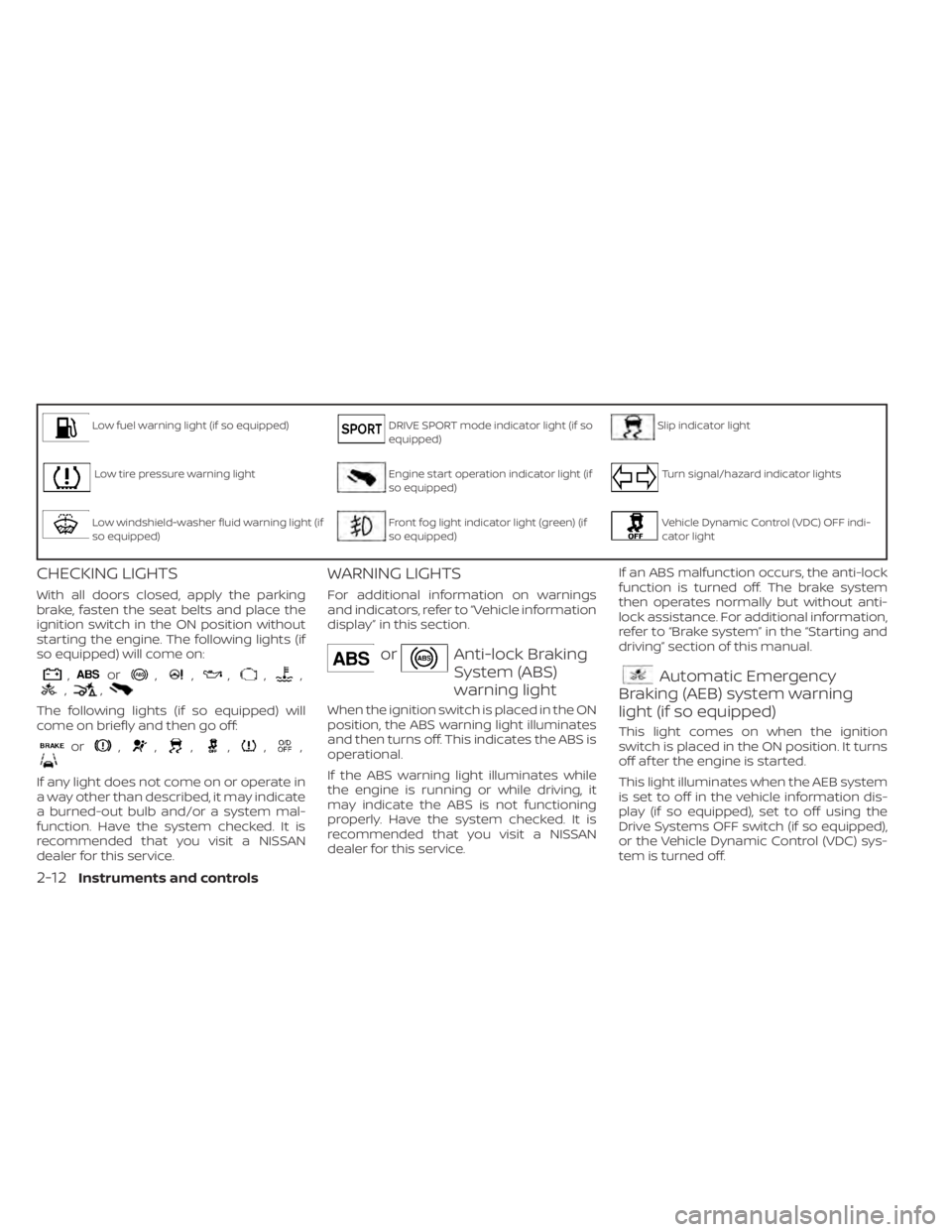
Low fuel warning light (if so equipped)DRIVE SPORT mode indicator light (if so
equipped)Slip indicator light
Low tire pressure warning lightEngine start operation indicator light (if
so equipped)Turn signal/hazard indicator lights
Low windshield-washer fluid warning light (if
so equipped)Front fog light indicator light (green) (if
so equipped)Vehicle Dynamic Control (VDC) OFF indi-
cator light
CHECKING LIGHTS
With all doors closed, apply the parking
brake, fasten the seat belts and place the
ignition switch in the ON position without
starting the engine. The following lights (if
so equipped) will come on:
,or,,,,,,,
The following lights (if so equipped) will
come on briefly and then go off:
or,,,,,,
If any light does not come on or operate in
a way other than described, it may indicate
a burned-out bulb and/or a system mal-
function. Have the system checked. It is
recommended that you visit a NISSAN
dealer for this service.
WARNING LIGHTS
For additional information on warnings
and indicators, refer to “Vehicle information
display” in this section.
orAnti-lock Braking
System (ABS)
warning light
When the ignition switch is placed in the ON
position, the ABS warning light illuminates
and then turns off. This indicates the ABS is
operational.
If the ABS warning light illuminates while
the engine is running or while driving, it
may indicate the ABS is not functioning
properly. Have the system checked. It is
recommended that you visit a NISSAN
dealer for this service.If an ABS malfunction occurs, the anti-lock
function is turned off. The brake system
then operates normally but without anti-
lock assistance. For additional information,
refer to “Brake system” in the “Starting and
driving” section of this manual.
Automatic Emergency
Braking (AEB) system warning
light (if so equipped)
This light comes on when the ignition
switch is placed in the ON position. It turns
off af ter the engine is started.
This light illuminates when the AEB system
is set to off in the vehicle information dis-
play (if so equipped), set to off using the
Drive Systems OFF switch (if so equipped),
or the Vehicle Dynamic Control (VDC) sys-
tem is turned off.
2-12Instruments and controls
Page 103 of 500
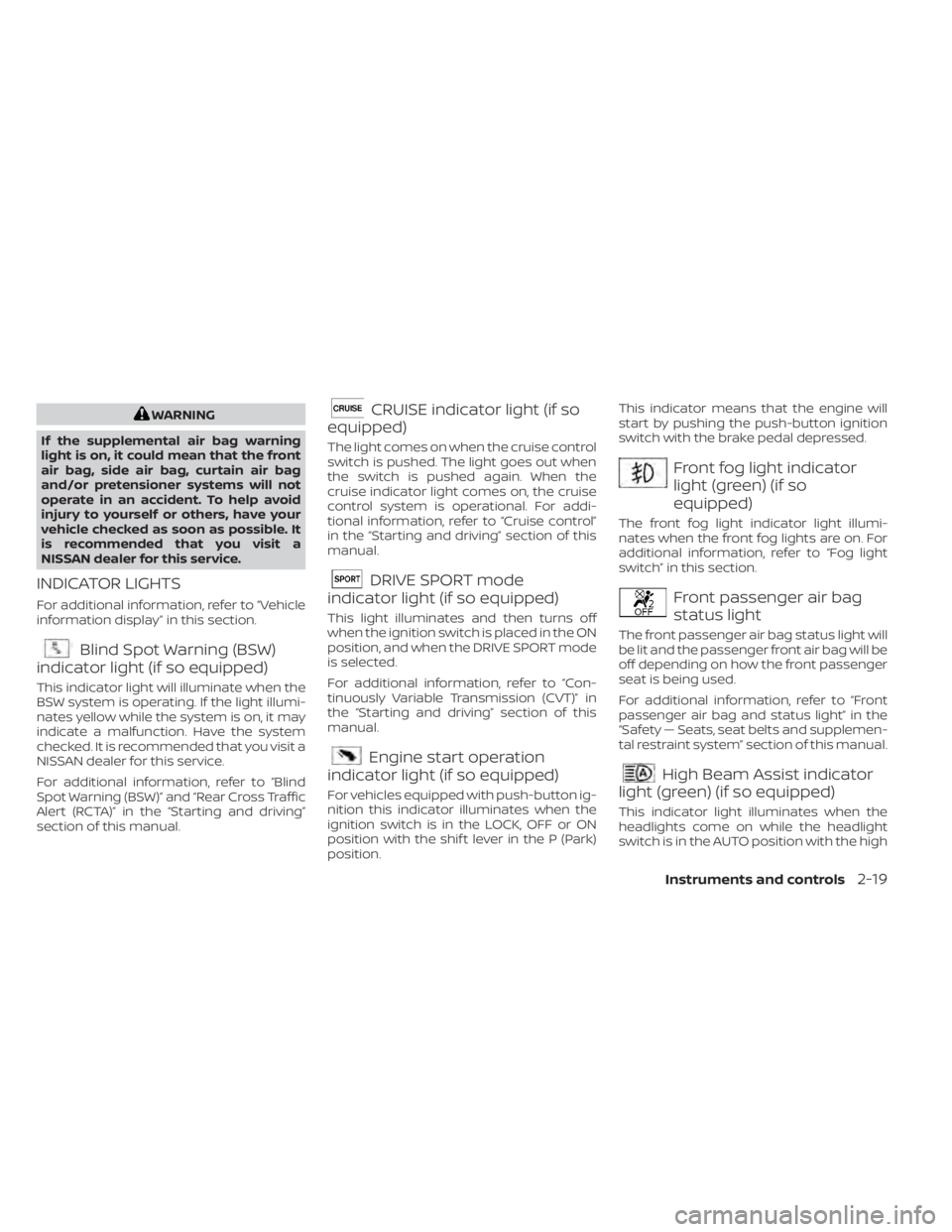
WARNING
If the supplemental air bag warning
light is on, it could mean that the front
air bag, side air bag, curtain air bag
and/or pretensioner systems will not
operate in an accident. To help avoid
injury to yourself or others, have your
vehicle checked as soon as possible. It
is recommended that you visit a
NISSAN dealer for this service.
INDICATOR LIGHTS
For additional information, refer to “Vehicle
information display” in this section.
Blind Spot Warning (BSW)
indicator light (if so equipped)
This indicator light will illuminate when the
BSW system is operating. If the light illumi-
nates yellow while the system is on, it may
indicate a malfunction. Have the system
checked. It is recommended that you visit a
NISSAN dealer for this service.
For additional information, refer to “Blind
Spot Warning (BSW)” and “Rear Cross Traffic
Alert (RCTA)” in the “Starting and driving”
section of this manual.
CRUISE indicator light (if so
equipped)
The light comes on when the cruise control
switch is pushed. The light goes out when
the switch is pushed again. When the
cruise indicator light comes on, the cruise
control system is operational. For addi-
tional information, refer to “Cruise control”
in the “Starting and driving” section of this
manual.
DRIVE SPORT mode
indicator light (if so equipped)
This light illuminates and then turns off
when the ignition switch is placed in the ON
position, and when the DRIVE SPORT mode
is selected.
For additional information, refer to “Con-
tinuously Variable Transmission (CVT)” in
the “Starting and driving” section of this
manual.
Engine start operation
indicator light (if so equipped)
For vehicles equipped with push-button ig-
nition this indicator illuminates when the
ignition switch is in the LOCK, OFF or ON
position with the shif t lever in the P (Park)
position. This indicator means that the engine will
start by pushing the push-button ignition
switch with the brake pedal depressed.
Front fog light indicator
light (green) (if so
equipped)
The front fog light indicator light illumi-
nates when the front fog lights are on. For
additional information, refer to “Fog light
switch” in this section.
Front passenger air bag
status light
The front passenger air bag status light will
be lit and the passenger front air bag will be
off depending on how the front passenger
seat is being used.
For additional information, refer to “Front
passenger air bag and status light” in the
“Safety — Seats, seat belts and supplemen-
tal restraint system” section of this manual.
High Beam Assist indicator
light (green) (if so equipped)
This indicator light illuminates when the
headlights come on while the headlight
switch is in the AUTO position with the high
Instruments and controls2-19
Page 116 of 500
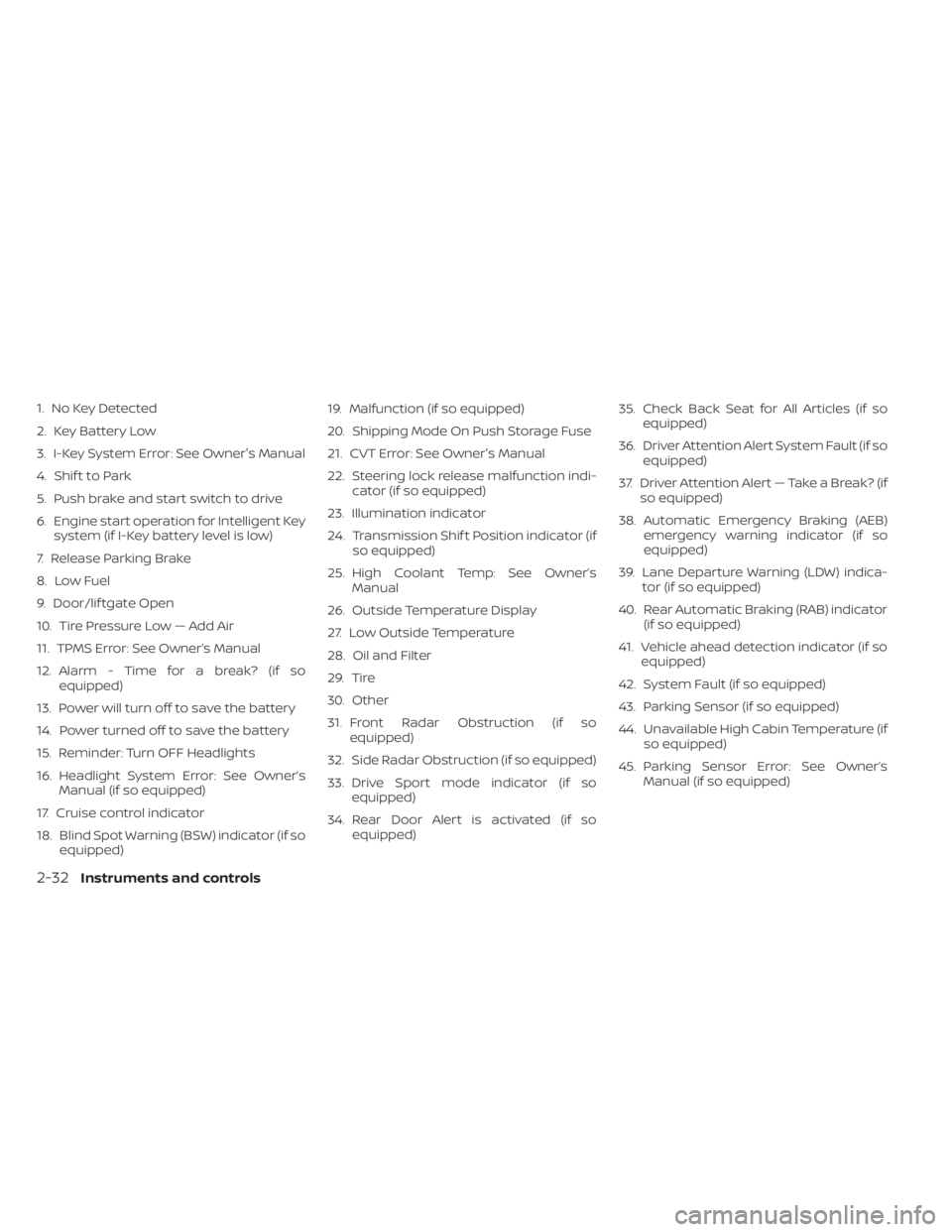
1. No Key Detected
2. Key Battery Low
3. I-Key System Error: See Owner's Manual
4. Shif t to Park
5. Push brake and start switch to drive
6. Engine start operation for Intelligent Keysystem (if I-Key battery level is low)
7. Release Parking Brake
8. Low Fuel
9. Door/lif tgate Open
10. Tire Pressure Low — Add Air
11. TPMS Error: See Owner’s Manual
12. Alarm - Time for a break? (if so equipped)
13. Power will turn off to save the battery
14. Power turned off to save the battery
15. Reminder: Turn OFF Headlights
16. Headlight System Error: See Owner’s Manual (if so equipped)
17. Cruise control indicator
18. Blind Spot Warning (BSW) indicator (if so equipped) 19. Malfunction (if so equipped)
20. Shipping Mode On Push Storage Fuse
21. CVT Error: See Owner's Manual
22. Steering lock release malfunction indi-
cator (if so equipped)
23. Illumination indicator
24. Transmission Shif t Position indicator (if so equipped)
25. High Coolant Temp: See Owner’s Manual
26. Outside Temperature Display
27. Low Outside Temperature
28. Oil and Filter
29. Tire
30. Other
31. Front Radar Obstruction (if so equipped)
32. Side Radar Obstruction (if so equipped)
33. Drive Sport mode indicator (if so equipped)
34. Rear Door Alert is activated (if so equipped) 35. Check Back Seat for All Articles (if so
equipped)
36. Driver Attention Alert System Fault (if so equipped)
37. Driver Attention Alert — Take a Break? (if so equipped)
38. Automatic Emergency Braking (AEB) emergency warning indicator (if so
equipped)
39. Lane Departure Warning (LDW) indica- tor (if so equipped)
40. Rear Automatic Braking (RAB) indicator (if so equipped)
41. Vehicle ahead detection indicator (if so equipped)
42. System Fault (if so equipped)
43. Parking Sensor (if so equipped)
44. Unavailable High Cabin Temperature (if so equipped)
45. Parking Sensor Error: See Owner’s Manual (if so equipped)
2-32Instruments and controls
Page 120 of 500
WARNING
The tire replacement indicator is not a
substitute for regular tire checks, in-
cluding tire pressure checks. For addi-
tional information, refer to “Changing
wheels and tires” in the “Do-it-yourself ”
section of this manual. Many factors in-
cluding tire inflation, alignment, driving
habits and road conditions affect tire
wear and when tires should be re-
placed. Setting the tire replacement in-
dicator for a certain driving distance
does not mean your tires will last that
long. Use the tire replacement indicator
as a guide only and always perform
regular tire checks. Failure to perform
regular tire checks, including tire pres-
sure checks could result in tire failure.
Serious vehicle damage could occur
and may lead to a collision, which could
result in serious personal injury or
death.
Other
This indicator appears when the customer
set distance is reached for checking or re-
placing maintenance items other than the
engine oil, oil filter and tires. Other mainte-
nance items can include such things as air filter or tire rotation. The distance for
checking or replacing the items can be set
or reset.
Front Radar Obstruction (if so
equipped)
This warning appears when there is a radar
obstruction detected. For additional infor-
mation, refer to “Automatic Emergency
Braking (AEB)” and “Automatic Emergency
Braking (AEB) with Pedestrian Detection” in
the “Starting and driving” section of this
manual.
Side Radar Obstruction (if so
equipped)
This message appears when the Blind
Spot Warning (BSW) or Rear Cross Traffic
Alert (RCTA) systems become unavailable
because a radar blockage is detected. For
additional information, refer to “Blind Spot
Warning (BSW)” or “Rear Cross Traffic Alert
(RCTA)” in the “Starting and driving” section
of this manual.
Drive Sport mode indicator (if so
equipped)
A small “S” appears to the right of the Trans-
mission Shif t Position indicator in the ve-
hicle information display when the Drive
Sport mode is engaged.Activate the Drive Sport mode by pressing
the switch on the shif t lever while the shif t
lever is in the D (Drive) position.
For additional information, refer to “Driving
the vehicle” in the “Starting and driving” sec-
tion of this manual.
Rear Door Alert is activated (if so
equipped)
When the system is enabled, this message
appears when the Rear Door Alert system
is active and can remind the driver to check
the back seat.
• Using the steering wheel switch, a driver
can select “Dismiss Message” to clear the
display for a period of time. If no selection
is made, this message automatically
turns off af ter a period of time.
• Using the steering wheel switch, a driver can select “Disable Alert” to disable the
horn alert for the remainder of the cur-
rent trip.
2-36Instruments and controls
Page 281 of 500
ON-PAVEMENT AND OFF-ROAD
DRIVING PRECAUTIONS
Utility vehicles have a significantly
higher rollover rate than other types of
vehicles.
They have higher ground clearance than
passenger cars to make them capable of
performing in a variety of on-pavement
and off-road applications. This gives them
a higher center of gravity than ordinary ve-
hicles. An advantage of higher ground
clearance is a better view of the road, allow-
ing you to anticipate problems. However,
they are not designed for cornering at the
same speeds as conventional 2-wheel
drive vehicles any more than low-slung
sports cars are designed to perform satis-
factorily under off-road conditions. If at all
possible, avoid sharp turns at high speeds.
As with other vehicles of this type, failure to
operate this vehicle correctly may result in
loss of control or vehicle rollover. In a roll-
over crash, an unbelted person is signifi-
cantly more likely to die than a person
wearing a seat belt.
AVOIDING COLLISION AND
ROLLOVER
WARNING
Failure to operate this vehicle in a safe
and prudent manner may result in loss
of control or an accident.
Be alert and drive defensively at all times.
Obey all traffic regulations. Avoid excessive
speed, high speed cornering, or sudden
steering maneuvers, because these driving
practices could cause you to lose control of
your vehicle.
As with any vehicle, loss of control could
result in a collision with other vehicles or
objects or cause the vehicle to roll over,
particularly if the loss of control causes
the vehicle to slide sideways.
Be attentive at all times, and avoid driving
when tired. Never drive when under the in-
fluence of alcohol or drugs (including pre-
scription or over-the-counter drugs which
may cause drowsiness). Always wear your
seat belt as outlined in the “Safety – Seats,
seat belts and supplemental restraint sys-
tem” section of this manual, and also in-
struct your passengers to do so. Seat belts help reduce the risk of injury in
collisions and rollovers.
In a rollover crash,
an unbelted or improperly belted person
is significantly more likely to be injured
or killed than a person properly wearing
a seat belt.
OFF-ROAD RECOVERY
While driving, the right side or lef t side
wheels may unintentionally leave the road
surface. If this occurs, maintain control of
the vehicle by following the procedure be-
low. Please note that this procedure is only
a general guide. The vehicle must be driven
as appropriate based on the conditions of
the vehicle, road and traffic.
1. Remain calm and do not overreact.
2. Do not apply the brakes.
3. Maintain a firm grip on the steering wheel with both hands and try to hold a
straight course.
4. When appropriate, slowly release the ac- celerator pedal to gradually slow the
vehicle.
5. If there is nothing in the way, steer the vehicle to follow the road while vehicle
speed is reduced. Do not attempt to
drive the vehicle back onto the road sur-
face until vehicle speed is reduced.
Starting and driving5-9
Page 293 of 500
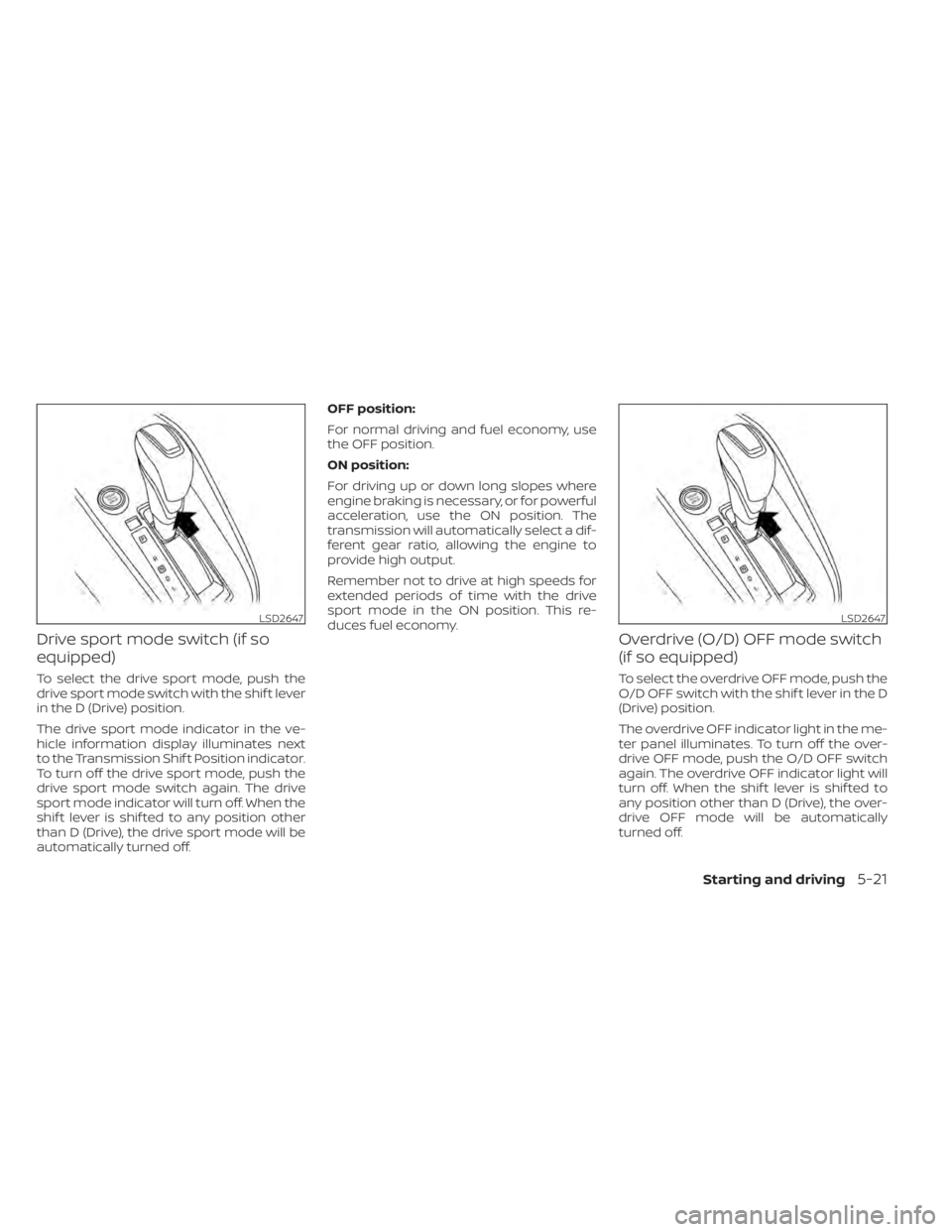
Drive sport mode switch (if so
equipped)
To select the drive sport mode, push the
drive sport mode switch with the shif t lever
in the D (Drive) position.
The drive sport mode indicator in the ve-
hicle information display illuminates next
to the Transmission Shif t Position indicator.
To turn off the drive sport mode, push the
drive sport mode switch again. The drive
sport mode indicator will turn off. When the
shif t lever is shif ted to any position other
than D (Drive), the drive sport mode will be
automatically turned off.OFF position:
For normal driving and fuel economy, use
the OFF position.
ON position:
For driving up or down long slopes where
engine braking is necessary, or for powerful
acceleration, use the ON position. The
transmission will automatically select a dif-
ferent gear ratio, allowing the engine to
provide high output.
Remember not to drive at high speeds for
extended periods of time with the drive
sport mode in the ON position. This re-
duces fuel economy.
Overdrive (O/D) OFF mode switch
(if so equipped)
To select the overdrive OFF mode, push the
O/D OFF switch with the shif t lever in the D
(Drive) position.
The overdrive OFF indicator light in the me-
ter panel illuminates. To turn off the over-
drive OFF mode, push the O/D OFF switch
again. The overdrive OFF indicator light will
turn off. When the shif t lever is shif ted to
any position other than D (Drive), the over-
drive OFF mode will be automatically
turned off.
LSD2647LSD2647
Starting and driving5-21
Page 346 of 500
AEB WITH PEDESTRIAN
DETECTION SYSTEM LIMITATIONS
WARNING
Listed below are the system limitations
for the AEB with Pedestrian Detection
system. Failure to operate the vehicle in
accordance with these system limita-
tions could result in serious injury or
death.
• The AEB with Pedestrian Detection
system cannot detect all vehicles or
pedestrians under all conditions.
• The AEB with Pedestrian Detection
system does not detect the following
objects:
– Small pedestrians (including
small children), animals and
cyclists.
– Pedestrians in wheelchairs or us-
ing mobile transport such as
scooters, child-operated toys, or
skateboards. –
Pedestrians who are seated or
otherwise not in a full upright
standing or walking position.
– Oncoming vehicles
– Crossing vehicles
– Obstacles on the roadside
• The AEB with Pedestrian Detection
system has some performance
limitations.
– If a stationary vehicle is in the ve-
hicle’s path, the AEB with Pedes-
trian Detection system will not
function when the vehicle is
driven at speeds over approxi-
mately 50 mph (80 km/h).
– For pedestrian detection, the AEB
with Pedestrian Detection system
will not function when the vehicle
is driven at speeds over approxi-
mately 37 mph (60 km/h) or below
approximately 6 mph (10 km/h).
• The AEB with Pedestrian Detection
system will not function for pedestri-
ans in darkness or in tunnels, even if
there is street lighting in the area. •
The AEB with Pedestrian Detection
system may not function if the ve-
hicle ahead is narrow (for example, a
motorcycle).
• The AEB with Pedestrian Detection
system may not function if the speed
difference between the two vehicles
is too small.
• The radar sensor AEB with Pedes-
trian Detection system may not
function properly or detect a vehicle
ahead in the following conditions:
– Poor visibility (conditions such as
rain, snow, fog, dust storms, sand-
storms, and road spray from other
vehicles)
– Driving on a steep downhill slope
or roads with sharp curves.
– Driving on a bumpy road surface,
such as an uneven dirt road.
– If dirt, ice, snow or other material
is covering the radar sensor area.
– Interference by other radar
sources.
– The camera area of the windshield
is fogged up, or covered with dirt,
water drops, ice, snow, etc.
5-74Starting and driving
Page 347 of 500
–Strong light (for example, sunlight
or high beams from oncoming ve-
hicles) enters the front camera.
Strong light causes the area
around the pedestrian to be cast
in a shadow, making it difficult to
see.
– A sudden change in brightness
occurs. (For example, when the
vehicle enters or exits a tunnel or a
shaded area or lightning flashes.)
– The poor contrast of a person to
the background, such as having
clothing color or pattern which is
similar to the background.
– The pedestrian’s profile is partially
obscured or unidentifiable due to
the pedestrian transporting lug-
gage, wearing bulky or very loose-
fitting clothing or accessories.
• The system performance may de-
grade in the following conditions:
– The vehicle is driven on a slippery
road.
– The vehicle is driven on a slope.
– Excessively heavy baggage is
loaded in the rear seat or the trunk
room of your vehicle. •
The system is designed to automati-
cally check the sensor’s (radar and
camera) functionality, within certain
limitations. The system may not de-
tect blockage of sensor areas cov-
ered by ice, snow or stickers, for ex-
ample. In these cases, the system
may not be able to warn the driver
properly. Be sure that you check,
clean and clear sensor areas
regularly.
• In some road and traffic conditions,
the AEB with Pedestrian Detection
system may unexpectedly apply par-
tial braking. When acceleration is
necessary, depress the accelerator
pedal to override the system.
• Excessive noise will interfere with the
warning chime sound, and the chime
may not be heard.
Starting and driving5-75