brake NISSAN KICKS 2023 User Guide
[x] Cancel search | Manufacturer: NISSAN, Model Year: 2023, Model line: KICKS, Model: NISSAN KICKS 2023Pages: 558, PDF Size: 6.25 MB
Page 105 of 558
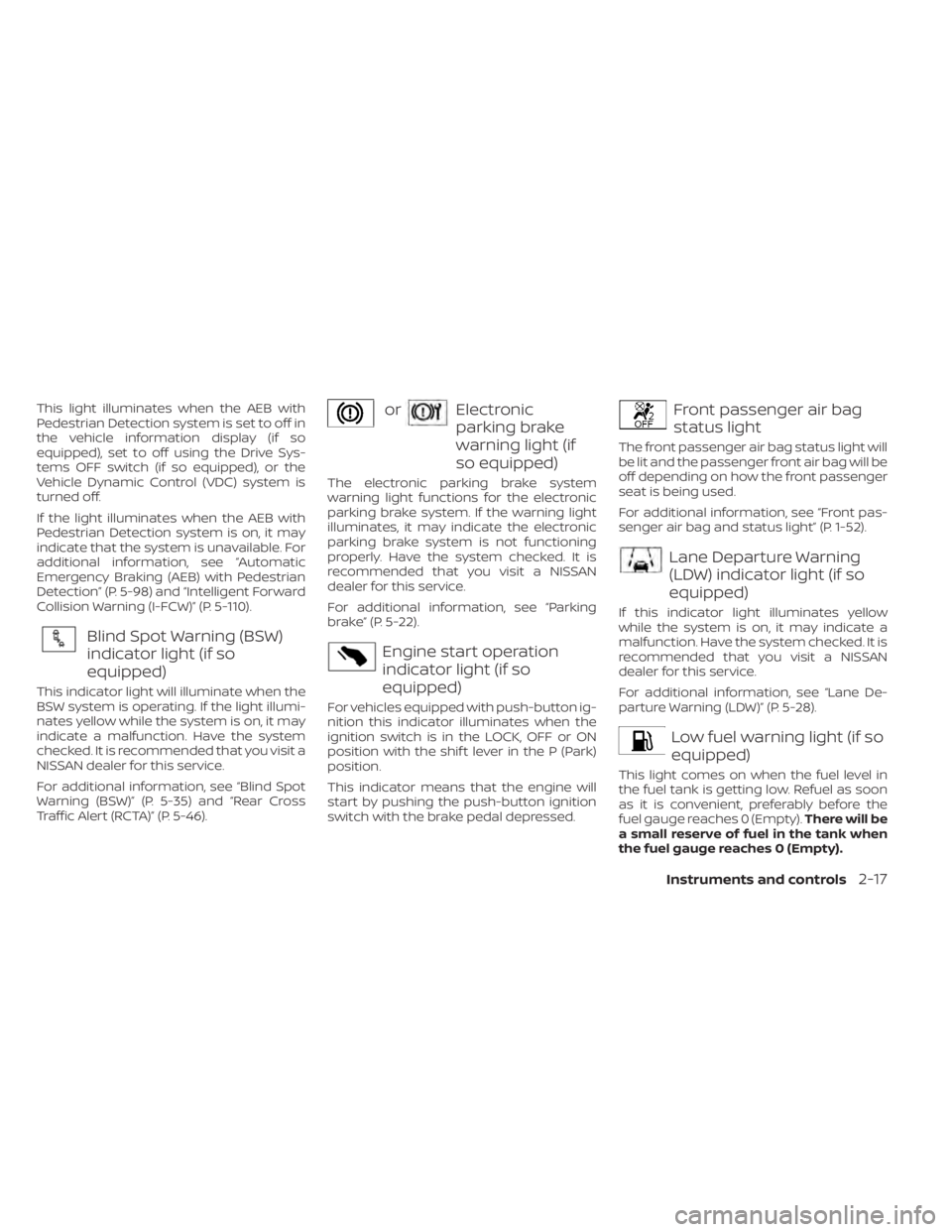
This light illuminates when the AEB with
Pedestrian Detection system is set to off in
the vehicle information display (if so
equipped), set to off using the Drive Sys-
tems OFF switch (if so equipped), or the
Vehicle Dynamic Control (VDC) system is
turned off.
If the light illuminates when the AEB with
Pedestrian Detection system is on, it may
indicate that the system is unavailable. For
additional information, see “Automatic
Emergency Braking (AEB) with Pedestrian
Detection” (P. 5-98) and “Intelligent Forward
Collision Warning (I-FCW)” (P. 5-110).
Blind Spot Warning (BSW)
indicator light (if so
equipped)
This indicator light will illuminate when the
BSW system is operating. If the light illumi-
nates yellow while the system is on, it may
indicate a malfunction. Have the system
checked. It is recommended that you visit a
NISSAN dealer for this service.
For additional information, see “Blind Spot
Warning (BSW)” (P. 5-35) and “Rear Cross
Traffic Alert (RCTA)” (P. 5-46).
orElectronic
parking brake
warning light (if
so equipped)
The electronic parking brake system
warning light functions for the electronic
parking brake system. If the warning light
illuminates, it may indicate the electronic
parking brake system is not functioning
properly. Have the system checked. It is
recommended that you visit a NISSAN
dealer for this service.
For additional information, see “Parking
brake” (P. 5-22).
Engine start operation
indicator light (if so
equipped)
For vehicles equipped with push-button ig-
nition this indicator illuminates when the
ignition switch is in the LOCK, OFF or ON
position with the shif t lever in the P (Park)
position.
This indicator means that the engine will
start by pushing the push-button ignition
switch with the brake pedal depressed.
Front passenger air bag
status light
The front passenger air bag status light will
be lit and the passenger front air bag will be
off depending on how the front passenger
seat is being used.
For additional information, see “Front pas-
senger air bag and status light” (P. 1-52).
Lane Departure Warning
(LDW) indicator light (if so
equipped)
If this indicator light illuminates yellow
while the system is on, it may indicate a
malfunction. Have the system checked. It is
recommended that you visit a NISSAN
dealer for this service.
For additional information, see “Lane De-
parture Warning (LDW)” (P. 5-28).
Low fuel warning light (if so
equipped)
This light comes on when the fuel level in
the fuel tank is getting low. Refuel as soon
as it is convenient, preferably before the
fuel gauge reaches 0 (Empty).There will be
a small reserve of fuel in the tank when
the fuel gauge reaches 0 (Empty).
Instruments and controls2-17
Page 109 of 558
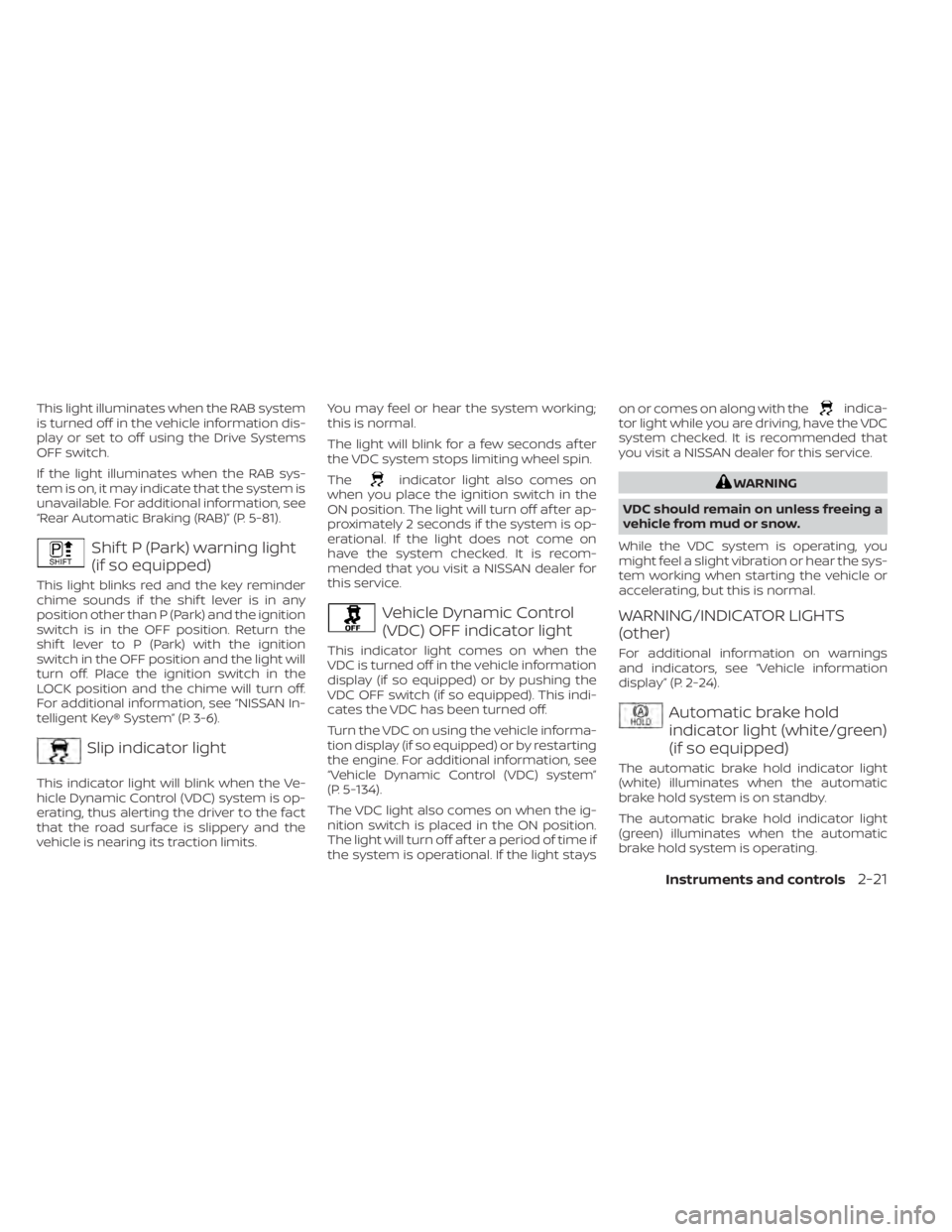
This light illuminates when the RAB system
is turned off in the vehicle information dis-
play or set to off using the Drive Systems
OFF switch.
If the light illuminates when the RAB sys-
tem is on, it may indicate that the system is
unavailable. For additional information, see
“Rear Automatic Braking (RAB)” (P. 5-81).
Shif t P (Park) warning light
(if so equipped)
This light blinks red and the key reminder
chime sounds if the shif t lever is in any
position other than P (Park) and the ignition
switch is in the OFF position. Return the
shif t lever to P (Park) with the ignition
switch in the OFF position and the light will
turn off. Place the ignition switch in the
LOCK position and the chime will turn off.
For additional information, see “NISSAN In-
telligent Key® System” (P. 3-6).
Slip indicator light
This indicator light will blink when the Ve-
hicle Dynamic Control (VDC) system is op-
erating, thus alerting the driver to the fact
that the road surface is slippery and the
vehicle is nearing its traction limits.You may feel or hear the system working;
this is normal.
The light will blink for a few seconds af ter
the VDC system stops limiting wheel spin.
The
indicator light also comes on
when you place the ignition switch in the
ON position. The light will turn off af ter ap-
proximately 2 seconds if the system is op-
erational. If the light does not come on
have the system checked. It is recom-
mended that you visit a NISSAN dealer for
this service.
Vehicle Dynamic Control
(VDC) OFF indicator light
This indicator light comes on when the
VDC is turned off in the vehicle information
display (if so equipped) or by pushing the
VDC OFF switch (if so equipped). This indi-
cates the VDC has been turned off.
Turn the VDC on using the vehicle informa-
tion display (if so equipped) or by restarting
the engine. For additional information, see
“Vehicle Dynamic Control (VDC) system”
(P. 5-134).
The VDC light also comes on when the ig-
nition switch is placed in the ON position.
The light will turn off af ter a period of time if
the system is operational. If the light stays on or comes on along with the
indica-
tor light while you are driving, have the VDC
system checked. It is recommended that
you visit a NISSAN dealer for this service.
WARNING
VDC should remain on unless freeing a
vehicle from mud or snow.
While the VDC system is operating, you
might feel a slight vibration or hear the sys-
tem working when starting the vehicle or
accelerating, but this is normal.
WARNING/INDICATOR LIGHTS
(other)
For additional information on warnings
and indicators, see “Vehicle information
display” (P. 2-24).
Automatic brake hold
indicator light (white/green)
(if so equipped)
The automatic brake hold indicator light
(white) illuminates when the automatic
brake hold system is on standby.
The automatic brake hold indicator light
(green) illuminates when the automatic
brake hold system is operating.
Instruments and controls2-21
Page 110 of 558
For additional information, see “Automatic
brake hold” (P. 5-25).
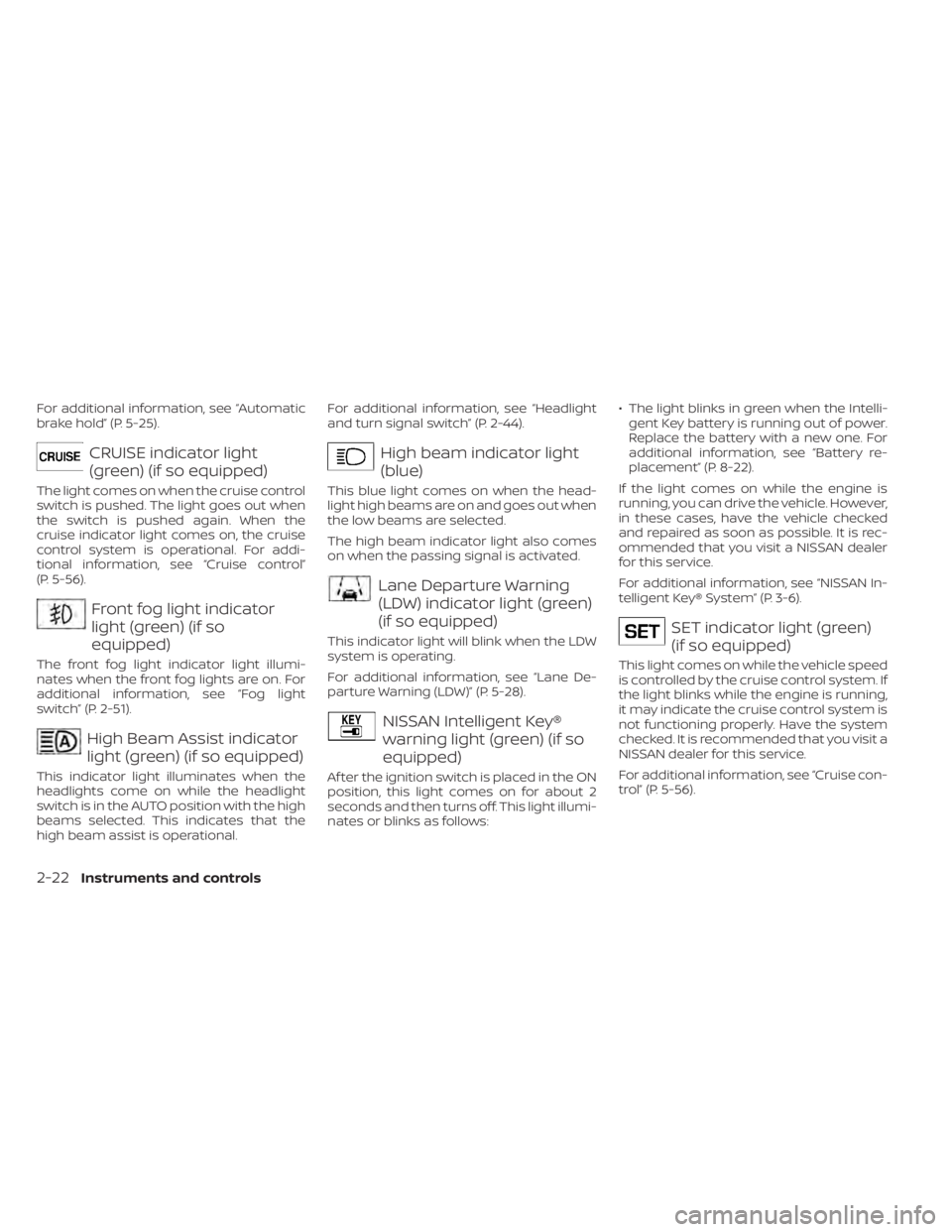
CRUISE indicator light
(green) (if so equipped)
The light comes on when the cruise control
switch is pushed. The light goes out when
the switch is pushed again. When the
cruise indicator light comes on, the cruise
control system is operational. For addi-
tional information, see “Cruise control”
(P. 5-56).
Front fog light indicator
light (green) (if so
equipped)
The front fog light indicator light illumi-
nates when the front fog lights are on. For
additional information, see “Fog light
switch” (P. 2-51).
High Beam Assist indicator
light (green) (if so equipped)
This indicator light illuminates when the
headlights come on while the headlight
switch is in the AUTO position with the high
beams selected. This indicates that the
high beam assist is operational.For additional information, see “Headlight
and turn signal switch” (P. 2-44).
High beam indicator light
(blue)
This blue light comes on when the head-
light high beams are on and goes out when
the low beams are selected.
The high beam indicator light also comes
on when the passing signal is activated.
Lane Departure Warning
(LDW) indicator light (green)
(if so equipped)
This indicator light will blink when the LDW
system is operating.
For additional information, see “Lane De-
parture Warning (LDW)” (P. 5-28).
NISSAN Intelligent Key®
warning light (green) (if so
equipped)
Af ter the ignition switch is placed in the ON
position, this light comes on for about 2
seconds and then turns off. This light illumi-
nates or blinks as follows:
• The light blinks in green when the Intelli-
gent Key battery is running out of power.
Replace the battery with a new one. For
additional information, see “Battery re-
placement” (P. 8-22).
If the light comes on while the engine is
running, you can drive the vehicle. However,
in these cases, have the vehicle checked
and repaired as soon as possible. It is rec-
ommended that you visit a NISSAN dealer
for this service.
For additional information, see “NISSAN In-
telligent Key® System” (P. 3-6).
SET indicator light (green)
(if so equipped)
This light comes on while the vehicle speed
is controlled by the cruise control system. If
the light blinks while the engine is running,
it may indicate the cruise control system is
not functioning properly. Have the system
checked. It is recommended that you visit a
NISSAN dealer for this service.
For additional information, see “Cruise con-
trol” (P. 5-56).
2-22Instruments and controls
Page 111 of 558
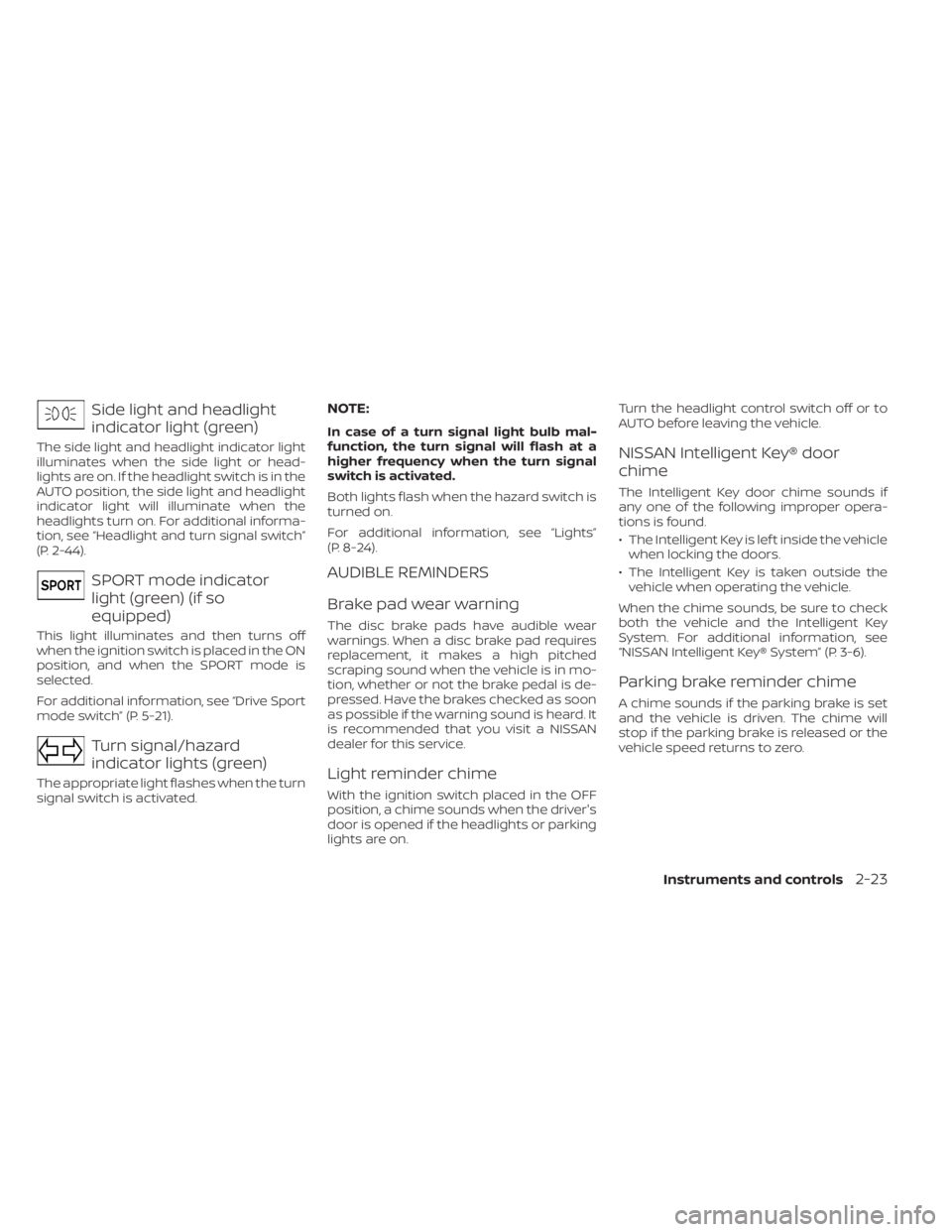
Side light and headlight
indicator light (green)
The side light and headlight indicator light
illuminates when the side light or head-
lights are on. If the headlight switch is in the
AUTO position, the side light and headlight
indicator light will illuminate when the
headlights turn on. For additional informa-
tion, see “Headlight and turn signal switch”
(P. 2-44).
SPORT mode indicator
light (green) (if so
equipped)
This light illuminates and then turns off
when the ignition switch is placed in the ON
position, and when the SPORT mode is
selected.
For additional information, see “Drive Sport
mode switch” (P. 5-21).
Turn signal/hazard
indicator lights (green)
The appropriate light flashes when the turn
signal switch is activated.
NOTE:
In case of a turn signal light bulb mal-
function, the turn signal will flash at a
higher frequency when the turn signal
switch is activated.
Both lights flash when the hazard switch is
turned on.
For additional information, see “Lights”
(P. 8-24).
AUDIBLE REMINDERS
Brake pad wear warning
The disc brake pads have audible wear
warnings. When a disc brake pad requires
replacement, it makes a high pitched
scraping sound when the vehicle is in mo-
tion, whether or not the brake pedal is de-
pressed. Have the brakes checked as soon
as possible if the warning sound is heard. It
is recommended that you visit a NISSAN
dealer for this service.
Light reminder chime
With the ignition switch placed in the OFF
position, a chime sounds when the driver's
door is opened if the headlights or parking
lights are on.Turn the headlight control switch off or to
AUTO before leaving the vehicle.
NISSAN Intelligent Key® door
chime
The Intelligent Key door chime sounds if
any one of the following improper opera-
tions is found.
• The Intelligent Key is lef t inside the vehicle
when locking the doors.
• The Intelligent Key is taken outside the vehicle when operating the vehicle.
When the chime sounds, be sure to check
both the vehicle and the Intelligent Key
System. For additional information, see
“NISSAN Intelligent Key® System” (P. 3-6).
Parking brake reminder chime
A chime sounds if the parking brake is set
and the vehicle is driven. The chime will
stop if the parking brake is released or the
vehicle speed returns to zero.
Instruments and controls2-23
Page 114 of 558
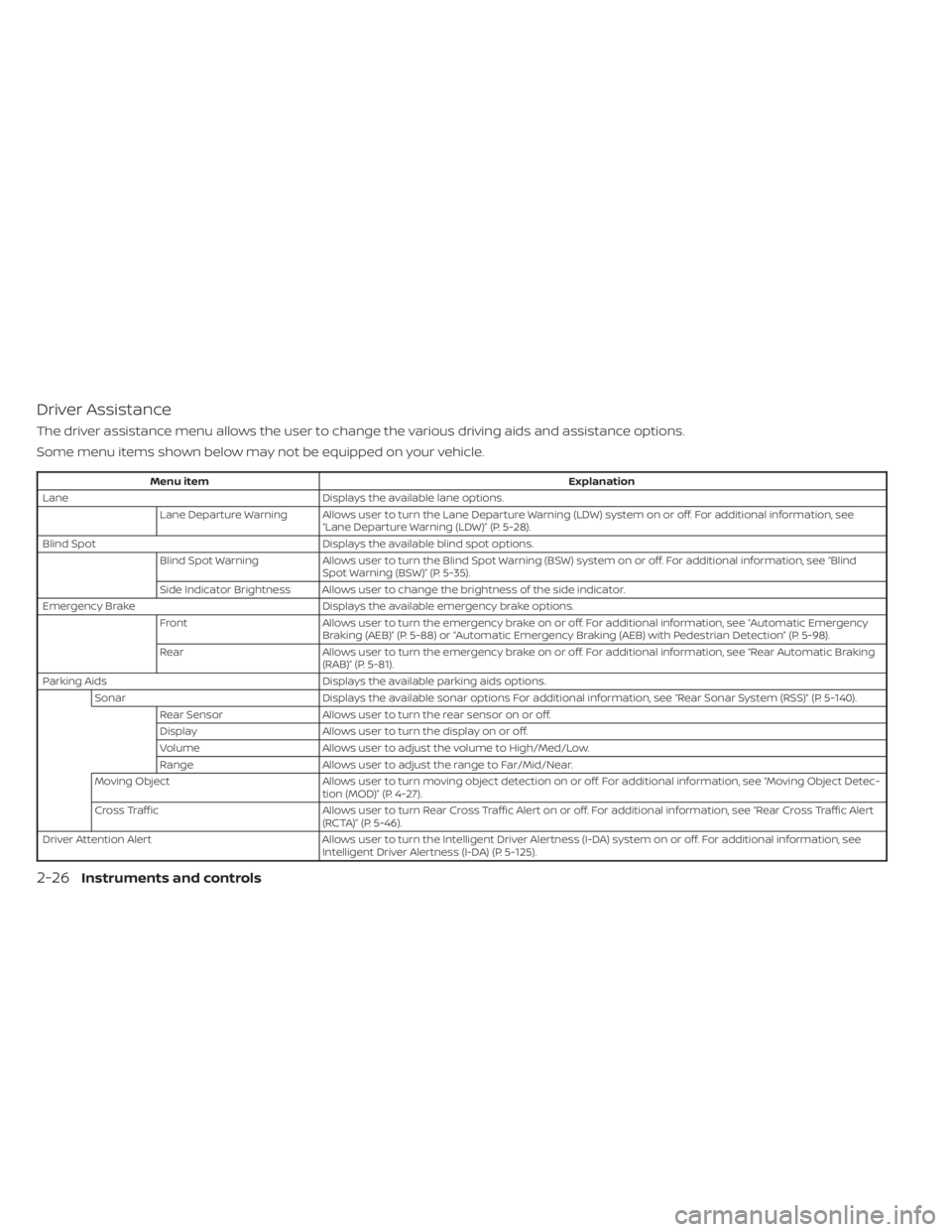
Driver Assistance
The driver assistance menu allows the user to change the various driving aids and assistance options.
Some menu items shown below may not be equipped on your vehicle.
Menu itemExplanation
Lane Displays the available lane options.
Lane Departure Warning Allows user to turn the Lane Departure Warning (LDW) system on or off. For additional information, see “Lane Departure Warning (LDW)” (P. 5-28).
Blind Spot Displays the available blind spot options.
Blind Spot Warning Allows user to turn the Blind Spot Warning (BSW) system on or off. For additional information, see “Blind
Spot Warning (BSW)” (P. 5-35).
Side Indicator Brightness Allows user to change the brightness of the side indicator.
Emergency Brake Displays the available emergency brake options.
Front Allows user to turn the emergency brake on or off. For additional information, see “Automatic Emergency
Braking (AEB)” (P. 5-88) or “Automatic Emergency Braking (AEB) with Pedestrian Detection” (P. 5-98).
Rear Allows user to turn the emergency brake on or off. For additional information, see “Rear Automatic Braking
(RAB)” (P. 5-81).
Parking Aids Displays the available parking aids options.
Sonar Displays the available sonar options For additional information, see “Rear Sonar System (RSS)” (P. 5-140).
Rear Sensor Allows user to turn the rear sensor on or off.
Display Allows user to turn the display on or off.
Volume Allows user to adjust the volume to High/Med/Low.
Range Allows user to adjust the range to Far/Mid/Near.
Moving Object Allows user to turn moving object detection on or off. For additional information, see “Moving Object Detec-
tion (MOD)” (P. 4-27).
Cross Traffic Allows user to turn Rear Cross Traffic Alert on or off. For additional information, see “Rear Cross Traffic Alert
(RCTA)” (P. 5-46).
Driver Attention Alert Allows user to turn the Intelligent Driver Alertness (I-DA) system on or off. For additional information, see
Intelligent Driver Alertness (I-DA) (P. 5-125).
2-26Instruments and controls
Page 115 of 558
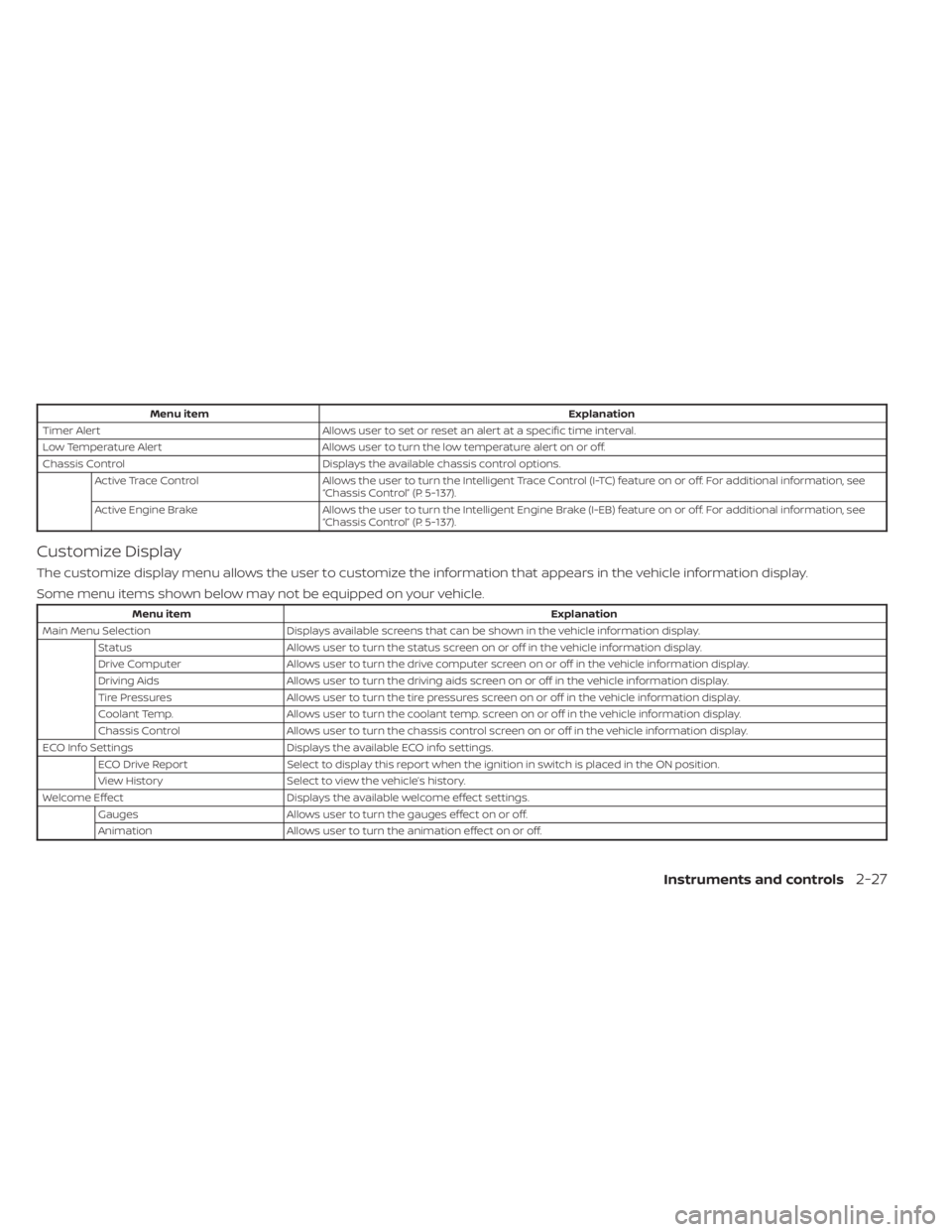
Menu itemExplanation
Timer Alert Allows user to set or reset an alert at a specific time interval.
Low Temperature Alert Allows user to turn the low temperature alert on or off.
Chassis Control Displays the available chassis control options.
Active Trace Control Allows the user to turn the Intelligent Trace Control (I-TC) feature on or off. For additional information, see
“Chassis Control” (P. 5-137).
Active Engine Brake Allows the user to turn the Intelligent Engine Brake (I-EB) feature on or off. For additional information, see
“Chassis Control” (P. 5-137).
Customize Display
The customize display menu allows the user to customize the information that appears in the vehicle information display.
Some menu items shown below may not be equipped on your vehicle.
Menu item Explanation
Main Menu Selection Displays available screens that can be shown in the vehicle information display.
Status Allows user to turn the status screen on or off in the vehicle information display.
Drive Computer Allows user to turn the drive computer screen on or off in the vehicle information display.
Driving Aids Allows user to turn the driving aids screen on or off in the vehicle information display.
Tire Pressures Allows user to turn the tire pressures screen on or off in the vehicle information display.
Coolant Temp. Allows user to turn the coolant temp. screen on or off in the vehicle information display.
Chassis Control Allows user to turn the chassis control screen on or off in the vehicle information display.
ECO Info Settings Displays the available ECO info settings.
ECO Drive Report Select to display this report when the ignition in switch is placed in the ON position.
View History Select to view the vehicle’s history.
Welcome Effect Displays the available welcome effect settings.
Gauges Allows user to turn the gauges effect on or off.
Animation Allows user to turn the animation effect on or off.
Instruments and controls2-27
Page 120 of 558
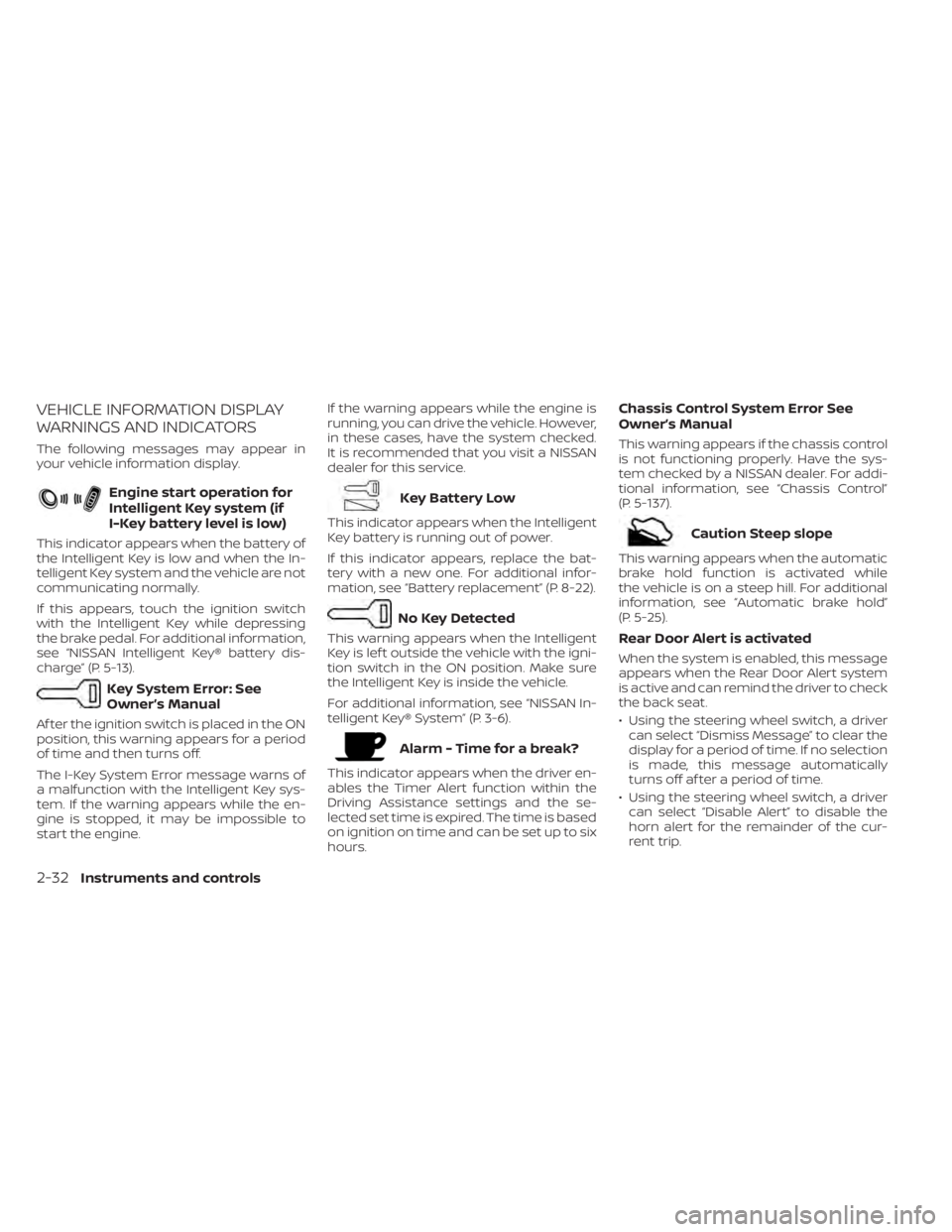
VEHICLE INFORMATION DISPLAY
WARNINGS AND INDICATORS
The following messages may appear in
your vehicle information display.
Engine start operation for
Intelligent Key system (if
I-Key battery level is low)
This indicator appears when the battery of
the Intelligent Key is low and when the In-
telligent Key system and the vehicle are not
communicating normally.
If this appears, touch the ignition switch
with the Intelligent Key while depressing
the brake pedal. For additional information,
see “NISSAN Intelligent Key® battery dis-
charge” (P. 5-13).
Key System Error: See
Owner’s Manual
Af ter the ignition switch is placed in the ON
position, this warning appears for a period
of time and then turns off.
The I-Key System Error message warns of
a malfunction with the Intelligent Key sys-
tem. If the warning appears while the en-
gine is stopped, it may be impossible to
start the engine.If the warning appears while the engine is
running, you can drive the vehicle. However,
in these cases, have the system checked.
It is recommended that you visit a NISSAN
dealer for this service.
Key Battery Low
This indicator appears when the Intelligent
Key battery is running out of power.
If this indicator appears, replace the bat-
tery with a new one. For additional infor-
mation, see “Battery replacement” (P. 8-22).
No Key Detected
This warning appears when the Intelligent
Key is lef t outside the vehicle with the igni-
tion switch in the ON position. Make sure
the Intelligent Key is inside the vehicle.
For additional information, see “NISSAN In-
telligent Key® System” (P. 3-6).
Alarm - Time for a break?
This indicator appears when the driver en-
ables the Timer Alert function within the
Driving Assistance settings and the se-
lected set time is expired. The time is based
on ignition on time and can be set up to six
hours.
Chassis Control System Error See
Owner’s Manual
This warning appears if the chassis control
is not functioning properly. Have the sys-
tem checked by a NISSAN dealer. For addi-
tional information, see “Chassis Control”
(P. 5-137).
Caution Steep slope
This warning appears when the automatic
brake hold function is activated while
the vehicle is on a steep hill. For additional
information, see “Automatic brake hold”
(P. 5-25).
Rear Door Alert is activated
When the system is enabled, this message
appears when the Rear Door Alert system
is active and can remind the driver to check
the back seat.
• Using the steering wheel switch, a driver
can select “Dismiss Message” to clear the
display for a period of time. If no selection
is made, this message automatically
turns off af ter a period of time.
• Using the steering wheel switch, a driver can select “Disable Alert” to disable the
horn alert for the remainder of the cur-
rent trip.
2-32Instruments and controls
Page 122 of 558
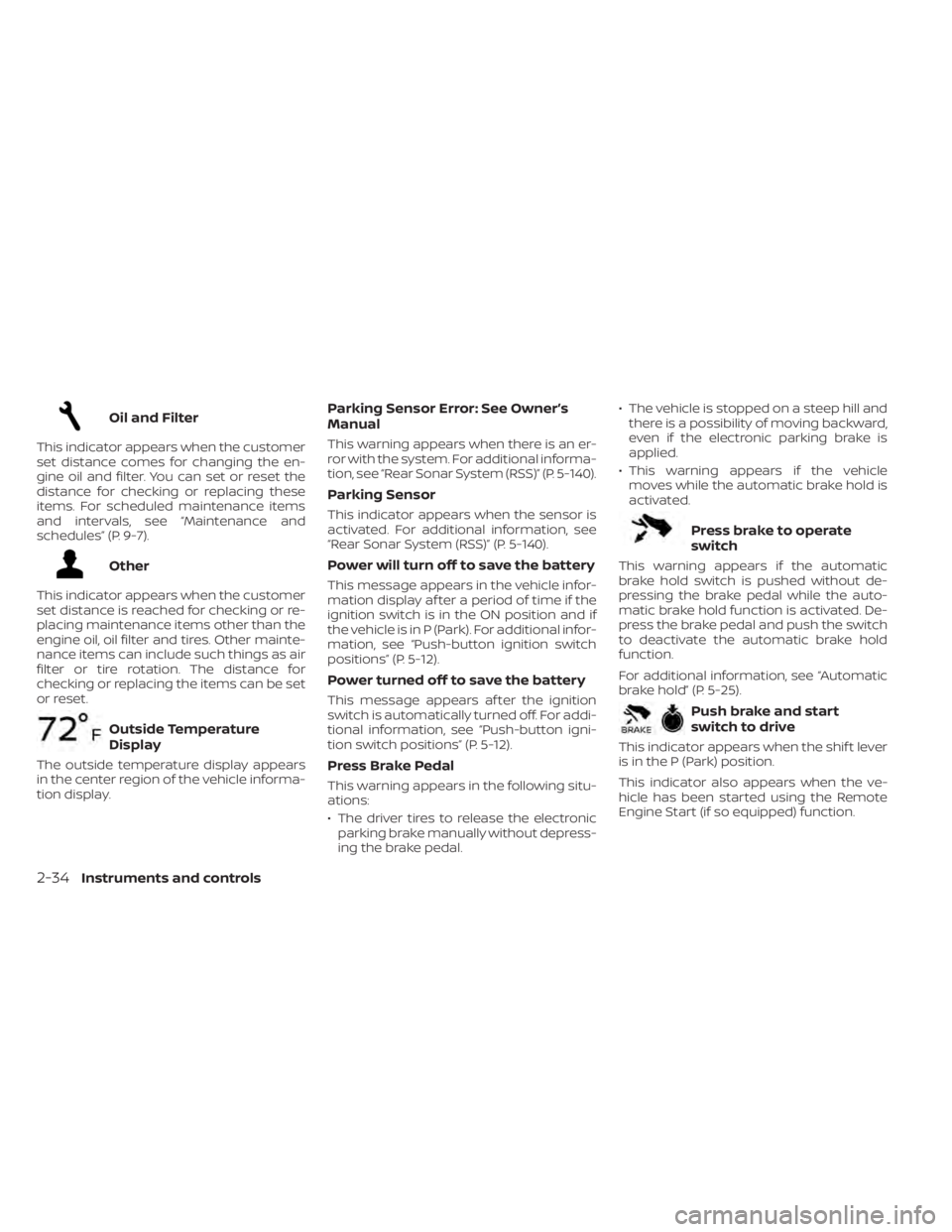
Oil and Filter
This indicator appears when the customer
set distance comes for changing the en-
gine oil and filter. You can set or reset the
distance for checking or replacing these
items. For scheduled maintenance items
and intervals, see “Maintenance and
schedules” (P. 9-7).
Other
This indicator appears when the customer
set distance is reached for checking or re-
placing maintenance items other than the
engine oil, oil filter and tires. Other mainte-
nance items can include such things as air
filter or tire rotation. The distance for
checking or replacing the items can be set
or reset.
Outside Temperature
Display
The outside temperature display appears
in the center region of the vehicle informa-
tion display.
Parking Sensor Error: See Owner’s
Manual
This warning appears when there is an er-
ror with the system. For additional informa-
tion, see “Rear Sonar System (RSS)” (P. 5-140).
Parking Sensor
This indicator appears when the sensor is
activated. For additional information, see
“Rear Sonar System (RSS)” (P. 5-140).
Power will turn off to save the battery
This message appears in the vehicle infor-
mation display af ter a period of time if the
ignition switch is in the ON position and if
the vehicle is in P (Park). For additional infor-
mation, see “Push-button ignition switch
positions” (P. 5-12).
Power turned off to save the battery
This message appears af ter the ignition
switch is automatically turned off. For addi-
tional information, see “Push-button igni-
tion switch positions” (P. 5-12).
Press Brake Pedal
This warning appears in the following situ-
ations:
• The driver tires to release the electronicparking brake manually without depress-
ing the brake pedal. • The vehicle is stopped on a steep hill and
there is a possibility of moving backward,
even if the electronic parking brake is
applied.
• This warning appears if the vehicle moves while the automatic brake hold is
activated.
Press brake to operate
switch
This warning appears if the automatic
brake hold switch is pushed without de-
pressing the brake pedal while the auto-
matic brake hold function is activated. De-
press the brake pedal and push the switch
to deactivate the automatic brake hold
function.
For additional information, see “Automatic
brake hold” (P. 5-25).
Push brake and start
switch to drive
This indicator appears when the shif t lever
is in the P (Park) position.
This indicator also appears when the ve-
hicle has been started using the Remote
Engine Start (if so equipped) function.
2-34Instruments and controls
Page 123 of 558
This indicator means that the engine will
start by pushing the ignition switch with
the brake pedal depressed. You can start
the engine from any position of the ignition
switch.
Rear seat belt reminder
This warning appears for 65 seconds af ter
the ignition is placed in the ON position and
the engine is started.
This warning message shows the status
of the three rear seat belts. When one of
the rear seat belts are buckled, the corre-
sponding rear seat belt indicator will ap-
pear white. When one of the rear seat belts
are unbuckled, the corresponding rear seat
belt indicator will appear red.
Af ter a change in buckle status, a chime will
sound and the warning will appear for an-
other 65 seconds.
Release Parking Brake
This warning appears in the message area
of the vehicle information display when
the parking brake is set and the vehicle is
driven.
Reminder: Turn OFF
Headlights
This warning appears when the headlights
are lef t in the ON position when exiting the
vehicle. Place the headlight switch in the
OFF (if so equipped) or AUTO position. For
additional information, see “Headlight and
turn signal switch” (P. 2-44).
Shif t to Park
This warning appears when the ignition
switch is in the OFF position and the shif t
lever is not in the P (Park) position. Also, a
chime sounds when the ignition switch is
in the OFF position.
If this warning appears, move the shif t lever
to the P (Park) position and start the engine.
Shipping Mode On Push Storage Fuse
This warning may appear if the extended
storage switch is not pushed in. When this
warning appears, push in the extended
storage switch to turn off the warning. For
additional information, see “Extended stor-
age switch” (P. 2-60).
Steep slope Apply foot
brake
This warning appears if the “Caution Steep
slope” warning has appeared over about 3
minutes. Then the parking brake will auto-
matically be applied and the brake force of
the automatic brake hold will be released,
and the vehicle may move or roll away un-
expectedly. Apply the foot brake to stop the
vehicle from moving.
For additional information, see “Automatic
brake hold” (P. 5-25).
Steering lock release
malfunction indicator
This indicator appears when the steering
lock cannot be released.
If this indicator appears, push the ignition
switch while lightly turning the steering
wheel right and lef t.
Tire
This indicator appears when the customer
set distance is reached for replacing tires.
You can set or reset the distance for replac-
ing tires.
Instruments and controls2-35
Page 137 of 558
If the ambient image sensor is damaged
due to an accident, it is recommended that
you visit a NISSAN dealer.
Battery saver system
The battery saver system automatically
turns off the ignition af ter a period of time
when the ignition switch is lef t in the ON
position.
The battery saver system automatically
turns off the following lights af ter a period
of time when the ignition switch is placed in
the OFF position:
• Headlights, when the headlight switch isin the
orposition
• Interior lights, when lef t in the ON position
CAUTION
Even though the battery saver feature
automatically turns off the headlights
af ter a period of time, you should turn
the headlight switch to the OFF posi-
tion (if so equipped) when the engine is
not running to avoid discharging the
vehicle battery.
DAYTIME RUNNING LIGHTS (DRL)
SYSTEM (Type A) (if so equipped)
The DRL portion of the fog light assembly
automatically illuminates when the engine
is started with the parking brake released.
The DRL operate with the headlight switch
in the OFF or AUTO position. Turn the head-
light switch to the
position for full
illumination when driving at night. (The DRL
will turn off.)
If the parking brake is applied before the
engine is started, the DRL do not illuminate.
The DRL illuminate once the parking brake
is released. The DRL will remain on until the
ignition switch is placed in the OFF position.
It is necessary at dusk to turn the headlight
switch on for interior controls and switches
to illuminate, as those remain off while the
switch is in the OFF or AUTO position.
WARNING
When the DRL system is active, tail
lights on your vehicle are not on. It is
necessary at dusk to turn on your
headlights. Failure to do so could cause
an accident injuring yourself and
others.
LED DAYTIME RUNNING LIGHTS
(DRL) SYSTEM (Type B) (if so
equipped)
The LED DRL portion of the fog light assem-
bly automatically illuminates when the
engine is started with the parking brake
released. The LED DRL operate with the
headlight switch in the OFF or AUTO posi-
tion. Turn the headlight switch to the
position for full illumination when driving at
night. (The LED DRL will turn off.)
If the parking brake is applied before the
engine is started, the LED DRL do not illumi-
nate. The LED DRL illuminate once the
parking brake is released. The LED DRL will
remain on until the ignition switch is placed
in the OFF position.
It is necessary at dusk to turn the headlight
switch on for interior controls and switches
to illuminate, as those remain off while the
switch is in the OFF or AUTO position.
WARNING
When the LED DRL system is active, tail
lights on your vehicle are not on. It is
necessary at dusk to turn on your head-
lights. Failure to do so could cause an
accident injuring yourself and others.
Instruments and controls2-49