brake NISSAN KICKS 2023 Service Manual
[x] Cancel search | Manufacturer: NISSAN, Model Year: 2023, Model line: KICKS, Model: NISSAN KICKS 2023Pages: 558, PDF Size: 6.25 MB
Page 298 of 558
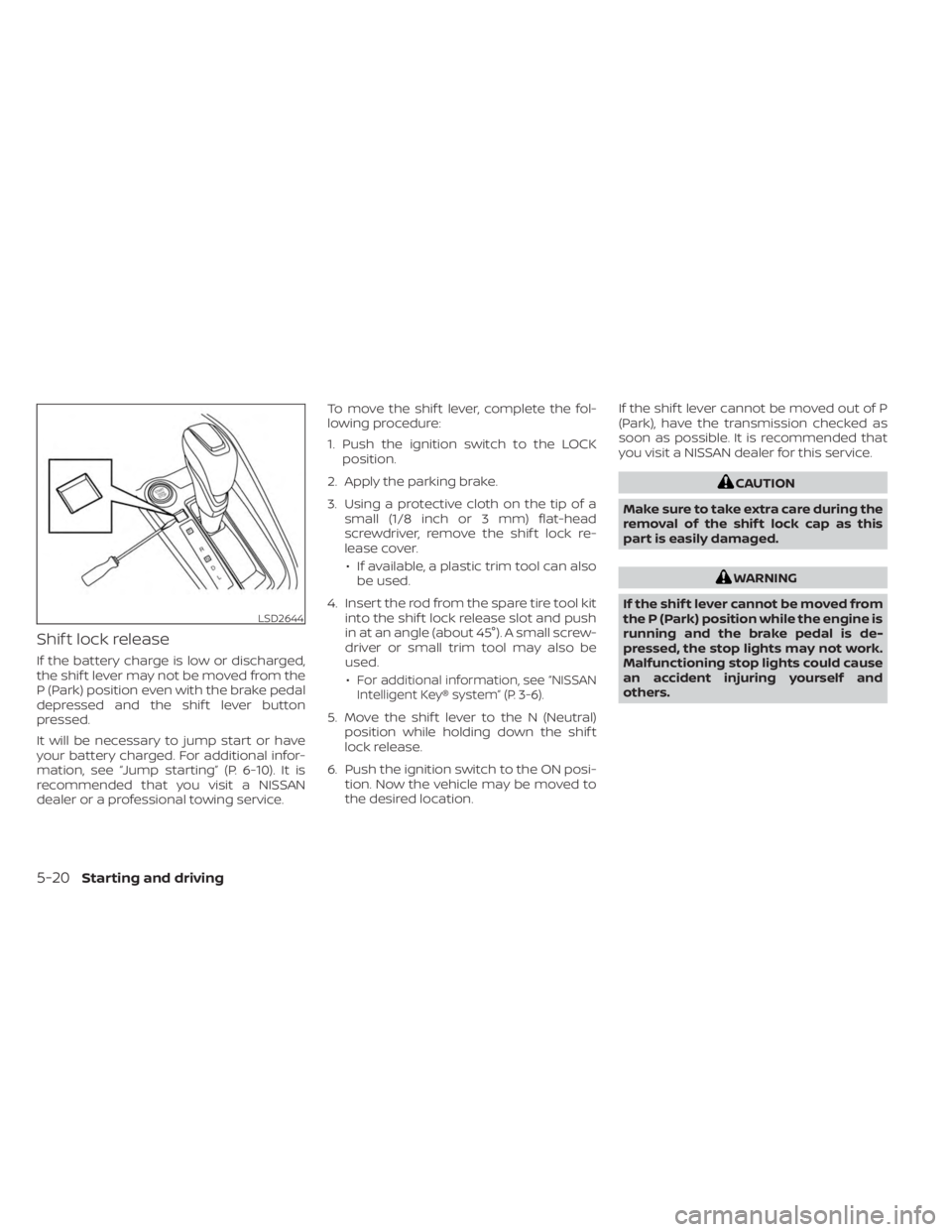
Shif t lock release
If the battery charge is low or discharged,
the shif t lever may not be moved from the
P (Park) position even with the brake pedal
depressed and the shif t lever button
pressed.
It will be necessary to jump start or have
your battery charged. For additional infor-
mation, see “Jump starting” (P. 6-10). It is
recommended that you visit a NISSAN
dealer or a professional towing service.To move the shif t lever, complete the fol-
lowing procedure:
1. Push the ignition switch to the LOCK
position.
2. Apply the parking brake.
3. Using a protective cloth on the tip of a small (1/8 inch or 3 mm) flat-head
screwdriver, remove the shif t lock re-
lease cover.
• If available, a plastic trim tool can also be used.
4. Insert the rod from the spare tire tool kit into the shif t lock release slot and push
in at an angle (about 45°). A small screw-
driver or small trim tool may also be
used.
•
For additional information, see “NISSAN
Intelligent Key® system” (P. 3-6).
5. Move the shif t lever to the N (Neutral) position while holding down the shif t
lock release.
6. Push the ignition switch to the ON posi- tion. Now the vehicle may be moved to
the desired location. If the shif t lever cannot be moved out of P
(Park), have the transmission checked as
soon as possible. It is recommended that
you visit a NISSAN dealer for this service.
CAUTION
Make sure to take extra care during the
removal of the shif t lock cap as this
part is easily damaged.
WARNING
If the shif t lever cannot be moved from
the P (Park) position while the engine is
running and the brake pedal is de-
pressed, the stop lights may not work.
Malfunctioning stop lights could cause
an accident injuring yourself and
others.
LSD2644
5-20Starting and driving
Page 300 of 558
its normal operating condition. If it does
not return to its normal operating condi-
tion, have the transmission checked and
repaired, if necessary. It is recommended
that you visit a NISSAN dealer for this
service.
WARNING
When the high fluid temperature pro-
tection mode or fail-safe operation oc-
curs, vehicle speed may be gradually
reduced. The reduced speed may be
lower than other traffic, which could in-
crease the chance of a collision. Be es-
pecially careful when driving. If neces-
sary, pull to the side of the road at a safe
place and allow the transmission to re-
turn to normal operation, or have it re-
paired if necessary.
WARNING
• Be sure the parking brake is fully re-
leased before driving. Failure to do so
can cause brake failure and lead to
an accident.
• Do not release the parking brake
from outside the vehicle.
• Do not use the shif t lever in place of
the parking brake. When parking, be
sure the parking brake is fully
engaged.
• To help avoid risk of injury or death
through unintended operation of the
vehicle and/or its systems, do not
leave children, people who require
the assistance of others or pets unat-
tended in your vehicle. Additionally,
the temperature inside a closed ve-
hicle on a warm day can quickly be-
come high enough to cause a signifi-
cant risk of injury or death to people
and pets.
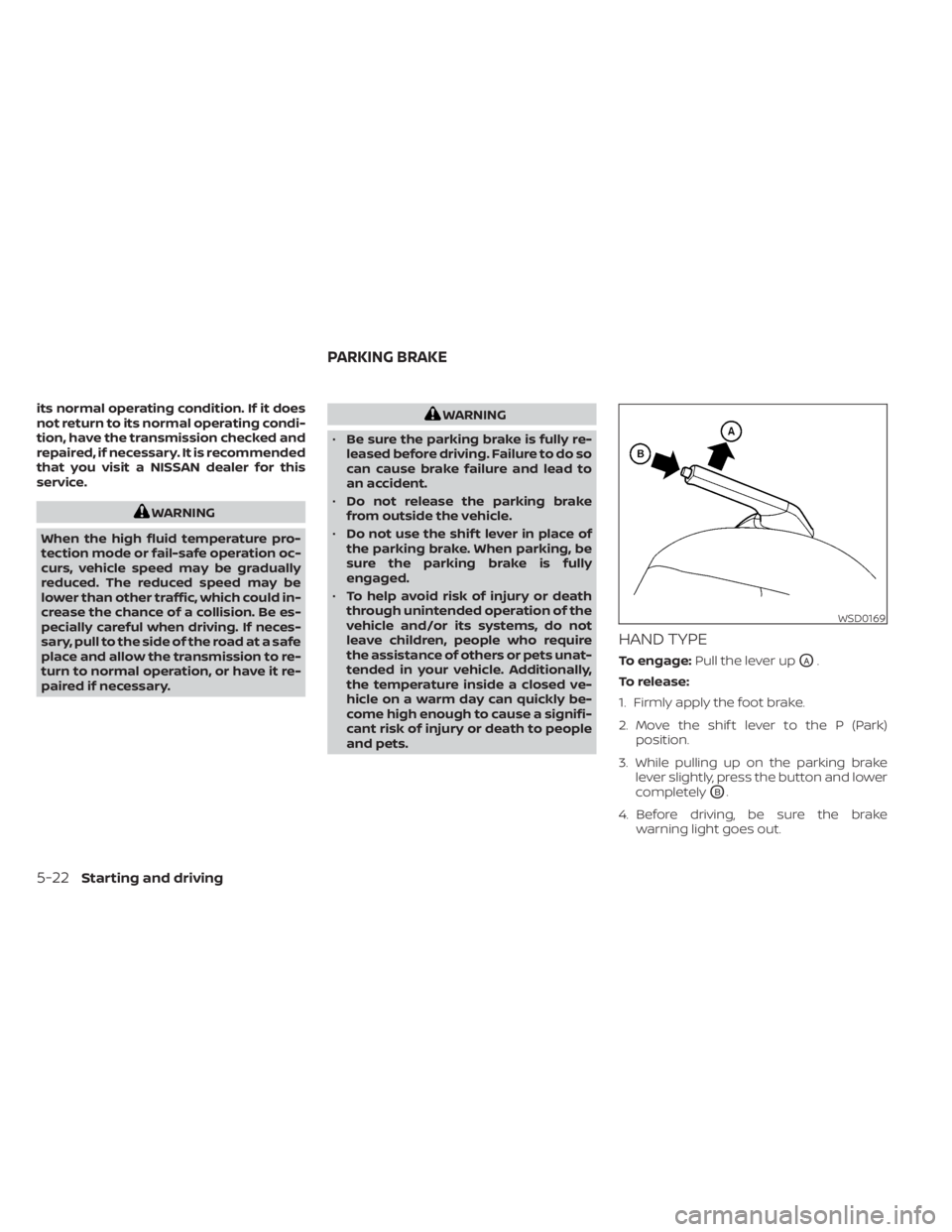
HAND TYPE
To engage: Pull the lever upOA.
To release:
1. Firmly apply the foot brake.
2. Move the shif t lever to the P (Park) position.
3. While pulling up on the parking brake lever slightly, press the button and lower
completely
OB.
4. Before driving, be sure the brake warning light goes out.
WSD0169
PARKING BRAKE
5-22Starting and driving
Page 301 of 558
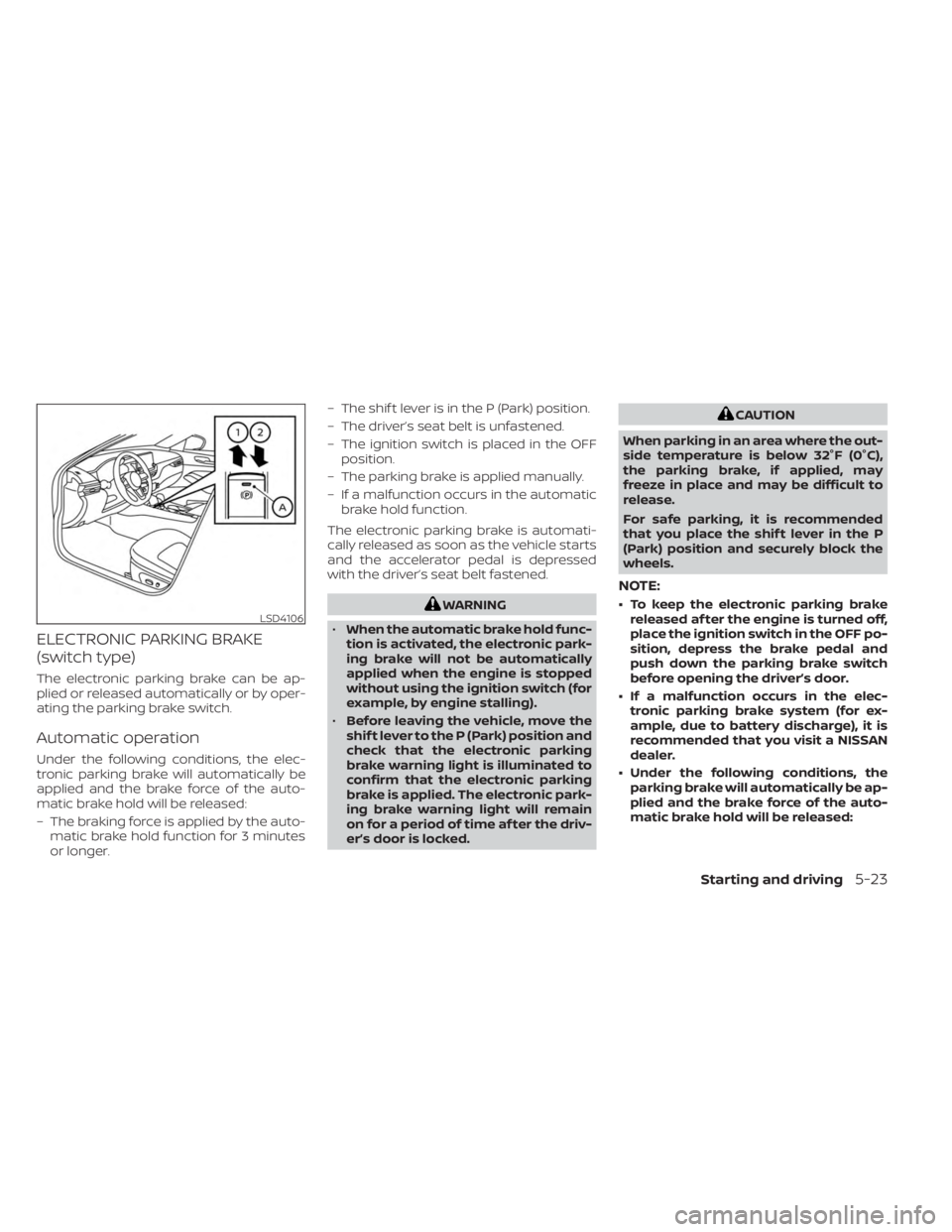
ELECTRONIC PARKING BRAKE
(switch type)
The electronic parking brake can be ap-
plied or released automatically or by oper-
ating the parking brake switch.
Automatic operation
Under the following conditions, the elec-
tronic parking brake will automatically be
applied and the brake force of the auto-
matic brake hold will be released:
– The braking force is applied by the auto-matic brake hold function for 3 minutes
or longer. – The shif t lever is in the P (Park) position.
– The driver’s seat belt is unfastened.
– The ignition switch is placed in the OFF
position.
– The parking brake is applied manually.
– If a malfunction occurs in the automatic brake hold function.
The electronic parking brake is automati-
cally released as soon as the vehicle starts
and the accelerator pedal is depressed
with the driver’s seat belt fastened.
WARNING
• When the automatic brake hold func-
tion is activated, the electronic park-
ing brake will not be automatically
applied when the engine is stopped
without using the ignition switch (for
example, by engine stalling).
• Before leaving the vehicle, move the
shif t lever to the P (Park) position and
check that the electronic parking
brake warning light is illuminated to
confirm that the electronic parking
brake is applied. The electronic park-
ing brake warning light will remain
on for a period of time af ter the driv-
er’s door is locked.
CAUTION
When parking in an area where the out-
side temperature is below 32°F (0°C),
the parking brake, if applied, may
freeze in place and may be difficult to
release.
For safe parking, it is recommended
that you place the shif t lever in the P
(Park) position and securely block the
wheels.
NOTE:
• To keep the electronic parking brake released af ter the engine is turned off,
place the ignition switch in the OFF po-
sition, depress the brake pedal and
push down the parking brake switch
before opening the driver’s door.
• If a malfunction occurs in the elec- tronic parking brake system (for ex-
ample, due to battery discharge), it is
recommended that you visit a NISSAN
dealer.
• Under the following conditions, the parking brake will automatically be ap-
plied and the brake force of the auto-
matic brake hold will be released:LSD4106
Starting and driving5-23
Page 302 of 558
– The braking force is applied by theautomatic brake hold function for
3 minutes or longer.
– The shif t lever is in the P (Park) position.
– The driver’s seat belt is unfastened.
– The ignition switch is placed in the OFF position.
–
The parking brake is applied manually.– If a malfunction occurs in the auto- matic brake hold function.
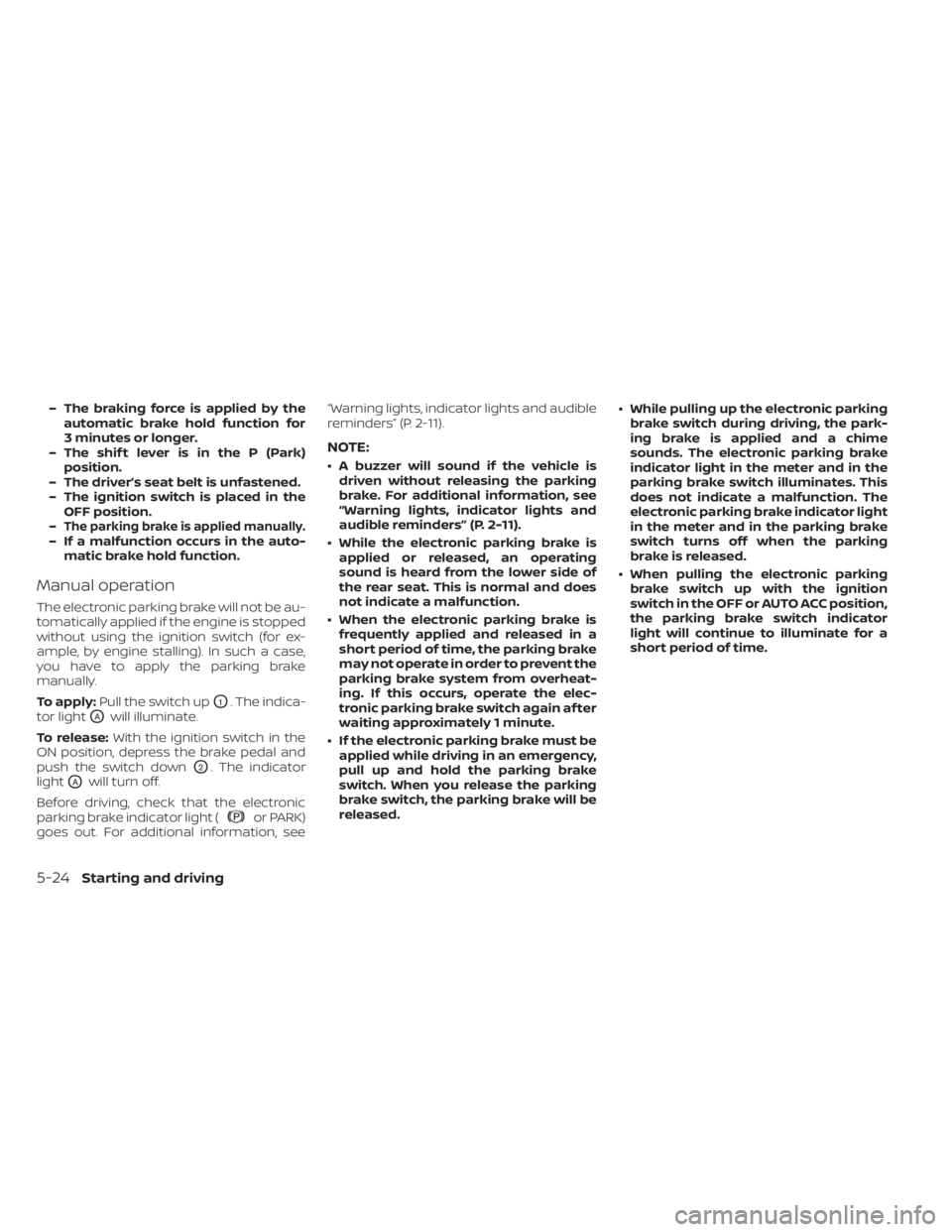
Manual operation
The electronic parking brake will not be au-
tomatically applied if the engine is stopped
without using the ignition switch (for ex-
ample, by engine stalling). In such a case,
you have to apply the parking brake
manually.
To apply: Pull the switch up
O1. The indica-
tor light
OAwill illuminate.
To release: With the ignition switch in the
ON position, depress the brake pedal and
push the switch down
O2. The indicator
light
OAwill turn off.
Before driving, check that the electronic
parking brake indicator light (
or PARK)
goes out. For additional information, see “Warning lights, indicator lights and audible
reminders” (P. 2-11).
NOTE:
• A buzzer will sound if the vehicle is
driven without releasing the parking
brake. For additional information, see
“Warning lights, indicator lights and
audible reminders” (P. 2-11).
• While the electronic parking brake is applied or released, an operating
sound is heard from the lower side of
the rear seat. This is normal and does
not indicate a malfunction.
• When the electronic parking brake is frequently applied and released in a
short period of time, the parking brake
may not operate in order to prevent the
parking brake system from overheat-
ing. If this occurs, operate the elec-
tronic parking brake switch again af ter
waiting approximately 1 minute.
• If the electronic parking brake must be applied while driving in an emergency,
pull up and hold the parking brake
switch. When you release the parking
brake switch, the parking brake will be
released. • While pulling up the electronic parking
brake switch during driving, the park-
ing brake is applied and a chime
sounds. The electronic parking brake
indicator light in the meter and in the
parking brake switch illuminates. This
does not indicate a malfunction. The
electronic parking brake indicator light
in the meter and in the parking brake
switch turns off when the parking
brake is released.
• When pulling the electronic parking brake switch up with the ignition
switch in the OFF or AUTO ACC position,
the parking brake switch indicator
light will continue to illuminate for a
short period of time.
5-24Starting and driving
Page 303 of 558
The automatic brake hold function main-
tains the braking force without the driver
having to depress the brake pedal when
the vehicle is stopped at a traffic light or
intersection. As soon as the driver de-
presses the accelerator pedal again, the
automatic brake hold function is deacti-
vated and the braking force is released. The
operating status of the automatic brake
hold can be displayed on the vehicle infor-
mation display. For additional information,
see “Vehicle information display” (P. 2-24).
WARNING
• The automatic brake hold function is
not designed to hold the vehicle on a
steep hill or slippery road. Never use
the automatic brake hold when the
vehicle is stopped on a steep hill or
slippery road. Failure to do so may
cause the vehicle to move.
• The automatic brake hold warning
may appear in the vehicle informa-
tion display to request that the driver
retake control by depressing the
brake pedal •
When the automatic brake hold func-
tion is activated but fails to maintain
the vehicle at a standstill, depress the
brake pedal to stop the vehicle. If the
vehicle unexpectedly moves due to
outside conditions, the chime may
sound and automatic brake hold
warning may illuminate in the vehicle
information display.
• Be sure to deactivate the automatic
brake hold function when using a car
wash or towing your vehicle.
• Make sure to place the shif t lever in
the P (Park) position and apply the
parking brake when parking your ve-
hicle, entering or exiting the vehicle,
or loading luggage. Failure to do so
could cause the vehicle to move or
roll away unexpectedly and result in
serious personal injury or property
damage. •
If any of the following conditions
occur, the automatic brake hold
function may not function. Have the
system checked promptly. It is rec-
ommended that you visit a NISSAN
dealer for this service. Failure to op-
erate the vehicle in accordance with
these conditions could cause the ve-
hicle to move or roll away unexpect-
edly and result in serious personal in-
jury or property damage.
– A warning message appears in the
vehicle information display.
– The indicator light on the auto-
matic brake hold switch does not
illuminate when the switch is
pushed.
• The automatic brake hold function
will not be activated if the Slip indica-
tor light, electronic parking brake
warning light or master warning light
illuminate and the chassis control
system fault message appears in the
vehicle information display.
•
To maintain the braking force to keep
the vehicle to a standstill, a noise may
be heard. This is not a malfunction.
AUTOMATIC BRAKE HOLD (if so
equipped)
Starting and driving5-25
Page 304 of 558
HOW TO ACTIVATE/DEACTIVATE
THE AUTOMATIC BRAKE HOLD
FUNCTION
For additional information on activating
and deactivating the automatic brake hold
function, refer to the instructions outlined
in this section.
How to activate the automatic
brake hold function
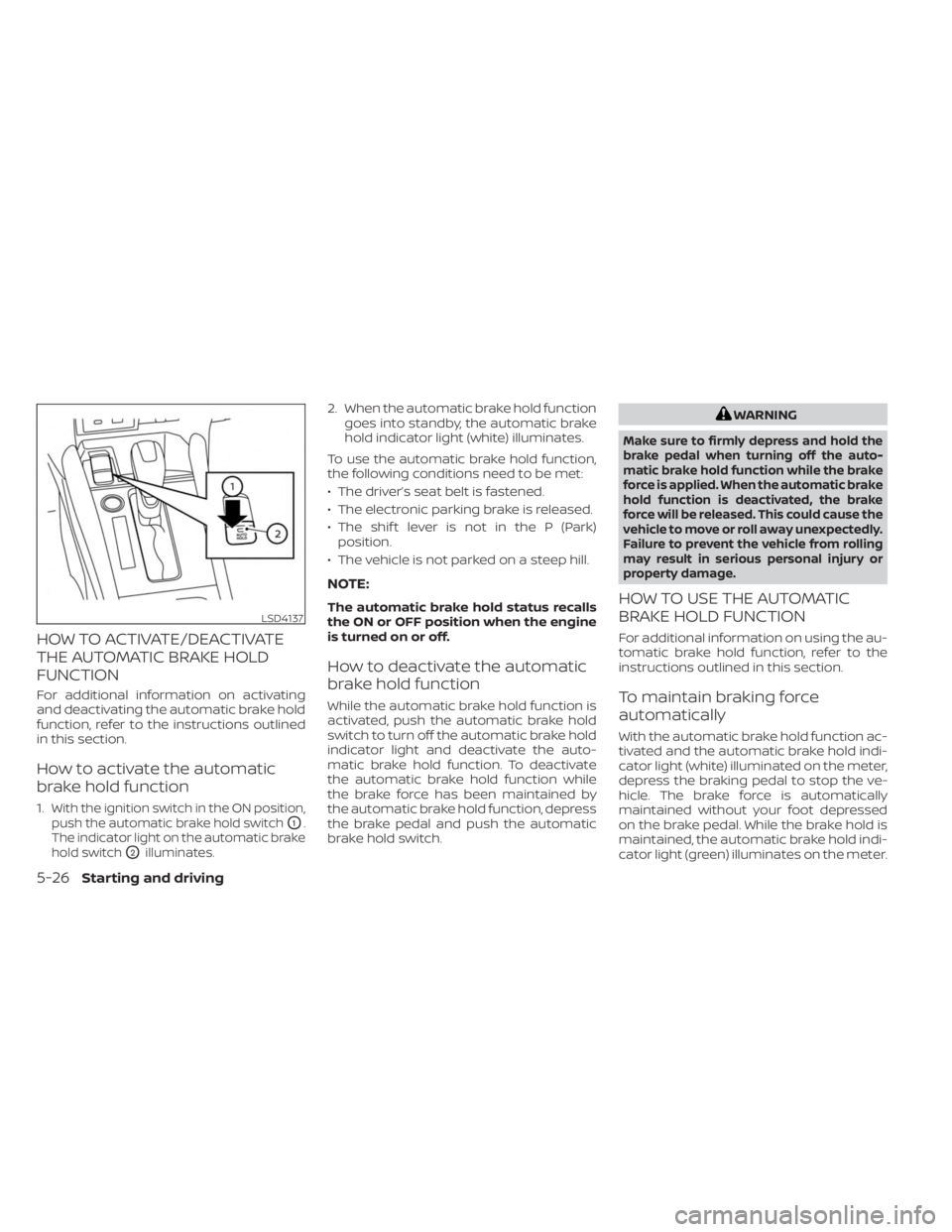
1.With the ignition switch in the ON position,
push the automatic brake hold switch
O1.
The indicator light on the automatic brake
hold switch
O2illuminates.
2. When the automatic brake hold function goes into standby, the automatic brake
hold indicator light (white) illuminates.
To use the automatic brake hold function,
the following conditions need to be met:
• The driver’s seat belt is fastened.
• The electronic parking brake is released.
• The shif t lever is not in the P (Park) position.
• The vehicle is not parked on a steep hill.
NOTE:
The automatic brake hold status recalls
the ON or OFF position when the engine
is turned on or off.
How to deactivate the automatic
brake hold function
While the automatic brake hold function is
activated, push the automatic brake hold
switch to turn off the automatic brake hold
indicator light and deactivate the auto-
matic brake hold function. To deactivate
the automatic brake hold function while
the brake force has been maintained by
the automatic brake hold function, depress
the brake pedal and push the automatic
brake hold switch.
WARNING
Make sure to firmly depress and hold the
brake pedal when turning off the auto-
matic brake hold function while the brake
force is applied. When the automatic brake
hold function is deactivated, the brake
force will be released. This could cause the
vehicle to move or roll away unexpectedly.
Failure to prevent the vehicle from rolling
may result in serious personal injury or
property damage.
HOW TO USE THE AUTOMATIC
BRAKE HOLD FUNCTION
For additional information on using the au-
tomatic brake hold function, refer to the
instructions outlined in this section.
To maintain braking force
automatically
With the automatic brake hold function ac-
tivated and the automatic brake hold indi-
cator light (white) illuminated on the meter,
depress the braking pedal to stop the ve-
hicle. The brake force is automatically
maintained without your foot depressed
on the brake pedal. While the brake hold is
maintained, the automatic brake hold indi-
cator light (green) illuminates on the meter.
LSD4137
5-26Starting and driving
Page 305 of 558
To start the vehicle from a
standstill
With the shif t lever not in the P (Park) or N
(Neutral) position, depress the accelerator
pedal while the brake force is maintained.
The brake force will automatically be re-
leased to restart the vehicle.
The automatic brake hold indicator light
(white) illuminates and the automatic
brake hold returns to standby.
Parking
When the shif t lever is in the P (Park) posi-
tion with the brake force maintained by the
automatic brake hold function, the parking
brake will automatically be applied and the
brake force of the automatic brake hold will
be released. The automatic brake hold in-
dicator light turns off. When the electronic
parking brake is applied with the brake
force maintained by the automatic brake
hold function, the brake force of the auto-
matic brake hold will be released. The au-
tomatic brake hold indicator light turns off.
NOTE:
• Under the following conditions, theelectronic parking brake will automati-
cally be applied and the brake force of
the automatic brake hold will be
released:– The braking force is applied by the automatic brake hold function for
3 minutes or longer.
– The shif t lever is in the P (Park) position.
– The driver's seat belt is unfastened.
– The ignition switch is placed in the OFF position.
–
The parking brake is applied manually.– If a malfunction occurs in the auto- matic brake hold function.
• When the vehicle stops, but the brake force is not automatically applied, de-
press the brake pedal firmly until the
automatic brake hold indicator light
(green) illuminates.Automatic brake hold function
display
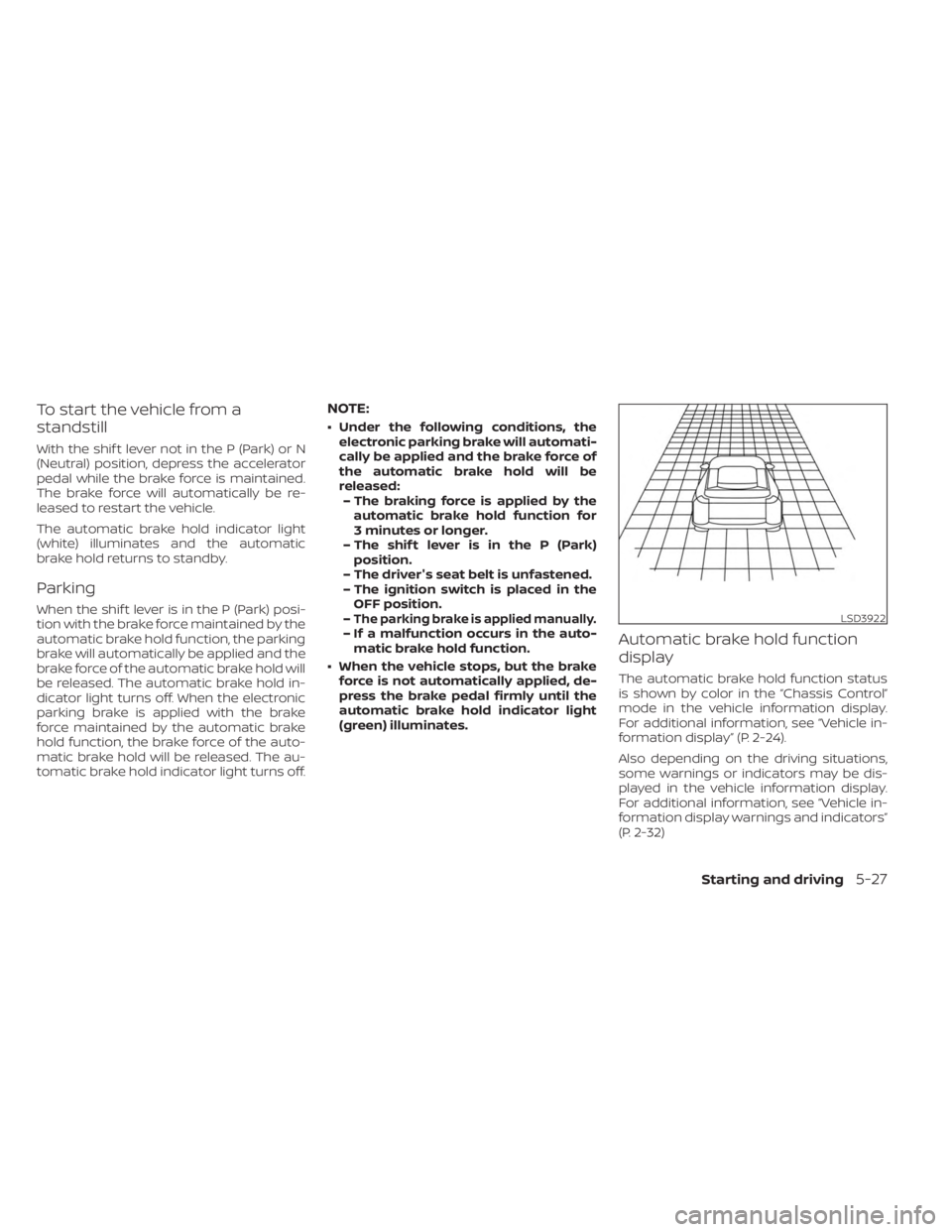
The automatic brake hold function status
is shown by color in the “Chassis Control”
mode in the vehicle information display.
For additional information, see “Vehicle in-
formation display” (P. 2-24).
Also depending on the driving situations,
some warnings or indicators may be dis-
played in the vehicle information display.
For additional information, see “Vehicle in-
formation display warnings and indicators”
(P. 2-32)
LSD3922
Starting and driving5-27
Page 311 of 558
–When driving without normal tire
conditions (for example, tire wear,
low tire pressure, installation of
spare tire, tire chains, nonstan-
dard wheels).
– When the vehicle is equipped with
non-original brake parts or sus-
pension parts.
– When you are towing a trailer or
other vehicle.
• The system may not function prop-
erly under the following conditions:
– On roads where there are multiple
parallel lane markers; lane mark-
ers that are faded or not painted
clearly; yellow painted lane mark-
ers; non-standard lane markers;
or lane markers covered with wa-
ter, dirt, snow, etc.
– On roads where the discontinued
lane markers are still detectable.
– On roads where there are sharp
curves. –
On roads where there are sharply
contrasting objects, such as shad-
ows, snow, water, wheel ruts,
seams or lines remaining af ter
road repairs. (The LDW system
could detect these items as lane
markers.)
– On roads where the traveling lane
merges or separates.
– When the vehicle’s traveling direc-
tion does not align with the lane
marker.
– When traveling close to the ve-
hicle in front of you, which ob-
structs the lane camera unit de-
tection range.
– When rain, snow, dirt or an object
adheres to the windshield in front
of the lane camera unit.
–
When the headlights are not bright due to dirt on the lens or if the aim-
ing is not adjusted properly.
– When strong light enters the lane
camera unit. (For example, the
light directly shines on the front of
the vehicle at sunrise or sunset.) –
When a sudden change in bright-
ness occurs. (For example, when
the vehicle enters or exits a tunnel
or under a bridge.)
SYSTEM TEMPORARILY
UNAVAILABLE
If the vehicle is parked in direct sunlight
under high temperature conditions (over
approximately 104°F [40°C]) and then
started, the LDW system may be deacti-
vated automatically and the following
message will appear in the vehicle infor-
mation display (if so equipped): “Unavail-
able: High Cabin Temperature.”
When the interior temperature is reduced,
the LDW system will resume operating
automatically.
The LDW system is not designed to warn
under the following conditions:
• When you operate the lane change signal and change traveling lanes in the direc-
tion of the signal. (The LDW system will
become operable again approximately 2
seconds af ter the lane change signal is
turned off.)
• When the vehicle speed lowers to less than approximately 37 mph (60 km/h).
Starting and driving5-33
Page 335 of 558
WARNING
Do not use the cruise control when driv-
ing under the following conditions:
• When it is not possible to keep the
vehicle at a set speed.
• In heavy traffic or in traffic that varies
in speed.
• On winding or hilly roads.
•
On slippery roads (rain, snow, ice, etc.).
• In very windy areas.
Doing so could cause a loss of vehicle
control and result in an accident.
CRUISE CONTROL OPERATIONS
The cruise control allows driving at a speed
between 25 - 89 mph (40 - 144 km/h) without
keeping your foot on the accelerator pedal.
To turn on the cruise control, push the
CRUISE ON/OFF switch. The CRUISE indica-
tor light or
indicator in the instrument
panel comes on.
To set cruising speed, accelerate the ve-
hicle to the desired speed, push the SET–
switch and release it. The SET indicator
light or
indicator in the instrument
panel comes on. Take your foot off the ac-
celerator pedal. Your vehicle maintains the
set speed. •
To pass another vehicle, depress the ac-
celerator pedal. When you release the
pedal, the vehicle returns to the previ-
ously set speed.
• The vehicle may not maintain the set speed when going up or down steep hills.
If this happens, drive without the cruise
control.
To cancel the preset speed, use one of the
following three methods:
• Push the CANCEL switch; the CRUISE indi- cator light or
indicator in the instru-
ment panel goes out.
• Tap the brake pedal; the CRUISE indicator light or
indicator goes out.
• Push the CRUISE ON/OFF switch. The CRUISE indicator light or
indicator in
the instrument panel goes out.
The cruise control is automatically can-
celed and the CRUISE indicator light or
indicator in the instrument panel goes out
if:
• You depress the brake pedal while push- ing the RES+ or SET– switch. The preset
speed is deleted from memory.
• The vehicle slows down more than 8 mph (13 km/h) below the set speed.
• You move the shif t lever to N (Neutral). To reset at a faster cruising speed,
use
one of the following three methods:
• Depress the accelerator pedal. When the vehicle attains the desired speed, push
and release the SET– switch.
• Push and hold the RES+ switch. When the vehicle attains the speed you desire, re-
lease the switch.
• Push and release the RES+ switch. Each time you do this, the set speed increases
by about 1 mph (1.6 km/h).
To reset at a slower cruising speed, use
one of the following three methods:
• Lightly tap the brake pedal. When the ve- hicle attains the desired speed, push the
SET– switch and release it.
• Push and hold the SET– switch. Release the switch when the vehicle slows to the
desired speed.
• Push and release the SET– switch. Each time you do this, the set speed decreases
by about 1 mph (1.6 km/h).
To resume the preset speed, push and
release the RES+ switch. The vehicle re-
turns to the last set cruising speed when
the vehicle speed is over 25 mph (40 km/h).
Starting and driving5-57
Page 339 of 558
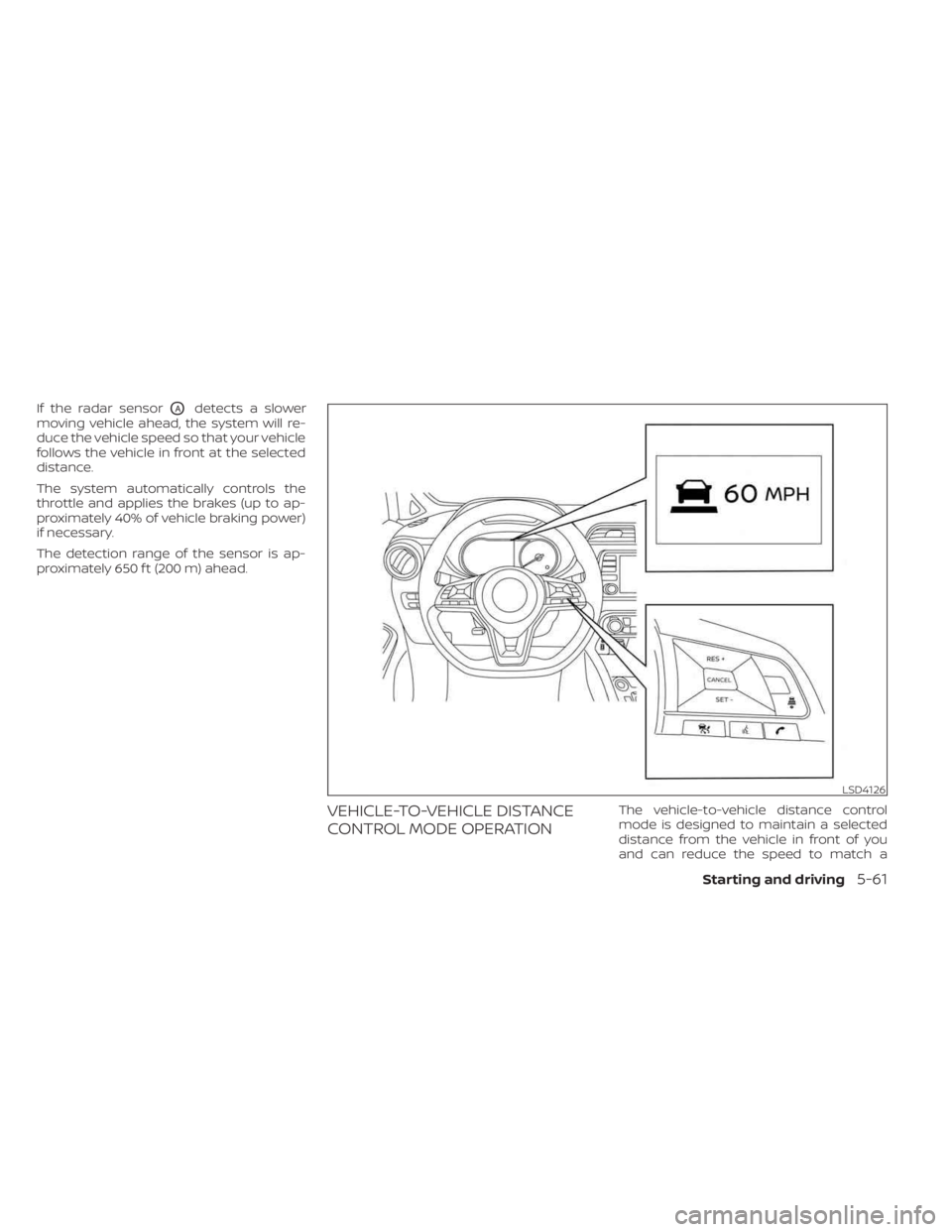
If the radar sensorOAdetects a slower
moving vehicle ahead, the system will re-
duce the vehicle speed so that your vehicle
follows the vehicle in front at the selected
distance.
The system automatically controls the
throttle and applies the brakes (up to ap-
proximately 40% of vehicle braking power)
if necessary.
The detection range of the sensor is ap-
proximately 650 f t (200 m) ahead.
VEHICLE-TO-VEHICLE DISTANCE
CONTROL MODE OPERATIONThe vehicle-to-vehicle distance control
mode is designed to maintain a selected
distance from the vehicle in front of you
and can reduce the speed to match a
LSD4126
Starting and driving5-61