brake NISSAN KICKS 2023 Repair Manual
[x] Cancel search | Manufacturer: NISSAN, Model Year: 2023, Model line: KICKS, Model: NISSAN KICKS 2023Pages: 558, PDF Size: 6.25 MB
Page 359 of 558
A chime sounds under the following condi-
tions and the control is automatically can-
celed:
• When the vehicle slows down more than8 mph (13 km/h) below the set speed
• When the shif t lever is not in the D (Drive) or manual shif t mode
• When the parking brake is applied
• When the VDC operates (including the traction control system)
• When a wheel slips
When the system is not operating properly,
the chime sounds and the color of the
cruise indicator will change to orange.
Action to take
If the color of the cruise indicator changes
to orange, stop the vehicle in a safe place
and place the shif t lever in the P (Park) po-
sition. Turn the engine off, restart the en-
gine, resume driving, and then perform the
setting again.
If it is not possible to set or the indicator
stays on, it may indicate that the system
is malfunctioning. Although the vehicle
is still drivable under normal conditions,
have the vehicle checked. It is recom-
mended that you visit a NISSAN dealer
for this service.
WARNING
Failure to follow the warnings and in-
structions for proper use of the RAB
system could result in serious injury or
death.
• The RAB system is a supplemental
aid to the driver. It is not a replace-
ment for proper driving procedures.
Always use the side and rear mirrors
and turn and look in the direction you
will move before and while backing
up. Never rely solely on the RAB sys- tem. It is the driver’s responsibility to
stay alert, drive safely, and be in con-
trol of the vehicle at all times.
• There is a limitation to the RAB sys-
tem capability. The RAB system is not
effective in all situations.
• Inclement weather or ultrasonic
sources such as an automatic car
wash, a truck’s compressed air
brakes or a pneumatic drill may af-
fect the function of the system; this
may include reduced performance or
a false activation.
The RAB system can assist the driver when
the vehicle is backing up and approaching
objects directly behind the vehicle.
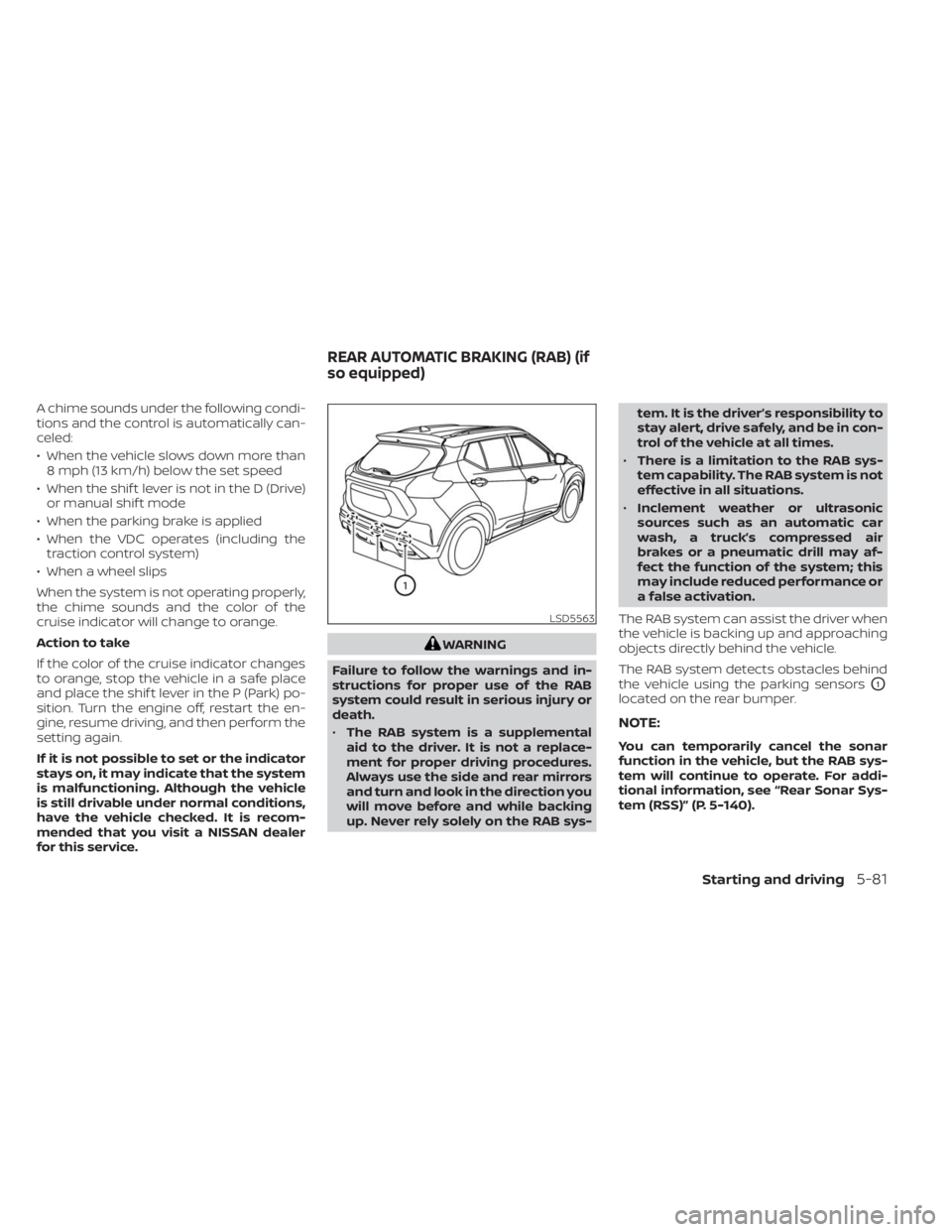
The RAB system detects obstacles behind
the vehicle using the parking sensors
O1
located on the rear bumper.
NOTE:
You can temporarily cancel the sonar
function in the vehicle, but the RAB sys-
tem will continue to operate. For addi-
tional information, see “Rear Sonar Sys-
tem (RSS)” (P. 5-140).
LSD5563
REAR AUTOMATIC BRAKING (RAB) (if
so equipped)
Starting and driving5-81
Page 361 of 558
When the shif t lever is in the R (Reverse)
position and the vehicle speed is less than
approximately 9 mph (15 km/h), the RAB
system operates.
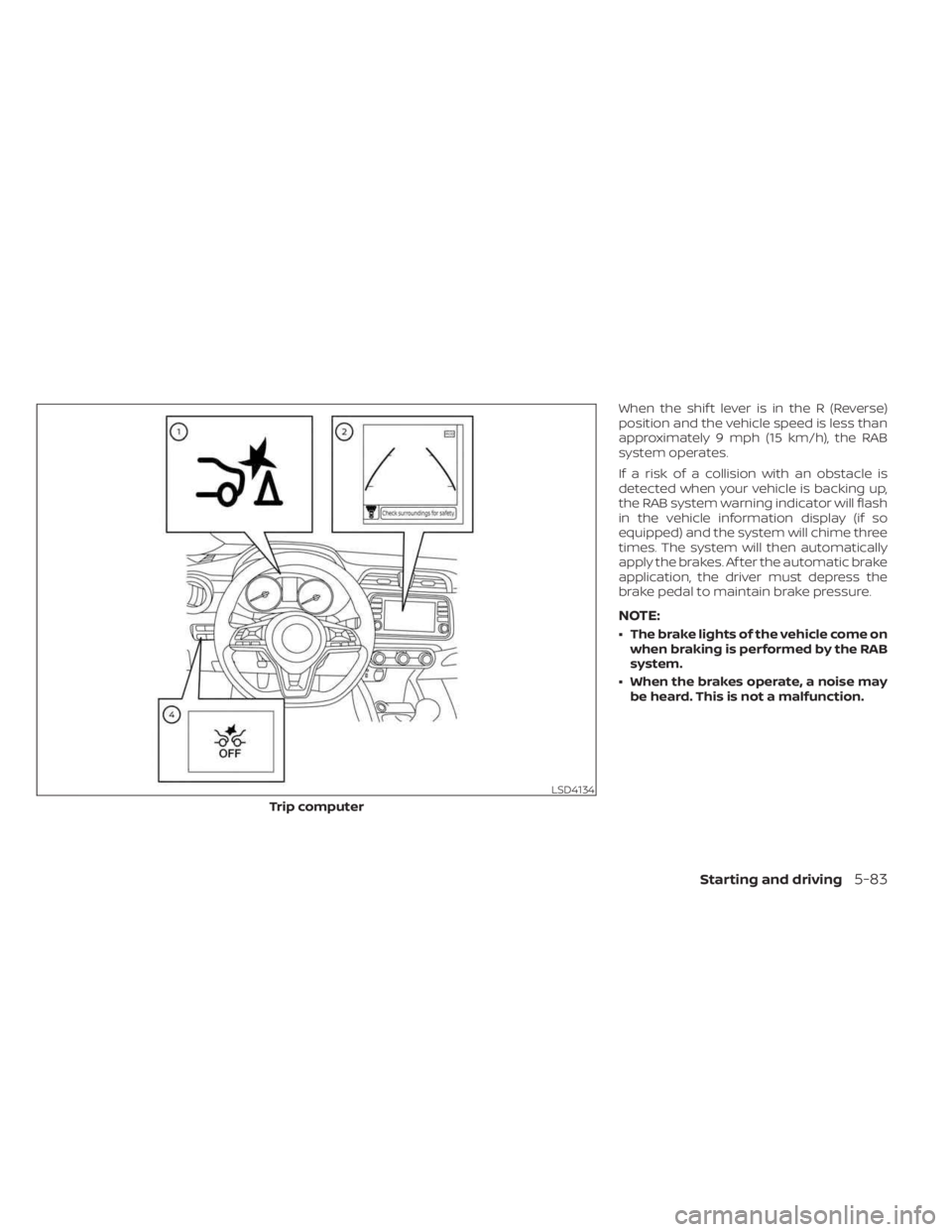
If a risk of a collision with an obstacle is
detected when your vehicle is backing up,
the RAB system warning indicator will flash
in the vehicle information display (if so
equipped) and the system will chime three
times. The system will then automatically
apply the brakes. Af ter the automatic brake
application, the driver must depress the
brake pedal to maintain brake pressure.
NOTE:
• The brake lights of the vehicle come onwhen braking is performed by the RAB
system.
• When the brakes operate, a noise may be heard. This is not a malfunction.
LSD4134
Trip computer
Starting and driving5-83
Page 362 of 558
TURNING THE RAB SYSTEM
ON/OFF
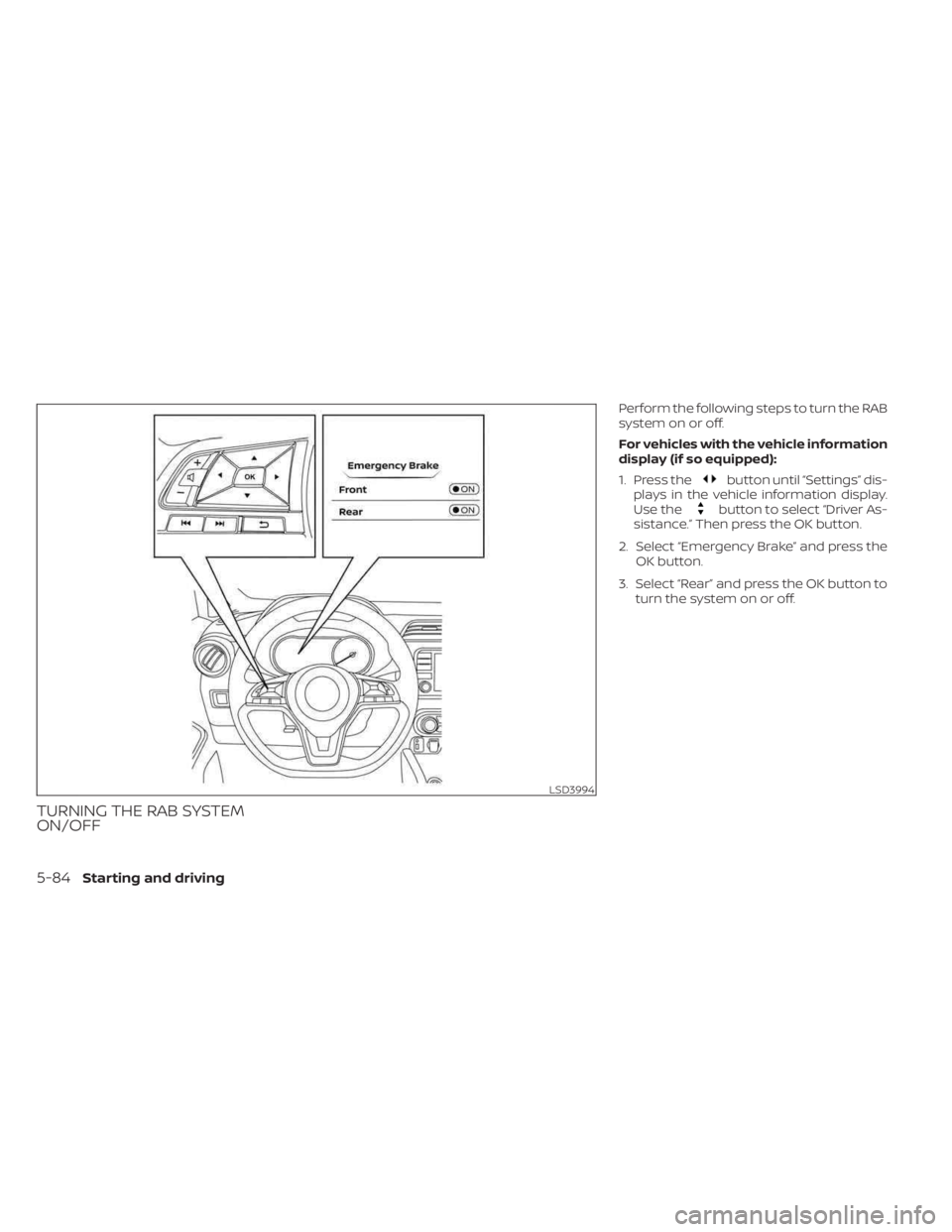
Perform the following steps to turn the RAB
system on or off.
For vehicles with the vehicle information
display (if so equipped):
1. Press the
button until “Settings” dis-
plays in the vehicle information display.
Use the
button to select “Driver As-
sistance.” Then press the OK button.
2. Select “Emergency Brake” and press the OK button.
3. Select “Rear” and press the OK button to turn the system on or off.
LSD3994
5-84Starting and driving
Page 364 of 558
•When the vehicle approaches an ob-
stacle while the accelerator or brake
pedal is depressed, the function may
not operate or the start of operation
may be delayed. The RAB system may
not operate or may not perform suffi-
ciently due to vehicle conditions, driving
conditions, the traffic environment, the
weather, road surface conditions, etc.
Do not wait for the system to operate.
Operate the brake pedal by yourself as
soon as necessary.
• If it is necessary to override RAB op-
eration, strongly press the accelera-
tor pedal.
•
Always check your surroundings and
turn to check what is behind you be-
fore and while backing up. The RAB
system detects stationary objects be-
hind the vehicle. The RAB system does
not detect the following objects:
– Moving objects
– Low objects
– Narrow objects
– Wedge-shaped objects
– Objects close to the bumper (less
than approximately 1 f t [30 cm])
– Objects that suddenly appear
– Thin objects such as rope, wire,
chain, etc. •
The RAB system may not operate for
the following obstacles:
– Obstacles located high off the
ground
– Obstacles in a position offset from
your vehicle
– Obstacles, such as spongy materi-
als or snow, that have sof t outer
surfaces and can easily absorb a
sound wave
• The RAB system may not operate in
the following conditions:
– There is rain, snow, ice, dirt, etc.,
attached to the sonar sensors.
– A loud sound is heard in the area
around the vehicle.
– The surface of the obstacle is di-
agonal to the rear of the vehicle.
• The RAB system may unintentionally
operate in the following conditions:
– There is overgrown grass in the
area around the vehicle.
– There is a structure (e.g., a wall, toll
gate equipment, a narrow tunnel,
a parking lot gate) near the side of
the vehicle.
–
There are bumps, protrusions, or manhole covers on the road surface.
– The vehicle drives through a
draped flag or a curtain.
– There is an accumulation of snow
or ice behind the vehicle.
– An ultrasonic wave source, such as
another vehicle’s sonar, is near
the vehicle.
• Once the automatic brake control
operates, it does not operate again if
the vehicle approaches the same
obstacle.
• The automatic brake control can only
operate for a short period of time.
Therefore, the driver must depress
the brake pedal.
• In the following situations, the RAB
system may not operate properly or
may not function sufficiently:
–
The vehicle is driven in bad weather(rain, fog, snow, etc.).
–The vehicle is driven on a steep hill.
– The vehicle’s posture is changed
(e.g., when driving over a bump).
– The vehicle is driven on a slippery
road.
– The vehicle is turned sharply by
turning the steering wheel fully.
– Snow chains are used.
5-86Starting and driving
Page 365 of 558
–Wheels or tires other than NISSAN
recommended are used.
– The brakes are cold at low ambi-
ent temperatures or immediately
af ter driving has started.
– The braking force becomes poor
due to wet brakes af ter driving
through a puddle or washing the
vehicle.
•
Turn the RAB system off in the follow-
ing conditions to prevent the occur-
rence of an unexpected accident re-
sulting from sudden system operation:
– The vehicle is towed.
– The vehicle is carried on a flatbed
truck.
– The vehicle is on the chassis
dynamometer.
– The vehicle drives on an uneven
road surface.
– The vehicle is towing an object (if
so equipped).
–
Suspension parts other than those designated as Genuine NISSAN
parts are used. (If the vehicle height
or the vehicle body inclination is
changed, the system may not de-
tect an obstacle correctly.)
– If the vehicle is using an accessory
like a bike rack, or cargo carrier
that blocks the sensors.
• Excessive noise (e.g., audio system
volume, an open vehicle window) will
interfere with the chime sound, and it
may not be heard.
SYSTEM MALFUNCTION
If the RAB system malfunctions, it will be
turned off automatically, and the RAB sys-
tem warning light will illuminate in the ve-
hicle information display.
Action to take:
If the warning light illuminates, park the ve-
hicle in a safe location, turn the engine off,
and restart the engine. If the warning light
continues to illuminate, have the RAB sys-
tem checked. It is recommended that you
visit a NISSAN dealer for this service.
NOTE:
If the RAB system cannot be operated
temporarily, the RAB system warning
light blinks.
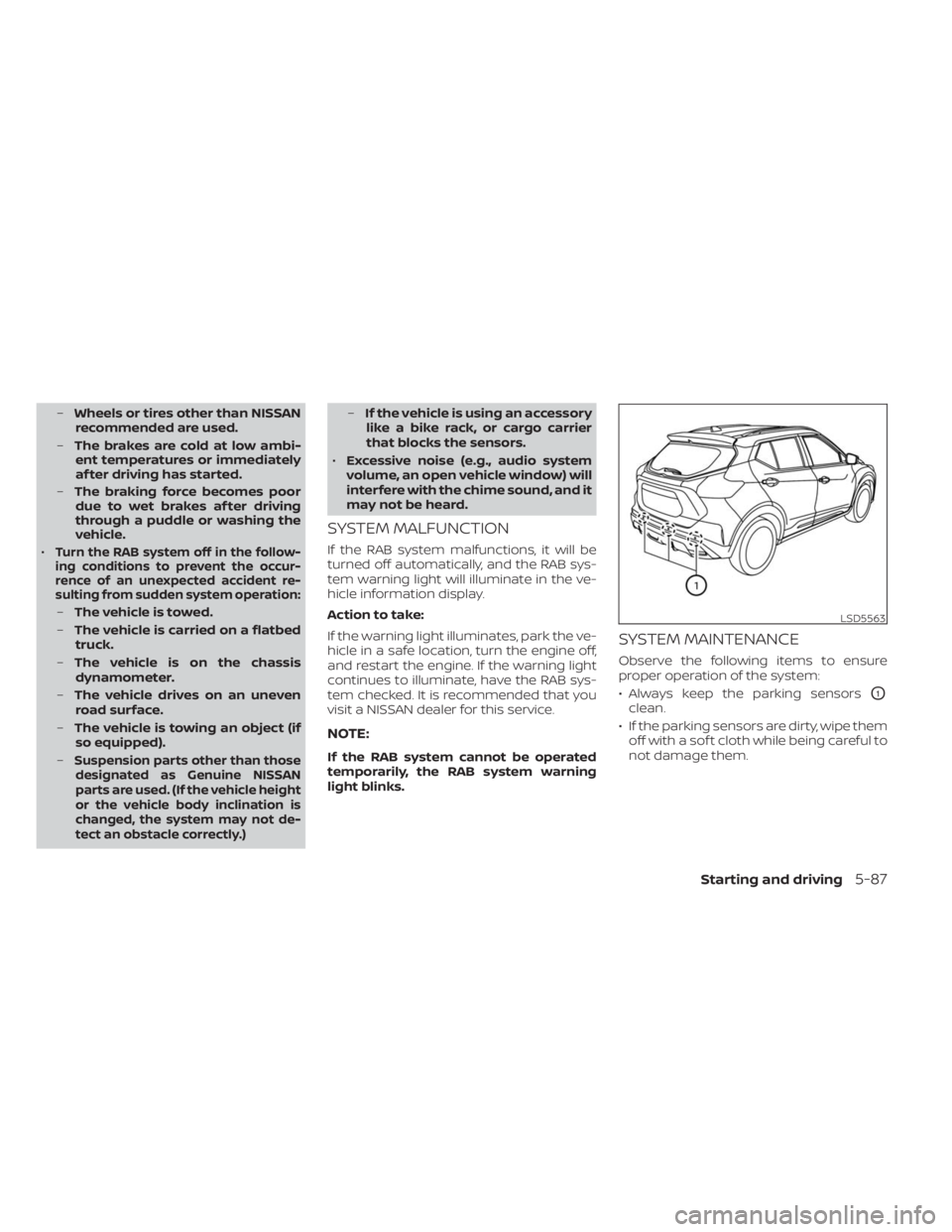
SYSTEM MAINTENANCE
Observe the following items to ensure
proper operation of the system:
• Always keep the parking sensors
O1
clean.
• If the parking sensors are dirty, wipe them off with a sof t cloth while being careful to
not damage them.
LSD5563
Starting and driving5-87
Page 367 of 558
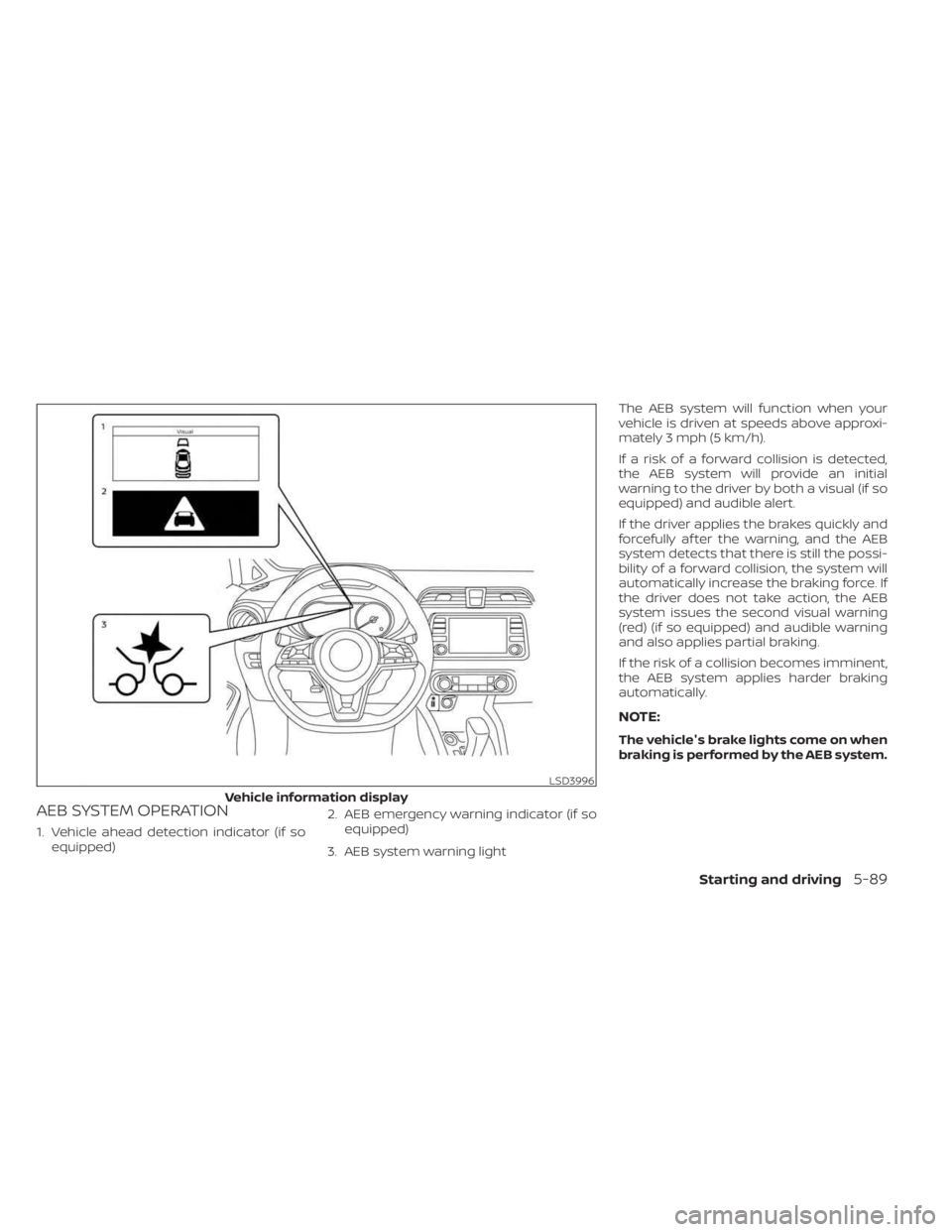
AEB SYSTEM OPERATION
1. Vehicle ahead detection indicator (if soequipped) 2. AEB emergency warning indicator (if so
equipped)
3. AEB system warning light The AEB system will function when your
vehicle is driven at speeds above approxi-
mately 3 mph (5 km/h).
If a risk of a forward collision is detected,
the AEB system will provide an initial
warning to the driver by both a visual (if so
equipped) and audible alert.
If the driver applies the brakes quickly and
forcefully af ter the warning, and the AEB
system detects that there is still the possi-
bility of a forward collision, the system will
automatically increase the braking force. If
the driver does not take action, the AEB
system issues the second visual warning
(red) (if so equipped) and audible warning
and also applies partial braking.
If the risk of a collision becomes imminent,
the AEB system applies harder braking
automatically.
NOTE:
The vehicle's brake lights come on when
braking is performed by the AEB system.
LSD3996
Vehicle information display
Starting and driving5-89
Page 368 of 558
Depending on vehicle speed and distance
to the vehicle ahead, as well as driving and
roadway conditions, the system may help
the driver avoid a forward collision or may
help mitigate the consequences of a colli-
sion, should one be unavoidable. If the
driver is handling the steering wheel, accel-
erating or braking, the AEB system will
function later or will not function.
The automatic braking will cease under the
following conditions:
• When the steering wheel is turned as faras necessary to avoid a collision.
• When the accelerator pedal is depressed.
• When there is no longer a vehicle de- tected ahead.
If the AEB system has stopped the vehicle,
the vehicle will remain at a standstill for
approximately 2 seconds before the
brakes are released.
LSD3997
Trip computer
5-90Starting and driving
Page 369 of 558
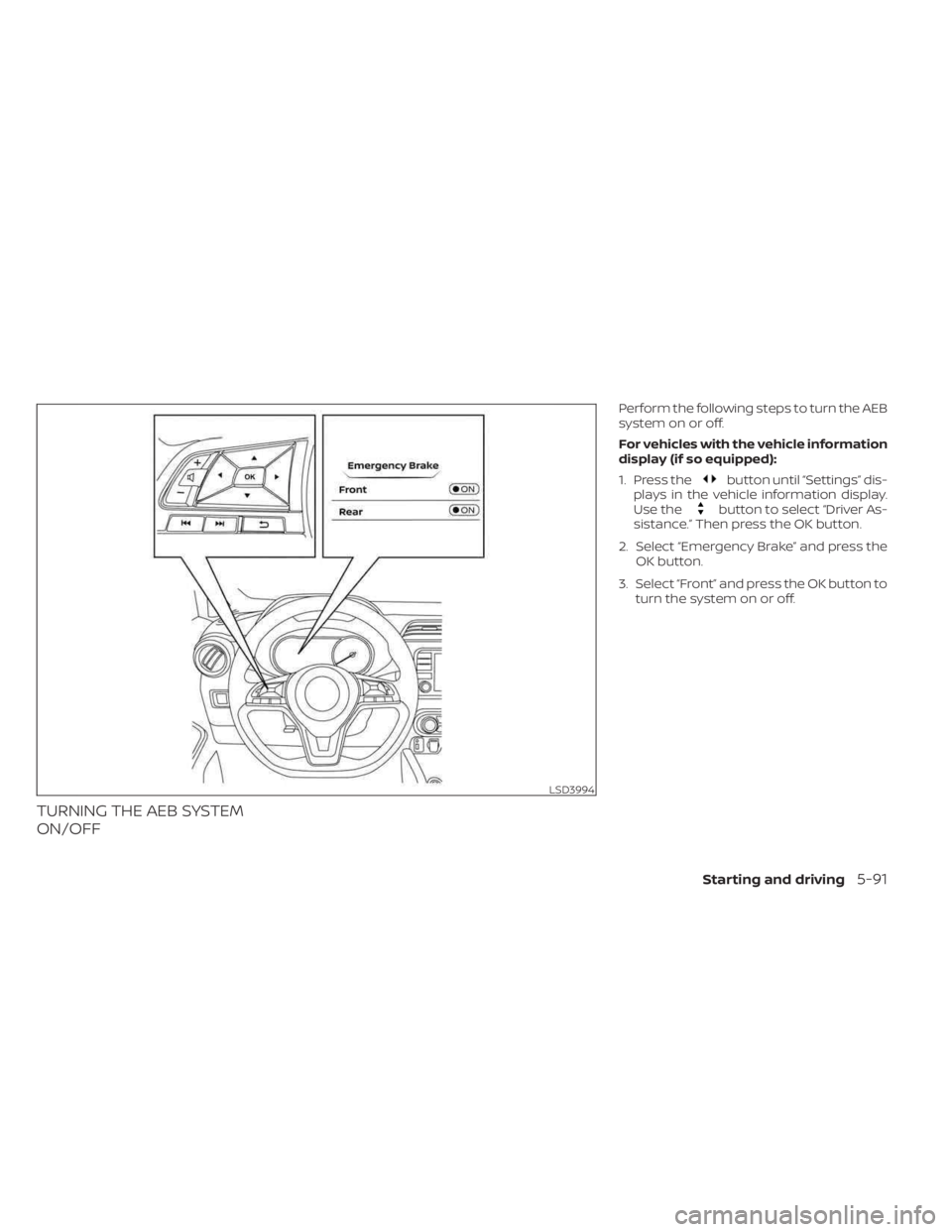
TURNING THE AEB SYSTEM
ON/OFF
Perform the following steps to turn the AEB
system on or off.
For vehicles with the vehicle information
display (if so equipped):
1. Press the
button until “Settings” dis-
plays in the vehicle information display.
Use the
button to select “Driver As-
sistance.” Then press the OK button.
2. Select “Emergency Brake” and press the OK button.
3. Select “Front” and press the OK button to turn the system on or off.
LSD3994
Starting and driving5-91
Page 377 of 558
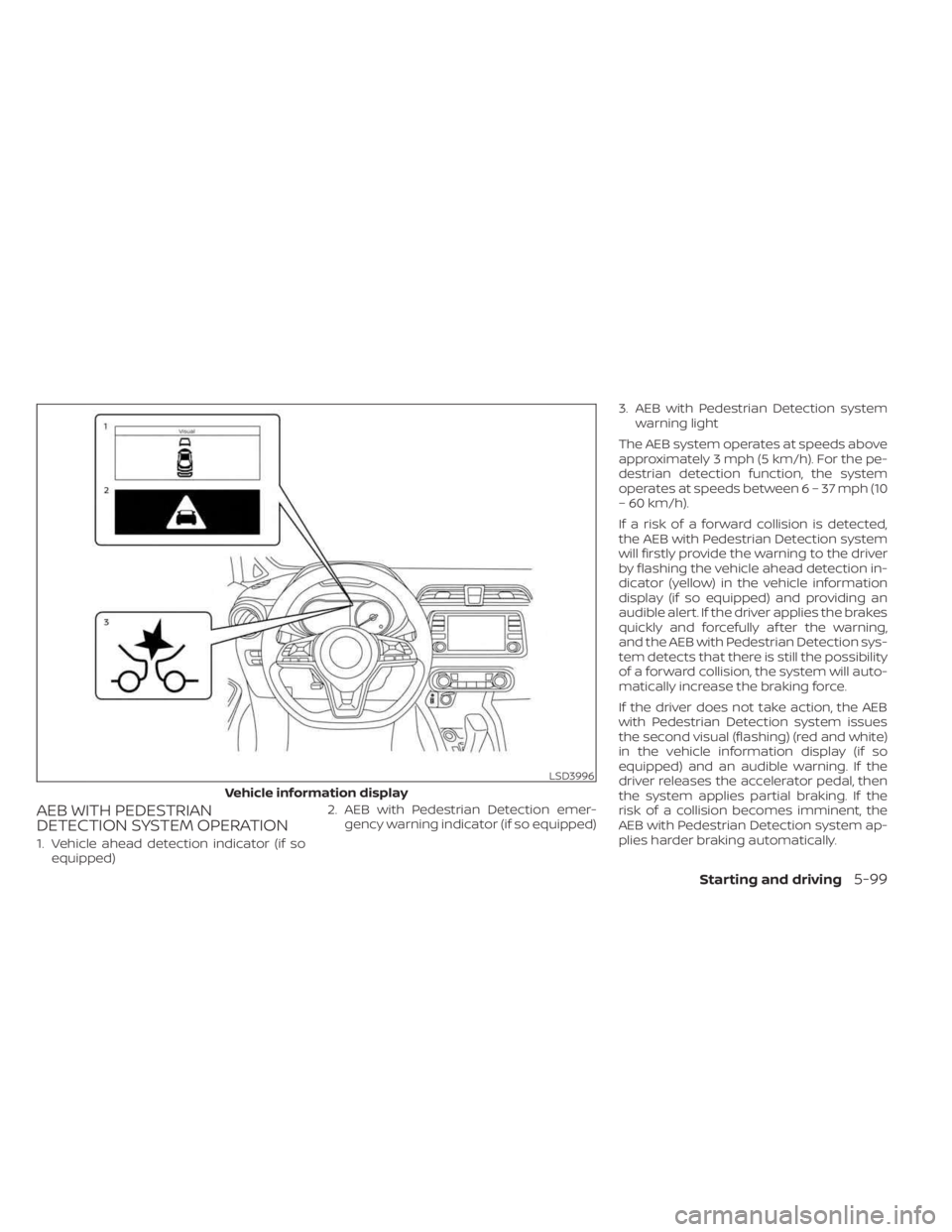
AEB WITH PEDESTRIAN
DETECTION SYSTEM OPERATION
1. Vehicle ahead detection indicator (if soequipped) 2. AEB with Pedestrian Detection emer-
gency warning indicator (if so equipped) 3. AEB with Pedestrian Detection system
warning light
The AEB system operates at speeds above
approximately 3 mph (5 km/h). For the pe-
destrian detection function, the system
operates at speeds between6–37mph(10
– 60 km/h).
If a risk of a forward collision is detected,
the AEB with Pedestrian Detection system
will firstly provide the warning to the driver
by flashing the vehicle ahead detection in-
dicator (yellow) in the vehicle information
display (if so equipped) and providing an
audible alert. If the driver applies the brakes
quickly and forcefully af ter the warning,
and the AEB with Pedestrian Detection sys-
tem detects that there is still the possibility
of a forward collision, the system will auto-
matically increase the braking force.
If the driver does not take action, the AEB
with Pedestrian Detection system issues
the second visual (flashing) (red and white)
in the vehicle information display (if so
equipped) and an audible warning. If the
driver releases the accelerator pedal, then
the system applies partial braking. If the
risk of a collision becomes imminent, the
AEB with Pedestrian Detection system ap-
plies harder braking automatically.
LSD3996
Vehicle information display
Starting and driving5-99
Page 378 of 558
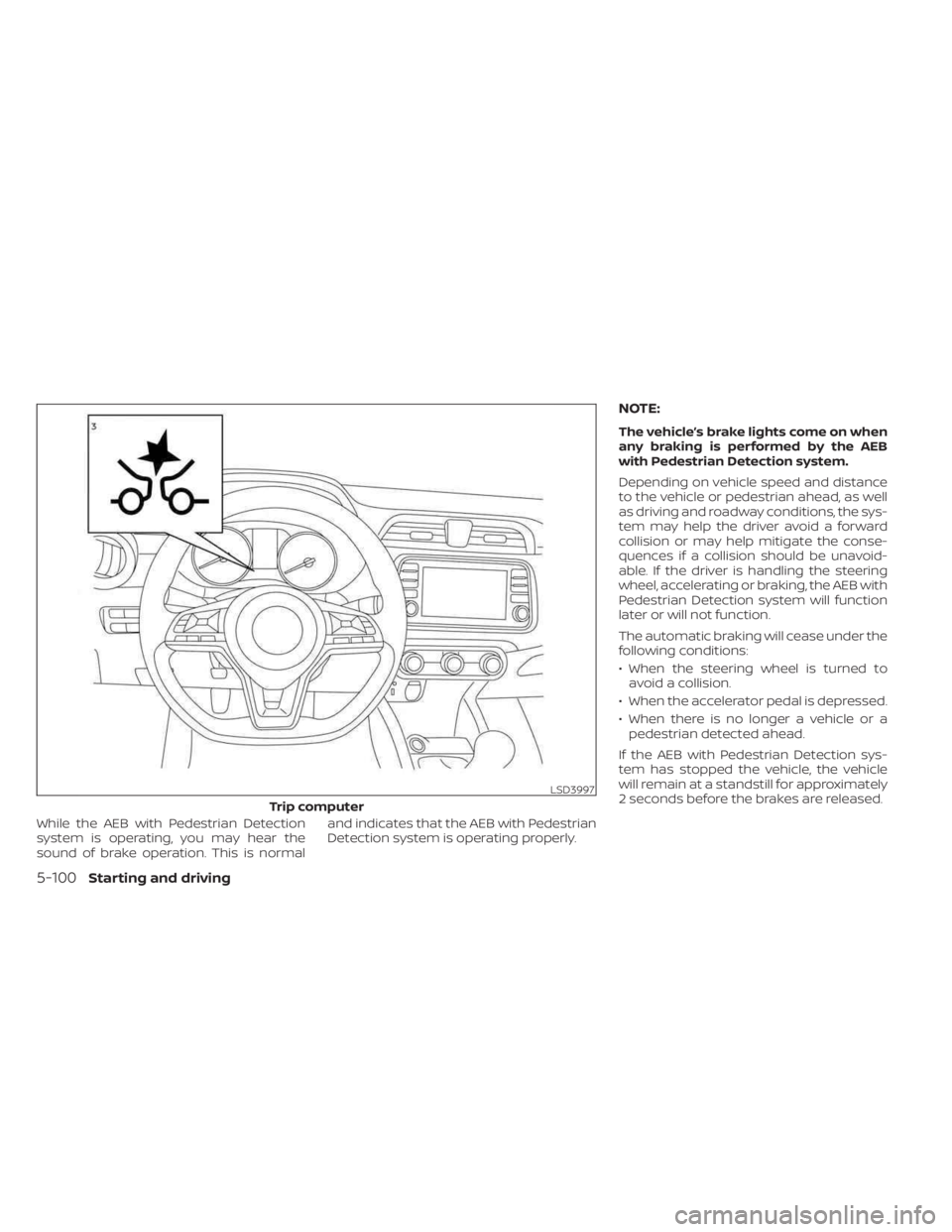
While the AEB with Pedestrian Detection
system is operating, you may hear the
sound of brake operation. This is normaland indicates that the AEB with Pedestrian
Detection system is operating properly.
NOTE:
The vehicle’s brake lights come on when
any braking is performed by the AEB
with Pedestrian Detection system.
Depending on vehicle speed and distance
to the vehicle or pedestrian ahead, as well
as driving and roadway conditions, the sys-
tem may help the driver avoid a forward
collision or may help mitigate the conse-
quences if a collision should be unavoid-
able. If the driver is handling the steering
wheel, accelerating or braking, the AEB with
Pedestrian Detection system will function
later or will not function.
The automatic braking will cease under the
following conditions:
• When the steering wheel is turned to
avoid a collision.
• When the accelerator pedal is depressed.
• When there is no longer a vehicle or a pedestrian detected ahead.
If the AEB with Pedestrian Detection sys-
tem has stopped the vehicle, the vehicle
will remain at a standstill for approximately
2 seconds before the brakes are released.
LSD3997
Trip computer
5-100Starting and driving