alarm NISSAN KICKS 2023 Owners Manual
[x] Cancel search | Manufacturer: NISSAN, Model Year: 2023, Model line: KICKS, Model: NISSAN KICKS 2023Pages: 558, PDF Size: 6.25 MB
Page 120 of 558
VEHICLE INFORMATION DISPLAY
WARNINGS AND INDICATORS
The following messages may appear in
your vehicle information display.
Engine start operation for
Intelligent Key system (if
I-Key battery level is low)
This indicator appears when the battery of
the Intelligent Key is low and when the In-
telligent Key system and the vehicle are not
communicating normally.
If this appears, touch the ignition switch
with the Intelligent Key while depressing
the brake pedal. For additional information,
see “NISSAN Intelligent Key® battery dis-
charge” (P. 5-13).
Key System Error: See
Owner’s Manual
Af ter the ignition switch is placed in the ON
position, this warning appears for a period
of time and then turns off.
The I-Key System Error message warns of
a malfunction with the Intelligent Key sys-
tem. If the warning appears while the en-
gine is stopped, it may be impossible to
start the engine.If the warning appears while the engine is
running, you can drive the vehicle. However,
in these cases, have the system checked.
It is recommended that you visit a NISSAN
dealer for this service.
Key Battery Low
This indicator appears when the Intelligent
Key battery is running out of power.
If this indicator appears, replace the bat-
tery with a new one. For additional infor-
mation, see “Battery replacement” (P. 8-22).
No Key Detected
This warning appears when the Intelligent
Key is lef t outside the vehicle with the igni-
tion switch in the ON position. Make sure
the Intelligent Key is inside the vehicle.
For additional information, see “NISSAN In-
telligent Key® System” (P. 3-6).
Alarm - Time for a break?
This indicator appears when the driver en-
ables the Timer Alert function within the
Driving Assistance settings and the se-
lected set time is expired. The time is based
on ignition on time and can be set up to six
hours.
Chassis Control System Error See
Owner’s Manual
This warning appears if the chassis control
is not functioning properly. Have the sys-
tem checked by a NISSAN dealer. For addi-
tional information, see “Chassis Control”
(P. 5-137).
Caution Steep slope
This warning appears when the automatic
brake hold function is activated while
the vehicle is on a steep hill. For additional
information, see “Automatic brake hold”
(P. 5-25).
Rear Door Alert is activated
When the system is enabled, this message
appears when the Rear Door Alert system
is active and can remind the driver to check
the back seat.
• Using the steering wheel switch, a driver
can select “Dismiss Message” to clear the
display for a period of time. If no selection
is made, this message automatically
turns off af ter a period of time.
• Using the steering wheel switch, a driver can select “Disable Alert” to disable the
horn alert for the remainder of the cur-
rent trip.
2-32Instruments and controls
Page 126 of 558
Side Radar Obstruction
This message appears when the Blind
Spot Warning (BSW) or Rear Cross Traffic
Alert (RCTA) systems become unavailable
because a radar blockage is detected. For
additional information, see “Blind Spot
Warning (BSW)” (P. 5-35) or “Rear Cross Traf-
fic Alert (RCTA)” (P. 5-46).
System Fault
This warning appears if there is a malfunc-
tion in the Rear Automatic Braking (RAB)
system. For additional information, see
“Rear Automatic Braking (RAB)” (P. 5-81).
Vehicle ahead detection
indicator
This indicator appears when the Auto-
matic Emergency Braking (AEB) system is
engaged and has detected a vehicle.
For additional information, see “Automatic
Emergency Braking (AEB)” (P. 5-88) or “Auto-
matic Emergency Braking (AEB) with Pe-
destrian Detection” (P. 5-98).
Unavailable: High Cabin Temperature
This message appears when the camera
detects an interior temperature of more
than approximately 104°F (40°C). For addi-
tional information, see “Lane Departure
Warning (LDW)” (P. 5-28).Your vehicle may have three types of secu-
rity systems:
• Vehicle security system
• NISSAN Anti-Thef t System
• NISSAN Vehicle Immobilizer System
VEHICLE SECURITY SYSTEM (if so
equipped)
The vehicle security system provides visual
and audible alarm signals if someone
opens the doors, hood or lif tgate when
the system is armed. It is not, however, a
motion detection type system that acti-vates when a vehicle is moved or when a
vibration occurs.
The system helps deter vehicle thef t but
cannot prevent it, nor can it prevent the
thef t of interior or exterior vehicle compo-
nents in all situations. Always secure your
vehicle even if parking for a brief period.
Never leave your keys in the vehicle, and
always lock the vehicle when unattended.
Be aware of your surroundings, and park in
secure, well-lit areas whenever possible.
Many devices offering additional protec-
tion, such as component locks, identifica-
tion markers, and tracking systems, are
available at auto supply stores and spe-
cialty shops. A NISSAN dealer may also offer
such equipment. Check with your insur-
ance company to see if you may be eligible
for discounts for various thef t protection
features.
How to arm the vehicle security
system
1. Close all windows.
(The system can be
armed even if the windows are open.)
2. Remove the keys from the vehicle.
LIC5080
SECURITY SYSTEMS (if so equipped)
2-38Instruments and controls
Page 127 of 558
3. Close all doors, hood and lif tgate. Lockall doors. The doors can be locked with
the Intelligent Key, mechanical key, or
door handle request switch (if so
equipped).
4. Confirm that the
security indicator
light stays on for about 30 seconds. The
vehicle security system is now pre-
armed. The vehicle security system will
automatically shif t into the armed
phase. The
security light begins to
flash once every three seconds. If during
the pre-armed phase one of the follow-
ing occurs, the system will not arm:
• Any door is unlocked with the Intelligent Key, mechanical key, or door request
switch (if so equipped).
• Ignition switch is placed in the ON position.
• Even when the driver and/or passen-
gers are in the vehicle, the system will
activate with all the doors, hood and
lif tgate locked with the ignition switch
placed in the LOCK position. When plac-
ing the ignition switch in the ON posi-
tion, the system will be released.
Vehicle security system activation
The vehicle security system will give the
following alarm:
• The headlights or turn lamps blink and the horn sounds intermittently but
synchronously.
•
The alarm automatically turns off af ter a
period of time. However, the alarm reacti-
vates if the vehicle is tampered with again.
The alarm is activated by:
• opening any door, hood or the lif tgate without using the key or Intelligent Key
(even if the door is unlocked by releasing
the door inside lock knob).
How to stop an activated alarm
The alarm stops only by unlocking a door
or the lif tgate with the key fob, pressing the
button on the Intelligent Key, or push-
ing the request switch (if so equipped) on
the driver's or passenger's door with the
Intelligent Key in range of the door handle.
NISSAN ANTI-THEFT SYSTEM
(NATS) (if so equipped)
The NISSAN Anti-Thef t System will not al-
low the engine to start without the use of a
registered NATS key. If the engine does not start using the reg-
istered NATS key, it may be due to interfer-
ence caused by:
• Another NATS key
• Automated toll road device
• Automated payment device
• Other devices that transmit similar
signals
Start the engine using the following
procedure:
1. Remove any items that may be causing the interference away from the NATS key.
2. Leave the ignition switch in the ON posi- tion for approximately 5 seconds.
3. Place the ignition switch in the OFF or LOCK position and wait approximately
10 seconds.
4. Repeat steps 2 and 3 again.
5. Start the engine.
6. Repeat the steps above until all possible interferences are eliminated.
If this procedure allows the engine to start,
NISSAN recommends placing the regis-
tered NATS key separate from other de-
vices to avoid interference.
Instruments and controls2-39
Page 178 of 558
For additional information, see “Interior
lights” (P. 2-74).
Using the panic alarm
If you are near your vehicle and feel threat-
ened, you may activate the panic alarm to
call attention by pressing and holding the
button on the Intelligent Key forlon-
ger than 1 second.
The headlights will flash and the panic
alarm will stay on for a period of time.
The panic alarm stops when:
• It has run for a period of time.
• Any button is pressed on the Intelligent Key.
• The request switch (if so equipped) on the driver or passenger door is pushed and
the Intelligent Key is in range of the door
handle.
• The lif tgate request switch (if so equipped) is pushed with the Intelligent
Key in range of the lif tgate area.
Answer back horn feature
If desired, the answer back horn feature
can be deactivated using the Intelligent
Key. When it is deactivated and the
button is pressed, the hazard indicator
lights flash twice. When thebutton is
pressed, neither the hazard indicator lights
nor the horn operates.
NOTE:
If you change the Answer Back Horn
and light flash feature with the Intelli-
gent Key, the vehicle information dis-
play (if so equipped) will show the cur-
rent mode af ter the ignition switch
has been cycled from the OFF to the
ON position. The vehicle information
display screen can also be used to
change the answer back horn mode.
For additional information, see “Ve-
hicle information display ” (P. 2-24).
To deactivate:
Press and hold theandbut-
tons for at least 4 seconds. The hazard
indicator lights will flash three times to con-
firm that the answer back horn feature has
been deactivated. To activate:
Press and hold the
andbut-
tons for at least 4 seconds once more.
The hazard indicator lights will flash once
and the horn will sound once to confirm
that the horn beep feature has been
reactivated.
Deactivating the horn beep feature does
not silence the horn if the alarm is
triggered.
3-14Pre-driving checks and adjustments
Page 184 of 558
• The engine hood has been opened.
•
The vehicle is shif ted out of P (Park) position.
• The alarm sounds due to illegal entry intothe vehicle.
• The ignition switch is pushed without an Intelligent Key in the vehicle.
• The ignition switch is pushed with an In- telligent Key in the vehicle but the brake
pedal is not depressed.
CONDITIONS THE REMOTE ENGINE
START WILL NOT WORK
The Remote Engine Start will not operate if
any of the following conditions are present:
• The ignition switch is placed in the ONposition.
• The hood is not securely closed.
• The hazard indicator lights are on.
• The engine is still running. The engine must be completely stopped. Wait at
least 6 seconds if the engine goes from
running to off. This is not applicable when
extending engine run time.
• The
button is not pressed and held
for at least 2 seconds.
•
Thebutton is not pressed and held
within 5 seconds of pressing the lock button.
• The brake is pressed.
• The doors are not closed and locked.
• The lif tgate is open.
• The Key System Error warning message appears in the vehicle information dis-
play (if so equipped).
• The alarm sounds due to illegal entry into the vehicle.
• Two Remote Engine Starts, or a single Remote Engine Start with an extension,
have already been used.
• The vehicle is not in P (Park).
• There is a detected registered key already inside of the vehicle.
• The Remote Engine Start feature has been switched to the OFF position using
the “Vehicle Settings” menu on the vehicle
information display (if so equipped).
For additional information, see “Vehicle
information display” (P. 2-24).
The Remote Engine Start may display a
warning or indicator in the vehicle informa-
tion display (if so equipped). For additional
information, see “Vehicle information dis-
play” (P. 2-24).
3-20Pre-driving checks and adjustments
Page 278 of 558
Volume & beeps
There are several methods to customize
the volume settings.
Volume & Beeps
The Volume & Beeps screen can be found
by pressing the
MENU button on the
control panel, touching the “Settings” key
on the screen and selecting “Volume &
Beeps”. To adjust the volume of the follow-
ing options, touch the “-” and “+” keys on the
screen.
The available settings are:
• Ringtone Adjust the volume level of the ringtone of
incoming calls.
• Outgoing Call Adjust the volume level of the outgoing
calls.
• Voice Prompt Vol. Adjust the volume level of the system
voice.
• Text-to-speech Vol. Adjust the volume of the replay voice for
text messaging.
• Button Beeps Turns on/off the button beep sounds and
alarm for prohibited operations. Volume Settings
The Volume settings screen can be found
by pressing the
button on the control
panel then touching the “Volume” key on
the screen. To adjust the volume of the
following options, touch the “-” and “+” keys
on the screen.
The available settings are:
• Ringtone Adjust the volume level of the ringtone of
incoming calls.
• Outgoing Call Adjust the volume level of the outgoing
calls. “Made for iPod”, “Made for iPhone” and
“Made for iPad” mean that an electronic
accessory has been designed to connect
specifically to iPod, iPhone or iPad, respec-
tively, and has been certified by the devel-
oper to meet Apple performance stan-
dards. Apple is not responsible for the
operation of this device or its compliance
with safety and regulatory standards.
Please note that the use of this accessory
with iPod, iPhone or iPad may affect wire-
less performance.
iPad, iPhone, iPod classic, iPod nano, iPod
shuffle and iPod touch are trademarks of
Apple Inc., registered in the U.S. and other
countries. Lightning is a trademark of
Apple Inc.
iPod®/iPhone®
4-82Monitor, climate, audio, phone and voice recognition systems
Page 418 of 558
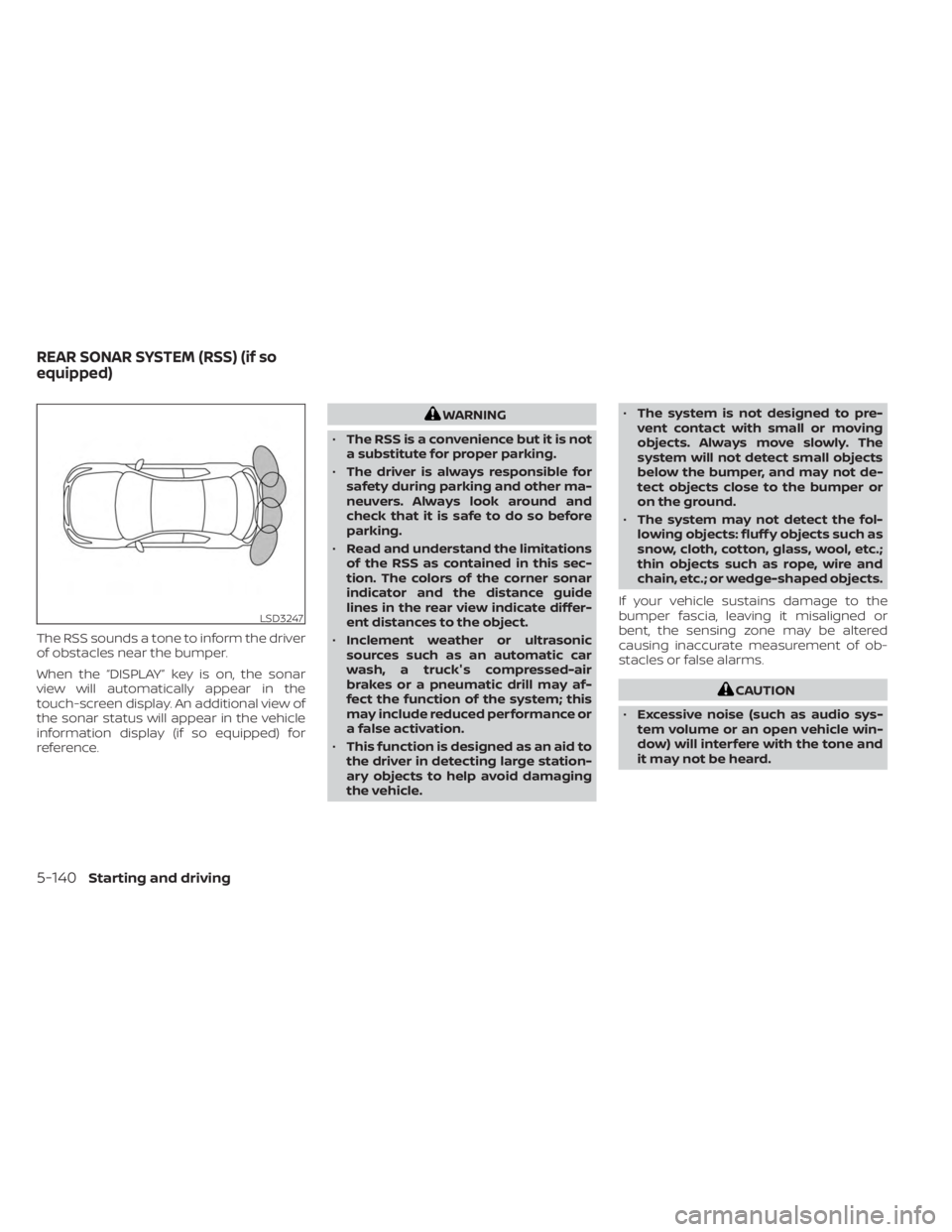
The RSS sounds a tone to inform the driver
of obstacles near the bumper.
When the “DISPLAY” key is on, the sonar
view will automatically appear in the
touch-screen display. An additional view of
the sonar status will appear in the vehicle
information display (if so equipped) for
reference.
WARNING
• The RSS is a convenience but it is not
a substitute for proper parking.
• The driver is always responsible for
safety during parking and other ma-
neuvers. Always look around and
check that it is safe to do so before
parking.
• Read and understand the limitations
of the RSS as contained in this sec-
tion. The colors of the corner sonar
indicator and the distance guide
lines in the rear view indicate differ-
ent distances to the object.
• Inclement weather or ultrasonic
sources such as an automatic car
wash, a truck's compressed-air
brakes or a pneumatic drill may af-
fect the function of the system; this
may include reduced performance or
a false activation.
• This function is designed as an aid to
the driver in detecting large station-
ary objects to help avoid damaging
the vehicle. •
The system is not designed to pre-
vent contact with small or moving
objects. Always move slowly. The
system will not detect small objects
below the bumper, and may not de-
tect objects close to the bumper or
on the ground.
• The system may not detect the fol-
lowing objects: fluff y objects such as
snow, cloth, cotton, glass, wool, etc.;
thin objects such as rope, wire and
chain, etc.; or wedge-shaped objects.
If your vehicle sustains damage to the
bumper fascia, leaving it misaligned or
bent, the sensing zone may be altered
causing inaccurate measurement of ob-
stacles or false alarms.
CAUTION
• Excessive noise (such as audio sys-
tem volume or an open vehicle win-
dow) will interfere with the tone and
it may not be heard.
LSD3247
REAR SONAR SYSTEM (RSS) (if so
equipped)
5-140Starting and driving
Page 547 of 558
11 Index
A
Active Ride Control (ARC).........5-138Air bag (See supplemental restraint
system).....................1-41Air bag system
Front (See supplemental front impact air
bag system)
................1-49Air bag warning labels............1-62Air bag warning light.........1-63, 2-15Air bag warning light,
supplemental..............1-63, 2-15Air cleaner housing filter..........8-15Air conditionerAir conditioner operation.....4-35, 4-41Air conditioner specification label. .10-12Air conditioner system refrigerant
recommendations............10-7Air conditioner system refrigerant and oil
recommendations............10-7Heater and air conditioner.......4-40Heater and air conditioner controls. .4-41Servicing air conditioner........4-43Air flow charts................4-36Alarm system (See vehicle security
system)................... .2-38Anchor point locations...........1-24Antenna....................4-62Anti-lock Braking System (ABS).....5-132Antifreeze...................5-145Audio system.................4-43
AM radio operation............4-50AM radio reception............4-44AM/FM radio............4-48, 4-50Auxiliary (AUX) devices operation. . .4-52Bluetooth® audio.............4-59FM radio operation............4-51FM radio reception............4-44iPod® Player................4-56iPod® player operation.........4-56Radio................... .4-43Steering wheel audio control
switch....................4-62USB Connections.............4-54USB interface...............4-53Autolight switch...............2-45Automatic
Automatic power window switch. . .2-73Automatic anti-glare inside mirror. . . .3-29Automatic brake hold............5-25Automatic door locks.............3-5Automatic Emergency Braking (AEB). .5-88Automatic Emergency Braking (AEB) with
Pedestrian Detection............5-98
B
Battery.................5- 145, 8-11Charge warning light...........2-14Battery replacement............8-22Key fob...................8-22
NISSAN Intelligent Key®.........8-23Before starting the engine.........5-15Belt (See drive belt)..............8-13Blind Spot Warning (BSW)..........5-35Blind Spot Warning (BSW) switch.....2-53Bluetooth® audio..............4-59Bluetooth® hands-free phone
system.................... .4-66Bluetooth® connections.........4-79Connecting procedure..........4-71Phone indicators.............4-70Text messaging..............4-76Voice commands.............4-72Booster seats.................1-37Brake
Anti-lock Braking System (ABS). . . .5-132Brake fluid................. .8-9Brake light (See stop light).......8-26Brake system...............5-132Brake warning light............2-13Brake wear indicators.......2-23,8-18Parking brake operation.........5-22Self-adjusting brakes...........8-17Brake Assist.................5-134Brake fluid................... .8-9Brake system................5-132Brakes.....................8-17Break-in schedule.............5-128Brightness control
Instrument panel.............2-50Brightness/contrast button.........4-7