jump start NISSAN KICKS 2023 Owners Manual
[x] Cancel search | Manufacturer: NISSAN, Model Year: 2023, Model line: KICKS, Model: NISSAN KICKS 2023Pages: 558, PDF Size: 6.25 MB
Page 161 of 558
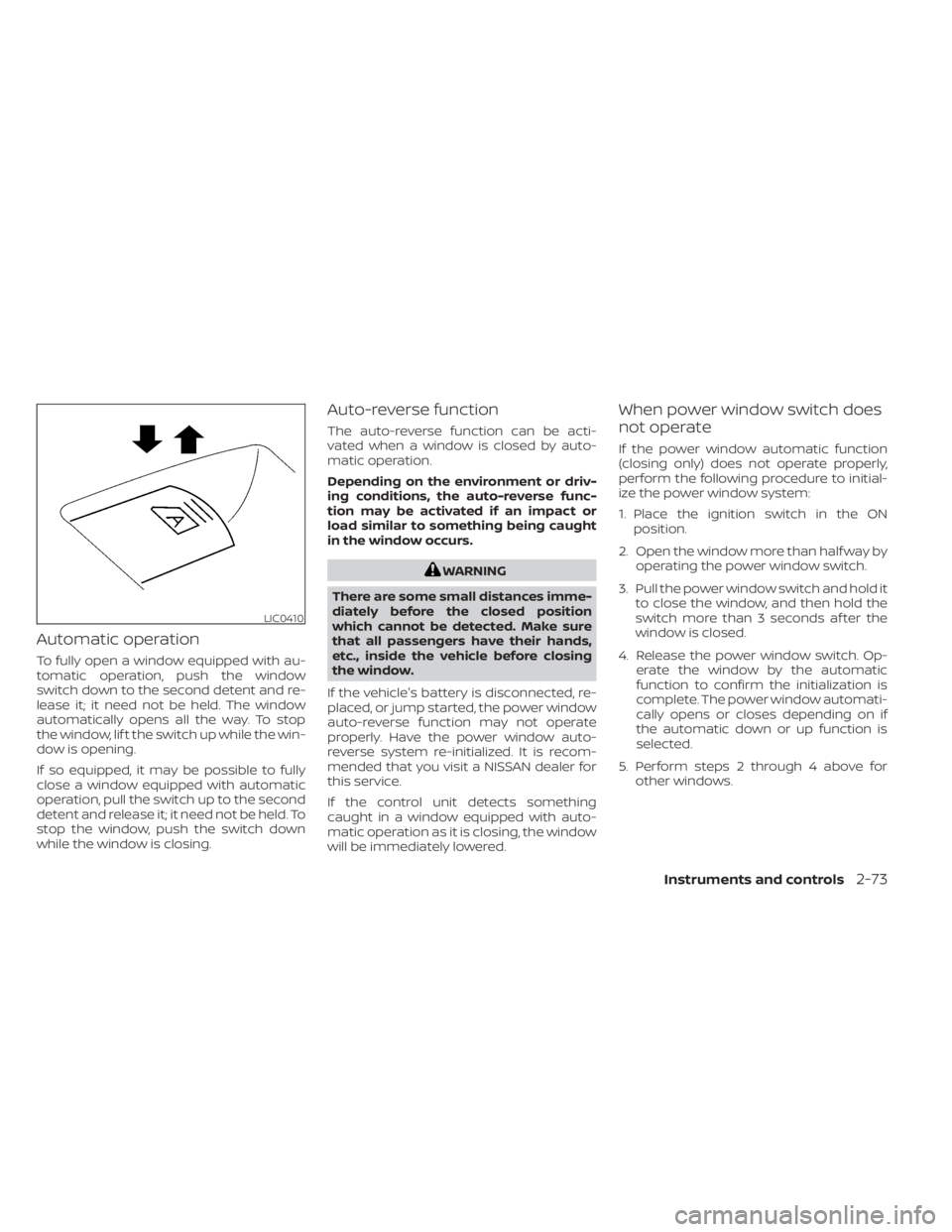
Automatic operation
To fully open a window equipped with au-
tomatic operation, push the window
switch down to the second detent and re-
lease it; it need not be held. The window
automatically opens all the way. To stop
the window, lif t the switch up while the win-
dow is opening.
If so equipped, it may be possible to fully
close a window equipped with automatic
operation, pull the switch up to the second
detent and release it; it need not be held. To
stop the window, push the switch down
while the window is closing.
Auto-reverse function
The auto-reverse function can be acti-
vated when a window is closed by auto-
matic operation.
Depending on the environment or driv-
ing conditions, the auto-reverse func-
tion may be activated if an impact or
load similar to something being caught
in the window occurs.
WARNING
There are some small distances imme-
diately before the closed position
which cannot be detected. Make sure
that all passengers have their hands,
etc., inside the vehicle before closing
the window.
If the vehicle's battery is disconnected, re-
placed, or jump started, the power window
auto-reverse function may not operate
properly. Have the power window auto-
reverse system re-initialized. It is recom-
mended that you visit a NISSAN dealer for
this service.
If the control unit detects something
caught in a window equipped with auto-
matic operation as it is closing, the window
will be immediately lowered.
When power window switch does
not operate
If the power window automatic function
(closing only) does not operate properly,
perform the following procedure to initial-
ize the power window system:
1. Place the ignition switch in the ON position.
2. Open the window more than half way by operating the power window switch.
3. Pull the power window switch and hold it to close the window, and then hold the
switch more than 3 seconds af ter the
window is closed.
4. Release the power window switch. Op- erate the window by the automatic
function to confirm the initialization is
complete. The power window automati-
cally opens or closes depending on if
the automatic down or up function is
selected.
5. Perform steps 2 through 4 above for other windows.
LIC0410
Instruments and controls2-73
Page 298 of 558
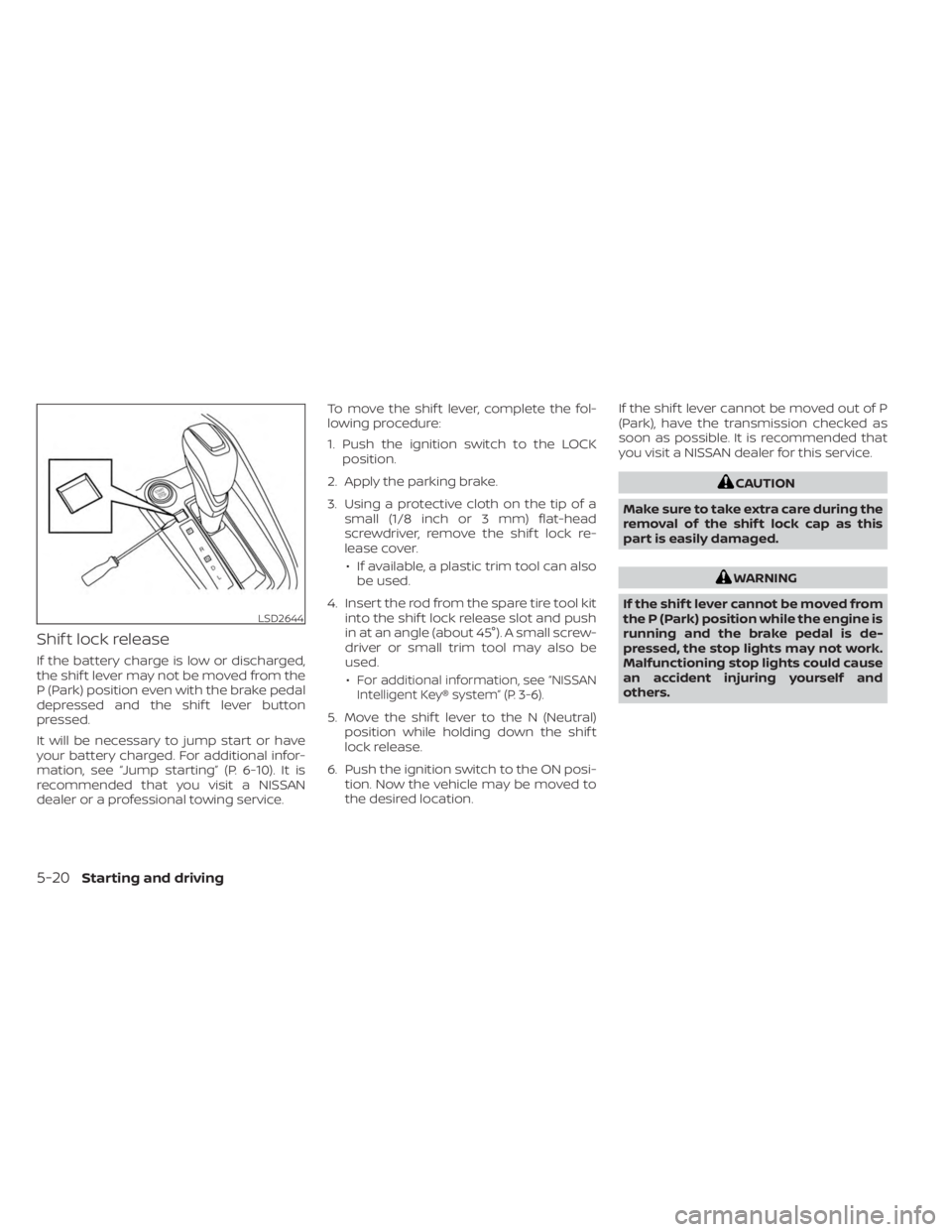
Shif t lock release
If the battery charge is low or discharged,
the shif t lever may not be moved from the
P (Park) position even with the brake pedal
depressed and the shif t lever button
pressed.
It will be necessary to jump start or have
your battery charged. For additional infor-
mation, see “Jump starting” (P. 6-10). It is
recommended that you visit a NISSAN
dealer or a professional towing service.To move the shif t lever, complete the fol-
lowing procedure:
1. Push the ignition switch to the LOCK
position.
2. Apply the parking brake.
3. Using a protective cloth on the tip of a small (1/8 inch or 3 mm) flat-head
screwdriver, remove the shif t lock re-
lease cover.
• If available, a plastic trim tool can also be used.
4. Insert the rod from the spare tire tool kit into the shif t lock release slot and push
in at an angle (about 45°). A small screw-
driver or small trim tool may also be
used.
•
For additional information, see “NISSAN
Intelligent Key® system” (P. 3-6).
5. Move the shif t lever to the N (Neutral) position while holding down the shif t
lock release.
6. Push the ignition switch to the ON posi- tion. Now the vehicle may be moved to
the desired location. If the shif t lever cannot be moved out of P
(Park), have the transmission checked as
soon as possible. It is recommended that
you visit a NISSAN dealer for this service.
CAUTION
Make sure to take extra care during the
removal of the shif t lock cap as this
part is easily damaged.
WARNING
If the shif t lever cannot be moved from
the P (Park) position while the engine is
running and the brake pedal is de-
pressed, the stop lights may not work.
Malfunctioning stop lights could cause
an accident injuring yourself and
others.
LSD2644
5-20Starting and driving
Page 427 of 558
6 In case of emergency
Hazard warning flasher switch..................6-2
Emergency engine shut off ......................6-2
Flat tire ..........................................6-3
Tire Pressure Monitoring System
(TPMS) .......................................6-3
Changing a flat tire ...........................6-4
Jump starting .................................. 6-10Push starting
................................... 6-12
If your vehicle overheats ........................6-12
Towing your vehicle ............................ 6-13
Towing recommended by NISSAN ...........6-13
Vehicle recovery
(freeing a stuck vehicle) .....................6-14
Page 436 of 558
Adjust tire pressure to the COLD
pressure.
COLD pressure: Af ter vehicle has been
parked for 3 hours or more or driven less
than 1 mile (1.6 km).
COLD tire pressures are shown on the
Tire and Loading Information label.
5. Securely store the jack and the tool kit inits storage area.
6. Place the spare tire cover and lif tgate floor carpeting over the jack and tool kit.
7. Securely store the damaged tire in the vehicle.
8. Close the lif tgate.
WARNING
• Always make sure that the spare tire
and jacking equipment are properly
secured af ter use. Such items can be-
come dangerous projectiles in an ac-
cident or sudden stop.
• The spare tire is designed for emer-
gency use. For additional informa-
tion, see “Wheels and tires” (P. 8-28). To start your engine with a booster battery,
the instructions and precautions below
must be followed.
WARNING
• If done incorrectly, jump starting can
lead to a battery explosion, resulting
in severe injury or death. It could also
damage your vehicle.
• Explosive hydrogen gas is always
present in the vicinity of the battery.
Keep all sparks and flames away
from the battery.
• Do not allow battery fluid to come
into contact with eyes, skin, clothing
or painted surfaces. Battery fluid is a
corrosive sulfuric acid solution which
can cause severe burns. If the fluid
should come into contact with any-
thing, immediately flush the con-
tacted area with water.
• Keep battery out of the reach of
children.
• The booster battery must be rated at
12 volts. Use of an improperly rated
battery can damage your vehicle. •
Whenever working on or near a bat-
tery, always wear suitable eye pro-
tectors (for example, goggles or in-
dustrial safety spectacles) and
remove rings, metal bands, or any
other jewelry. Do not lean over the
battery when jump starting.
• Do not attempt to jump start a frozen
battery. It could explode and cause
serious injury.
• The automatic engine cooling fan (if
so equipped) may come on at any
time without warning, even if the ig-
nition switch is in the OFF position
and the engine is not running. To
avoid injury, keep hands and other
objects away from it.
JUMP STARTING
6-10In case of emergency
Page 437 of 558
WARNING
Always follow the instructions below.
Failure to do so could result in damage
to the charging system and cause per-
sonal injury.
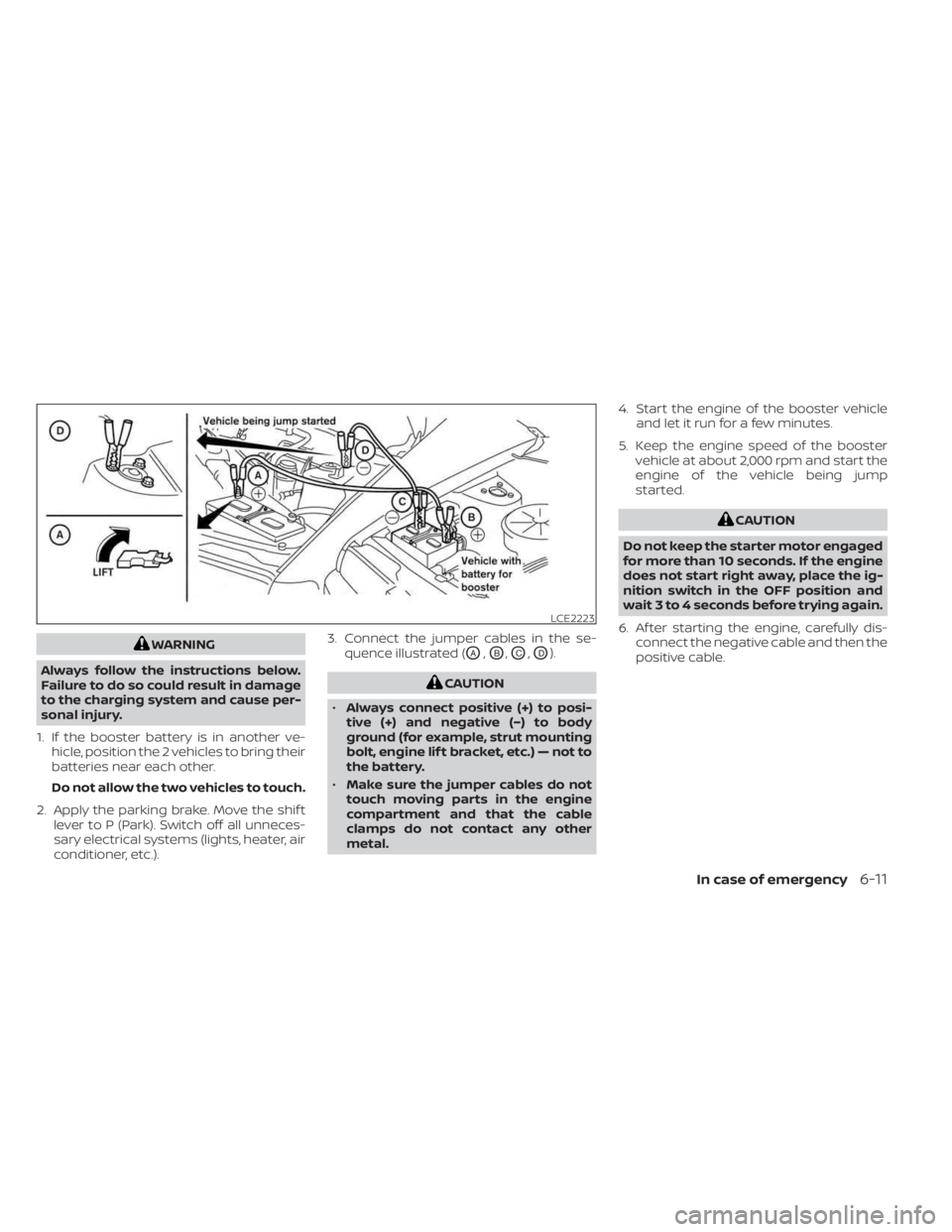
1. If the booster battery is in another ve- hicle, position the 2 vehicles to bring their
batteries near each other.
Do not allow the two vehicles to touch.
2. Apply the parking brake. Move the shif t lever to P (Park). Switch off all unneces-
sary electrical systems (lights, heater, air
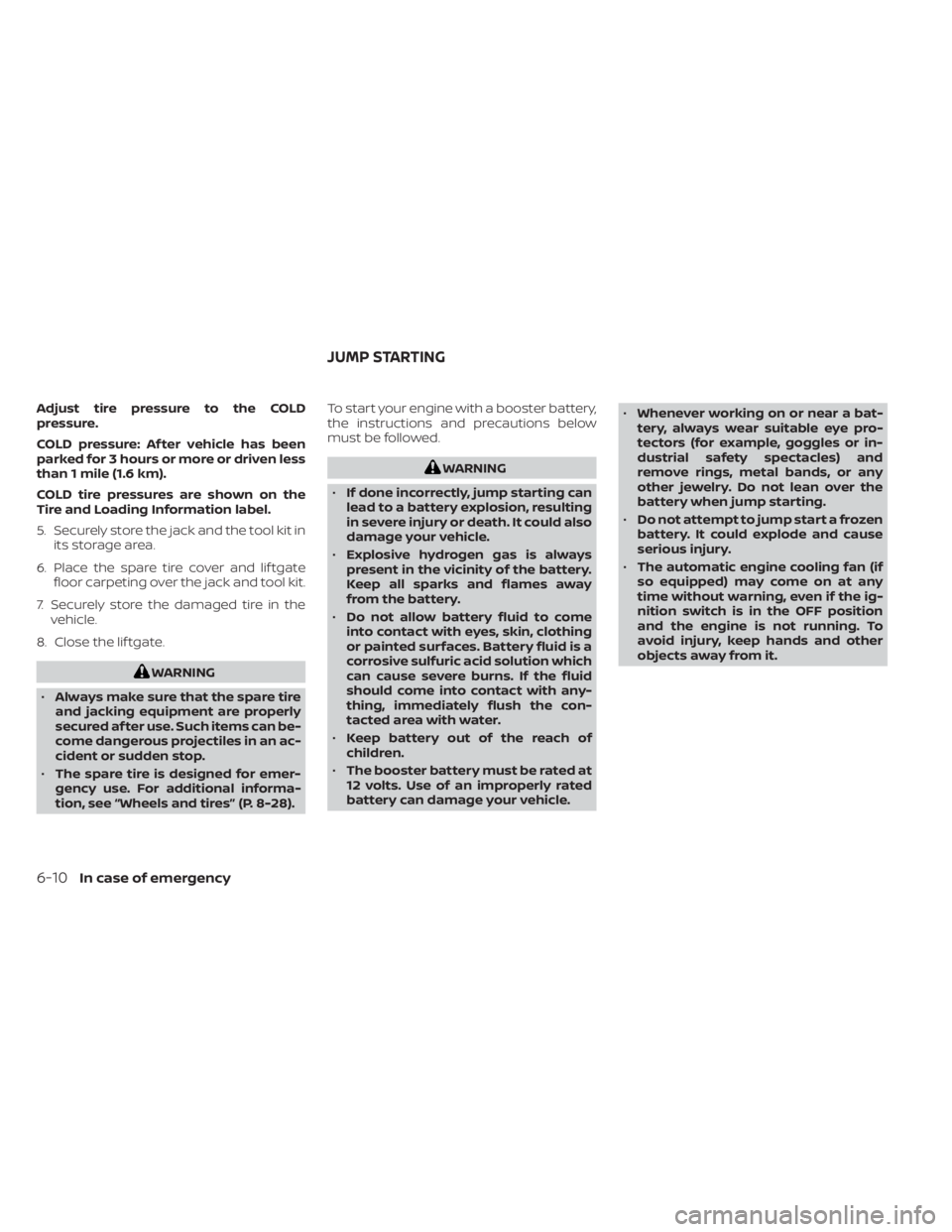
conditioner, etc.). 3. Connect the jumper cables in the se-
quence illustrated (OA,OB,OC,OD).
CAUTION
• Always connect positive (+) to posi-
tive (+) and negative (−) to body
ground (for example, strut mounting
bolt, engine lif t bracket, etc.) — not to
the battery.
• Make sure the jumper cables do not
touch moving parts in the engine
compartment and that the cable
clamps do not contact any other
metal. 4. Start the engine of the booster vehicle
and let it run for a few minutes.
5. Keep the engine speed of the booster vehicle at about 2,000 rpm and start the
engine of the vehicle being jump
started.
CAUTION
Do not keep the starter motor engaged
for more than 10 seconds. If the engine
does not start right away, place the ig-
nition switch in the OFF position and
wait 3 to 4 seconds before trying again.
6. Af ter starting the engine, carefully dis- connect the negative cable and then the
positive cable.
LCE2223
In case of emergency6-11
Page 451 of 558
8 Do-it-yourself
Maintenance precautions.......................8-2
Engine compartment check locations ...........8-3
Engine cooling system ..........................8-4
Checking engine coolant level ................8-5
Changing engine coolant ....................8-5
Engine oil .......................................8-5
Checking engine oil level .....................8-5
Changing engine oil and oil filter ..............8-6
Continuously Variable Transmission (CVT)
fluid .............................................8-9
Brake fluid .......................................8-9
Windshield-washer fluid ........................8-10
Windshield-washer fluid reservoir ...........8-10
Battery.......................................... 8-11
Jump starting ............................... 8-12
Variable voltage control system ................8-13
Drive belt ....................................... 8-13
Spark plugs .................................... 8-14
Replacing spark plugs ....................... 8-14
Air cleaner ..................................... 8-15
In-cabin microfilter .......................... 8-15Windshield wiper blades
........................8-16
Cleaning .................................... 8-16
Replacing ................................... 8-16
Brakes ......................................... 8-17
Fuses .......................................... 8-18
Engine compartment .......................8-18
Passenger compartment ...................8-20
Passenger compartment
(with electronic parking brake) ..............8-21
Battery replacement ........................... 8-22
NISSAN Intelligent Key® ......................8-23
Lights .......................................... 8-24
Headlights .................................. 8-24
Fog lights (if so equipped) ...................8-25
Exterior and interior lights ...................8-26
Wheels and tires ............................... 8-28
Tire pressure ................................ 8-28
Tire labeling ................................. 8-32
Types of tires ................................ 8-35
Tir
e chains .................................. 8-36
Changing wheels and tires ..................8-37
Page 462 of 558

• If the battery is labeled “do not open” it ismaintenance free and battery fluid
should not be checked. It is recom-
mended that you visit a NISSAN dealer or
a qualified specialist workshop to con-
firm the battery’s performance.
• Keep the battery surface clean and dry. Clean the battery with a solution of bak-
ing soda and water.
• Make certain the terminal connections are clean and securely tightened.
• If the vehicle is not to be used for 30 days or longer, disconnect the negative (-) bat-
tery terminal cable to prevent discharge.
NOTE:
Care should be taken to avoid situations
that can lead to potential battery dis-
charge and potential no-start conditions
such as:
1. Installation or extended use of elec- tronic accessories that consume bat-
tery power when the engine is not
running (Phone chargers, GPS, DVD
players, etc.)
2. Vehicle is not driven regularly and/or only driven short distances.
In these cases, the battery may need to
be charged to maintain battery health.
WARNING
• Do not expose the battery to flames,
an electrical spark or a cigarette. Hy-
drogen gas generated by the battery
is explosive. Explosive gases can
cause blindness or injury. Do not al-
low battery fluid to contact your skin,
eyes, fabrics or painted surfaces. Sul-
furic acid can cause blindness or in-
jury. Af ter touching a battery or bat-
tery cap, do not touch or rub your
eyes. Thoroughly wash your hands. If
the acid contacts your eyes, skin or
clothing, immediately flush with wa-
ter for at least 15 minutes and seek
medical attention.
• When working on or near a battery,
always wear suitable eye protection
and remove all jewelry.
• Battery posts, terminals and related
accessories contain lead and lead
compounds. Wash hands af ter
handling.
• Keep battery out of the reach of
children.
• Do not tip the battery.
NOTE:
Do not try to open the top of the battery.
This battery is not equipped with remov-
able vent caps.
JUMP STARTING
If jump starting is necessary, see “Jump
starting” (P. 6-10). If the engine does not
start by jump starting, the battery may
have to be replaced. It is recommended
that you visit a NISSAN dealer for this
service.
LDI3302
8-12Do-it-yourself
Page 550 of 558
Instrument brightness control.......2-50Instrument panel.............0-6, 2-2Instrument panel dimmer switch.....2-50Intelligent Around View® Monitor......4-16Intelligent Cruise Control..........5-58Intelligent Driver Alertness (I-DA).....5-125Intelligent Engine Brake (I-EB).......5-138Intelligent Forward Collision Warning
(I-FCW).....................5-110Intelligent Key systemKey operating range............3-7Key operation................3-9Mechanical key................3-3Remote keyless entry operation. . . .3-12Troubleshooting guide..........3-15Warning signals...............3-15Intelligent Trace Control (I-TC).......5-137Interior light...................2-74iPod® Player................. .4-56ISOFIX child restraints.............1-21
J
Jump starting..............6-10,8-12
K
Key.........................3-2Key fob battery replacement........8-22Keyless entry
With Intelligent Key system
(See Intelligent Key system)
.......3-12
KeysNISSAN Intelligent Key®...........3-6NISSAN Vehicle Immobilizer System
keys..................... .3-3
L
Labels
Air conditioner specification label. . .10-12Emission control information label. .10-11Engine serial number...........10-11F.M.V.S.S. certification label........10-11Tire and Loading Information label. .10-12Vehicle identification number (VIN)
plate.................... .10-10Warning labels (for SRS)..........1-62Lane Departure Warning (LDW).......5-28Lane Departure Warning (LDW) switch. .2-54LATCH (Lower Anchors and Tethers for
CHildren) System................1-21Launch bar menu................4-7License plate
Installing the license plate........10-13Lif tgate.....................3-22LightAir bag warning light........1-63, 2-15Brake light (See stop light)........8-26Bulb check/instrument panel......2-13Bulb replacement.............8-26Charge warning light...........2-14Exterior and Interior lights........8-26Fog light switch...............2-51Fog lights..................8-25
Headlight and turn signal switch. . . .2-44Headlight control switch.........2-44Headlights..................8-24Interior light.................2-74Light bulbs.................8-24Low tire pressure warning light.....2-18Low windshield-washer fluid warning
light......................2-19Luggage compartment lights......2-76Personal lights...............2-75Security indicator light..........2-15Lights......................8-24Map lights..................2-75LockChild safety rear door lock.........3-6Door locks................. .3-4Fuel-filler door lock opener lever. . . .3-25Power door locks..............3-5Low fuel warning light. .2-15, 2-17, 2-20, 2-33Low tire pressure warning light.......2-18Low windshield-washer fluid warning
light........................2-19Luggage (See vehicle loading
information)..................10-14Luggage compartment lights.......2-76Luggage hook.................2-65Luggage rack (see roof rack). . . .2-67, 2-68
M
Maintenance
General maintenance...........9-2Inside the vehicle..............9-3
11-4
Page 552 of 558
Rear Sonar System (RSS)..........5-140Rear sonar system OFF switch.......2-56Rear window and outside mirror defroster
switch...............2-43, 4-34, 4-42Rear window defroster switch.......2-43Rear window wiper and washer
switches....................2-42Rearview mirror................3-28RearView Monitor................4-8Adjusting the screen...........4-24Recommended Fluids............10-2Recorders
Event Data................ .10-23Refrigerant recommendation........10-7Registering a vehicle in another
country.................... .10-10Remote Engine Start..........3-18,5-16Reporting safety defects (US only). . . .10-21Roof rack.................2-67, 2-68
S
Safety
Child safety rear door lock.........3-6Child seat belts.....1-19,1-26, 1-33, 1-38Reporting safety defects (US only). . .10-21Seat adjustment
Front manual seat adjustment......1-3Rear seat adjustment............1-4Seat beltChild safety..................1-17Infants and small children........1-18Injured person................1-12
Larger children...............1-18Precautions on seat belt usage......1-9Pregnant women..............1-12Seat belt extenders............1-16Seat belt maintenance..........1-16Seat belts................1-9, 7-6Shoulder belt height adjustment. . . .1-15Three-point type with retractor.....1-13Seat belt extenders..............1-16Seat belt warning light.........1-12,2-15Seatback pockets...............2-62SeatsAdjustment..................1-2Front seats..................1-2Manual front seat adjustment......1-3Rear seat.................. .1-4Security indicator light............2-15Security system (NISSAN Anti-Thef t System),
engine start...............2-39, 5-14Security system (NISSAN Vehicle Immobilizer
System), engine start.........2-40, 5-14Security systems
Vehicle security system.........2-38Self-adjusting brakes.............8-17Service manual order form........10-23Servicing air conditioner...........4-43Shif tingContinuously Variable Transmission
(CVT)
.....................5-18Shoulder belt height adjustment......1-15Siri® Eyes-Free................ .4-63Sonar
Rear system................5-140Spark plug replacement...........8-14
Spark plugs...................8-14Specifications................ .10-8Speedometer...............2-5, 2-6SRS warning label...............1-62Stability control................5-134Standard maintenance............9-8Starting
Before starting the engine........5-15Jump starting............6-10,8-12Precautions when starting and
driving.................... .5-4Push starting................6-12Starting the engine............5-15Starting the engine..............5-15Steering
Power steering system.........5-131Steering wheel.................3-26Steering wheel audio control switch. . .4-62Stop light....................8-26Storage.................... .2-61Storage tray..................2-62Sun visors....................3-27Supplemental air bag warning labels. . .1-62Supplemental air bag warning
light................... .1-63, 2-15Supplemental front impact air bag
system..................... .1-49Supplemental restraint system
Information and warning labels.....1-62Precautions on supplemental restraint
system................... .1-41Supplemental restraint system
(Supplemental air bag system).......1-41
11-6