open hood NISSAN KICKS 2023 Owners Manual
[x] Cancel search | Manufacturer: NISSAN, Model Year: 2023, Model line: KICKS, Model: NISSAN KICKS 2023Pages: 558, PDF Size: 6.25 MB
Page 107 of 558
•If the light does not illuminate with
the ignition switch placed in the ON
position, have the vehicle checked as
soon as possible. It is recommended
that you visit a NISSAN dealer for this
service.
• If the light illuminates while driving,
avoid sudden steering maneuvers or
abrupt braking, reduce vehicle
speed, pull off the road to a safe loca-
tion and stop the vehicle as soon as
possible. Driving with under-inflated
tires may permanently damage the
tires and increase the likelihood of
tire failure. Serious vehicle damage
could occur and may lead to an acci-
dent and could result in serious per-
sonal injury or death. Check the tire
pressure for all four tires. Adjust the
tire pressure to the recommended
COLD tire pressure shown on the Tire
and Loading Information label lo-
cated in the driver’s door opening to
turn the low tire pressure warning
light off. If the light still illuminates
while driving af ter adjusting the tire
pressure, a tire may be flat or the
TPMS may be malfunctioning. If you
have a flat tire, replace it with a spare
tire as soon as possible. If no tire is flat and all tires are properly inflated,
have the vehicle checked. It is recom-
mended that you visit a NISSAN
dealer for this service.
• When using a wheel without the
TPMS such as the spare tire, the TPMS
will not function and the low tire
pressure warning light will flash for
approximately 1 minute. The light will
remain on af ter 1 minute. Have your
tires replaced and/or TPMS system
reset as soon as possible. It is recom-
mended that you visit a NISSAN
dealer for these services.
• Replacing tires with those not origi-
nally specified by NISSAN could af-
fect the proper operation of the
TPMS.
CAUTION
• The TPMS is not a substitute for the
regular tire pressure check. Be sure
to check the tire pressure regularly.
• If the vehicle is being driven at
speeds of less than 16 mph (25 km/h),
the TPMS may not operate correctly.
• Be sure to install the specified size of
tires to the four wheels correctly.
Low windshield-washer
fluid warning light (if so
equipped)
This light comes on when the windshield-
washer fluid is at a low level. Add
windshield-washer fluid as necessary. For
additional information, see “Windshield-
washer fluid” (P. 8-10).
Malfunction Indicator Light
(MIL)
If this indicator light comes on steady or
blinks while the engine is running, it may
indicate a potential emission control
malfunction.
The MIL may also come on steady if the
fuel-filler cap is loose or missing, or if the
vehicle runs out of fuel. Check to make sure
the fuel-filler cap is installed and closed
tightly, and that the vehicle has at least 3
gallons (11.4 liters) of fuel in the fuel tank.
Af ter a few driving trips, the
light
should turn off if no other potential emis-
sion control system malfunction exists.
If this indicator light comes on steady for 20
seconds and then blinks for 10 seconds
when the engine is not running, it indicates
that the vehicle is not ready for an emission
Instruments and controls2-19
Page 126 of 558
Side Radar Obstruction
This message appears when the Blind
Spot Warning (BSW) or Rear Cross Traffic
Alert (RCTA) systems become unavailable
because a radar blockage is detected. For
additional information, see “Blind Spot
Warning (BSW)” (P. 5-35) or “Rear Cross Traf-
fic Alert (RCTA)” (P. 5-46).
System Fault
This warning appears if there is a malfunc-
tion in the Rear Automatic Braking (RAB)
system. For additional information, see
“Rear Automatic Braking (RAB)” (P. 5-81).
Vehicle ahead detection
indicator
This indicator appears when the Auto-
matic Emergency Braking (AEB) system is
engaged and has detected a vehicle.
For additional information, see “Automatic
Emergency Braking (AEB)” (P. 5-88) or “Auto-
matic Emergency Braking (AEB) with Pe-
destrian Detection” (P. 5-98).
Unavailable: High Cabin Temperature
This message appears when the camera
detects an interior temperature of more
than approximately 104°F (40°C). For addi-
tional information, see “Lane Departure
Warning (LDW)” (P. 5-28).Your vehicle may have three types of secu-
rity systems:
• Vehicle security system
• NISSAN Anti-Thef t System
• NISSAN Vehicle Immobilizer System
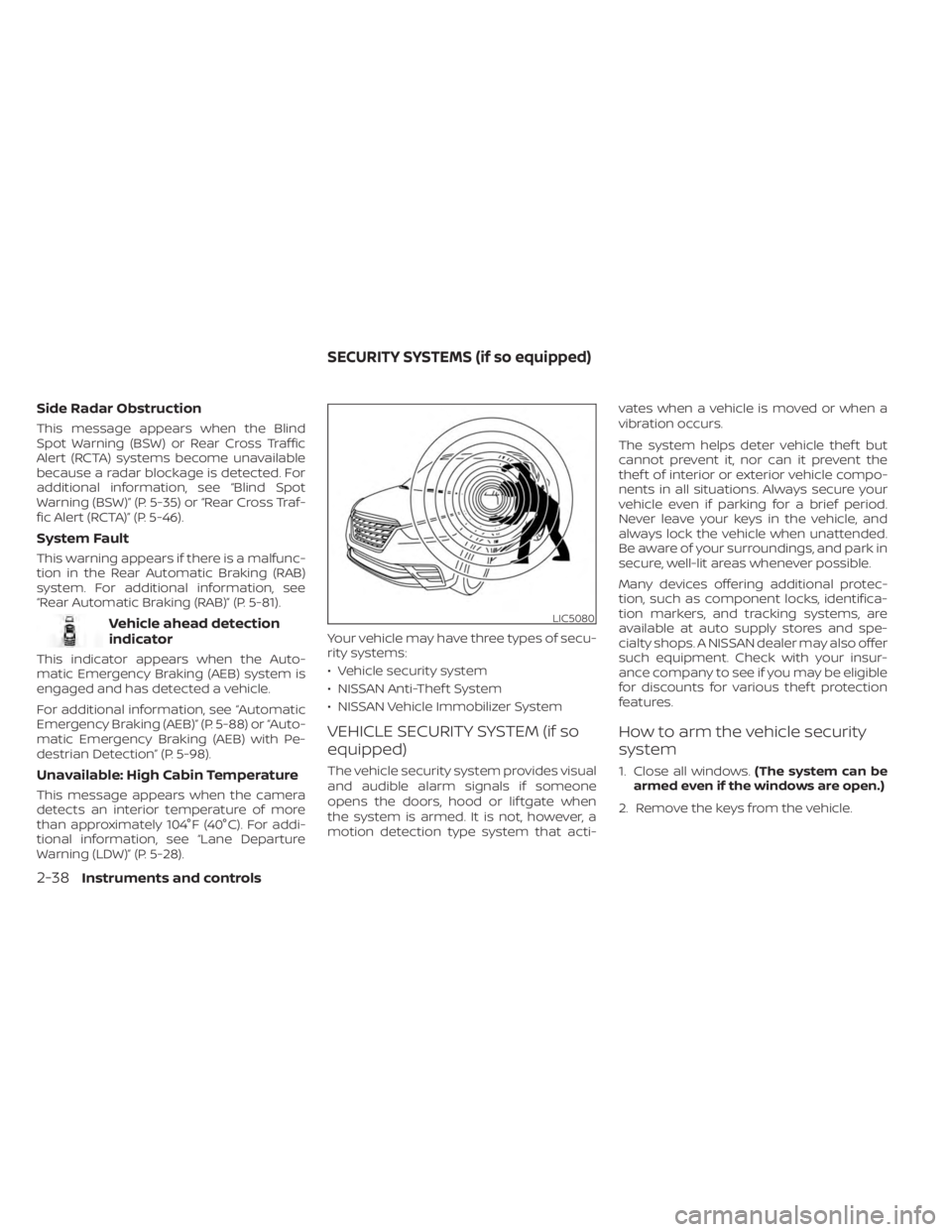
VEHICLE SECURITY SYSTEM (if so
equipped)
The vehicle security system provides visual
and audible alarm signals if someone
opens the doors, hood or lif tgate when
the system is armed. It is not, however, a
motion detection type system that acti-vates when a vehicle is moved or when a
vibration occurs.
The system helps deter vehicle thef t but
cannot prevent it, nor can it prevent the
thef t of interior or exterior vehicle compo-
nents in all situations. Always secure your
vehicle even if parking for a brief period.
Never leave your keys in the vehicle, and
always lock the vehicle when unattended.
Be aware of your surroundings, and park in
secure, well-lit areas whenever possible.
Many devices offering additional protec-
tion, such as component locks, identifica-
tion markers, and tracking systems, are
available at auto supply stores and spe-
cialty shops. A NISSAN dealer may also offer
such equipment. Check with your insur-
ance company to see if you may be eligible
for discounts for various thef t protection
features.
How to arm the vehicle security
system
1. Close all windows.
(The system can be
armed even if the windows are open.)
2. Remove the keys from the vehicle.
LIC5080
SECURITY SYSTEMS (if so equipped)
2-38Instruments and controls
Page 127 of 558
3. Close all doors, hood and lif tgate. Lockall doors. The doors can be locked with
the Intelligent Key, mechanical key, or
door handle request switch (if so
equipped).
4. Confirm that the
security indicator
light stays on for about 30 seconds. The
vehicle security system is now pre-
armed. The vehicle security system will
automatically shif t into the armed
phase. The
security light begins to
flash once every three seconds. If during
the pre-armed phase one of the follow-
ing occurs, the system will not arm:
• Any door is unlocked with the Intelligent Key, mechanical key, or door request
switch (if so equipped).
• Ignition switch is placed in the ON position.
• Even when the driver and/or passen-
gers are in the vehicle, the system will
activate with all the doors, hood and
lif tgate locked with the ignition switch
placed in the LOCK position. When plac-
ing the ignition switch in the ON posi-
tion, the system will be released.
Vehicle security system activation
The vehicle security system will give the
following alarm:
• The headlights or turn lamps blink and the horn sounds intermittently but
synchronously.
•
The alarm automatically turns off af ter a
period of time. However, the alarm reacti-
vates if the vehicle is tampered with again.
The alarm is activated by:
• opening any door, hood or the lif tgate without using the key or Intelligent Key
(even if the door is unlocked by releasing
the door inside lock knob).
How to stop an activated alarm
The alarm stops only by unlocking a door
or the lif tgate with the key fob, pressing the
button on the Intelligent Key, or push-
ing the request switch (if so equipped) on
the driver's or passenger's door with the
Intelligent Key in range of the door handle.
NISSAN ANTI-THEFT SYSTEM
(NATS) (if so equipped)
The NISSAN Anti-Thef t System will not al-
low the engine to start without the use of a
registered NATS key. If the engine does not start using the reg-
istered NATS key, it may be due to interfer-
ence caused by:
• Another NATS key
• Automated toll road device
• Automated payment device
• Other devices that transmit similar
signals
Start the engine using the following
procedure:
1. Remove any items that may be causing the interference away from the NATS key.
2. Leave the ignition switch in the ON posi- tion for approximately 5 seconds.
3. Place the ignition switch in the OFF or LOCK position and wait approximately
10 seconds.
4. Repeat steps 2 and 3 again.
5. Start the engine.
6. Repeat the steps above until all possible interferences are eliminated.
If this procedure allows the engine to start,
NISSAN recommends placing the regis-
tered NATS key separate from other de-
vices to avoid interference.
Instruments and controls2-39
Page 165 of 558
3 Pre-driving checks and adjustments
Keys.............................................3-2NISSAN Intelligent Key® .......................3-2
NISSAN Vehicle Immobilizer System
keys..........................................3-3
Doors ...........................................3-4
Locking with key .............................3-4
Locking with inside lock knob ................3-5
Locking with power door lock switch .........3-5
Automatic door locks ........................3-5
Child safety rear door lock ....................3-6
NISSAN Intelligent Key® system ..................3-6
Operating range ............................. 3-7
Door locks/unlocks precaution ...............3-8
NISSAN Intelligent Key® Operation ............3-9
How to use the remote keyless entry
function ..................................... 3-12
Warning signals ............................. 3-15
Troubleshooting guide ......................3-15
Remote Engine Start (if so equipped) ...........3-18
Remote Engine Start operating range .......3-18
Remote starting the vehicle .................3-19
Extending engine run time ..................3-19
Canceling a Remote Engine Start ...........3-19 Conditions the Remote Engine Start will
notwork ....................................
3-20
Hood ........................................... 3-21
Lif tgate ........................................ 3-22
Opening the lif tgate ......................... 3-23
Closing the lif tgate .......................... 3-23
Secondary lif tgate unlock ...................3-24
Fuel-filler door .................................. 3-25
Opening the fuel-filler door ..................3-25
Fuel-filler cap ................................ 3-25
Steering wheel ................................. 3-26
Tilt and telescopic operation ................3-27
Sun visors ...................................... 3-27
Vanity mirrors ............................... 3-28
Card holder (driver's side only) ...............3-28
Mirrors ......................................... 3-28
Manual anti-glare rearview mirror
(if so equipped) .............................. 3-28
Automatic anti-glare rearview mirror
(if so equipped) .............................. 3-29
Outside mirrors .............................
3-29
Page 184 of 558
• The engine hood has been opened.
•
The vehicle is shif ted out of P (Park) position.
• The alarm sounds due to illegal entry intothe vehicle.
• The ignition switch is pushed without an Intelligent Key in the vehicle.
• The ignition switch is pushed with an In- telligent Key in the vehicle but the brake
pedal is not depressed.
CONDITIONS THE REMOTE ENGINE
START WILL NOT WORK
The Remote Engine Start will not operate if
any of the following conditions are present:
• The ignition switch is placed in the ONposition.
• The hood is not securely closed.
• The hazard indicator lights are on.
• The engine is still running. The engine must be completely stopped. Wait at
least 6 seconds if the engine goes from
running to off. This is not applicable when
extending engine run time.
• The
button is not pressed and held
for at least 2 seconds.
•
Thebutton is not pressed and held
within 5 seconds of pressing the lock button.
• The brake is pressed.
• The doors are not closed and locked.
• The lif tgate is open.
• The Key System Error warning message appears in the vehicle information dis-
play (if so equipped).
• The alarm sounds due to illegal entry into the vehicle.
• Two Remote Engine Starts, or a single Remote Engine Start with an extension,
have already been used.
• The vehicle is not in P (Park).
• There is a detected registered key already inside of the vehicle.
• The Remote Engine Start feature has been switched to the OFF position using
the “Vehicle Settings” menu on the vehicle
information display (if so equipped).
For additional information, see “Vehicle
information display” (P. 2-24).
The Remote Engine Start may display a
warning or indicator in the vehicle informa-
tion display (if so equipped). For additional
information, see “Vehicle information dis-
play” (P. 2-24).
3-20Pre-driving checks and adjustments
Page 185 of 558
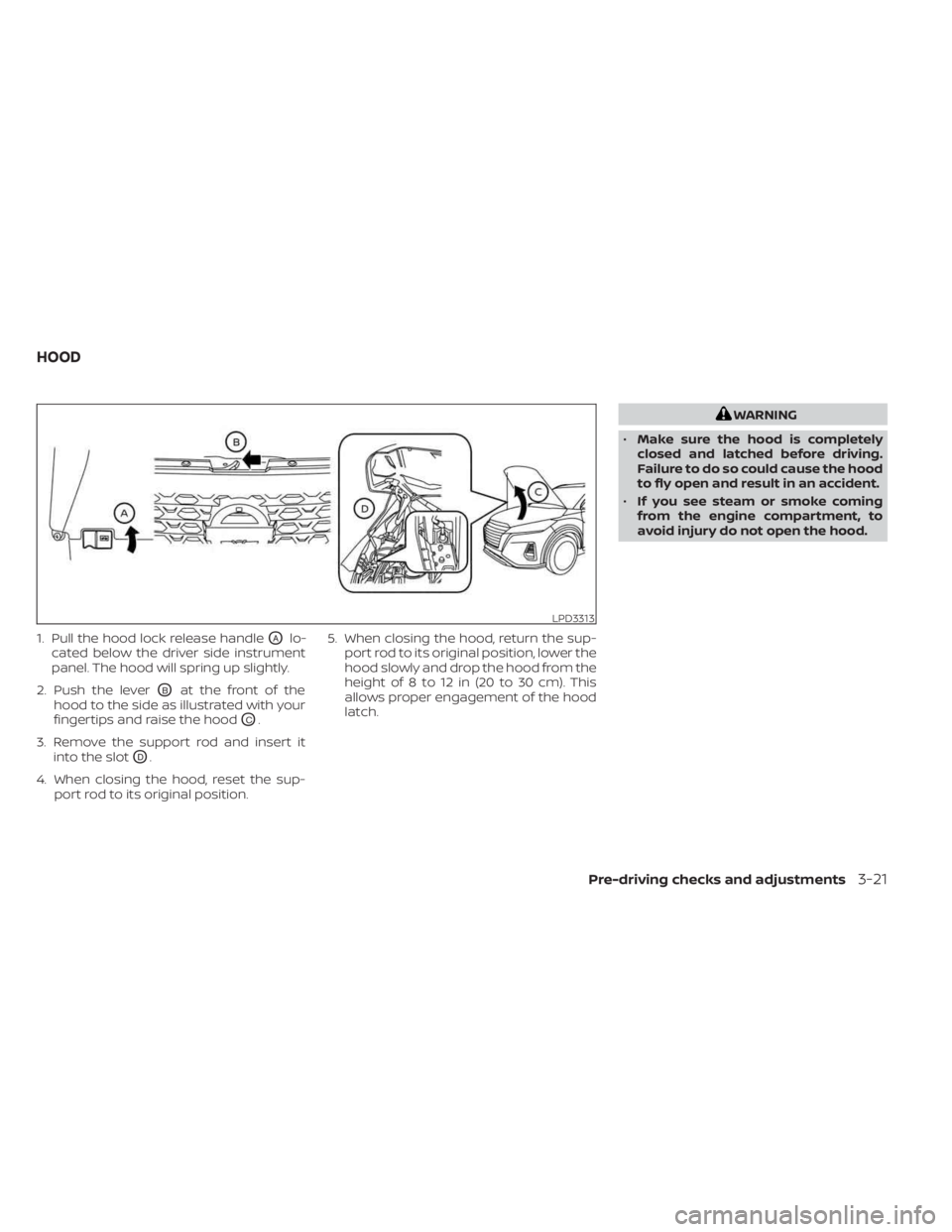
1. Pull the hood lock release handleOAlo-
cated below the driver side instrument
panel. The hood will spring up slightly.
2. Push the lever
OBat the front of the
hood to the side as illustrated with your
fingertips and raise the hood
OC.
3. Remove the support rod and insert it into the slot
OD.
4. When closing the hood, reset the sup- port rod to its original position. 5. When closing the hood, return the sup-
port rod to its original position, lower the
hood slowly and drop the hood from the
height of 8 to 12 in (20 to 30 cm). This
allows proper engagement of the hood
latch.
WARNING
• Make sure the hood is completely
closed and latched before driving.
Failure to do so could cause the hood
to fly open and result in an accident.
• If you see steam or smoke coming
from the engine compartment, to
avoid injury do not open the hood.
LPD3313
HOOD
Pre-driving checks and adjustments3-21
Page 425 of 558
To use the engine block heater:
1. Turn the engine off.
2. Open the hood and unwrap the engineblock heater cord.
3. Plug the engine block heater cord into a grounded 3-wire, 3-pronged extension
cord.
4. Plug the extension cord into a Ground Fault Interrupt (GFI) protected, grounded
110-volt AC (VAC) outlet.
5. The engine block heater must be plugged in for at least2-4hours, de-
pending on outside temperatures, to
properly warm the engine coolant. Use
an appropriate timer to turn the engine
block heater on.
6. Before starting the engine, unplug and properly store the cord to keep it away
from moving parts.
Starting and driving5-147
Page 438 of 558
CAUTION
•
Do not push start this vehicle. The
three-way catalyst may be damaged.
• Continuously Variable Transmission
(CVT) models cannot be push-
started or tow-started. Attempting
to do so may cause transmission
damage. If your vehicle is overheating (indicated by a
(red) high temperature warning light
(if
so equipped)), or if you feel a lack of engine
power, detect abnormal noise, etc., take the
following steps.
WARNING
• Do not continue to drive if your ve-
hicle overheats. Doing so could cause
engine damage or a vehicle fire.
• To avoid the danger of being scalded,
never remove the coolant reservoir
cap while the engine is still hot. When
the coolant reservoir cap is removed,
pressurized hot water will spurt out,
possibly causing serious injury.
• Do not open the hood if steam is
coming out.
1. Move the vehicle safely off the road, ap- ply the parking brake and move the shif t
lever to P (Park).
Do not stop the engine.
2. Turn off the air conditioner. Open all the windows, move the heater or air condi-
tioner temperature control to maximum
hot and fan control to high speed. 3. Get out of the vehicle. Look and listen for
steam or coolant escaping from the ra-
diator before opening the hood. (If
steam or coolant is escaping, turn off
the engine.) Do not open the hood fur-
ther until no steam or coolant can be
seen.
4. Open the engine hood.
WARNING
If steam or water is coming from the
engine, stand clear to prevent getting
burned.
5. Visually check drive belts for damage or looseness. Also check if the cooling fan
is running. The radiator hoses and radia-
tor should not leak water. If coolant is
leaking, the water pump belt is missing
or loose, or the cooling fan does not run,
stop the engine.
WARNING
Be careful not to allow your hands, hair,
jewelry or clothing to come into con-
tact with, or get caught in, engine belts
or the engine cooling fan. The engine
cooling fan can start at any time.
PUSH STARTING IF YOUR VEHICLE OVERHEATS
6-12In case of emergency
Page 444 of 558
In order to maintain the appearance of
your vehicle, it is important to take proper
care of it.
To protect the paint surfaces, wash your
vehicle as soon as you can:
• Af ter a rainfall to prevent possible dam-age from acid rain.
• Af ter driving on coastal roads.
• When contaminants such as soot, bird droppings, tree sap, metal particles or
bugs get on the paint surface.
• When dust or mud builds up on the surface.
Whenever possible, store or park your ve-
hicle inside a garage or in a covered area.
When it is necessary to park outside, park in
a shady area or protect the vehicle with a
body cover.
Be careful not to scratch the paint sur-
face when putting on or removing the
body cover.
WASHING
Wash dirt off with a wet sponge and plenty
of water. Clean the vehicle thoroughly us-
ing a mild soap, a special vehicle soap or
general purpose dishwashing liquid mixed
with clean, lukewarm (never hot) water.
CAUTION
• Do not concentrate water spray di-
rectly on the sonar sensors (if so
equipped) on the bumper as this will
result in damage to the sensors. Do
not use pressure washers capable of
spraying water over 8,274 kPa (1,200
psi) to wash your vehicle. Use of high-
pressure washers over 8,274 kPa
(1,200 psi) can result in damage to or
removal of paint or graphics. Avoid
using a high-pressure washer closer
than 30 cm (12 inches ) to the vehicle.
Always use a wide-angle nozzle only,
keep the nozzle moving and do not
concentrate the water spray on any
one area.
• Do not use car washes that use acid
in the detergent. Some car washes,
especially brushless ones, use some
acid for cleaning. The acid may react
with some plastic vehicle compo-
nents, causing them to crack. This
could affect their appearance, and
also could cause them not to func-
tion properly. Always check with your
car wash to confirm that acid is not
used. •
Do not wash the vehicle with strong
household soap, strong chemical de-
tergents, gasoline or solvents.
• Do not wash the vehicle in direct sun-
light or while the vehicle body is hot,
as the surface may become
water-spotted.
• Avoid using tight-napped or rough
cloths, such as washing mitts. Care
must be taken when removing
caked-on dirt or other foreign sub-
stances so the paint surface is not
scratched or damaged.
• When using a high pressure car wash,
keep the high pressure nozzle away
from the shark fin antenna. The seal
may be deformed or damaged.
Rinse the vehicle thoroughly with plenty of
clean water.
Inside edges, seams and folds on the
doors, hatches and hood are particularly
vulnerable to the effects of road salt. There-
fore, these areas must be cleaned regularly.
Take care that the drain holes in the lower
edge of the door are open. Spray water
under the body and in the wheel wells to
loosen the dirt and wash away road salt.
A damp chamois can be used to dry the
vehicle to avoid water spots.
CLEANING EXTERIOR
7-2Appearance and care
Page 466 of 558
CLEANING
If your windshield is not clear af ter using
the windshield–washer or if a wiper blade
chatters when running, wax or other mate-
rial may be on the blade or windshield.
Clean the outside of the windshield with a
washer fluid or a mild detergent. Your wind-
shield is clean if beads do not form when
rinsing with clear water.
Clean each blade by wiping it with a cloth
soaked in a washer fluid or a mild deter-
gent. Then rinse the blades with clear wa-
ter. If your windshield is still not clear af ter
cleaning the blades and using the wiper,
install new windshield wiper blades.
CAUTION
Worn windshield wiper blades can
damage the windshield and impair
driver vision.
REPLACING
Replace the wiper blades if they are worn.
To replace the windshield wiper blades, fol-
low the procedure below:
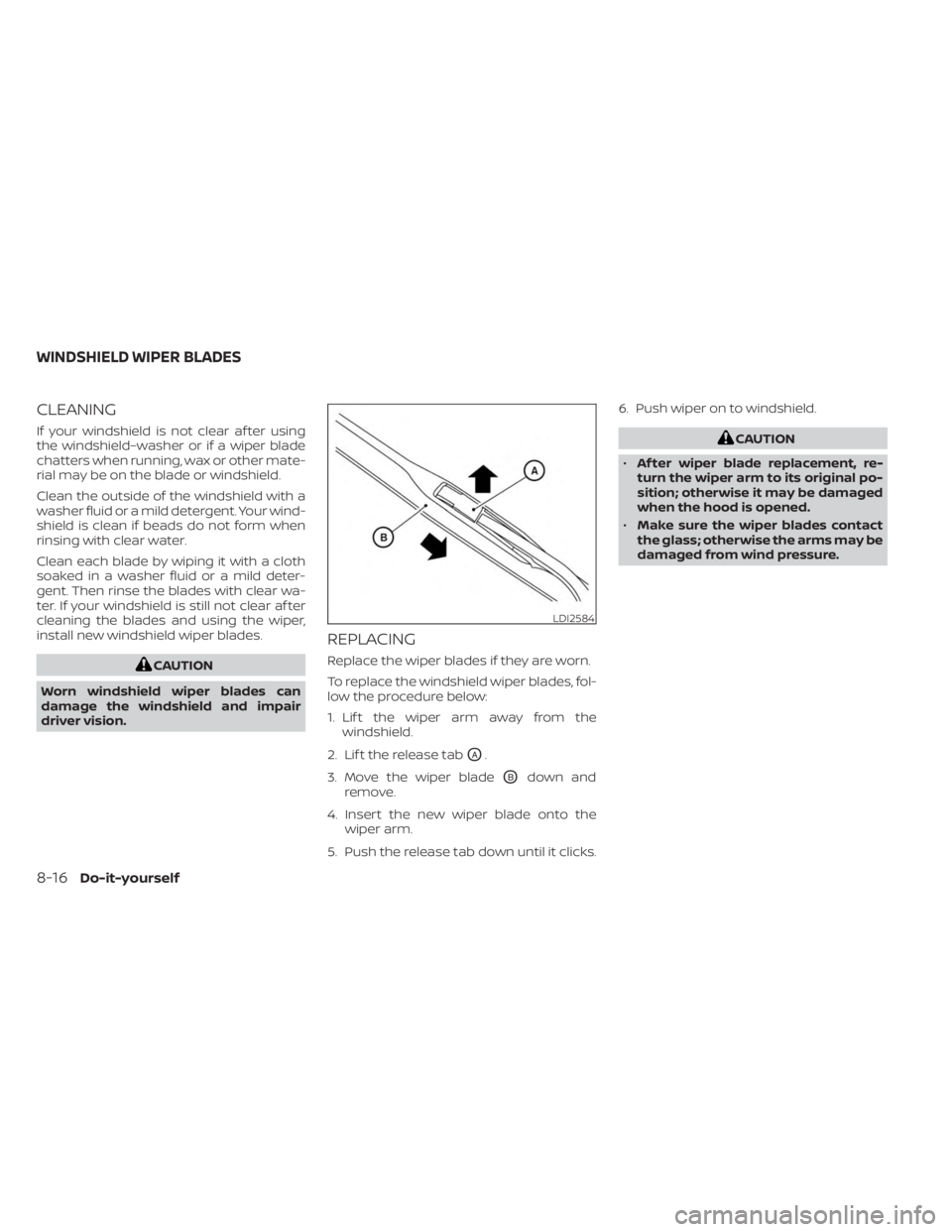
1. Lif t the wiper arm away from the windshield.
2. Lif t the release tab
OA.
3. Move the wiper blade
OBdown and
remove.
4. Insert the new wiper blade onto the wiper arm.
5. Push the release tab down until it clicks. 6. Push wiper on to windshield.
CAUTION
• Af ter wiper blade replacement, re-
turn the wiper arm to its original po-
sition; otherwise it may be damaged
when the hood is opened.
• Make sure the wiper blades contact
the glass; otherwise the arms may be
damaged from wind pressure.
LDI2584
WINDSHIELD WIPER BLADES
8-16Do-it-yourself