sensor NISSAN LATIO 2008 Service Repair Manual
[x] Cancel search | Manufacturer: NISSAN, Model Year: 2008, Model line: LATIO, Model: NISSAN LATIO 2008Pages: 2771, PDF Size: 60.61 MB
Page 612 of 2771
BL-178
< SERVICE INFORMATION >
TRUNK LID OPENER
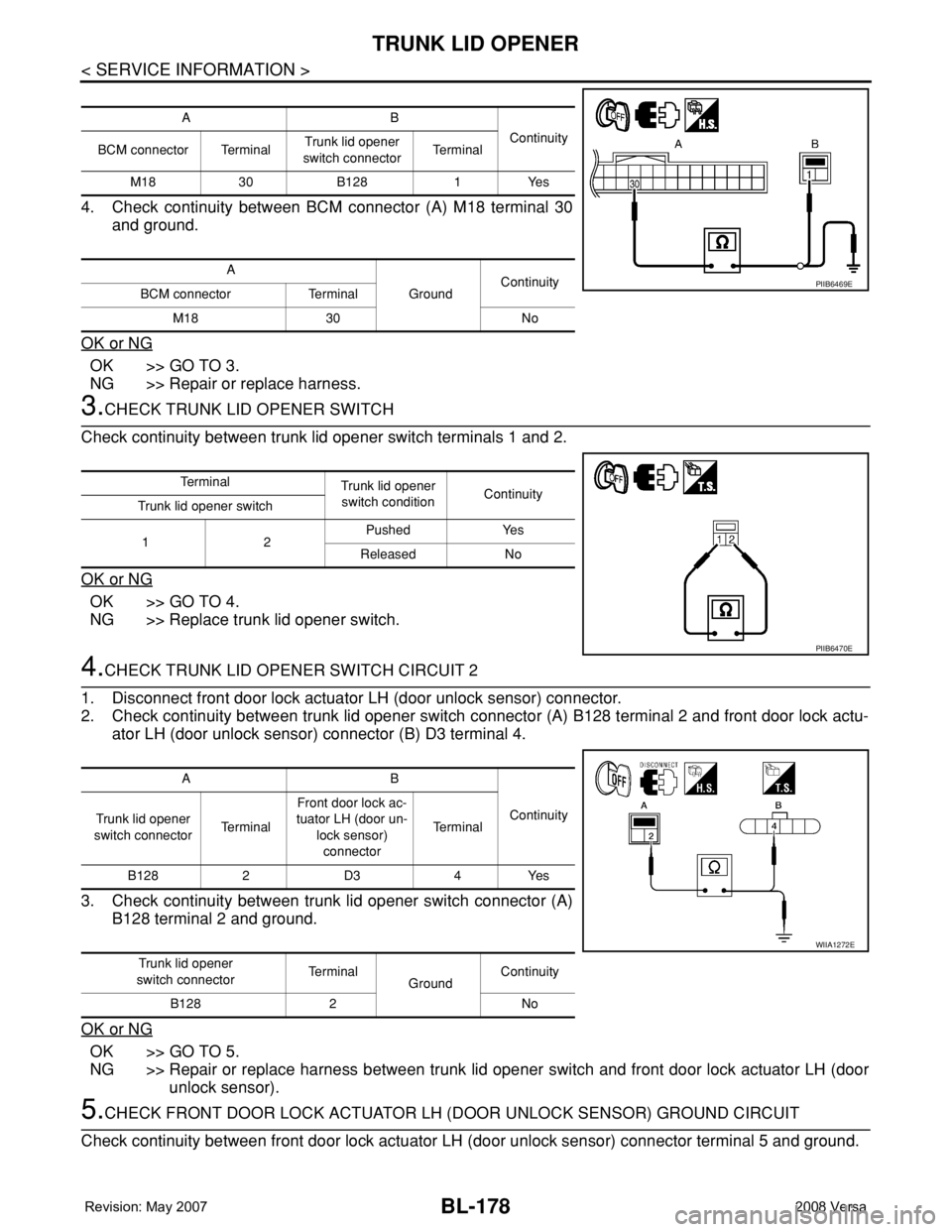
4. Check continuity between BCM connector (A) M18 terminal 30
and ground.
OK or NG
OK >> GO TO 3.
NG >> Repair or replace harness.
3.CHECK TRUNK LID OPENER SWITCH
Check continuity between trunk lid opener switch terminals 1 and 2.
OK or NG
OK >> GO TO 4.
NG >> Replace trunk lid opener switch.
4.CHECK TRUNK LID OPENER SWITCH CIRCUIT 2
1. Disconnect front door lock actuator LH (door unlock sensor) connector.
2. Check continuity between trunk lid opener switch connector (A) B128 terminal 2 and front door lock actu-
ator LH (door unlock sensor) connector (B) D3 terminal 4.
3. Check continuity between trunk lid opener switch connector (A)
B128 terminal 2 and ground.
OK or NG
OK >> GO TO 5.
NG >> Repair or replace harness between trunk lid opener switch and front door lock actuator LH (door
unlock sensor).
5.CHECK FRONT DOOR LOCK ACTUATOR LH (DOOR UNLOCK SENSOR) GROUND CIRCUIT
Check continuity between front door lock actuator LH (door unlock sensor) connector terminal 5 and ground.
AB
Continuity
BCM connector TerminalTrunk lid opener
switch connectorTe r m i n a l
M18 30 B128 1 Yes
A
GroundContinuity
BCM connector Terminal
M18 30 No
PIIB6469E
Te r m i n a l
Trunk lid opener
switch conditionContinuity
Trunk lid opener switch
12Pushed Yes
Released No
PIIB6470E
AB
Continuity
Trunk lid opener
switch connectorTe r m i n a lFront door lock ac-
tuator LH (door un-
lock sensor)
connectorTe r m i n a l
B128 2 D3 4 Yes
Trunk lid opener
switch connectorTe r m i n a l
GroundContinuity
B128 2 No
WIIA1272E
Page 613 of 2771
TRUNK LID OPENER
BL-179
< SERVICE INFORMATION >
C
D
E
F
G
H
J
K
L
MA
B
BL
N
O
P
OK or NG
OK >> GO TO 6.
NG >> Repair or replace harness.
6.CHECK UNLOCK SENSOR FUNCTION
1. Connect front door lock actuator LH (door unlock sensor) connector.
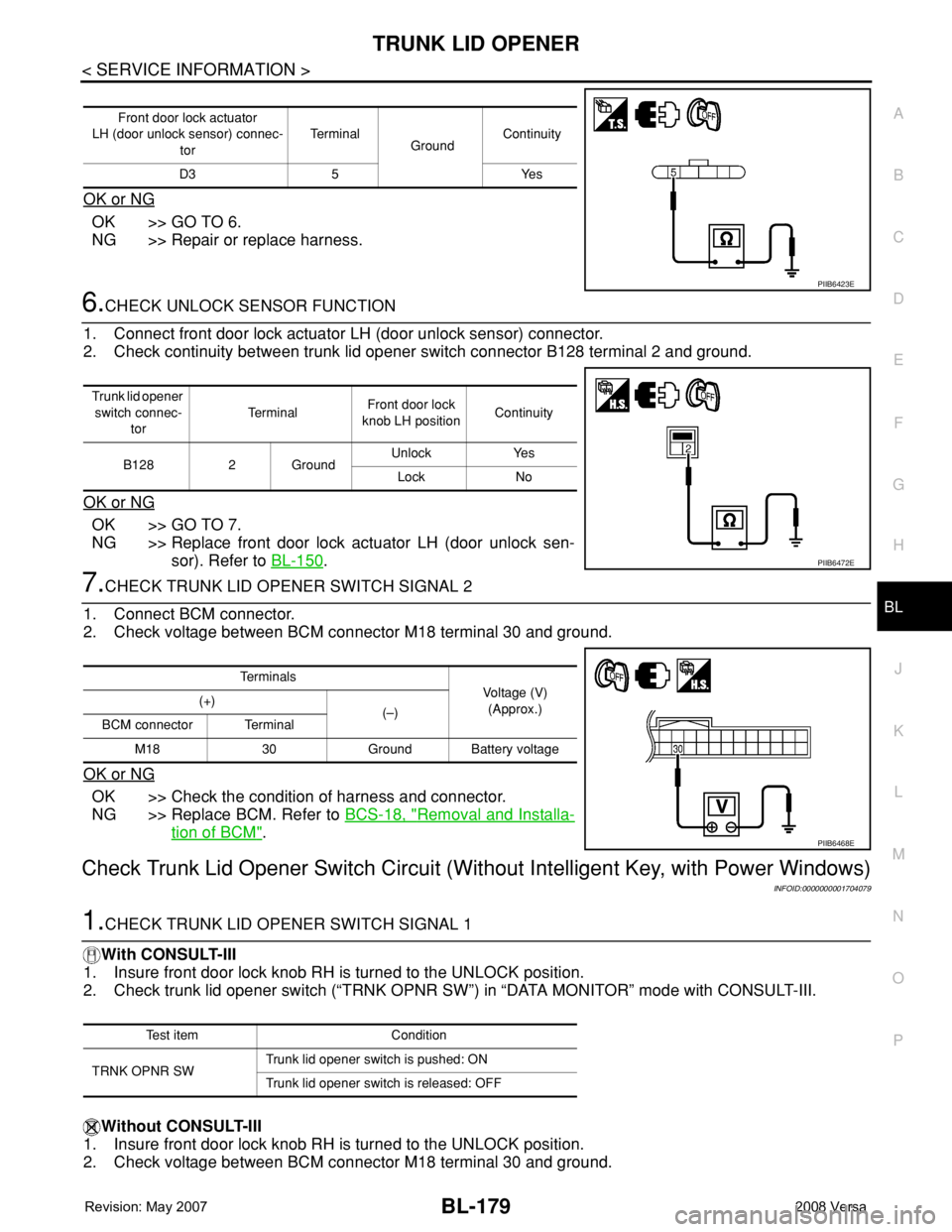
2. Check continuity between trunk lid opener switch connector B128 terminal 2 and ground.
OK or NG
OK >> GO TO 7.
NG >> Replace front door lock actuator LH (door unlock sen-
sor). Refer to BL-150
.
7.CHECK TRUNK LID OPENER SWITCH SIGNAL 2
1. Connect BCM connector.
2. Check voltage between BCM connector M18 terminal 30 and ground.
OK or NG
OK >> Check the condition of harness and connector.
NG >> Replace BCM. Refer to BCS-18, "
Removal and Installa-
tion of BCM".
Check Trunk Lid Opener Switch Circuit (Without Intelligent Key, with Power Windows)
INFOID:0000000001704079
1.CHECK TRUNK LID OPENER SWITCH SIGNAL 1
With CONSULT-III
1. Insure front door lock knob RH is turned to the UNLOCK position.
2. Check trunk lid opener switch (“TRNK OPNR SW”) in “DATA MONITOR” mode with CONSULT-III.
Without CONSULT-III
1. Insure front door lock knob RH is turned to the UNLOCK position.
2. Check voltage between BCM connector M18 terminal 30 and ground.
Front door lock actuator
LH (door unlock sensor) connec-
torTe r m i n a l
GroundContinuity
D3 5 Yes
PIIB6423E
Trunk lid opener
switch connec-
torTe r m i n a lFront door lock
knob LH positionContinuity
B128 2 GroundUnlock Yes
Lock No
PIIB6472E
Te r m i n a l s
Voltage (V)
(Approx.) (+)
(–)
BCM connector Terminal
M18 30 Ground Battery voltage
PIIB6468E
Test item Condition
TRNK OPNR SWTrunk lid opener switch is pushed: ON
Trunk lid opener switch is released: OFF
Page 614 of 2771
BL-180
< SERVICE INFORMATION >
TRUNK LID OPENER
OK or NG
OK >> Trunk lid opener switch is OK.
NG >> GO TO 2.
2.CHECK TRUNK LID OPENER SWITCH CIRCUIT 1
1. Turn ignition switch OFF.
2. Disconnect BCM and trunk lid opener switch connector.
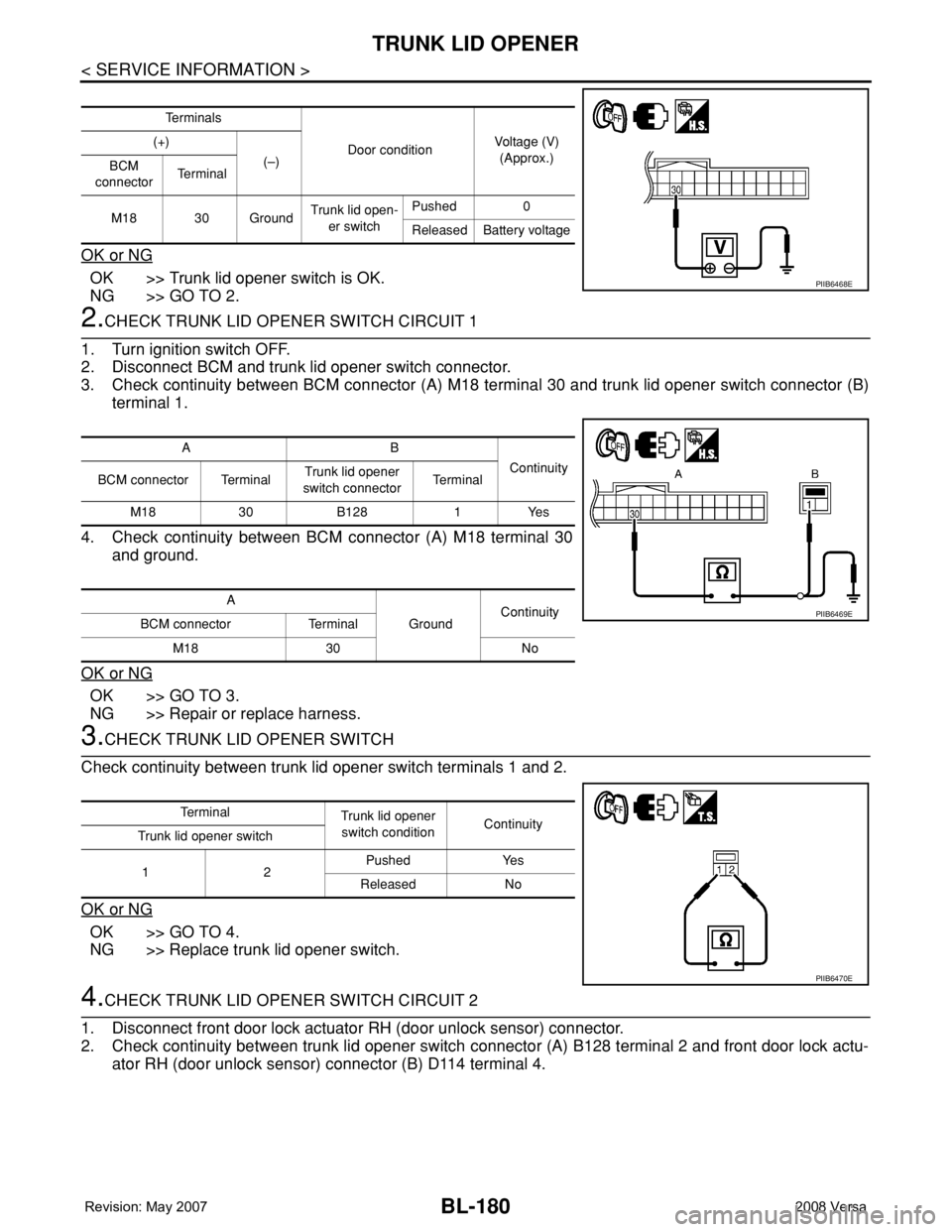
3. Check continuity between BCM connector (A) M18 terminal 30 and trunk lid opener switch connector (B)
terminal 1.
4. Check continuity between BCM connector (A) M18 terminal 30
and ground.
OK or NG
OK >> GO TO 3.
NG >> Repair or replace harness.
3.CHECK TRUNK LID OPENER SWITCH
Check continuity between trunk lid opener switch terminals 1 and 2.
OK or NG
OK >> GO TO 4.
NG >> Replace trunk lid opener switch.
4.CHECK TRUNK LID OPENER SWITCH CIRCUIT 2
1. Disconnect front door lock actuator RH (door unlock sensor) connector.
2. Check continuity between trunk lid opener switch connector (A) B128 terminal 2 and front door lock actu-
ator RH (door unlock sensor) connector (B) D114 terminal 4.
Te r m i n a l s
Door conditionVoltage (V)
(Approx.) (+)
(–)
BCM
connectorTe r m i n a l
M18 30 GroundTrunk lid open-
er switchPushed 0
Released Battery voltage
PIIB6468E
AB
Continuity
BCM connector TerminalTrunk lid opener
switch connectorTe r m i n a l
M18 30 B128 1 Yes
A
GroundContinuity
BCM connector Terminal
M18 30 No
PIIB6469E
Te r m i n a l
Trunk lid opener
switch conditionContinuity
Trunk lid opener switch
12Pushed Yes
Released No
PIIB6470E
Page 615 of 2771
TRUNK LID OPENER
BL-181
< SERVICE INFORMATION >
C
D
E
F
G
H
J
K
L
MA
B
BL
N
O
P
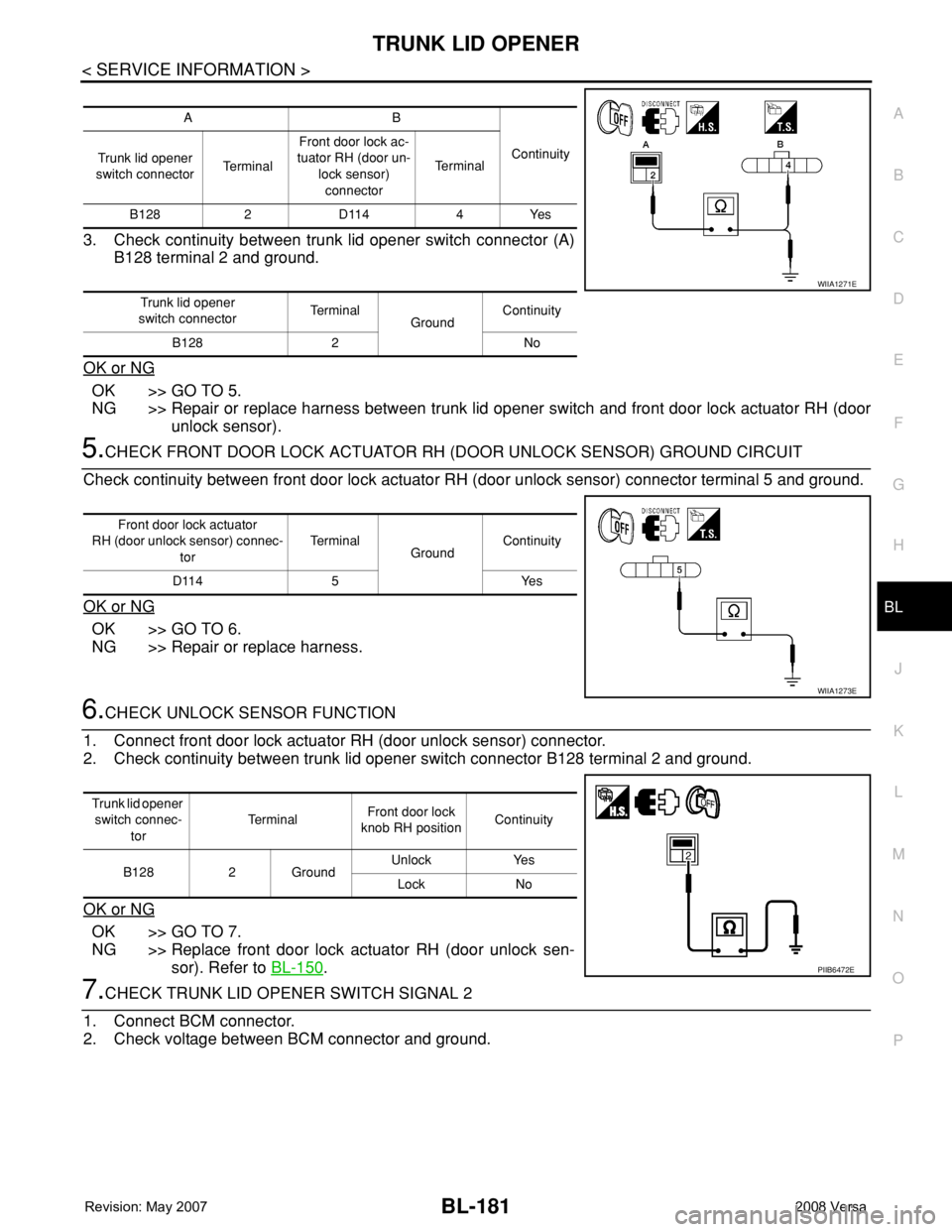
3. Check continuity between trunk lid opener switch connector (A)
B128 terminal 2 and ground.
OK or NG
OK >> GO TO 5.
NG >> Repair or replace harness between trunk lid opener switch and front door lock actuator RH (door
unlock sensor).
5.CHECK FRONT DOOR LOCK ACTUATOR RH (DOOR UNLOCK SENSOR) GROUND CIRCUIT
Check continuity between front door lock actuator RH (door unlock sensor) connector terminal 5 and ground.
OK or NG
OK >> GO TO 6.
NG >> Repair or replace harness.
6.CHECK UNLOCK SENSOR FUNCTION
1. Connect front door lock actuator RH (door unlock sensor) connector.
2. Check continuity between trunk lid opener switch connector B128 terminal 2 and ground.
OK or NG
OK >> GO TO 7.
NG >> Replace front door lock actuator RH (door unlock sen-
sor). Refer to BL-150
.
7.CHECK TRUNK LID OPENER SWITCH SIGNAL 2
1. Connect BCM connector.
2. Check voltage between BCM connector and ground.
AB
Continuity
Trunk lid opener
switch connectorTe r m i n a lFront door lock ac-
tuator RH (door un-
lock sensor)
connectorTe r m i n a l
B128 2 D114 4 Yes
Trunk lid opener
switch connectorTe r m i n a l
GroundContinuity
B128 2 No
WIIA1271E
Front door lock actuator
RH (door unlock sensor) connec-
torTe r m i n a l
GroundContinuity
D114 5 Yes
WIIA1273E
Trunk lid opener
switch connec-
torTe r m i n a lFront door lock
knob RH positionContinuity
B128 2 GroundUnlock Yes
Lock No
PIIB6472E
Page 738 of 2771
BRAKE PEDAL
BR-7
< SERVICE INFORMATION >
C
D
E
G
H
I
J
K
L
MA
B
BR
N
O
P
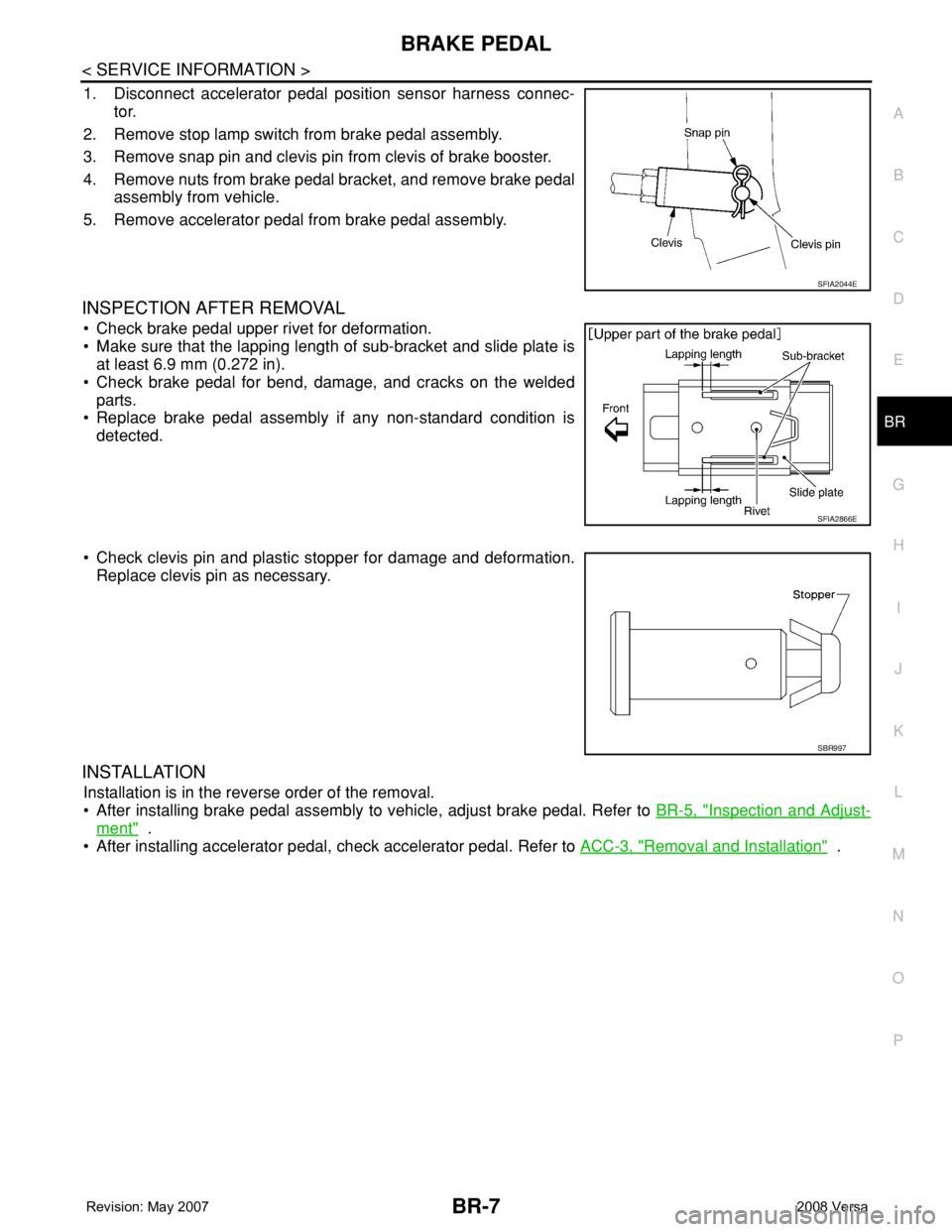
1. Disconnect accelerator pedal position sensor harness connec-
tor.
2. Remove stop lamp switch from brake pedal assembly.
3. Remove snap pin and clevis pin from clevis of brake booster.
4. Remove nuts from brake pedal bracket, and remove brake pedal
assembly from vehicle.
5. Remove accelerator pedal from brake pedal assembly.
INSPECTION AFTER REMOVAL
• Check brake pedal upper rivet for deformation.
• Make sure that the lapping length of sub-bracket and slide plate is
at least 6.9 mm (0.272 in).
• Check brake pedal for bend, damage, and cracks on the welded
parts.
• Replace brake pedal assembly if any non-standard condition is
detected.
• Check clevis pin and plastic stopper for damage and deformation.
Replace clevis pin as necessary.
INSTALLATION
Installation is in the reverse order of the removal.
• After installing brake pedal assembly to vehicle, adjust brake pedal. Refer to BR-5, "
Inspection and Adjust-
ment" .
• After installing accelerator pedal, check accelerator pedal. Refer to ACC-3, "
Removal and Installation" .
SFIA2044E
SFIA2866E
SBR997
Page 754 of 2771
FRONT DISC BRAKE
BR-23
< SERVICE INFORMATION >
C
D
E
G
H
I
J
K
L
MA
B
BR
N
O
P
FRONT DISC BRAKE
On Board InspectionINFOID:0000000001703796
PAD WEAR INSPECTION
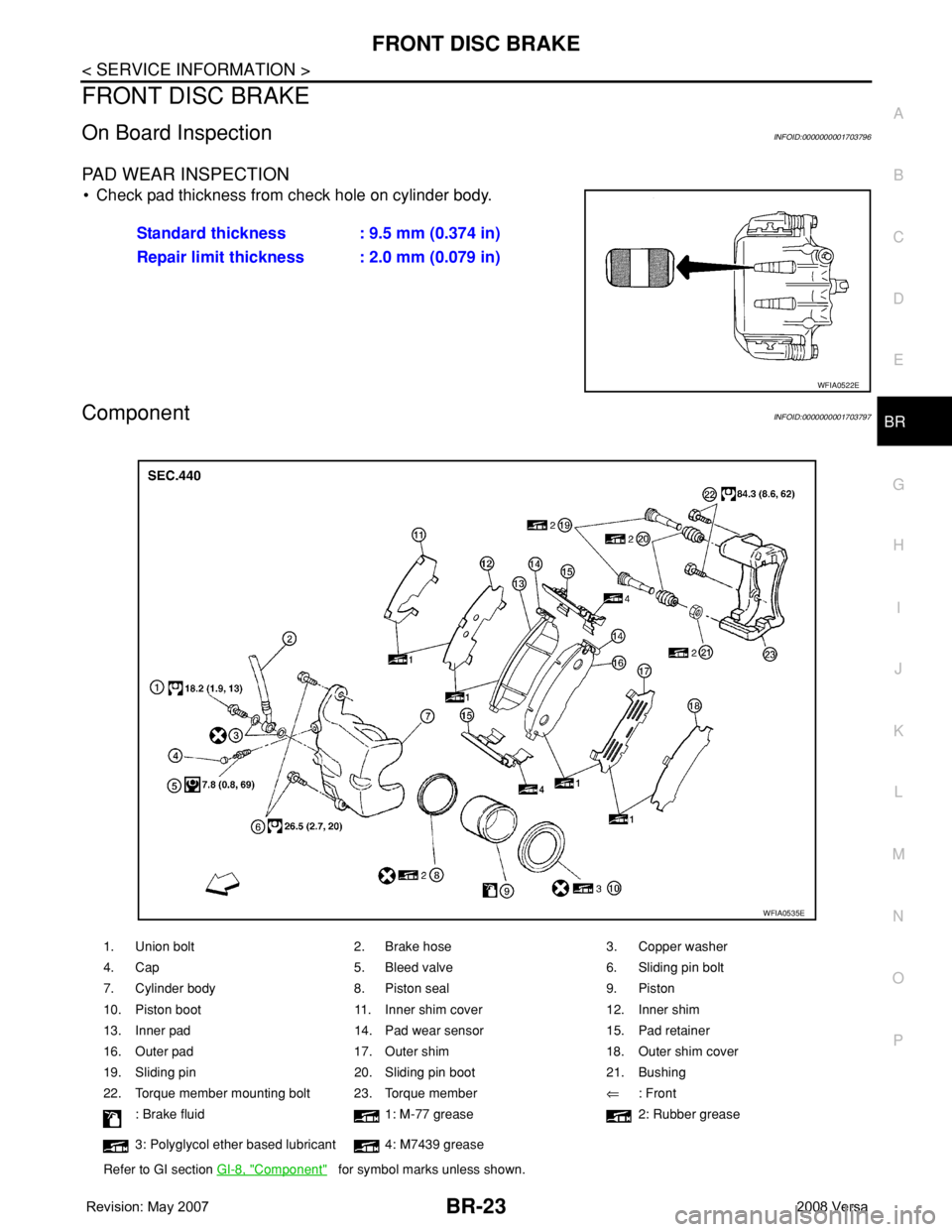
• Check pad thickness from check hole on cylinder body.
ComponentINFOID:0000000001703797
Standard thickness : 9.5 mm (0.374 in)
Repair limit thickness : 2.0 mm (0.079 in)
WFIA0522E
1. Union bolt 2. Brake hose 3. Copper washer
4. Cap 5. Bleed valve 6. Sliding pin bolt
7. Cylinder body 8. Piston seal 9. Piston
10. Piston boot 11. Inner shim cover 12. Inner shim
13. Inner pad 14. Pad wear sensor 15. Pad retainer
16. Outer pad 17. Outer shim 18. Outer shim cover
19. Sliding pin 20. Sliding pin boot 21. Bushing
22. Torque member mounting bolt 23. Torque member⇐: Front
: Brake fluid 1: M-77 grease 2: Rubber grease
3: Polyglycol ether based lubricant 4: M7439 grease
Refer to GI section GI-8, "
Component" for symbol marks unless shown.
WFIA0535E
Page 766 of 2771

BRC-1
BRAKES
C
D
E
G
H
I
J
K
L
M
SECTION BRC
A
B
BRC
N
O
P
CONTENTS
BRAKE CONTROL SYSTEM
ABS
SERVICE INFORMATION ............................
2
PRECAUTIONS ...................................................2
Precaution for Supplemental Restraint System
(SRS) "AIR BAG" and "SEAT BELT PRE-TEN-
SIONER" ...................................................................
2
Precaution for Brake System ....................................2
Precaution for Brake Control .....................................2
Precaution for CAN System ......................................3
PREPARATION ...................................................4
Special Service Tool .................................................4
Commercial Service Tool ..........................................4
SYSTEM DESCRIPTION .....................................5
System Component ...................................................5
ABS Function ............................................................5
EBD Function ............................................................5
Fail-Safe Function .....................................................5
Hydraulic Circuit Diagram .........................................6
CAN COMMUNICATION .....................................7
System Description ...................................................7
TROUBLE DIAGNOSIS ......................................8
How to Perform Trouble Diagnosis for Quick and
Accurate Repair ........................................................
8
Component Parts and Harness Connector Loca-
tion ..........................................................................
11
Schematic ...............................................................12
Wiring Diagram - ABS - ...........................................13
Basic Inspection ......................................................16
Warning Lamp and Indicator Timing ........................17
Control Unit Input/Output Signal Standard ..............17
CONSULT-III Function (ABS) ..................................18
TROUBLE DIAGNOSIS FOR SELF-DIAG-
NOSTIC ITEMS .................................................
24
Wheel Sensor System .............................................24
ABS Control Unit Inspection ....................................25
Solenoid Valve System Inspection ..........................25
Actuator Motor, Motor Relay, and Circuit Inspec-
tion ...........................................................................
26
ABS Control Unit Power and Ground Systems In-
spection ...................................................................
27
CAN Communication System Inspection .................28
TROUBLE DIAGNOSES FOR SYMPTOMS .....29
ABS Works Frequently ............................................29
Unexpected Pedal Action ........................................29
Long Stopping Distance ..........................................30
ABS Does Not Work ................................................30
Pedal Vibration or ABS Operation Noise .................30
WHEEL SENSORS ...........................................32
Removal and Installation .........................................32
SENSOR ROTOR ..............................................34
Removal and Installation .........................................34
ACTUATOR AND ELECTRIC UNIT (ASSEM-
BLY) ..................................................................
35
Removal and Installation .........................................35
Page 769 of 2771
![NISSAN LATIO 2008 Service Repair Manual BRC-4
< SERVICE INFORMATION >[ABS]
PREPARATION
PREPARATION
Special Service ToolINFOID:0000000001703823
The actual shapes of Kent-Moore tools may differ from those of special service tools illustrated](/img/5/57360/w960_57360-768.png "NISSAN LATIO 2008 Service Repair Manual BRC-4
< SERVICE INFORMATION >[ABS]
PREPARATION
PREPARATION
Special Service ToolINFOID:0000000001703823
The actual shapes of Kent-Moore tools may differ from those of special service tools illustrated")
BRC-4
< SERVICE INFORMATION >[ABS]
PREPARATION
PREPARATION
Special Service ToolINFOID:0000000001703823
The actual shapes of Kent-Moore tools may differ from those of special service tools illustrated here.
Commercial Service ToolINFOID:0000000001703824
Tool number
(Kent-Moore No.)
Tool nameDescription
KV991J0080
(J-45741)
ABS active wheel sensor testerChecking operation of ABS active wheel sen-
sors
WFIA0101E
Tool nameDescription
1. Flare nut crowfoot
2. Torque wrenchRemoving and installing brake piping
a: 10 mm (0.39 in)/12 mm (0.47 in)
S-NT360
Page 773 of 2771
![NISSAN LATIO 2008 Service Repair Manual BRC-8
< SERVICE INFORMATION >[ABS]
TROUBLE DIAGNOSIS
TROUBLE DIAGNOSIS
How to Perform Trouble Diagnosis for Quick and Accurate RepairINFOID:0000000001703831
INTRODUCTION
The ABS system has an electron](/img/5/57360/w960_57360-772.png "NISSAN LATIO 2008 Service Repair Manual BRC-8
< SERVICE INFORMATION >[ABS]
TROUBLE DIAGNOSIS
TROUBLE DIAGNOSIS
How to Perform Trouble Diagnosis for Quick and Accurate RepairINFOID:0000000001703831
INTRODUCTION
The ABS system has an electron")
BRC-8
< SERVICE INFORMATION >[ABS]
TROUBLE DIAGNOSIS
TROUBLE DIAGNOSIS
How to Perform Trouble Diagnosis for Quick and Accurate RepairINFOID:0000000001703831
INTRODUCTION
The ABS system has an electronic control unit to control major func-
tions. The control unit accepts input signals from sensors and con-
trols actuator operation. It is also important to check for air leaks in
the booster or brake and vacuum lines, lack of brake fluid, or other
malfunctions in the brake system.
It is much more difficult to diagnose a malfunction that occurs inter-
mittently rather than continuously. Most intermittent conditions are
caused by poor electrical connections or damaged wiring. In this
case, careful checking of suspicious circuits may help prevent the
replacement of good parts.
A visual check only may not find the cause of the malfunction, so a
road test should be performed.
Before undertaking actual checks, take just a few minutes to talk with
a customer who approaches with an ABS complaint. The customer
is a very good source of information, especially for intermittent condi-
tions. Through the talks with the customer, find out what symptoms
are present and under what conditions they occur.
Start your diagnosis by looking for “conventional” malfunctions first.
This is one of the best ways to troubleshoot brake malfunctions on
an ABS equipped vehicle. Also check related Service Bulletins for
information.
SEF233G
SEF234G
Page 776 of 2771
![NISSAN LATIO 2008 Service Repair Manual TROUBLE DIAGNOSIS
BRC-11
< SERVICE INFORMATION >[ABS]
C
D
E
G
H
I
J
K
L
MA
B
BRC
N
O
P
Component Parts and Harness Connector LocationINFOID:0000000001703832
1. Front wheel sensor
LH E51
RH E522. Rear](/img/5/57360/w960_57360-775.png "NISSAN LATIO 2008 Service Repair Manual TROUBLE DIAGNOSIS
BRC-11
< SERVICE INFORMATION >[ABS]
C
D
E
G
H
I
J
K
L
MA
B
BRC
N
O
P
Component Parts and Harness Connector LocationINFOID:0000000001703832
1. Front wheel sensor
LH E51
RH E522. Rear")
TROUBLE DIAGNOSIS
BRC-11
< SERVICE INFORMATION >[ABS]
C
D
E
G
H
I
J
K
L
MA
B
BRC
N
O
P
Component Parts and Harness Connector LocationINFOID:0000000001703832
1. Front wheel sensor
LH E51
RH E522. Rear wheel sensor
LH B123
RH B1243. ABS actuator and electric unit (con-
trol unit) E33
4. Combination meter M24
WFIA0497E