brake rotor NISSAN LATIO 2011 Service User Guide
[x] Cancel search | Manufacturer: NISSAN, Model Year: 2011, Model line: LATIO, Model: NISSAN LATIO 2011Pages: 3787, PDF Size: 78.35 MB
Page 889 of 3787
BR-42
< SERVICE INFORMATION >
SERVICE DATA AND SPECIFICATIONS (SDS)
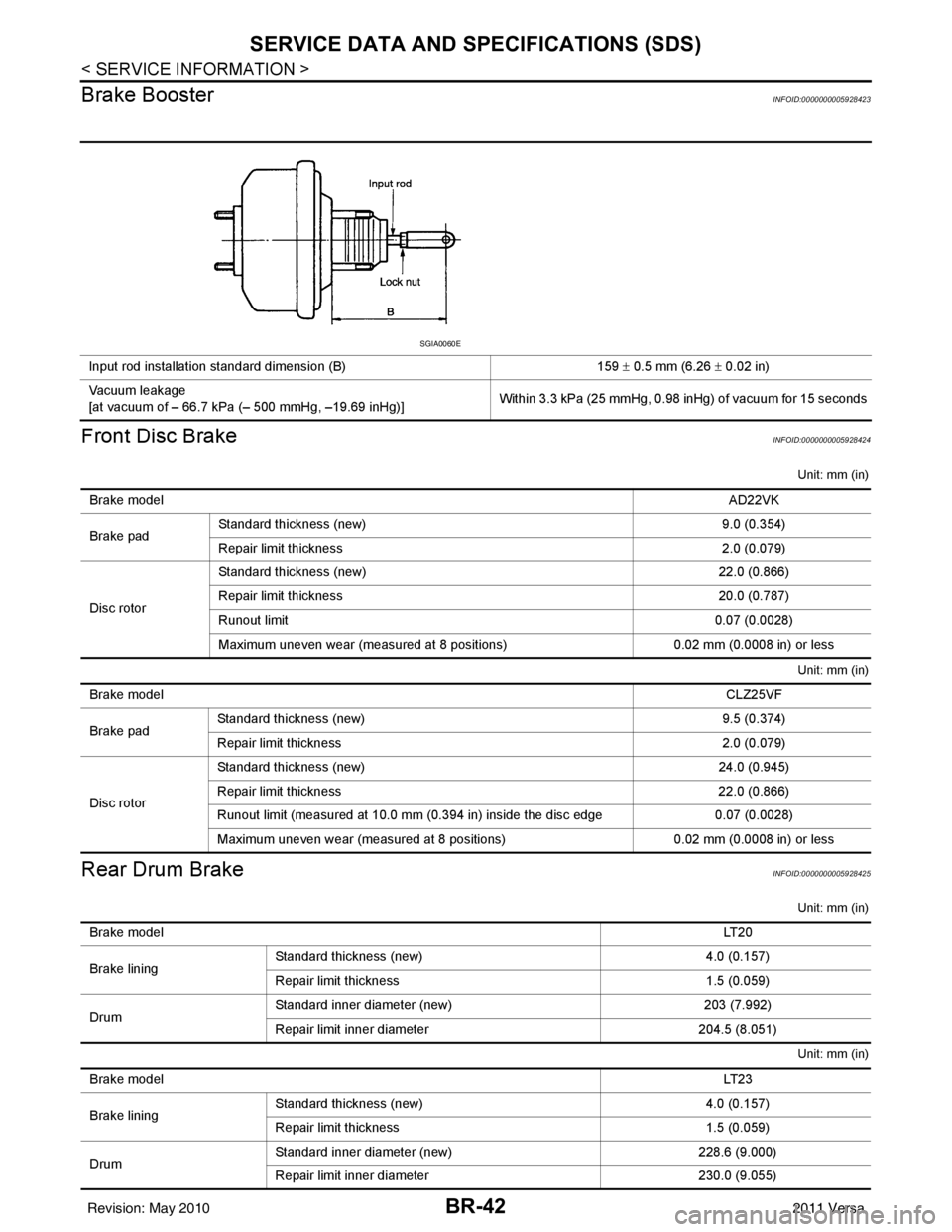
Brake Booster
INFOID:0000000005928423
Front Disc BrakeINFOID:0000000005928424
Unit: mm (in)
Unit: mm (in)
Rear Drum BrakeINFOID:0000000005928425
Unit: mm (in)
Unit: mm (in)
Input rod installation standard dimension (B) 159 ± 0.5 mm (6.26 ± 0.02 in)
Vacuum leakage
[at vacuum of – 66.7 kPa (– 500 mmHg, –19.69 inHg)] Within 3.3 kPa (25 mmHg, 0.98 inHg) of vacuum for 15 seconds
SGIA0060E
Brake model
AD22VK
Brake pad Standard thickness (new)
9.0 (0.354)
Repair limit thickness 2.0 (0.079)
Disc rotor Standard thickness (new)
22.0 (0.866)
Repair limit thickness 20.0 (0.787)
Runout limit 0.07 (0.0028)
Maximum uneven wear (measured at 8 positions) 0.02 mm (0.0008 in) or less
Brake model CLZ25VF
Brake pad Standard thickness (new)
9.5 (0.374)
Repair limit thickness 2.0 (0.079)
Disc rotor Standard thickness (new)
24.0 (0.945)
Repair limit thickness 22.0 (0.866)
Runout limit (measured at 10.0 mm (0.394 in) inside the disc edge 0.07 (0.0028)
Maximum uneven wear (measured at 8 positions) 0.02 mm (0.0008 in) or less
Brake model LT 2 0
Brake lining Standard thickness
(new) 4.0 (0.157)
Repair limit thickness 1.5 (0.059)
Drum Standard inner diameter (new)
203 (7.992)
Repair limit inner diameter 204.5 (8.051)
Brake model LT 2 3
Brake lining Standard thickness (new)
4.0 (0.157)
Repair limit thickness 1.5 (0.059)
Drum Standard inner diameter (new)
228.6 (9.000)
Repair limit inner diameter 230.0 (9.055)
Revision: May 2010 2011 Versa
Page 890 of 3787

BRC-1
BRAKES
C
DE
G H
I
J
K L
M
SECTION BRC
A
B
BRC
N
O P
CONTENTS
BRAKE CONTROL SYSTEM
ABS
SERVICE INFORMATION .. ..........................
3
PRECAUTIONS .............................................. .....3
Precaution for Supplemental Restraint System
(SRS) "AIR BAG" and "SEAT BELT PRE-TEN-
SIONER" ............................................................. ......
3
Precaution for Brake System ....................................3
Precaution for Brake Control .....................................4
Precaution for CAN System ................................ ......4
PREPARATION ...................................................5
Special Service Tool ........................................... ......5
Commercial Service Tool ..........................................5
SYSTEM DESCRIPTION .....................................6
System Component ............................................. ......6
ABS Function ............................................................6
EBD Function ............................................................6
Fail-Safe Function .....................................................6
Hydraulic Circuit Diagram .........................................7
CAN COMMUNICATION ................................ .....8
System Description ............................................. ......8
TROUBLE DIAGNOSIS ......................................9
How to Perform Trouble Diagnosis for Quick and
Accurate Repair ........................................................
9
Component Parts and Harness Connector Loca-
tion ...................................................................... ....
12
Schematic ...............................................................13
Wiring Diagram - ABS - ...........................................14
Basic Inspection .................................................. ....17
Warning Lamp and Indicator Timing .......................18
Control Unit Input/Output Signal Standard ..............18
CONSULT-III Function (ABS) .................................19
TROUBLE DIAGNOSIS FOR SELF-DIAG-
NOSTIC ITEMS ..................................................
25
Wheel Sensor System .............................................25
ABS Control Unit Inspection ....................................26
Solenoid Valve System Inspection ...................... ....26
Actuator Motor, Motor Relay, and Circuit Inspec-
tion ....................................................................... ....
27
ABS Control Unit Power and Ground Systems In-
spection ...................................................................
28
CAN Communication System Inspection .................29
TROUBLE DIAGNOSES FOR SYMPTOMS .....30
ABS Works Frequently ............................................30
Unexpected Pedal Action ........................................30
Long Stopping Distance ..........................................31
ABS Does Not Work ................................................31
Pedal Vibration or ABS Operation Noise .................31
WHEEL SENSORS ...........................................33
Removal and Installation ..................................... ....33
SENSOR ROTOR ..............................................35
Removal and Installation .........................................35
ACTUATOR AND ELECTRIC UNIT (ASSEM-
BLY) ..................................................................
36
Removal and Installation .........................................36
VDC/TCS/ABS
SERVICE INFORMATION .. .........................
38
PRECAUTIONS .................................................38
Precaution for Supplemental Restraint System
(SRS) "AIR BAG" and "SEAT BELT PRE-TEN-
SIONER" ............................................................. ....
38
Precautions Necessary for Steering Wheel Rota-
tion after Battery Disconnect ...................................
38
Precaution for Brake System ...................................39
Precaution for Brake Control ...................................39
Precaution for CAN System .....................................40
PREPARATION .................................................41
Special Service Tool ................................................41
Commercial Service Tool ........................................41
SYSTEM DESCRIPTION ..................................42
Revision: May 2010 2011 Versa
Page 891 of 3787

BRC-2
System Component ................................................42
ABS Function ....................................... ...................42
EBD Function ...................................................... ...42
TCS Function ..........................................................43
VDC Function .........................................................43
Wheel Sensors .......................................................43
Fail-Safe Function ..................................................43
Hydraulic Circuit Diagram .......................................44
CAN COMMUNICATION ...................................45
System Description .................................................45
TROUBLE DIAGNOSIS .....................................46
How to Perform Trouble Diagnosis for Quick and
Accurate Repair ................................................... ...
46
Component Parts and Harness Connector Loca-
tion ..........................................................................
49
Schematic ...............................................................51
Wiring Diagram - VDC - ..........................................52
Basic Inspection .....................................................56
Warning Lamp and Indicator Timing .......................57
Control Unit Input/Output Signal Standard .............57
CONSULT-III Function (ABS) .................................60
TROUBLE DIAGNOSIS FOR SELF-DIAG-
NOSTIC ITEMS ............................................... ...
67
Wheel Sensor System Inspection ...........................67
Engine System Inspection ................................... ...68
ABS/TCS/VDC Control Unit Inspection ..................68
Steering Angle Sensor System Inspection .......... ...69
Yaw Rate/Side/Decel G Sensor System Inspec-
tion ....................................................................... ...
70
Solenoid and VDC Change-Over Valve System
Inspection ...............................................................
72
Actuator Motor, Motor Relay, and Circuit Inspec-
tion ....................................................................... ...
73
Stop Lamp Switch System Inspection ....................74
ABS/TCS/VDC Control Unit Power and Ground
Systems Inspection .............................................. ...
75
Brake Fluid Level Switch System Inspection ..........76
Pressure Sensor System Inspection .......................77
Transmission Range Switch System Inspection .. ...78
CAN Communication System Inspection ................79
Component Inspection ............................................79
TROUBLE DIAGNOSES FOR SYMPTOMS .....81
ABS Works Frequently ............................................81
Unexpected Pedal Action ..................................... ...81
Long Stopping Distance ..........................................82
ABS Does Not Work ...............................................82
Pedal Vibration or ABS Op eration Noise ................82
ABS Warning Lamp Does Not Come On When Ig-
nition Switch Is Turned On ................................... ...
83
ABS Warning Lamp Stays On When Ignition
Switch Is Turned On ............................................ ...
83
Vehicle Jerks During TCS/VDC Activation ..............84
ON-VEHICLE SERVICE ....................................85
Adjustment of Steering Angle Sensor Neutral Po-
sition ..................................................................... ...
85
WHEEL SENSORS ............................................86
Removal and Installation .........................................86
SENSOR ROTOR ........................................... ...88
Removal and Installation .........................................88
ACTUATOR AND ELECTRIC UNIT (ASSEM-
BLY) ................................................................ ...
89
Removal and Installation .........................................89
STEERING ANGLE SENSOR ........................ ...91
Removal and Installation .........................................91
G SENSOR ........................................................92
Removal and Installation .........................................92
Revision: May 2010 2011 Versa
Page 892 of 3787
![NISSAN LATIO 2011 Service User Guide PRECAUTIONSBRC-3
< SERVICE INFORMATION > [ABS]
C
D
E
G H
I
J
K L
M A
B
BRC
N
O P
SERVICE INFORMATION
PRECAUTIONS
Precaution for Supplemental Restraint System (SRS) "AIR BAG" and "SEAT BELT
PRE-TENSI](/img/5/57357/w960_57357-891.png "NISSAN LATIO 2011 Service User Guide PRECAUTIONSBRC-3
< SERVICE INFORMATION > [ABS]
C
D
E
G H
I
J
K L
M A
B
BRC
N
O P
SERVICE INFORMATION
PRECAUTIONS
Precaution for Supplemental Restraint System (SRS) \"AIR BAG\" and \"SEAT BELT
PRE-TENSI")
PRECAUTIONSBRC-3
< SERVICE INFORMATION > [ABS]
C
D
E
G H
I
J
K L
M A
B
BRC
N
O P
SERVICE INFORMATION
PRECAUTIONS
Precaution for Supplemental Restraint System (SRS) "AIR BAG" and "SEAT BELT
PRE-TENSIONER"
INFOID:0000000005928426
The Supplemental Restraint System such as “AIR BAG” and “SEAT BELT PRE-TENSIONER”, used along
with a front seat belt, helps to reduce the risk or severi ty of injury to the driver and front passenger for certain
types of collision. This system includes seat belt switch inputs and dual stage front air bag modules. The SRS
system uses the seat belt switches to determine the front air bag deployment, and may only deploy one front
air bag, depending on the severity of a collision and w hether the front occupants are belted or unbelted.
Information necessary to service the system safely is included in the SRS and SB section of this Service Man-
ual.
WARNING:
• To avoid rendering the SRS inoper ative, which could increase the risk of personal injury or death in
the event of a collision which would result in air bag inflation, all maintenance must be performed by
an authorized NISSAN/INFINITI dealer.
• Improper maintenance, including in correct removal and installation of the SRS can lead to personal
injury caused by unintentional act ivation of the system. For removal of Spiral Cable and Air Bag
Module, see the SRS section.
• Do not use electrical test equipm ent on any circuit related to the SRS unless instructed to in this
Service Manual. SRS wiring harnesses can be identi fied by yellow and/or orange harnesses or har-
ness connectors.
PRECAUTIONS WHEN USING POWER TOOLS (AIR OR ELECTRIC) AND HAMMERS
WARNING:
• When working near the Airbag Diagnosis Sensor Un it or other Airbag System sensors with the Igni-
tion ON or engine running, DO NOT use air or el ectric power tools or strike near the sensor(s) with a
hammer. Heavy vibration could activate the sensor( s) and deploy the air bag(s), possibly causing
serious injury.
• When using air or electric power tools or hammers, always switch the Ignition OFF, disconnect the battery, and wait at least 3 minutes before performing any service.
Precaution for Brake SystemINFOID:0000000005928427
CAUTION:
• Refer to MA-14
for recommended brake fluid.
• Never reuse drained brake fluid.
• Be careful not to splash brake fluid on painted areas; it may cause paint damage. If brake fluid is
splashed on painted areas, wash it away with water immediately.
• To clean or wash all parts of master cylin der and disc brake caliper, use clean brake fluid.
• Never use mineral oils such as gasoline or kerosen e. They will ruin rubber parts of the hydraulic sys-
tem.
• Use flare nut wrench when removing and installing brake tube.
• If a brake fluid leak is found, the part must be disassembled
without fail. Then it has to be replaced with a new one if a
defect exists.
• Turn the ignition switch OFF and remove the connector of the
ABS actuator and electric unit (con trol unit) or the battery ter-
minal before performing the work.
• Always torque brake lines when installing.
• Burnish the brake contact surf aces after refinishing or replac-
ing rotors, after replacing pads, or if a soft pedal occurs at
very low mileage. Refer to BR-34, "
Brake Burnishing Proce-
dure".
WARNING:
• Clean brake pads and shoes with a waste cl oth, then wipe with a dust collector.
SBR686C
Revision: May 2010 2011 Versa
Page 919 of 3787
![NISSAN LATIO 2011 Service User Guide BRC-30
< SERVICE INFORMATION >[ABS]
TROUBLE DIAGNOSES FOR SYMPTOMS
TROUBLE DIAGNOSES FOR SYMPTOMS
ABS Works FrequentlyINFOID:0000000005928452
1.CHECK WARNING LAMP ACTIVATION
Make sure warning lamp rem](/img/5/57357/w960_57357-918.png "NISSAN LATIO 2011 Service User Guide BRC-30
< SERVICE INFORMATION >[ABS]
TROUBLE DIAGNOSES FOR SYMPTOMS
TROUBLE DIAGNOSES FOR SYMPTOMS
ABS Works FrequentlyINFOID:0000000005928452
1.CHECK WARNING LAMP ACTIVATION
Make sure warning lamp rem")
BRC-30
< SERVICE INFORMATION >[ABS]
TROUBLE DIAGNOSES FOR SYMPTOMS
TROUBLE DIAGNOSES FOR SYMPTOMS
ABS Works FrequentlyINFOID:0000000005928452
1.CHECK WARNING LAMP ACTIVATION
Make sure warning lamp remains off while driving.
OK or NG
OK >> GO TO 2.
NG >> Carry out self-diagnosis. Refer to BRC-19, "
CONSULT-III Function (ABS)".
2.CHECK WHEEL SENSORS
Check the following.
• Wheel sensor mounting for looseness
• Wheel sensors for physical damage
• Wheel sensor connectors for terminal damage or loose connections
• Sensor rotor and mount for physical damage
OK or NG
OK >> GO TO 3.
NG >> Repair or replace as necessary.
3.CHECK WHEEL BEARINGS
Check wheel bearing axial end play. Refer to FAX-6, "
On-Vehicle Inspection and Service" or RAX-6, "On-Vehi-
cle Inspection and Service".
OK or NG
OK >> GO TO 4.
NG >> Repair as necessary.
4.CHECK BRAKE FLUID PRESSURE
Check brake fluid pressure distribution.
Refer to BRC-17, "
Basic Inspection".
Is brake fluid pressure distribution normal?
YES >> Inspection End.
NO >> Perform Basic Inspection. Refer to BRC-17, "
Basic Inspection".
Unexpected Pedal ActionINFOID:0000000005928453
1.CHECK WARNING LAMP ACTIVATION
Make sure warning lamp remains off while driving.
OK or NG
OK >> GO TO 2.
NG >> Carry out self-diagnosis. Refer to BRC-19, "
CONSULT-III Function (ABS)".
2.CHECK BRAKE PEDAL STROKE
Check brake pedal stroke.
Is brake pedal stroke excessive?
YES >> Perform Basic Inspection. Refer to BRC-17, "Basic
Inspection".
NO >> GO TO 3.
3.CHECK CONNECTOR AND BRAKING PERFORMANCE
1. Disable ABS by disconnecting ABS actuator and electric unit (control unit) connector.
SBR540A
Revision: May 2010 2011 Versa
Page 920 of 3787
![NISSAN LATIO 2011 Service User Guide TROUBLE DIAGNOSES FOR SYMPTOMSBRC-31
< SERVICE INFORMATION > [ABS]
C
D
E
G H
I
J
K L
M A
B
BRC
N
O P
2. Drive vehicle and check brake operation. NOTE:
• Stopping distance may be longer than vehicles](/img/5/57357/w960_57357-919.png "NISSAN LATIO 2011 Service User Guide TROUBLE DIAGNOSES FOR SYMPTOMSBRC-31
< SERVICE INFORMATION > [ABS]
C
D
E
G H
I
J
K L
M A
B
BRC
N
O P
2. Drive vehicle and check brake operation. NOTE:
• Stopping distance may be longer than vehicles")
TROUBLE DIAGNOSES FOR SYMPTOMSBRC-31
< SERVICE INFORMATION > [ABS]
C
D
E
G H
I
J
K L
M A
B
BRC
N
O P
2. Drive vehicle and check brake operation. NOTE:
• Stopping distance may be longer than vehicles without ABS when road condition is slippery.
• Driving the vehicle with the ABS actuator and elec tric unit (control unit) disconnected may induce DTCs
in electrical control units using CAN communication. After the inspection, clear all DTCs. Refer to LAN-
7, "System Description".
OK or NG
OK >> GO TO 4.
NG >> Perform Basic Inspection. Refer to BRC-17, "
Basic Inspection".
4.CHECK WHEEL SENSORS
Check the following.
• Wheel sensor mounting for looseness
• Wheel sensors for physical damage
• Wheel sensor connectors for terminal damage or loose connections
• Sensor rotor and mount for physical damage
OK or NG
OK >> Check ABS actuator and electric unit (control unit) connector terminals for deformation, discon-
nection, looseness or damage. Re connect ABS actuator and electric unit (control unit) harness
connector. Then retest.
NG >> Repair or replace as necessary.
Long Stopping DistanceINFOID:0000000005928454
1.CHECK BASE BRAKING SYSTEM PERFORMANCE
1. Disable ABS by disconnecting ABS actuator and electric unit (control unit) connector.
2. Drive vehicle and check brake operation. NOTE:
• Stopping distance may be longer than vehicles without ABS when road condition is slippery.
• Driving the vehicle with the ABS actuator and elec tric unit (control unit) disconnected may induce DTCs
in electrical control units using CAN communication. After the inspection, clear all DTCs. Refer to LAN-
7, "System Description".
OK or NG
OK >> Go to BRC-30, "ABS Works Frequently".
NG >> Perform Basic Inspection. Refer to BRC-17, "
Basic Inspection".
ABS Does Not WorkINFOID:0000000005928455
CAUTION:
The ABS does not operate when the vehicle speed is 10 km/h (6 MPH) or less.
1.CHECK WARNING LAMP ACTIVATION
Turn ignition switch ON and check for warning lamp activation.
• Warning lamp should activate for approximately 2 seconds after turning the ignition switch ON.
OK or NG
OK >> Carry out self-diagnosis. Refer to BRC-19, "CONSULT-III Function (ABS)".
NG >> Go to BRC-17, "
Basic Inspection".
Pedal Vibration or ABS Operation NoiseINFOID:0000000005928456
NOTE:
During ABS activation, pedal vibration may be felt and a noise may be heard. This is normal and does not indi-
cate a malfunction.
1.CHECK SYMPTOM
1. Apply brake.
2. Start engine.
Does the symptom occur only when engine is started?
YES >> Carry out self-diagnosis. Refer to BRC-19, "CONSULT-III Function (ABS)".
Revision: May 2010 2011 Versa
Page 928 of 3787
![NISSAN LATIO 2011 Service User Guide PRECAUTIONSBRC-39
< SERVICE INFORMATION > [VDC/TCS/ABS]
C
D
E
G H
I
J
K L
M A
B
BRC
N
O P
5. When the repair work is completed, re-connect both battery cables. With the brake pedal released, turn the](/img/5/57357/w960_57357-927.png "NISSAN LATIO 2011 Service User Guide PRECAUTIONSBRC-39
< SERVICE INFORMATION > [VDC/TCS/ABS]
C
D
E
G H
I
J
K L
M A
B
BRC
N
O P
5. When the repair work is completed, re-connect both battery cables. With the brake pedal released, turn the")
PRECAUTIONSBRC-39
< SERVICE INFORMATION > [VDC/TCS/ABS]
C
D
E
G H
I
J
K L
M A
B
BRC
N
O P
5. When the repair work is completed, re-connect both battery cables. With the brake pedal released, turn the push-button ignition switch from ACC position to ON position, then to LOCK position. (The steering
wheel will lock when the push-button ignition switch is turned to LOCK position.)
6. Perform self-diagnosis check of a ll control units using CONSULT-III.
Precaution for Brake SystemINFOID:0000000005928462
CAUTION:
• Refer to MA-14, "
Fluids and Lubricants" for recommended brake fluid.
• Never reuse drained brake fluid.
• Be careful not to splash brake fluid on painted areas; it may cause paint damage. If brake fluid is
splashed on painted areas, wash it away with water immediately.
• To clean or wash all parts of master cylin der and disc brake caliper, use clean brake fluid.
• Never use mineral oils such as gasoline or kerosen e. They will ruin rubber parts of the hydraulic sys-
tem.
• Use flare nut wrench when removing and installing brake tube.
• If a brake fluid leak is found, the part must be disassembled
without fail. Then it has to be replaced with a new one if a
defect exists.
• Turn the ignition switch OFF and remove the connector of the
ABS actuator and electric unit (con trol unit) or the battery ter-
minal before performing the work.
• Always torque brake lines when installing.
• Burnish the brake contact surf aces after refinishing or replac-
ing rotors, after replacing pads, or if a soft pedal occurs at
very low mileage.
Refer to BR-34, "
Brake Burnishing Procedure".
WARNING:
• Clean brake pads and shoes with a waste cl oth, then wipe with a dust collector.
Precaution for Brake ControlINFOID:0000000005928463
• During ABS operation, the brake pedal may vibrate lightly and a mechanical noise may be heard. This is
normal.
• Just after starting vehicle, the brake pedal may vibrate or a motor operating noise may be heard from engine
compartment. This is a normal status of operation check.
• Stopping distance may be longer than that of vehicles without ABS when vehicle drives on rough, gravel, or snow-covered (fresh, deep snow) roads.
• When an error is indicated by ABS or another warning lamp, collect all necessary information from customer (what symptoms are present under what conditions) and check for simple causes before starting diagnosis.
Besides electrical system inspection, check boos ter operation, brake fluid level, and fluid leaks.
• If incorrect tire sizes or types are installed on the vehicle or brake pads are not Genuine NISSAN parts, stop-
ping distance or steering stability may deteriorate.
• If there is a radio, antenna or related wiring near control module, ABS function may have a malfunction or
error.
• If aftermarket parts (car stereo, CD player, etc.) have been installed, check for incidents such as harness pinches, open circuits or improper wiring.
• If the following components are replaced with non-genuine components or modified, the VDC OFF indicator lamp and SLIP indicator lamp may turn on or the VDC system may not operate properly. Components
related to suspension (shock absorbers, struts, springs , bushings, etc.), tires, wheels (exclude specified
size), components related to brake system (pads, roto rs, calipers, etc.), components related to engine (muf-
fler, ECM, etc.), components related to body reinforcement (roll bar, tower bar, etc.).
• Driving with broken or excessively worn suspensi on components, tires or brake system components may
cause the VDC OFF indicator lamp and the SLIP indicator lamp to turn on, and the VDC system may not
operate properly.
• When the TCS or VDC is activated by sudden acceleration or sudden turn, some noise may occur. The noise is a result of the normal operation of the TCS and VDC.
• When driving on roads which have extreme slopes (such as mountainous roads) or high banks (such as sharp curves on a freeway), the VDC may not operate no rmally, or the VDC warning lamp and the SLIP indi-
cator lamp may turn on. This is not a problem if normal operation can be resumed after restarting the engine.
SBR686C
Revision: May 2010 2011 Versa
Page 932 of 3787
![NISSAN LATIO 2011 Service User Guide SYSTEM DESCRIPTIONBRC-43
< SERVICE INFORMATION > [VDC/TCS/ABS]
C
D
E
G H
I
J
K L
M A
B
BRC
N
O P
TCS FunctionINFOID:0000000005928470
• Spinning of the drive wheels is detected by the ABS/TCS/VDC con](/img/5/57357/w960_57357-931.png "NISSAN LATIO 2011 Service User Guide SYSTEM DESCRIPTIONBRC-43
< SERVICE INFORMATION > [VDC/TCS/ABS]
C
D
E
G H
I
J
K L
M A
B
BRC
N
O P
TCS FunctionINFOID:0000000005928470
• Spinning of the drive wheels is detected by the ABS/TCS/VDC con")
SYSTEM DESCRIPTIONBRC-43
< SERVICE INFORMATION > [VDC/TCS/ABS]
C
D
E
G H
I
J
K L
M A
B
BRC
N
O P
TCS FunctionINFOID:0000000005928470
• Spinning of the drive wheels is detected by the ABS/TCS/VDC control unit using inputs from the wheel speed sensors. If wheel spin occurs, the drive wheel right and left brake fluid pressure control and engine
fuel cut are conducted while the throttle value is restricted to reduce the engine torque and decrease the
amount of wheel spin. In addition, the throttle openi ng is controlled to achieve the optimum engine torque.
• Depending on road condition, the vehicle may have a sluggi sh feel. This is normal, because optimum trac-
tion has the highest priority during TCS operation.
• TCS may be activated during sudden vehicle acceleration, wide open throttle acceleration, sudden transmis- sion shifts or when the vehicle is driven on a road with a varying surface friction coefficient.
• The SLIP indicator lamp flashes to inform the driver of TCS operation.
VDC FunctionINFOID:0000000005928471
• In addition to the ABS/TCS function, the driver steering amount and brake operation amount are detected
from the steering angle sensor, and the vehicle's driving status (amount of under steering/over steering) is
determined using inputs from the yaw rate/side/decel G sensor, wheel speed sensors, etc. and this informa-
tion is used to improve vehicle stability by controlling the braking and engine torque application to the
wheels.
• The SLIP indicator lamp flashes to inform the driver of VDC operation.
• During VDC operation, the vehicle body and brake pedal may vibrate lightly and a mechanical noise may be
heard. This is normal.
• The ABS warning lamp, VDC OFF indicator lamp and SLIP indicator lamp may turn on when the vehicle is
subject to strong shaking or large vibration, such as when the vehicle is on a turn table or a ship while the
engine is running or steep slope. In this case, restart the engine on a normal road and if the ABS warning
lamp, VDC OFF indicator lamp and SLIP indicator lamp turn off, there is no problem.
Wheel SensorsINFOID:0000000005928472
The front sensor units consist of a gear-shaped sensor rotor and a
sensor element. The element contains a magnet around which a coil
is wound. The front wheel sensors are installed on the front of the
wheel knuckles. As the wheel rotates, the sensor generates a
square-wave signal. The frequency increases as the wheel speed
increases.
The rear sensor units consist of wheel hubs with a series of internal
magnets and a sensor element. The rear wheel sensors are installed
on the inner side of the wheel knuckles. As the wheel rotates, the
sensor generates a square-wave signal. The frequency increases as
the wheel speed increases.
Fail-Safe FunctionINFOID:0000000005928473
ABS/EBD SYSTEM
In case of an electrical malfunction with the ABS, the ABS warning lamp, VDC OFF indicator lamp and SLIP
indicator lamp will turn on. In case of an electrical malfunction with the EBD system, the BRAKE warning lamp,
ABS warning lamp, VDC OFF indicator lamp and SLIP indicator lamp will turn on.
LBR333
WFIA0033E
Revision: May 2010 2011 Versa
Page 2649 of 3787
FRONT WHEEL HUB AND KNUCKLEFAX-7
< SERVICE INFORMATION >
CEF
G H
I
J
K L
M A
B
FA X
N
O P
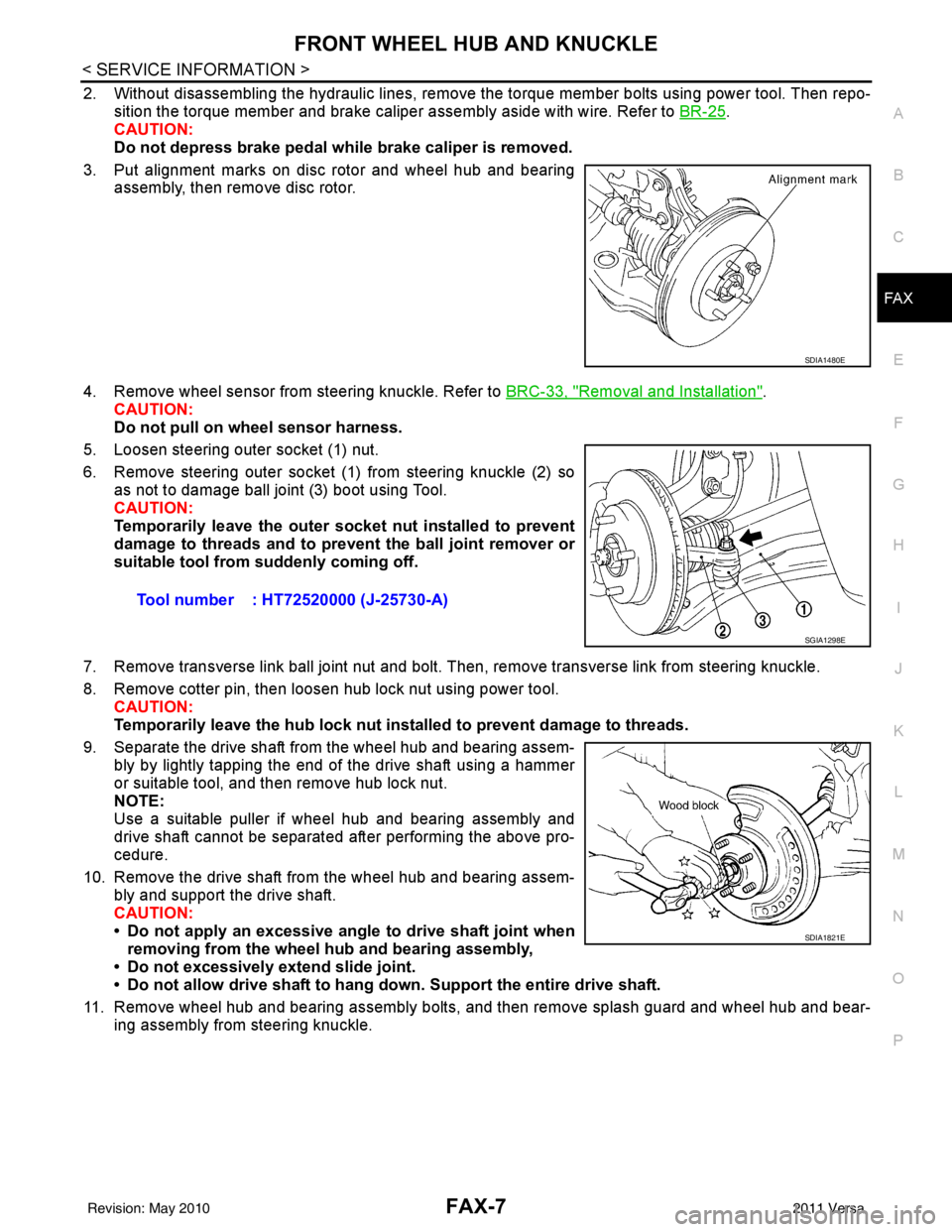
2. Without disassembling the hydraulic lines, remove the torque member bolts using power tool. Then repo- sition the torque member and brake caliper assembly aside with wire. Refer to BR-25
.
CAUTION:
Do not depress brake pedal while brake caliper is removed.
3. Put alignment marks on disc rotor and wheel hub and bearing assembly, then remove disc rotor.
4. Remove wheel sensor from steering knuckle. Refer to BRC-33, "
Removal and Installation".
CAUTION:
Do not pull on wheel sensor harness.
5. Loosen steering outer socket (1) nut.
6. Remove steering outer socket (1) from steering knuckle (2) so as not to damage ball joint (3) boot using Tool.
CAUTION:
Temporarily leave the outer socket nut installed to prevent
damage to threads and to prevent the ball joint remover or
suitable tool from suddenly coming off.
7. Remove transverse link ball joint nut and bolt. Then, remove transverse link from steering knuckle.
8. Remove cotter pin, then loosen hub lock nut using power tool. CAUTION:
Temporarily leave the hub lock nut inst alled to prevent damage to threads.
9. Separate the drive shaft from the wheel hub and bearing assem- bly by lightly tapping the end of the drive shaft using a hammer
or suitable tool, and then remove hub lock nut.
NOTE:
Use a suitable puller if wheel hub and bearing assembly and
drive shaft cannot be separated after performing the above pro-
cedure.
10. Remove the drive shaft from the wheel hub and bearing assem- bly and support the drive shaft.
CAUTION:
• Do not apply an excessive angle to drive shaft joint when
removing from the wheel hub and bearing assembly,
• Do not excessively extend slide joint.
• Do not allow drive shaft to hang do wn. Support the entire drive shaft.
11. Remove wheel hub and bearing assembly bolts, and then remove splash guard and wheel hub and bear- ing assembly from steering knuckle.
SDIA1480E
Tool number : HT72520000 (J-25730-A)
SGIA1298E
SDIA1821E
Revision: May 2010 2011 Versa
Page 2650 of 3787
FAX-8
< SERVICE INFORMATION >
FRONT WHEEL HUB AND KNUCKLE
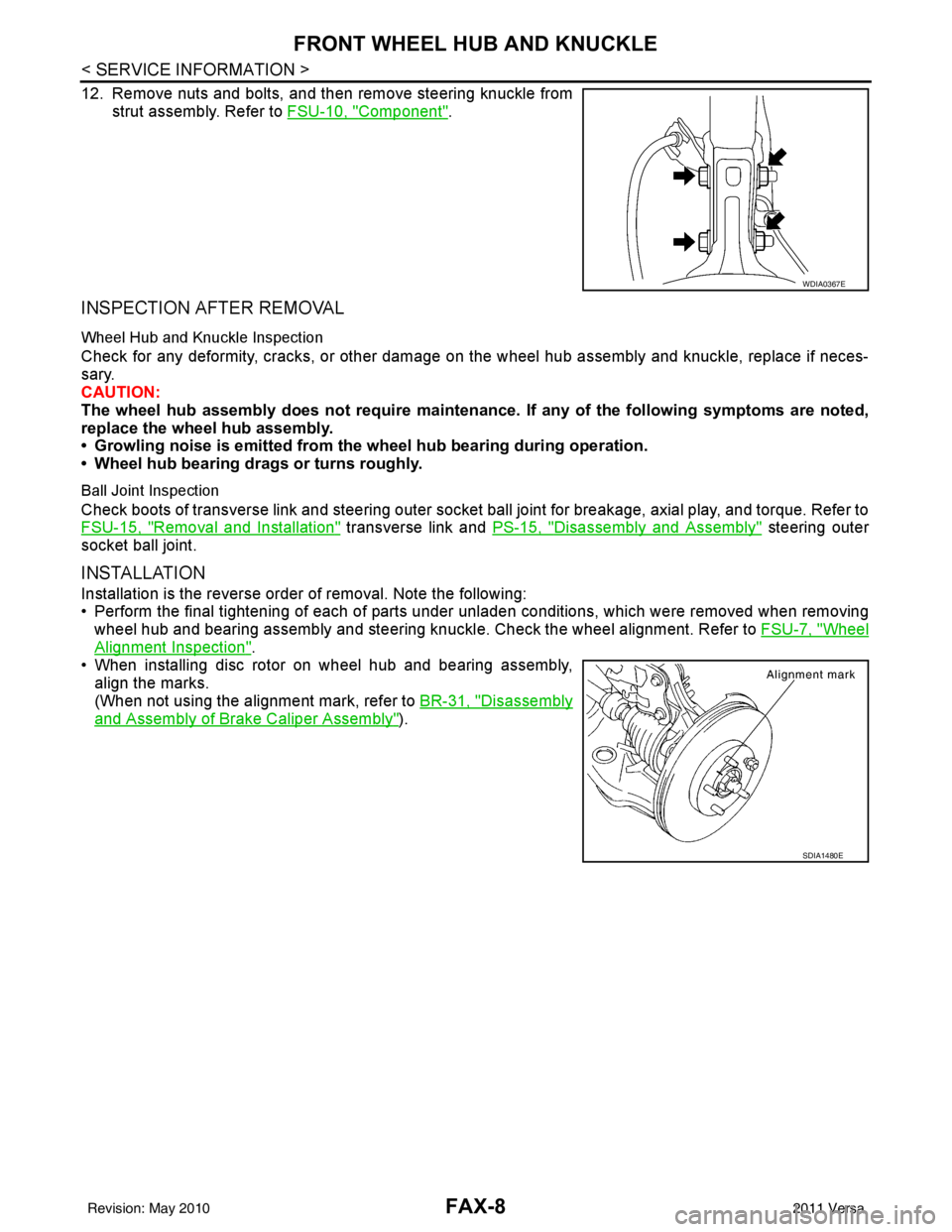
12. Remove nuts and bolts, and then remove steering knuckle fromstrut assembly. Refer to FSU-10, "
Component".
INSPECTION AFTER REMOVAL
Wheel Hub and Knuckle Inspection
Check for any deformity, cracks, or other damage on the wheel hub assembly and knuckle, replace if neces-
sary.
CAUTION:
The wheel hub assembly does not require maintenance. If any of the following symptoms are noted,
replace the wheel hub assembly.
• Growling noise is emitted from the wheel hub bearing during operation.
• Wheel hub bearing drags or turns roughly.
Ball Joint Inspection
Check boots of transverse link and steering outer socket ball joint for breakage, axial play, and torque. Refer to
FSU-15, "
Removal and Installation" transverse link and PS-15, "Disassembly and Assembly" steering outer
socket ball joint.
INSTALLATION
Installation is the reverse order of removal. Note the following:
• Perform the final tightening of each of parts under unladen conditions, which were removed when removing wheel hub and bearing assembly and steering knuckl e. Check the wheel alignment. Refer to FSU-7, "
Wheel
Alignment Inspection".
• When installing disc rotor on wheel hub and bearing assembly,
align the marks.
(When not using the alignment mark, refer to BR-31, "
Disassembly
and Assembly of Brake Caliper Assembly").
WDIA0367E
SDIA1480E
Revision: May 2010 2011 Versa