turn signal NISSAN LATIO 2011 Service Workshop Manual
[x] Cancel search | Manufacturer: NISSAN, Model Year: 2011, Model line: LATIO, Model: NISSAN LATIO 2011Pages: 3787, PDF Size: 78.35 MB
Page 216 of 3787
TROUBLE DIAGNOSIS FOR SYMPTOMSAT-199
< SERVICE INFORMATION >
DE
F
G H
I
J
K L
M A
B
AT
N
O P
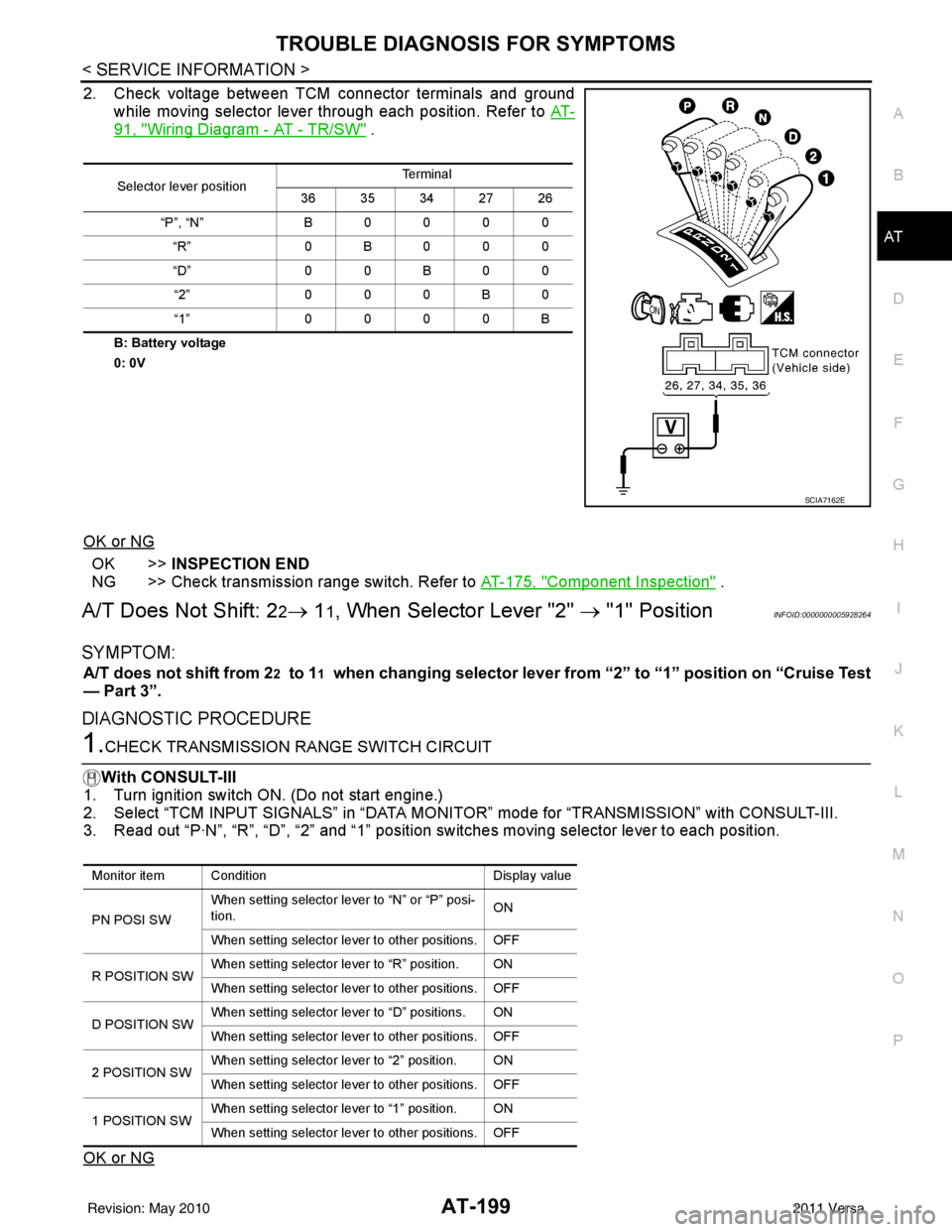
2. Check voltage between TCM connector terminals and ground while moving selector lever through each position. Refer to AT-
91, "Wiring Diagram - AT - TR/SW" .
B: Battery voltage
0: 0V
OK or NG
OK >>INSPECTION END
NG >> Check transmission range switch. Refer to AT-175, "
Component Inspection" .
A/T Does Not Shift: 22→ 11, When Selector Lever "2" → "1" PositionINFOID:0000000005928264
SYMPTOM:
A/T does not shift from 22 to 11 when changing selector lever from “2” to “1” position on “Cruise Test
— Part 3”.
DIAGNOSTIC PROCEDURE
1.CHECK TRANSMISSION RANGE SWITCH CIRCUIT
With CONSULT-III
1. Turn ignition switch ON. (Do not start engine.)
2. Select “TCM INPUT SIGNALS” in “DATA MONI TOR” mode for “TRANSMISSION” with CONSULT-III.
3. Read out “P·N”, “R”, “D”, “2” and “1” position switches moving selector lever to each position.
OK or NG
Selector lever position Te r m i n a l
36 35 34 27 26
“P”, “N” B 0 0 0 0
“R” 0B000
“D” 0 0 B 0 0
“2” 0 0 0 B 0
“1” 0 0 0 0 B
SCIA7162E
Monitor item Condition Display value
PN POSI SW When setting selector le
ver to “N” or “P” posi-
tion. ON
When setting selector lever to other positions. OFF
R POSITION SW When setting selector lever to “R” position. ON
When setting selector lever to other positions. OFF
D POSITION SW When setting selector lever to “D” positions. ON
When setting selector lever to other positions. OFF
2 POSITION SW When setting selector lever to “2” position. ON
When setting selector lever to other positions. OFF
1 POSITION SW When setting selector lever to “1” position. ON
When setting selector lever to other positions. OFF
Revision: May 2010
2011 Versa
Page 217 of 3787
AT-200
< SERVICE INFORMATION >
TROUBLE DIAGNOSIS FOR SYMPTOMS
OK >> GO TO 3
NG >> Check transmission range switch. Refer to AT-175, "
Component Inspection" .
2.CHECK TRANSMISSION RANGE SWITCH CIRCUIT
Without CONSULT-III
1. Turn ignition switch ON. (Do not start engine.)
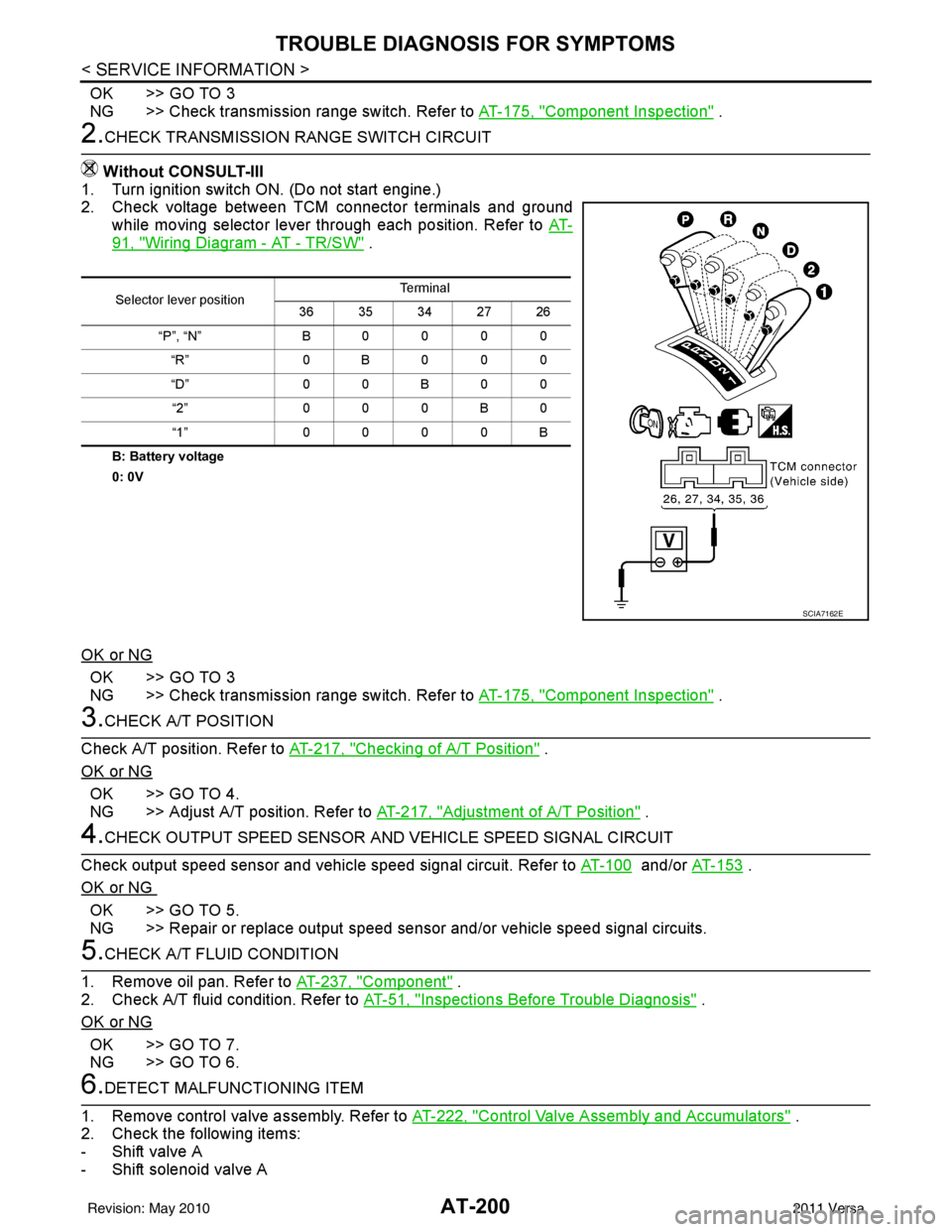
2. Check voltage between TCM connector terminals and ground
while moving selector lever through each position. Refer to AT-
91, "Wiring Diagram - AT - TR/SW" .
B: Battery voltage
0: 0V
OK or NG
OK >> GO TO 3
NG >> Check transmission range switch. Refer to AT-175, "
Component Inspection" .
3.CHECK A/T POSITION
Check A/T position. Refer to AT-217, "
Checking of A/T Position" .
OK or NG
OK >> GO TO 4.
NG >> Adjust A/T position. Refer to AT-217, "
Adjustment of A/T Position" .
4.CHECK OUTPUT SPEED SENSOR AND VEHICLE SPEED SIGNAL CIRCUIT
Check output speed sensor and vehicle speed signal circuit. Refer to AT-100
and/or AT-153 .
OK or NG
OK >> GO TO 5.
NG >> Repair or replace output speed sens or and/or vehicle speed signal circuits.
5.CHECK A/T FLUID CONDITION
1. Remove oil pan. Refer to AT-237, "
Component" .
2. Check A/T fluid condition. Refer to AT-51, "
Inspections Before Trouble Diagnosis" .
OK or NG
OK >> GO TO 7.
NG >> GO TO 6.
6.DETECT MALFUNCTIONING ITEM
1. Remove control valve assembly. Refer to AT-222, "
Control Valve Assembly and Accumulators" .
2. Check the following items:
- Shift valve A
- Shift solenoid valve A
Selector lever position Te r m i n a l
36 35 34 27 26
“P”, “N” B0000 “R” 0B000
“D” 0 0 B 0 0
“2” 000B0
“1” 0000B
SCIA7162E
Revision: May 2010 2011 Versa
Page 218 of 3787
TROUBLE DIAGNOSIS FOR SYMPTOMSAT-201
< SERVICE INFORMATION >
DE
F
G H
I
J
K L
M A
B
AT
N
O P
- Overrun clutch control valve
- Overrun clutch solenoid valve
3. Disassemble A/T. Refer to AT-257, "
Disassembly" .
4. Check the following items:
- Servo piston assembly
- Brake band
OK or NG
OK >> GO TO 7.
NG >> Repair or replace damaged parts.
7.CHECK SYMPTOM
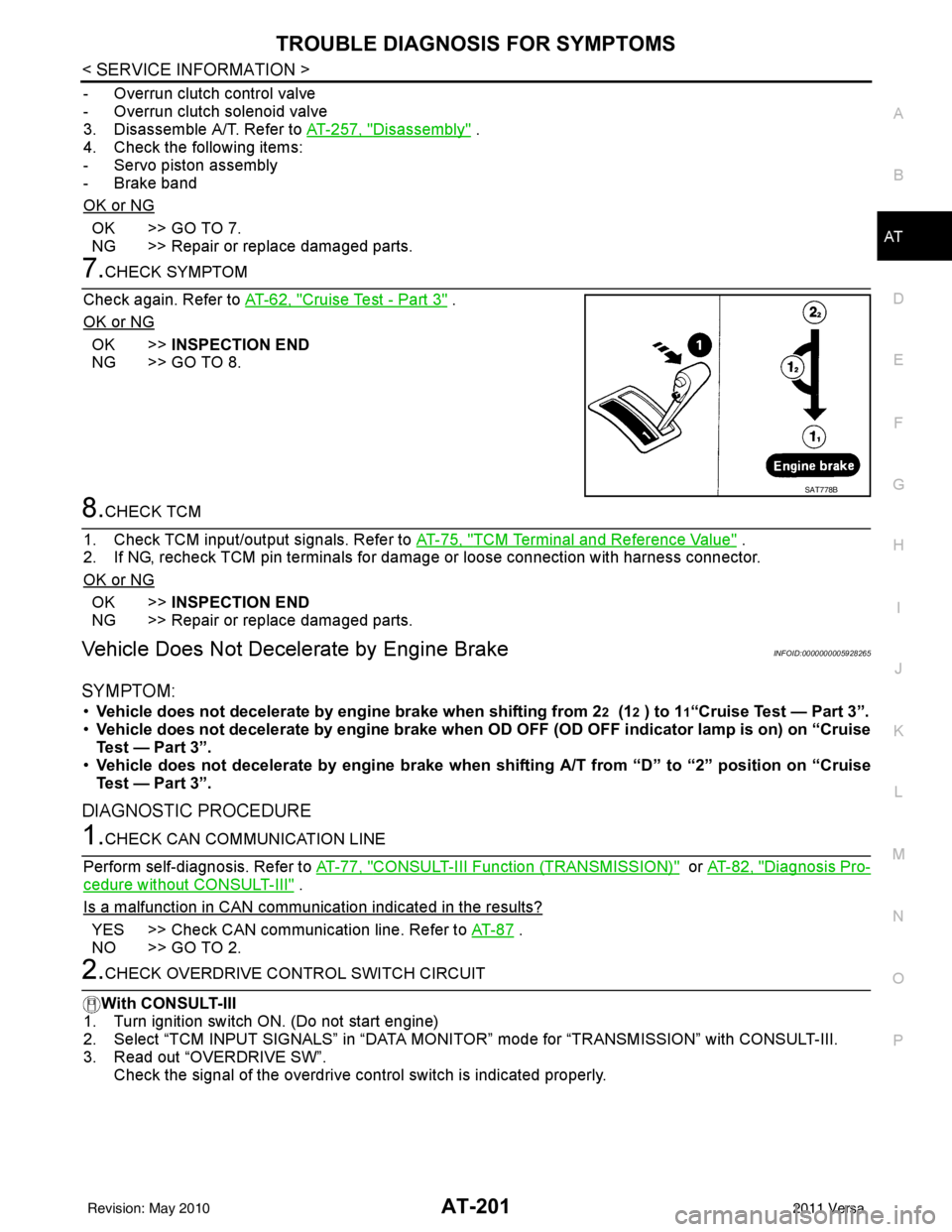
Check again. Refer to AT-62, "
Cruise Test - Part 3" .
OK or NG
OK >> INSPECTION END
NG >> GO TO 8.
8.CHECK TCM
1. Check TCM input/output signals. Refer to AT-75, "
TCM Terminal and Reference Value" .
2. If NG, recheck TCM pin terminals for dam age or loose connection with harness connector.
OK or NG
OK >> INSPECTION END
NG >> Repair or replace damaged parts.
Vehicle Does Not Decelerate by Engine BrakeINFOID:0000000005928265
SYMPTOM:
• Vehicle does not decelerate by engine brake when shifting from 22 (12 ) to 11“Cruise Test — Part 3”.
• Vehicle does not decelerate by engi ne brake when OD OFF (OD OFF indicator lamp is on) on “Cruise
Test — Part 3”.
• Vehicle does not decelerate by engi ne brake when shifting A/T from “D” to “2” position on “Cruise
Test — Part 3”.
DIAGNOSTIC PROCEDURE
1.CHECK CAN COMMUNICATION LINE
Perform self-diagnosis. Refer to AT-77, "
CONSULT-III Function (TRANSMISSION)" or AT-82, "Diagnosis Pro-
cedure without CONSULT-III" .
Is a malfunction in CAN communication indicated in the results?
YES >> Check CAN communication line. Refer to AT- 8 7 .
NO >> GO TO 2.
2.CHECK OVERDRIVE CO NTROL SWITCH CIRCUIT
With CONSULT-III
1. Turn ignition switch ON. (Do not start engine)
2. Select “TCM INPUT SIGNALS” in “DATA MONI TOR” mode for “TRANSMISSION” with CONSULT-III.
3. Read out “OVERDRIVE SW”.
Check the signal of the overdrive control switch is indicated properly.
SAT778B
Revision: May 2010 2011 Versa
Page 219 of 3787
AT-202
< SERVICE INFORMATION >
TROUBLE DIAGNOSIS FOR SYMPTOMS
Without CONSULT-III
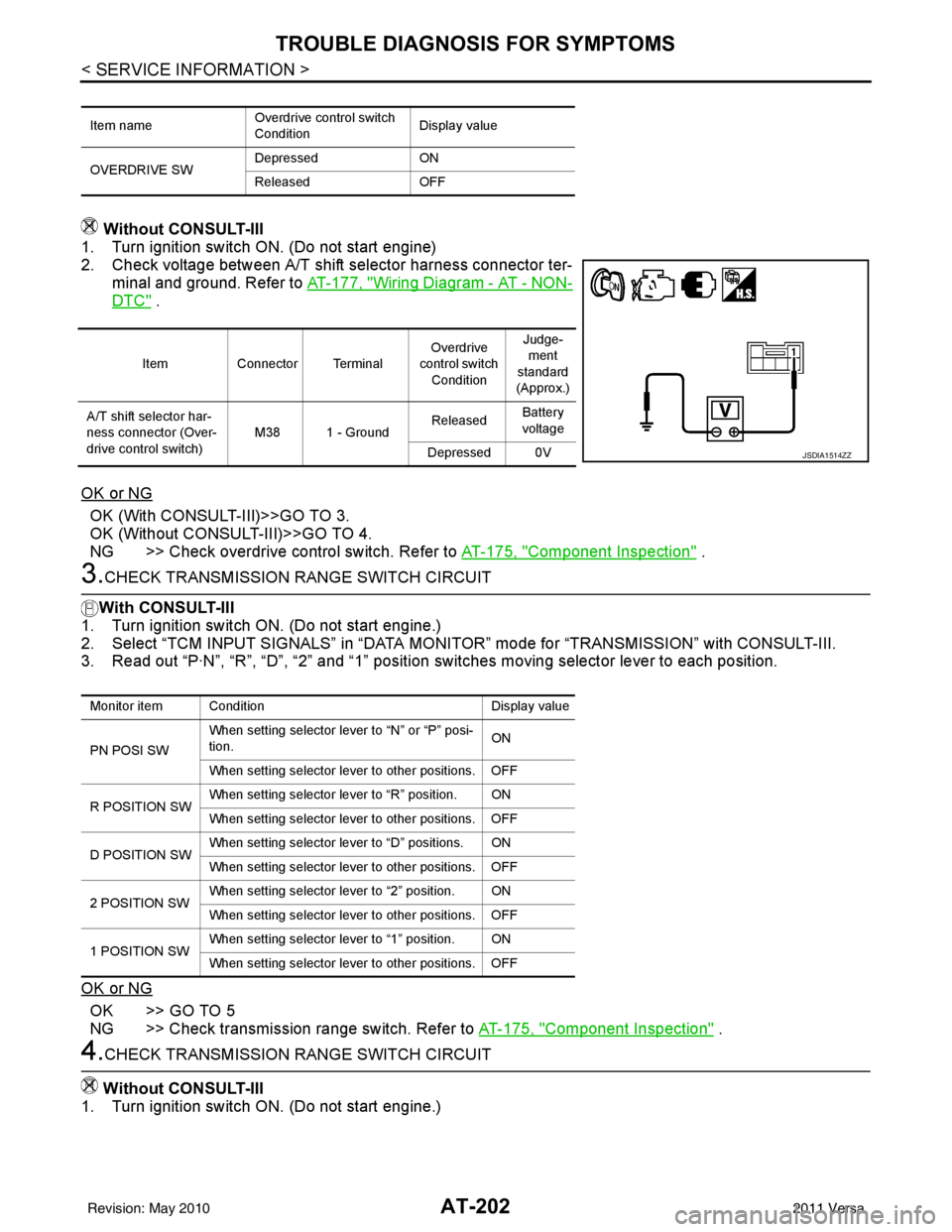
1. Turn ignition switch ON. (Do not start engine)
2. Check voltage between A/T shift selector harness connector ter-
minal and ground. Refer to AT-177, "
Wiring Diagram - AT - NON-
DTC" .
OK or NG
OK (With CONSULT-III)>>GO TO 3.
OK (Without CONSULT-III)>>GO TO 4.
NG >> Check overdrive control switch. Refer to AT-175, "
Component Inspection" .
3.CHECK TRANSMISSION RANGE SWITCH CIRCUIT
With CONSULT-III
1. Turn ignition switch ON. (Do not start engine.)
2. Select “TCM INPUT SIGNALS” in “DATA MONITOR” mode for “TRANSMISSION” with CONSULT-III.
3. Read out “P·N”, “R”, “D”, “2” and “1” position switches moving selector lever to each position.
OK or NG
OK >> GO TO 5
NG >> Check transmission range switch. Refer to AT-175, "
Component Inspection" .
4.CHECK TRANSMISSION RANGE SWITCH CIRCUIT
Without CONSULT-III
1. Turn ignition switch ON. (Do not start engine.)
Item name Overdrive control switch
ConditionDisplay value
OVERDRIVE SW Depressed
ON
Released OFF
ItemConnector Terminal Overdrive
control switch
Condition Judge-
ment
standard
(Approx.)
A/T shift selector har-
ness connector (Over-
drive control switch) M38 1 - Ground
Released
Battery
voltage
Depressed 0V
JSDIA1514ZZ
Monitor item Condition Display value
PN POSI SW When setting selector le
ver to “N” or “P” posi-
tion. ON
When setting selector lever to other positions. OFF
R POSITION SW When setting selector lever to “R” position. ON
When setting selector lever to other positions. OFF
D POSITION SW When setting selector lever to “D” positions. ON
When setting selector lever to other positions. OFF
2 POSITION SW When setting selector lever to “2” position. ON
When setting selector lever to other positions. OFF
1 POSITION SW When setting selector lever to “1” position. ON
When setting selector lever to other positions. OFF
Revision: May 2010
2011 Versa
Page 417 of 3787
![NISSAN LATIO 2011 Service Workshop Manual AV-20
< SERVICE INFORMATION >[AUDIO WITHOUT NAVIGATION]
AUDIO
Trouble Diagnosis
INFOID:0000000006217253
The vehicle itself can be a source of noise if noise prevention parts or electrical equipment i](/img/5/57357/w960_57357-416.png "NISSAN LATIO 2011 Service Workshop Manual AV-20
< SERVICE INFORMATION >[AUDIO WITHOUT NAVIGATION]
AUDIO
Trouble Diagnosis
INFOID:0000000006217253
The vehicle itself can be a source of noise if noise prevention parts or electrical equipment i")
AV-20
< SERVICE INFORMATION >[AUDIO WITHOUT NAVIGATION]
AUDIO
Trouble Diagnosis
INFOID:0000000006217253
The vehicle itself can be a source of noise if noise prevention parts or electrical equipment is malfunctioning.
Check if noise is caused and/or changed by engine speed, ignition switch turned to each position, and opera-
tion of each piece of electrical equipment, and then determine the cause.
NOTE:
The majority of the audio malfunctions are the result of outside causes (damaged CD, electromagnetic inter-
ference, etc.). Check the sympto ms below to diagnose the malfunction.
12
(BR) Ground
iPod® sound signal RH Input Ignition
switch ON When iPod® mode is se-
lected.
15 — Shield — —— —
16
(L) —AV communication signal
(H) Input/
Output ——
—
17
(P) Ground Ground
—Ignition
switch ON — 0
V
18 — Shield — —— —
19 — Shield — —— —
20
(R) Ground iPod® battery charge Output Ignition
switch ON Connected to iPod®.
5.0V
21
(L) Ground
iPod® connection recogni-
tion signal InputIgnition
switch
ON Not connected to iPod®.
4.0V
Connected to iPod®. 0V
22
(O) Ground ACCESSORY-DETECT — Ignition
switch ON Connected to iPod®.
0V
23 — Shield — —— —
24
(Y) Ground iPod® sound signal LH Input Ignition
switch ON When iPod® mode is se-
lected.
Terminal
(Wire color) Description
ConditionReference value
(Approx.)
+ – Signal nameInput/
Output
SKIB3609E
SKIB3609E
Symptom Check item
Audio system does not work properly. • Audio unit power supply circuit. Refer to
AV- 2 2 , "
Power Supply
Circuit Inspection" .
• Audio unit. Refer to AV- 2 9 , "
Removal and Installation" .
No sound can be heard from all speakers. • Speaker circuit shorted to ground. Refer to
AV- 9 , "
Wiring Dia-
gram - AUDIO -" .
• Audio unit. Refer to AV- 2 9 , "
Removal and Installation" .
Revision: May 2010 2011 Versa
Page 418 of 3787
![NISSAN LATIO 2011 Service Workshop Manual AUDIOAV-21
< SERVICE INFORMATION > [AUDIO WITHOUT NAVIGATION]
C
D
E
F
G H
I
J
L
M A
B
AV
N
O P
NOTE:
Noise resulting from variations in field strength, such as fading noise and multi-path noise, or e](/img/5/57357/w960_57357-417.png "NISSAN LATIO 2011 Service Workshop Manual AUDIOAV-21
< SERVICE INFORMATION > [AUDIO WITHOUT NAVIGATION]
C
D
E
F
G H
I
J
L
M A
B
AV
N
O P
NOTE:
Noise resulting from variations in field strength, such as fading noise and multi-path noise, or e")
AUDIOAV-21
< SERVICE INFORMATION > [AUDIO WITHOUT NAVIGATION]
C
D
E
F
G H
I
J
L
M A
B
AV
N
O P
NOTE:
Noise resulting from variations in field strength, such as fading noise and multi-path noise, or external noise
from trains and other sources. It is not a malfunction.
• Fading noise: This noise occurs because of variations in the field strength in a narrow range due to moun-
tains or buildings blocking the signal.
• Multi-path noise: This noise results from the waves sent directly from the broadcast station arriving at the antenna at a different time from the waves t hat reflect off of mountains or buildings.
Noise InspectionINFOID:0000000005931285
The vehicle itself can be a source of noise if noise prevention parts or electrical equipment is malfunctioning.
Check if noise is caused and/or changed by engine speed, ignition switch turned to each position, and opera-
tion of each piece of electrical equipment, and determine the cause.
NOTE:
The source of the noise can be found easily by listening to the noise while removing the fuses of electrical
components, one by one.
TYPE OF NOISE AND POSSIBLE CAUSE
No sound can be heard from one or several speakers. • Open or short in audio signal circuit between audio unit and front
speaker. Refer to AV- 2 4 , "
Sound Is Not Heard from Front Door
Speaker (Base System)" or AV- 2 6 , "Sound Is Not Heard from
Front Door Speaker or Tweeter (Premium System)" .
• Front speaker. Refer to AV- 2 4 , "
Sound Is Not Heard from Front
Door Speaker (Base System)" or AV- 2 6 , "Sound Is Not Heard
from Front Door Speaker or Tweeter (Premium System)" .
• Open or short in audio signal circuit between audio unit and rear
speaker. Refer to AV- 2 5 , "
Sound Is Not Heard from Rear Door
Speaker (Base System)" or AV- 2 7 , "Sound Is Not Heard from
Rear Door Speaker (Premium System)" .
• Rear speaker. Refer to AV- 2 5 , "
Sound Is Not Heard from Rear
Door Speaker (Base System)" or AV- 2 7 , "Sound Is Not Heard
from Rear Door Speaker (Premium System)" .
• Tweeter (mid level and premium system) AV- 2 6 , "
Sound Is Not
Heard from Front Door Speaker or Tweeter (Premium System)"
or AV- 2 7 , "
Sound Is Not Heard from Rear Door Speaker (Premi-
um System)" .
• Audio unit. Refer to AV- 2 9 , "
Removal and Installation" .
No sound can be heard from radio or noise is heard. • Antenna feeder. Refer to
AV- 3 3 , "
Location of Antenna" .
• Antenna. Refer to AV- 3 3 , "
Location of Antenna" .
• Audio unit. Refer to AV- 2 9 , "
Removal and Installation" .
Symptom
Check item
Occurrence condition Possible cause
Occurs only when engine is ON. A continuous growling noise occurs. The speed of
the noise varies with changes in the engine speed.
Ignition components
A whistling noise occurs while the engine speed is
high. A booming noise occurs while the engine is
running and the lighting switch is ON. Generator
Noise only occurs when various
electrical components are oper-
ating. A cracking or snapping sound occurs with the op-
eration of various switches.
Relay malfunction, radio malfunction
The noise occurs when various motors are operat-
ing. • Motor case ground
•Motor
The noise occurs constantly, not just under certain conditions. • Rear defogger coil malfunction
• Open circuit in printed heater
A cracking or snapping sound occurs while the vehicle is being driven, especially when
it is vibrating excessively. • Ground wire of body parts.
• Ground due to improper part installation
• Wiring connections or a short circuit
Revision: May 2010
2011 Versa
Page 419 of 3787
![NISSAN LATIO 2011 Service Workshop Manual AV-22
< SERVICE INFORMATION >[AUDIO WITHOUT NAVIGATION]
AUDIO
Power Supply Circuit Inspection
INFOID:0000000005931286
1.CHECK FUSE
Check that the following fuses of the audio unit are not blown.
OK or](/img/5/57357/w960_57357-418.png "NISSAN LATIO 2011 Service Workshop Manual AV-22
< SERVICE INFORMATION >[AUDIO WITHOUT NAVIGATION]
AUDIO
Power Supply Circuit Inspection
INFOID:0000000005931286
1.CHECK FUSE
Check that the following fuses of the audio unit are not blown.
OK or")
AV-22
< SERVICE INFORMATION >[AUDIO WITHOUT NAVIGATION]
AUDIO
Power Supply Circuit Inspection
INFOID:0000000005931286
1.CHECK FUSE
Check that the following fuses of the audio unit are not blown.
OK or NG
OK >> GO TO 2.
NG >> If fuse is blown, be sure to eliminate cause of blown fuse before installing new fuse. Refer to PG-
4, "Schematic" .
2.AUDIO UNIT POWER SUPPLY CIRCUIT CHECK
1. Disconnect audio unit connector.
2. Check voltage between the audio unit and ground.
OK or NG
OK >> With premium system, GO TO 3.
NG >> • Check connector housings for disconnected or loose
terminals.
• Repair harness or connector.
3.GROUND CIRCUIT CHECK
Check continuity between audio uni t (premium system) harness con-
nectors M43 (A), M44 (B) terminals 20, 61 and ground.
OK or NG
OK >> Inspection End.
NG >> • Check connector housings for disconnected or loose
terminals.
• Repair harness or connector.
Steering Switch Check (With Bluetooth)INFOID:0000000005931287
1.CHECK HARNESS
1. Turn ignition switch OFF.
2. Disconnect Bluetooth control unit connector and spiral cable connector M30.
3. Check continuity between Bluetooth control unit (A) connector B121 terminals 12, 14, and 13 and spiral
cable (B) connector M30 terminals 24, 31, and 32.
Unit Terminals Signal name Fuse No.
Audio unit 19
Battery power 27
7 Ignition switch ACC or ON 20
UnitTe r m i n a l N o .
OFF ACC ON
(+)
(-)
Connector Terminal
Audio unit M43 19 Ground
Battery
voltage Battery
voltage Battery
voltage
7Ground0V Battery
voltage Battery
voltage
WKIA5345E
Continuity should exist.
AWNIA2078ZZ
Revision: May 2010 2011 Versa
Page 421 of 3787
![NISSAN LATIO 2011 Service Workshop Manual AV-24
< SERVICE INFORMATION >[AUDIO WITHOUT NAVIGATION]
AUDIO
OK or NG
OK >> Inspection End.
NG >> Replace steering switch. Refer to AV-29, "
Removal and Installation" .
Sound Is Not Heard fr
om Front](/img/5/57357/w960_57357-420.png "NISSAN LATIO 2011 Service Workshop Manual AV-24
< SERVICE INFORMATION >[AUDIO WITHOUT NAVIGATION]
AUDIO
OK or NG
OK >> Inspection End.
NG >> Replace steering switch. Refer to AV-29, \"
Removal and Installation\" .
Sound Is Not Heard fr
om Front")
AV-24
< SERVICE INFORMATION >[AUDIO WITHOUT NAVIGATION]
AUDIO
OK or NG
OK >> Inspection End.
NG >> Replace steering switch. Refer to AV-29, "
Removal and Installation" .
Sound Is Not Heard fr
om Front Door Speaker (Base System)INFOID:0000000005931288
1.HARNESS CHECK
1. Disconnect audio unit connector and front door speaker connector (LH or RH).
2. Check continuity between audio unit connector M43 (A) terminal and suspect speaker connector (B) terminal.
3. Check continuity between audio unit connector M43 terminal and ground.
OK or NG
OK >> GO TO 2.
NG >> • Check connector housings for disconnected or loose terminals. • Repair harness or connector.
2.FRONT SPEAKER SIGNAL CHECK
1. Connect audio unit connector and suspect speaker connector.
2. Turn ignition switch to ACC.
3. Push “POWER” switch.
Terminal Signal name ConditionResistance
(Ω)
(Approx.)
16 17 Seek (down) Depress Seek down switch.
165
Phone/Send Depress Phone/Send switch. 0
Volume (down) Depress volume down switch. 487
20 17 Seek (up) Depress Seek up switch.
165
Phone/End Depress Phone/End switch. 0
Volume (up) Depress volume up switch. 487
LKIA0191E
Te r m i n a l s
Continuity
A B
Connector Terminal Connector Terminal
M43 2
D12 +
Ye s
3-
11 D112 +
12 -
Te r m i n a l s Continuity
Audio unit
—
Connector Terminal
M43 2
Ground No
3
11
12
WKIA5444E
Revision: May 2010 2011 Versa
Page 423 of 3787
![NISSAN LATIO 2011 Service Workshop Manual AV-26
< SERVICE INFORMATION >[AUDIO WITHOUT NAVIGATION]
AUDIO
1. Connect audio unit connector and rear speaker connector.
2. Turn ignition switch to ACC.
3. Push “POWER” switch.
4. Check the signa](/img/5/57357/w960_57357-422.png "NISSAN LATIO 2011 Service Workshop Manual AV-26
< SERVICE INFORMATION >[AUDIO WITHOUT NAVIGATION]
AUDIO
1. Connect audio unit connector and rear speaker connector.
2. Turn ignition switch to ACC.
3. Push “POWER” switch.
4. Check the signa")
AV-26
< SERVICE INFORMATION >[AUDIO WITHOUT NAVIGATION]
AUDIO
1. Connect audio unit connector and rear speaker connector.
2. Turn ignition switch to ACC.
3. Push “POWER” switch.
4. Check the signal between audio unit harness connector termi-
nals with CONSULT-III or oscilloscope.
OK or NG
OK >> Replace speaker. Refer to AV-29, "Removal and Instal-
lation" .
NG >> Replace audio unit. Refer to AV-29, "
Removal and
Installation" .
Sound Is Not Heard from Front Door Speaker or Tweeter (Premium System)
INFOID:0000000005931290
1.HARNESS CHECK
1. Disconnect audio unit connector and front door speaker and tweeter connector (LH or RH).
2. Check continuity between audio unit harness connector terminal and front door speaker and tweeter harness connector terminal.
3. Check continuity between audio unit harness connector terminal and ground.
Te r m i n a l s
Condi-tion Reference
signal
(+)
(-)
Con-
nector Te r m i -
nal Con-
nector Te r m i -
nal
M43 4
M43 5
Receive
audio
signal
13
14
WKIA5354E
SKIA0177E
Te r m i n a l s
Continuity
Audio unit. Speaker or tweeter
Connector Terminal Connector Terminal
M43 2
M46 +
Ye s
3-
11 M47 +
12 -
2 D12 +
3-
11 D112 +
12 -
WKIA5351E
Revision: May 2010 2011 Versa
Page 424 of 3787
![NISSAN LATIO 2011 Service Workshop Manual AUDIOAV-27
< SERVICE INFORMATION > [AUDIO WITHOUT NAVIGATION]
C
D
E
F
G H
I
J
L
M A
B
AV
N
O P
OK or NG
OK >> GO TO 2.
NG >> • Check connector housings for disconnected or loose terminals. • Repai](/img/5/57357/w960_57357-423.png "NISSAN LATIO 2011 Service Workshop Manual AUDIOAV-27
< SERVICE INFORMATION > [AUDIO WITHOUT NAVIGATION]
C
D
E
F
G H
I
J
L
M A
B
AV
N
O P
OK or NG
OK >> GO TO 2.
NG >> • Check connector housings for disconnected or loose terminals. • Repai")
AUDIOAV-27
< SERVICE INFORMATION > [AUDIO WITHOUT NAVIGATION]
C
D
E
F
G H
I
J
L
M A
B
AV
N
O P
OK or NG
OK >> GO TO 2.
NG >> • Check connector housings for disconnected or loose terminals. • Repair harness or connector.
2.FRONT SPEAKER SIGNAL CHECK
1. Connect audio unit connector, front door speaker connector and tweeter connector.
2. Turn ignition switch to ACC.
3. Push “POWER” switch.
4. Check the signal between audio unit connector terminals with CONSULT-III or oscilloscope.
OK or NG
OK >> Replace front speaker. Refer to AV-29, "Removal and
Installation" .
NG >> Replace audio unit. Refer to AV-29, "
Removal and
Installation" .
Sound Is Not Heard from Rear Door Speaker (Premium System)INFOID:0000000005931291
1.HARNESS CHECK
1. Disconnect audio unit connector and rear door speaker connector.
Te r m i n a l s
Continuity
Audio unit
—
Connector Terminal
M43 2
Ground No
3
11
12
Te r m i n a l s Condi-tion Reference
signal
(+)
(-)
Con-
nector Te r m i -
nal Con-
nector Te r m i -
nal
M43 2
M43 3
Receive
audio
signal
11
1 2
WKIA5352E
SKIA0177E
Revision: May 2010 2011 Versa