service NISSAN LEAF 2013 1.G Navigation Manual
[x] Cancel search | Manufacturer: NISSAN, Model Year: 2013, Model line: LEAF, Model: NISSAN LEAF 2013 1.GPages: 275, PDF Size: 6.66 MB
Page 165 of 275
Remote functions
.Battery status check:
The status of the battery can be checked
using your personal computer or cellular
phone even if you are not in the vehicle.
. Unplugged status, Charge status:
By registering frequently used charging
stations, notifications can be sent to your
personal computer or cellular phone email
address to inform you when the charging
connector is disconnected at those loca-
tions or charging is completed.
. Remote charge, Remote climate con-
trol:
Remote activation of battery charging or
climate control can be set using your
personal computer or cellular phone.
. Li-ion battery warmer status:
When the ambient temperature is low, the
Li-ion battery warmer operates automati-
cally.
Notifications will be sent to your personal
computer or cellular phone email address
under the following conditions in order to
remind you to connect the charging con-
nector. — Approximately 5 minutes after the Li-ion
battery warmer starts operating while the
power switch is in the OFF state and the
charging cable is not connected to the
vehicle.
— Approximately 5 minutes after the Li-ion battery warmer stops operating due to
low remaining Li-ion battery power while
the power switch is in the OFF state and
the charging cable is not connected to
the vehicle.
NOTE:
. The remaining Li-ion battery power
lowers gradually while the battery
warmer is operating without con-
necting the charging connector.
. When the remaining Li-ion battery
power lowers, the battery warmer stops
operating. When this occurs, the Li-ion
battery temperature lowers gradually,
and as a result the EV system may be
disabled.
Navigation Telematics (CARWINGS
TMser-
vice)
. Automatic update of charging stations:
The information for the charging stations that is recorded in the map data is
automatically updated.
. All Information Feeds:
Convenient information for driving such as
weather and traffic information, ECO infor-
mation shared with the LEAF users, etc. is
provided.
. Favorites:
When the information of an Internet site is
selected and it is stored in the page that is
specially established in the NISSAN Own-
er’s Portal Website, the information is
converted into an appropriate format via
the NISSAN CARWINGS Data Center and
provided for use in the vehicle. The content
of the information is automatically read out.
For the registration method of information
data, visit the NISSAN Owner’s Portal
Website.
NOTE:
. Establishing the CARWINGS
TMservice
is necessary before using this service.
. To check the Li-ion battery charging
status or to use the remote heater and
air conditioner using an internet en-
abled smart phone or personal compu-
ter, the following conditions must be
met:
CARWINGSTM5-5
Page 166 of 275
5-6CARWINGSTM
—The vehicle must be located in a
cellular phone or smart phone cov-
erage area.
— The internet enabled cellular phone
or smart phone must be located in a
cellular phone or smart phone cov-
erage area.
— The computer must be connected to
the internet.
— A cellular phone must be used to
communicate with the vehicle.
— A cellular phone capable of text
messaging must be used to receive
text message regarding vehicle
charge status.
. When the charge connector is discon-
nected from the vehicle, the heater and
air conditioner operates using vehicle
Li-ion battery electric power.
. If the remote heater and air conditioner
function and Li-ion battery charging are
performed at the same time, Li-ion
battery charging will take longer than
usual due to the power used to heat or
cool the vehicle.
. Certain remote functions require a
compatible smart phone, which is not
included with vehicle. .
CARWINGSTMinformation system fea-
tures are included through a subscrip-
tion service which requires owner
consent to activate. The subscription
must be active to use these features.
. CARWINGS
TMcommunications may be
received at a verified e-mail address or
by SMS/text messaging-enabled cellu-
lar phone.
. Standard text rates and/or data usage
may apply depending on your carrier.
ABOUT SERVICE APPLICATION
Registering for the CARWINGSTMservice is
necessary before using this service. For detailed
information, access the NISSAN Owner’s Portal
Website. Confirm the terms of service and
complete the user registration form. After
registration is completed, a user ID and pass-
word are provided.
“Inputting user ID and password”
(page 1-11)
CAUTION
If the vehicle is sold to another person,
this service must be canceled and all
data stored in the device must be
deleted to avoid having personal data
inadvertently disclosed.
NOTICE FOR USAGE
. The CARWINGSTMservice uses the TCU
(Telematics Communication Unit) . Even if
the signal strength bar of the in-vehicle data
communication module indicates good re-
ception, connection to the NISSAN CARW-
INGS Data Center may be disabled. This
does not indicate a malfunction. Operate the
system again after a few minutes.
. The CARWINGS
TMservice cannot be used
under the following conditions:
— The vehicle moves outside the service area of the TCU (Telematics Commu-
nication Unit) connection to the system.
— The vehicle is in a location with poor signal reception such as a tunnel, under-
ground parking, behind a building or in a
mountainous area.
Page 172 of 275
![NISSAN LEAF 2013 1.G Navigation Manual 5-12CARWINGSTM
1. Push theMENUbutton and touch [CARW-
INGS].
2. Touch [CARWINGS Settings].
3. Touch the item you would like to set.
Available settings
. [Charging Message]:
Sends a notification to a p](/img/5/324/w960_324-171.png "NISSAN LEAF 2013 1.G Navigation Manual 5-12CARWINGSTM
1. Push theMENUbutton and touch [CARW-
INGS].
2. Touch [CARWINGS Settings].
3. Touch the item you would like to set.
Available settings
. [Charging Message]:
Sends a notification to a p")
5-12CARWINGSTM
1. Push theMENUbutton and touch [CARW-
INGS].
2. Touch [CARWINGS Settings].
3. Touch the item you would like to set.
Available settings
. [Charging Message]:
Sends a notification to a preset e-mail
address. This notification includes the
charge connector status and the charge
completion.
“Setting messages that are received
by email” (page 5-12)
. [Sign in]:
The user ID and password can be entered.
“Inputting user ID and password”
(page 1-11)
. [Auto-Update Stations]:
When information for new charging stations
is received while the vehicle is connecting to
the NISSAN CARWINGS Data Center, the information is automatically downloaded and
the map data is updated.
. [Service Reminders]:
The information that is sent from the
NISSAN CARWINGS Data Center is dis-
played.
. [Information Feed Setting]:
Set the timing of the connection to the
NISSAN CARWINGS Data Center, or edit
the list of the information feeds.
“Information feed setting” (page 5-15)
. [Vehicle Data Transmission Setting]:
— [Share Vehicle Information]:
Vehicle information (driving history, etc.) is
automatically sent to the NISSAN CARWINGS
Data Center. — [Share Vehicle Info When Powered On]:
Vehicle information (such as the driving history,
etc.) is automatically sent to the NISSAN
CARWINGS Data Center every time the power
switch is turned to the ACC, ON or READY
position. — [Delete Share Vehicle Information]
Vehicle information (driving history, etc.) is
deleted.
. [Unit ID Information]:
The necessary information for user registra-
tion is displayed.
“Displaying unit ID information” (page 5-18)
. [Reset all CARWINGS settings to default]:
All CARWINGS
TMsettings are reset to the
factory default setting.
“Reset all CARWINGSTMsettings to
default” (page 5-18)
SETTING MESSAGES THAT ARE
RECEIVED BY EMAIL
Sends a notification to a preset e-mail address.
This notification includes the charge connector
status and the charge completion. To receive a
notification to your personal computer or cellular
phone, an e-mail address should be set before-
hand. For details, access the NISSAN Owner’s
Portal Website.
Storing location for receiving charge
connector disconnected notifica-
tions
A maximum of 5 regularly used charging stations
can be registered. If the charging connector is
disconnected in one of these locations, an email
informing you of this will be sent.
1. Touch [Store charging plug reminder loca- tions].
CARWINGSTMSETTINGS
Page 174 of 275
![NISSAN LEAF 2013 1.G Navigation Manual 5-14CARWINGSTM
1. Touch [Charging Plug Reminder Time].
2. Touch the preferred checking time. Theindicator of the selected time illuminates.
Available checking times
.5 min.10 min.15 min.30 min.1 hour](/img/5/324/w960_324-173.png "NISSAN LEAF 2013 1.G Navigation Manual 5-14CARWINGSTM
1. Touch [Charging Plug Reminder Time].
2. Touch the preferred checking time. Theindicator of the selected time illuminates.
Available checking times
.5 min.10 min.15 min.30 min.1 hour")
5-14CARWINGSTM
1. Touch [Charging Plug Reminder Time].
2. Touch the preferred checking time. Theindicator of the selected time illuminates.
Available checking times
.5 min.10 min.15 min.30 min.1 hour
3. When the power switch is placed in the "OFF" position from the "ON" position, the
setting will be set to ON.
INFO:
When the power switch is placed in the "OFF"
position from the "ACC" position, the check time
setting will be reset.
Sending charge connector status
information to Data Center
If the system recognizes that the charge
connector is not connected to the vehicle even
though the charge timer function is set, the
system transmits this information to the NISSAN
CARWINGS Data Center. When the NISSAN
CARWINGS Data Center receives the informa-
tion, it will send an e-mail to the specified
address to inform you of the charge connector
status.
1. Touch [Send unplugged status to Data Center]. The indicator illuminates when the
item is set.
INFO:
Even if the notification service for the charge
connector status is set, no notification is sent
and no status can be checked under the
following conditions.
. The system will check the connection status
of the charge connector within the period of
time set, but will not check once this period
of time has been exceeded. Therefore, if the
charge connector is removed from the
vehicle after the period of time set, a
notification is not sent.
. The charge connector status notification
does not indicate the start of battery
charging.
. No notification is sent if the vehicle is
outside the communication service area.
. The notification does not include the reason
why the charge connector is disconnected.
. If the vehicle is not used for 2 weeks,
communication with the vehicle is disabled.
. If the power switch is in the "ON" position,
no notification is sent.
Sending battery charge status in-
formation to Data Center
If a battery charge is interrupted before it is
completed, the system recognizes this and
transmits this information to the NISSAN
Page 175 of 275
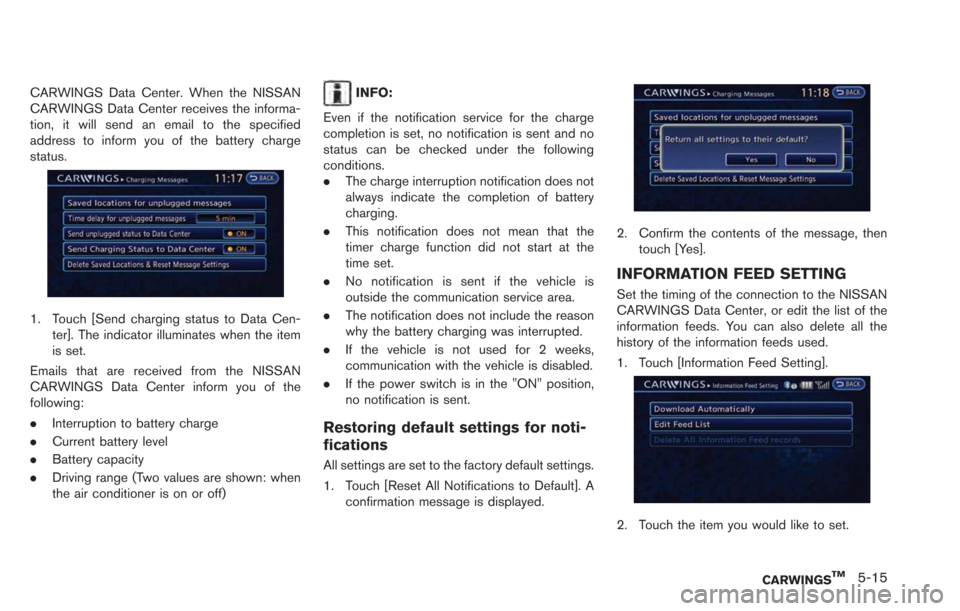
CARWINGS Data Center. When the NISSAN
CARWINGS Data Center receives the informa-
tion, it will send an email to the specified
address to inform you of the battery charge
status.
1. Touch [Send charging status to Data Cen-ter]. The indicator illuminates when the item
is set.
Emails that are received from the NISSAN
CARWINGS Data Center inform you of the
following:
. Interruption to battery charge
. Current battery level
. Battery capacity
. Driving range (Two values are shown: when
the air conditioner is on or off)
INFO:
Even if the notification service for the charge
completion is set, no notification is sent and no
status can be checked under the following
conditions.
. The charge interruption notification does not
always indicate the completion of battery
charging.
. This notification does not mean that the
timer charge function did not start at the
time set.
. No notification is sent if the vehicle is
outside the communication service area.
. The notification does not include the reason
why the battery charging was interrupted.
. If the vehicle is not used for 2 weeks,
communication with the vehicle is disabled.
. If the power switch is in the "ON" position,
no notification is sent.
Restoring default settings for noti-
fications
All settings are set to the factory default settings.
1. Touch [Reset All Notifications to Default]. A
confirmation message is displayed.
2. Confirm the contents of the message, thentouch [Yes].
INFORMATION FEED SETTING
Set the timing of the connection to the NISSAN
CARWINGS Data Center, or edit the list of the
information feeds. You can also delete all the
history of the information feeds used.
1. Touch [Information Feed Setting].
2. Touch the item you would like to set.
CARWINGSTM5-15
Page 179 of 275
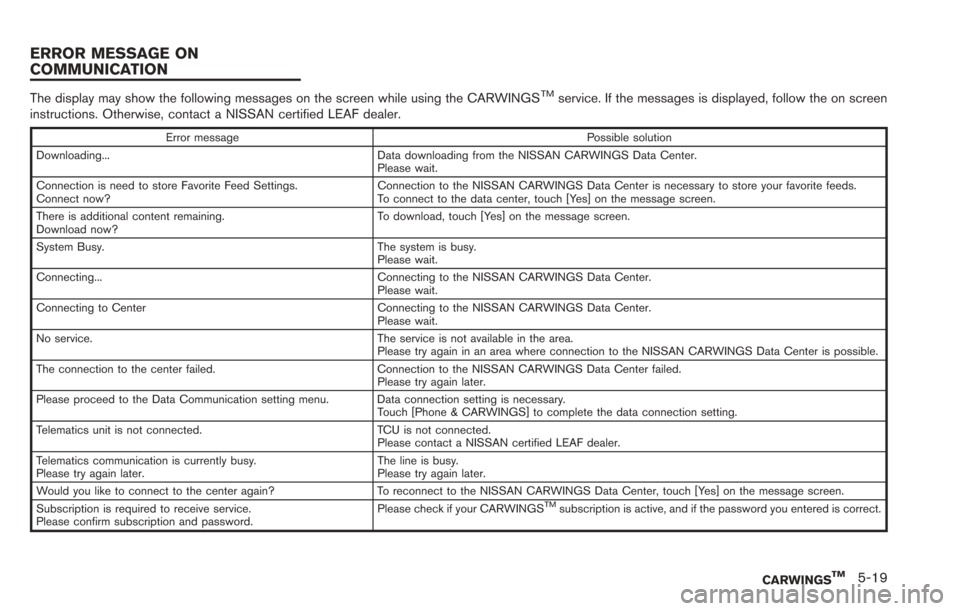
The display may show the following messages on the screen while using the CARWINGSTMservice. If the messages is displayed, follow the on screen
instructions. Otherwise, contact a NISSAN certified LEAF dealer.
Error message Possible solution
Downloading... Data downloading from the NISSAN CARWINGS Data Center. Please wait.
Connection is need to store Favorite Feed Settings.
Connect now? Connection to the NISSAN CARWINGS Data Center is necessary to store your favorite feeds.
To connect to the data center, touch [Yes] on the message screen.
There is additional content remaining.
Download now? To download, touch [Yes] on the message screen.
System Busy. The system is busy. Please wait.
Connecting... Connecting to the NISSAN CARWINGS Data Center. Please wait.
Connecting to Center Connecting to the NISSAN CARWINGS Data Center. Please wait.
No service. The service is not available in the area. Please try again in an area where connection to the NISSAN CARWINGS Data Center is possible.
The connection to the center failed. Connection to the NISSAN CARWINGS Data Center failed. Please try again later.
Please proceed to the Data Communication setting menu. Data connection setting is necessary. Touch [Phone & CARWINGS] to complete the data connection setting.
Telematics unit is not connected. TCU is not connected. Please contact a NISSAN certified LEAF dealer.
Telematics communication is currently busy.
Please try again later. The line is busy.
Please try again later.
Would you like to connect to the center again? To reconnect to the NISSAN CARWINGS Data Center, touch [Yes] on the message screen.
Subscription is required to receive service.
Please confirm subscription and password. Please check if your CARWINGS
TMsubscription is active, and if the password you entered is correct.
CARWINGSTM5-19
ERROR MESSAGE ON
COMMUNICATION
Page 185 of 275
![NISSAN LEAF 2013 1.G Navigation Manual VIEWING MAINTENANCE INFOR-
MATION
The maintenance intervals can be displayed for
your preferred maintenance items.
1. Push theMENUbutton and touch [Info.].
2. Touch [Maintenance].
3. Select the mainte](/img/5/324/w960_324-184.png "NISSAN LEAF 2013 1.G Navigation Manual VIEWING MAINTENANCE INFOR-
MATION
The maintenance intervals can be displayed for
your preferred maintenance items.
1. Push theMENUbutton and touch [Info.].
2. Touch [Maintenance].
3. Select the mainte")
VIEWING MAINTENANCE INFOR-
MATION
The maintenance intervals can be displayed for
your preferred maintenance items.
1. Push theMENUbutton and touch [Info.].
2. Touch [Maintenance].
3. Select the maintenance interval for the battery, air conditioner filter, tire and other
reminders.
You can also set the system to display a
message to remind you that the maintenance
needs to be performed.
The following example shows how to set the
battery maintenance information. Use the same
steps to set the other maintenance information
items.
1. Reset the driving distance to the new maintenance schedule.
2. Set the interval (mileage) of the maintenance schedule. To determine the recommended
maintenance interval, refer to the "NISSAN
Service and Maintenance Guide".
3. To display the reminder automatically when the set trip distance is reached, touch
[Reminder].
4. To return the display to MAINTENANCE INFO., touch [BACK].
The unit can be converted between "US" and
"Metric".
“Unit settings” (page 1-17)
The Reminder will be automatically displayed as
shown when both of the following conditions are
met:
. the vehicle is driven the set distance and the
power switch is pushed to the "LOCK"
position.
. the power switch is pushed to the "ACC" or
"ON" position the next time you drive the
vehicle after the set value has been reached.
To return to the previous screen after the
maintenance reminder screen is displayed,
touch [OK].
The maintenance reminder screen is displayed
each time the power switch is pushed to the ON
position unless one of the following operations is
performed:
. [Reset Distance] is touched.
. [Reminder] is set to OFF.
Viewing technical information6-3
VIEWING VEHICLE INFORMATION
Page 188 of 275
![NISSAN LEAF 2013 1.G Navigation Manual 6-6Viewing technical information
.[Call]:
Makes a call for the selected charging
station. A cellular phone should be con-
nected beforehand.
“Connecting cellular phone”
(page 1-13)
. [Details]:
Di](/img/5/324/w960_324-187.png "NISSAN LEAF 2013 1.G Navigation Manual 6-6Viewing technical information
.[Call]:
Makes a call for the selected charging
station. A cellular phone should be con-
nected beforehand.
“Connecting cellular phone”
(page 1-13)
. [Details]:
Di")
6-6Viewing technical information
.[Call]:
Makes a call for the selected charging
station. A cellular phone should be con-
nected beforehand.
“Connecting cellular phone”
(page 1-13)
. [Details]:
Displays detailed information including the
type and number of charging devices exist-
ing at the selected charging station.
NavTraffic information is a subscription service
offered by SiriusXM Satellite Radio.
This service provides real-time information
regarding traffic flow, accidents, road construc-
tion and other incidents, where available.
NavTraffic combines information from commer-
cial and public traffic data providers including
government departments of transportation, po-
lice, emergency services, road sensors, cameras
and aircraft reports. The traffic information is
broadcast to the vehicle by the SiriusXM
Satellite Radio. Available traffic information on
the route the driver selected is shown on the
navigation screen so traffic conditions between
you and the destination are known. Three types
of real-time traffic information for major road-
ways are shown on the navigation system:
* Unscheduled traffic data for example, acci-
dents and disabled vehicles.
* Scheduled traffic data, for example road
construction and road closures.
* Traffic flow information (rate of speed data) .WARNING
NavTraffic information is not a substi-
tute for attentive driving. Traffic condi-
tions change constantly and emergency
situations can arise without warning.
Relying only on NavTraffic information
may lead to a collision and could result
in serious personal injury.
INFO:
. Flow information is provided only for roads
equipped with traffic sensors and is not
available in all markets covered by the
service. Flow data may not be available on
portions of a road that is under construction.
. If a contract is not completed for NavTraffic
traffic information service, a message ap-
pears, and it will not be possible to check
the information on the traffic information
menu.
NavTraffic information is available in limited
markets. To subscribe or to check if this service
is available in the area:
call 1-866-635-2349 or see www.siriusxm.
com/navtraffic
VIEWING AVAILABLE TRAFFIC
INFORMATION
Page 190 of 275
![NISSAN LEAF 2013 1.G Navigation Manual 6-8Viewing technical information
1. Touch [Nearby Traffic Info]. A list screen isdisplayed.
2. Touch the event to check detailed informa-tion.
3. The map screen centered around the
selected event is d](/img/5/324/w960_324-189.png "NISSAN LEAF 2013 1.G Navigation Manual 6-8Viewing technical information
1. Touch [Nearby Traffic Info]. A list screen isdisplayed.
2. Touch the event to check detailed informa-tion.
3. The map screen centered around the
selected event is d")
6-8Viewing technical information
1. Touch [Nearby Traffic Info]. A list screen isdisplayed.
2. Touch the event to check detailed informa-tion.
3. The map screen centered around the
selected event is displayed. On the left
screen, detailed information about the event
is displayed. The message can be scrolled
touch [
]or[]. 4. Touch [BACK] to return to the previous
screen.
DISPLAY URGENT TRAFFIC INFOR-
MATION
When an urgent event is found near the current
vehicle location, a message pops up automati-
cally with a voice announcement.
The message includes the icon, event type,
event information and the direct distance from
the current location to the event.
INFO:
. Urgent traffic information is displayed re-
gardless of whether the traffic information
setting is on or off.
. When there are multiple urgent events, the
event with the shortest direct distance from
the current location is displayed. .
If the urgent event is on the recommended
route, and if a detour is found, the detour
route notification screen is displayed when
the vehicle approaches the detour point.
TRAFFIC INFORMATION ON MAP
With subscription to NavTraffic service, traffic
information is displayed on both Plan View and
Birdview
TMmap screen.
See "Notes on Traffic Information" for further
information.
“Notes on Nav Traffic information”
(page 10-37)
Page 191 of 275
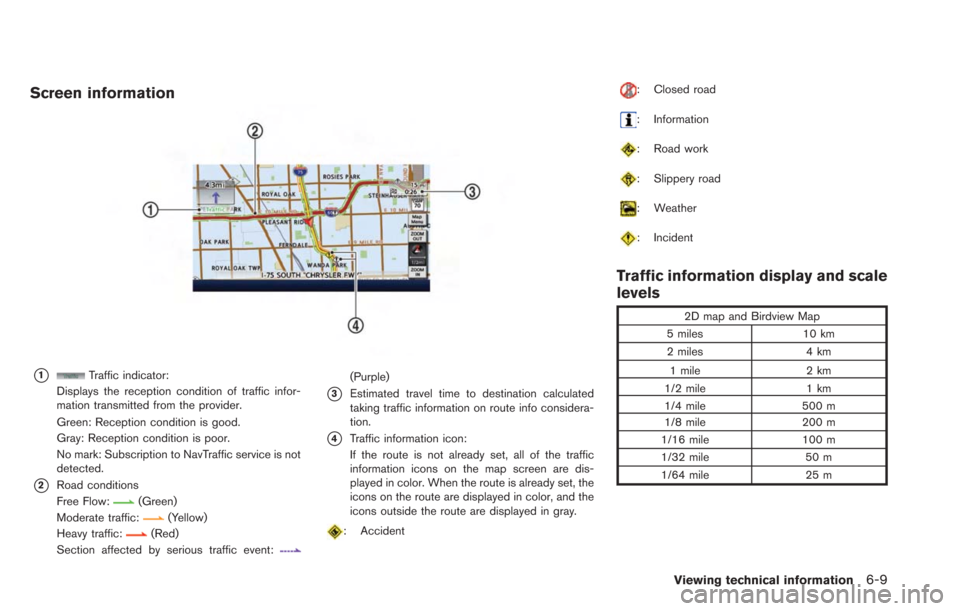
Screen information
*1Traffic indicator:
Displays the reception condition of traffic infor-
mation transmitted from the provider.
Green: Reception condition is good.
Gray: Reception condition is poor.
No mark: Subscription to NavTraffic service is not
detected.
*2Road conditions
Free Flow:
(Green)
Moderate traffic:
(Yellow)
Heavy traffic:(Red)
Section affected by serious traffic event:
(Purple)
*3Estimated travel time to destination calculated
taking traffic information on route info considera-
tion.
*4Traffic information icon:
If the route is not already set, all of the traffic
information icons on the map screen are dis-
played in color. When the route is already set, the
icons on the route are displayed in color, and the
icons outside the route are displayed in gray.
: Accident
: Closed road
: Information
: Road work
: Slippery road
: Weather
: Incident
Traffic information display and scale
levels
2D map and Birdview Map
5 miles 10 km
2 miles 4 km
1 mile 2 km
1/2 mile 1 km
1/4 mile 500 m
1/8 mile 200 m
1/16 mile 100 m
1/32 mile 50 m
1/64 mile 25 m
Viewing technical information6-9