lights NISSAN LEAF 2014 1.G Owner's Manual
[x] Cancel search | Manufacturer: NISSAN, Model Year: 2014, Model line: LEAF, Model: NISSAN LEAF 2014 1.GPages: 397, PDF Size: 9.45 MB
Page 137 of 397
2 Instruments and controls
Cockpit.............................2-3
Instrument panel........................2-4
Meters and gauges......................2-5
Speedometer and odometer...............2-6
Li-ion battery temperature gauge............2-7
Power meter........................2-7
Driving range........................2-8
Li-ion battery available charge gauge.........2-9
Li-ion battery capacity level gauge..........2-10
Outside air temperature................2-10
ECO indicator......................2-10
Clock...........................2-11
Warning/indicator lights and audible reminders.....2-13
Checking bulbs.....................2-14
Warning lights......................2-14
Indicator lights......................2-20
Audible reminders....................2-22
Vehicle information display.................2-23
Indicators for operation.................2-24
Trip computer......................2-28
Warning information displays.............2-33
Indicators for maintenance...............2-35
Indicator for timer....................2-36
Security systems......................2-36Vehicle security system.................2-37
NISSAN Vehicle Immobilizer System.........2-38
Windshield wiper and washer switch...........2-39
Washer operation....................2-40
Rear window wiper and washer switch.........2-41
Rear window and outside mirror defroster switch . . .2-42
Instrument brightness control...............2-42
Headlight and turn signal switch.............2-43
Headlight switch.....................2-43
Turn signal switch....................2-45
Fog light switch (if so equipped)............
.2-45
Heated steering wheel switch...............2-46
Horn..............................2-47
ECO switch.........................2-47
Heated seat switch.....................2-47
Vehicle Dynamic Control (VDC) OFF switch......2-49
Charge port lid switch...................2-49
Charge connector lock switch...............2-50
Charge timer OFF switch.................2-50
Power outlet.........................2-50
Storage............................2-51
Cup holders.......................2-51
Sunglasses holder....................2-52
Glove box.........................2-53
Console box.......................2-53
Page 138 of 397
Cargo cover (if so equipped).............2-53
Stowing golf bags....................2-55
Luggage side hook...................2-55
Windows...........................2-55
Power windows.....................2-55
Interior lights.........................2-58
Map lights........................2-58
Ceiling light........................2-58
HomeLink® universal transceiver (if so equipped) . . .2-59Programming HomeLink®...............2-60
Programming HomeLink® for Canadian customers
and gate openers....................2-61
Operating the HomeLink® universal transceiver . .2-61
Programming trouble-diagnosis............2-62
Clearing the programmed information........2-62
Reprogramming a single HomeLink® button. . . .2-62
If your vehicle is stolen.................2-62
Page 141 of 397
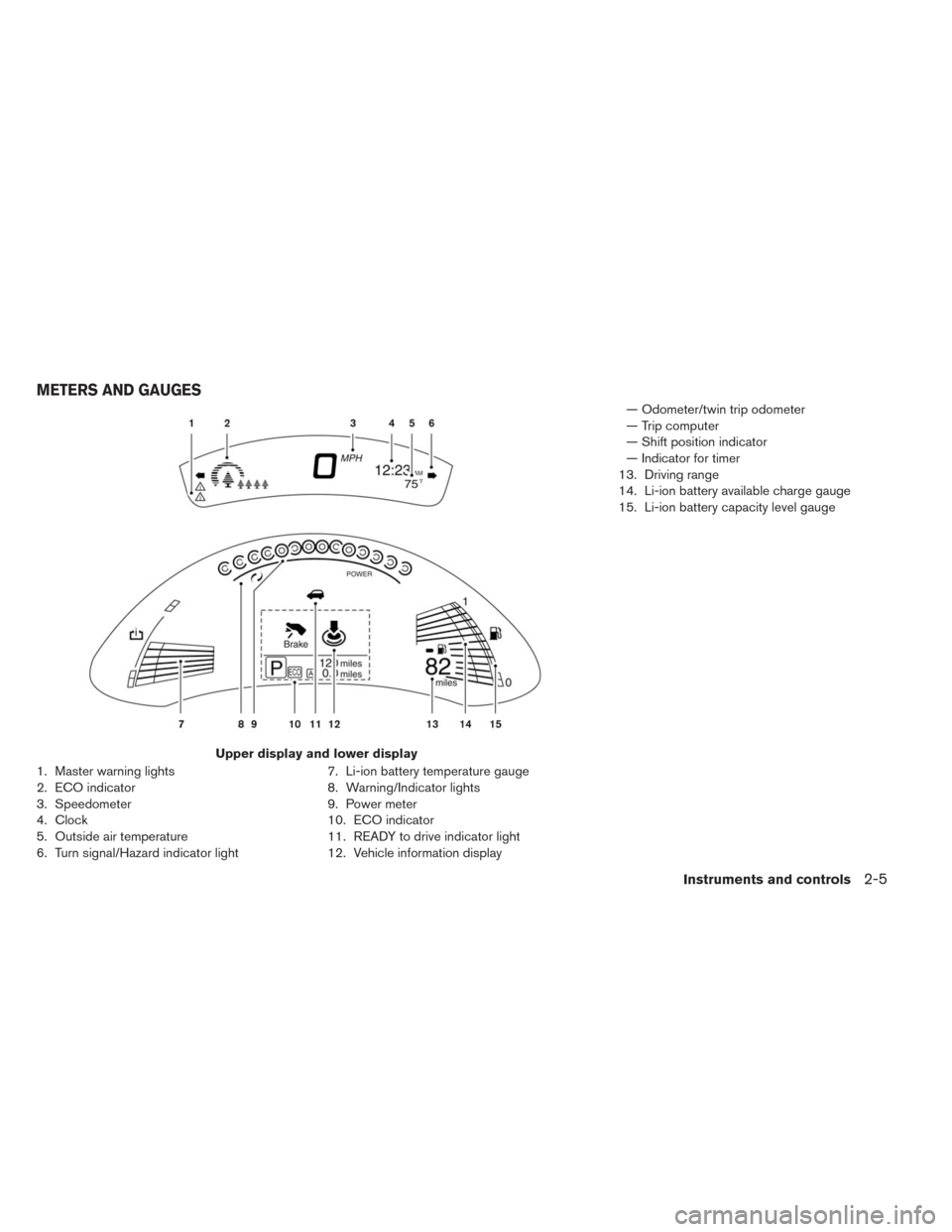
1. Master warning lights
2. ECO indicator
3. Speedometer
4. Clock
5. Outside air temperature
6. Turn signal/Hazard indicator light7. Li-ion battery temperature gauge
8. Warning/Indicator lights
9. Power meter
10. ECO indicator
11. READY to drive indicator light
12. Vehicle information display— Odometer/twin trip odometer
— Trip computer
— Shift position indicator
— Indicator for timer
13. Driving range
14. Li-ion battery available charge gauge
15. Li-ion battery capacity level gauge
Upper display and lower display
METERS AND GAUGES
Instruments and controls2-5
Page 149 of 397
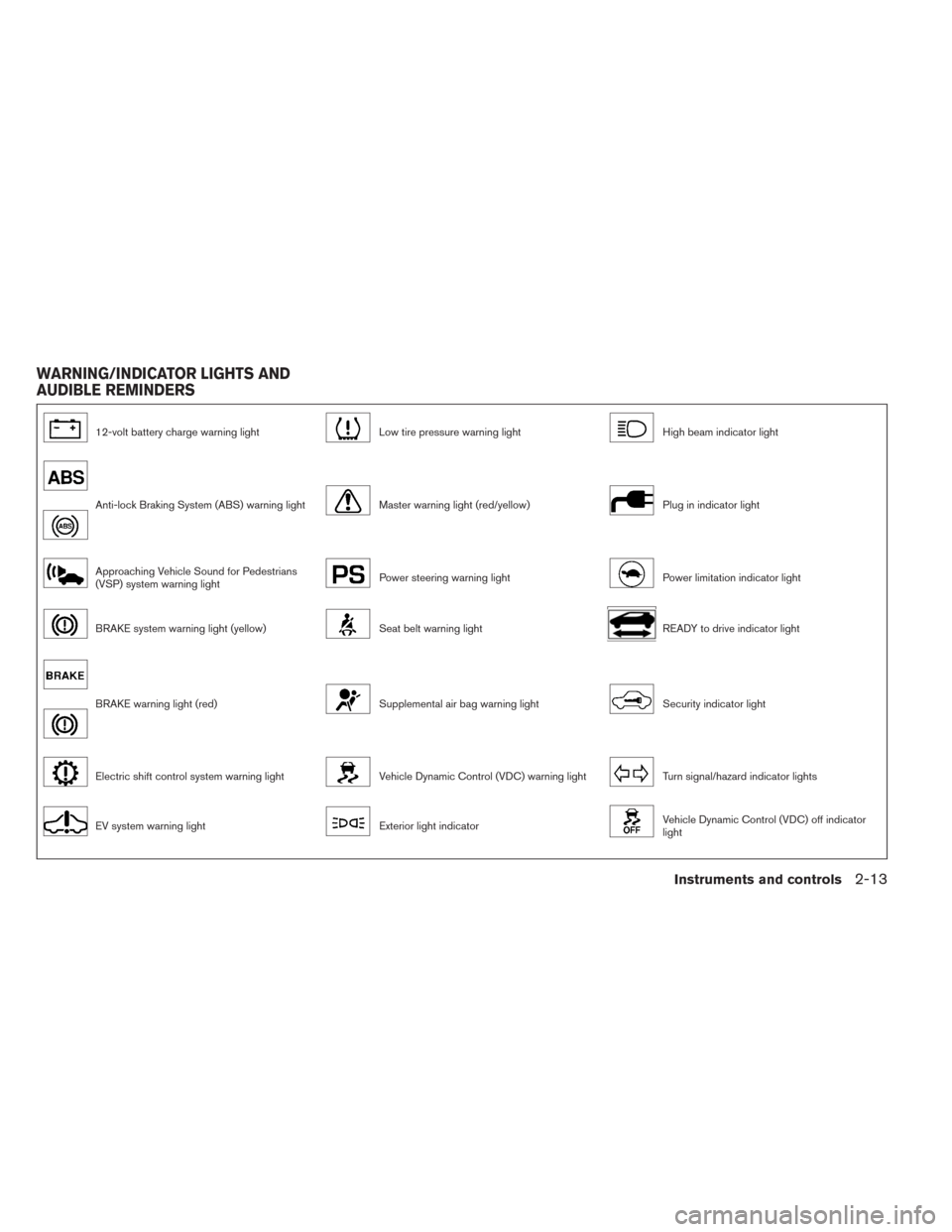
12-volt battery charge warning lightLow tire pressure warning lightHigh beam indicator light
Anti-lock Braking System (ABS) warning lightMaster warning light (red/yellow)Plug in indicator light
Approaching Vehicle Sound for Pedestrians
(VSP) system warning lightPower steering warning lightPower limitation indicator light
BRAKE system warning light (yellow)Seat belt warning lightREADY to drive indicator light
BRAKE warning light (red)Supplemental air bag warning lightSecurity indicator light
Electric shift control system warning lightVehicle Dynamic Control (VDC) warning lightTurn signal/hazard indicator lights
EV system warning lightExterior light indicatorVehicle Dynamic Control (VDC) off indicator
light
WARNING/INDICATOR LIGHTS AND
AUDIBLE REMINDERS
Instruments and controls2-13
Page 150 of 397
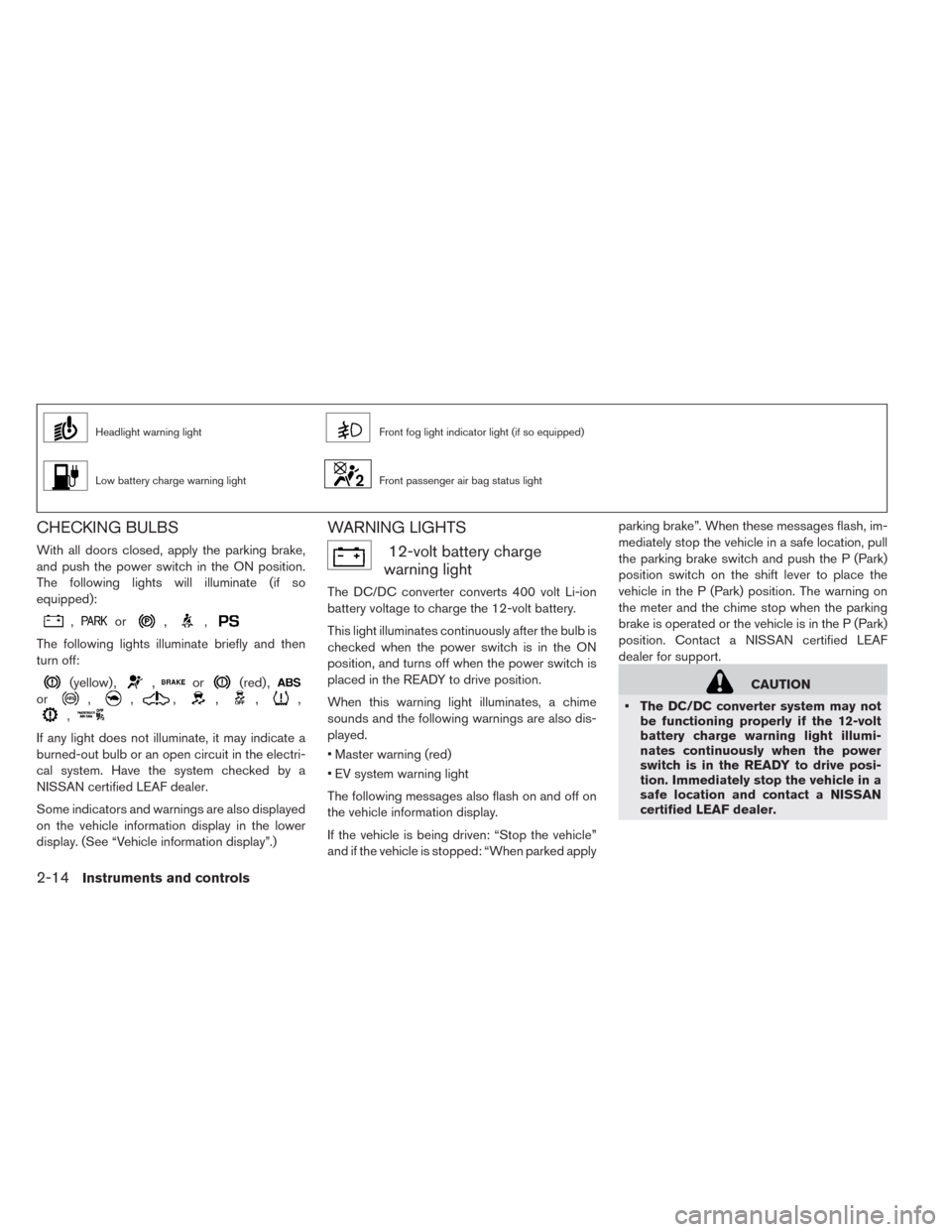
Headlight warning lightFront fog light indicator light (if so equipped)
Low battery charge warning lightFront passenger air bag status light
CHECKING BULBS
With all doors closed, apply the parking brake,
and push the power switch in the ON position.
The following lights will illuminate (if so
equipped):
,or,,
The following lights illuminate briefly and then
turn off:
(yellow) ,,or(red) ,
or,,,,,,
,
If any light does not illuminate, it may indicate a
burned-out bulb or an open circuit in the electri-
cal system. Have the system checked by a
NISSAN certified LEAF dealer.
Some indicators and warnings are also displayed
on the vehicle information display in the lower
display. (See “Vehicle information display”.)
WARNING LIGHTS
12-volt battery charge
warning light
The DC/DC converter converts 400 volt Li-ion
battery voltage to charge the 12-volt battery.
This light illuminates continuously after the bulb is
checked when the power switch is in the ON
position, and turns off when the power switch is
placed in the READY to drive position.
When this warning light illuminates, a chime
sounds and the following warnings are also dis-
played.
• Master warning (red)
• EV system warning light
The following messages also flash on and off on
the vehicle information display.
If the vehicle is being driven: “Stop the vehicle”
and if the vehicle is stopped: “When parked applyparking brake”. When these messages flash, im-
mediately stop the vehicle in a safe location, pull
the parking brake switch and push the P (Park)
position switch on the shift lever to place the
vehicle in the P (Park) position. The warning on
the meter and the chime stop when the parking
brake is operated or the vehicle is in the P (Park)
position. Contact a NISSAN certified LEAF
dealer for support.
CAUTION
• The DC/DC converter system may not
be functioning properly if the 12-volt
battery charge warning light illumi-
nates continuously when the power
switch is in the READY to drive posi-
tion. Immediately stop the vehicle in a
safe location and contact a NISSAN
certified LEAF dealer.
2-14Instruments and controls
Page 153 of 397
• Pressing the brake pedal when the
power switch position is not in the ON
or READY to drive position and/or low
brake fluid level may increase the
stopping distance and braking will re-
quire greater pedal effort as well as
pedal travel.
• If the brake fluid level is below the
minimum or MIN mark on the brake
fluid reservoir, do not drive until the
brake system has been checked at a
NISSAN certified LEAF dealer.
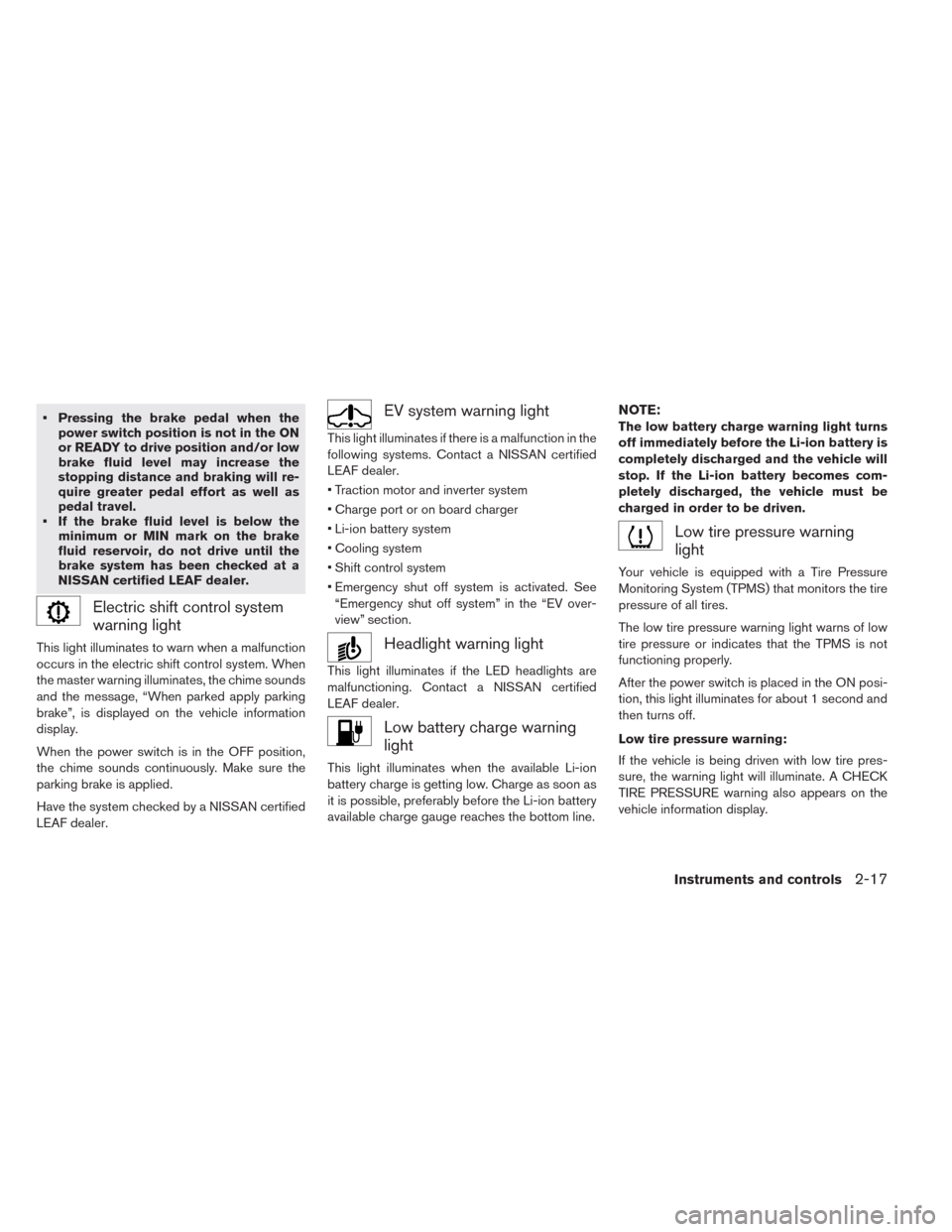
Electric shift control system
warning light
This light illuminates to warn when a malfunction
occurs in the electric shift control system. When
the master warning illuminates, the chime sounds
and the message, “When parked apply parking
brake”, is displayed on the vehicle information
display.
When the power switch is in the OFF position,
the chime sounds continuously. Make sure the
parking brake is applied.
Have the system checked by a NISSAN certified
LEAF dealer.
EV system warning light
This light illuminates if there is a malfunction in the
following systems. Contact a NISSAN certified
LEAF dealer.
• Traction motor and inverter system
• Charge port or on board charger
• Li-ion battery system
• Cooling system
• Shift control system
• Emergency shut off system is activated. See
“Emergency shut off system” in the “EV over-
view” section.
Headlight warning light
This light illuminates if the LED headlights are
malfunctioning. Contact a NISSAN certified
LEAF dealer.
Low battery charge warning
light
This light illuminates when the available Li-ion
battery charge is getting low. Charge as soon as
it is possible, preferably before the Li-ion battery
available charge gauge reaches the bottom line.
NOTE:
The low battery charge warning light turns
off immediately before the Li-ion battery is
completely discharged and the vehicle will
stop. If the Li-ion battery becomes com-
pletely discharged, the vehicle must be
charged in order to be driven.
Low tire pressure warning
light
Your vehicle is equipped with a Tire Pressure
Monitoring System (TPMS) that monitors the tire
pressure of all tires.
The low tire pressure warning light warns of low
tire pressure or indicates that the TPMS is not
functioning properly.
After the power switch is placed in the ON posi-
tion, this light illuminates for about 1 second and
then turns off.
Low tire pressure warning:
If the vehicle is being driven with low tire pres-
sure, the warning light will illuminate. A CHECK
TIRE PRESSURE warning also appears on the
vehicle information display.
Instruments and controls2-17
Page 155 of 397
• If the vehicle is being driven at speeds
of less than 16 MPH (25 km/h) , the
TPMS may not operate correctly.
• Be sure to install the specified size of
tires to the four wheels correctly.
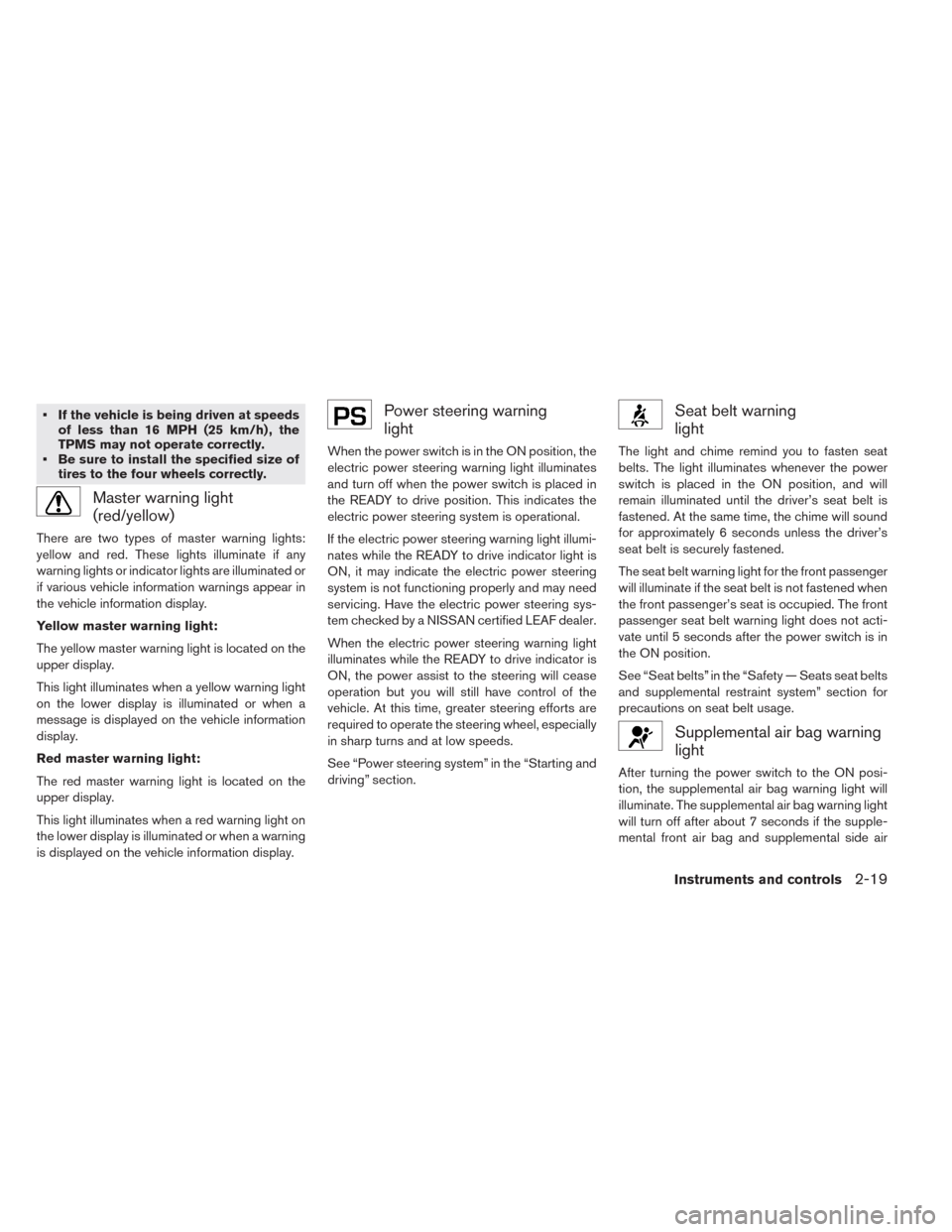
Master warning light
(red/yellow)
There are two types of master warning lights:
yellow and red. These lights illuminate if any
warning lights or indicator lights are illuminated or
if various vehicle information warnings appear in
the vehicle information display.
Yellow master warning light:
The yellow master warning light is located on the
upper display.
This light illuminates when a yellow warning light
on the lower display is illuminated or when a
message is displayed on the vehicle information
display.
Red master warning light:
The red master warning light is located on the
upper display.
This light illuminates when a red warning light on
the lower display is illuminated or when a warning
is displayed on the vehicle information display.
Power steering warning
light
When the power switch is in the ON position, the
electric power steering warning light illuminates
and turn off when the power switch is placed in
the READY to drive position. This indicates the
electric power steering system is operational.
If the electric power steering warning light illumi-
nates while the READY to drive indicator light is
ON, it may indicate the electric power steering
system is not functioning properly and may need
servicing. Have the electric power steering sys-
tem checked by a NISSAN certified LEAF dealer.
When the electric power steering warning light
illuminates while the READY to drive indicator is
ON, the power assist to the steering will cease
operation but you will still have control of the
vehicle. At this time, greater steering efforts are
required to operate the steering wheel, especially
in sharp turns and at low speeds.
See “Power steering system” in the “Starting and
driving” section.
Seat belt warning
light
The light and chime remind you to fasten seat
belts. The light illuminates whenever the power
switch is placed in the ON position, and will
remain illuminated until the driver’s seat belt is
fastened. At the same time, the chime will sound
for approximately 6 seconds unless the driver’s
seat belt is securely fastened.
The seat belt warning light for the front passenger
will illuminate if the seat belt is not fastened when
the front passenger’s seat is occupied. The front
passenger seat belt warning light does not acti-
vate until 5 seconds after the power switch is in
the ON position.
See “Seat belts” in the “Safety — Seats seat belts
and supplemental restraint system” section for
precautions on seat belt usage.
Supplemental air bag warning
light
After turning the power switch to the ON posi-
tion, the supplemental air bag warning light will
illuminate. The supplemental air bag warning light
will turn off after about 7 seconds if the supple-
mental front air bag and supplemental side air
Instruments and controls2-19
Page 156 of 397
bag, curtain side-impact air bag systems and/or
pretensioner seat belt are operational.
If any of the following conditions occur, the front
air bag, side air bag, curtain air bag and preten-
sioner systems need servicing and your vehicle
must be taken to your nearest NISSAN certified
LEAF dealer.
• The supplemental air bag warning light remains
on after approximately 7 seconds.
• The supplemental air bag warning light flashes
intermittently.
• The supplemental air bag warning light does not
illuminate at all.
Unless checked and repaired, the Supplemental
Restraint Systems and/or the pretensioners may
not function properly.
For additional information, see “Supplemental re-
straint system” in the “Safety — Seats seat belts
and supplemental restraint system” section.
WARNING
If the supplemental air bag warning light
is on, it could mean that the front air bag,
side air bag, curtain air bag and/or pre-
tensioner systems will not operate in an
accident. To help avoid injury to yourselfor others, have your vehicle checked by a
NISSAN certified LEAF dealer as soon as
possible.
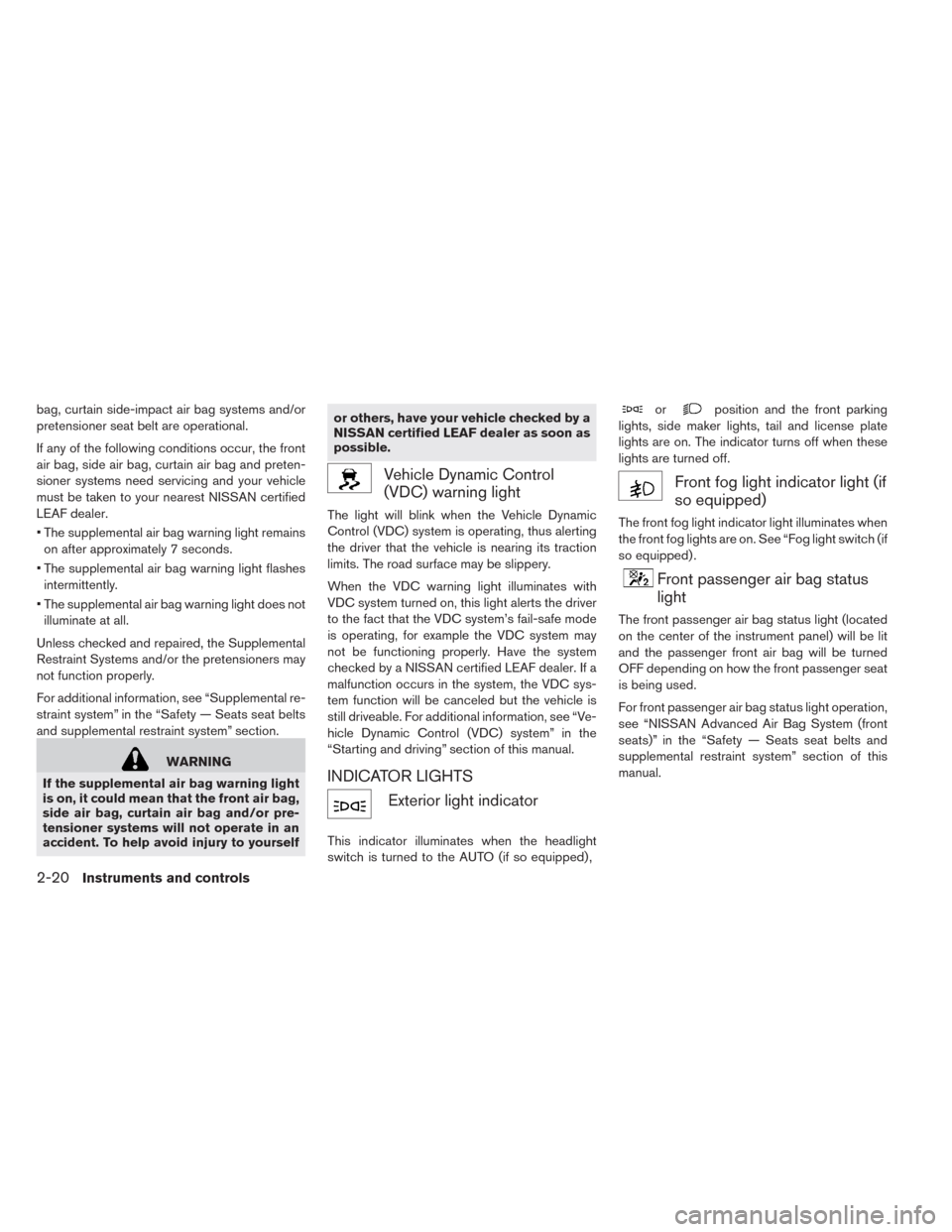
Vehicle Dynamic Control
(VDC) warning light
The light will blink when the Vehicle Dynamic
Control (VDC) system is operating, thus alerting
the driver that the vehicle is nearing its traction
limits. The road surface may be slippery.
When the VDC warning light illuminates with
VDC system turned on, this light alerts the driver
to the fact that the VDC system’s fail-safe mode
is operating, for example the VDC system may
not be functioning properly. Have the system
checked by a NISSAN certified LEAF dealer. If a
malfunction occurs in the system, the VDC sys-
tem function will be canceled but the vehicle is
still driveable. For additional information, see “Ve-
hicle Dynamic Control (VDC) system” in the
“Starting and driving” section of this manual.
INDICATOR LIGHTS
Exterior light indicator
This indicator illuminates when the headlight
switch is turned to the AUTO (if so equipped) ,
orposition and the front parking
lights, side maker lights, tail and license plate
lights are on. The indicator turns off when these
lights are turned off.
Front fog light indicator light (if
so equipped)
The front fog light indicator light illuminates when
the front fog lights are on. See “Fog light switch (if
so equipped) .
Front passenger air bag status
light
The front passenger air bag status light (located
on the center of the instrument panel) will be lit
and the passenger front air bag will be turned
OFF depending on how the front passenger seat
is being used.
For front passenger air bag status light operation,
see “NISSAN Advanced Air Bag System (front
seats)” in the “Safety — Seats seat belts and
supplemental restraint system” section of this
manual.
2-20Instruments and controls
Page 158 of 397
charged in order to be driven. See “Low battery
charge warning light”.
Security indicator light
This light blinks when the power switch is in the
ACC, OFF or LOCK position. This function indi-
cates the security system equipped on the ve-
hicle is operational.
If the security system is malfunctioning, this light
will remain on while the power switch is in the ON
position. For additional information, see “Security
systems.
Turn signal/hazard indicator
lights
This light flashes when the turn signal switch
lever or hazard switch is turned on.
Vehicle Dynamic Control
(VDC) off indicator light
This light illuminates when the Vehicle Dynamic
Control (VDC) switch is pushed to OFF. This
indicates that the VDC system is not operating.
See “Vehicle Dynamic Control (VDC) system” in
the “Starting and driving” section.
AUDIBLE REMINDERS
Brake pad wear warning
The disc brake pads have audible wear warnings.
When a brake pad requires replacement, it will
make a high pitched scraping sound when the
vehicle is in motion. This scraping sound will first
occur only when the brake pedal is depressed.
After more wear of the brake pad, the sound will
always be heard even if the brake pedal is not
depressed. Have the brakes checked as soon as
possible if the warning sound is heard.
Electric shift control system reminder
chime
If an improper shift operation is performed, for
safety reasons a chime will sound and at the
same time, depending on the conditions, the
operation will be cancelled or the shift position
will switch to the N position.
For more details, see “Driving vehicle” in the
“Starting and driving” section.
Key reminder chime
A chime will sound if the driver’s side door is
opened while the power switch is pushed to the
ON or ACC position.Make sure that the power switch is pushed to the
OFF position, and take the Intelligent Key with
you when leaving the vehicle.
Light reminder chime
The light reminder chime will sound when the
driver side door is opened with the light switch in
the
orposition, and the power
switch in the ACC, OFF or LOCK position.
Turn the light switch off when you leave the
vehicle.
Parking brake reminder chime
A chime sounds if the parking brake is set and the
vehicle is driven. The chime will stop if the parking
brake is released or the vehicle speed returns to
zero.
Power switch reminder chime (if so
equipped)
The power switch reminder chime will sound
when the driver’s door is opened while the power
switch is in the ON or READY position. Push the
power switch to the OFF position.
2-22Instruments and controls
Page 173 of 397
VEHICLE SECURITY SYSTEM
The vehicle security system provides visual and
audio alarm signals if someone opens the doors,
or rear hatch when the system is armed. It is not,
however, a motion detection type system that
activates when a vehicle is moved or when a
vibration occurs.
The system helps deter vehicle theft but cannot
prevent it, nor can it prevent the theft of interior or
exterior vehicle components in all situations. Al-
ways secure your vehicle even if parking for a
brief period. Never leave your keys in the vehicle,
and always lock it when it is left unattended. Be
aware of your surroundings, and park in secure,
well-lit areas whenever possible.
Many devices offering additional protection, such
as component locks, identification markers, and
tracking systems, are available at auto supply
stores and specialty shops. Your NISSAN certi-
fied LEAF dealer may also offer such equipment.
Check with your insurance company to see if you
may be eligible for discounts for various theft
protection features.
How to arm the vehicle security
system
1. Close all windows.
The system can be armed even if the
windows are open.
2. Place the power switch in the LOCK or OFF
position and remove the Intelligent Key from
the vehicle.
3. Close all doors. Lock all doors. The doors can
be locked with:
• the LOCK
button on the Intelligent Key
• any request switch• the power door lock switch
• the mechanical key
4. Confirm that the security indicator light illumi-
nates. The security indicator light stays on for
about 30 seconds. The vehicle security sys-
tem is now pre-armed. After about 30 sec-
onds the vehicle security system automati-
cally shifts into the armed phase. The security
light begins to flash once every approximately
3 seconds. If, during this 30-second pre-arm
time period, the door is unlocked, or the
power switch is placed in the ACC or ON
position, the system will not arm.
Even when the driver and/or passengers
are in the vehicle, the system will activate
with all doors locked and the power switch
in the OFF position. When placing the
power switch to the ACC or ON position,
the system will be released.
Vehicle security system activation
The vehicle security system will give the following
alarm:
• The headlights blink and the horn sounds inter-
mittently.
Instruments and controls2-37