air condition NISSAN LEAF 2017 1.G Navigation Manual
[x] Cancel search | Manufacturer: NISSAN, Model Year: 2017, Model line: LEAF, Model: NISSAN LEAF 2017 1.GPages: 268, PDF Size: 1.41 MB
Page 89 of 268
![NISSAN LEAF 2017 1.G Navigation Manual — [Fastest] (purple)Selects a route that is shortest in time.
— [Min. FWY] (orange) Selects a route with minimum use of
freeways.
— [Short. Dist.] (pink) Selects a route that is shortest in
dist](/img/5/531/w960_531-88.png "NISSAN LEAF 2017 1.G Navigation Manual — [Fastest] (purple)Selects a route that is shortest in time.
— [Min. FWY] (orange) Selects a route with minimum use of
freeways.
— [Short. Dist.] (pink) Selects a route that is shortest in
dist")
— [Fastest] (purple)Selects a route that is shortest in time.
— [Min. FWY] (orange) Selects a route with minimum use of
freeways.
— [Short. Dist.] (pink) Selects a route that is shortest in
distance.
. [Route Info]:
Route Information such as turn list and
scrolled map can be displayed. The route
can also be saved for future use.
. [Add Way Pt.]:
Route can be edited by adding a destination
or a waypoint.
— If a waypoint is added, 3 alternative routes cannot be selected.
— It is possible to edit or add a destination or waypoints to the route that is already set.
“Editing route” (page 3-39)
INFO:
. Battery power information is displayed on the
screen after [More Routes] is touched. The
remaining battery power estimation function
cannot be used to confirm condition
changes that arise after driving starts. Utilize
the function as a reference when selecting
driving routes.
. After starting to drive, refer to the driving
range on the meter and perform battery
charging allowing for some leeway.
. In the following instances, the actual battery
power may differ from the remaining battery
power estimation.
— Frequent repetition of sudden accelera- tion and sudden braking
— Change of air conditioner operating con- ditions — Change of traffic conditions and driving
routes that differ from the one used for the
estimation
— Strong wind, cold, and snow weather conditions
— Tires that do not comply with specifica- tions, low air pressure tires, worn tires,
studless tires, and others.
— Decreased capacity of the Li-ion battery
— Installation of equipment that does not comply with specifications (carriers and
others)
. Choosing different route search conditions
in [More Routes] may not always generate
results search for different routes.
Example 2:
. [Start]:
Starts route guidance to the selected desti-
3-29
3. Navigation
Page 108 of 268
VIEWING TRAFFIC INFORMA-
TION
SiriusXM Traffic information is a subscription
service offered by SiriusXM Satellite Radio.
This service provides real-time information re-
garding traffic flow, accidents, road construction
and other incidents, where available.
SiriusXM Traffic combines information from
commercial and public traffic data providers
including government departments of transpor-
tation, police, emergency services, road sensors,
cameras and aircraft reports. The traffic informa-
tion is broadcast to the vehicle by the SiriusXM
satellites. Available traffic information on the
route the driver selected is shown on the
navigation screen so traffic conditions between
you and the destination are known. Three types
of real-time traffic information for major roadways
are shown on the navigation system:
* Unscheduled traffic data for example, accidents
and disabled vehicles.
* Scheduled traffic data, for example road
construction and road closures.
* Traffic flow information (rate of speed data) .
WARNING
SiriusXM Traffic information is not a
substitute for attentive driving. Traffic
conditions change constantly and emer-
gency situations can arise without warn-
ing. Relying only on SiriusXM Traffic
information may lead to a collision and
could result in serious personal injury.
NOTE:
. Flow information is provided only for
roads equipped with traffic sensors and
is not available in all markets covered
by the service. Flow data may not be
available on portions of a road that is
under construction.
. A SiriusXM Traffic subscription is ne-
cessary to view Traffic Info.
“SiriusXM Travel Link” (page 6-8)
VIEWING AVAILABLE TRAFFIC IN-
FORMATION
Viewing traffic events from list
1. Touch [Info] on the Launch Bar.
2. Touch [SXM Traffic]. A list of available types
of information are displayed.
Avail-
able
items Function
[Info on
Route] Displays a list of traffic information
found on the route from the
current vehicle location to the
destination. Available only when a
route is set.
[Nearby
Traffic
Info] Displays a list of available traffic
information around the current
vehicle location.
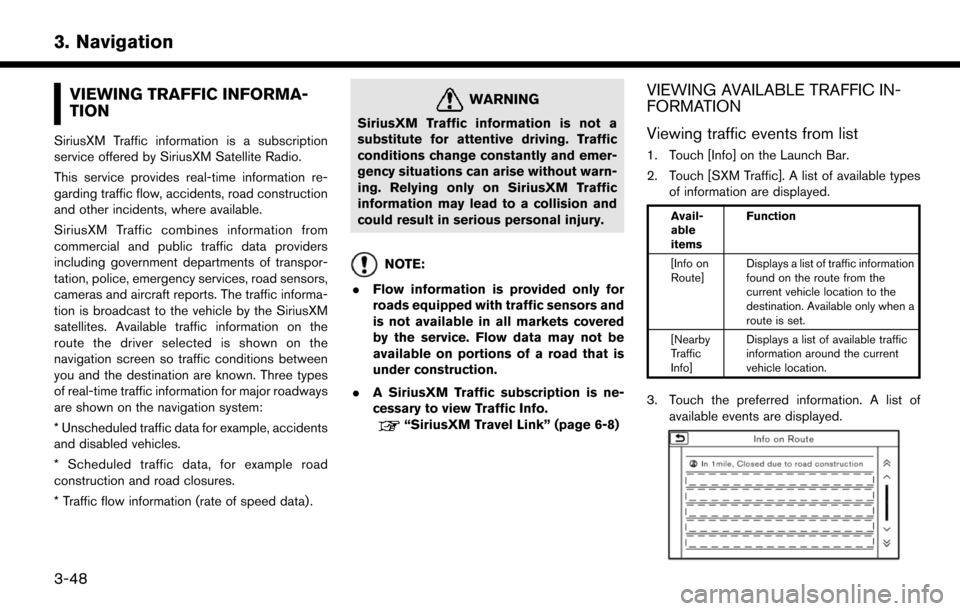
3. Touch the preferred information. A list of
available events are displayed.
3-48
3. Navigation
Page 156 of 268
TELEMATICS OVERVIEW
In addition to Event Data Recorders (EDRs)
mentioned in the LEAF Owner’s Manual, this
vehicle is equipped with electronic modules that
monitor, control and record data concerning
various vehicle systems, including the motor,
batteries, braking and electrical systems. Other
electronic modules record information concern-
ing driving conditions, including idling, braking,
acceleration, trip and other related data, informa-
tion about your use of the car and its features
such as air conditioner or headlight usage,
diagnostic trouble codes, vehicle charging,
vehicle speed, direction and/or location.
Some of this data is stored by the vehicle for use
during vehicle servicing. Other data concerning
your vehicle’s operation and performance is
wirelessly transmitted by cellular connection
through the vehicle onboard telematics system
upon vehicle start-up or at other intervals to
NISSAN. This data may be used by NISSAN for
various purposes, including: to provide you with
NissanConnect
SMEV; troubleshooting; evalua-
tion of your vehicle’s quality, functionality and
performance; analysis and research by NISSAN
designed to, among other things, optimize
performance of future electric vehicles including
improvements in future battery life; to offer you new or additional products or services; and as
otherwise may be required by law. Such data
may be shared with NISSAN’s parents, sub-
sidiaries, affiliates, successors or assignees;
authorized NISSAN certified LEAF dealers;
NISSAN’s marketing partners; your fleet com-
pany, if your vehicle is a fleet vehicle; your rental
company, if your vehicle is a rental vehicle; and
third party service providers such as cellular,
information systems and data management
providers.
State and provincial laws allow access and use
of data recorded by vehicle devices with the
consent of the vehicle owner or pursuant to
subscription agreement. While you are not
required to allow such access and use, if you
do not so agree NISSAN may be unable under
applicable law to activate the vehicle telematics
system in your vehicle, and certain features of
your vehicle which are dependent on vehicle
telematics will not operate as intended or
designed. These may include features such as
automatic charging station map updates, remote
battery state of charge check, charging complete
notice, remote plug in reminder, remote charging
on, remote climate control on, drive route
planning, driving tips to improve range, driving
history, billing simulation, ECO ranking, ECO
forest, maintenance reminders, etc. Other fea-
tures that may be developed and offered by
NISSAN in the future may also not function
without telematics data transmission.
NissanConnect
SMEV telematics services are
provided by NISSAN pursuant to a subscription
services agreement covering your vehicle. This
agreement is necessary for all owners. This
agreement, and an explanation of its terms and
conditions, can be found at the NissanCon-
nect
SMWebsite. Further, the operator of the
vehicle must also touch [OK] on the Navi screen
to indicate assent when requested. If you decide
at any time that you do not want your vehicle to
transmit data to NISSAN, you can deactivate the
telematics account associated with this vehicle
by canceling the subscription services agree-
ment by visiting the NissanConnect
SMWebsite
or calling NISSAN at 1-877-NOGASEV (1-877-
664-2738) . The service can be reactivated later
upon request if you choose. Simply visit the same
website or call the number above. Alternatively,
you can turn off the transmission of certain
categories of data through the use of settings
found in the Navigation system under Menu,
NissanConnect
SMEV, Vehicle Information Shar-
ing with NISSAN. Note, turning off “Vehicle
Information Sharing with NISSAN” will only
disable the automatic sharing of information at
vehicle start-up. Certain categories of data may
5-2
5. NissanConnectSMEV
Page 159 of 268
.Battery status check:
The status of the battery can be checked
using your personal computer or cellular
phone even if you are not in the vehicle.
. Unplugged status, Charge status:
By registering frequently used charging
stations, notifications can be sent to your
personal computer or cellular phone e-mail
address to inform you when the charging
connector is disconnected at those locations
or charging is completed.
. Remote charge, Remote climate con-
trol:
Remote activation of battery charging or
climate control can be set using your
personal computer or cellular phone.
. Li-ion battery warmer status (if so
equipped):
When the ambient temperature is low, the Li-
ion battery warmer operates automatically.
Notifications will be sent to your personal
computer or cellular phone e-mail address
under the following conditions in order to
remind you to connect the charging con-
nector.
— Approximately 5 minutes after the Li-ion battery warmer starts operating while the
power switch is in the OFF state and the charging cable is not connected to the
vehicle.
— Approximately 5 minutes after the Li-ion battery warmer stops operating due to
low remaining Li-ion battery power while
the power switch is in the OFF state and
the charging cable is not connected to
the vehicle.
NOTE:
. The remaining Li-ion battery power
lowers gradually while the battery war-
mer is operating without connecting the
charging connector.
. When the remaining Li-ion battery
power lowers, the battery warmer stops
operating. When this occurs, the Li-ion
battery temperature lowers gradually,
and as a result the EV system may be
disabled.
Navigation Telematics (NissanConnect
SM
EV) . Automatic update of charging stations:
The information for the charging stations that
is recorded in the map data is automatically
updated. .
All Information Feeds:
Convenient information for driving such as
weather and traffic information, ECO infor-
mation shared with the LEAF users, etc. is
provided.
. Favorites:
When the information of an Internet site is
selected and it is stored in the page that is
specially established in the NissanCon-
nect
SMWebsite, the information is converted
into an appropriate format via the Nissan
Data Center and provided for use in the
vehicle. The content of the information is
automatically read out. For the registration
method of information data, visit the Nissan-
Connect
SMWebsite.
NOTE:
. Completing the NissanConnect
SMEV
registration is necessary before using
this service.
. To check the Li-ion battery charging
status or to use the remote heater and
air conditioner using an internet en-
abled smart phone or personal compu-
ter, the following conditions must be
met:
5-5
5. NissanConnectSMEV
Page 160 of 268

—The vehicle must be located in a
cellular phone or smart phone cover-
age area.
— The internet enabled cellular phone
or smart phone must be located in a
cellular phone or smart phone cover-
age area.
— The computer must be connected to
the internet.
— A cellular phone capable of text
messaging must be used to receive
text message regarding vehicle
charge status.
. When the charge connector is discon-
nected from the vehicle, the heater and
air conditioner operates using vehicle
Li-ion battery electric power.
. If the remote heater and air conditioner
function and Li-ion battery charging are
performed at the same time, Li-ion
battery charging will take longer than
usual due to the power used to heat or
cool the vehicle.
. Certain remote functions require a
compatible smart phone, which is not
included with vehicle. .
NissanConnectSMEV information sys-
tem features are included through a
subscription service which requires
owner consent to activate. The sub-
scription must be active to use these
features.
. NissanConnect
SMEV communications
may be received at a verified e-mail
address or by SMS/text messaging-
enabled cellular phone.
. Standard text rates and/or data usage
may apply depending on your carrier.
ABOUT SERVICE APPLICATION
Registration to the NissanConnectSMEV is
necessary before using this service. For detailed
information, contact a NISSAN certified LEAF
dealer.
CAUTION
If the vehicle is sold to another person,
this service must be canceled and all
data stored in the device must be deleted
to avoid having personal data inadver-
tently disclosed.
NOTICE FOR USAGE
. The NissanConnectSMEV use the TCU
(Telematics Control Unit) . Even if the signal
strength bar of the in-vehicle data commu-
nication module indicates good reception,
connection to the Nissan Data Center may
be disabled. This does not indicate a
malfunction. Operate the system again after
a few minutes.
. The NissanConnect
SMEV cannot be used
under the following conditions:
— The vehicle moves outside the service area of the TCU (Telematics Control Unit)
connection to the system.
— The vehicle is in a location with poor signal reception such as a tunnel, under-
ground parking, behind a building or in a
mountainous area.
RADIO APPROVAL NUMBER AND
INFORMATION
WARNING
.The TCU antenna is installed inside
the upper central part of the instru-
ment panel. An occupant should not
get any closer to the antenna than
specified by the pacemaker manu-
5-6
5. NissanConnectSMEV
Page 175 of 268
![NISSAN LEAF 2017 1.G Navigation Manual Menu itemResult
[Maintenance] [Battery] Maintenance intervals can be displayed and changed. Register preferred interval by touching [+]/[-] and turn on/off the reminder by touching [ON].
Touch [Reset](/img/5/531/w960_531-174.png "NISSAN LEAF 2017 1.G Navigation Manual Menu itemResult
[Maintenance] [Battery] Maintenance intervals can be displayed and changed. Register preferred interval by touching [+]/[-] and turn on/off the reminder by touching [ON].
Touch [Reset")
Menu itemResult
[Maintenance] [Battery] Maintenance intervals can be displayed and changed. Register preferred interval by touching [+]/[-] and turn on/off the reminder by touching [ON].
Touch [Reset Distance] to reset the interval.
The maintenance reminder will be automatically displayed when both of the
following conditions are met:
.
the vehicle is driven the set distance and the power switch is pushed to the
LOCK position.
.the power switch is pushed to the ACC or ON position the next time you drive
the vehicle after the set value has been reached.
Touch [OK] on the reminder screen to return to the previous screen.
[Air Conditioner
Filter]
[Tire]
[Other Reminder]
[Charging Station Info] [Near Current Location] Location information about the charging stations around the selected area can be checked. Touch the preferred charging station from the list. Touch [Show
Map] to display the selected charging station and to set it as a destination.
Touch [Call] to make a call to the charging station. Touch [Details] to display
detail information such as the type and number of charging devices at the
charging station.
Touch [Options] to select option items.
“Finding charging station” (page 3-19)
[Near Destination]
[Near Scroll Position]
[Near City Center]
[Where am I?] The name and distance of the next/previous street, and other information that indicates the current vehicle location are displayed. GPS coordinates and
altitude are shown on the bottom right.
[SXM Weather Alerts] Display the list of weather alerts. Touch [Nearby Current] to display nearby current alerts, touch [Nearby
Destination] to display nearby destination alerts.
[Navigation Version] Displays the information of the current map version, program version, unit code, etc.
[GPS Position] Displays GPS information, such as number of satellites, latitude/longitude, and approximate altitude.
6-5
6. Viewing information
Page 204 of 268
1st Command 2nd Command 3rd Command ActionWhere am I? Displays the information of the current position.
Operating tips for navigation command operation:
. Depending on the area where the vehicle is located (such as in Puerto Rico, Guam, etc.) , the system may not recognize the general navigation
commands.
. Points Of Interest:
— The POI commands searches for Points of Interest registered in the navigation system.
— When searching for POI, the search is conducted within the current state/province or the state/province specified by “Change State” command. To change the state/province, speak “Change State” after the prompt and then after the next prompt, speak the name of the state/province for which
you wish to conduct the POI search. The state/province will be reset to the current state each time the voice recognition session is restarted.
— The following POI main categories cannot be used for “Points of Interest” search with voice command operations while all registered categories can be recognized for “Nearby” search:
Others, Repair, Rental Car Agency, Parking, Police Station, Administration, ATM, Other Leisure, Bars & Clubs, Other Dealers, Motorcycle
Dealership, Medical Offices, Post Office, Auto Parts, Banquets & Food Delivery, Carwash, Copying, Day Care, Fire Station, Laundry & Cleaners,
Office Supply, Other Services, Other Shopping, Package Delivery
. Street Address:
— Alphabet letters cannot be included when speaking a house number. When a specified house number cannot be found, a location representing the address will be displayed.
— Speak in a natural conversational speed without pausing between words for better recognition.
— When the system recognizes the command incorrectly, correct the search conditions using commands such as “Change State”, “Change City”, “Change Street” or “Change House Number”.
8-12
8. Voice recognition
Page 233 of 268

ENERGY INFORMATION DISPLAY
SymptomPossible cause Possible solution
The driving range increase/decrease when the air
conditioner/heater is ON/OFF that is displayed in the
energy usage information screen is displayed as +0
mile (+0 km) or -0 mile (-0 km). The power used for the air conditioner/heater will
decrease in response to the power used by the
traction motor and the increase/decrease difference
of the driving range will be under ±1 mile (±1 km) .
Also, when the Li-ion battery available charge is low,
the increase/decrease of the driving range will also
become smaller.This is not a malfunction.
10-7
10. Troubleshooting guide
Page 234 of 268

TIMER FUNCTION
SymptomPossible cause Possible solution
Charging does not start at the time set. Timer charge has not been set to ON. Check on the timer charge screen whether the
indicator for the timer charge is turned on.
The EVSE (Electric Vehicle Supply Equipment) is not
connected correctly. Check that the EVSE (Electric Vehicle Supply
Equipment) is connected correctly.
The immediate charge switch is in the ON position. Check the immediate charge switch setting.
The power switch is in the ON position. Place the power switch in the OFF position when
setting timer charge.
The air conditioner or heater does not operate at the
time set. The Climate Ctrl. Timer is not set to ON.
On the Climate Ctrl. Timer screen, check whether the
Climate Ctrl. Timer indicator is on.
The EVSE (Electric Vehicle Supply Equipment) is not
connected correctly to the vehicle. Check whether the EVSE (Electric Vehicle Supply
Equipment) is connected correctly to the vehicle.
When the Timer charge is set as the first priority, the
Climate Ctrl. Timer will not operate until the remain-
ing Li-ion battery power displayed in the meter
exceeds 10 segments (80%) . Check the Climate Ctrl. Timer priority setting.
“Priority setting between timer charge and
Climate Ctrl. Timer” (page 2-13)
When the Climate Ctrl. Timer is set as the first
priority, the Climate Ctrl. Timer operates only when
remaining Li-ion battery power displayed in the meter
is more than 2 segments (15%) . Charge the Li-ion battery so that the remaining Li-ion
battery power displayed in the meter is more than 2
segments (15%) and then, operate the Climate Ctrl.
Timer.
The power switch is in the ON position. Place the power switch in the OFF position when setting timer charge.
10-8
10. Troubleshooting guide
Page 246 of 268
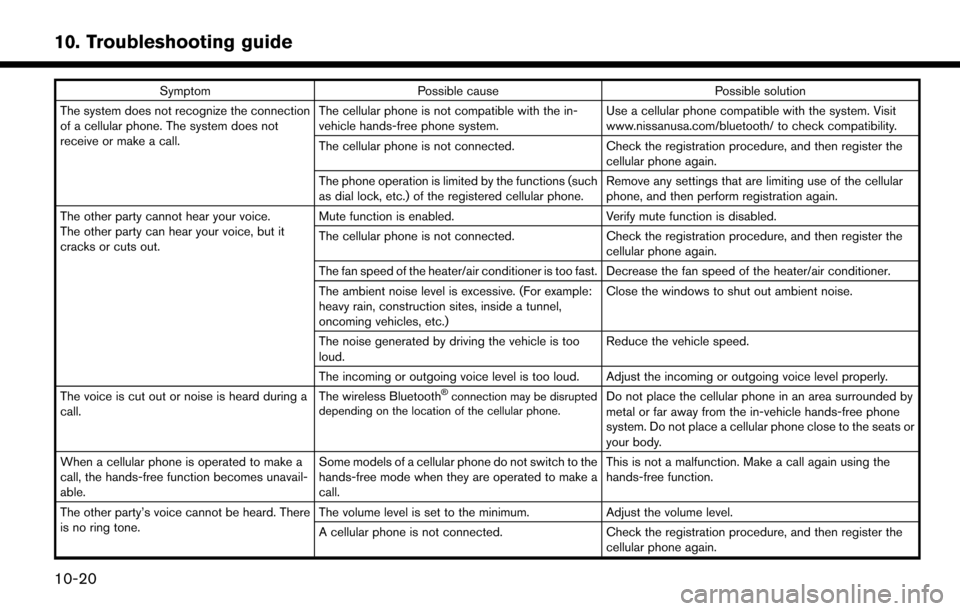
SymptomPossible cause Possible solution
The system does not recognize the connection
of a cellular phone. The system does not
receive or make a call. The cellular phone is not compatible with the in-
vehicle hands-free phone system.
Use a cellular phone compatible with the system. Visit
www.nissanusa.com/bluetooth/ to check compatibility.
The cellular phone is not connected. Check the registration procedure, and then register the
cellular phone again.
The phone operation is limited by the functions (such
as dial lock, etc.) of the registered cellular phone. Remove any settings that are limiting use of the cellular
phone, and then perform registration again.
The other party cannot hear your voice.
The other party can hear your voice, but it
cracks or cuts out. Mute function is enabled.
Verify mute function is disabled.
The cellular phone is not connected. Check the registration procedure, and then register the
cellular phone again.
The fan speed of the heater/air conditioner is too fast. Decrease the fan speed of the heater/air conditioner.
The ambient noise level is excessive. (For example:
heavy rain, construction sites, inside a tunnel,
oncoming vehicles, etc.) Close the windows to shut out ambient noise.
The noise generated by driving the vehicle is too
loud. Reduce the vehicle speed.
The incoming or outgoing voice level is too loud. Adjust the incoming or outgoing voice level properly.
The voice is cut out or noise is heard during a
call. The wireless Bluetooth
Šconnection may be disrupted
depending on the location of the cellular phone.Do not place the cellular phone in an area surrounded by
metal or far away from the in-vehicle hands-free phone
system. Do not place a cellular phone close to the seats or
your body.
When a cellular phone is operated to make a
call, the hands-free function becomes unavail-
able. Some models of a cellular phone do not switch to the
hands-free mode when they are operated to make a
call. This is not a malfunction. Make a call again using the
hands-free function.
The other party’s voice cannot be heard. There
is no ring tone. The volume level is set to the minimum.
Adjust the volume level.
A cellular phone is not connected. Check the registration procedure, and then register the
cellular phone again.
10-20
10. Troubleshooting guide