radio NISSAN LEAF 2017 1.G Navigation Manual
[x] Cancel search | Manufacturer: NISSAN, Model Year: 2017, Model line: LEAF, Model: NISSAN LEAF 2017 1.GPages: 268, PDF Size: 1.41 MB
Page 161 of 268
facturer. The radio waves from the
TCU antenna may adversely affect the
operation of the pacemaker while
using the NissanConnect
SMEV.
. Radio waves could adversely affect
electric medical equipment. Those
who use a pacemaker should contact
the electric medical equipment man-
ufacturer regarding the possible in-
fluences before use.
. FCC ID:
25915 4NP0A (QY8200): WY2QY8200
25915 4NP5A (QY8250): WY2QY8250
The antenna(s) used for this transmitter must
not be co-located or operating in conjunction
with any other antenna or transmitter.
. IC ID:
25915 4NP3A (QY8201): 419E-QY8201
25915 4NP7A (QY8251): 419E-QY8251
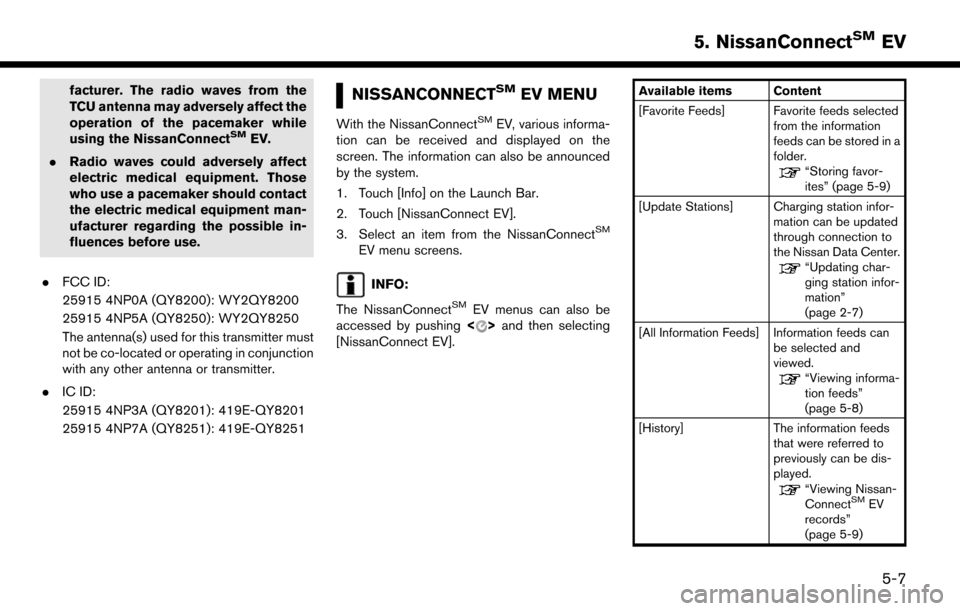
NISSANCONNECTSMEV MENU
With the NissanConnectSMEV, various informa-
tion can be received and displayed on the
screen. The information can also be announced
by the system.
1. Touch [Info] on the Launch Bar.
2. Touch [NissanConnect EV].
3. Select an item from the NissanConnect
SM
EV menu screens.
INFO:
The NissanConnect
SMEV menus can also be
accessed by pushing <>and then selecting
[NissanConnect EV].
Available items Content
[Favorite Feeds] Favorite feeds selected from the information
feeds can be stored in a
folder.
“Storing favor-
ites” (page 5-9)
[Update Stations] Charging station infor- mation can be updated
through connection to
the Nissan Data Center.
“Updating char-
ging station infor-
mation”
(page 2-7)
[All Information Feeds] Information feeds can be selected and
viewed.
“Viewing informa-
tion feeds”
(page 5-8)
[History] The information feeds that were referred to
previously can be dis-
played.
“Viewing Nissan-
ConnectSMEV
records”
(page 5-9)
5-7
5. NissanConnectSMEV
Page 178 of 268

For Canadian customers:
www.Nissan.ca/NissanConnect (English)
www.Nissan.ca/NissanConnect/fr (French)SiriusXM TRAVEL LINK
SiriusXM Travel Link information is a subscription
service offered by SiriusXM Satellite Radio. It is
necessary to subscribe to use the SiriusXM
Travel Link information.
This service provides real-time information re-
garding current weather, fuel prices, sports
scores, stock tickers and movie times where
available. The SiriusXM Travel Link is broadcast
to the vehicle by SiriusXM Satellite Radio.
The service enables you to view the following
information on the navigation system:
*Current information around the destination
*Detailed information and forecasts of an area of
interest
*Countrywide and local maps with the current
weather, temperature, warnings and road condi-
tion information
*List of warning/watches events detected
around the current location
*Pop-up messages on the navigation screen with
voice announcements when warnings and
watches are detected around the current loca-
tion
SXM service menus can be accessed from the
information screen.
“Information menu” (page 6-2)
WARNING
SiriusXM Travel Link information is not a
substitute for attentive driving. Weather
conditions change constantly and emer-
gency situations can arise without warn-
ing. Relying only on SiriusXM Travel Link
information could result in serious per-
sonal injury.
VIEWING SiriusXM TRAVEL LINK
SiriusXM Satellite Radio and SiriusXM Travel
Link subscriptions are sold separately or as a
package, and are continuous until you call
SiriusXM to cancel. See SiriusXM Customer
Agreement for complete terms at www.siriusxm.
com (for U.S.) or www.siriusxm.ca (for Canada) .
SiriusXM Travel Link is available in select
markets.
For more information, refer to the SiriusXM
website or call Listener Care.SiriusXM website:
For U.S.
www.siriusxm.com/travellink
For Canada
6-8
6. Viewing information
Page 179 of 268

www.siriusxm.ca/siriusxm-traffic-services/
siriusxm-travel-link (English)
www.siriusxm.ca/fr/services-siriusxm-
traffic/siriusxm-travel-link (French)
Listener Care:
For U.S.
1-877-447-0011
For Canada
1-877-438-9677
INFO:
. If a contract is not completed for the
SiriusXM Travel Link information service, a
message appears and it will not be possible
to check the information on the traffic
information system.
Example
.The weather information is available only for
areas that provide weather information to SiriusXM Travel Link.
. Not all vehicles or devices are capable of
receiving all services offered by SiriusXM.
Data displays and individual product avail-
ability vary by vehicle hardware. Current
information and features may not be available
in all locations, or on all receivers. SiriusXM is
not responsible for any errors or inaccuracies
in the data services or their use in the vehicle.
Notes on SiriusXM Traffic information
.The SiriusXM Traffic information service is
not provided for some cities. In addition, the
cities for which the traffic information service
is provided may be changed.
. In some cases, infrastructure problems may
prevent the complete display of the traffic
information. This is not a malfunction.
. Due to infrastructure problems, or due to the
time when the traffic information service
broadcast is received, the displayed informa-
tion may differ from the actual traffic condi-
tions.
. Depending on the traffic information, a
detour route may be slower than the original
route. .
SiriusXM Satellite Radio and SiriusXM Traffic
subscriptions are sold separately or as a
package, and are continuous until you call
SiriusXM to cancel. See SiriusXM Customer
Agreement for complete terms at the Sir-
iusXM website.
SiriusXM website:
For U.S.
www. siriusxm.com
For Canada
www.siriusxm.ca (English)
www.siriusxm.ca/fr (French)
SiriusXM Traffic is available in select mar-
kets. For more information, refer to the
SiriusXM website or call Listener Care.
SiriusXM website:
For U.S.
www.siriusxm.com/traffic
For Canada
www.siriusxm.ca/siriusxm-traffic-services/
siriusxm-travel-link (English)
www.siriusxm.ca/fr/services-siriusxm-
traffic/siriusxm-travel-link (French)
Listener Care:
For U.S.
6-9
6. Viewing information
Page 180 of 268
1-877-447-0011
For Canada
1-877-438-9677
. SiriusXM Traffic is available in over 130
metropolitan markets. For the most current
list of markets covered, please refer to the
SiriusXM website or call Listener Care.
SiriusXM website:
For U.S.
www.siriusxm.com/siriusxmtraffic
For Canada
www.siriusxm.ca/siriusxm-traffic-services/
siriusxm-traffic (English)
www.siriusxm.ca/fr/services-siriusxm-
traffic/siriusxm-traffic (French)
Listener Care:
For U.S.
1-877-447-0011
For Canada
1-877-438-9677
. Due to road maintenance, infrastructure
problems (e.g. malfunction of road sensors,
outage of central computer of infrastructure)
or natural disasters, there are times when
some or all traffic information may not be available.
. Incident information is based on human
collection. Not all incidents that have hap-
pened are collected and provided.
. Due to infrastructure problems, or transmis-
sion delay, there are times when the informa-
tion may differ from the actual condition.
Always observe safe driving practices and
follow all traffic regulations.
. Due to the coverage and quality of traffic
information and road conditions, it is not
always possible for the system to provide the
shortest time route even when traffic in-
formation is considered.
. Traffic information that is displayed may differ
from information from other media (e.g.,
radio) , as other media may use different
information sources.
6-10
6. Viewing information
Page 182 of 268
BLUETOOTHŠHANDS-FREE
PHONE SYSTEM
WARNING
. Use a phone after stopping your
vehicle in a safe location. If you have
to use a phone while driving, exercise
extreme caution at all times so full
attention may be given to vehicle
operation.
. If you find yourself unable to devote
full attention to vehicle operation
while talking on the phone, pull off
the road to a safe location and stop
your vehicle before doing so.
CAUTION
To avoid draining the vehicle battery, use
a phone after the READY to drive in-
dicator light is ON.
Your vehicle is equipped with Bluetooth
ŠHands-
Free Phone System. If you are an owner of a
compatible Bluetooth
Šenabled cellular phone,
you can set up the wireless connection between
your cellular phone and the in-vehicle phone module. With Bluetooth
Šwireless technology,
you can make or receive a telephone call with
your cellular phone in your pocket.
Once a cellular phone is connected to the in-
vehicle phone module, the procedure for con-
necting the phone does not need to be
performed again. Your phone is automatically
selected with the in-vehicle phone module when
the power switch is pushed to the ON position
with the selected cellular phone turned on and
carried in the vehicle.
You can register up to 5 different Bluetooth
Š
devices in the in-vehicle phone module. How-
ever, you can talk on only one cellular phone at a
time.
The Voice Recognition system supports phone
commands, so dialing a phone number using
your voice is possible.
“8. Voice recognition”
Before using the BluetoothŠHands-Free Phone
System, refer to the following notes.
. Wireless LAN (Wi-Fi) and the Bluetooth
Š
functions share the same frequency band
(2.4 GHz) . Using the BluetoothŠand the
wireless LAN functions at the same time may
slow down or disconnect the communication
and cause undesired noise. It is recom-
mended that you turn off the wireless LAN (Wi-Fi) when using the Bluetooth
Šfunctions.
. Set up the wireless connection between a
compatible cellular phone and the in-vehicle
phone module before using the Bluetooth
Š
Hands-Free Phone System.
. Some Bluetooth
Šenabled cellular phones
may not be recognized by the in-vehicle
phone module. Visit the website below for a
recommended phone list.
www.nissanusa.com/bluetooth/
. You will not be able to use a hands-free
phone under the following conditions:
— Your vehicle is outside of the telephone service area.
— Your vehicle is in an area where it is difficult to receive radio waves; such as in
a tunnel, in an underground parking
garage, behind a tall building or in a
mountainous area.
— Your cellular phone is locked in order to prevent dialing.
. When the radio wave condition is not ideal or
ambient sound is too loud, it may be difficult
to hear the other person’s voice during a call.
. Immediately after the power switch is pushed
to the ON position, it may be impossible to
7-2
7. Hands-Free Phone
Page 205 of 268

Audio Command
1st Command 2nd Command 3rd Command Action
AudioPlay
AM Turns to the AM band, selecting the last played station.
FM Turns to the FM band, selecting the last played station.
SXM Turns to the SiriusXM Satellite Radio band, selecting the channel last played.
CD Turns on the CD, selecting the last played mode.
USB Turns on the USB, selecting the last played mode.
iPod Turns on the iPod
Š, selecting the last played mode.
Bluetooth Audio Turns on the BluetoothŠAudio, selecting the last played mode.
AUXTurns on the AUX audio, selecting the last played mode.
Play AM Turns to the AM band, selecting the last played station.
Play FM Turns to the FM band, selecting the last played station.
Play SXM Turns to the SiriusXM Satellite Radio band, selecting the channel last played.
Play CD Turns on the CD, selecting the last played mode.
Play USB Turns on the USB, selecting the last played mode.
Play iPod Turns on the iPod
Š, selecting the last played mode.
Play Bluetooth Audio
Turns on the BluetoothŠAudio, selecting the last played mode.
Play AUXTurns on the AUX audio, selecting the last played mode.
AM Turns to the AM band, selecting the last played station.
FM Turns to the FM band, selecting the last played station.
SXM Turns to the SiriusXM Satellite Radio band, selecting the channel last played.
8-13
8. Voice recognition
Page 206 of 268

1st Command 2nd Command 3rd Command ActionCD Turns on the CD, selecting the last played mode.
USB Turns on the USB, selecting the last played mode.
iPod Turns on the iPod
Š, selecting the last played mode.
Bluetooth AudioTurns on the BluetoothŠAudio, selecting the last played mode.
AUX
Turns on the AUX audio, selecting the last played mode.
AM
AM Preset <1-6> Plays the spoken AM preset station.
FM
FM Preset <1-12> Plays the spoken FM preset station.
SXM
SXM
SXM Preset <1-18> Plays the spoken SXM preset channel.
USB Show Folders Displays folders in the USB memory device.
USB Play Folder
USB Play File
iPod Play Artist
Š, selecting the artist.
iPod Play Album
iPod Play Song
iPod Play Playlist
iPod Show ArtistsDisplays a list of Artist names stored in the iPodŠ.
8-14
8. Voice recognition
Page 208 of 268
.When selecting “Yes” in the pop-up screen that displays after a new USB audio device is connected, the USB audio device is registered in the voice
recognition system and is selected automatically. One iPodŠand one USB device can be registered in the system. If a USB audio device is newly
registered, old data is overwritten. It may take a few moments to register an audio device. If you want to enable voice operation for music stored in a
previously registered audio device, select the device you want to use in advance. Even when a device has been previously registered, simply connecting
the device will not result in it being selected automatically.
“Voice recognition settings” (page 8-18)
. The Voice Recognition system may not function when the song information is too long (artist names, album titles, song titles and play lists, etc.) .
. The SiriusXM function will not operate without a subscription to SiriusXM Satellite Radio.
. When playing USB files with the voice recognition system, do not pronounce the extension attached to the file name (such as “.mp3”) .
. Song titles registered in ID3 tags cannot be pronounced for voice recognition operation.
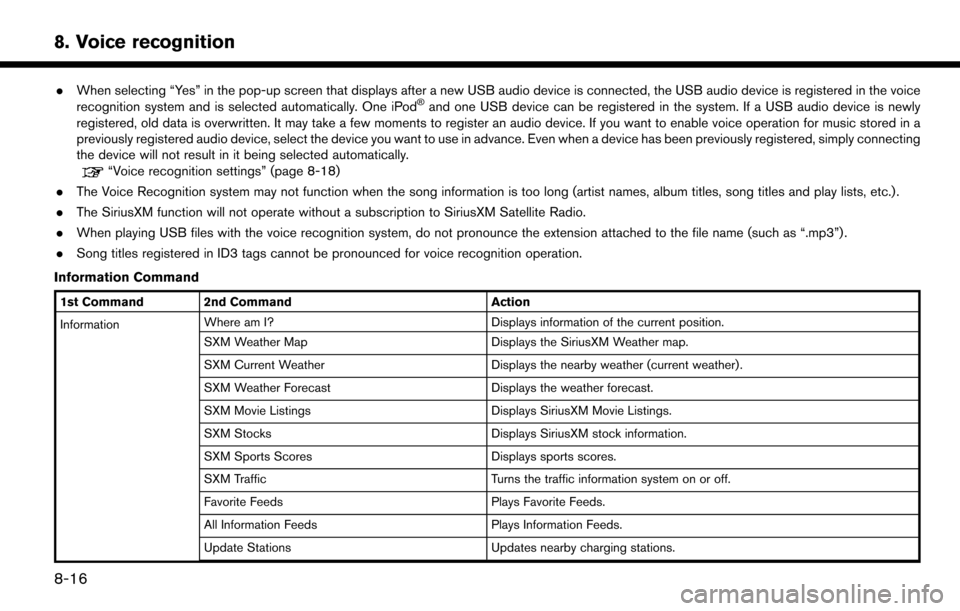
Information Command
1st Command 2nd Command Action
Information Where am I?
Displays information of the current position.
SXM Weather Map Displays the SiriusXM Weather map.
SXM Current Weather Displays the nearby weather (current weather).
SXM Weather Forecast Displays the weather forecast.
SXM Movie Listings Displays SiriusXM Movie Listings.
SXM Stocks Displays SiriusXM stock information.
SXM Sports Scores Displays sports scores.
SXM Traffic Turns the traffic information system on or off.
Favorite Feeds Plays Favorite Feeds.
All Information Feeds Plays Information Feeds.
Update Stations Updates nearby charging stations.
8-16
8. Voice recognition
Page 212 of 268
CURRENT VEHICLE LOCATION
DISPLAY OF CURRENT VEHICLE
LOCATION
This navigation system combines the data
obtained from the vehicle (by gyro sensor) and
from GPS (Global Positioning System) satellites
to calculate the current location of the vehicle.
This position is then displayed throughout route
guidance to a destination.
WHAT IS GPS (Global Positioning
System)?
GPS is a position detecting system that uses
satellites deployed by the U.S. government. This
navigation system receives radio signals from
three or more different satellites that orbit
13,049 miles (21,000 km) above the earth in
space, and detect the position of the vehicle by
utilizing the principle of triangulation.
Positioning adjustment
When the system judges that the vehicle position
is not accurate based on vehicle speed and gyro
sensor data calculations, the system will auto-
matically adjust the position of the vehicle icon
using GPS signals.
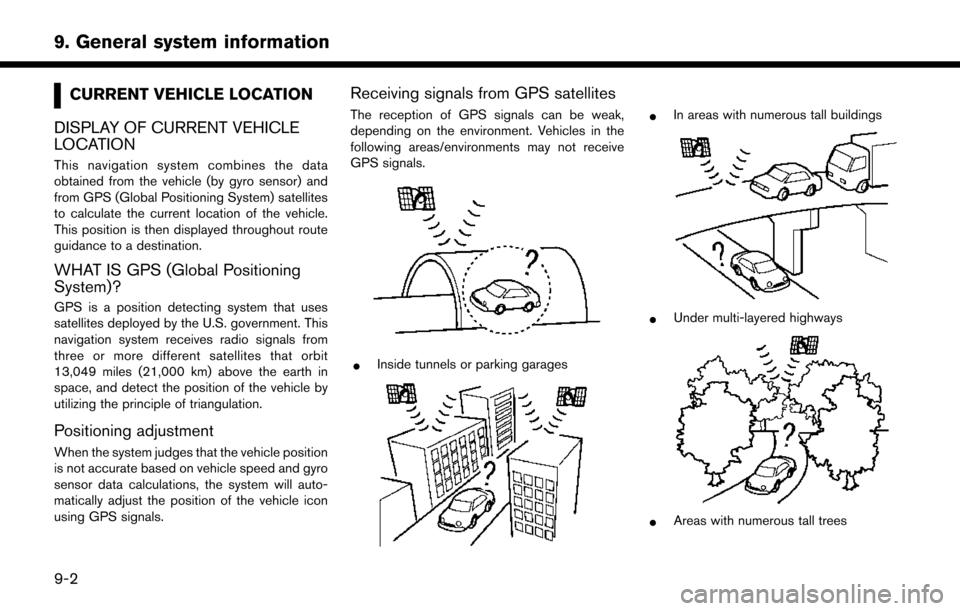
Receiving signals from GPS satellites
The reception of GPS signals can be weak,
depending on the environment. Vehicles in the
following areas/environments may not receive
GPS signals.
*Inside tunnels or parking garages
*In areas with numerous tall buildings
*Under multi-layered highways
*Areas with numerous tall trees
9-2
9. General system information
Page 227 of 268

10 Troubleshooting guide
Customer assistance ............................................................. 10-2
System unit ........................................................................\
...... 10-3Liquid crystal display ....................................................... 10-3
Unique EV functions .............................................................. 10-5 Driving range ..................................................................... 10-5
Charging stations ............................................................. 10-6
Energy information display ............................................. 10-7
Timer function .................................................................... 10-8
Audio system ........................................................................\
10-10 HD Radio technology (for U.S.) ................................. 10-10
Compact Disc (CD) player ......................................... 10-12
iPod
Šplayer .................................................................... 10-14 USB memory device ................................................... 10-16
Bluetooth
Šstreaming audio ..................................... 10-17
BluetoothŠHands-Free Phone System ........................ 10-19
NissanConnectSMEV ........................................................ 10-22
Navigation ........................................................................\
..... 10-23 Basic operations .......................................................... 10-23
Vehicle icon .................................................................. 10-24
Route calculation and visual guidance .................. 10-26
Voice guidance ............................................................ 10-28
Traffic information ........................................................ 10-29
Voice recognition ................................................................ 10-30