turn signal NISSAN LEAF 2018 Owner´s Manual
[x] Cancel search | Manufacturer: NISSAN, Model Year: 2018, Model line: LEAF, Model: NISSAN LEAF 2018Pages: 435, PDF Size: 5.48 MB
Page 292 of 435
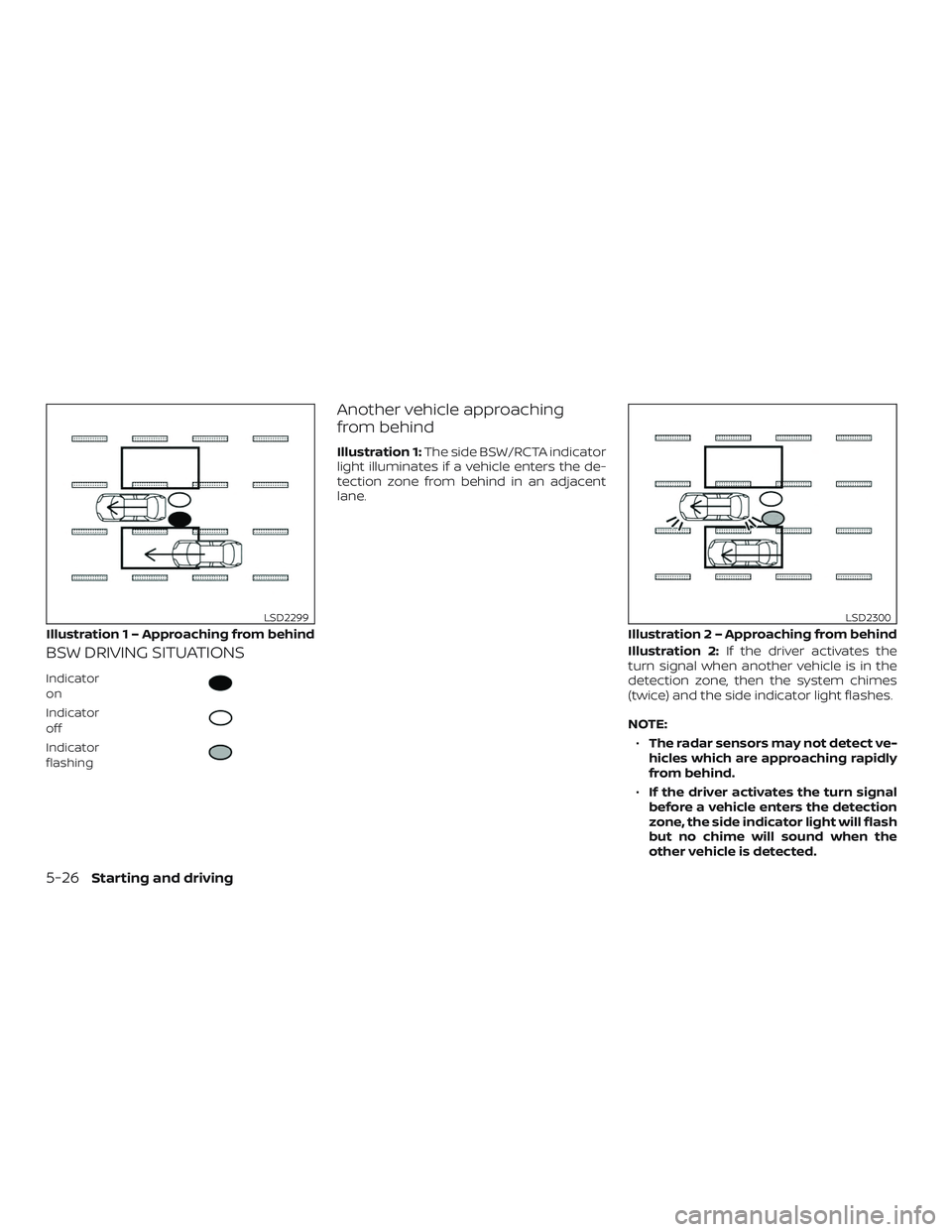
BSW DRIVING SITUATIONS
Indicator
on
Indicator
off
Indicator
flashing
Another vehicle approaching
from behind
Illustration 1:The side BSW/RCTA indicator
light illuminates if a vehicle enters the de-
tection zone from behind in an adjacent
lane.
Illustration 2:If the driver activates the
turn signal when another vehicle is in the
detection zone, then the system chimes
(twice) and the side indicator light flashes.
NOTE:
∙ The radar sensors may not detect ve-
hicles which are approaching rapidly
from behind.
∙ If the driver activates the turn signal
before a vehicle enters the detection
zone, the side indicator light will flash
but no chime will sound when the
other vehicle is detected.
Illustratio n 1 – Approaching from behind
LSD2299
Illustration 2 – Approaching from behind
LSD2300
5-26Starting and driving
Page 293 of 435
Overtaking another vehicle
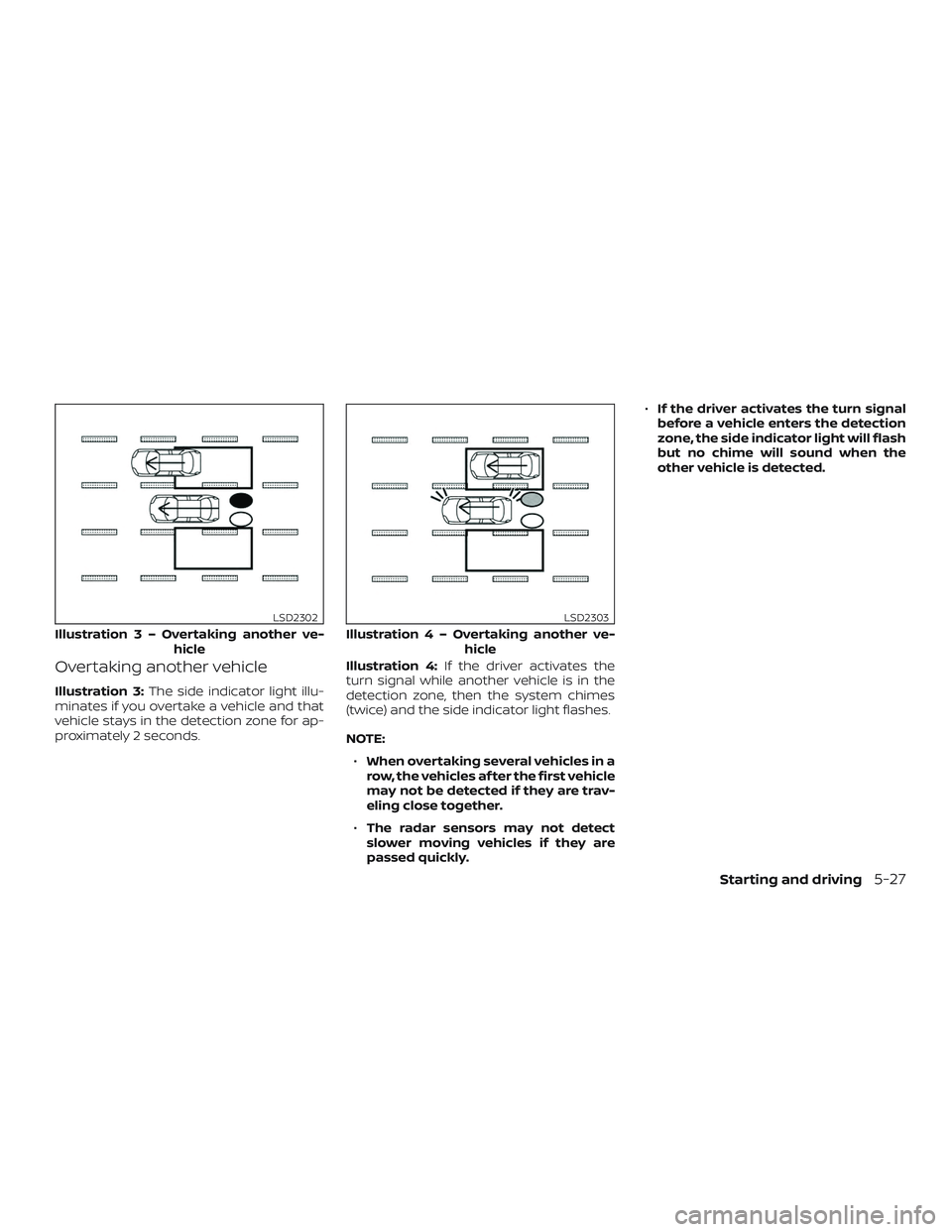
Illustration 3:The side indicator light illu-
minates if you overtake a vehicle and that
vehicle stays in the detection zone for ap-
proximately 2 seconds. Illustration 4:
If the driver activates the
turn signal while another vehicle is in the
detection zone, then the system chimes
(twice) and the side indicator light flashes.
NOTE:
∙ When overtaking several vehicles in a
row, the vehicles af ter the first vehicle
may not be detected if they are trav-
eling close together.
∙ The radar sensors may not detect
slower moving vehicles if they are
passed quickly. ∙
If the driver activates the turn signal
before a vehicle enters the detection
zone, the side indicator light will flash
but no chime will sound when the
other vehicle is detected.
Illustratio n3–Over taking another ve-
hicle
LSD2302
Illustratio n4–Over taking another ve-
hicle
LSD2303
Starting and driving5-27
Page 294 of 435
Entering from the side
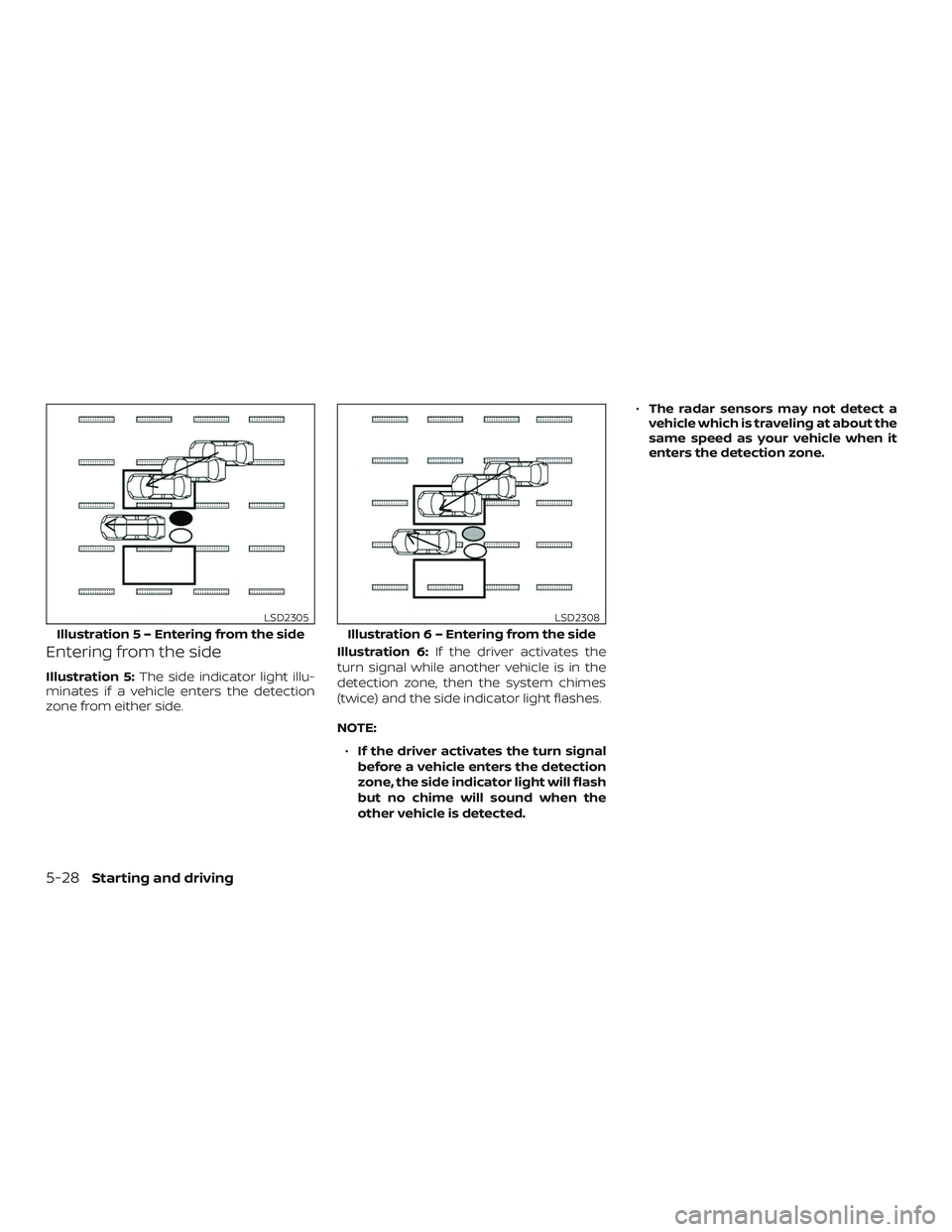
Illustration 5:The side indicator light illu-
minates if a vehicle enters the detection
zone from either side. Illustration 6:
If the driver activates the
turn signal while another vehicle is in the
detection zone, then the system chimes
(twice) and the side indicator light flashes.
NOTE:
∙ If the driver activates the turn signal
before a vehicle enters the detection
zone, the side indicator light will flash
but no chime will sound when the
other vehicle is detected. ∙
The radar sensors may not detect a
vehicle which is traveling at about the
same speed as your vehicle when it
enters the detection zone.
Illustratio n 5 – Entering from the side
LSD2305
Illustration 6 – Entering from the side
LSD2308
5-28Starting and driving
Page 330 of 435
Push the switch on to warn other drivers
when you must stop or park under emer-
gency conditions. All turn signal lights flash.
WARNING
∙ If stopping for an emergency, be sureto move the vehicle well off the road.
∙ Do not use the hazard warning flash- ers while moving on the highway un-
less unusual circumstances force you
to drive so slowly that your vehicle
might become a hazard to other
traffic.
∙ Turn signals do not work when the hazard warning flasher lights are on.
The flashers will operate with the ignition
switch placed in any position.
Some jurisdictions may prohibit the use
of the hazard warning flasher switch
while driving. To shut off the engine in an emergency
situation while driving, perform the follow-
ing procedure:
∙ Rapidly push the push-button ignition switch three consecutive times in less
than 1.5 seconds, or
∙ Push and hold the push-button ignition switch for more than 2 seconds.
LIC0394
HAZARD WARNING FLASHER SWITCH EMERGENCY ENGINE SHUT OFF
(push-button ignition models only)
6-2In case of emergency
Page 332 of 435
4. Turn off the engine.
5. Raise the hood to warn other trafficand to signal professional road assis-
tance personnel that you need assis-
tance.
6. Have all passengers get out of the ve- hicle and stand in a safe place, away
from traffic and clear of the vehicle.
WARNING
∙ Make sure the parking brake is se-curely applied and the Continuously
Variable Transmission (CVT) is shif ted
into P (Park).
∙ Never change tires when the vehicle is on a slope, ice or slippery areas. This is
hazardous.
∙ Never change tires if oncoming traffic is close to your vehicle. Wait for pro-
fessional road assistance.
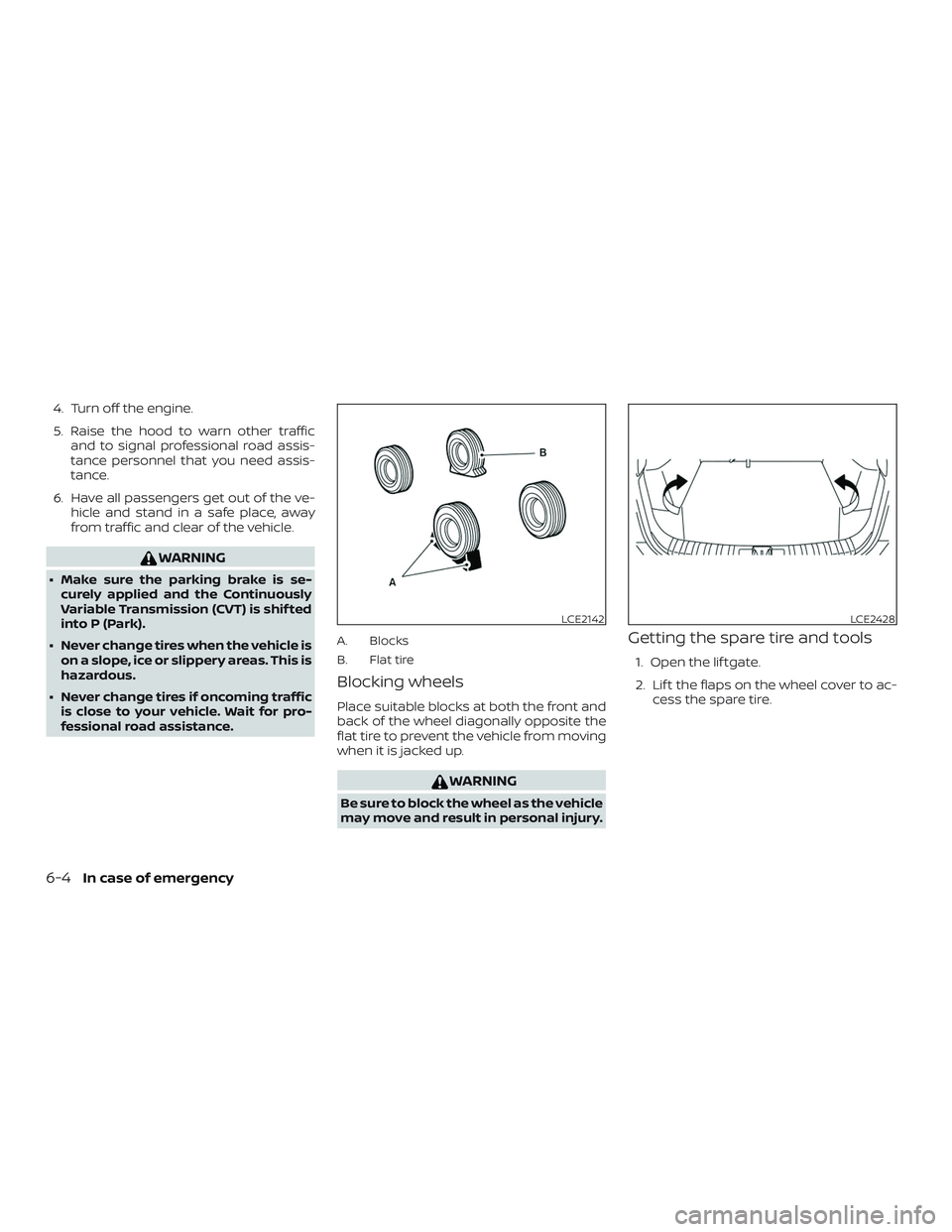
A. Blocks
B. Flat tire
Blocking wheels
Place suitable blocks at both the front and
back of the wheel diagonally opposite the
flat tire to prevent the vehicle from moving
when it is jacked up.
WARNING
Be sure to block the wheel as the vehicle
may move and result in personal injury.
Getting the spare tire and tools
1. Open the lif tgate.
2. Lif t the flaps on the wheel cover to ac- cess the spare tire.
LCE2142LCE2428
6-4In case of emergency
Page 375 of 435
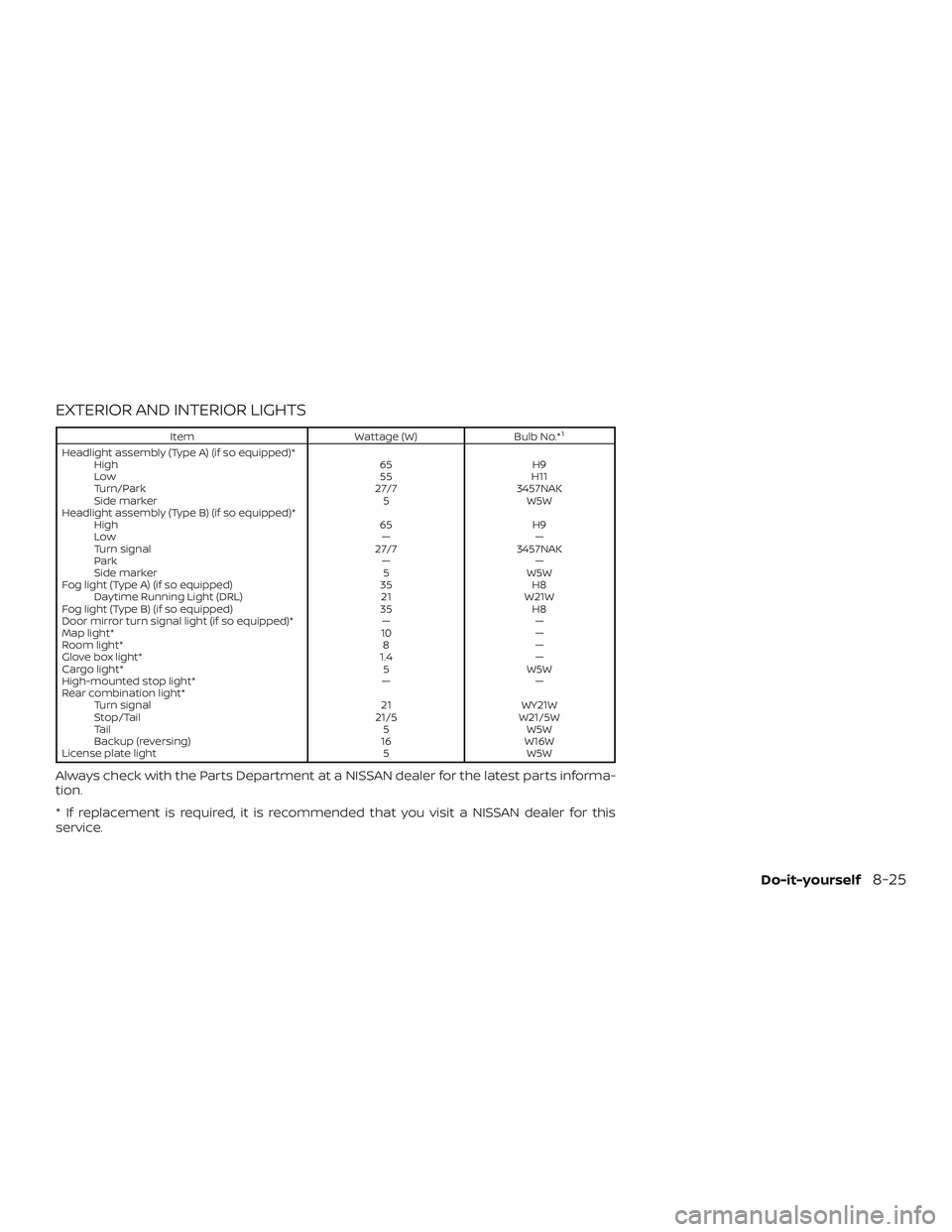
EXTERIOR AND INTERIOR LIGHTS
ItemWattage (W)Bulb No.*1
Headlight assembly (Type A) (if so equipped)*
High 65 H9
Low 55 H11
Turn/Park 27/7 3457NAK
Side marker 5 W5W
Headlight assembly (Type B) (if so equipped)* High 65 H9
Low — —
Turn signal 27/7 3457NAK
Park — —
Side marker 5 W5W
Fog light (Type A) (if so equipped) 35 H8 Daytime Running Light (DRL) 21 W21W
Fog light (Type B) (if so equipped) 35 H8
Door mirror turn signal light (if so equipped)* — —
Map light* 10 —
Room light* 8 —
Glove box light* 1.4 —
Cargo light* 5 W5W
High-mounted stop light* — —
Rear combination light* Turn signal 21 WY21W
Stop/Tail 21/5 W21/5W
Tail 5 W5W
Backup (reversing) 16 W16W
License plate light 5 W5W
Always check with the Parts Department at a NISSAN dealer for the latest parts informa-
tion.
* If replacement is required, it is recommended that you visit a NISSAN dealer for this
service.
Do-it-yourself8-25
Page 376 of 435
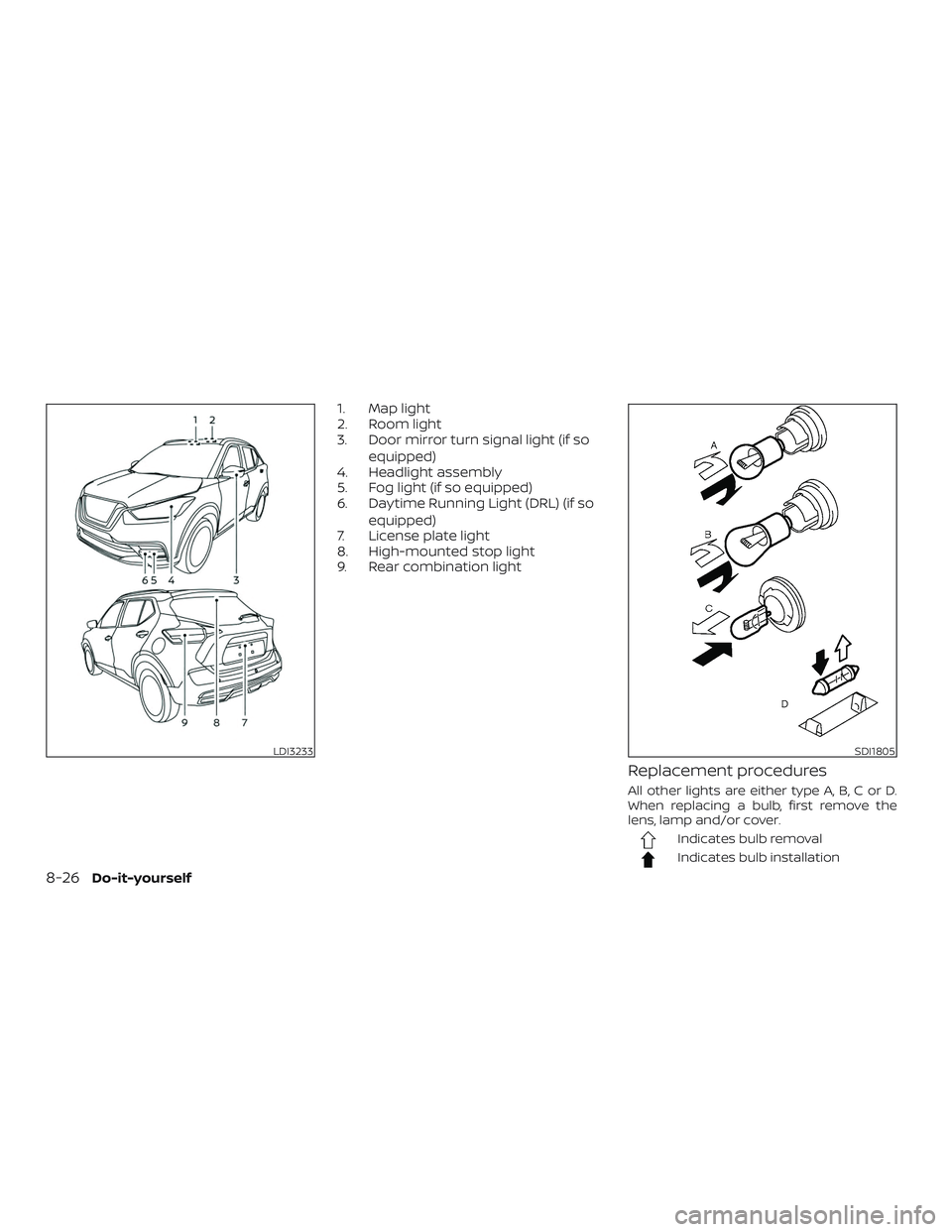
1. Map light
2. Room light
3. Door mirror turn signal light (if soequipped)
4. Headlight assembly
5. Fog light (if so equipped)
6. Daytime Running Light (DRL) (if so
equipped)
7. License plate light
8. High-mounted stop light
9. Rear combination light
Replacement procedures
All other lights are either type A, B, C or D.
When replacing a bulb, first remove the
lens, lamp and/or cover.
Indicates bulb removal
Indicates bulb installation
LDI3233SDI1805
8-26Do-it-yourself
Page 391 of 435
secondary latch keeps the hood from
opening when the primary latch is re-
leased.
When driving in areas using road salt or
other corrosive materials, check lubrica-
tion frequently.
Lights*:Clean the headlights on a regular
basis. Make sure that the headlights, stop
lights, tail lights, turn signal lights, and other
lights are all operating properly and in-
stalled securely. Also check headlight aim.
Road wheel nuts (lug nuts)*: When check-
ing the tires, make sure no wheel nuts are
missing, and check for any loose wheel
nuts. Tighten if necessary.
Tire rotation*: Tires should be rotated ev-
ery 5,000 miles (8,000 km).
Tires*: Check the pressure with a gauge
of ten and always prior to long distance
trips. If necessary, adjust the pressure in all
tires, including the spare, to the pressure
specified. Check carefully for damage, cuts
or excessive wear.
Tire Pressure Monitoring System (TPMS)
transmitter components: Replace the
TPMS transmitter grommet seal, valve core
and cap when the tires are replaced due to
wear or age. Wheel alignment and balance:
If the ve-
hicle should pull to either side while driving
on a straight and level road, or if you detect
uneven or abnormal tire wear, there may
be a need for wheel alignment. If the steer-
ing wheel or seat vibrates at normal high-
way speeds, wheel balancing may be
needed.
For additional information regarding tires,
refer to “Important Tire Safety Information”
(US) or “Tire Safety Information” (Canada) in
the Warranty Information Booklet.
Windshield: Clean the windshield on a
regular basis. Check the windshield at least
every six months for cracks or other dam-
age. Have a damaged windshield repaired
by a qualified repair facility.
Windshield wiper blades*: Check for
cracks or wear if they do not wipe properly.
Inside the vehicle
The maintenance items listed here should
be checked on a regular basis, such as
when performing scheduled maintenance,
cleaning the vehicle, etc. Accelerator pedal:
Check the pedal for
smooth operation and make sure the
pedal does not catch or require uneven
effort. Keep the floor mat away from the
pedal.
Brake pedal: Check the pedal for smooth
operation. If the brake pedal suddenly goes
down further than normal, the pedal feels
spongy or the vehicle seems to take longer
to stop, have your vehicle checked imme-
diately. It is recommended that you visit a
NISSAN dealer for this service. Keep the
floor mat away from the pedal.
Brakes: Check that the brakes do not pull
the vehicle to one side when applied.
Continuously Variable Transmission
(CVT) P (Park) position mechanism: On a
fairly steep hill check that the vehicle is held
securely with the shif t lever in the P (Park)
position without applying any brakes.
Parking brake: Check the parking brake
operation regularly. The vehicle should be
securely held on a fairly steep hill with only
the parking brake applied. If the parking
brake needs adjustment, it is recom-
mended that you visit a NISSAN dealer for
this service.
Maintenance and schedules9-3
Page 429 of 435
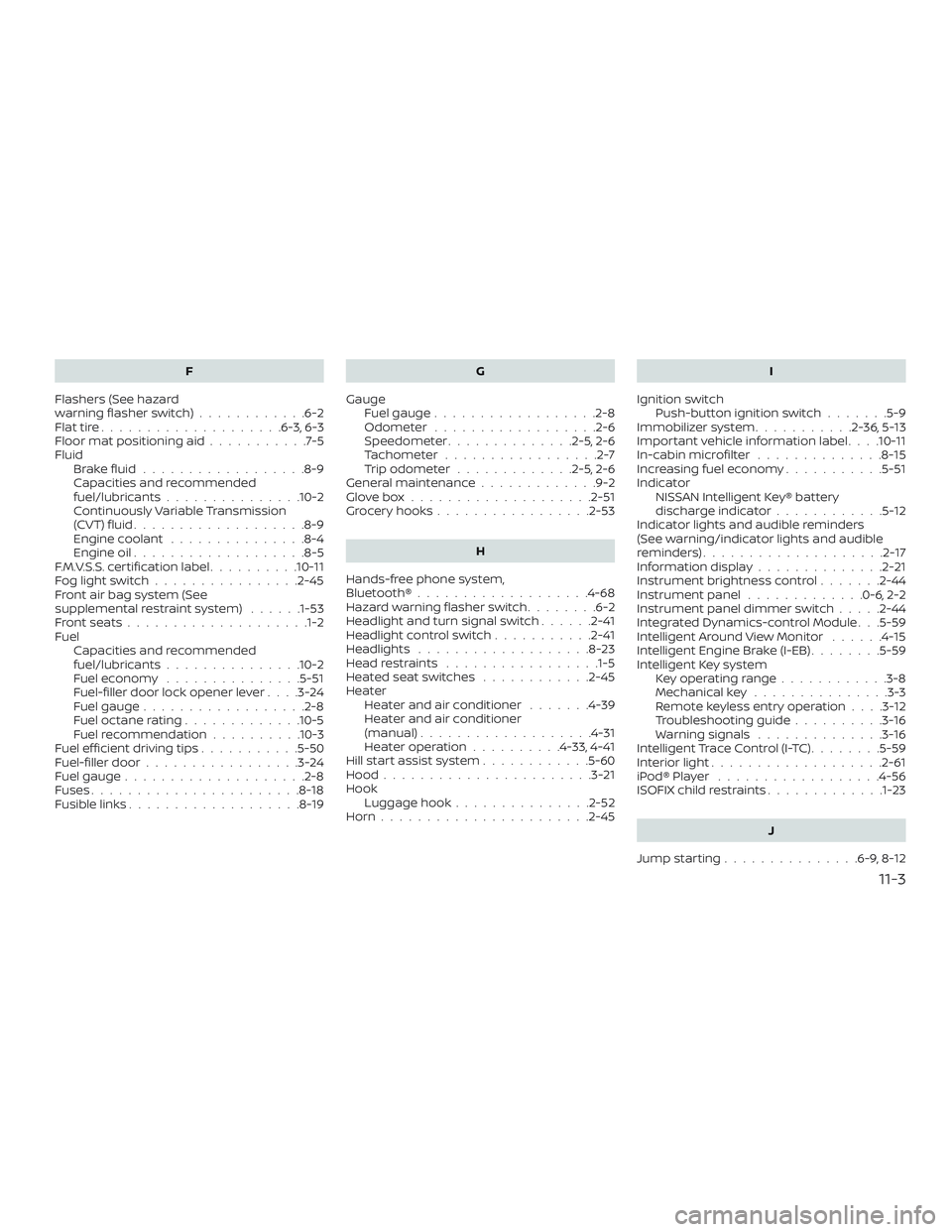
F
Flashers (See hazard
warning flasher switch) ............6-2
Flattire....................6-3,6-3
Floormatpositioningaid...........7-5
Fluid Brakefluid..................8-9
Capacities and recommended
fuel/lubricants...............10-2
Continuously Variable Transmission
(CVT) fluid ...................8-9
Engine coolant ...............8-4
Engine oil ...................8-5
F.M.V.S.S. certification label ..........10-11
Foglightswitch................2-45
Front air bag system (See
supplemental restraint system) ......1-53
Frontseats................... .1-2
Fuel Capacities and recommended
fuel/lubricants...............10-2
Fuel economy ...............5-51
Fuel-filler door lock opener lever ....3-24
Fuel gauge ..................2-8
Fueloctanerating.............10-5
Fuel recommendation ..........10-3
Fuelefficientdrivingtips...........5-50
Fuel-filler door .................3-24
Fuel gauge ....................2-8
Fuses .......................8-18
Fusiblelinks...................8-19 G
Gauge Fuel gauge ..................2-8
Odometer ..................2-6
Speedometer ..............2-5,2-6
Tachometer .................2-7
Trip odometer .............2-5,2-6
General maintenance .............9-2
Glovebox....................2-51
Grocery hooks .................2-53
H
Hands-free phone system,
Bluetooth®...................4-68
Hazard warning flasher switch ........6-2
Headlight and turn signal switch ......2-41
Headlightcontrolswitch...........2-41
Headlights ...................8-23
Headrestraints ................ .1-5
Heated seat switches ............2-45
Heater Heater and air conditioner .......4-39
Heater and air conditioner
(manual) ...................4-31
Heater operation ..........4-33,4-41
Hill start assist system ............5-60
Hood ...................... .3-21
Hook Luggage hook ...............2-52
Horn.......................2-45 I
Ignition switch Push-button ignition switch .......5-9
Immobilizer system ...........2-36,5-13
Important vehicle information label . . . .10-11
In-cabinmicrofilter ..............8-15
Increasing fuel economy ...........5-51
Indicator NISSAN Intelligent Key® battery
discharge indicator ............5-12
Indicator lights and audible reminders
(See warning/indicator lights and audible
reminders) ....................2-17
Informationdisplay............. .2-21
Instrument brightness control .......2-44
Instrument panel .............0-6,2-2
Instrument panel dimmer switch .....2-44
Integr
ated Dynamics-control Module . . .5-59
Intelligent Around View Monitor ......4-15
Intelligent Engine Brake (I-EB) ........5-59
Intelligent Key system Key operating range ............3-8
Mechanical key ...............3-3
Remote keyless entry operation ....3-12
Troubleshooting guide ..........3-16
Warning signals ..............3-16
Intelligent Trace Control (I-TC) ........5-59
Interiorlight...................2-61
iPod®Player ..................4-56
ISOFIX child restraints .............1-23
J
Jumpstarting...............6-9,8-12
11-3
Page 430 of 435
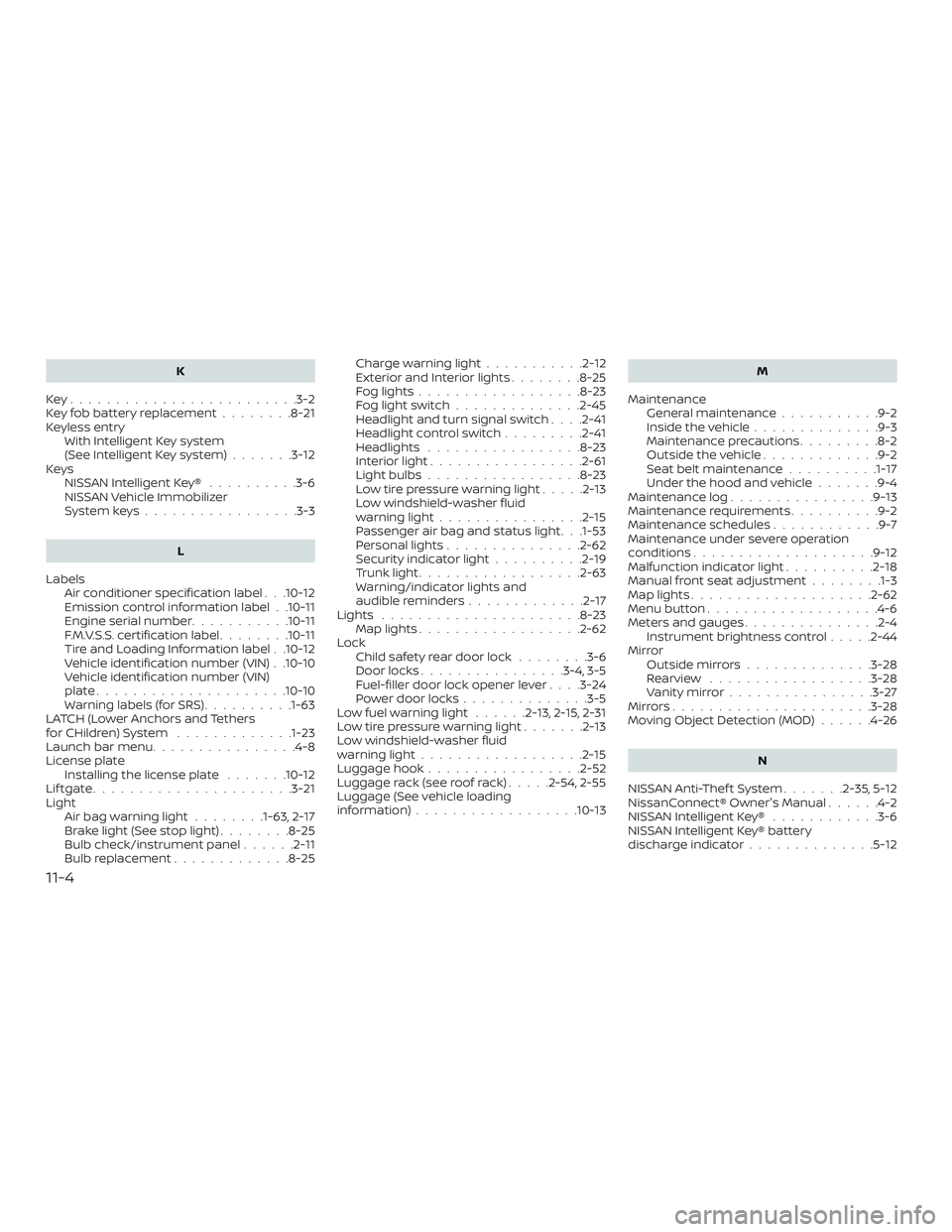
K
Key.........................3-2
Key fob battery replacement ........8-21
Keyless entry With Intelligent Key system
(See Intelligent Key system) .......3-12
Keys NISSAN Intelligent Key® ..........3-6
NISSAN Vehicle Immobilizer
Systemkeys.................3-3
L
Labels Air conditioner specification label . . .10-12
Emission control information label . .10-11
Engine serial number ...........10-11
F.M.V.S.S. certification label ........10-11
Tire and Loading Information label . .10-12
Vehicle identification number (VIN) . .10-10
Vehicle identification number (VIN)
plate.....................10-10
Warning labels (for SRS) ..........1-63
LATCH (Lower Anchors and Tethers
forCHildren)System .............1-23
Launch bar menu ................4-8
License plate Installing the license plate .......10-12
Liftgate......................3-21
Light Airbagwarninglight........1-63, 2-17
Brakelight(Seestoplight)........8-25
Bulb check/instrument panel ......2-11
Bulb replacement .............8-25 Charge warning light
...........2-12
ExteriorandInteriorlights........8-25
Foglights..................8-23
Foglightswitch..............2-45
Headlight and turn signal switch ....2-41
Headlightcontrolswitch.........2-41
Headlights .................8-23
Interiorlight.................2-61
Lightbulbs.................8-23
Low tire pressure warning light .....2-13
Low windshield-washer fluid
warninglight................2-15
Passenger air bag and status light . . .1-53
Personal lights ...............2-62
Security indicator light ..........2-19
Trunklight..................2-63
Warning/indicator lights and
audible reminders .............2-17
Lights ......................8-23 Maplights..................2-62
Lock Child safety rear door lock ........3-6
Door locks ................3-4,3-5
Fuel-filler door lock opener lever . . . .3-24
Power door locks ..............3-5
Lowfuelwarninglight ......2-13,2-15,2-31
Low tire pressure warning light .......2-13
Low windshield-washer fluid
warninglight..................2-15
Luggage hook .................2-52
Luggage rack (see roof rack) .....2-54,2-55
Luggage (See vehicle loading
information)..................10-13 M
Maintenance General maintenance ...........9-2
Insidethevehicle..............9-3
Maintenance precautions .........8-2
Outsidethevehicle.............9-2
Seat belt maintenance ..........1-17
Under the hood and vehicle .......9-4
Maintenance log ................9-13
Maintenance requirements ..........9-2
Maintenance schedules ............9-7
Maintenance under severe operation
conditions....................9-12
Malfunctionindicatorlight..........2-18
Manual front seat adjustment ........1-3
Maplights....................2-62
Menu button ...................4-6
Meters and gauges ...............2-4
Instrument brightness control .....2-44
Mirror Outsidemirrors..............3-28
Rearview ..................3-28
Vanitymirror................3-27
Mirrors......................3-28
Moving Object Detection (MOD) ......4-26
N
NISSAN Anti-Thef t System .......2-35,5-12
NissanConnect® Owner's Manual ......
4-2
NISSAN Intelligent Key® ............3-6
NISSAN Intelligent Key® battery
discharge indicator ..............5-12
11-4