warning lights NISSAN LEAF 2019 Owner´s Manual
[x] Cancel search | Manufacturer: NISSAN, Model Year: 2019, Model line: LEAF, Model: NISSAN LEAF 2019Pages: 610, PDF Size: 7.11 MB
Page 179 of 610
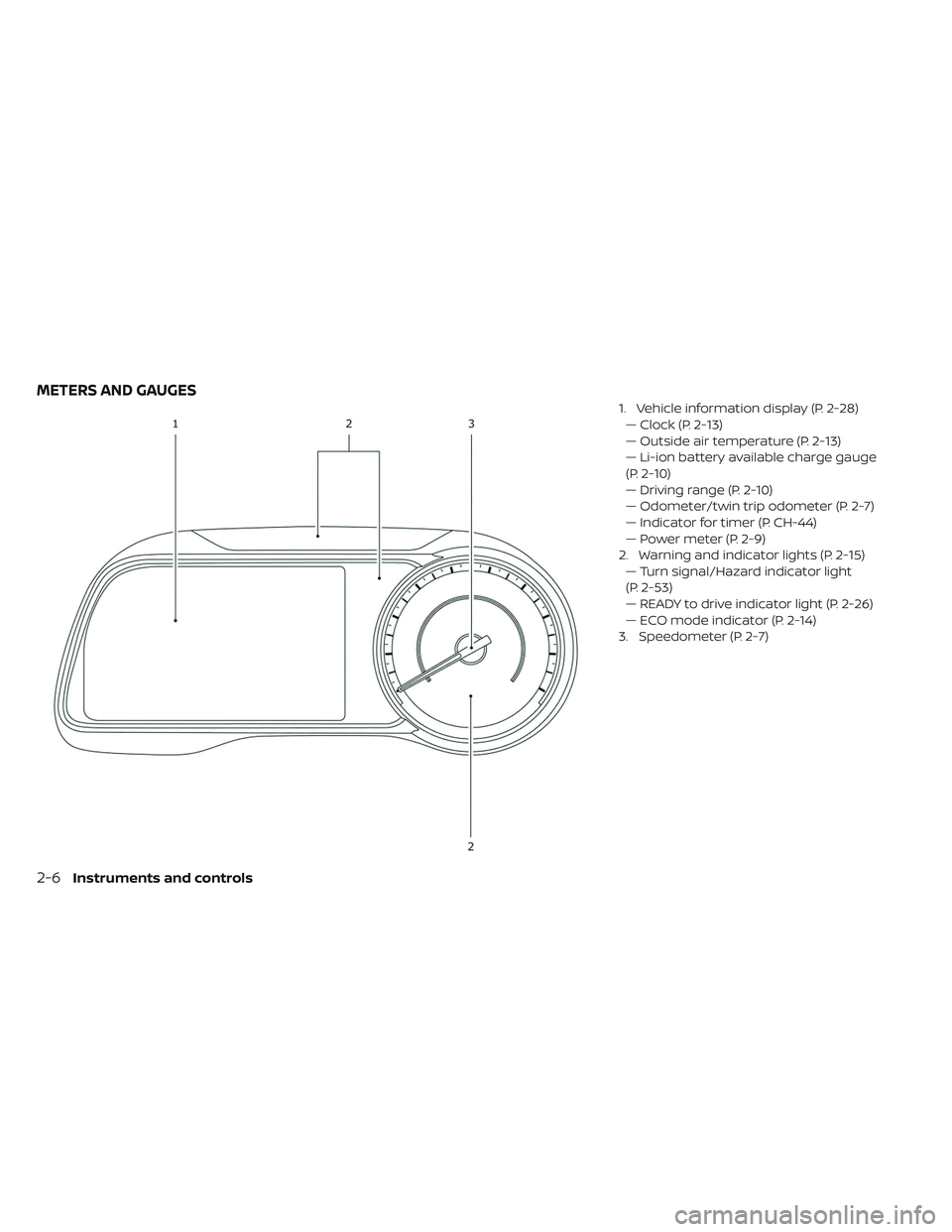
1. Vehicle information display (P. 2-28)— Clock (P. 2-13)
— Outside air temperature (P. 2-13)
— Li-ion battery available charge gauge
(P. 2-10)
— Driving range (P. 2-10)
— Odometer/twin trip odometer (P. 2-7)
— Indicator for timer (P. CH-44)
— Power meter (P. 2-9)
2. Warning and indicator lights (P. 2-15) — Turn signal/Hazard indicator light
(P. 2-53)
— READY to drive indicator light (P. 2-26)
— ECO mode indicator (P. 2-14)
3. Speedometer (P. 2-7)
METERS AND GAUGES
2-6Instruments and controls
Page 188 of 610
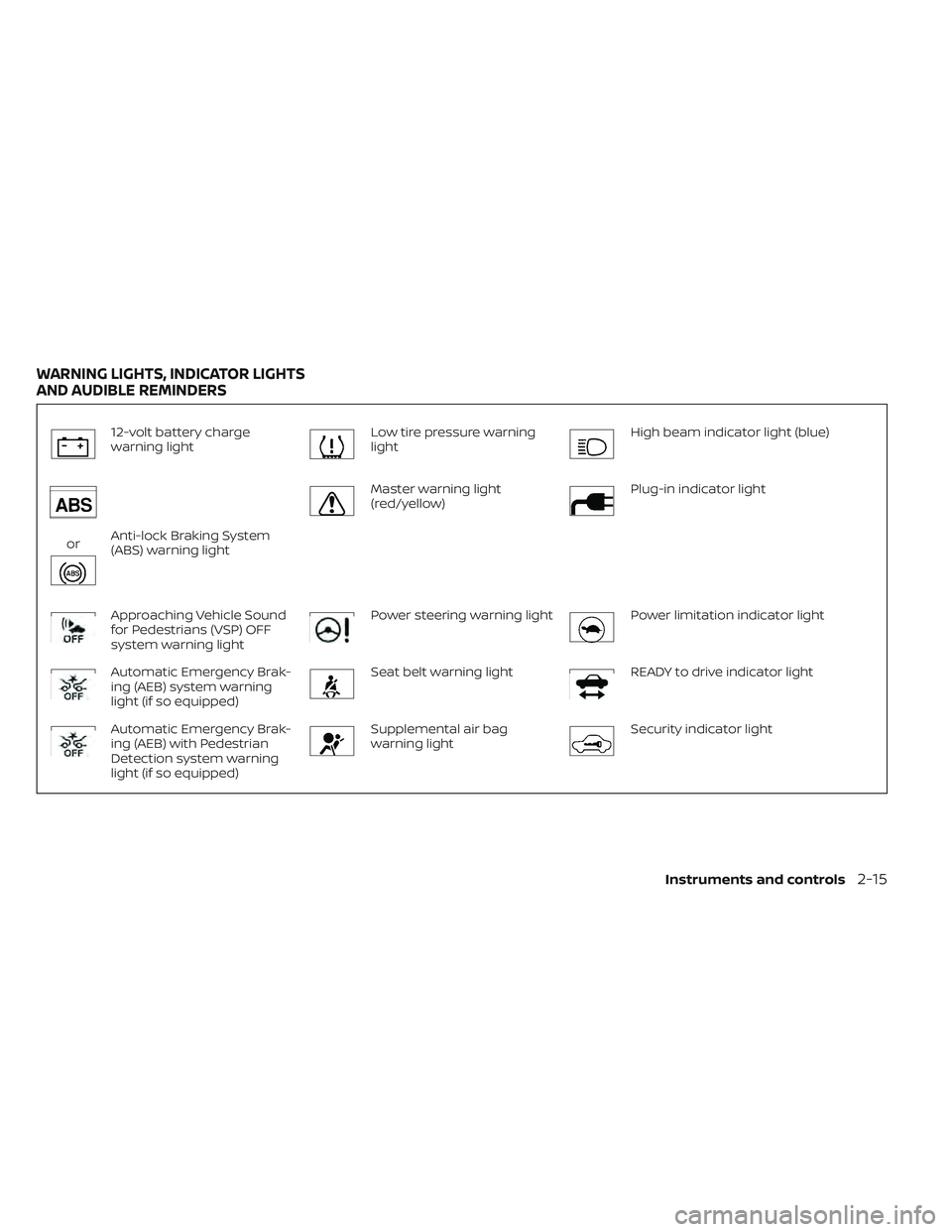
12-volt battery charge
warning lightLow tire pressure warning
lightHigh beam indicator light (blue)
orAnti-lock Braking System
(ABS) warning light
Master warning light
(red/yellow)Plug-in indicator light
Approaching Vehicle Sound
for Pedestrians (VSP) OFF
system warning lightPower steering warning lightPower limitation indicator light
Automatic Emergency Brak-
ing (AEB) system warning
light (if so equipped)Seat belt warning lightREADY to drive indicator light
Automatic Emergency Brak-
ing (AEB) with Pedestrian
Detection system warning
light (if so equipped)Supplemental air bag
warning lightSecurity indicator light
WARNING LIGHTS, INDICATOR LIGHTS
AND AUDIBLE REMINDERS
Instruments and controls2-15
Page 189 of 610
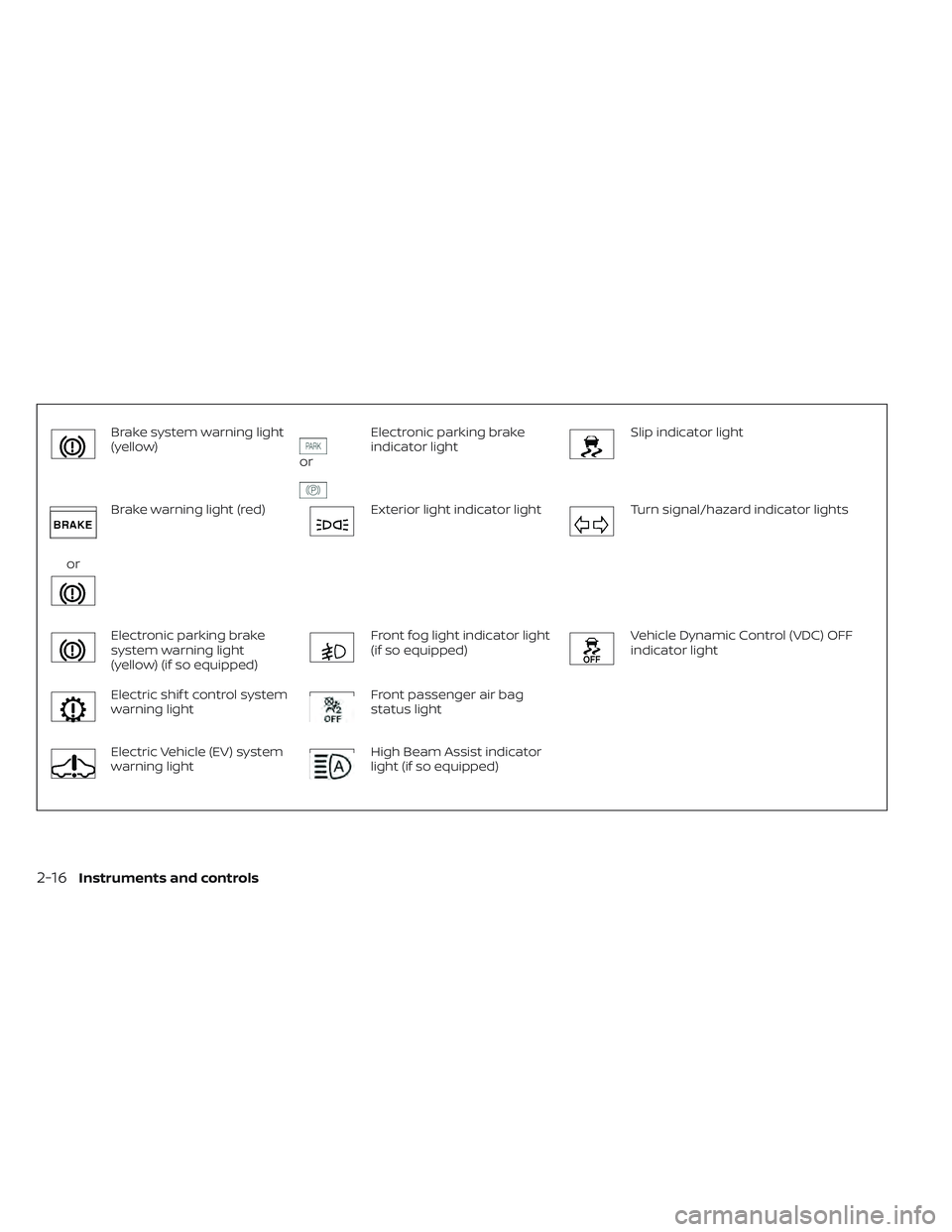
Brake system warning light
(yellow)
or
Electronic parking brake
indicator lightSlip indicator light
or
Brake warning light (red)Exterior light indicator lightTurn signal/hazard indicator lights
Electronic parking brake
system warning light
(yellow) (if so equipped)Front fog light indicator light
(if so equipped)Vehicle Dynamic Control (VDC) OFF
indicator light
Electric shif t control system
warning lightFront passenger air bag
status light
Electric Vehicle (EV) system
warning lightHigh Beam Assist indicator
light (if so equipped)
2-16Instruments and controls
Page 190 of 610
CHECKING LIGHTS
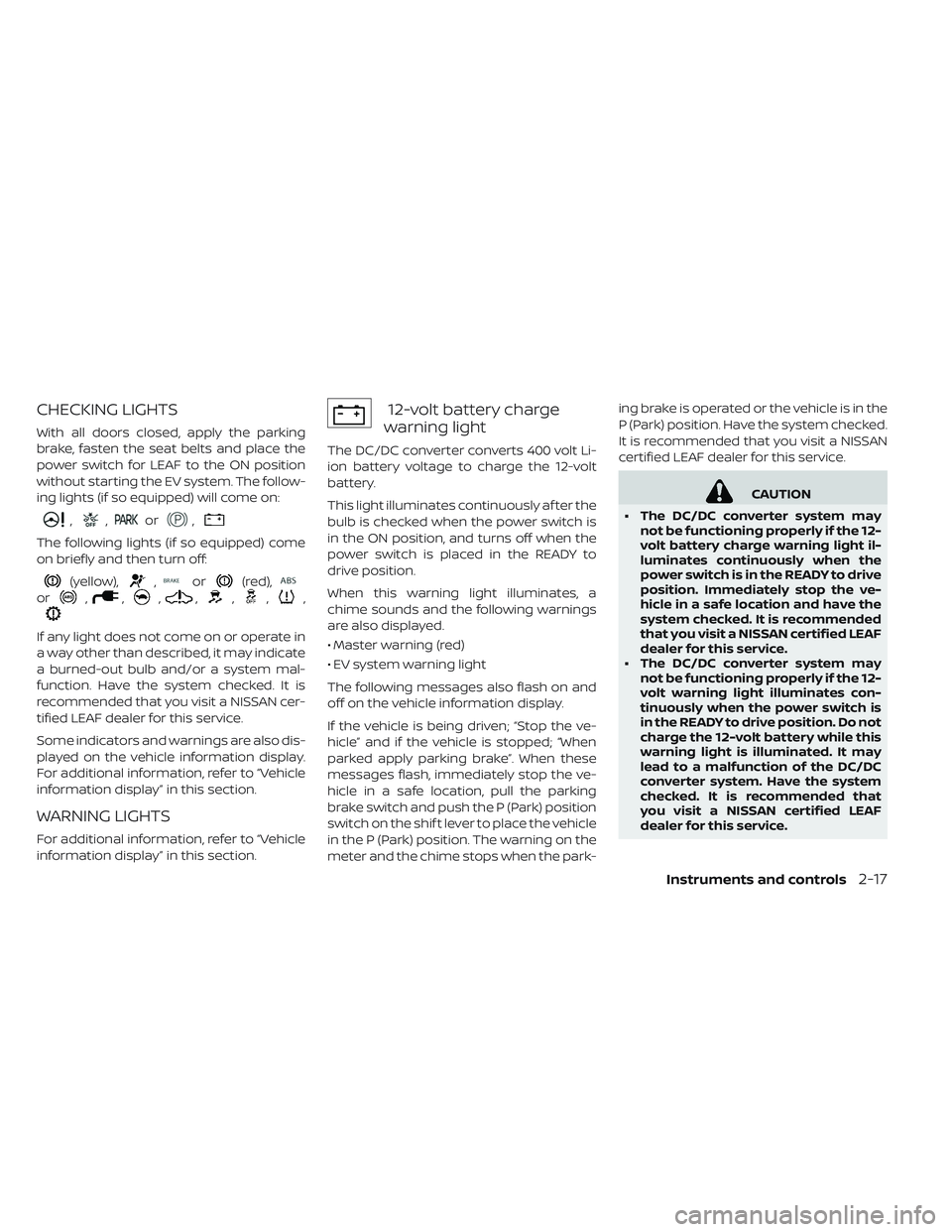
With all doors closed, apply the parking
brake, fasten the seat belts and place the
power switch for LEAF to the ON position
without starting the EV system. The follow-
ing lights (if so equipped) will come on:
,,or,
The following lights (if so equipped) come
on briefly and then turn off:
(yellow),,or(red),
or,,,,,,,
If any light does not come on or operate in
a way other than described, it may indicate
a burned-out bulb and/or a system mal-
function. Have the system checked. It is
recommended that you visit a NISSAN cer-
tified LEAF dealer for this service.
Some indicators and warnings are also dis-
played on the vehicle information display.
For additional information, refer to “Vehicle
information display” in this section.
WARNING LIGHTS
For additional information, refer to “Vehicle
information display” in this section.
12-volt battery charge
warning light
The DC/DC converter converts 400 volt Li-
ion battery voltage to charge the 12-volt
battery.
This light illuminates continuously af ter the
bulb is checked when the power switch is
in the ON position, and turns off when the
power switch is placed in the READY to
drive position.
When this warning light illuminates, a
chime sounds and the following warnings
are also displayed.
• Master warning (red)
• EV system warning light
The following messages also flash on and
off on the vehicle information display.
If the vehicle is being driven; “Stop the ve-
hicle” and if the vehicle is stopped; “When
parked apply parking brake”. When these
messages flash, immediately stop the ve-
hicle in a safe location, pull the parking
brake switch and push the P (Park) position
switch on the shif t lever to place the vehicle
in the P (Park) position. The warning on the
meter and the chime stops when the park- ing brake is operated or the vehicle is in the
P (Park) position. Have the system checked.
It is recommended that you visit a NISSAN
certified LEAF dealer for this service.
CAUTION
• The DC/DC converter system may not be functioning properly if the 12-
volt battery charge warning light il-
luminates continuously when the
power switch is in the READY to drive
position. Immediately stop the ve-
hicle in a safe location and have the
system checked. It is recommended
that you visit a NISSAN certified LEAF
dealer for this service.
• The DC/DC converter system may not be functioning properly if the 12-
volt warning light illuminates con-
tinuously when the power switch is
in the READY to drive position. Do not
charge the 12-volt battery while this
warning light is illuminated. It may
lead to a malfunction of the DC/DC
converter system. Have the system
checked. It is recommended that
you visit a NISSAN certified LEAF
dealer for this service.
Instruments and controls2-17
Page 196 of 610
CAUTION
• The TPMS is not a substitute for the regular tire pressure check. Be sure
to check the tire pressure regularly.
• If the vehicle is being driven at speeds of less than 16 mph
(25 km/h), the TPMS may not oper-
ate correctly.
• Be sure to install the specified size of tires to the four wheels correctly.
Master warning light
(red/yellow)
There are two types of master warning
lights: yellow and red. These lights illumi-
nate if any warning lights or indicator lights
are illuminated or if various vehicle infor-
mation warnings appear in the vehicle in-
formation display.
Yellow master warning light
This light illuminates when a yellow warn-
ing light within the vehicle information dis-
play is illuminated or when a message is
displayed on the vehicle information dis-
play. Red master warning light
This light illuminates when a red warning
light within the vehicle information display
is illuminated or when a warning is dis-
played on the vehicle information display.
Power steering warning
light
When the power switch is in the ON posi-
tion, the electric power steering warning
light illuminates and turns off when the
power switch is placed in the READY to
drive position. This indicates the electric
power steering system is operational.
If the electric power steering warning light
illuminates while the READY to drive indica-
tor light is ON, it may indicate the electric
power steering system is not functioning
properly and may need servicing. Have the
electric power steering system checked. It
is recommended that you visit a NISSAN
certified LEAF dealer for this service.
When the electric power steering warning
light illuminates while the READY to drive
indicator is ON, the power assist to the
steering will cease operation but you will
still have control of the vehicle. At this time,greater steering efforts are required to
operate the steering wheel, especially in
sharp turns and at low speeds.
For additional information, refer to “Power
steering system” in the “Starting and driv-
ing” section of this manual.
Seat belt warning light
The light and chime remind you to fasten
your seat belts. The light illuminates when-
ever the power switch is placed in the ON
position, and will remain illuminated until
the driver’s seat belt is fastened. At the
same time, the chime will sound for ap-
proximately 6 seconds unless the driver’s
seat belt is securely fastened.
The seat belt warning light for the front
passenger will illuminate if the seat belt is
not fastened when the front passenger’s
seat is occupied. The front passenger seat
belt warning light does not activate until
5 seconds af ter the power switch is in the
ON position.
For additional information, refer to “Seat belts”
in the “Safety — Seats, seat belts and supple-
mental restraint system” section of this
manual for precautions on seat belt usage.
Instruments and controls2-23
Page 197 of 610
Supplemental air bag
warning light
Af ter turning the power switch to the ON
position, the supplemental air bag warning
light will illuminate. The supplemental air
bag warning light will turn off af ter about
7 seconds if the supplemental front air bag
and supplemental side air bag, curtain
side-impact air bag systems and/or pre-
tensioner seat belt are operational.
If any of the following conditions occur, the
front air bag, side air bag, curtain air bag
and pretensioner systems need servicing
and your vehicle must be taken to your
nearest NISSAN certified LEAF dealer.
•
The supplemental air bag warning light re-
mains on af ter approximately 7 seconds.
• The supplemental air bag warning lightflashes intermittently.
• The supplemental air bag warning light does not illuminate at all.
Unless checked and repaired, the Supple-
mental Restraint Systems and/or the pre-
tensioners may not function properly. For additional information, refer to “Supple-
mental restraint system (SRS)” in the “Safety
— Seats, seat belts and supplemental re-
straint system” section of this manual.
WARNING
If the supplemental air bag warning
light is on, it could mean that the front
air bag, side air bag, curtain air bag
and/or pretensioner systems will not
operate in an accident. To help avoid
injury to yourself or others, have your
vehicle checked. It is recommended
that you visit a NISSAN certified LEAF
dealer as soon as possible for this ser-
vice.
INDICATOR LIGHTS
For additional information, refer to “Vehicle
information display” in this section.
orElectronic parking
brake indicator light
When the power switch is placed in the ON
position, the light comes on when the park-
ing brake is applied.
Exterior light indicator light
This indicator illuminates when the head-
light switch is turned to the AUTO,
or
position and the front parking lights,
side marker lights, tail and license plate
lights are on. The indicator turns off when
these lights are turned off.
Front fog light indicator light
(if so equipped)
The front fog indicator light illuminates
when the front fog lights are on. For addi-
tional information, refer to “Fog light switch”
in this section.
Front passenger air bag
status light
The front passenger air bag status light
(located on the center of the instrument
panel) will be lit and the passenger front air
bag will be turned off depending on how
the front passenger seat is being used.
For front passenger air bag status light op-
eration, refer to “NISSAN Advanced Air Bag
System (front seats)” in the “Safety — Seats,
seat belts and supplemental restraint sys-
tem” section of this manual.
2-24Instruments and controls
Page 198 of 610
High Beam Assist indicator
light (if so equipped)
The indicator light illuminates when the
headlights come on while the headlight
switch is in the AUTO position with the high
beam selected. This indicates that the high
beam assist system is operational. For ad-
ditional information, refer to “Headlight
beam select” in this section.
High beam indicator light
(blue)
This light illuminates when the headlight
high beam is on and goes out when the low
beam is selected.
Plug-in indicator light
This light illuminates when the charge con-
nector is connected to the vehicle and
blinks during charging.
NOTE:
If the charge connector is connected to
the vehicle, the power switch cannot be
placed in the READY to drive position.
Power limitation indicator
light
When the power limitation indicator light
is illuminated, the power provided to the
traction motor is reduced. Therefore the
vehicle is not as responsive when the
accelerator is depressed while the power
limitation light is illuminated.
When this light comes on, the warning dis-
play appears within the vehicle information
display. Follow the instructions provided on
the vehicle information display.
This light illuminates in the following condi-
tions.
• Li-ion battery available charge is ex-tremely low
• Li-ion battery temperature is very lowj (approximately −4°F (−20°C)
• When the temperature of the EV system is high (motor, inverter, coolant system,
Li-ion battery etc.)
• When the EV system has a malfunction. If the low battery charge indicator is illumi-
nated, charge the Li-ion battery as soon as
possible.
If this indicator illuminates because the Li-
ion battery is cold due to low outside tem-
peratures, move the vehicle to a warmer
location. The Li-ion battery temperature
may be increased by charging the Li-ion
battery.
If the light illuminates when the EV system
becomes hot due to continuous hill climb-
ing, either continue driving at a slower safe
speed or stop the vehicle in a safe location.
If this indicator does not turn off, have the
system checked. It is recommended that
you visit a NISSAN certified LEAF dealer for
this service.
The indicator illuminates when a part in the
EV system has malfunctioned. If the indica-
tor illuminates in a situation other than
those described above, or if it does not turn
off, there may be a system malfunction.
Have the system checked. It is recom-
mended that you visit a NISSAN certified
LEAF dealer for this service.
Instruments and controls2-25
Page 199 of 610
WARNING
Power limitation mode can result in re-
duced power and vehicle speed. The
reduced speed may be lower than
other traffic, which could increase the
chance of a collision. Be especially
careful when driving. If the vehicle can-
not maintain a safe driving speed, pull
to the side of the road in a safe area.
Charge the Li-ion battery if the charge
is low or allow the Li-ion battery to
cool.
NOTE:
You can reduce charging time and keep
the Li-ion battery temperature lower if
you:
• Charge more frequently in smaller
amounts, and
• Keep the battery at a higher level of
charge.
READY to drive indicator
light
The READY to drive indicator light illumi-
nates when the EV system is powered and
the vehicle may be driven. The READY to drive indicator light will turn
off in the following conditions.
• Certain EV system malfunctions.
• The READY to drive indicator light turns off
immediately before the Li-ion battery is
completely discharged. If the Li-ion bat-
tery becomes completely discharged, the
vehicle must be charged in order to be
driven. For additional information, refer to
“Low battery charge indicator” in this
section.
Security indicator light
This light blinks when the power switch is in
the ACC, OFF or LOCK position. This func-
tion indicates the security system
equipped on the vehicle is operational.
If the security system is malfunctioning,
this light will remain on while the power
switch is in the ON position. For additional
information, refer to “Security systems” in
this section.
Slip indicator light
This indicator will blink when the VDC sys-
tem or the traction control system is oper-
ating, thus alerting that the vehicle is near-
ing its traction limits. The road surface may
be slippery.
You may feel or hear the system working;
this is normal. The light will blink for a few
seconds af ter the VDC system stops limit-
ing wheel spin.
The indicator light also comes on when
you place the power switch in the ON posi-
tion.
The light will turn off af ter approximately
2 seconds if the system is operational. If the
light does not come on, have the system
checked. It is recommended that you visit a
NISSAN certified LEAF dealer for this ser-
vice.
Turn signal/hazard
indicator lights
This light flashes when the turn signal
switch lever or hazard switch is turned on.
2-26Instruments and controls
Page 211 of 610
1. Push brake and power switch to drive
2. No Key Detected
3. Key Battery Low
4. EV system operation for discharged In-telligent Key system indicator
5. Door open
6. Low battery charge indicator
7. Driver alert
8. Low outside air temperature
9. Low Washer Fluid (if so equipped)
10. Reminder Turn OFF Headlights
11. Tire Pressure Low — Add Air
12. Cruise control indicator (if so equipped)
13. Intelligent Cruise Control (ICC) indica- tors (if so equipped)
14. Shif t to Park
15. Key System Error: See Owner’s Manual
16. Release Parking Brake
17.
ProPILOT Assist indicator (if so equipped)
18. Not Available Seat Belt Not Fastened (if so equipped)
19. Malfunction: See Owner’s Manual
20. Indicators for maintenance
21.
Steering Assist indicator (if so equipped)
22. Steering Assist warning (if so equipped)
23. Not Available Front Radar Blocked (if so equipped)
24. Not Available Visibility is Impaired (if so equipped)
25. Driver Attention Alert Take a Break? (if so equipped)
26. Driver Attention Alert System Fault (if so equipped)
27. Unavailable High Cabin Temperature (if so equipped)
28. Not Available Parking Brake On (if so equipped)
29. Not Available Poor Road Conditions (if so equipped)
30. Currently not available (if so equipped)
31. Press Brake Pedal (if so equipped)
32. Lane Departure Warning (LDW)/ Intelligent Lane Intervention (I-LI) indi-
cator (if so equipped)
33. Automatic Emergency Braking (AEB)/ Automatic Emergency Braking (AEB)
with Pedestrian Detection indicator
(if so equipped) 34. Shipping Mode On Push Storage Fuse
35. Blind Spot Warning (BSW) indicator (if so
equipped)
36. Headlight System Error: See Owner’s Manual (if so equipped)
37. When Parked Apply Parking Brake
38. T/M system malfunction Visit dealer
39. Check position of shif t lever
40. Chassis control system error: See Owner’s Manual
41. Press brake pedal to operate e-Pedal switch
42.
Rear Door Alert is activated (if so
equipped)
43. Check Rear Seat For All Articles (if so equipped)
44. e-Pedal system failure! Press brake pedal to slow or stop (if so equipped)
2-38Instruments and controls
Page 213 of 610
NOTE:
The low battery charge indicator turns
off immediately before the Li-ion bat-
tery is completely discharged and the
vehicle will stop. If the Li-ion battery
becomes completely discharged, the
vehicle must be charged in order to be
driven.
Driver alert
This warning appears when the previously
set time for a break is reached. You can set
the time for up to 6 hours in the setting
menu. For additional information, refer to
“Vehicle information display” in this section.
Low outside air temperature
The outside air temperature is displayed in
°F or °C in the range of −20°F to 140°F (−30°C
to 60°C).
The outside air temperature mode includes
a low temperature warning feature. If the
outside air temperature is below 37°F (3°C),
the warning is displayed on the screen.
The outside temperature sensor is located
in front side of the vehicle. The sensor may
be affected by road, wind directions andother driving conditions. The display may
differ from the actual outside temperature
or the temperature displayed on various
signs or billboards.
Low Washer Fluid (if so equipped)
This warning appears when the washer
tank fluid is at a low level. Add washer fluid
as necessary. For additional information,
refer to “Windshield washer fluid” in the
“Maintenance and do-it-yourself ” section.
Reminder Turn OFF Headlights
This warning appears when the power
switch is turned to the OFF position but
the headlight switch is still on. Turn off the
headlight switch.
Tire Pressure Low - Add Air
This warning appears when the low tire
pressure warning light in the meter illumi-
nates and low tire pressure is detected. The
warning appears each time the power
switch is placed in the ON position as long
as the low tire pressure warning light re-
mains illuminated.
If this warning appears, stop the vehicle and
adjust the tire pressure to the recom-
mended COLD tire pressure shown on the
Tire and Loading Information label. For addi-
tional information, refer to “Low tire pressure
warning light” in this section and “Tire Pres-
sure Monitoring System (TPMS)” in the “Start-
ing and driving” section of this manual.
Cruise control indicator (if so
equipped)
This indicator shows the cruise control sys-
tem status.
When cruise control is activated, a green
circle will illuminate to indicate it is set. The
vehicle information display will also display
the speed the cruise control was set at.
If you accelerate past the set speed, the
speed will blink until you either cancel
cruise control or go back to the set speed.
If cruise control is on and canceled, the
speed will be displayed to show the speed
the vehicle will return to if the resume but-
ton is activated.
For additional information, refer to “Cruise
control” in the “Starting and driving” section
of this manual.
2-40Instruments and controls