warning lights NISSAN LEAF 2019 Owner´s Manual
[x] Cancel search | Manufacturer: NISSAN, Model Year: 2019, Model line: LEAF, Model: NISSAN LEAF 2019Pages: 610, PDF Size: 7.11 MB
Page 394 of 610
–When the headlights are not bright
due to dirt on the lens or if the aim-
ing is not adjusted properly.
– When strong light enters the lanecamera unit (for example, the light
directly shines on the front of the
vehicle at sunrise or sunset).
– When a sudden change in bright- ness occurs (for example, when
the vehicle enters or exits a tunnel
or under a bridge).
While the I-LI system is operating, you may
hear a sound of brake operation. This is
normal and indicates that the I-LI system is
operating properly.
SYSTEM TEMPORARILY UNAVAILABLE
Condition A:
The warning and assist functions of the I-LI
system are not designed to work under the
following conditions:
•
When you operate the lane change signal
and change the traveling lanes in the direc-
tion of the signal. (The I-LI system will be
deactivated for approximately 2 seconds
af ter the lane change signal is turned off.)
• When the vehicle speed lowers to less than approximately 37 mph (60 km/h). Af ter the above conditions have finished
and the necessary operating conditions
are satisfied, the warning and assist func-
tions will resume.
Condition B:
The assist function of the I-LI system is not
designed to work under the following con-
ditions (warning is still functional):
• When the brake pedal is depressed.
• When the steering wheel is turned as far
as necessary for the vehicle to change
lanes.
• When the vehicle is accelerated during I-LI system operation.
• When the Intelligent Cruise Control (ICC) approach warning occurs.
• When the hazard warning flashers are operated.
• When driving on a curve at high speed.
Af ter the above conditions have finished
and the necessary operating conditions
are satisfied, the I-LI system application of
the brakes will resume. Condition C:
If the following messages appear in the
vehicle information display, a chime will
sound and the I-LI system will be turned off
automatically.
• “Not Available - Poor Road Conditions”:
When the Vehicle Dynamic Control (VDC)
system (except Traction Control System
[TCS] function) or ABS operates.
• “Currently not available”: When the VDC system is turned off.
Action to take:
When the above conditions no longer exist,
turn off the I-LI system. Push the ProPILOT
Assist switch to turn the I-LI system back on.
Temporary disabled status at high tem-
perature:
If the vehicle is parked in direct sunlight
under high temperature conditions (over
approximately 104°F [40°C]) and then the
I-LI system is turned on, the I-LI system
may be deactivated automatically and the
following message will appear on the ve-
hicle information display: “Unavailable: High
Cabin Temperature.” When the interior
temperature is reduced, the system will re-
sume operating automatically.
Starting and driving5-35
Page 464 of 610
WARNING
Steering Assist is not a system for
hands-free driving. Always keep your
hands on the steering wheel and drive
your vehicle safely. Failure to do so
could cause a collision resulting in se-
rious personal injury or death.
NOTE:
If the driver lightly touches (instead of
firmly grips) the steering wheel, the
steering torque sensor may not detect
the driver’s hand(s) on the wheel and a
sequence of warnings may occur.
When the driver holds and operates
the steering wheel again, the warn-
ings turn off.
Steering Assist limitations
WARNING
• In the following situations, the cam- era may not detect lane markers
correctly or may detect lane mark-
ers incorrectly and the Steering As-
sist may not operate properly:
– When driving on roads wherethere are multiple parallel lane
markers, lane markers that are
faded or not painted clearly, non-
standard lane markers, or lane
markers covered with water, dirt,
snow, etc.
– When driving on roads with dis- continued lane markers
– When driving on roads with a wid- ening or narrowing lane width
– When driving on roads where there are multiple lanes or unclear
lane markers due to road con-
struction
– When driving on roads where there are sharply contrasting ob-
jects, such as shadows, snow,
water, wheel ruts, seams, or lines
remaining af ter road repairs (the Steering Assist could detect these
items as lane markers)
– When driving on roads where the traveling lane merges or sepa-
rates
• Do not use the Steering Assist under the following conditions because
the system may not properly detect
lane markers. Doing so could cause a
loss of vehicle control and result in
an accident.
– During bad weather (rain, fog,snow, dust, etc.)
– When rain, snow, sand, etc., is thrown up by the wheels of other
vehicles
– When dirt, oil, ice, snow, water, or another object adheres to the
camera unit
– When the lens of the camera unit is foggy
– When strong light (for example, sunlight or high beams from on-
coming vehicles) shines on the
camera
– When the headlights are not bright due to dirt on the lens or
the headlights are off in tunnels or
in darkness
Starting and driving5-105
Page 472 of 610
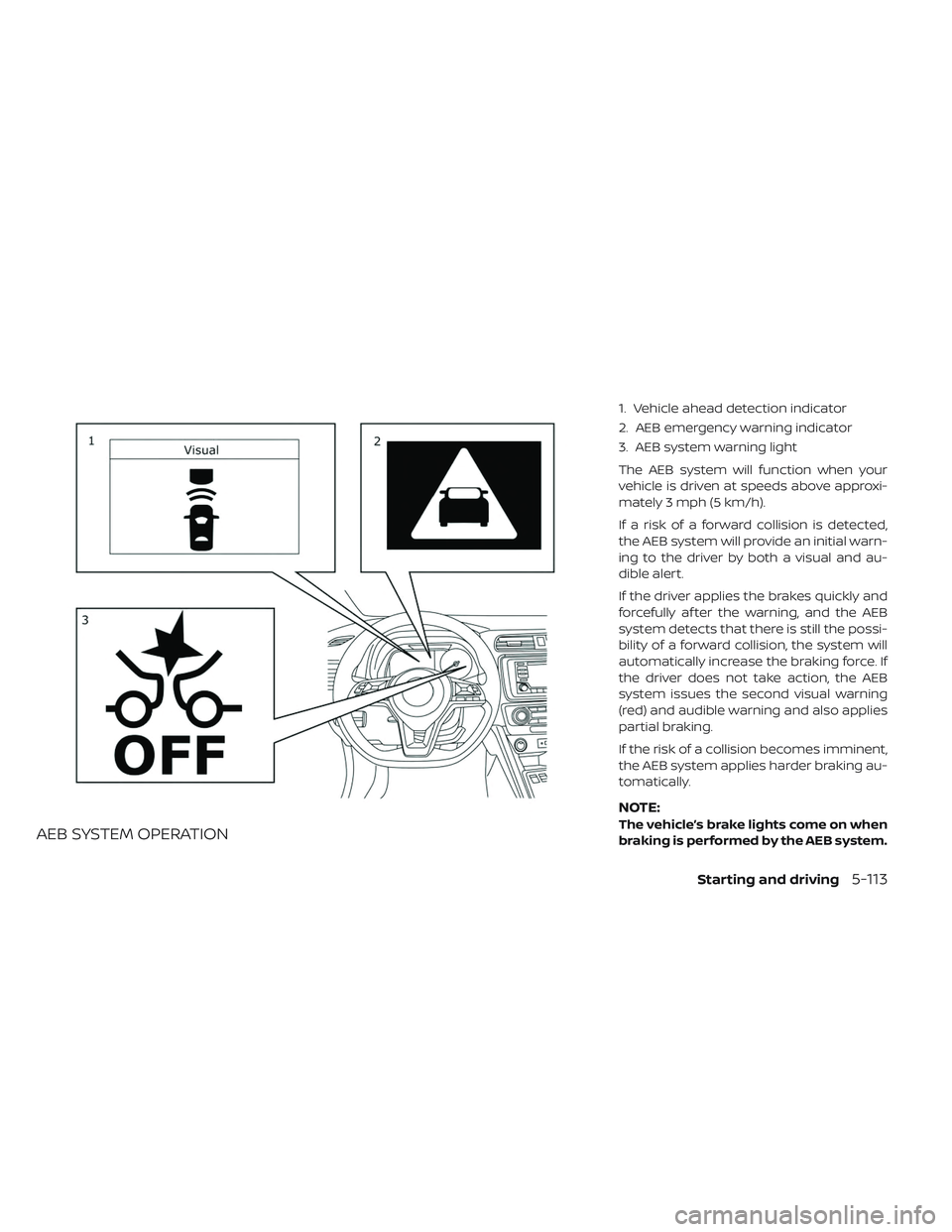
AEB SYSTEM OPERATION
1. Vehicle ahead detection indicator
2. AEB emergency warning indicator
3. AEB system warning light
The AEB system will function when your
vehicle is driven at speeds above approxi-
mately 3 mph (5 km/h).
If a risk of a forward collision is detected,
the AEB system will provide an initial warn-
ing to the driver by both a visual and au-
dible alert.
If the driver applies the brakes quickly and
forcefully af ter the warning, and the AEB
system detects that there is still the possi-
bility of a forward collision, the system will
automatically increase the braking force. If
the driver does not take action, the AEB
system issues the second visual warning
(red) and audible warning and also applies
partial braking.
If the risk of a collision becomes imminent,
the AEB system applies harder braking au-
tomatically.
NOTE:
The vehicle’s brake lights come on when
braking is performed by the AEB system.
Starting and driving5-113
Page 480 of 610
emergency warning indicator (red), provid-
ing an audible warning, and then automati-
cally applies harder braking.
If a risk of a forward impact with a pedes-
trian is detected, the AEB with Pedestrian
Detection system will provide a warning to
the driver by flashing the AEB with Pedes-
trian Detection emergency warning indica-
tor (red), provides an audible alert and the
system will apply partial braking. If the
driver applies the brakes quickly and force-
fully but the AEB with Pedestrian Detection
system detects that there is still the possi-
bility of a forward impact with a pedestrian,
the system will automatically increase the
braking force. If the risk of collision be-
comes imminent and the driver does not
take action, the AEB with Pedestrian Detec-
tion system automatically applies harder
braking.
NOTE:
The vehicle’s brake lights come on when
any braking is performed by the AEB
with Pedestrian Detection system.Depending on vehicle speed and distance
to the vehicle or pedestrian ahead, as well
as driving and roadway conditions, the sys-
tem may help the driver avoid a forward
collision or may help mitigate the conse-
quences if a collision should be unavoid-
able. If the driver is handling the steering
wheel, accelerating or braking, the AEB with
Pedestrian Detection system will function
later or will not function.
The automatic braking will cease under the
following conditions:
• When the steering wheel is turned to
avoid a collision.
• When the accelerator pedal is depressed.
• When there is no longer a vehicle or a pedestrian detected ahead.
If the AEB with Pedestrian Detection sys-
tem has stopped the vehicle, the vehicle
will remain at a standstill for approximately
2 seconds before the brakes are released.
Starting and driving5-121
Page 517 of 610
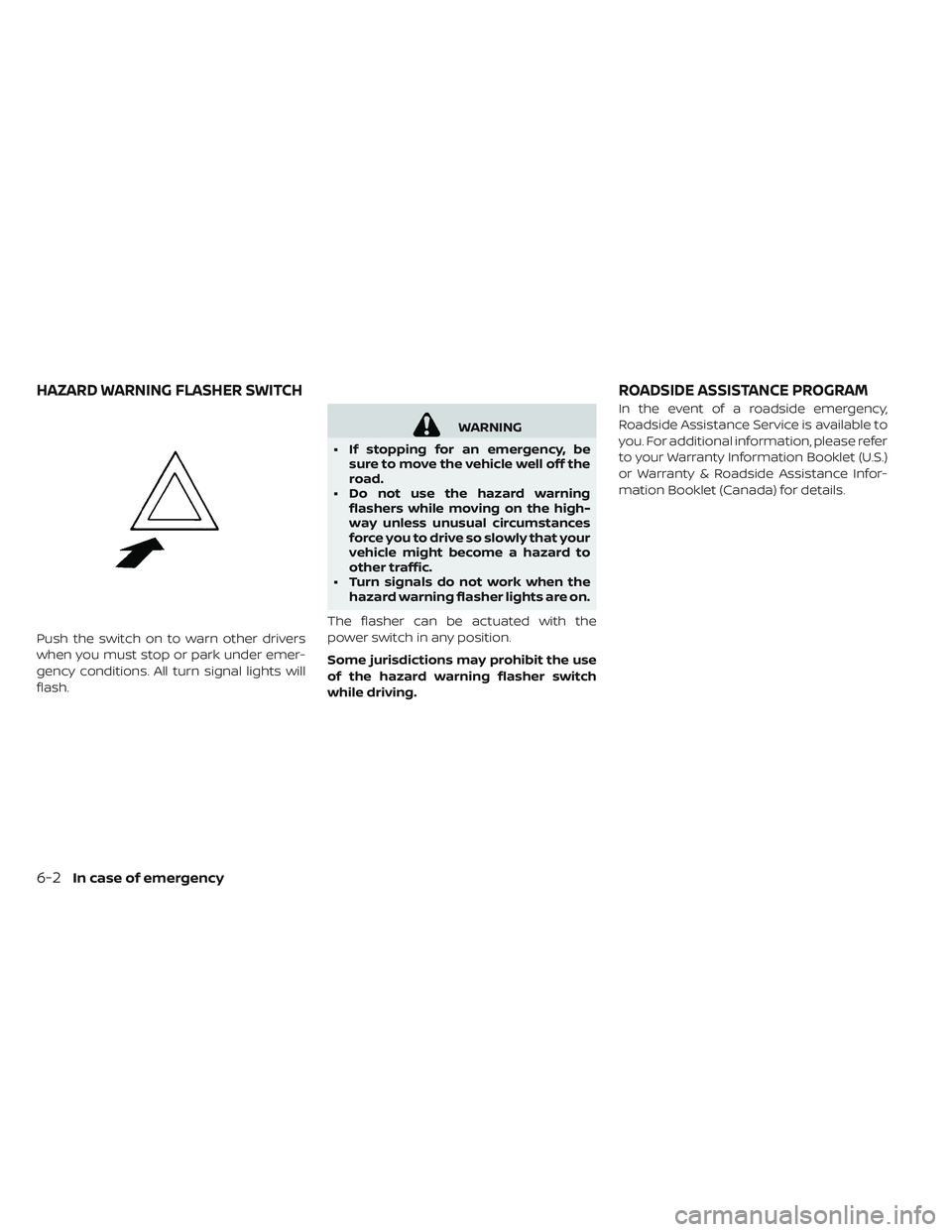
Push the switch on to warn other drivers
when you must stop or park under emer-
gency conditions. All turn signal lights will
flash.
WARNING
• If stopping for an emergency, be sure to move the vehicle well off the
road.
• Do not use the hazard warning flashers while moving on the high-
way unless unusual circumstances
force you to drive so slowly that your
vehicle might become a hazard to
other traffic.
• Turn signals do not work when the hazard warning flasher lights are on.
The flasher can be actuated with the
power switch in any position.
Some jurisdictions may prohibit the use
of the hazard warning flasher switch
while driving. In the event of a roadside emergency,
Roadside Assistance Service is available to
you. For additional information, please refer
to your Warranty Information Booklet (U.S.)
or Warranty & Roadside Assistance Infor-
mation Booklet (Canada) for details.
HAZARD WARNING FLASHER SWITCH
ROADSIDE ASSISTANCE PROGRAM
6-2In case of emergency
Page 518 of 610
To shut off the EV system in an emergency
situation while driving, perform the follow-
ing procedure.
• Rapidly push the power switch three con-secutive times in less than 1.5 seconds, or
• Push and hold the power switch for more than 2 seconds.TIRE PRESSURE MONITORING
SYSTEM (TPMS)
This vehicle is equipped with TPMS. It moni-
tors tire pressure of all tires. When the low
tire pressure warning light is lit, and the “Tire
Pressure Low — Add Air” warning appears
on the vehicle information display, one or
more of your tires is significantly under-
inflated. If the vehicle is being driven with
low tire pressure, the TPMS will activate and
warn you of it by the low tire pressure warn-
ing light. This system will activate only
when the vehicle is driven at speeds above
16 mph (25 km/h). For additional informa-
tion, refer to “Warning lights, indicator lights
and audible reminders” in the “Instruments
and controls” section and “Tire Pressure
Monitoring System (TPMS)” in the “Starting
and driving” section of this manual.
WARNING
• Radio waves could adversely affect electric medical equipment. Those
who use a pacemaker should con-
tact the electric medical equipment
manufacturer for the possible influ-
ences before use. • If the low tire pressure warning light
illuminates while driving, avoid sud-
den steering maneuvers or abrupt
braking, reduce vehicle speed, pull
off the road to a safe location and
stop the vehicle as soon as possible.
Driving with underinflated tires may
permanently damage the tires and
increase the likelihood of tire failure.
Serious vehicle damage could occur
and may lead to an accident and
could result in serious personal in-
jury. Check the tire pressure for all
four tires. Adjust the tire pressure to
the recommended COLD tire pres-
sure shown on the Tire and Loading
Information label to turn the low tire
pressure warning light OFF. If the
light still illuminates while driving
af ter adjusting the tire pressure, a
tire may be flat or the TPMS may be
malfunctioning. If you have a flat
tire, repair it as soon as possible. If
no tire is flat and all tires are properly
inflated, have the vehicle checked. It
is recommended that you visit a cer-
tified LEAF dealer for this service.
EMERGENCY EV (ELECTRIC VEHICLE)
SHUT OFF FLAT TIRE
In case of emergency6-3
Page 540 of 610
8 Maintenance and do-it yourself
Maintenance requirement................8-2
Scheduled maintenance ...............8-2
General maintenance ................ .8-2
Where to go for service ................8-2
General maintenance .................. .8-3
Explanation of maintenance items ........8-3
Maintenance precautions ................8-5
Motor compartment check locations ........8-7
Cooling system .......................8-8
Checking coolant level ................8-9
Changing coolant .................. .8-9
Reduction gear fluid .................. .8-10
Brake fluid ......................... .8-10
Windshield-washer fluid .................8-11
12-volt battery .......................8-12
Jump starting .................... .8-14
Windshield wiper blades ................8-15
Cleaning .........................8-15
Replacing ........................8-15 Rear window wiper blade
..............8-17
Brakes ........................... .8-17
Brake pad wear warning ..............8-17
Fuses ............................ .8-18
Motor compartment ................ .8-18
Passenger compartment ..............8-21
Nissan Intelligent Key® battery replacement . . .8-22
Lights ............................ .8-25
Headlights .......................8-25
Fog lights (if so equipped) .............8-26
Exterior and interior lights .............8-27
Wheels and tires .................... .8-30
Tire pressure ......................8-30
Tire labeling ......................8-34
Types of tires ......................8-36
Tire chains ...................... .8-37
Changing wheels
and tires ............8-38
Emergency tire puncture repair kit .......8-40
Page 543 of 610
Inside vehicle
The maintenance items listed here should
be checked on a regular basis, such as
when performing scheduled maintenance,
cleaning the vehicle, etc.
Accelerator pedal:Check the pedal for
smooth operation and make sure that the
pedal does not catch or require uneven
effort. Keep the floor mat away from the
pedal.
Brake pedal: Check the pedal for smooth
operation. If the brake pedal suddenly goes
down further than normal, the pedal feels
spongy or the vehicle seems to take longer
to stop, it is recommended that you visit a
NISSAN certified LEAF dealer immediately.
Keep the floor mat away from the pedal.
Brakes: Check that the brakes do not pull
the vehicle to one side when applied.
Electric shif t P (Park) position mecha-
nism: On a steep hill, check that the vehicle
is held securely while the vehicle is in the P
(Park) position without applying the brakes. Parking brake:
Check the parking brake
operation regularly. The vehicle should be
securely held on a steep hill with only the
parking brake applied. If the parking brake
cannot keep a vehicle position, it is recom-
mended that you visit a NISSAN certified
LEAF dealer for this service.
Seat: Check seat position controls such as
the seat adjusters, seatback recliners, etc.
to ensure that they operate smoothly and
that all latches lock securely in every posi-
tion. Check that the head restraints/
headrests move up and down smoothly
and that the locks (if so equipped) hold
securely in all latched positions.
Seat belts: Check that all parts of the seat
belt system (for example, buckles, anchors,
adjusters and retractors) operate properly
and smoothly, and are installed securely.
Check the belt webbing for cuts, fraying,
wear or damage.
Steering wheel: Check for changes in the
steering conditions, such as excessive free
play, hard steering or strange noises. Warning lights and chimes:
Make sure
that all warning lights and chimes are op-
erating properly.
Windshield defroster: Check that the air
emits from the defroster outlets properly
and in sufficient quantity when operating
the heater or air conditioner.
Windshield wiper and washer*: Check
that the wipers and washers operate prop-
erly and that the wipers do not streak.
Under hood and vehicle
The maintenance items listed here should
be checked periodically.
12-volt battery (except for maintenance
free batteries)*: Check the fluid level in
each cell. The fluid should be at the bottom
of the filler opening. Vehicles operated in
high temperatures or under severe condi-
tions require frequent checks of the 12–volt
battery fluid level.
8-4Maintenance and do-it yourself
Page 545 of 610
• Park the vehicle on a level surface,apply the parking brake securely
and chock the wheels to prevent the
vehicle from moving. Push the P
(Park) position switch on the shif t
lever or place the vehicle into the N
(Neutral) position.
• If you must work with the EV (Electric Vehicle) system is turned on, keep
hands, clothing, hair and tools away
from moving fans and any other
moving parts.
• Make sure that the power switch is in the OFF or LOCK position when per-
forming any part replacement or re-
pairs.
• It is advisable to secure or remove any loose clothing and remove any
jewelry, such as rings, watches, etc.
before working on your vehicle.
• Always wear eye protection when- ever you work on your vehicle.
• Never get under the vehicle while it is supported only by a jack. If it is
necessary to work under the vehicle,
support it with safety stands.
•
Keep smoking materials, flames and
sparks away from the 12-volt battery.
CAUTION
• Do not work under the hood while the motor compartment is hot. Push
the power switch in the OFF position
and wait until it cools down.
• Avoid direct contact with used cool- ant. Improperly disposed coolant
and/or other vehicle fluids can dam-
age the environment. Always con-
form to local regulations for the dis-
posal of vehicle fluids.
• Never connect or disconnect the battery or any transistorized com-
ponent while the power switch is in
the ON position.
• Your vehicle is equipped with an au- tomatic cooling fan. It may come on
at any time without warning, even if
the power switch is not in the ACC,
ON or READY to drive position. To
avoid injury, always disconnect the
negative 12-volt battery cable be-
fore working near the fan.
• Before performing any electrical maintenance work on the vehicle
such as the battery, fuses or bulb re-
placement, confirm the following:
– The charge connector is removedfrom the vehicle. – The Climate Ctrl. Timer is not ac-
tive or operating. For additional
information, refer to “Climate Ctrl.
Timer” in the “Monitor, climate, au-
dio, phone and voice recognition
systems” section of this manual.
– The 12-volt battery is not being charged by the Li-ion battery and
that all charging status indicator
lights are off. For additional infor-
mation, refer to “Charging the 12-
volt battery ” in the “EV overview”
section and “Charging status indi-
cator lights” in the “Charging” sec-
tion of this manual.
• The power switch is in the OFF posi- tion. Place the power switch in the
ON position and then in the OFF po-
sition to prevent the 12-volt battery
automatically being charged by the
Li-ion battery. For additional infor-
mation, refer to “Charging the 12-
volt battery ” in the “EV overview”
section of this manual.
The “Maintenance and do-it-yourself ” sec-
tion gives instructions regarding only
those items that are relatively easy for an
owner to perform.
8-6Maintenance and do-it yourself
Page 605 of 610
Charging troubleshooting guide.....CH-57
Chassis control ................5-152
Checking ..................2-17, 8-9
Checking bulbs .................2-17
Checking coolant level .............8-9
Child restraints ...........1-21, 1-25, 1-39
Child safety ....................1-18
Child safety rear door lock ...........3-6
Child seat belts .................1-18
Circuit breaker, Fusible link ..........8-20
Cleaning ......................7-3
Cleaning aluminum alloy wheels .......7-3
Cleaning exterior and interior .......7-2,7-4
Climate control .................4-46
Climate control operation ...........4-31
Climate control service ............4-46
Climate control system ............4-31
Climate control system refrigerant and
lubricant recommendations .........4-46
Climate Ctrl. Timer ...............4-41
Clock .......................2-13
Clock setting (models without Navigation
System) .....................4-56
Cold tire pressures ...............9-23
Cold weather driving .............5-154
Console box ...................2-67
coolant ......................8-8
Coolant ....................8-9, 9-2
Cooling system .................8-8
Corrosion protection ..............7-7
Cruise control ..................5-54 Cup holders
...................2-68
D
Defroster switch, Rear window and outside
mirror defroster switch ............2-53
Dimensions and weights ............9-6
Display, vehicle information .........2-28
Door locks ..................3-4, 3-6
Doors .......................3-4
Driving ................5-4, 5-15, 5-154
Driving range ..................2-10
Driving the vehicle ..............EV-18
Driving vehicle ..................5-15
E
e-Pedal......................2-14
e-Pedal system .................5-22
ECO........................2-60
ECO drive report ................5-143
ECO mode ....................2-14
ECO Mode ...................5-142
ECO switch ...................2-60
Efficient use of your vehicle ........EV-23
Electric shif t control system .........5-15
Electronic parking brake ...........5-20
Emergency charge .....CH-11, CH-17, CH-25
Emergency EV (Electric Vehicle)
shut off ...................5-12, 6-3 Emergency shutoff system
.........EV-10
Emission control information label ......9-8
EV Characteristics ..............EV-11
EV system ....................EV-2
EV unique information ............EV-25
Event Data Recorder (EDR) ..........9-19
EVSE (Electric Vehicle Supply Equipment) ....
CH-11, CH-17, CH-25
Exterior appearance care ...........7-2
F
F.M.V.S.S./C.M.V.S.S. certification label .....9-8
Flashers (Refer to hazard warning flasher
switch) .......................6-2
Flat tire ......................6-3
Flat towing ....................9-13
Floor mat cleaning ...............7-5
Fluid ................8-8, 8-10, 8-11, 9-2
FM/AM/SAT Radio with Compact Disc (CD)
Player.......................4-55
Fog light bulb replacement .........8-26
Fog light switch .................2-59
Fog lights ....................8-26
For Intelligent Key system ...........3-6
Front passenger air bag and status light. . .1-52
Front-seat mounted side-impact
supplemental air bag system ........1-58
Fuses .......................8-18
Fusible links ...................8-20
10-2Index