ESP NISSAN LEAF 2019 Owner´s Manual
[x] Cancel search | Manufacturer: NISSAN, Model Year: 2019, Model line: LEAF, Model: NISSAN LEAF 2019Pages: 610, PDF Size: 7.11 MB
Page 507 of 610
Wet brakes
When the vehicle is washed or driven
through water, the brakes may get wet. As
a result, the braking distance will be longer
and the vehicle may pull to one side during
braking.
To dry brakes, drive the vehicle at a safe
speed while lightly tapping the brake pedal
to heat up the brakes. Do this until the
brakes return to normal. Avoid driving the
vehicle at high speeds until the brakes
have dried.
Parking brake break-in
Break in the parking brake shoes whenever
the stopping effect of the parking brake is
weakened or whenever the parking brake
shoes and/or drums/rotors are replaced,
in order to assure the best braking perfor-
mance.
This procedure is described in the Genuine
NISSAN Service Manual, and it can be per-
formed by a certified repair facility. It is rec-
ommended that you visit a NISSAN certi-
fied LEAF dealer.
ANTI-LOCK BRAKING SYSTEM (ABS)
WARNING
• The ABS is a sophisticated device, but it cannot prevent accidents re-
sulting from careless or dangerous
driving techniques. It can help main-
tain vehicle control during braking
on slippery surfaces. Remember
that stopping distances on slippery
surfaces will be longer than on nor-
mal surfaces even with ABS. Stop-
ping distances may also be longer
on rough, gravel or snow covered
roads, or if you are using tire chains.
Always maintain a safe distance
from the vehicle in front of you. Ulti-
mately, the driver is responsible for
safety.
• Tire type and condition may also af- fect braking effectiveness.
– When replacing tires, install thespecified size of tires on all four
wheels.
– For additional information, refer to “Wheels and tires” in the “Main-
tenance and do-it-yourself ” sec-
tion of this manual. The ABS controls the brakes so the wheels
do not lock during hard braking or when
braking on slippery surfaces. The system
detects the rotation speed at each wheel
and varies the brake fluid pressure to pre-
vent each wheel from locking and sliding.
By preventing each wheel from locking, the
system helps the driver maintain steering
control and helps to minimize swerving
and spinning on slippery surfaces.
Using the system
Depress the brake pedal and hold it down.
Depress the brake pedal with firm steady
pressure, but do not pump the brakes. The
Anti-lock Braking System will operate to
prevent the wheels from locking up. Steer
the vehicle to avoid obstacles.
WARNING
Do not pump the brake pedal. Doing so
may result in increased stopping dis-
tances.
5-148Starting and driving
Page 508 of 610
Self-test feature
The Anti-lock Braking System (ABS) in-
cludes electronic sensors, electric pumps,
hydraulic solenoids and a computer. The
computer has a built-in diagnostic feature
that tests the system each time you push
the power switch in the READY to drive po-
sition and move the vehicle at a low speed
in forward or reverse. When the self-test
occurs, you may hear a “clunk” noise
and/or feel a pulsation in the brake pedal.
This is normal and does not indicate a mal-
function. If the computer senses a mal-
function, it switches the ABS off and illumi-
nates the ABS warning light on the
instrument panel. The brake system then
operates normally, but without anti-lock
assistance.
If the ABS warning light illuminates during
the self-test or while driving, have the ve-
hicle checked. It is recommended that you
visit a NISSAN certified LEAF dealer for this
service.
Normal operation
The Anti-lock Braking System (ABS) oper-
ates at speeds above 3 to 6 mph (5 to
10 km/h). The speed varies according to
road conditions.
When the ABS senses that one or more
wheels are close to locking up, the actuator
rapidly applies and releases hydraulic pres-
sure. This action is similar to pumping the
brakes very quickly. You may feel a pulsa-
tion in the brake pedal and hear a noise
from under the hood or feel a vibration
from the actuator when it is operating. This
is normal and indicates that the ABS is op-
erating properly. However, the pulsation
may indicate that road conditions are haz-
ardous and extra care is required while
driving.
BRAKE ASSIST
When the force applied to the brake pedal
exceeds a certain level, the Brake Assist is
activated generating greater braking force
than a conventional brake booster even
with light pedal force.
WARNING
The Brake Assist is only an aid to assist
braking operation and is not a collision
warning or avoidance device. It is the
drivers responsibility to stay alert,
drive safely and be in control of the
vehicle at all times.
Starting and driving5-149
Page 509 of 610
The VDC system uses various sensors to
monitor driver inputs and vehicle motion.
Under certain driving conditions, the VDC
system helps to perform the following
functions.
• Controls brake pressure to reduce wheelslip on one slipping drive wheel so power
is transferred to a drive wheel on the same
axle that is not slipping.
• Controls brake pressure and traction mo- tor output to reduce drive wheel slip
based on vehicle speed (traction control
function).
• Controls brake pressure at individual wheels and traction motor output to help
the driver maintain control of the vehicle
in the following conditions:
• Understeer (vehicle tends to not follow the steered path despite increased steering
input).
• Oversteer (vehicle tends to spin due to certain road or driving conditions).
The VDC system can help the driver main-
tain control of the vehicle, but it cannot
prevent loss of vehicle control in all driving
situations. When the VDC system operates, the
indicator light in the instrument panel
flashes. When the indicator light flashes,
note the following items:
• The road may be slippery or the system
may determine some action is required to
help keep the vehicle on the steered path.
• You may feel a pulsation in the brake pedal and hear a noise or vibration from under
the hood. This is normal and indicates
that the VDC system is working properly.
• Adjust your speed and driving according to the road conditions.
For additional information, refer to “Slip in-
dicator light” and “Vehicle Dynamic Control
(VDC) OFF indicator light” in the “Instru-
ments and controls” section of this manual.
If a malfunction occurs in the system, the
indicator light illuminates in the ve-
hicle information display. The VDC system
automatically turns off when this indicator
light is lit. The vehicle information display is used to
turn off the VDC system. The VDC OFF indi-
cator light
illuminates to indicate that
the VDC system is off. When the vehicle
information display is used to turn off the
system, the VDC system still operates to
prevent one drive wheel from slipping by
transferring power to a non-slipping wheel.
The
indicator light flashes if this oc-
curs. All other VDC functions are off and the
indicator light will not flash. The VDC
system is automatically reset to on when
the power switch is placed in the OFF posi-
tion then back to the ON position. For addi-
tional information, refer to “Vehicle infor-
mation display” in the “Instruments and
controls” section of this manual.
The computer has a built-in diagnostic fea-
ture that tests the system each time you
start the EV and move the vehicle forward
or in reverse at a slow speed. When the
self-test occurs, you may hear a “clunk”
noise and/or feel a pulsation in the brake
pedal. This is normal and is not an indica-
tion of a malfunction.
VEHICLE DYNAMIC CONTROL (VDC)
SYSTEM
5-150Starting and driving
Page 510 of 610
WARNING
• The VDC system is designed to help the driver maintain stability but
does not prevent accidents due to
abrupt steering operation at high
speeds or by careless or dangerous
driving techniques. Reduce vehicle
speed and be especially careful
when driving and cornering on slip-
pery surfaces and always drive care-
fully.
• Do not modif y the vehicle’s suspen- sion. If suspension parts such as
shock absorbers, struts, springs,
stabilizer bars, bushings and wheels
are not NISSAN recommended for
your vehicle or are extremely dete-
riorated the VDC system may not op-
erate properly. This could adversely
affect vehicle handling perfor-
mance, and the
indicator light
may flash or theindicator
light may illuminate. • If brake related parts such as brake
pads, rotors and calipers are not
NISSAN recommended or are ex-
tremely deteriorated, the VDC sys-
tem may not operate properly and
the
indicator light may illumi-
nate.
• If traction motor control related parts are not NISSAN recommended
or are extremely deteriorated, the
indicator light may illuminate.
• When driving on extremely inclined surfaces such as higher banked cor-
ners, the VDC system may not oper-
ate properly and the
indicator
light may illuminate. Do not drive on
these types of roads.
• When driving on an unstable surface such as a turntable, ferry, elevator or
ramp, the
indicator light may il-
luminate. This is not a malfunction.
Restart the EV system af ter driving
onto a stable surface.
• If wheels or tires other than the NISSAN recommended ones are
used, the VDC system may not oper-
ate properly and the
indicator
light may illuminate. • The VDC system is not a substitute
for winter tires or tire chains on a
snow covered road.
Starting and driving5-151
Page 511 of 610
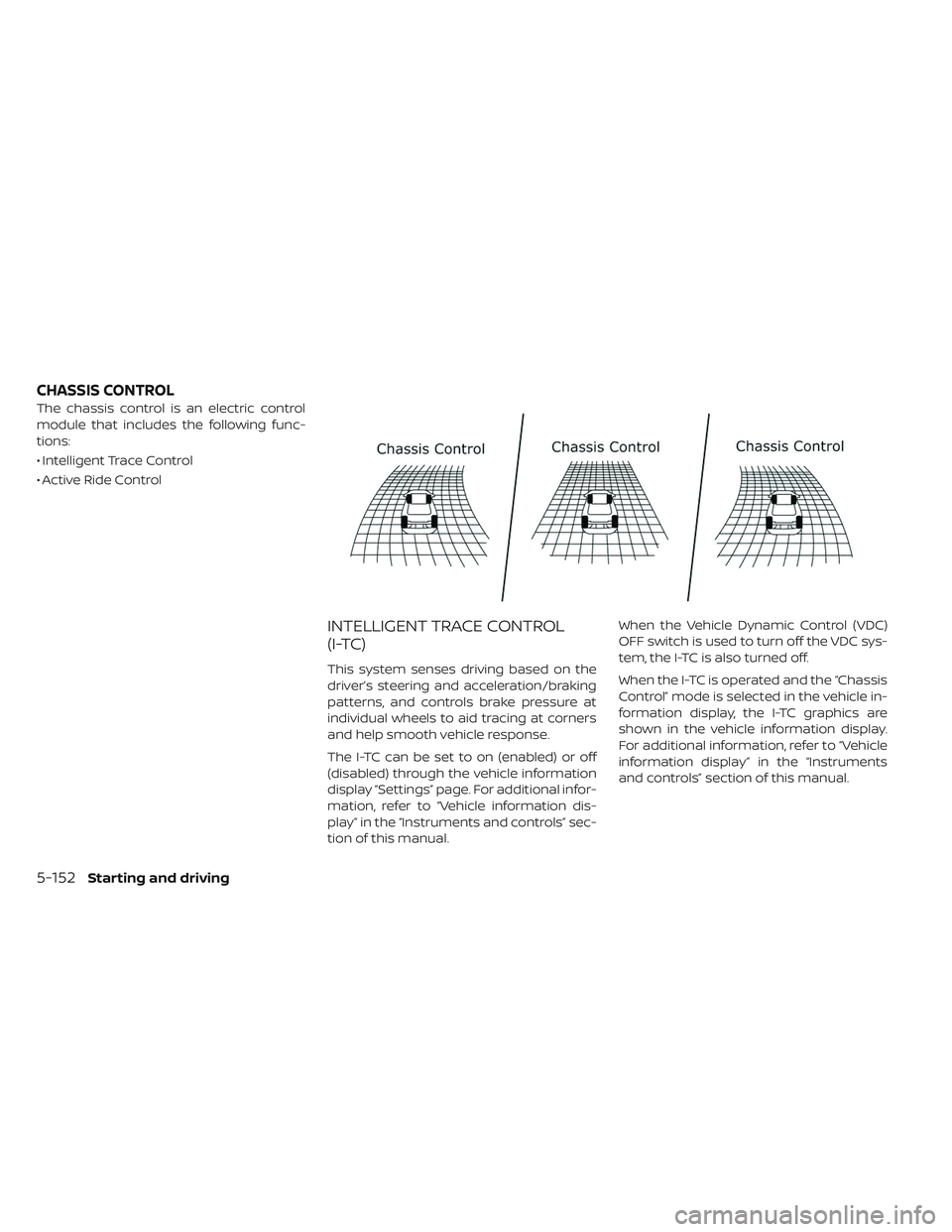
The chassis control is an electric control
module that includes the following func-
tions:
• Intelligent Trace Control
• Active Ride Control
INTELLIGENT TRACE CONTROL
(I-TC)
This system senses driving based on the
driver’s steering and acceleration/braking
patterns, and controls brake pressure at
individual wheels to aid tracing at corners
and help smooth vehicle response.
The I-TC can be set to on (enabled) or off
(disabled) through the vehicle information
display “Settings” page. For additional infor-
mation, refer to “Vehicle information dis-
play” in the “Instruments and controls” sec-
tion of this manual.When the Vehicle Dynamic Control (VDC)
OFF switch is used to turn off the VDC sys-
tem, the I-TC is also turned off.
When the I-TC is operated and the “Chassis
Control” mode is selected in the vehicle in-
formation display, the I-TC graphics are
shown in the vehicle information display.
For additional information, refer to “Vehicle
information display” in the “Instruments
and controls” section of this manual.
CHASSIS CONTROL
5-152Starting and driving
Page 512 of 610
If the “Chassis Control System Error: See
Owner’s Manual” warning message ap-
pears in the vehicle information display, it
may indicate that the I-TC is not function-
ing properly. Have the system checked as
soon as possible. It is recommended that
you visit a NISSAN certified LEAF dealer for
this service.
WARNING
The I-TC may not be effective depend-
ing on the driving condition. Always
drive carefully and attentively.
When the I-TC is operating, you may feel a
pulsation in the brake pedal and hear a
noise. This is normal and indicates that the
I-TC is operating properly.
Even if the I-TC is turned off, some functions
will remain on to assist the driver (for ex-
ample, avoidance scenes).
ACTIVE RIDE CONTROL (ARC)
This system senses upper body motion
(based on wheel speed information) and
controls motor torque. This will enhance
ride comfort in effort to restrain uncom-
fortable upper body movement when
passing over undulated road surfaces. This
system comes into effect above 25 mph
(40 km/h).
When the VDC OFF switch is used to turn off
the VDC system, the Active Ride Control is
also turned off.WARNING
• Never rely solely on the hill start as- sist system to prevent the vehicle
from moving backward on a hill. Al-
ways drive carefully and attentively.
Depress the brake pedal when the
vehicle is stopped on a steep hill. Be
especially careful when stopped on
a hill on frozen or muddy roads. Fail-
ure to prevent the vehicle from roll-
ing backwards may result in a loss of
control of the vehicle and possible
serious injury or death.
• The hill start assist system is not de- signed to hold the vehicle at a stand-
still on a hill. Depress the brake pedal
when the vehicle is stopped on a
steep hill. Failure to do so may cause
the vehicle to roll backwards and
may result in a collision or serious
personal injury.
• The hill start assist may not prevent the vehicle from rolling backwards
on a hill under all load or road condi-
tions. Always be prepared to de-
press the brake pedal to prevent the
vehicle from rolling backwards. Fail-
ure to do so may result in a collision
or serious personal injury.
HILL START ASSIST SYSTEM
Starting and driving5-153
Page 533 of 610
In order to maintain the appearance of
your vehicle, it is important to take proper
care of it.
To protect the paint surfaces, wash your
vehicle as soon as you can:
• Af ter a rainfall to prevent possible dam-age from acid rain.
• Af ter driving on coastal roads.
• When contaminants such as soot, bird droppings, tree sap, metal particles or
bugs get on the paint surface.
• When dust or mud builds up on the surface.
Whenever possible, store or park your ve-
hicle inside a garage or in a covered area.
When it is necessary to park outside, park in
a shady area or protect the vehicle with a
body cover.
Be careful not to scratch the paint sur-
face when putting on or removing the
body cover.
WASHING
Wash dirt off the vehicle with a wet sponge
and plenty of water. Clean the vehicle thor-
oughly using a mild soap, a special vehicle soap or general purpose dishwashing liq-
uid mixed with clean, lukewarm (never hot)
water.
CAUTION
• Do not use car washes that use acid in the detergent. Some car washes,
especially brushless ones, use some
acid for cleaning. The acid may react
with some plastic vehicle compo-
nents, causing them to crack. This
could affect their appearance, and
also could cause them not to func-
tion properly. Always check with
your car wash to confirm that acid is
not used.
• Do not wash the vehicle with strong household soap, strong chemical
detergents, gasoline or solvents.
• Do not wash the vehicle in direct sunlight or while the vehicle body is
hot, as the surface may become
water-spotted.
• Avoid using tight-napped or rough cloths, such as washing mitts. Care
must be taken when removing
caked-on dirt or other foreign sub-
stances so the paint surface is not
scratched or damaged. Rinse the vehicle thoroughly with plenty of
clean water.
Inside flanges, seams and folds on the
doors, hatches and hood are particularly
vulnerable to the effects of road salt. There-
fore, these areas must be regularly
cleaned. Make sure that the drain holes in
the lower edge of the door are open. Spray
water under the body and in the wheel
wells to loosen the dirt and wash away
road salt.
Avoid leaving water spots on the paint sur-
face by using a damp chamois to dry the
vehicle.
WAXING
Regular waxing protects the paint surface
and helps retain new vehicle appearance.
Polishing is recommended to remove
built-up wax residue and to avoid a weath-
ered appearance before reapplying wax.
A NISSAN certified LEAF dealer can assist
you in choosing the proper product.
• Wax your vehicle only af ter a thorough
washing. Follow the instructions supplied
with the wax.
CLEANING EXTERIOR
7-2Appearance and care
Page 534 of 610
• Do not use a wax containing any abra-sives, cutting compounds or cleaners that
may damage the vehicle finish.
Machine compound or aggressive polish-
ing on a base coat/clear coat paint finish
may dull the finish or leave swirl marks.
REMOVING SPOTS
Remove tar and oil spots, industrial dust,
insects, and tree sap as quickly as possible
from the paint surface to avoid lasting
damage or staining. Special cleaning prod-
ucts are available at a NISSAN certified
LEAF dealer or any automotive accessory
stores.
UNDERBODY
In areas where road salt is used in winter,
the underbody must be cleaned regularly.
This will prevent dirt and salt from building
up and causing the acceleration of corro-
sion on the underbody and suspension.
Before the winter period and again in the
spring, the underseal must be checked
and, if necessary, re-treated.
GLASS
Use glass cleaner to remove smoke and
dust film from the glass surfaces. It is nor-
mal for glass to become coated with a film
af ter the vehicle is parked in the hot sun.
Glass cleaner and a sof t cloth will easily
remove this film.
CAUTION
When cleaning the inside of the win-
dows, do not use sharp-edged tools,
abrasive cleaners or chlorine-based
disinfectant cleaners. They could dam-
age the electrical conductors, radio
antenna elements or rear window de-
froster elements.
WHEELS
Wash the wheels when washing the vehicle
to maintain their appearance.
• Clean the inner side of the wheels when the wheel is changed or the underside of
the vehicle is washed.
• Inspect wheel rims regularly for dents or corrosion. Such damage may cause loss
of pressure or poor seal at the tire bead. • NISSAN recommends that the road
wheels be waxed to protect against road
salt in areas where it is used during winter.
CAUTION
Do not use abrasive cleaners when
washing the wheels.
Aluminum alloy wheels (if so
equipped)
Wash regularly with a sponge dampened in a
mild soap solution, especially during winter
months in areas where road salt is used. Salt
could discolor the wheels if not removed.
CAUTION
Follow the directions below to avoid
staining or discoloring the wheels:
• Do not use a cleaner that uses strong acid or alkali contents to
clean the wheels.
• Do not apply wheel cleaners to the wheels when they are hot. The wheel
temperature should be the same as
ambient temperature.
• Rinse the wheel to completely re- move the cleaner within 15 minutes
af ter the cleaner is applied.
Appearance and care7-3
Page 538 of 610
SEAT BELTS
The seat belts can be cleaned by wiping
them with a sponge dampened in a mild
soap solution. Allow the belts to dry com-
pletely in the shade before using them.
For additional information, refer to “Seat
belts” in the “Safety—Seats, seat belts and
supplemental restraint system” section of
this manual.
WARNING
Do not allow wet seat belts to roll up in
the retractor. NEVER use bleach, dye, or
chemical solvents to clean the seat
belts, since these materials may se-
verely weaken the seat belt webbing.
MOST COMMON FACTORS
CONTRIBUTING TO VEHICLE
CORROSION
• The accumulation of moisture-retaining dirt and debris in body panel sections,
cavities, and other areas.
• Damage to paint and other protective coatings caused by gravel and stone
chips or minor traffic accidents.
ENVIRONMENTAL FACTORS
INFLUENCE THE RATE OF
CORROSION
Moisture
Accumulation of sand, dirt and water on
the vehicle body underside can accelerate
corrosion. Wet floor coverings will not dry
completely inside the vehicle, and should
be removed for drying to avoid floor panel
corrosion.
Relative humidity
Corrosion will be accelerated in areas of
high relative humidity, especially those ar-
eas where the temperatures stay above
freezing, where atmospheric pollution ex-
ists, or where road salt is used.
Temperature
A temperature increase will accelerate the
rate of corrosion to those parts which are
not well ventilated.
Air pollution
Industrial pollution, the presence of salt in
the air in coastal areas, or heavy road salt
use will accelerate the corrosion process.
Road salt will also accelerate the disinte-
gration of paint surfaces.
PROTECT YOUR VEHICLE FROM
CORROSION
• Wash and wax your vehicle of ten to keepthe vehicle clean.
• Always check for minor damage to the paint and repair it as soon as possible.
• Keep drain holes at the bottom of the doors open to avoid water accumulation.
• Check the underbody for accumulation of sand, dirt or salt. If present, wash with wa-
ter as soon as possible.
CORROSION PROTECTION
Appearance and care7-7
Page 541 of 610
Your new NISSAN has been designed to
have minimum maintenance require-
ments with long service intervals to save
you both time and money. However, some
day-to-day and regular maintenance is es-
sential to maintain your NISSAN’s fine me-
chanical condition, and its Electric Vehicle
(EV) system performance.
It is the owner’s responsibility to make sure
that the scheduled maintenance, and gen-
eral maintenance, is performed.
As the vehicle owner, you are the only one
who can ensure that your vehicle receives
the proper maintenance care. You are a
vital link in the maintenance chain.
SCHEDULED MAINTENANCE
For your convenience, both required and
optional scheduled maintenance items
are described and listed in your “NISSAN
Service and Maintenance Guide”. You must
refer to that guide to ensure that neces-
sary maintenance is performed on your
NISSAN at regular intervals.
GENERAL MAINTENANCE
General maintenance includes those items
which should be checked during normal
day-to-day operation. They are essential
for proper vehicle operation. It is your re-
sponsibility to perform these procedures
regularly as prescribed.
Performing general maintenance checks
requires minimal mechanical skill and only
a few general automotive tools.
These checks or inspections can be done
by yourself, a qualified technician or, if you
prefer, a NISSAN certified LEAF dealer.
WHERE TO GO FOR SERVICE
If maintenance service is required or your
vehicle appears to malfunction, have the
systems checked and serviced. It is recom-
mended that you visit a NISSAN certified
LEAF dealer for this service.NISSAN technicians are well-trained spe-
cialists and are kept up-to-date with the
latest service information through techni-
cal bulletins, service tips, and in-dealership
information systems. They are completely
qualified to work on NISSAN vehicles
be-
fore work begins.
You can be confident that a NISSAN certi-
fied LEAF dealer’s service department per-
forms the best job to meet the mainte-
nance requirements on your vehicle — in a
reliable and economical way.
MAINTENANCE REQUIREMENT
8-2Maintenance and do-it yourself