heating NISSAN LEAF 2019 Owner´s Manual
[x] Cancel search | Manufacturer: NISSAN, Model Year: 2019, Model line: LEAF, Model: NISSAN LEAF 2019Pages: 610, PDF Size: 7.11 MB
Page 37 of 610
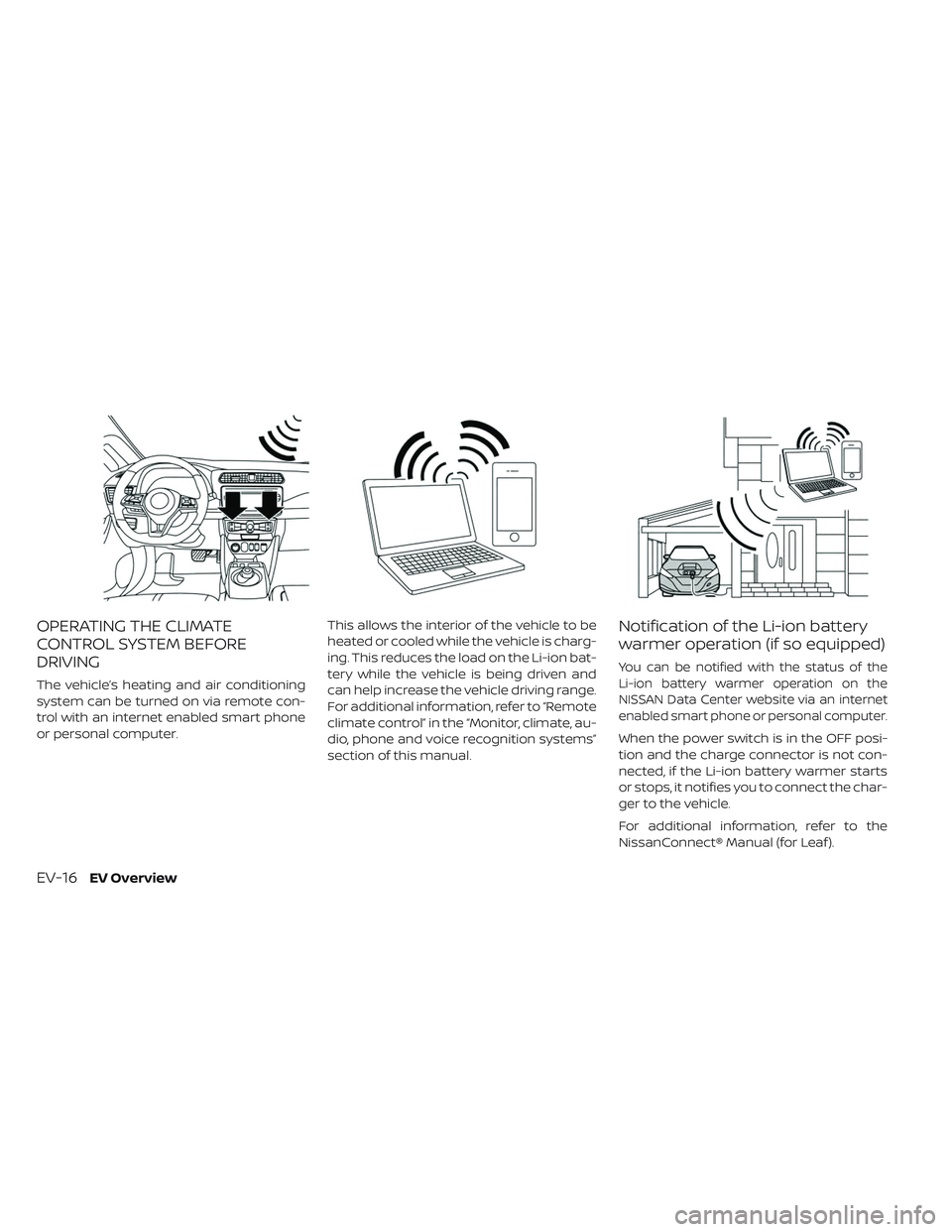
OPERATING THE CLIMATE
CONTROL SYSTEM BEFORE
DRIVING
The vehicle’s heating and air conditioning
system can be turned on via remote con-
trol with an internet enabled smart phone
or personal computer.This allows the interior of the vehicle to be
heated or cooled while the vehicle is charg-
ing. This reduces the load on the Li-ion bat-
tery while the vehicle is being driven and
can help increase the vehicle driving range.
For additional information, refer to “Remote
climate control” in the “Monitor, climate, au-
dio, phone and voice recognition systems”
section of this manual.
Notification of the Li-ion battery
warmer operation (if so equipped)
You can be notified with the status of the
Li-ion battery warmer operation on the
NISSAN Data Center website via an internet
enabled smart phone or personal computer.
When the power switch is in the OFF posi-
tion and the charge connector is not con-
nected, if the Li-ion battery warmer starts
or stops, it notifies you to connect the char-
ger to the vehicle.
For additional information, refer to the
NissanConnect® Manual (for Leaf ).
EV-16EV Overview
Page 44 of 610
RANGE
The distance you can drive the vehicle
(range) varies considerably depending
upon available charge, weather, tempera-
ture, usage, battery age, topography, and
driving style.
Refer to the Monroney label (window sticker)
for the official EPA range. Your actual range
will vary and could be significantly less, either
initially or as the battery ages and with use
over time. For additional information, refer to
“Improve driving range” in this section for in-
formation on the factors that affect vehicle
range and how to use the vehicle to maxi-
mize vehicle range.
IMPROVE DRIVING RANGE
Vehicle range depends on a number of fac-
tors.
Actual vehicle range will vary depending
upon:
• Speed,
• Vehicle load,
• Electrical load from vehicle accessories,
• Traffic and road conditions,• Distance driven without stopping,
• Usage,
• Driving style,
• Battery age,
• Weather or temperature,
• Topography,
• Charging habits.
• Speed,
• Vehicle load,
• Electrical load from vehicle accessories,
• Traffic and road conditions.
NISSAN recommends the following driv-
ing habits to help maximize vehicle range:
Before driving:
• Follow recommended periodic main-
tenance.
• Keep tires inflated to correct pressure.
• Keep wheels in correct alignment.
• Pre-heat or pre-cool the interior cabin while the vehicle is charging.
• Remove unnecessary cargo from the vehicle. While driving:
• Drive in ECO mode
– The ECO mode helps reduce powerconsumption by reducing acceleration
when compared to the same accelera-
tor pedal position in the D (Drive) posi-
tion (normal mode).
• Drive at a constant speed. Maintain cruis- ing speeds with constant accelerator po-
sitions or by using cruise control when
appropriate.
• Accelerate slowly and smoothly. Gently press and release the accelerator pedal
for acceleration and deceleration.
• Drive at moderate speeds on the highway.
• Avoid extending highway driving with multiple quick charges.
• Avoid frequent stopping and braking. Maintain a safe distance behind other
vehicles.
• Turn off the air conditioner/heater when it is not necessary.
• Select a moderate temperature setting for heating or cooling to help reduce
power consumption.
EFFICIENT USE OF YOUR VEHICLE
EV OverviewEV-23
Page 63 of 610
• Discontinue EVSE use immediately ifplug or outlet becomes hot to the
touch or if you notice any unusual
odors.
• Never use extension cords or plug adapters with EVSE.
• Always unplug the EVSE when not in use.
• The NISSAN Genuine L1 EVSE charg- ing device draws 12 amps continu-
ously while charging the Li-ion bat-
tery with AC 110–120 volt outlet. Do
not plug in to any electrical circuit
unless it is inspected by a qualified
electrician to confirm that the elec-
trical circuit can accept a 12 amp
draw. Any electrical circuit has a
much higher likelihood of being
compromised in the following con-
ditions listed below.
– Improper use of the EVSE may re-sult in a fire and serious injury or
death.
– Do not use the EVSE in structures more than 40 years old.
–
Do not use the EVSE in structures
using fuse-based circuit protec-
tion. Use only with electrical circuits
protected by circuit breakers.
– Do not use the EVSE on electrical circuits with two-prong outlets.
– Do not use the EVSE if other de- vices are plugged into the same
circuit.
– When unplugging, be sure to pull by the plug or the EVSE, not the
cord.
– Do not pull, twist, bend, step on or drag the cable.
– Do not attach or detach the Genu- ine NISSAN Adapter while the
Genuine NISSAN Adapter is in-
serted into an outlet.
– Do not use the Genuine NISSAN Adapter if the plug is not fully in-
serted and not locked.
– If you use the EVSE holder, handle it with care to avoid injuries due to
contact with its edges or other
parts.
– Do not use the EVSE if the cable or cord is frayed, has broken insula-
tion, or shows any other indica-
tions of damage.
– Stop using the EVSE immediately if charging stops before comple-
tion when you move the plug or
cord. – Do not use the EVSE if the control
box, plug, the EVSE or charge con-
nector is broken, cracked, open,
corroded or shows any other indi-
cations of damage.
– Do not use the EVSE if the plug has a loose connection with the outlet
or if the outlet is damaged or
rusted.
– Before you connect the EVSE, be sure to check the rated current
shown on the EVSE to ensure that
the outlet and circuit have enough
current capacity to charge your
vehicle safely. If the capacity of
the outlet and circuit is not
enough, wiring may cause over-
heating or a fire.
– If in any doubt about the outlet and circuit, consult a qualified
electrician.
– The EVSE has parts that may spark inside. Do not use it where
gasoline, paint, or flammable liq-
uids are used or stored.
– Do not use if a malfunction occurs or if the EVSE has been damaged
in any manner. It is recommended
that you visit a NISSAN certified
LEAF dealer for replacement.
CH-12Charging
Page 69 of 610
• Never use plug adapters other thanthe Genuine NISSAN Adapter for
EVSE.
• Always unplug the EVSE when not in use.
• The NISSAN Genuine L1 & L2 EVSE draws 12 amps continuously while
charging the Li-ion battery with AC
110–120 volt outlet. Do not plug in to
any electrical circuit unless it is in-
spected by a qualified electrician to
confirm that the electrical circuit can
accept a 12 amp draw. Any electrical
circuit has a much higher likelihood
of being compromised in the follow-
ing conditions listed below.
– Improper use of the EVSE may re-sult in a fire and serious injury or
death.
– Do not use the EVSE in structures more than 40 years old.
– Do not use the EVSE in structures using fuse-based circuit protec-
tion. Use only with electrical cir-
cuits protected by circuit break-
ers.
– Do not use the EVSE on electrical circuits with two-prong outlets. – Do not use the EVSE if other de-
vices are plugged into the same
circuit.
– When unplugging, be sure to pull by the plug or the Genuine NISSAN
Adapter, not the cord.
– Do not pull, twist, bend, step on or drag the cable.
– Do not attach or detach the Genu- ine NISSAN Adapter while the
Genuine NISSAN Adapter is in-
serted into an outlet.
– Do not use the Genuine NISSAN Adapter if the plug is not fully in-
serted and not locked.
– If you use the EVSE holder, handle it with care to avoid injuries due to
contact with its edges or other
parts.
– Do not use the EVSE or Genuine NISSAN Adapter if the cable or
cord is frayed, has broken insula-
tion, or shows any other indica-
tions of damage.
– Stop using the EVSE or Genuine NISSAN Adapter immediately if
charging stops before completion
when you move the Genuine
NISSAN Adapter, the plug or the
cord. – Do not use the EVSE or Genuine
NISSAN Adapter if the control box,
plug, Genuine NISSAN Adapter or
charge connector is broken,
cracked, open, corroded or shows
any other indications of damage.
– Do not use the EVSE or Genuine NISSAN Adapter if the plug or
Genuine NISSAN Adapter has a
loose connection with the outlet
or if the outlet is damaged or
rusted.
– Before connecting the EVSE, be sure to check the rated current
shown on the EVSE to ensure that
the outlet and circuit have enough
current capacity to charge your
vehicle safely. If the capacity of
the outlet and circuit is not
enough, wiring may cause over-
heating or a fire.
– If in any doubt about the outlet and circuit, consult a qualified
electrician.
– The device has parts that may spark inside. Do not use it where
gasoline, paint, or flammable liq-
uids are used or stored.
CH-18Charging
Page 77 of 610
– If you use the EVSE holder, handleit with care to avoid injuries due to
contact with its edges or other
parts.
– Do not use the EVSE if the cable or cord is frayed, has broken insula-
tion, or shows any other indica-
tions of damage.
– Stop using the EVSE immediately if charging stops before comple-
tion when you move the plug or
cord.
– Do not use the EVSE if the control box, plug, the EVSE or charge con-
nector is broken, cracked, open,
corroded or shows any other indi-
cations of damage.
– Do not use the EVSE if the plug has a loose connection with the outlet
or if the outlet is damaged or
rusted.
– Before you connect the EVSE, be sure to check the rated current
shown on the EVSE to ensure that
the outlet and circuit have enough
current capacity to charge your
vehicle safely. If the capacity of
the outlet and circuit is not
enough, wiring may cause over-
heating or a fire. – If in any doubt about the outlet
and circuit, consult a qualified
electrician.
– The EVSE has parts that may spark inside. Do not use it where
gasoline, paint, or flammable liq-
uids are used or stored.
– Do not use if a malfunction occurs or if the EVSE has been damaged
in any manner. It is recommended
that you visit a NISSAN certified
LEAF dealer for replacement.
– The EVSE contains no user ser- viceable parts. Do not attempt to
repair the EVSE, doing so will void
your warranty.
• Pass the lower side belt of the EVSE case securely through the fastener
on the bottom of the luggage board.
If the case suddenly becomes loose,
it may cause serious injury or death.CAUTION
• Only charge using a standard AC 220 - 240 volt, 50A dedicated electrical
outlet (for example, do not use an
electric generator). Failure to do so
may cause charging to fail and could
cause damage to the vehicle or the
EVSE due to power surges.
• NISSAN recommends using Genuine NISSAN charging equipment to
charge the vehicle. Using non-
NISSAN equipment could cause the
Li-ion battery to not charge cor-
rectly and may damage the vehicle
or the EVSE.
CH-26Charging
Page 315 of 610
conditioner can be economized com-
pared to the amount consumed while
the AUTO indicator is not illuminated.
The HEAT indicator light and the A/C indi-
cator light illuminates according to the
operation modes of the climate control
system.
Operation
mode A/C
indicator HEAT
indicator
Cooling
(HEAT off ) ON
OFF
Heating
(A/C off ) OFF ON
Manual operation
The manual mode can be used to control
the heater and air conditioner to your de-
sired temperature. The HEAT indicator light and the A/C indi-
cator light illuminates according to the op-
eration modes.
Operation
mode
A/C
indicator HEAT
indicator
Cooling
(HEAT off ) ON
OFF
Dehumidi-
fied heating ON
ON
Heating
(A/C off ) OFF ON
Ventilation OFF OFF
Cooling:
1. Press the A/C button to illuminate the A/C indicator light.
2. Press the
HEAT button to turn off
the HEAT indicator light.
• Do not set the temperature higher than the outside air temperature. Doing so may
prevent the temperature from being con-
trolled properly.
• A visible mist may be seen coming from the ventilators in hot, humid conditions as
the air is cooled rapidly. This does not indi-
cate a malfunction. Dehumidified heating:
1. Press the A/C button to illuminate the
A/C indicator light.
2. Press the
HEAT button to illuminate
the HEAT indicator light
NOTE:
Electric power consumption of climate
control increases while A/C button indi-
cator and
HEAT button indicator si-
multaneously illuminate. As a result, the
driving range may be decreased.
Heating (A/C off ):
1. Press the
HEAT button to illuminate
the HEAT indicator light.
2. Press the A/C button to turn off the A/C indicator light.
• Do not set temperature lower than the outside air temperature. Doing so may
prevent the temperature from being con-
trolled properly.
• If the windows fog up, use dehumidified heating instead of the A/C off heating.
4-36Monitor, climate, audio, phone and voice recognition systems
Page 318 of 610
10. MODE (manual air flow control) button
11. A/C (air conditioner) ON·OFF button
Automatic operation (AUTO)
The AUTO mode may be used year-round
as the system automatically controls con-
stant temperature, air flow distribution and
fan speed.
1. Press the AUTO button. The AUTO indica-tor will be illuminated.
2. Press the temperature control button to set the desired temperature.
When any of the following functions are
operated, the AUTO indicator will turn off.
• The
HEAT or A/C button is pressed.
• The fan speed control or ventilator air flow control is operated.
However, the functions that were not oper-
ated continue operating in AUTO mode.
NOTE:
• If thefan speed control button,
MODE button, or
intake air control
button is operated while AUTO is in use,
all the other buttons operate in AUTO
mode. •
While the AUTO indicator is illuminated,
electric power consumption of the air
conditioner can be economized com-
pared to the amount consumed while
the AUTO indicator is not illuminated.
The HEAT indicator light and the A/C indi-
cator light illuminates according to the op-
eration modes of the climate control sys-
tem.
Operation
mode A/C
indicator HEAT
indicator
Cooling
(HEAT off ) ON
OFF
Heating
(A/C off ) OFF ON
Manual operation
The manual mode can be used to control
the heater and air conditioner to your de-
sired temperature.
The HEAT indicator light and the A/C indi-
cator light illuminates according to the op-
eration modes.
Operation
modeA/C
indicator HEAT
indicator
Cooling
(HEAT off ) ON
OFF
Dehumidi-
fied heating ON
ON
Heating
(A/C off ) OFF ON
Ventilation OFF OFF
Cooling:
1. Press the A/C button to illuminate the A/C indicator light.
2. Press the
HEAT button to turn off
the HEAT indicator light.
• Do not set the temperature higher than the outside air temperature. Doing so may
prevent the temperature from being con-
trolled properly.
• A visible mist may be seen coming from the ventilators in hot, humid conditions as
the air is cooled rapidly. This does not indi-
cate a malfunction.
Monitor, climate, audio, phone and voice recognition systems4-39
Page 319 of 610
Dehumidified heating:
1. Press the A/C button to illuminate theA/C indicator light.
2. Press the
HEAT button to illuminate
the HEAT indicator light
NOTE:
Electric power consumption of climate
control increases while A/C button indi-
cator and
HEAT button indicator si-
multaneously illuminate. As a result, the
driving range may be decreased.
Heating (A/C off ):
1. Press the
HEAT button to illuminate
the HEAT indicator light.
2. Press the A/C button to turn off the A/C indicator light.
• Do not set temperature lower than the outside air temperature. Doing so may
prevent the temperature from being con-
trolled properly.
• If the windows fog up, use dehumidified heating instead of the A/C off heating. Ventilation:
Press the
HEAT button and A/C but-
ton if the indicator lights are on so that
both indicator lights turn off.
NOTE:
• The ventilation mode requires a lower
power consumption, so cruising dis-
tance will increase.
• In ventilation mode, temperature is not
indicated on the navigation monitor or
on the air conditioner display.
Dehumidified defrosting/defogging:
Press the
front defroster button (the
indicator light will illuminate).
• To remove moisture or fog on the front window quickly, set the temperature to
the high temperature and the fan speed
to their maximum level.
• Af ter the windshield is cleared, press the
front defroster button again (the in-
dicator light will turn off ).
• When the
front defroster button is
pressed, the air conditioner and heater will
automatically turn on to defog the wind-
shield. The outside air recirculation mode will be selected to improve the defogging
performance.
Fan speed control:
Press the
fan speed control button to
manually control the fan speed.
Press the AUTO button to change the fan
speed to the automatic mode.
Air flow control:
Press the MODE button to change the air
flow mode.
— Air flows from the center and side
ventilators.
—Air flows from the center and side
ventilators and foot outlets.
—Air flows mainly from the foot
outlets.
—Air flows from the defroster out-
lets and foot outlets.
—Air flows from the defroster
vents.
Temperature control:
Press the temperature control buttons to
set the desired temperature.
4-40Monitor, climate, audio, phone and voice recognition systems
Page 428 of 610
• Always pay attention to the opera-tion of the vehicle and be ready to
manually control the proper follow-
ing distance. The ICC system may
not be able to maintain the selected
distance between vehicles (follow-
ing distance) or selected vehicle
speed under some circumstances.
• The system may not detect the ve- hicle in front of you in certain road or
weather conditions. To avoid acci-
dents, never use the ICC system un-
der the following conditions:
– On roads where the traffic is heavyor there are sharp curves
– On slippery road surfaces such as on ice or snow, etc.
– During bad weather (rain, fog, snow, etc.)
– When rain, snow or dirt adhere to the bumper around the distance
sensor – On steep downhill roads (the ve-
hicle may go beyond the set ve-
hicle speed and frequent braking
may result in overheating the
brakes)
– On repeated uphill and downhill roads
– When traffic conditions make it difficult to keep a proper distance
between vehicles because of fre-
quent acceleration or decelera-
tion
– Interference by other radar sources.
• Do not use the ICC system if you are towing a trailer. The system may not
detect a vehicle ahead.
• In some road or traffic conditions, a vehicle or object can unexpectedly
come into the sensor detection zone
and cause automatic braking. Al-
ways stay alert and avoid using the
ICC system where not recom-
mended in this warning section. The radar sensor will not detect the follow-
ing objects:
• Stationary and slow moving vehicles
• Pedestrians or objects in the roadway
• Oncoming vehicles in the same lane
• Motorcycles traveling offset in the travel
lane
The sensor generally detects the signals
returned from the vehicle ahead. Therefore,
if the sensor cannot detect the reflection
from the vehicle ahead, the ICC system
may not maintain the selected distance.
The following are some conditions in which
the sensor cannot properly detect a ve-
hicle ahead and the system may not oper-
ate properly:
• When snow or road spray from traveling vehicles reduces the sensor’s detection.
• When your vehicle is towing a trailer, etc.
• When excessively heavy baggage is loaded in the rear seat or the cargo area of
your vehicle.
Starting and driving5-69
Page 456 of 610
• As there is a performance limit to thedistance control function, never rely
solely on the ICC system. This sys-
tem does not correct careless, inat-
tentive or absentminded driving or
overcome poor visibility in rain, fog,
or other bad weather. Decelerate the
vehicle speed by depressing the
brake pedal, depending on the dis-
tance to the vehicle ahead and the
surrounding circumstances in order
to maintain a safe distance between
vehicles.
• When the ICC system automatically brings the car to a stop, your vehicle
can automatically accelerate if the
vehicle is stopped for less than ap-
proximately 3 seconds. Be prepared
to stop your vehicle if necessary.
• Always pay attention to the opera- tion of the vehicle and be ready to
manually control the proper follow-
ing distance. The ICC system may
not be able to maintain the selected
distance between vehicles (follow-
ing distance) or selected vehicle
speed under some circumstances. • The system may not detect the ve-
hicle in front of you in certain road or
weather conditions. To avoid acci-
dents, never use the ICC system un-
der the following conditions:
– On roads with heavy, high-speedtraffic or sharp curves
– On slippery road surfaces such as on ice or snow, etc.
– During bad weather (rain, fog, snow, etc.)
– When rain, snow or dirt adhere to the bumper around the distance
sensor
– On steep downhill roads (the ve- hicle may go beyond the set ve-
hicle speed and frequent braking
may result in overheating the
brakes)
– On repeated uphill and downhill roads
– When traffic conditions make it difficult to keep a proper distance
between vehicles because of fre-
quent acceleration or decelera-
tion
–
Interference by other radar sources
• Do not use the ICC system if you are towing a trailer. The system may not
detect a vehicle ahead.
• In some road or traffic conditions, a vehicle or object can unexpectedly
come into the sensor detection zone
and cause automatic braking. Al-
ways stay alert and avoid using the
ICC system where not recom-
mended in this warning section.
The ICC system will not detect the following
objects:
• Stationary or slow moving vehicles
• Pedestrians or objects in the roadway
• Oncoming vehicles in the same lane
• Motorcycles traveling offset in the travel lane
The following are some conditions in which
the radar sensor cannot properly detect a
vehicle ahead and the system may not op-
erate properly:
• When the sensor detection is reduced (conditions such as rain, snow, fog, dust
storms, sandstorms, and road spray from
other vehicles)
Starting and driving5-97