turn signal NISSAN LEAF 2019 Owner´s Manual
[x] Cancel search | Manufacturer: NISSAN, Model Year: 2019, Model line: LEAF, Model: NISSAN LEAF 2019Pages: 610, PDF Size: 7.11 MB
Page 10 of 610
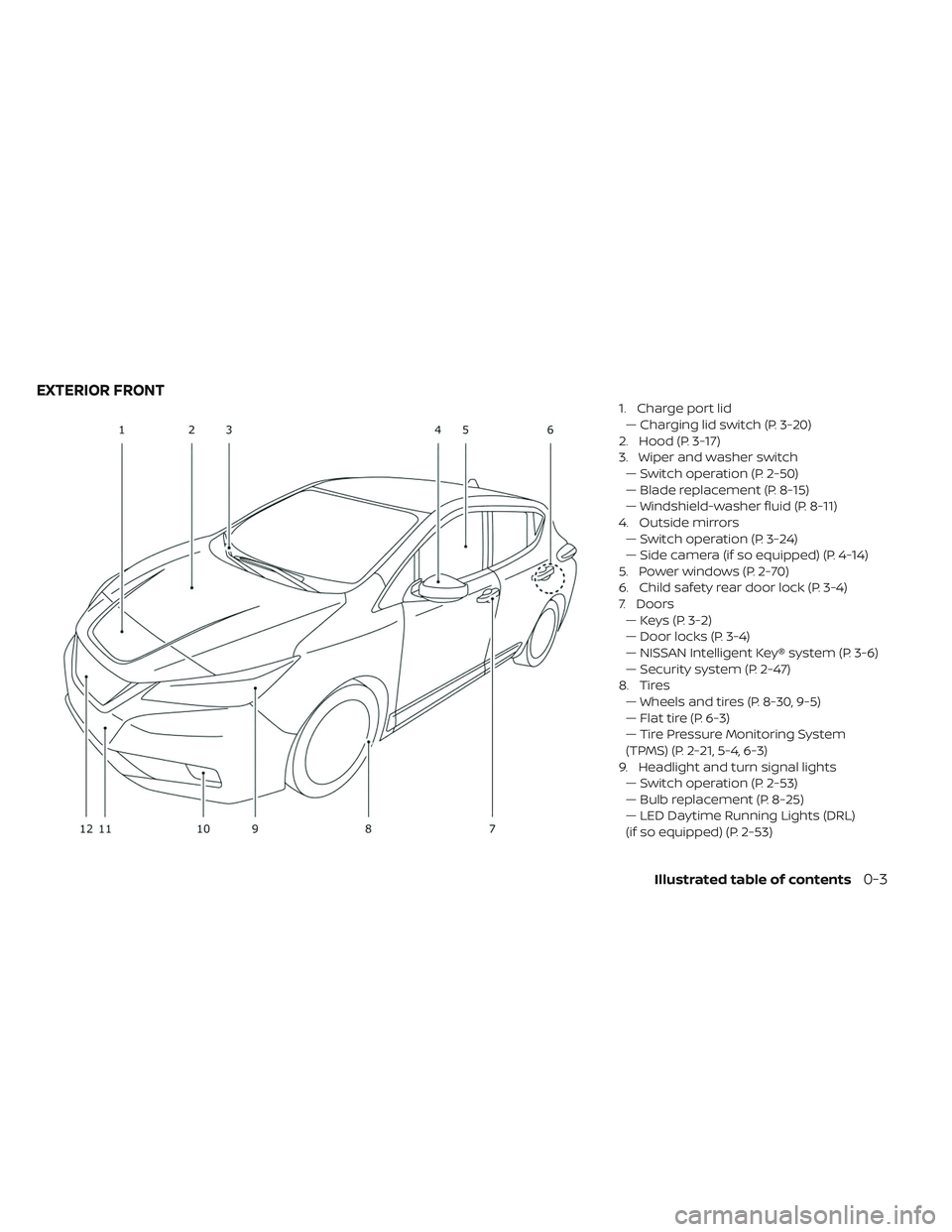
1. Charge port lid— Charging lid switch (P. 3-20)
2. Hood (P. 3-17)
3. Wiper and washer switch — Switch operation (P. 2-50)
— Blade replacement (P. 8-15)
— Windshield-washer fluid (P. 8-11)
4. Outside mirrors — Switch operation (P. 3-24)
— Side camera (if so equipped) (P. 4-14)
5. Power windows (P. 2-70)
6. Child safety rear door lock (P. 3-4)
7. Doors — Keys (P. 3-2)
— Door locks (P. 3-4)
— NISSAN Intelligent Key® system (P. 3-6)
— Security system (P. 2-47)
8. Tires — Wheels and tires (P. 8-30, 9-5)
— Flat tire (P. 6-3)
— Tire Pressure Monitoring System
(TPMS) (P. 2-21, 5-4, 6-3)
9. Headlight and turn signal lights — Switch operation (P. 2-53)
— Bulb replacement (P. 8-25)
— LED Daytime Running Lights (DRL)
(if so equipped) (P. 2-53)
EXTERIOR FRONT
Illustrated table of contents0-3
Page 14 of 610
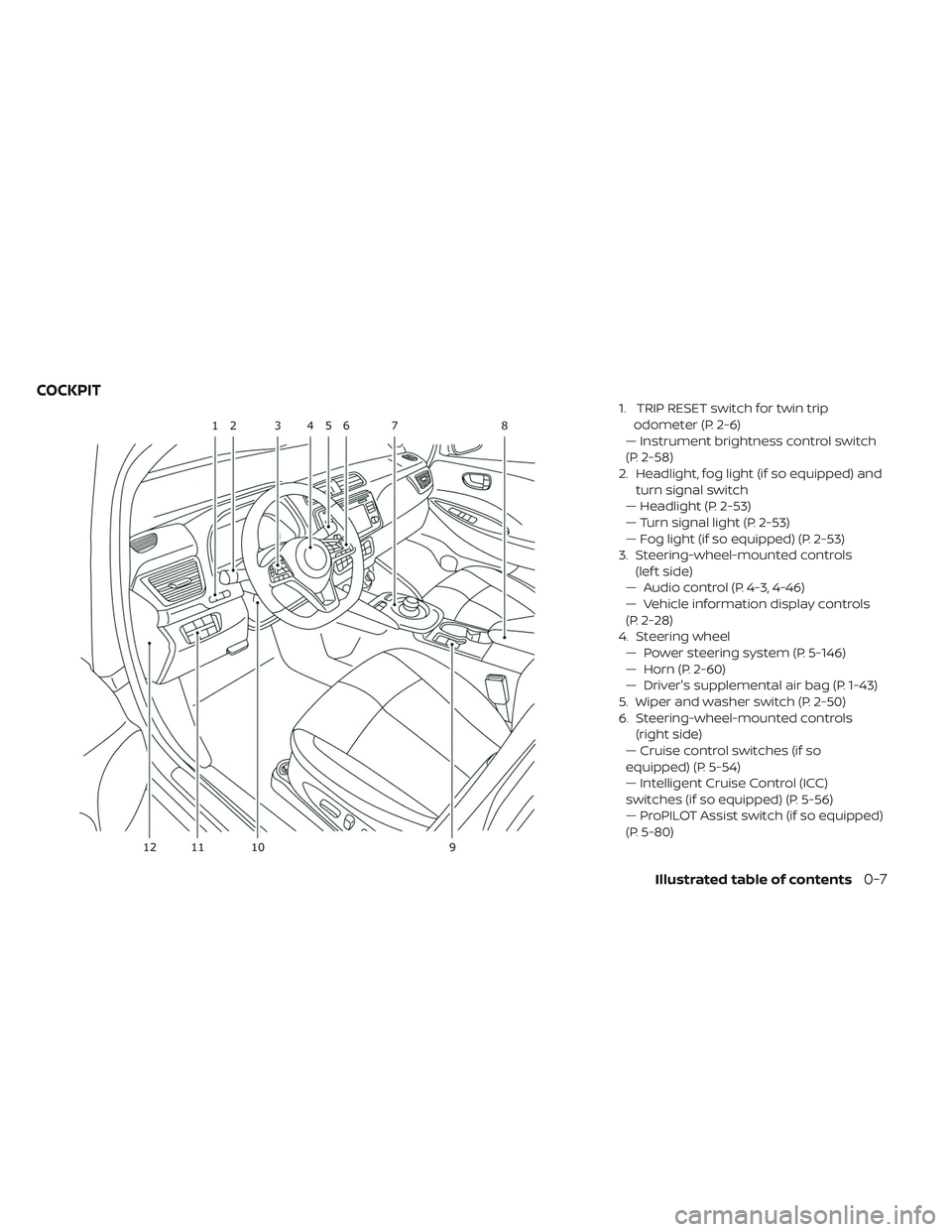
1. TRIP RESET switch for twin tripodometer (P. 2-6)
— Instrument brightness control switch
(P. 2-58)
2. Headlight, fog light (if so equipped) and turn signal switch
— Headlight (P. 2-53)
— Turn signal light (P. 2-53)
— Fog light (if so equipped) (P. 2-53)
3. Steering-wheel-mounted controls (lef t side)
— Audio control (P. 4-3, 4-46)
— Vehicle information display controls
(P. 2-28)
4. Steering wheel — Power steering system (P. 5-146)
— Horn (P. 2-60)
— Driver's supplemental air bag (P. 1-43)
5. Wiper and washer switch (P. 2-50)
6. Steering-wheel-mounted controls (right side)
— Cruise control switches (if so
equipped) (P. 5-54)
— Intelligent Cruise Control (ICC)
switches (if so equipped) (P. 5-56)
— ProPILOT Assist switch (if so equipped)
(P. 5-80)
COCKPIT
Illustrated table of contents0-7
Page 17 of 610
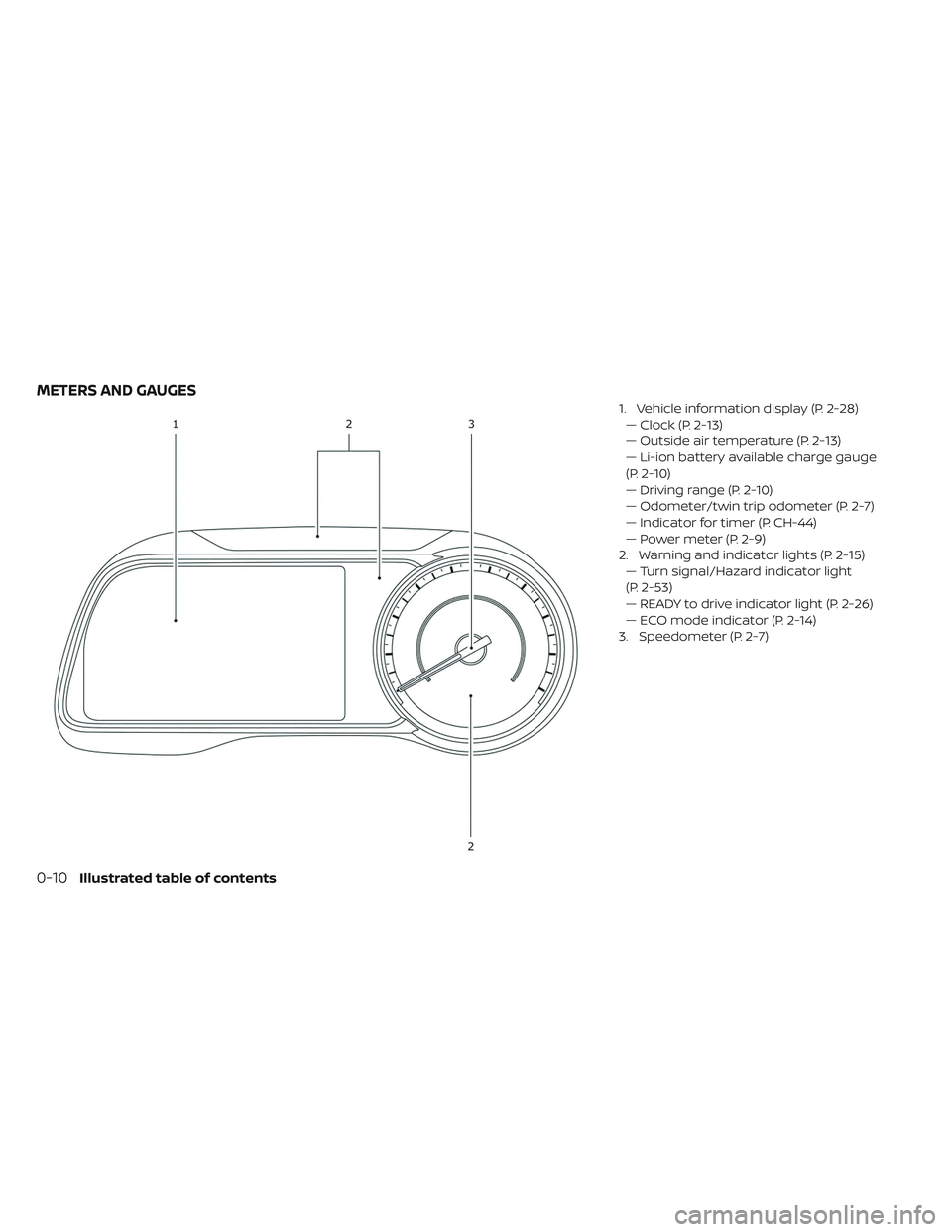
1. Vehicle information display (P. 2-28)— Clock (P. 2-13)
— Outside air temperature (P. 2-13)
— Li-ion battery available charge gauge
(P. 2-10)
— Driving range (P. 2-10)
— Odometer/twin trip odometer (P. 2-7)
— Indicator for timer (P. CH-44)
— Power meter (P. 2-9)
2. Warning and indicator lights (P. 2-15) — Turn signal/Hazard indicator light
(P. 2-53)
— READY to drive indicator light (P. 2-26)
— ECO mode indicator (P. 2-14)
3. Speedometer (P. 2-7)
METERS AND GAUGES
0-10Illustrated table of contents
Page 20 of 610
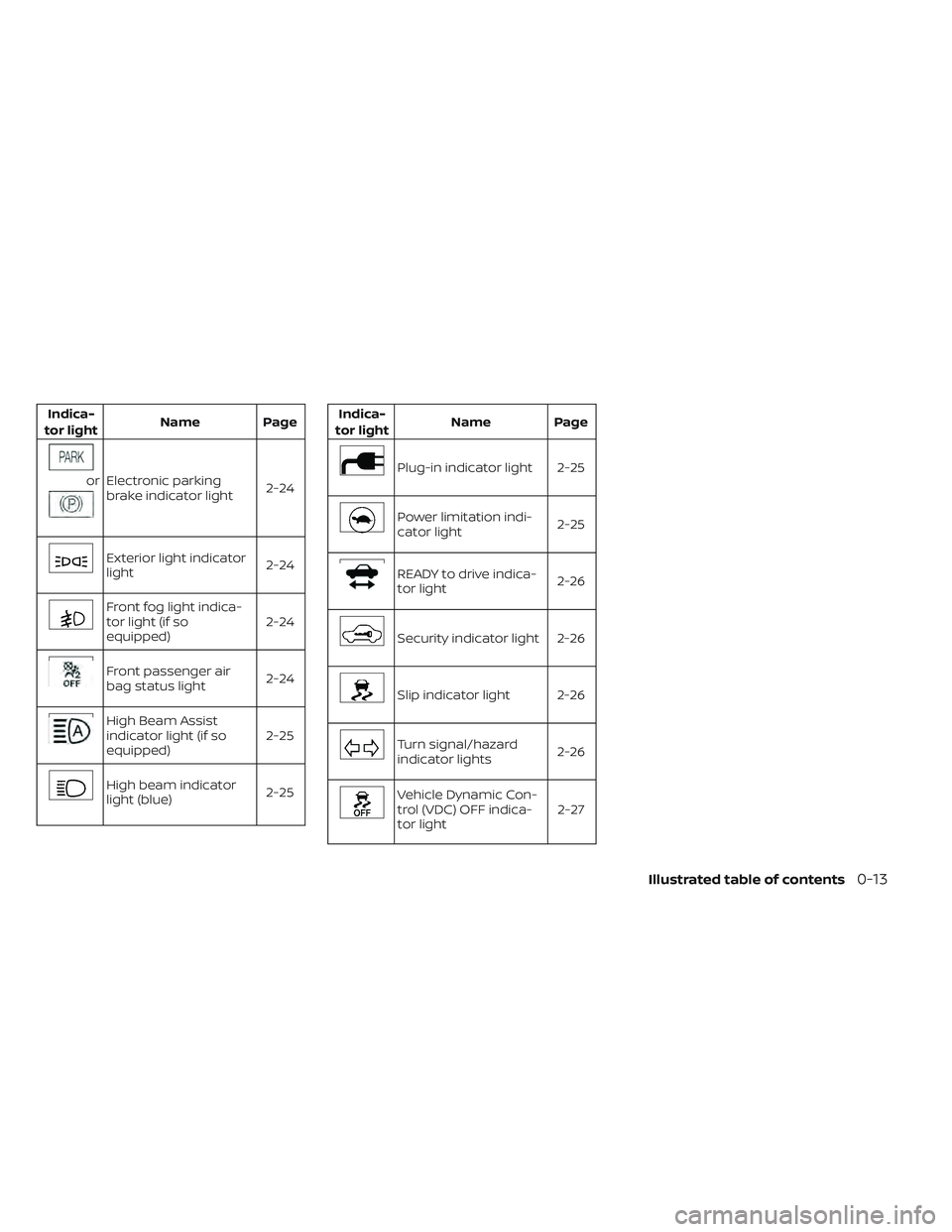
Indica-
tor light Name Page
orElectronic parking
brake indicator light
2-24
Exterior light indicator
light2-24
Front fog light indica-
tor light (if so
equipped)2-24
Front passenger air
bag status light
2-24
High Beam Assist
indicator light (if so
equipped) 2-25
High beam indicator
light (blue)
2-25
Indica-
tor light Name Page
Plug-in indicator light 2-25
Power limitation indi-
cator light
2-25
READY to drive indica-
tor light2-26
Security indicator light 2-26
Slip indicator light 2-26
Turn signal/hazard
indicator lights2-26
Vehicle Dynamic Con-
trol (VDC) OFF indica-
tor light 2-27
Illustrated table of contents0-13
Page 174 of 610
2 Instruments and controls
Cockpit........................... .2-3
Instrument panel ......................2-5
Meters and gauges ................... .2-6
Speedometer and odometer ............2-7
Li-ion battery temperature gauge .........2-8
Power meter .......................2-9
Driving range ......................2-10
Li-ion battery available charge gauge ......2-10
Outside air temperature ...............2-13
Clock .......................... .2-13
ECO mode indicator ................ .2-14
e-Pedal system indicator ..............2-14
Warning lights, indicator lights and audible
reminders ......................... .2-15
Checking lights .................... .2-17
Warning lights .................... .2-17
Indicator lights .................... .2-24
Audible reminders ................. .2-27
Vehicle information display ..............2-28
How to use the vehicle information display . . .2-28
Startup display................... .2-29
Settings .........................2-29
Vehicle information display warnings and
indicators ........................2-37 Warning information displays
(models with a Navigation System)
.......2-46
Security systems .................... .2-47
Vehicle security system ...............2-48
NISSAN Vehicle Immobilizer System .......2-49
Wiper and washer switch ................2-50
Washer operation .................. .2-51
Rear wiper operation ................2-52
Rear window and outside mirror (if so equipped)
defroster switch......................2-53
Headlight and turn signal switch ...........2-53
Headlight switch .................. .2-53
Instrument brightness control ..........2-58
Turn signal switch ................. .2-59
Fog light switch (if so equipped) ...........2-59
Horn ............................ .2-60
ECO switch .........................2-60
Heated seat switches (if so equipped) .......2-60
Heated steering wheel switch (if so equipped) . . .2-62E-call (SOS) button (if so equipped).........2-62
Charge port lid switch ................. .2-63
Immediate Charge switch ...............2-63
Steering Assist switch (if so equipped) .......2-63
Rear Door Alert (if so equipped) ............2-64
Page 176 of 610
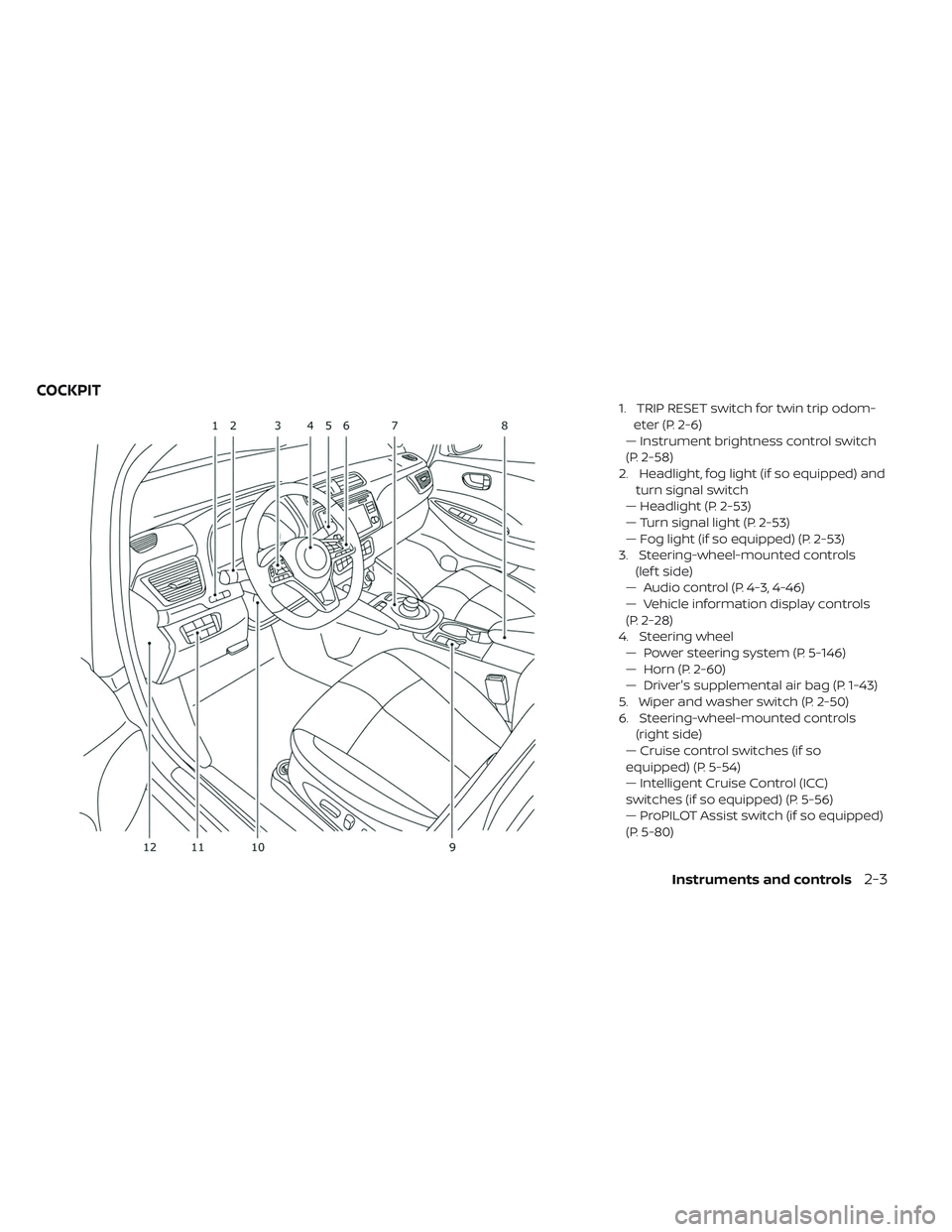
1. TRIP RESET switch for twin trip odom-eter (P. 2-6)
— Instrument brightness control switch
(P. 2-58)
2. Headlight, fog light (if so equipped) and turn signal switch
— Headlight (P. 2-53)
— Turn signal light (P. 2-53)
— Fog light (if so equipped) (P. 2-53)
3. Steering-wheel-mounted controls (lef t side)
— Audio control (P. 4-3, 4-46)
— Vehicle information display controls
(P. 2-28)
4. Steering wheel — Power steering system (P. 5-146)
— Horn (P. 2-60)
— Driver's supplemental air bag (P. 1-43)
5. Wiper and washer switch (P. 2-50)
6. Steering-wheel-mounted controls (right side)
— Cruise control switches (if so
equipped) (P. 5-54)
— Intelligent Cruise Control (ICC)
switches (if so equipped) (P. 5-56)
— ProPILOT Assist switch (if so equipped)
(P. 5-80)
COCKPIT
Instruments and controls2-3
Page 179 of 610
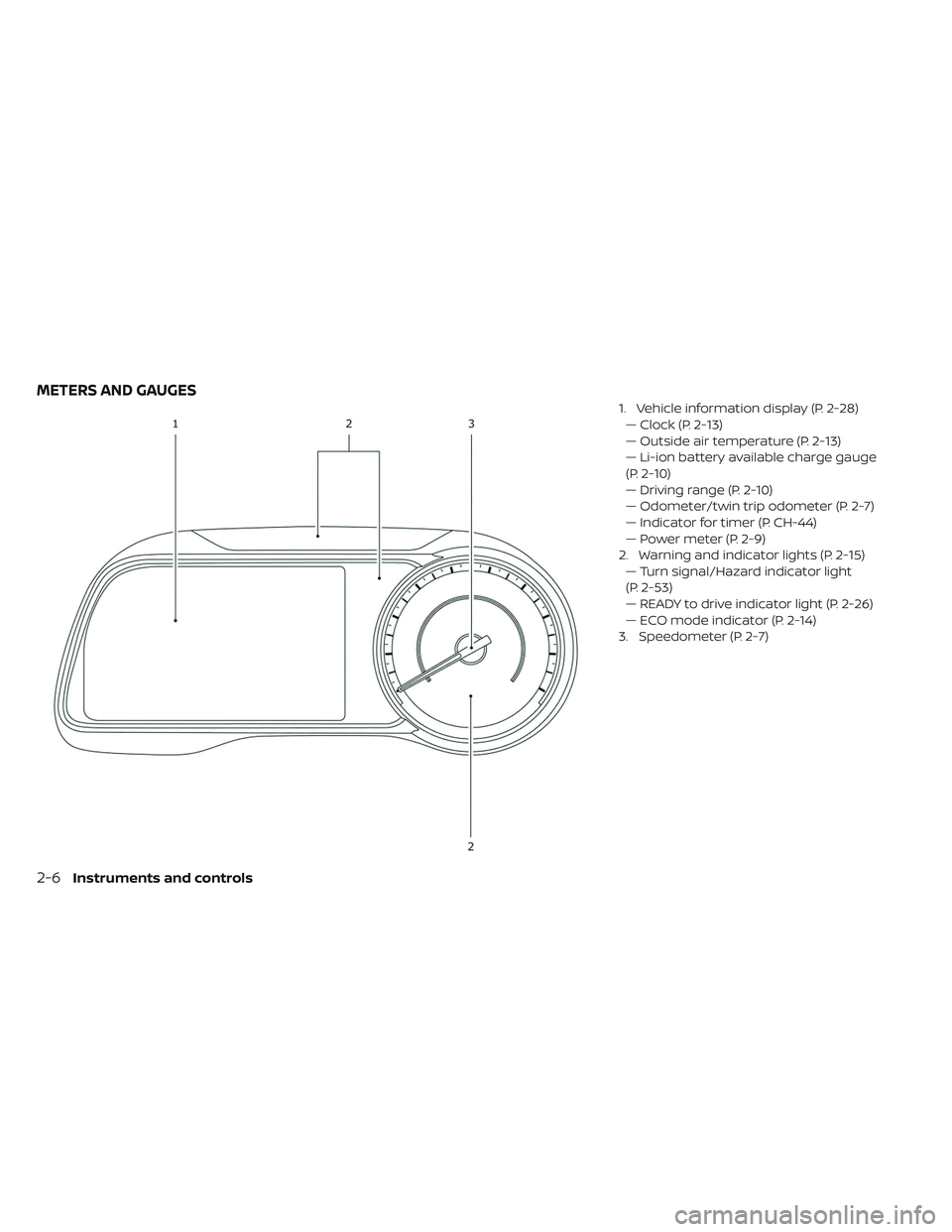
1. Vehicle information display (P. 2-28)— Clock (P. 2-13)
— Outside air temperature (P. 2-13)
— Li-ion battery available charge gauge
(P. 2-10)
— Driving range (P. 2-10)
— Odometer/twin trip odometer (P. 2-7)
— Indicator for timer (P. CH-44)
— Power meter (P. 2-9)
2. Warning and indicator lights (P. 2-15) — Turn signal/Hazard indicator light
(P. 2-53)
— READY to drive indicator light (P. 2-26)
— ECO mode indicator (P. 2-14)
3. Speedometer (P. 2-7)
METERS AND GAUGES
2-6Instruments and controls
Page 189 of 610
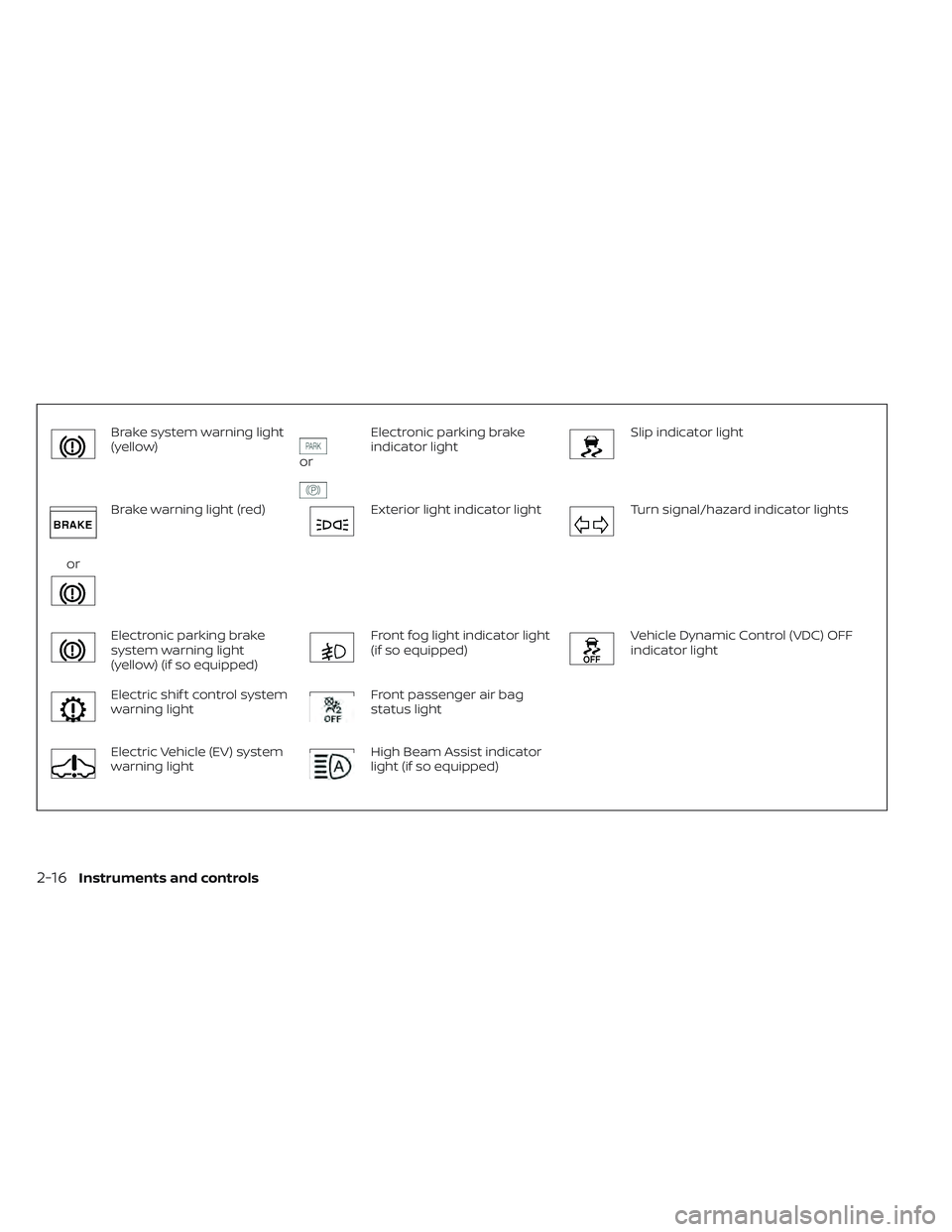
Brake system warning light
(yellow)
or
Electronic parking brake
indicator lightSlip indicator light
or
Brake warning light (red)Exterior light indicator lightTurn signal/hazard indicator lights
Electronic parking brake
system warning light
(yellow) (if so equipped)Front fog light indicator light
(if so equipped)Vehicle Dynamic Control (VDC) OFF
indicator light
Electric shif t control system
warning lightFront passenger air bag
status light
Electric Vehicle (EV) system
warning lightHigh Beam Assist indicator
light (if so equipped)
2-16Instruments and controls
Page 199 of 610
WARNING
Power limitation mode can result in re-
duced power and vehicle speed. The
reduced speed may be lower than
other traffic, which could increase the
chance of a collision. Be especially
careful when driving. If the vehicle can-
not maintain a safe driving speed, pull
to the side of the road in a safe area.
Charge the Li-ion battery if the charge
is low or allow the Li-ion battery to
cool.
NOTE:
You can reduce charging time and keep
the Li-ion battery temperature lower if
you:
• Charge more frequently in smaller
amounts, and
• Keep the battery at a higher level of
charge.
READY to drive indicator
light
The READY to drive indicator light illumi-
nates when the EV system is powered and
the vehicle may be driven. The READY to drive indicator light will turn
off in the following conditions.
• Certain EV system malfunctions.
• The READY to drive indicator light turns off
immediately before the Li-ion battery is
completely discharged. If the Li-ion bat-
tery becomes completely discharged, the
vehicle must be charged in order to be
driven. For additional information, refer to
“Low battery charge indicator” in this
section.
Security indicator light
This light blinks when the power switch is in
the ACC, OFF or LOCK position. This func-
tion indicates the security system
equipped on the vehicle is operational.
If the security system is malfunctioning,
this light will remain on while the power
switch is in the ON position. For additional
information, refer to “Security systems” in
this section.
Slip indicator light
This indicator will blink when the VDC sys-
tem or the traction control system is oper-
ating, thus alerting that the vehicle is near-
ing its traction limits. The road surface may
be slippery.
You may feel or hear the system working;
this is normal. The light will blink for a few
seconds af ter the VDC system stops limit-
ing wheel spin.
The indicator light also comes on when
you place the power switch in the ON posi-
tion.
The light will turn off af ter approximately
2 seconds if the system is operational. If the
light does not come on, have the system
checked. It is recommended that you visit a
NISSAN certified LEAF dealer for this ser-
vice.
Turn signal/hazard
indicator lights
This light flashes when the turn signal
switch lever or hazard switch is turned on.
2-26Instruments and controls
Page 221 of 610
VEHICLE SECURITY SYSTEM
The vehicle security system provides visual
and audio alarm signals if someone opens
the doors, or rear hatch when the system is
armed. It is not, however, a motion detec-
tion type system that activates when a ve-
hicle is moved or when a vibration occurs.
The system helps deter vehicle thef t but
cannot prevent it, nor can it prevent the
thef t of interior or exterior vehicle compo-
nents in all situations. Always secure your
vehicle even if parking for a brief period.
Never leave your keys in the vehicle, and
always lock it when it is lef t unattended.
Be aware of your surroundings, and park in
secure, well-lit areas whenever possible.
Many devices offering additional protec-
tion, such as component locks, identifica-
tion markers, and tracking systems, are
available at auto supply stores and spe-
cialty shops. A NISSAN certified LEAF dealer
may also offer such equipment. Check with
your insurance company to see if you may
be eligible for discounts for various thef t
protection features.
How to arm the vehicle security
system
1. Close all windows.The system can be armed even if the
windows are open.
2. Place the power switch in the LOCK or OFF position and remove the Intelligent
Key from the vehicle.
3. Close all doors. Lock all doors. The doors can be locked with:
• the LOCK
button on the Intelligent
Key
• any request switch
• the power door lock switch
4. Confirm that the security indicator light illuminates. The security indicator light
stays on for about 30 seconds. The ve-
hicle security system is now pre-armed.
Af ter about 30 seconds the vehicle se-
curity system automatically shif ts into
the armed phase. The security light be-
gins to flash once every approximately
3 seconds. If, during this 30-second pre-
arm time period, the door is unlocked, or
the power switch is placed in the ACC or
ON position, the system will not arm. Even when the driver and/or passengers
are in the vehicle, the system will acti-
vate with all doors locked and the power
switch in the OFF position. When placing
the power switch to the ACC or ON posi-
tion, the system will be released.
Vehicle security system activation
The vehicle security system will give the
following alarm:
• The headlights blink and the horn sounds
intermittently.
• The alarm automatically turns off af ter approximately 50 seconds. However, the
alarm reactivates if the vehicle is tam-
pered with again.
The alarm is activated by:
• Unlocking the door without using the In- telligent Key, the request switch or the key.
(Even if the door is opened by releasing
the door inside lock knob, the alarm will
activate.)
• Opening the hood.
2-48Instruments and controls