remote control NISSAN LEAF 2020 Owner´s Manual
[x] Cancel search | Manufacturer: NISSAN, Model Year: 2020, Model line: LEAF, Model: NISSAN LEAF 2020Pages: 596, PDF Size: 4.33 MB
Page 63 of 596

To start trickle charging:
NOTE:
Charging timer, remote charge (models
with navigation system) and immediate
charge can be performed in the trickle
charge mode. For additional informa-
tion, refer to “Charging methods” in this
section.
1. Push the P (Park) position switch to placethe vehicle in the P (Park) position and
apply the parking brake. 2. When charging the Li-ion battery, place
the power switch in the OFF position.
When the power switch is in the ON po-
sition, the Li-ion battery will not start
charging.
3. Open the charge port lid. For additional information, refer to “Charge port lid” in
the “Pre-driving checks and adjust-
ments” section of this manual.
4. Take out the EVSE from the rear hatch. 5. Connect the electrical plug to the AC 110
- 120 volt, 15A dedicated electrical outlet.
If it is connected normally, the green light
on the EVSE control box indicator light
illuminates.
NOTE:You can pass a rope through the holes
OAin the control box in order to hang it
up while the Li-ion battery is charging.
Use the EVSE with the plug in an up-
right position (the cord should extend
down from the outlet).
6. Open the charge port cap. For additional information, refer to “Charge port cap” in
the “Pre-driving checks and adjust-
ments” section of this manual.
LCH2106
CH-14Charging
Page 70 of 596

To start trickle charging:
NOTE:
Charging timer, remote charge (models
with navigation system) and immediate
charge can be performed in the trickle
charge mode. For additional informa-
tion, refer to “Charging methods” in this
section.
1. Push the P (Park) position switch to placethe vehicle in the P (Park) position and
apply the parking brake. 2. When charging the Li-ion battery, place
the power switch in the OFF position.
When the power switch is in the ON po-
sition, the Li-ion battery will not start
charging.
3. Open the charge port lid. For additional information, refer to “Charge port lid” in
the “Pre-driving checks and adjust-
ments” section of this manual.
4. Take out the EVSE from the rear hatch. 5. Connect the electrical plug to the AC 110
- 120 volt, 15A dedicated electrical outlet
using a Genuine NISSAN Adapter. If it is
connected normally, the green light on
the EVSE control box indicator light
illuminates.
LCH2201
ChargingCH-21
Page 79 of 596

To start normal charging
NOTE:
Charging timer, remote charge (models
with navigation system) and immediate
charge can be performed in the normal
charge mode. For additional informa-
tion, refer to “Charging methods” in this
section.
1. Push the P (Park) position switch to placethe vehicle in the P (Park) position and
apply the parking brake. 2. When charging the Li-ion battery, place
the power switch in the OFF position.
When the power switch is in the ON po-
sition, the Li-ion battery will not start
charging.
3. Open the charge port lid. For additional information, refer to “Charge port lid” in
the “Pre-driving checks and adjust-
ments” section of this manual.
LHA5094
Incorrect electric outlet connection
If EVSE is connected to this miswired outlet, EVSE does not work and the POWER indicator light (orange) on the EVSE control box will blink.
CH-30Charging
Page 92 of 596
NOTE:
• Depending on the charging station, thelock mechanism established by local
standards may not be compatible with
your vehicle. It may not be possible for
the charge connector to lock to your
vehicle.
• When the power source is cut off while charging in AUTO mode, the connector
will be continuously locked for 5 min-
utes, then it will be released.
• When timer charging is set with AUTO mode, the connector will not lock until
charging is started.
• When the following system(s) are oper- ated individually or the 12-volt battery
is being charged, the charging connec-
tor lock will not lock:– Climate Ctrl. Timer
– Remote climate control (if so equipped)
– Li-ion battery warmer (if so equipped)
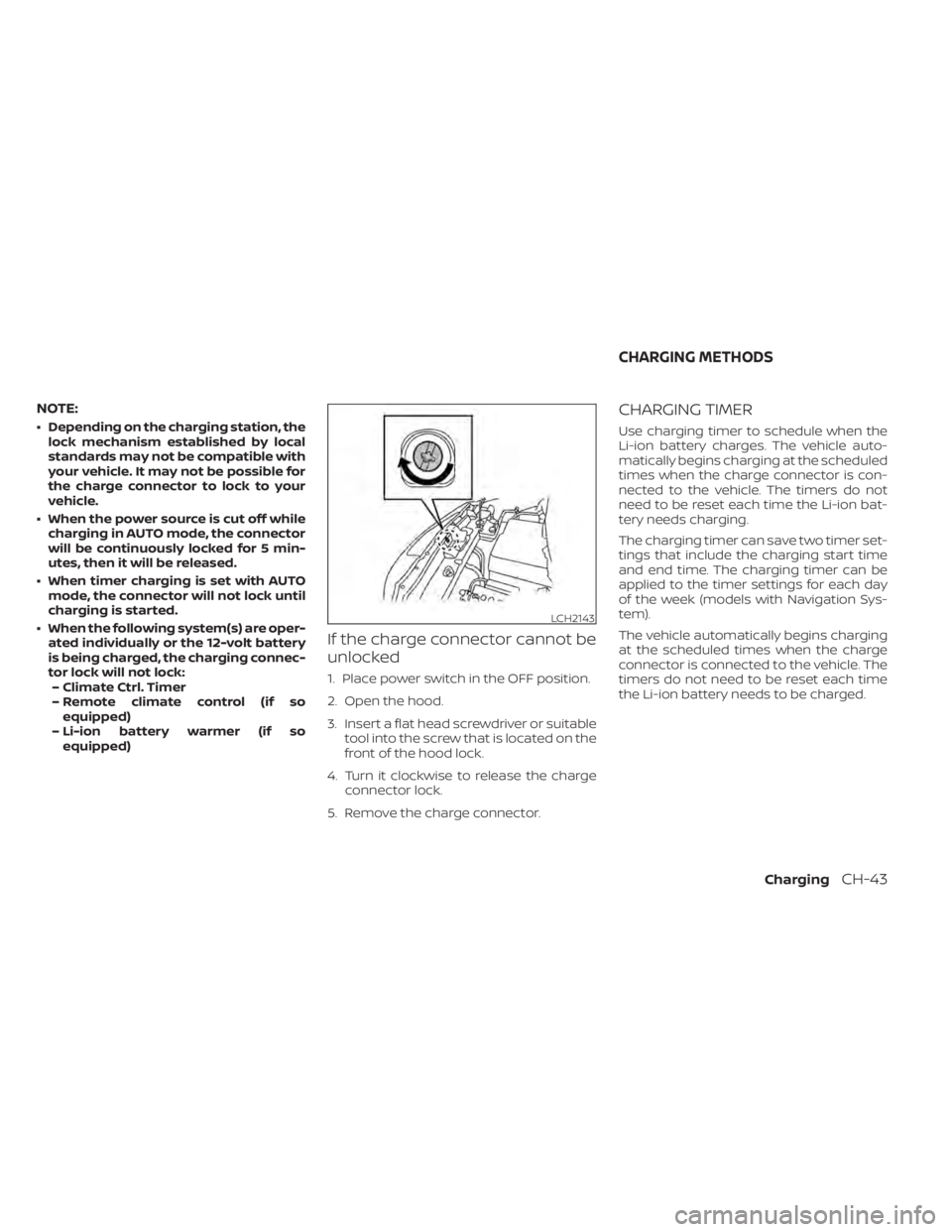
If the charge connector cannot be
unlocked
1. Place power switch in the OFF position.
2. Open the hood.
3. Insert a flat head screwdriver or suitable tool into the screw that is located on the
front of the hood lock.
4. Turn it clockwise to release the charge connector lock.
5. Remove the charge connector.
CHARGING TIMER
Use charging timer to schedule when the
Li-ion battery charges. The vehicle auto-
matically begins charging at the scheduled
times when the charge connector is con-
nected to the vehicle. The timers do not
need to be reset each time the Li-ion bat-
tery needs charging.
The charging timer can save two timer set-
tings that include the charging start time
and end time. The charging timer can be
applied to the timer settings for each day
of the week (models with Navigation Sys-
tem).
The vehicle automatically begins charging
at the scheduled times when the charge
connector is connected to the vehicle. The
timers do not need to be reset each time
the Li-ion battery needs to be charged.
LCH2143
CHARGING METHODS
ChargingCH-43
Page 101 of 596
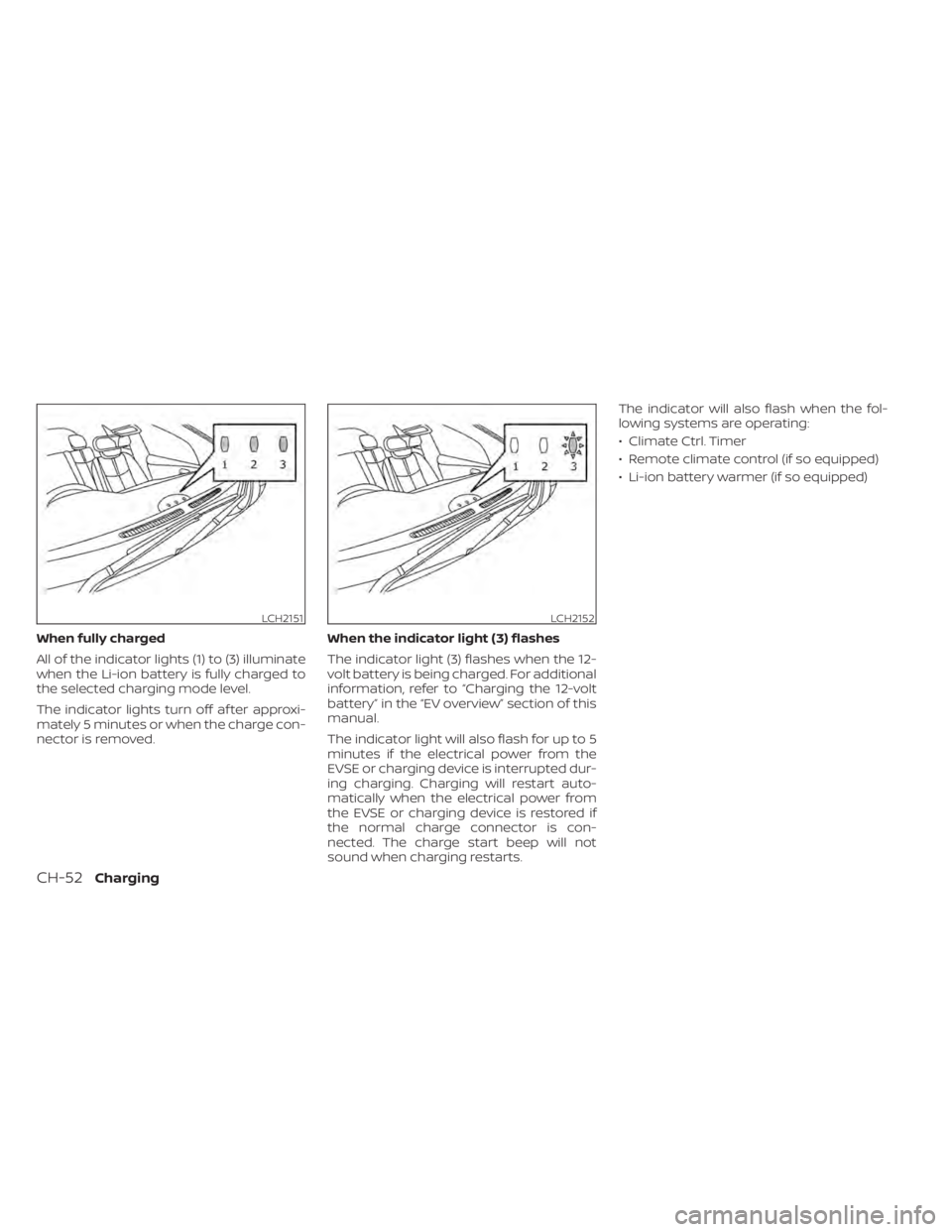
When fully charged
All of the indicator lights (1) to (3) illuminate
when the Li-ion battery is fully charged to
the selected charging mode level.
The indicator lights turn off af ter approxi-
mately 5 minutes or when the charge con-
nector is removed.When the indicator light (3) flashes
The indicator light (3) flashes when the 12-
volt battery is being charged. For additional
information, refer to “Charging the 12-volt
battery” in the “EV overview” section of this
manual.
The indicator light will also flash for up to 5
minutes if the electrical power from the
EVSE or charging device is interrupted dur-
ing charging. Charging will restart auto-
matically when the electrical power from
the EVSE or charging device is restored if
the normal charge connector is con-
nected. The charge start beep will not
sound when charging restarts.The indicator will also flash when the fol-
lowing systems are operating:
• Climate Ctrl. Timer
• Remote climate control (if so equipped)
• Li-ion battery warmer (if so equipped)
LCH2151LCH2152
CH-52Charging
Page 230 of 596
•Do not place anything hard or heavy
on the seat or pierce it with a pin or
similar object. This may result in
damage to the heater.
• Any liquid spilled on the heated seat
should be removed immediately with
a dry cloth.
• When cleaning the seat, never use
gasoline, thinner, or any similar
materials.
• If any malfunctions are found or the
heated seat does not operate, turn
the switch off and have the system
checked. It is recommended that you
visit a NISSAN certified LEAF dealer
for this service. The heated steering wheel system is de-
signed to operate only when the surface
temperature of the steering wheel is below
approximately 68°F (20°C).
Push the heated steering wheel switch to
warm the steering wheel when the power
switch is in the ACC or ON position.
If the surface temperature of the steering
wheel is below approximately 68°F (20°C),
the system will heat the steering wheel and
cycle off and on to maintain a temperature
above 68°F (20°C). The indicator light will
remain on as long as the system is on. Push the switch again to turn the heated
steering wheel system off manually. The
indicator light turns off.
NOTE:
• If the surface temperature of the steer-
ing wheel is above 68°F (20°C) when the
switch is turned on, the system will not
heat the steering wheel. This is not a
malfunction.
• If the outside temperature is low (ap- proximately 50°F (10°C) or less) and the
Climate Control Timer or Remote Cli-
mate Control are used, the steering
wheel heater will automatically oper-
ate in the following conditions.– When using the Climate Control Timer: Operates from approximately
15 minutes before the set departure
time until the set departure time.
– When using Remote Climate Control: Operates 15 minutes af ter Remote
Climate Control starts.
• The heated steering wheel consumes less power than the heater and can be
used to either help extend vehicle
range by reducing heater use or to
maximize comfort by supplementing
the heater.
LIC3804
HEATED STEERING WHEEL SWITCH (if
so equipped)
Instruments and controls2-57
Page 256 of 596
WARNING
• Radio waves could adversely affect
electric medical equipment. Those
who use a pacemaker should contact
the electric medical equipment
manufacturer for the possible influ-
ences before use.
• The Intelligent Key transmits radio
waves when the buttons are pressed.
The FAA advises that the radio waves
may affect aircraf t navigation and
communication systems. Do not op-
erate the Intelligent Key while on an
airplane. Make sure the buttons are
not operated unintentionally when
the unit is stored during a flight.
The Intelligent Key system can operate all
the door and the rear hatch locks by using
the remote control function or pushing the
request switch on the vehicle without tak-
ing the key out from a pocket or purse. The
operating environment and/or conditions
may affect the Intelligent Key system op-
eration.
Be sure to read the following items before
using the Intelligent Key system.CAUTION
• Be sure to carry the Intelligent Key
with you when operating the vehicle.
• Never leave the Intelligent Key in the
vehicle when you leave the vehicle.
The Intelligent Key is always communicat-
ing with the vehicle because it receives ra-
dio waves. The Intelligent Key system
transmits weak radio waves. Environmen-
tal conditions may interfere with the op-
eration of the Intelligent Key system under
the following operating conditions.
• When operating near a location where strong radio waves are transmitted, such
as a TV tower, power station or broad-
casting station.
• When in possession of wireless equip- ment, such as a cellular phone, trans-
ceiver or a CB radio.
• When the Intelligent Key is in contact with or covered by metallic materials.
• When any type of radio wave remote con- trol is used nearby.
• When the Intelligent Key is placed near an electric appliance such as a personal
computer.
• When the vehicle is parked near a parking meter. In such cases, correct the operating condi-
tions before using the Intelligent Key func-
tion or use the mechanical key.
Although the life of the battery varies de-
pending on the operating conditions, the
battery’s life is approximately two years. If
the battery is discharged, replace it with a
new one.
When the Intelligent Key battery is almost
discharged, firmly apply the foot brake and
touch the power switch with the Intelligent
Key. Then push the power switch while de-
pressing the brake pedal within 10 seconds
af ter the chime sound.
Since the Intelligent Key is continuously re-
ceiving radio waves, if the key is lef t near
equipment that transmits strong radio
waves, such as signals from a TV or per-
sonal computer, the battery life may be-
come shorter.
For additional information, refer to “NISSAN
Intelligent Key® battery replacement” in the
“Maintenance and do-it-yourself ” section
of this manual.
Pay special attention that the vehicle bat-
tery is not completely discharged.
As many as four Intelligent Keys can be
registered and used with one vehicle. For
NISSAN INTELLIGENT KEY® SYSTEM
Pre-driving checks and adjustments3-7
Page 305 of 596
WARNING
• The air conditioning cooling function
operates only when the power
switch is in the ON position or when
the READY to drive indicator light is
ON.
• Do not leave children or adults who
would normally require the assis-
tance of others alone in your vehicle.
Pets should also not be lef t alone.
They could accidentally injure them-
selves or others through inadvertent
operation of the vehicle. Also, on hot,
sunny days, temperatures in a closed
vehicle could quickly become high
enough to causes severe or possibly
fatal injuries to people or animals.
• Do not use the recirculation mode for
long periods as it may cause the inte-
rior air to become stale and the win-
dows to fog up.NOTE:
• Odors from inside and outside the ve- hicle can build up in the air conditioner
unit. Odor can enter the passenger
compartment through the vents.
• When parking, set the heater or air conditioner controls to turn off air re-
circulation to allow fresh air into the
passenger compartment. This should
help reduce odors inside the vehicle. The climate control system (air conditioner
and heater functions) can be operated
when the READY to drive indicator light is
illuminated. However, while charging, the
climate control system can be used when
the power switch is in the ON position.
The fan, heater and air conditioning can be
turned on manually, using the timer func-
tion and using the remote climate control
function.
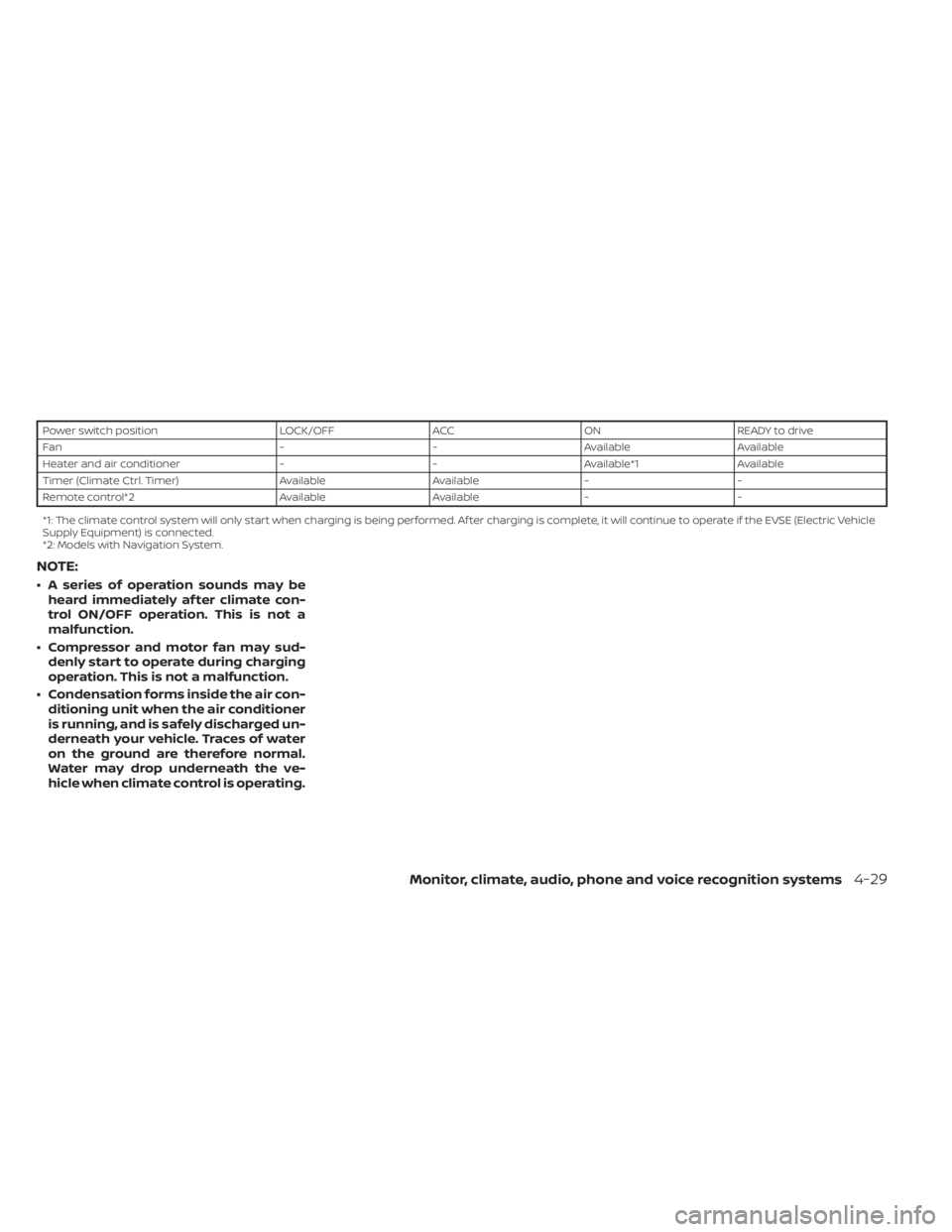
These functions operate in the following
conditions.
HEATER AND AIR CONDITIONER
(automatic)
4-28Monitor, climate, audio, phone and voice recognition systems
Page 306 of 596
Power switch positionLOCK/OFFACCON READY to drive
Fan --Available Available
Heater and air conditioner --Available*1 Available
Timer (Climate Ctrl. Timer) AvailableAvailable- -
Remote control*2 AvailableAvailable- -
*1: The climate control system will only start when charging is being performed. Af ter charging is complete, it will continue to operate if the EVSE (El ectric Vehicle
Supply Equipment) is connected.
*2: Models with Navigation System.
NOTE:
• A series of operation sounds may be heard immediately af ter climate con-
trol ON/OFF operation. This is not a
malfunction.
• Compressor and motor fan may sud- denly start to operate during charging
operation. This is not a malfunction.
• Condensation forms inside the air con- ditioning unit when the air conditioner
is running, and is safely discharged un-
derneath your vehicle. Traces of water
on the ground are therefore normal.
Water may drop underneath the ve-
hicle when climate control is operating.
Monitor, climate, audio, phone and voice recognition systems4-29
Page 308 of 596
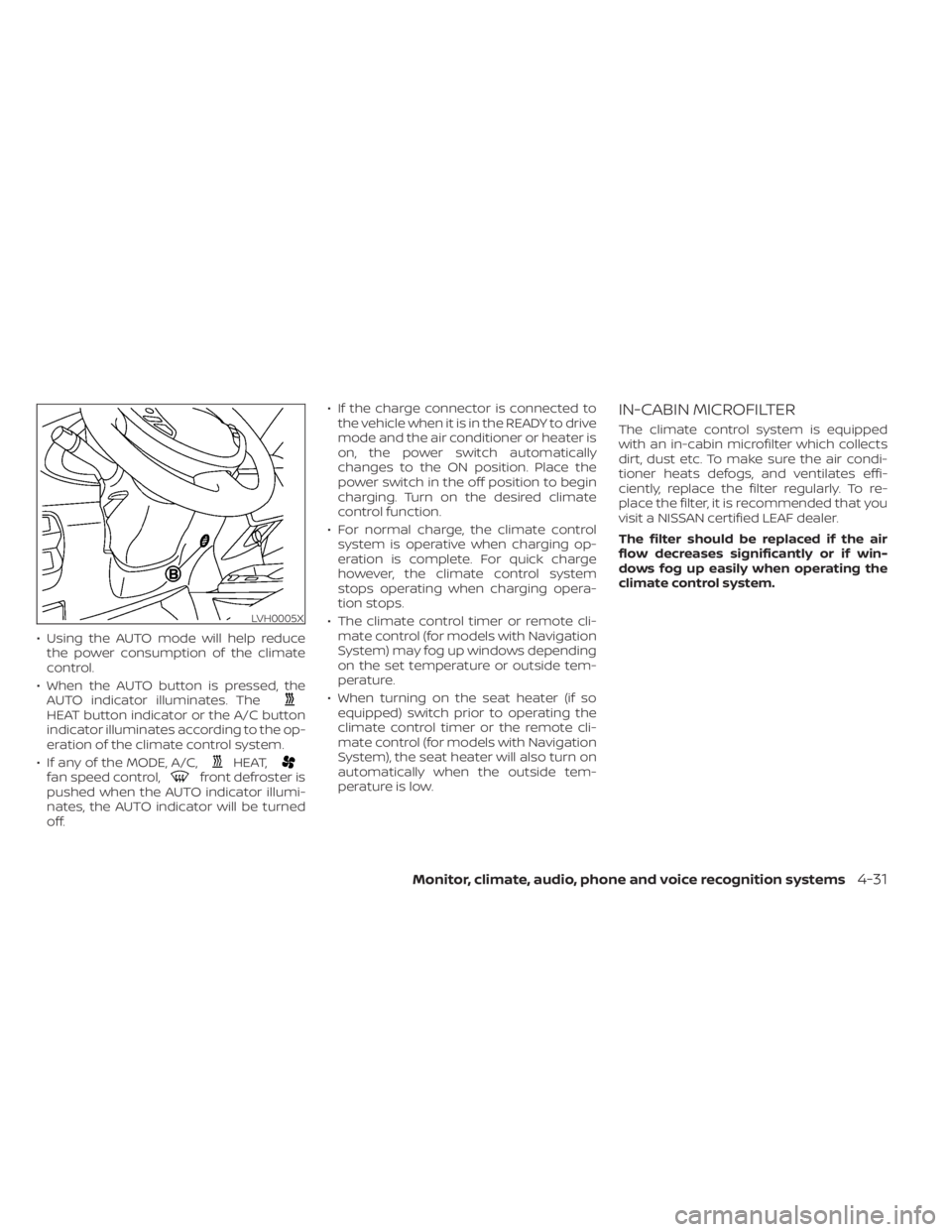
• Using the AUTO mode will help reducethe power consumption of the climate
control.
• When the AUTO button is pressed, the AUTO indicator illuminates. The
HEAT button indicator or the A/C button
indicator illuminates according to the op-
eration of the climate control system.
• If any of the MODE, A/C,
HEAT,fan speed control,front defroster is
pushed when the AUTO indicator illumi-
nates, the AUTO indicator will be turned
off. • If the charge connector is connected to
the vehicle when it is in the READY to drive
mode and the air conditioner or heater is
on, the power switch automatically
changes to the ON position. Place the
power switch in the off position to begin
charging. Turn on the desired climate
control function.
• For normal charge, the climate control system is operative when charging op-
eration is complete. For quick charge
however, the climate control system
stops operating when charging opera-
tion stops.
• The climate control timer or remote cli- mate control (for models with Navigation
System) may fog up windows depending
on the set temperature or outside tem-
perature.
• When turning on the seat heater (if so equipped) switch prior to operating the
climate control timer or the remote cli-
mate control (for models with Navigation
System), the seat heater will also turn on
automatically when the outside tem-
perature is low.
IN-CABIN MICROFILTER
The climate control system is equipped
with an in-cabin microfilter which collects
dirt, dust etc. To make sure the air condi-
tioner heats defogs, and ventilates effi-
ciently, replace the filter regularly. To re-
place the filter, it is recommended that you
visit a NISSAN certified LEAF dealer.
The filter should be replaced if the air
flow decreases significantly or if win-
dows fog up easily when operating the
climate control system.
LVH0005X
Monitor, climate, audio, phone and voice recognition systems4-31