radio NISSAN LEAF 2020 Owner´s Manual
[x] Cancel search | Manufacturer: NISSAN, Model Year: 2020, Model line: LEAF, Model: NISSAN LEAF 2020Pages: 596, PDF Size: 4.33 MB
Page 410 of 596
For Canada
Model: ARS4–B
IC: 4135A-ARS4B
FCC ID: OAYARS4B
This device complies with Part 15 of the FCC
Rules and with Industry Canada licence-
exempt RSS standard(s). Operation is sub-
ject to the following two conditions:
1. This device may not cause interference,
2. This device must accept any interfer-ence, including interference that may
cause undesired operation of the
device.
Le présent appareil est conforme aux CNR
d’Industrie Canada applicables aux appar-
eils radio exempts de licence. L’exploitation
est autorisée aux deux conditions suiv-
antes:
1. L’appareil ne doit pas produire de brouil- lage, et
2. L’utilisateur de l’appareil doit accepter tout brouillage radio électrique subi,
même si le brouillage est susceptible
d’en compromettre le fonctionnement. Radio Frequency Radiation Exposure Infor-
mation:
This equipment complies with FCC radia-
tion exposure limits set forth for an uncon-
trolled environment.
This equipment should be installed and
operated with minimum distance of 30 cm
between the radiator and your body.
The transmitter must not be co-located or
operating in conjunction with any other an-
tenna or transmitter.
Cet équipement est conforme aux limites
d’exposition aux rayonnements IC établies
pour un environnement non contrôlé. Cet
équipement doit être installé et utilisé avec
un minimum de 30 cm de distance entre la
source de rayonnement et votre corps.
FCC Notice
Changes or modifications not expressly
approved by the party responsible for
compliance could void the user’s authority
to operate the equipment.CONVENTIONAL (fixed speed)
CRUISE CONTROL MODE
This mode allows driving at a speed be-
tween 25 to 90 mph (40 to 144 km/h) with-
out keeping your foot on the accelerator
pedal.
WARNING
• In the conventional (fixed speed)
cruise control mode, a warning
chime does not sound to warn you if
you are too close to the vehicle
ahead, as neither the presence of the
vehicle ahead nor the vehicle-to-
vehicle distance is detected.
• Pay special attention to the distance
between your vehicle and the vehicle
ahead of you or a collision could
occur.
• Always confirm the setting in the ICC
system display.
• Do not use the conventional (fixed
speed) cruise control mode when
driving under the following
conditions:
– When it is not possible to keep the
vehicle at a set speed
– In heavy traffic or in traffic that
varies in speed
Starting and driving5-87
Page 443 of 596
Steering Assist cancel
Under the following conditions, the Steer-
ing Assist cancels, and the Steering Assist
status indicator and the Steering Assist in-
dicator turn off, and the “Not Available Bad
Weather” warning message will appear:
• When unusual lane markers appear inthe traveling lane or when the lane
marker cannot be correctly detected for
some time due to certain conditions (for
example, a snow rut, the reflection of light
on a rainy day, the presence of several
unclear lane markers)
• When the windshield wiper operates in the high (HI) speed operation (the Steer-
ing Assist is disabled when the wiper op-
erates for more than approximately 10
seconds)
Action to take:
Turn the ICC system off using the CANCEL
switch. When the conditions listed above
are no longer present, turn the ICC system
on again.
Steering Assist malfunction
When the system malfunctions, it turns off
automatically. The Steering Assist status
warning illuminates (orange). A chime may
sound depending on the situation.
Action to take:
Stop the vehicle in a safe location, place the
vehicle in the P (Park) position, turn the EV
system off, restart the EV system, resume
driving, and set the Intelligent Cruise Con-
trol system again. If the warning (orange)
continues to illuminate, the Steering Assist
is malfunctioning. Although the vehicle is
still drivable under normal conditions, have
the system checked. It is recommended
that you visit a NISSAN certified LEAF dealer
for this service.
Steering Assist maintenance
The camera sensor is located above the
inside mirror.
To keep the proper operation of the system
and prevent a system malfunction, be sure
to observe the following:
• Always keep the windshield clean.
• Do not attach a sticker (including trans- parent material) or install an accessory
near the camera unit. • Do not place reflective materials, such as
white paper or a mirror, on the instru-
ment panel. The reflection of sunlight
may adversely affect the camera unit’s
capability of detecting the lane markers.
• Do not strike or damage the areas around the camera unit. Do not touch the
camera lens or remove the screw located
on the camera unit.
If the camera unit is damaged due to an
accident, it is recommended that you visit a
NISSAN certified LEAF dealer.
Radio frequency statement
For USA
FCC ID OAYARS4B
This device complies with Part 15 of the FCC
Rules. Operation is subject to the following
two conditions:
1. This device may not cause harmful inter- ference, and
2. This device must accept any interfer- ence received, including interference
that may cause undesired operation.
5-120Starting and driving
Page 444 of 596
FCC Warning
Changes or modifications not expressly
approved by the party responsible for
compliance could void the user’s authority
to operate the equipment.
For Canada
Model: ARS4–B
IC: 4135A-ARS4B
FCC ID: OAYARS4B
This device complies with Part 15 of the FCC
Rules and with Industry Canada licence-
exempt RSS standard(s). Operation is sub-
ject to the following two conditions:
1. This device may not cause harmful inter-ference, and
2. This device must accept any interfer- ence received, including interference
that may cause undesired operation.
Le present appareil est conforme aux CNR
d’Industrie Canada applicables aux appar-
eils radio exempts de licence. L’exploitation
est autorisee aux deux conditions suiv-
antes:
1. L’appareil ne doit pas produire de brouil- lage, et 2. L’utilisateur de l’appareil doit accepter
tout brouillage radioelectrique subi,
meme si le brouillage est susceptible
d’en compromettre le fonctionnement.
Radio Frequency Radiation Exposure Infor-
mation:
This equipment complies with FCC radia-
tion exposure limits set forth for an uncon-
trolled environment.
This equipment should be installed and
operated with minimum distance of 30 cm
between the radiator and your body.
The transmitter must not be co-located or
operating in conjunction with any other an-
tenna or transmitter.
Cet equipement est conforme aux limites
d’exposition aux rayonnements IC etablies
pour un environnement non controle. Cet
equipement doit etre installe et utilise avec
un minimum de 30 cm de distance entre la
source de rayonnement et votre corps.
FCC Notice
Changes or modifications not expressly
approved by the party responsible for
compliance could void the user’s authority
to operate the equipment.CONVENTIONAL (fixed speed)
CRUISE CONTROL MODE
NOTE:
ProPILOT Assist provides no approach
warnings, automatic braking, or steering
assist in the conventional (fixed speed)
cruise control mode.
This mode allows driving at a speed be-
tween 25 to 90 mph (40 to 144 km/h) with-
out keeping your foot on the accelerator
pedal.
WARNING
• In the conventional (fixed speed)
cruise control mode, a warning
chime does not sound to warn you if
you are too close to the vehicle
ahead, as neither the presence of the
vehicle ahead nor the vehicle-to-
vehicle distance is detected.
• Pay special attention to the distance
between your vehicle and the vehicle
ahead of you or a collision could
occur.
• Always confirm the setting in the ICC
system display.
Starting and driving5-121
Page 456 of 596
SYSTEM MAINTENANCE
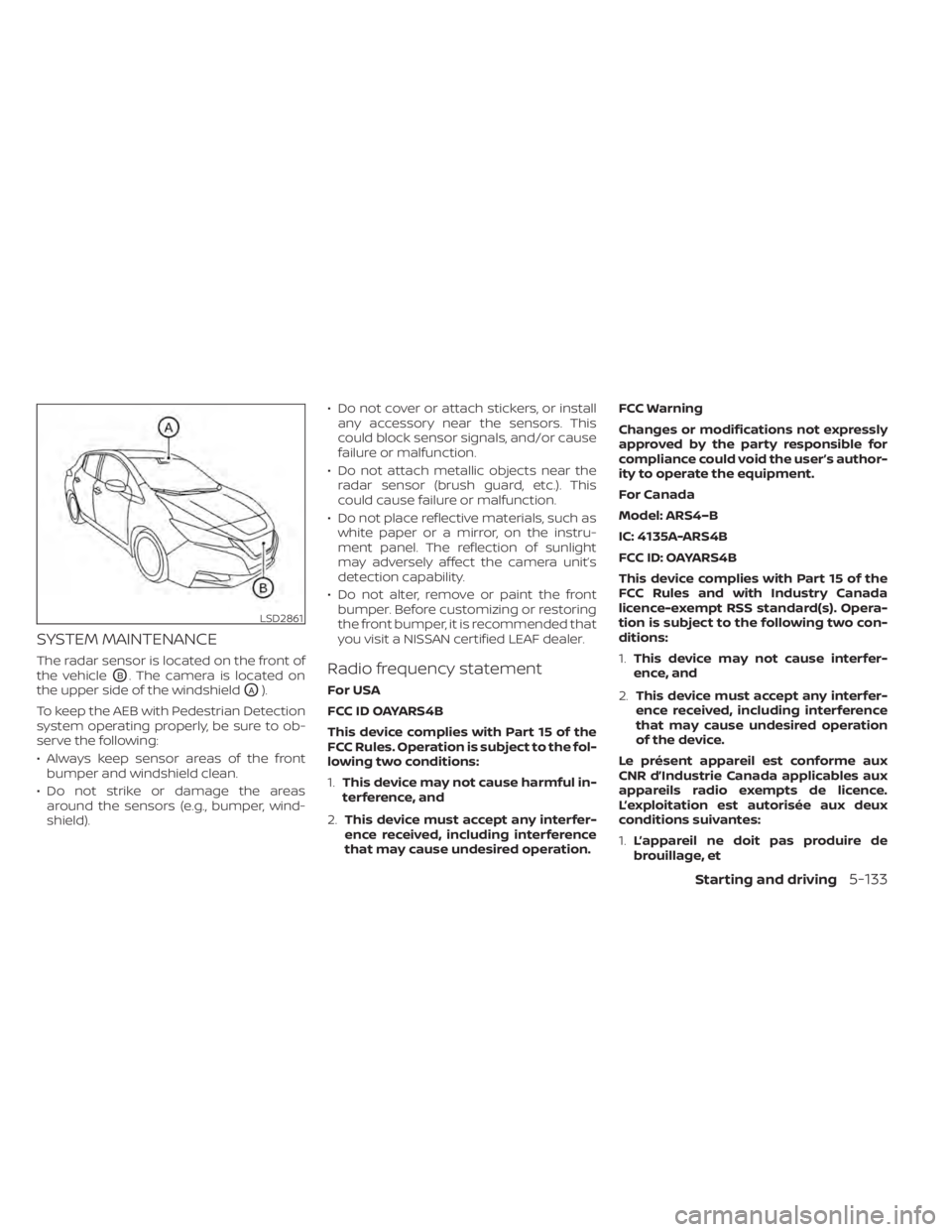
The radar sensor is located on the front of
the vehicle
OB. The camera is located on
the upper side of the windshield
OA).
To keep the AEB with Pedestrian Detection
system operating properly, be sure to ob-
serve the following:
• Always keep sensor areas of the front bumper and windshield clean.
• Do not strike or damage the areas around the sensors (e.g., bumper, wind-
shield). • Do not cover or attach stickers, or install
any accessory near the sensors. This
could block sensor signals, and/or cause
failure or malfunction.
• Do not attach metallic objects near the radar sensor (brush guard, etc.). This
could cause failure or malfunction.
• Do not place reflective materials, such as white paper or a mirror, on the instru-
ment panel. The reflection of sunlight
may adversely affect the camera unit’s
detection capability.
• Do not alter, remove or paint the front bumper. Before customizing or restoring
the front bumper, it is recommended that
you visit a NISSAN certified LEAF dealer.
Radio frequency statement
For USA
FCC ID OAYARS4B
This device complies with Part 15 of the
FCC Rules. Operation is subject to the fol-
lowing two conditions:
1. This device may not cause harmful in-
terference, and
2. This device must accept any interfer-
ence received, including interference
that may cause undesired operation. FCC Warning
Changes or modifications not expressly
approved by the party responsible for
compliance could void the user’s author-
ity to operate the equipment.
For Canada
Model: ARS4–B
IC: 4135A-ARS4B
FCC ID: OAYARS4B
This device complies with Part 15 of the
FCC Rules and with Industry Canada
licence-exempt RSS standard(s). Opera-
tion is subject to the following two con-
ditions:
1.
This device may not cause interfer-
ence, and
2. This device must accept any interfer-
ence received, including interference
that may cause undesired operation
of the device.
Le présent appareil est conforme aux
CNR d’Industrie Canada applicables aux
appareils radio exempts de licence.
L’exploitation est autorisée aux deux
conditions suivantes:
1. L’appareil ne doit pas produire de
brouillage, et
LSD2861
Starting and driving5-133
Page 457 of 596
2.L’utilisateur de l’appareil doit accepter
tout brouillage radioélectrique subi,
même si le brouillage est susceptible
d’en compromettre le fonctionnement.
Radio frequency radiation exposure in-
formation:
This equipment complies with FCC and IC
radiation exposure limits set forth for an
uncontrolled environment.
This equipment should be installed and
operated with minimum distance of 30
cm between the radiator and your body.
This transmitter must not be co-located
or operating in conjunction with any
other antenna or transmitter.
Cet équipement est conforme aux lim-
ites d’exposition aux rayonnements IC
établies pour un environnement non
contrôlé.
Cet équipement doit être installé et
utilisé avec un minimum de 30 cm de
distance entre la source de rayonnement
et votre corps.
FCC Notice
Changes or modifications not expressly
approved by the party responsible for
compliance could void the user’s author-
ity to operate the equipment.
WARNING
Failure to follow the warnings and in-
structions for proper use of the RAB
system could result in serious injury or
death.
• The RAB system is a supplemental
aid to the driver. It is not a replace-
ment for proper driving procedures.
Always use the side and rear mirrors
and turn and look in the direction you
will move before and while backing
up. Never rely solely on the RAB sys-
tem. It is the driver’s responsibility to
stay alert, drive safely, and be in con-
trol of the vehicle at all times.
• There is a limitation to the RAB sys-
tem capability. The RAB system is not
effective in all situations.
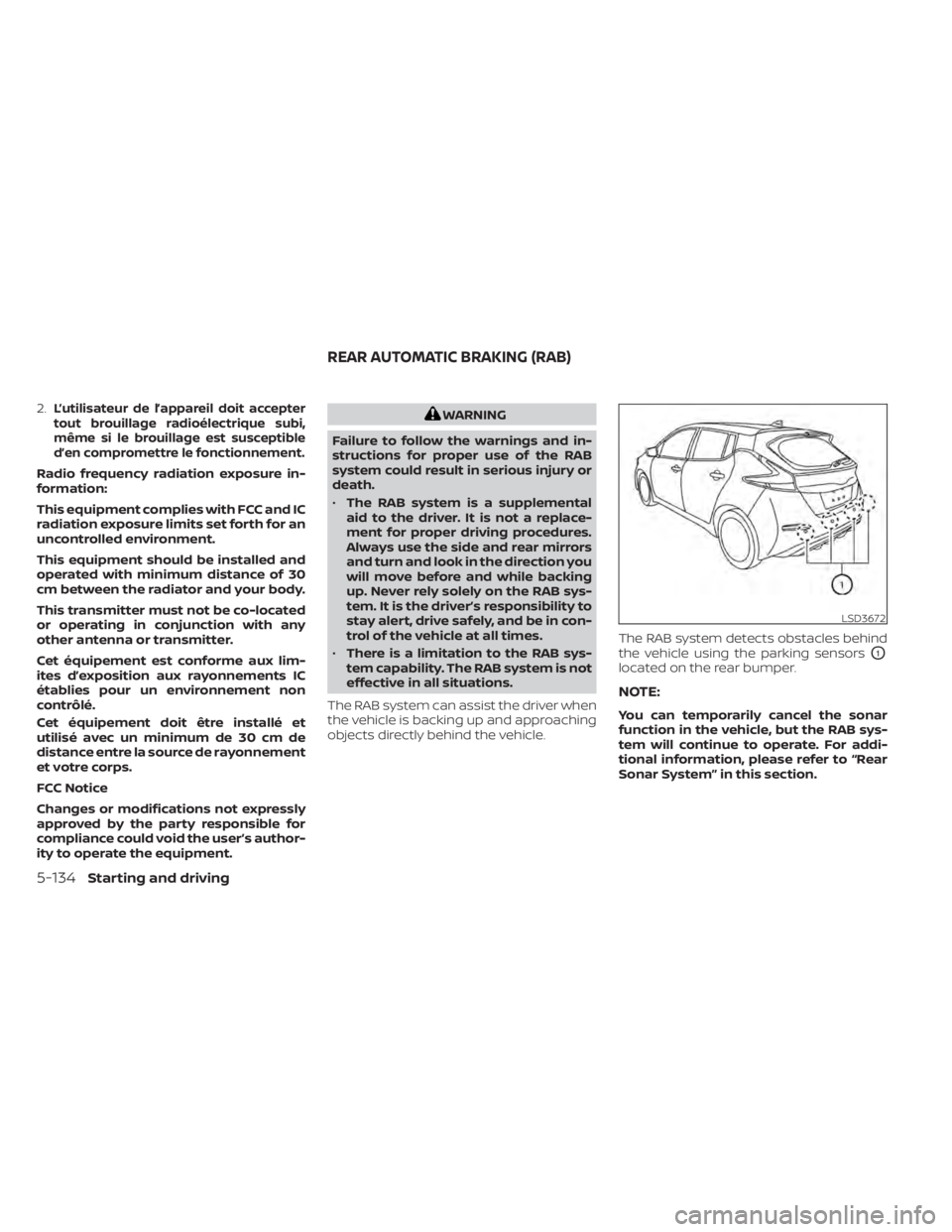
The RAB system can assist the driver when
the vehicle is backing up and approaching
objects directly behind the vehicle. The RAB system detects obstacles behind
the vehicle using the parking sensors
O1
located on the rear bumper.
NOTE:
You can temporarily cancel the sonar
function in the vehicle, but the RAB sys-
tem will continue to operate. For addi-
tional information, please refer to “Rear
Sonar System” in this section.
LSD3672
REAR AUTOMATIC BRAKING (RAB)
5-134Starting and driving
Page 472 of 596
• Do not attach metallic objects near thesensor area (brush guard, etc.). This could
cause failure or malfunction.
• Do not alter, remove or paint the front bumper. Before customizing or restoring
the front bumper, it is recommended that
you visit a NISSAN certified LEAF dealer.
Radio frequency statement
For USA
FCC ID OAYARS4B
This device complies with Part 15 of the
FCC Rules. Operation is subject to the fol-
lowing two conditions:
1. This device may not cause harmful in-
terference, and
2. This device must accept any interfer-
ence received, including interference
that may cause undesired operation.
FCC Warning
Changes or modifications not expressly
approved by the party responsible for
compliance could void the user’s author-
ity to operate the equipment. For Canada
Model: ARS4–B
IC: 4135A-ARS4B
FCC ID: OAYARS4B
This device complies with Part 15 of the
FCC Rules and with Industry Canada
licence-exempt RSS standard(s). Opera-
tion is subject to the following two con-
ditions:
1.
This device may not cause harmful in-
terference, and
2. This device must accept any interfer-
ence received, including interference
that may cause undesired operation.
Le présent appareil est conforme aux
CNR d’Industrie Canada applicables aux
appareils radio exempts de licence.
L’exploitation est autorisée aux deux
conditions suivantes:
1. L’appareil ne doit pas produire de
brouillage, et
2. L’utilisateur de l’appareil doit ac-
cepter tout brouillage radioélectrique
subi, même si le brouillage est suscep-
tible d’en compromettre le
fonctionnement. Radio frequency radiation exposure in-
formation:
This equipment complies with FCC and IC
radiation exposure limits set forth for an
uncontrolled environment.
This equipment should be installed and
operated with minimum distance of 30
cm between the radiator and your body.
This transmitter must not be co-located
or operating in conjunction with any
other antenna or transmitter.
Cet équipement est conforme aux lim-
ites d’exposition aux rayonnements IC
établies pour un environnement non
contrôlé.
Cet équipement doit être installé et
utilisé avec un minimum de 30 cm de
distance entre la source de rayonnement
et votre corps.
FCC Notice
Changes or modifications not expressly
approved by the party responsible for
compliance could void the user’s author-
ity to operate the equipment.
Starting and driving5-149
Page 498 of 596
To shut off the EV system in an emergency
situation while driving, perform the follow-
ing procedure.
• Rapidly push the power switch three con-secutive times in less than 1.5 seconds, or
• Push and hold the power switch for more than 2 seconds.TIRE PRESSURE MONITORING
SYSTEM (TPMS)
This vehicle is equipped with TPMS. It moni-
tors tire pressure of all tires. When the low
tire pressure warning light is lit, and the “Tire
Pressure Low — Add Air” warning appears
on the vehicle information display, one or
more of your tires is significantly under-
inflated. If the vehicle is being driven with
low tire pressure, the TPMS will activate and
warn you of it by the low tire pressure warn-
ing light. This system will activate only
when the vehicle is driven at speeds above
16 mph (25 km/h). For additional informa-
tion, refer to “Warning lights, indicator lights
and audible reminders” in the “Instruments
and controls” section and “Tire Pressure
Monitoring System (TPMS)” in the “Starting
and driving” section of this manual.
WARNING
• Radio waves could adversely affect
electric medical equipment. Those
who use a pacemaker should contact
the electric medical equipment
manufacturer for the possible influ-
ences before use. •
If the low tire pressure warning light
illuminates while driving, avoid sud-
den steering maneuvers or abrupt
braking, reduce vehicle speed, pull
off the road to a safe location and
stop the vehicle as soon as possible.
Driving with underinflated tires may
permanently damage the tires and
increase the likelihood of tire failure.
Serious vehicle damage could occur
and may lead to an accident and
could result in serious personal in-
jury. Check the tire pressure for all
four tires. Adjust the tire pressure to
the recommended COLD tire pres-
sure shown on the Tire and Loading
Information label to turn the low tire
pressure warning light OFF. If the
light still illuminates while driving af-
ter adjusting the tire pressure, a tire
may be flat or the TPMS may be mal-
functioning. If you have a flat tire, re-
pair it as soon as possible. If no tire is
flat and all tires are properly inflated,
have the vehicle checked. It is recom-
mended that you visit a certified
LEAF dealer for this service.
EMERGENCY EV (Electric Vehicle)
SHUT OFF FLAT TIRE
In case of emergency6-3
Page 514 of 596
Rinse the vehicle thoroughly with plenty of
clean water.
Inside flanges, seams and folds on the
doors, hatches and hood are particularly
vulnerable to the effects of road salt. There-
fore, these areas must be regularly
cleaned. Make sure that the drain holes in
the lower edge of the door are open. Spray
water under the body and in the wheel
wells to loosen the dirt and wash away
road salt.
Avoid leaving water spots on the paint sur-
face by using a damp chamois to dry the
vehicle.
WAXING
Regular waxing protects the paint surface
and helps retain new vehicle appearance.
Polishing is recommended to remove
built-up wax residue and to avoid a weath-
ered appearance before reapplying wax.
A NISSAN certified LEAF dealer can assist
you in choosing the proper product.
• Wax your vehicle only af ter a thoroughwashing. Follow the instructions supplied
with the wax.
• Do not use a wax containing any abra- sives, cutting compounds or cleaners
that may damage the vehicle finish. Machine compound or aggressive polish-
ing on a base coat/clear coat paint finish
may dull the finish or leave swirl marks.
REMOVING SPOTS
Remove tar and oil spots, industrial dust,
insects, and tree sap as quickly as possible
from the paint surface to avoid lasting
damage or staining. Special cleaning prod-
ucts are available at a NISSAN certified
LEAF dealer or any automotive accessory
stores.
UNDERBODY
In areas where road salt is used in winter,
the underbody must be cleaned regularly.
This will prevent dirt and salt from building
up and causing the acceleration of corro-
sion on the underbody and suspension.
Before the winter period and again in the
spring, the underseal must be checked
and, if necessary, re-treated.
GLASS
Use glass cleaner to remove smoke and
dust film from the glass surfaces. It is nor-
mal for glass to become coated with a film
af ter the vehicle is parked in the hot sun.
Glass cleaner and a sof t cloth will easily
remove this film.
CAUTION
When cleaning the inside of the win-
dows, do not use sharp-edged tools,
abrasive cleaners or chlorine-based
disinfectant cleaners. They could dam-
age the electrical conductors, radio an-
tenna elements or rear window de-
froster elements.
WHEELS
Wash the wheels when washing the vehicle
to maintain their appearance.
• Clean the inner side of the wheels when the wheel is changed or the underside of
the vehicle is washed.
• Inspect wheel rims regularly for dents or corrosion. Such damage may cause loss
of pressure or poor seal at the tire bead.
• NISSAN recommends that the road wheels be waxed to protect against road
salt in areas where it is used during win-
ter.
CAUTION
Do not use abrasive cleaners when
washing the wheels.
Appearance and care7-3
Page 547 of 596
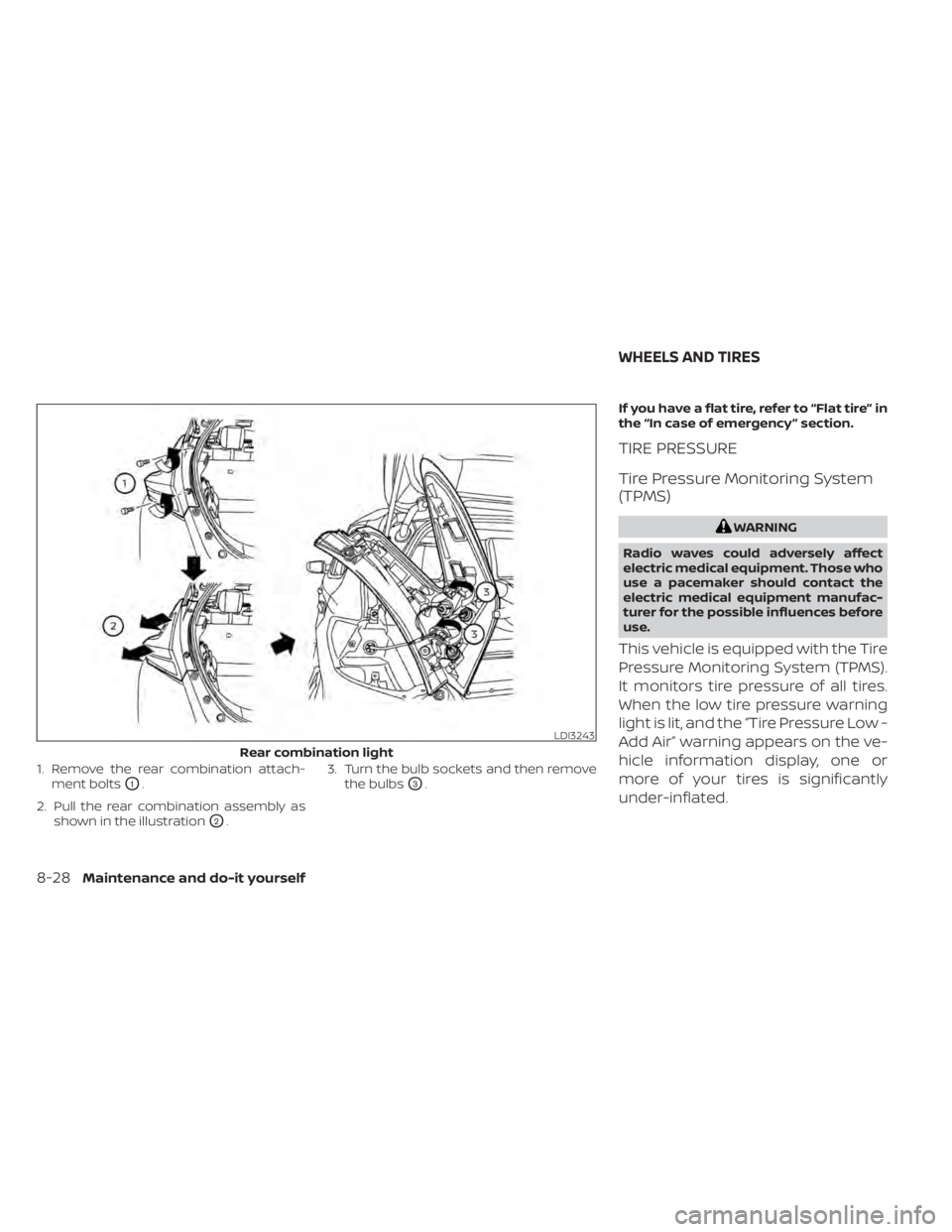
1. Remove the rear combination attach-ment bolts
O1.
2. Pull the rear combination assembly as shown in the illustration
O2. 3. Turn the bulb sockets and then remove
the bulbs
O3. If you have a flat tire, refer to “Flat tire” in
the “In case of emergency ” section.
TIRE PRESSURE
Tire Pressure Monitoring System
(TPMS)
WARNING
Radio waves could adversely affect
electric medical equipment. Those who
use a pacemaker should contact the
electric medical equipment manufac-
turer for the possible influences before
use.
This vehicle is equipped with the Tire
Pressure Monitoring System (TPMS).
It monitors tire pressure of all tires.
When the low tire pressure warning
light is lit, and the “Tire Pressure Low -
Add Air” warning appears on the ve-
hicle information display, one or
more of your tires is significantly
under-inflated.
LDI3243
Rear combination light
WHEELS AND TIRES
8-28Maintenance and do-it yourself
Page 577 of 596
will not transmit data. However, the telem-
atics features referenced above, and per-
haps others, will not be available to you. The
vehicle’s static navigation system will re-
main operational, and you will be able to
access your radio and climate controls.
Telematics features are dependent on cel-
lular data transmission. Some areas may
have limited or no cellular connectivity, re-
sulting in a loss or interruption of data
transmission and, as a result, certain fea-
tures may be temporarily unavailable. Even
if areas with good signal reception, cellular
connectivity can be adversely affected by
things such as tall buildings, apartments,
tunnels, underground parking, mountain-
ous areas, etc. Even if the signal strength
bar of the in-vehicle data communication
module indicates good reception, connec-
tivity may be disrupted. This does not indi-
cate a malfunction. Operate the system
again af ter a few minutes to restore con-
nectivity.NissanConnect® EV & Services or
NissanConnect® Services telematics fea-
tures are offered as a convenience to the
vehicle owner. NISSAN is not responsible
for, and owner assumes all risk of, interrup-
tions in service or errors based on incom-
plete or inaccurate data. NissanConnect®
EV & Services or NissanConnect® Services
communications may be received at averified e-mail address or by SMS/text
messaging-enabled mobile phone. Stan-
dard text rates and/or data usage may ap-
ply depending on your carrier.
If your vehicle’s telematics account is ac-
tive, and you are not the original owner,
please contact NISSAN at the website or
phone number above as soon as possible
to update the telematics enrollment infor-
mation. Upon sale of the vehicle, please
contact NISSAN at the website or phone
number above so that NISSAN’s records
may be updated. NissanConnect® EV &
Services or NissanConnect® Services sub-
scription services will automatically termi-
nate at the end of the initial free term if you
do not wish to renew your subscription
agreement at the prices then in effect.
A. INTRODUCTION
This product Telematic Control Unit Gen2K
incorporates the following sof tware:
1. the sof tware developed by, or developed
for, Ficosa International, S.A. (“Ficosa”),
2. the sof tware owned by third party and licensed to Ficosa,
3. the sof tware licensed under the GNU GENERAL PUBLIC LICENSE, Version 2
(“GPL”),
4. the sof tware licensed under the GNU LI- BRARY GENERAL PUBLIC LICENSE, Ver-
sion 2.0 or the GNU LESSER GENERAL
PUBLIC LICENSE, Version 2.1 (collectively
“LGPL”), the Mozilla Public license v2
(“MPL”), the GPL-2.0 license with-
OpenSSL-exception (“GPLOpenSSL”) and
GNU GENERAL PUBLIC LICENSE, Version
3 with GCC exception (together with the
GPL sof tware, jointly “Copylef t Sof t-
ware”), and/or
5. open sourced sof tware licensed under terms and conditions other than Copyl-
ef t Sof tware.
TELEMATIC CONTROL UNIT GEN2K
9-18Technical and consumer information