mirror NISSAN LEAF 2020 Owner´s Manual
[x] Cancel search | Manufacturer: NISSAN, Model Year: 2020, Model line: LEAF, Model: NISSAN LEAF 2020Pages: 596, PDF Size: 4.33 MB
Page 370 of 596
For Canada
Applicable law: Canada 310
This device complies with Industry
Canada licence-exempt RSS standard(s).
Operation is subject to the following two
conditions: (1) this device may not cause
interference, and (2) this device must ac-
cept any interference, including interfer-
ence that may cause undesired opera-
tion of the device.
Frequency bands: 24.05 – 24.25GHz
Output power: less than 20 milliwattsWARNING
Failure to follow the warnings and in-
structions for proper use of the I-BSI
system could result in serious injury or
death.
• The I-BSI system is not a replace-
ment for proper driving procedure
and is not designed to prevent con-
tact with vehicles or objects. When
changing lanes, always use the side
and rear mirrors and turn and look in
the direction you will move to ensure
it is safe to change lanes. Never rely
solely on the I-BSI system.
• There is a limitation to the detection
capability of the radar or the sonar.
Not every moving object or vehicle
will be detected. Using the I-BSI sys-
tem under some road, ground, lane
marker, traffic or weather conditions
could lead to improper system op-
eration. Always rely on your own op-
eration to avoid accidents.
The I-BSI system helps alert the driver of
other vehicles in adjacent lanes when
changing lanes, and helps assist the driver
to return the vehicle to the center of the
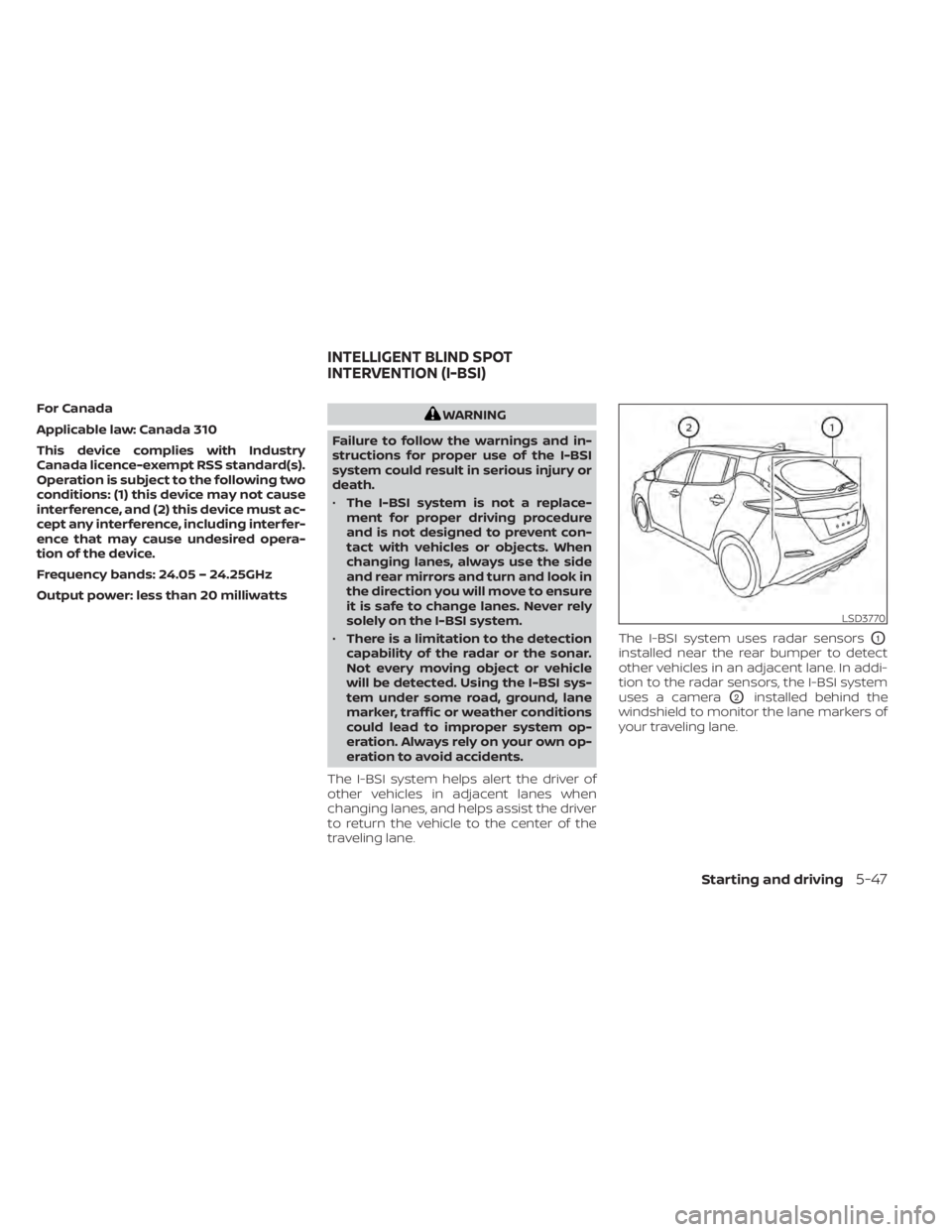
traveling lane. The I-BSI system uses radar sensors
O1
installed near the rear bumper to detect
other vehicles in an adjacent lane. In addi-
tion to the radar sensors, the I-BSI system
uses a camera
O2installed behind the
windshield to monitor the lane markers of
your traveling lane.
LSD3770
INTELLIGENT BLIND SPOT
INTERVENTION (I-BSI)
Starting and driving5-47
Page 371 of 596
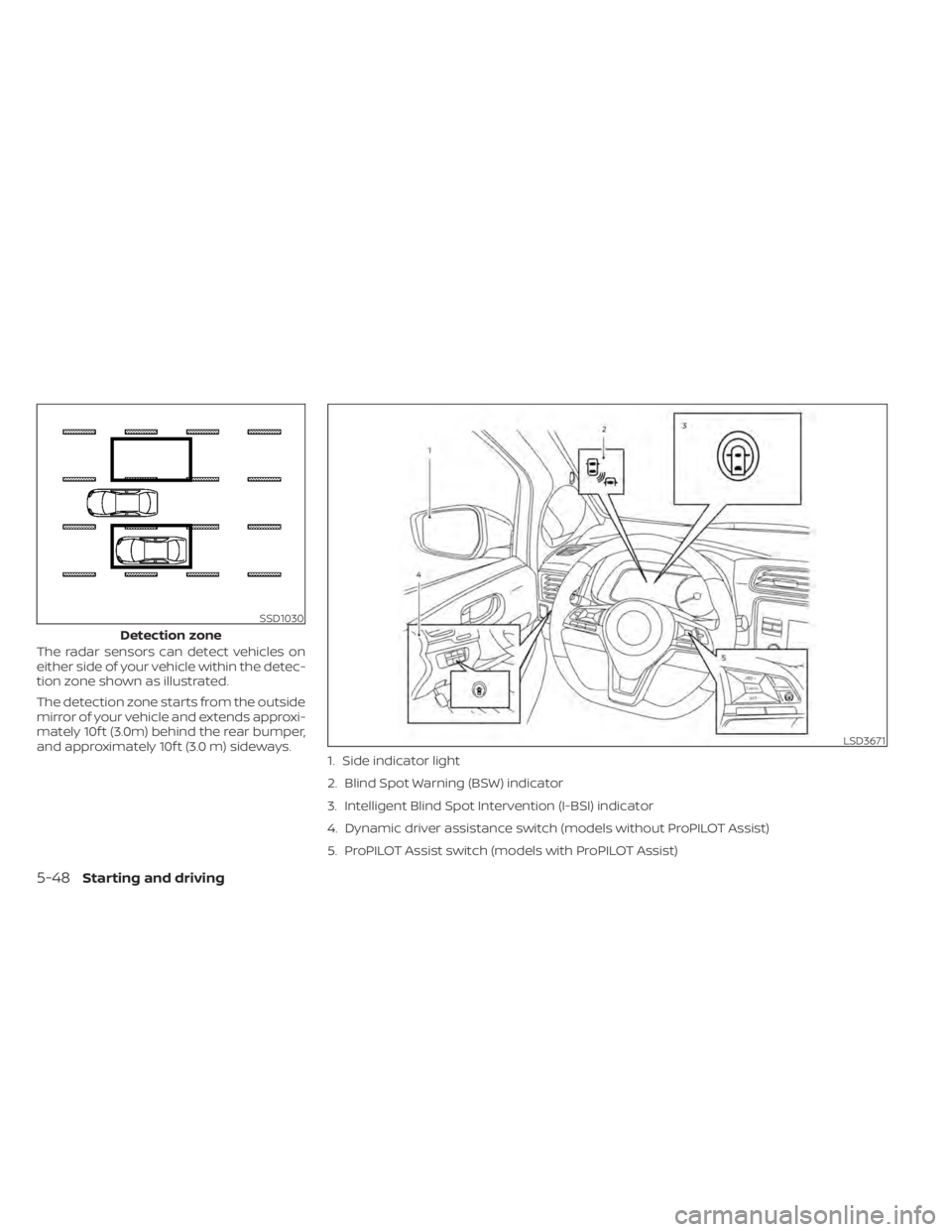
The radar sensors can detect vehicles on
either side of your vehicle within the detec-
tion zone shown as illustrated.
The detection zone starts from the outside
mirror of your vehicle and extends approxi-
mately 10f t (3.0m) behind the rear bumper,
and approximately 10f t (3.0 m) sideways.
SSD1030
Detection zone
LSD3671
1. Side indicator light
2. Blind Spot Warning (BSW) indicator
3. Intelligent Blind Spot Intervention (I-BSI) indicator
4. Dynamic driver assistance switch (models without ProPILOT Assist)
5. ProPILOT Assist switch (models with ProPILOT Assist)
5-48Starting and driving
Page 381 of 596
SYSTEM MAINTENANCE
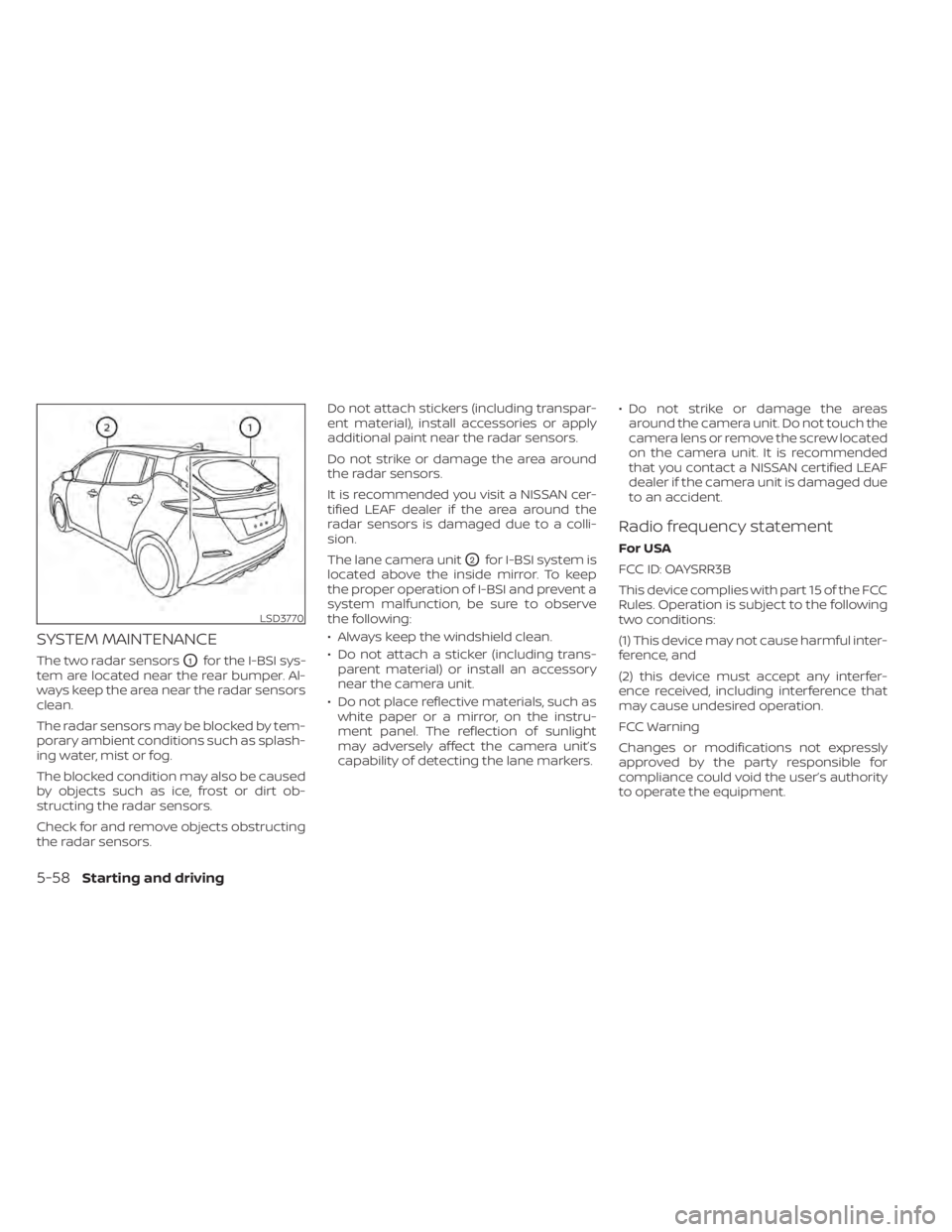
The two radar sensorsO1for the I-BSI sys-
tem are located near the rear bumper. Al-
ways keep the area near the radar sensors
clean.
The radar sensors may be blocked by tem-
porary ambient conditions such as splash-
ing water, mist or fog.
The blocked condition may also be caused
by objects such as ice, frost or dirt ob-
structing the radar sensors.
Check for and remove objects obstructing
the radar sensors. Do not attach stickers (including transpar-
ent material), install accessories or apply
additional paint near the radar sensors.
Do not strike or damage the area around
the radar sensors.
It is recommended you visit a NISSAN cer-
tified LEAF dealer if the area around the
radar sensors is damaged due to a colli-
sion.
The lane camera unit
O2for I-BSI system is
located above the inside mirror. To keep
the proper operation of I-BSI and prevent a
system malfunction, be sure to observe
the following:
• Always keep the windshield clean.
• Do not attach a sticker (including trans- parent material) or install an accessory
near the camera unit.
• Do not place reflective materials, such as white paper or a mirror, on the instru-
ment panel. The reflection of sunlight
may adversely affect the camera unit’s
capability of detecting the lane markers. • Do not strike or damage the areas
around the camera unit. Do not touch the
camera lens or remove the screw located
on the camera unit. It is recommended
that you contact a NISSAN certified LEAF
dealer if the camera unit is damaged due
to an accident.
Radio frequency statement
For USA
FCC ID: OAYSRR3B
This device complies with part 15 of the FCC
Rules. Operation is subject to the following
two conditions:
(1) This device may not cause harmful inter-
ference, and
(2) this device must accept any interfer-
ence received, including interference that
may cause undesired operation.
FCC Warning
Changes or modifications not expressly
approved by the party responsible for
compliance could void the user’s authority
to operate the equipment.
LSD3770
5-58Starting and driving
Page 382 of 596
NOTE:
The manufacturer is not responsible for
any radio or TV interference caused by
unauthorized modifications to this
equipment. Such modifications could
void the user’s authority to operate the
equipment.
For Canada
Applicable law: Canada 310
This device complies with Industry Canada
licence-exempt RSS standard(s). Operation
is subject to the following two conditions:
(1) This device may not cause interference,
and (2) this device must accept any inter-
ference, including interference that may
cause undesired operation of the device.
Frequency bands: 24.05 — 24.25GHz
Output power: less than 20 milliwatts
WARNING
Failure to follow the warnings and in-
structions for proper use of the RCTA
system could result in serious injury or
death.
• The RCTA system is not a replace-
ment for proper driving procedures
and is not designed to prevent con-
tact with vehicles or objects. When
backing out of a parking space, al-
ways use the side and rear mirrors
and turn and look in the direction
your vehicle will move. Never rely
solely on the RCTA system.
The RCTA system will assist you when
backing out from a parking space. When
the vehicle is in reverse, the system is de-
signed to detect other vehicles approach-
ing from the right or lef t of the vehicle. If the
system detects cross traffic, it will alert you.
REAR CROSS TRAFFIC ALERT (RCTA)
Starting and driving5-59
Page 437 of 596
ICC system malfunction
If the ICC system malfunctions, it will be
turned off automatically, a chime will
sound, and the speed control status warn-
ing (orange) will illuminate.
Action to take:
If the warning light comes on, stop the ve-
hicle in a safe place. Turn the EV system off,
restart the EV system and set the ICC sys-
tem again. If it is not possible to set the ICC
system or the indicator stays on, it may be
a malfunction. Although the normal driving
can be continued, the ICC system should
be inspected. It is recommended that you
visit a NISSAN certified LEAF dealer for this
service.
ICC sensor maintenance
The radar sensor is located on the front of
the vehicle.
To keep the ICC system operating properly,
be sure to observe the following:
• Always keep the sensor area clean.
• Do not strike or damage the areasaround the sensor. • Do not attach a sticker (including trans-
parent material) or install an accessory
near the sensor. This could cause failure
or malfunction.
• Do not attach metallic objects near the sensor area (brush guard, etc.). This could
cause failure or malfunction.
• Do not alter, remove, or paint the front bumper.
Before customizing or restoring the front
bumper, it is recommended that you visit a
NISSAN certified LEAF dealer.
The camera sensor is located above the
inside mirror.
To keep the proper operation of the sys-
tems and prevent a system malfunction,
be sure to observe the following:
• Always keep the windshield clean.
• Do not attach a sticker (including trans- parent material) or install an accessory
near the camera unit.
• Do not place reflective materials, such as white paper or a mirror, on the instru-
ment panel. The reflection of sunlight
may adversely affect the camera unit’s
capability of detecting the lane markers. • Do not strike or damage the areas
around the camera unit. Do not touch the
camera lens or remove the screw located
on the camera unit.
If the camera unit is damaged due to an
accident, it is recommended that you visit a
NISSAN certified LEAF dealer.
STEERING ASSIST
WARNING
Failure to follow the warnings and in-
structions for proper use of the Steer-
ing Assist could result in serious injury
or death.
• The Steering Assist is not a replace-
ment for proper driving procedures
and is not designed to correct care-
less, inattentive or absent-minded
driving. The Steering Assist will not
always steer the vehicle to keep it in
the lane. It is not designed to prevent
loss of control. It is the driver’s re-
sponsibility to stay alert, drive safely,
keep the vehicle in the traveling lane,
and be in control of the vehicle at all
times.
5-114Starting and driving
Page 443 of 596
Steering Assist cancel
Under the following conditions, the Steer-
ing Assist cancels, and the Steering Assist
status indicator and the Steering Assist in-
dicator turn off, and the “Not Available Bad
Weather” warning message will appear:
• When unusual lane markers appear inthe traveling lane or when the lane
marker cannot be correctly detected for
some time due to certain conditions (for
example, a snow rut, the reflection of light
on a rainy day, the presence of several
unclear lane markers)
• When the windshield wiper operates in the high (HI) speed operation (the Steer-
ing Assist is disabled when the wiper op-
erates for more than approximately 10
seconds)
Action to take:
Turn the ICC system off using the CANCEL
switch. When the conditions listed above
are no longer present, turn the ICC system
on again.
Steering Assist malfunction
When the system malfunctions, it turns off
automatically. The Steering Assist status
warning illuminates (orange). A chime may
sound depending on the situation.
Action to take:
Stop the vehicle in a safe location, place the
vehicle in the P (Park) position, turn the EV
system off, restart the EV system, resume
driving, and set the Intelligent Cruise Con-
trol system again. If the warning (orange)
continues to illuminate, the Steering Assist
is malfunctioning. Although the vehicle is
still drivable under normal conditions, have
the system checked. It is recommended
that you visit a NISSAN certified LEAF dealer
for this service.
Steering Assist maintenance
The camera sensor is located above the
inside mirror.
To keep the proper operation of the system
and prevent a system malfunction, be sure
to observe the following:
• Always keep the windshield clean.
• Do not attach a sticker (including trans- parent material) or install an accessory
near the camera unit. • Do not place reflective materials, such as
white paper or a mirror, on the instru-
ment panel. The reflection of sunlight
may adversely affect the camera unit’s
capability of detecting the lane markers.
• Do not strike or damage the areas around the camera unit. Do not touch the
camera lens or remove the screw located
on the camera unit.
If the camera unit is damaged due to an
accident, it is recommended that you visit a
NISSAN certified LEAF dealer.
Radio frequency statement
For USA
FCC ID OAYARS4B
This device complies with Part 15 of the FCC
Rules. Operation is subject to the following
two conditions:
1. This device may not cause harmful inter- ference, and
2. This device must accept any interfer- ence received, including interference
that may cause undesired operation.
5-120Starting and driving
Page 456 of 596
SYSTEM MAINTENANCE
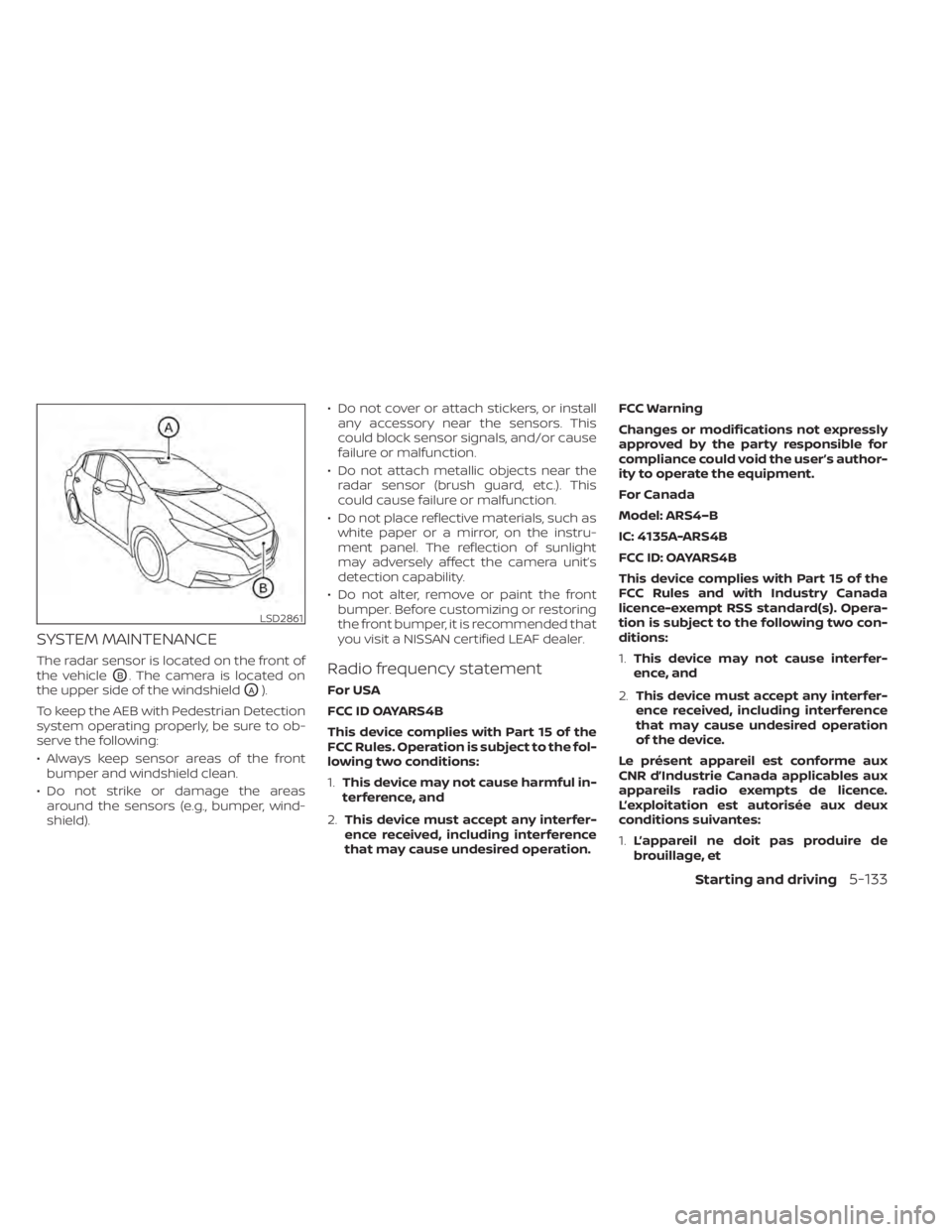
The radar sensor is located on the front of
the vehicle
OB. The camera is located on
the upper side of the windshield
OA).
To keep the AEB with Pedestrian Detection
system operating properly, be sure to ob-
serve the following:
• Always keep sensor areas of the front bumper and windshield clean.
• Do not strike or damage the areas around the sensors (e.g., bumper, wind-
shield). • Do not cover or attach stickers, or install
any accessory near the sensors. This
could block sensor signals, and/or cause
failure or malfunction.
• Do not attach metallic objects near the radar sensor (brush guard, etc.). This
could cause failure or malfunction.
• Do not place reflective materials, such as white paper or a mirror, on the instru-
ment panel. The reflection of sunlight
may adversely affect the camera unit’s
detection capability.
• Do not alter, remove or paint the front bumper. Before customizing or restoring
the front bumper, it is recommended that
you visit a NISSAN certified LEAF dealer.
Radio frequency statement
For USA
FCC ID OAYARS4B
This device complies with Part 15 of the
FCC Rules. Operation is subject to the fol-
lowing two conditions:
1. This device may not cause harmful in-
terference, and
2. This device must accept any interfer-
ence received, including interference
that may cause undesired operation. FCC Warning
Changes or modifications not expressly
approved by the party responsible for
compliance could void the user’s author-
ity to operate the equipment.
For Canada
Model: ARS4–B
IC: 4135A-ARS4B
FCC ID: OAYARS4B
This device complies with Part 15 of the
FCC Rules and with Industry Canada
licence-exempt RSS standard(s). Opera-
tion is subject to the following two con-
ditions:
1.
This device may not cause interfer-
ence, and
2. This device must accept any interfer-
ence received, including interference
that may cause undesired operation
of the device.
Le présent appareil est conforme aux
CNR d’Industrie Canada applicables aux
appareils radio exempts de licence.
L’exploitation est autorisée aux deux
conditions suivantes:
1. L’appareil ne doit pas produire de
brouillage, et
LSD2861
Starting and driving5-133
Page 457 of 596
2.L’utilisateur de l’appareil doit accepter
tout brouillage radioélectrique subi,
même si le brouillage est susceptible
d’en compromettre le fonctionnement.
Radio frequency radiation exposure in-
formation:
This equipment complies with FCC and IC
radiation exposure limits set forth for an
uncontrolled environment.
This equipment should be installed and
operated with minimum distance of 30
cm between the radiator and your body.
This transmitter must not be co-located
or operating in conjunction with any
other antenna or transmitter.
Cet équipement est conforme aux lim-
ites d’exposition aux rayonnements IC
établies pour un environnement non
contrôlé.
Cet équipement doit être installé et
utilisé avec un minimum de 30 cm de
distance entre la source de rayonnement
et votre corps.
FCC Notice
Changes or modifications not expressly
approved by the party responsible for
compliance could void the user’s author-
ity to operate the equipment.
WARNING
Failure to follow the warnings and in-
structions for proper use of the RAB
system could result in serious injury or
death.
• The RAB system is a supplemental
aid to the driver. It is not a replace-
ment for proper driving procedures.
Always use the side and rear mirrors
and turn and look in the direction you
will move before and while backing
up. Never rely solely on the RAB sys-
tem. It is the driver’s responsibility to
stay alert, drive safely, and be in con-
trol of the vehicle at all times.
• There is a limitation to the RAB sys-
tem capability. The RAB system is not
effective in all situations.
The RAB system can assist the driver when
the vehicle is backing up and approaching
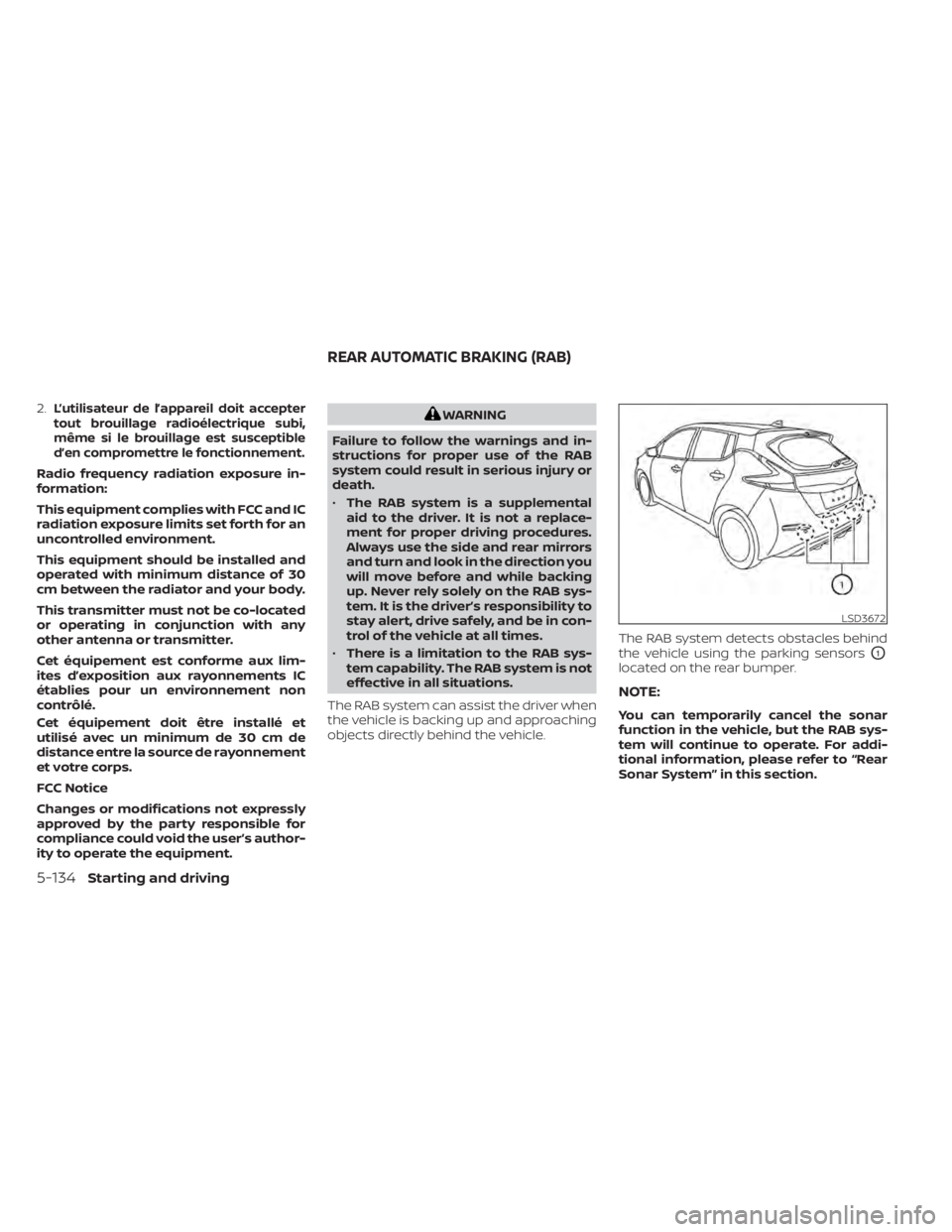
objects directly behind the vehicle. The RAB system detects obstacles behind
the vehicle using the parking sensors
O1
located on the rear bumper.
NOTE:
You can temporarily cancel the sonar
function in the vehicle, but the RAB sys-
tem will continue to operate. For addi-
tional information, please refer to “Rear
Sonar System” in this section.
LSD3672
REAR AUTOMATIC BRAKING (RAB)
5-134Starting and driving
Page 544 of 596
1. Headlight assembly
2. Map light
3. Room light
4. High-mounted stop light
5. Rear combination light
6. Door mirror turn signal light (if soequipped)
7. Cargo light
8. License plate light
9. Fog light (if so equipped)
Fog may temporarily form inside the lens
of the exterior lights in the rain or in a car
wash. A temperature difference between
the inside and the outside of the lens
causes the fog. This is not a malfunction. If
large drops of water collect inside the lens,
it is recommended that you visit a NISSAN
certified LEAF dealer for this service.
HEADLIGHTS
If headlight bulb replacement is required, it
is recommended that you visit a NISSAN
certified LEAF dealer for this service.
Replacing the LED headlight bulb
(if so equipped)
If LED headlight bulb replacement is neces-
sary, it is recommended that you visit a
NISSAN certified LEAF dealer for this ser-
vice.
Replacing the halogen headlight
bulb (if so equipped)
The headlight is a semi-sealed beam type
that uses a headlight (halogen) bulb. If bulb
replacement is required, it is recom-
mended that you visit a NISSAN certified
LEAF dealer.
CAUTION
• Do not leave the bulb out of the head-
light reflector for a long period of
time. Dust, moisture, smoke, etc. en-
tering the headlight body may affect
bulb performance
• High-pressure halogen gas is sealed
inside the halogen bulb. The bulb
may break if the glass envelope is
scratched or the bulb is dropped. •
Only touch the base when handling
the bulb. Never touch the glass enve-
lope. Touching the glass envelope
could significantly affect bulb life
and/or headlight performance.
• Aiming is not necessary af ter replac-
ing the bulb. When aiming adjust-
ment is necessary, it is recom-
mended that you visit a NISSAN
certified LEAF dealer for this service.
• Fog may temporarily form inside the
lens of the exterior lights in the rain
or in a car wash. A temperature dif-
ference between the inside and the
outside of the lens causes the fog. If
large drops of water collect inside
the lens, it is recommended that you
visit a NISSAN certified LEAF dealer.
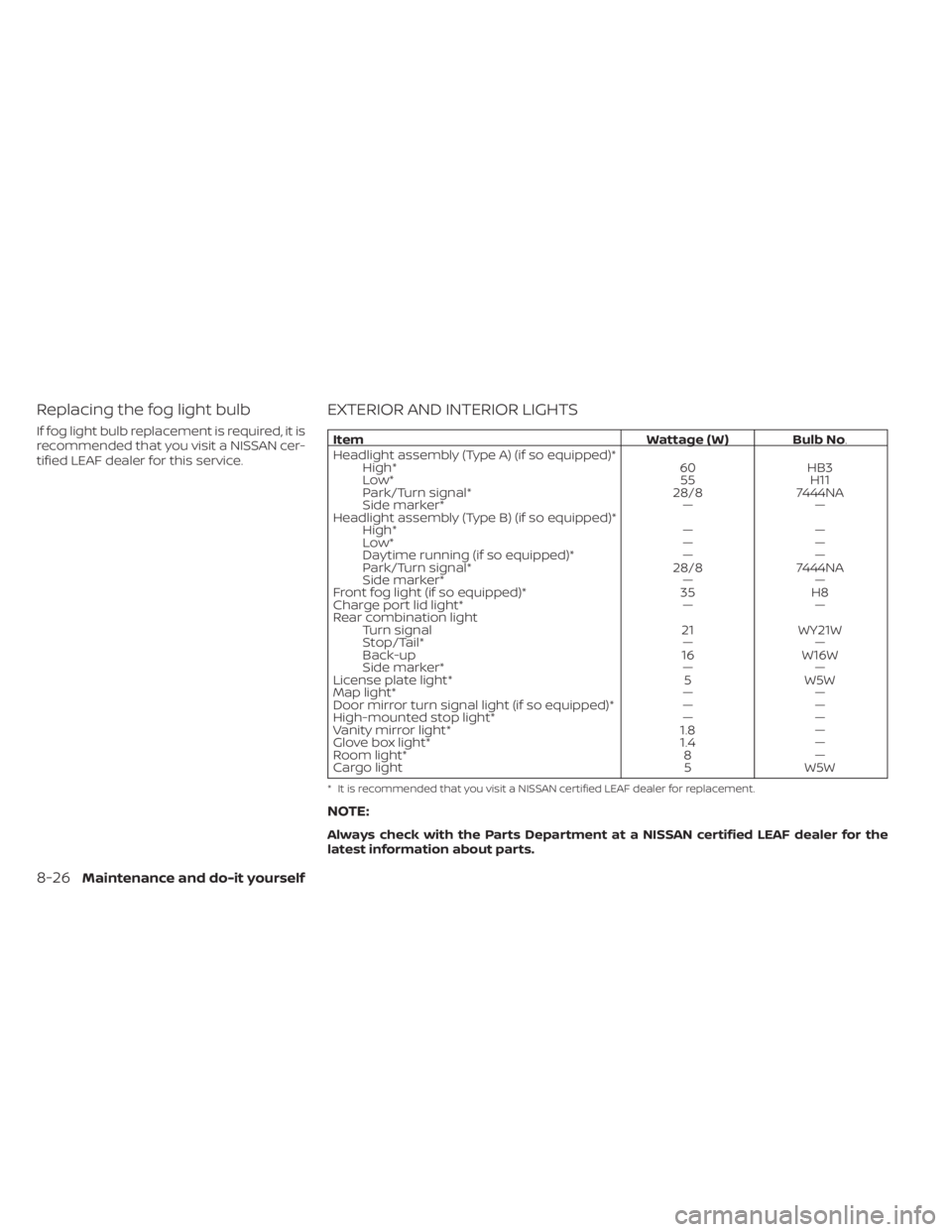
Use the same number and wattage as
originally installed as shown in the chart.
FOG LIGHTS (if so equipped)
For additional information on fog light bulb
replacement, refer to the instruction out-
lined in this section
Maintenance and do-it yourself8-25
Page 545 of 596
Replacing the fog light bulb
If fog light bulb replacement is required, it is
recommended that you visit a NISSAN cer-
tified LEAF dealer for this service.
EXTERIOR AND INTERIOR LIGHTS
ItemWattage ( W ) Bulb No.
Headlight assembly (Type A) (if so equipped)* High* 60HB3
Low* 55H11
Park/Turn signal* 28/87444NA
Side marker* ——
Headlight assembly (Type B) (if so equipped)* High* ——
Low* ——
Daytime running (if so equipped)* ——
Park/Turn signal* 28/87444NA
Side marker* ——
Front fog light (if so equipped)* 35H8
Charge port lid light* ——
Rear combination light Turn signal 21WY21W
Stop/Tail* ——
Back-up 16W16W
Side marker* ——
License plate light* 5W5W
Map light* ——
Door mirror turn signal light (if so equipped)* ——
High-mounted stop light* ——
Vanity mirror light* 1.8—
Glove box light* 1.4—
Room light* 8—
Cargo light 5W5W
* It is recommended that you visit a NISSAN certified LEAF dealer for replacement.
NOTE:
Always check with the Parts Department at a NISSAN certified LEAF dealer for the
latest information about parts.
8-26Maintenance and do-it yourself