lights NISSAN LEAF 2020 Owner´s Manual
[x] Cancel search | Manufacturer: NISSAN, Model Year: 2020, Model line: LEAF, Model: NISSAN LEAF 2020Pages: 596, PDF Size: 4.33 MB
Page 243 of 596
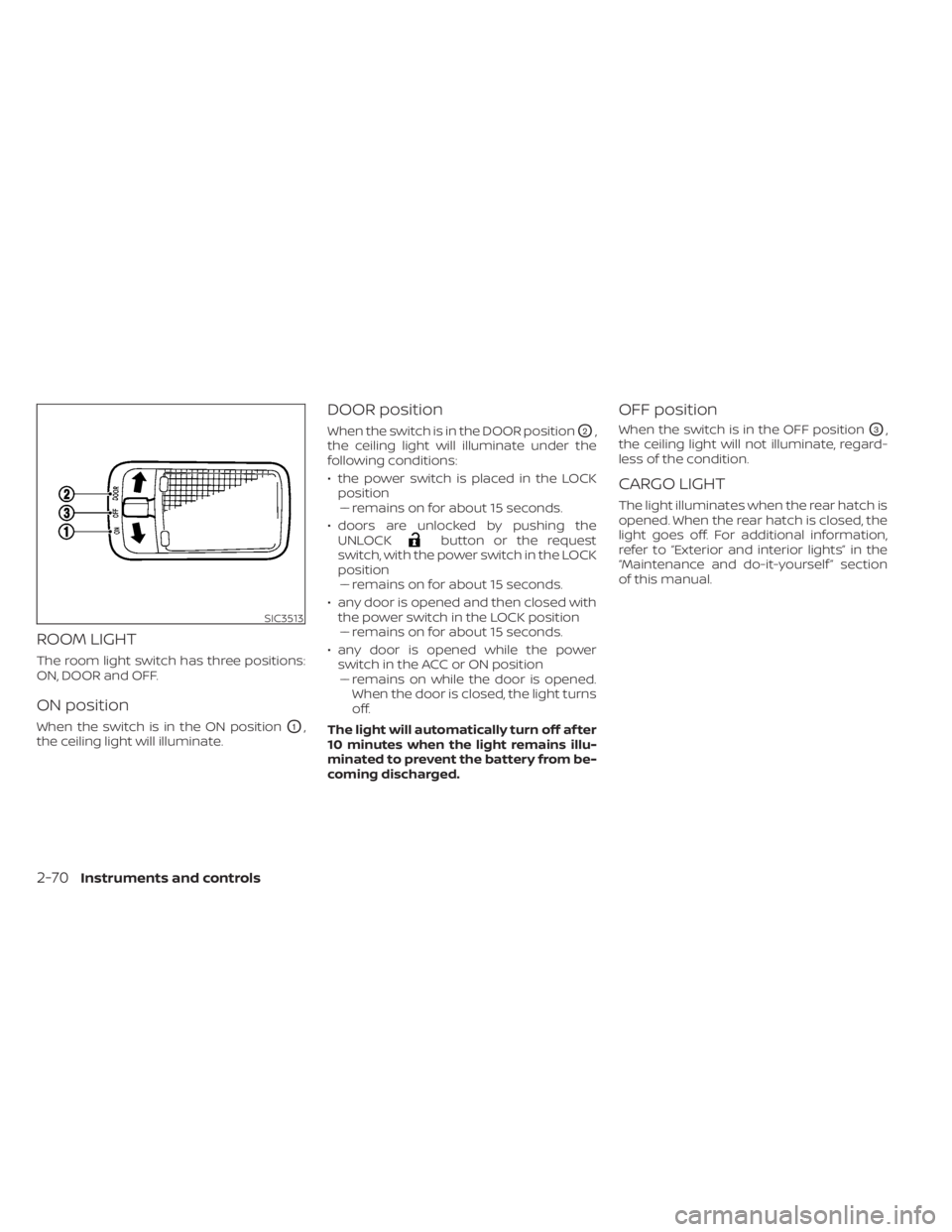
ROOM LIGHT
The room light switch has three positions:
ON, DOOR and OFF.
ON position
When the switch is in the ON positionO1,
the ceiling light will illuminate.
DOOR position
When the switch is in the DOOR positionO2,
the ceiling light will illuminate under the
following conditions:
• the power switch is placed in the LOCK position–– remains on for about 15 seconds.
• doors are unlocked by pushing the UNLOCK
button or the request
switch, with the power switch in the LOCK
position –– remains on for about 15 seconds.
• any door is opened and then closed with the power switch in the LOCK position–– remains on for about 15 seconds.
• any door is opened while the power switch in the ACC or ON position– – remains on while the door is opened.
When the door is closed, the light turns
off.
The light will automatically turn off af ter
10 minutes when the light remains illu-
minated to prevent the battery from be-
coming discharged.
OFF position
When the switch is in the OFF positionO3,
the ceiling light will not illuminate, regard-
less of the condition.
CARGO LIGHT
The light illuminates when the rear hatch is
opened. When the rear hatch is closed, the
light goes off. For additional information,
refer to “Exterior and interior lights” in the
“Maintenance and do-it-yourself ” section
of this manual.
SIC3513
2-70Instruments and controls
Page 264 of 596
CAUTION
When locking the doors using the Intel-
ligent Key, be sure not to leave the key
in the vehicle.
Locking doors
1. Place the power switch in the LOCK position.
2. Close all doors.
3. Press the
button on the Intelli-
gent Key.
4. The hazard warning lights flash twice and the horn beeps once.
5. All doors and the rear hatch will be locked.
WARNING
Af ter locking the doors using the Intel-
ligent Key, be sure that the doors have
been securely locked by operating the
door handles. Failure to follow these in-
structions may result in inadvertently
unlocking the doors, which may de-
crease the safety and security of your
vehicle.
Unlocking doors
1. Press thebutton on the Intelligent
Key to unlock the driver’s door.
2. The hazard warning lights flash once.
3. Press the
button again within 1
minute to unlock all doors and rear
hatch.
All doors and rear hatch will be locked au-
tomatically unless one of the following op-
erations is performed within 1 minute af ter
pressing the
button:
• Opening any doors or rear hatch.
• Pushing the power switch.
The interior light illuminates for a period of
time when a door is unlocked and the
room light switch is in the DOOR position.
The light can be turned off without waiting
by performing one of the following opera-
tions:
• Placing the power switch in the ON posi- tion.
• Locking the doors with the Intelligent Key.
• Switching the room light switch to the OFF position.
Opening charge port lid
The charge port lid may be opened by
pressing and holding thebutton.
For additional information, refer to "Open-
ing charge port lid" in this section.
Using panic alarm
If you are near your vehicle and feel threat-
ened, you may activate the alarm to call
attention as follows:
1. Press the
button on the Intelligent
Key for more than 1 second.
2. The panic alarm and headlights will stay on for a period of time.
3. The panic alarm stops when: • It has run for a period of time, or
• Any of the buttons on the IntelligentKey is pushed. (Note: The
button
must be pushed for more than 1 sec-
ond.)
Pre-driving checks and adjustments3-15
Page 271 of 596
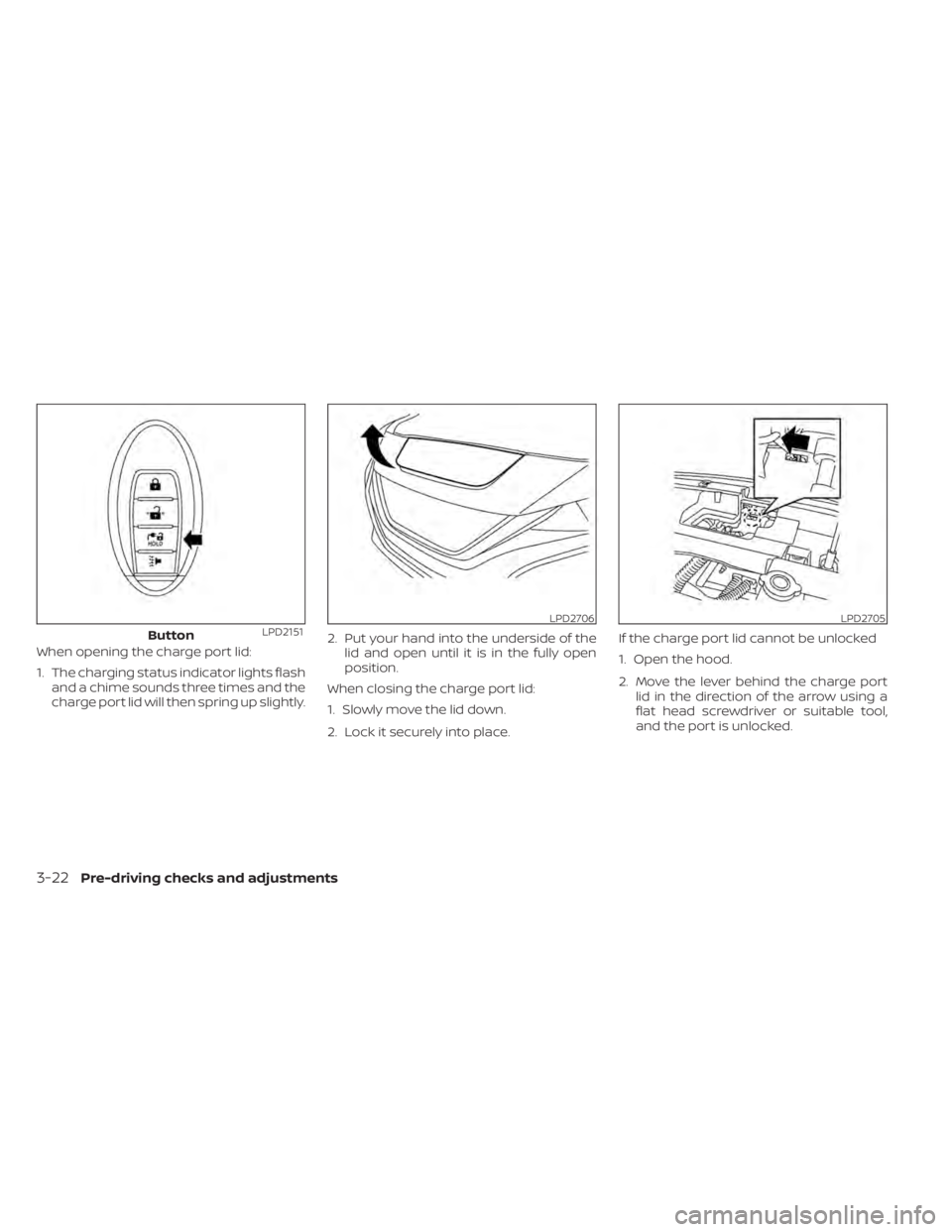
When opening the charge port lid:
1. The charging status indicator lights flashand a chime sounds three times and the
charge port lid will then spring up slightly. 2. Put your hand into the underside of the
lid and open until it is in the fully open
position.
When closing the charge port lid:
1. Slowly move the lid down.
2. Lock it securely into place. If the charge port lid cannot be unlocked
1. Open the hood.
2. Move the lever behind the charge port
lid in the direction of the arrow using a
flat head screwdriver or suitable tool,
and the port is unlocked.
ButtonLPD2151LPD2706LPD2705
3-22Pre-driving checks and adjustments
Page 274 of 596
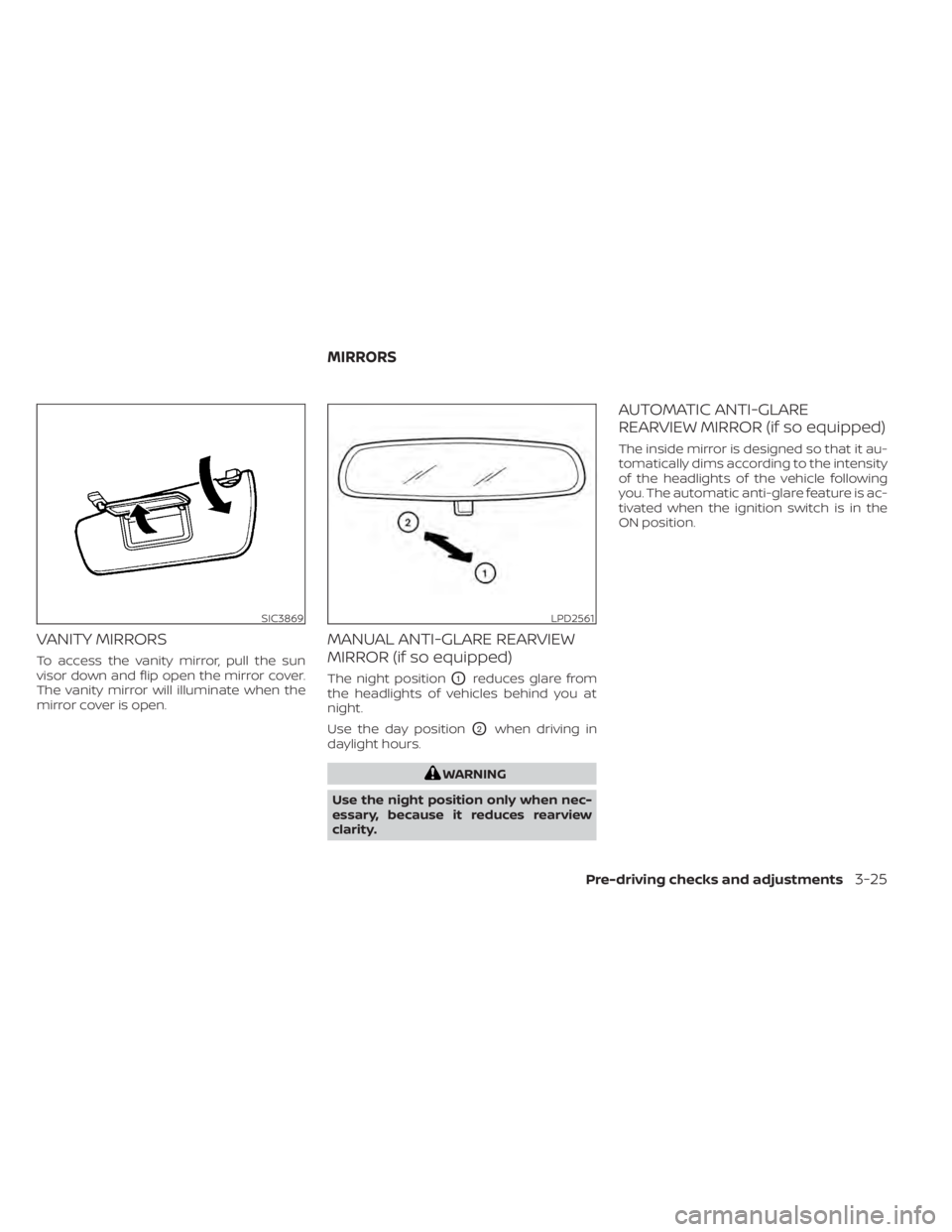
VANITY MIRRORS
To access the vanity mirror, pull the sun
visor down and flip open the mirror cover.
The vanity mirror will illuminate when the
mirror cover is open.
MANUAL ANTI-GLARE REARVIEW
MIRROR (if so equipped)
The night positionO1reduces glare from
the headlights of vehicles behind you at
night.
Use the day position
O2when driving in
daylight hours.
WARNING
Use the night position only when nec-
essary, because it reduces rearview
clarity.
AUTOMATIC ANTI-GLARE
REARVIEW MIRROR (if so equipped)
The inside mirror is designed so that it au-
tomatically dims according to the intensity
of the headlights of the vehicle following
you. The automatic anti-glare feature is ac-
tivated when the ignition switch is in the
ON position.
SIC3869LPD2561
MIRRORS
Pre-driving checks and adjustments3-25
Page 311 of 596
Ventilation
Press the
HEAT button and A/C but-
ton if the indicator lights are on so that
both indicator lights turn off.
NOTE:
• The ventilation mode requires a lower power consumption, so cruising dis-
tance will increase.
• In ventilation mode, temperature is not indicated on the air conditioner dis-
play.
Dehumidified defrosting/defogging
Press the
front defroster button (the
indicator light will illuminate).
• To remove moisture or fog on the front window quickly, set the temperature to
the high temperature and the fan speed
to their maximum level.
• Af ter the windshield is cleared, press the
front defroster button again (the in-
dicator light will turn off ).
• When the
front defroster button is
pressed, the air conditioner will automati-
cally turn on to defog the windshield. The
outside air recirculation mode will be se-
lected to improve the defogging perfor-
mance. Fan speed control
Turn the
fan speed control dial to
manually control the fan speed.
Press the AUTO button to change the fan
speed to the automatic mode.
Air flow control
Press the MODE button to change the air
flow mode.
Air flows from the center and
side ventilators.
Air flows from the center and
side ventilators and foot outlets.
Air flows mainly from the foot
outlets.
Air flows from the defroster out-
lets and foot outlets.
Air flows from the defroster
vents. Temperature control
Turn the temperature control dial to set the
desired temperature.
Recirculation
Press the
intake air control button to
change the air circulation mode. When the
indicator light illuminates, the flowing air is
recirculated inside the vehicle.
When the outside temperature exceeds
70°F (21°C) the air conditioning system may
default to air recirculation mode automati-
cally to reduce overall power consumption.
To exit air recirculation mode, deselect the
air recirculation button (indicator will turn
off ) to enter fresh mode.
Fresh air
Press the
intake air control button to
change the air circulation mode. When the
indicator light does not illuminate, the flow-
ing air is drawn from outside the vehicle.
Automatic air intake control
In the AUTO mode, the intake air will be
controlled automatically. When the outside
temperature exceeds 70°F (21°C), the air
conditioning system may default to air re-
circulation mode automatically to reduce
overall power consumption.
4-34Monitor, climate, audio, phone and voice recognition systems
Page 314 of 596
Dehumidified heating
1. Press the A/C button to illuminate theA/C indicator light.
2. Press the
HEAT button to illuminate
the HEAT indicator light
NOTE:
Electric power consumption of climate
control increases while A/C button indi-
cator and
HEAT button indicator si-
multaneously illuminate. As a result, the
driving range may be decreased.
Heating (A/C off )
1. Press the
HEAT button to illuminate
the HEAT indicator light.
2. Press the A/C button to turn off the A/C indicator light.
• Do not set temperature lower than the outside air temperature. Doing so may
prevent the temperature from being
controlled properly.
• If the windows fog up, use dehumidi- fied heating instead of the A/C off
heating. Ventilation
Press the
HEAT button and A/C but-
ton if the indicator lights are on so that
both indicator lights turn off.
NOTE:
• The ventilation mode requires a lower power consumption, so cruising dis-
tance will increase.
• In ventilation mode, temperature is not indicated on the navigation monitor or
on the air conditioner display.
Dehumidified defrosting/defogging
Press the
front defroster button (the
indicator light will illuminate).
• To remove moisture or fog on the front window quickly, set the temperature to
the high temperature and the fan speed
to their maximum level.
• Af ter the windshield is cleared, press the
front defroster button again (the in-
dicator light will turn off ).
• When the
front defroster button is
pressed, the air conditioner and heater
will automatically turn on to defog the
windshield. The outside air recirculation
mode will be selected to improve the de-
fogging performance. Fan speed control
Press the
fan speed control button to
manually control the fan speed.
Press the AUTO button to change the fan
speed to the automatic mode.
Air flow control
Press the MODE button to change the air
flow mode.
Air flows from the center and
side ventilators.
Air flows from the center and
side ventilators and foot outlets.
Air flows mainly from the foot
outlets.
Air flows from the defroster out-
lets and foot outlets.
Air flows from the defroster
vents.
Temperature control
Press the temperature control buttons to
set the desired temperature.
Monitor, climate, audio, phone and voice recognition systems4-37
Page 317 of 596
9. Press thebutton to set Cli-
mate Temperature and then press the
OK button.
10. * Press the
button to select
"Days" and then press the OK button.
The current day of the week is dis-
played with an underline.
Press the
button to select the
days of the week you wish to activate
the Climate Control system and then
press the OK button. The indicator light
of the selected button will turn on.
11. * Af ter setting the day of the week, press the Back button and return to the pre-
vious screen.
The set day of the week is lit in white.
12. Af ter the setting is complete, place the power switch in the OFF position, and
then connect the charge connector to
the vehicle.
* models with Navigation System Info
The Climate Ctrl. Timer does not activate if
the charge connector is not connected to
the vehicle. When the “Battery Operation
OK” is turned on and the charging connec-
tor is not connected to the vehicle, the Cli-
mate Ctrl. Timer will activate for 15 minutes.
When the outside temperature is high, the
interior temperature may not reach the set
temperature within the 15 minutes.
Turn "Battery Operation OK" to OFF when it
is not necessary to operate air condition-
ing timer in order to prevent Li-ion battery
from discharging.
For models without Navigation System, the
Climate Ctrl. Timer operates repeatedly ev-
ery day once it is turned on.
Operating tips for using Climate
Ctrl. Timer
• The Climate Ctrl. Timer will only start
when the power switch is in the LOCK/
OFF or ACC position. • To turn off the Climate Ctrl. Timer func-
tion, turn off the “Climate Ctrl. Timer1” and
"Climate Ctrl. Timer2" setting in the video
information display using the
button on the steering wheel. The start
and stop time settings will not be deleted
even if the Climate Ctrl. Timer function is
turned off.
• While the Climate Ctrl. Timer is operating, the Climate Ctrl. Timer indicator and the
charging status indicator lights flash. If
the Climate Ctrl. Timer is set to activate,
the Climate Ctrl. Timer indicator illumi-
nates.*
• If the Climate Ctrl. Timer starts operating while the vehicle is being charged, the
time required for charging will be longer.
• Operating the Climate Ctrl. Timer or re- mote climate control in an environment
where the temperature is low may de-
crease the rate of battery charge.
4-40Monitor, climate, audio, phone and voice recognition systems
Page 318 of 596
• Timer setting can also be changed whileClimate Ctrl. Timer is operated. When the
power position is switched to OFF, the air
conditioner starts or enters waiting
mode depending on the new timer set-
tings.
• When the difference in temperature be- tween the air conditioner setting tem-
perature and the temperature outside
the vehicle is large, the temperature in-
side the vehicle may not be maintained
at the setting temperature.
• The charging status indicator lights illu- minate in a specific pattern when the Li-
ion battery warmer operates. The charg-
ing status indicator lights use the same
pattern to indicate 12–volt battery charg-
ing, Climate Ctrl. Timer operation or Re-
mote Climate Control operation. The
charging status indicator lights do not
change if the Li-ion battery warmer oper-
ates at the same time as the above fea-
tures.
• The temperature in the passenger com- partment may not be comfortable if en-
tering the vehicle too soon before or too
long af ter the scheduled time of depar-
ture. • Air conditioning is limited to the capacity
of the electric power when the charge
connector is connected. Therefore, the
temperature may not reach the set tem-
perature due to limitations in air condi-
tioning performance, if ambient tem-
perature is excessively high or low, or if
the charge connector is connected to a
120–volt plug outlet.
• The Climate Ctrl. Timer operates the cli- mate control function so that a comfort-
able temperature is provided in the pas-
senger compartment at the scheduled
time of departure. The climate control is
set to stop at the scheduled time of de-
parture.
• Depending on the facilities of charging station, there may be time when it is not
available for charging. Confirm the avail-
ability of the charging facility before set-
ting the Climate Ctrl. Timer. Be sure that
the power switch of the charger is turned
on when setting the Climate Ctrl. Timer.
• When the power switch is turned OFF af- ter changing the setting, the new setting
will be applied.
*models with Navigation SystemRemote climate control
This vehicle incorporates a communica-
tion device that is called a TCU (Telematics
Control Unit). The communication connec-
tion between this unit and Nissan Data
Center allows for various remote function
services.
Even when away from the vehicle, climate
control can be started by accessing the
Web Owner Portal using a cellular phone or
a personal computer.
When operation is started, or at the set
start time, the Nissan Data Center ac-
cesses the vehicle. When the vehicle re-
ceives a command for remote operation,
the climate control immediately turns ON
and operates for the specified period of
time. Confirmation of the ON/OFF of the
climate control operation can be checked
by accessing the Web Owner Portal, or by
e-mail.
Completing registration for the
NissanConnect® EV and Services is neces-
sary before using the service. For additional
information, refer to the NissanConnect®
Manual (for Leaf ).
Monitor, climate, audio, phone and voice recognition systems4-41
Page 337 of 596
4. Push the power switch while depressingthe brake pedal within 10 seconds af ter
the chime sounds. The power switch
position changes to the READY to drive
mode.
Af ter step 3 is performed, if the power
switch is pushed without depressing the
brake pedal, the power switch position will
change to ACC.
NOTE:
• When the power switch is pushed to the ACC or ON position or READY to
drive mode by the above procedure,
the EV system operation for dis-
charged Intelligent Key system indica-
tor appears on the vehicle information
display even if the Intelligent Key is in-
side the vehicle. This is not a malfunc-
tion. To stop the warning indicator
from blinking, touch the power switch
with the Intelligent Key again.
• If the Intelligent Key battery discharge indicator appears on the vehicle infor-
mation display, replace the battery as
soon as possible. For additional infor-
mation, refer to “NISSAN Intelligent
Key® battery replacement” in the
“Maintenance and do-it-yourself ” sec-
tion of this manual.
NISSAN VEHICLE IMMOBILIZER
SYSTEM
The NISSAN Vehicle Immobilizer System
will not allow the power switch to be placed
in the READY to drive position without the
use of the registered key.
If the power switch fails to place the vehicle
into the READY to drive position using the
registered key, it may be due to interfer-
ence caused by another registered key, an
automated toll road device or automated
payment device on the key ring. Restart the
EV system using the following procedure:
1. Leave the power switch in the ON posi- tion for approximately 5 seconds.
2. Place the power switch in the OFF posi- tion and wait approximately 10 seconds.
3. Repeat steps 1 and 2 again.
4. Place the power switch in the READY to drive position while holding the device
(which may have caused the interfer-
ence) separate from the registered key.
If this procedure allows the power
switch to be placed in the READY to drive
mode, NISSAN recommends placing the
registered key on a separate key ring to
avoid interference from other devices. • Make sure that the area around the ve-
hicle is clear.
• Check fluid levels such as coolant, brake fluid, and windshield-washer fluid as fre-
quently as possible.
• Check that all windows and lights are clean.
• Visually inspect tires for their appearance and condition. Also check tires for proper
inflation.
• Check that all doors are closed.
• Position the seat and adjust the head restraints/headrests.
• Adjust the inside and outside mirrors.
• Fasten seat belts and ask all passengers to do likewise.
• Check the operation of the warning lights when the power switch is pushed to the
ON position. For additional information,
refer to “Warning lights, indicator lights
and audible reminders” in the “Instru-
ments and controls” section of this
manual.
BEFORE STARTING THE EV SYSTEM
5-14Starting and driving
Page 344 of 596
• If the shif t lever is moved to the P (Park)position when the brake force is main-
tained by the automatic brake hold
function, the electronic parking brake
will apply automatically.
• If the driver’s seat belt is unfastened when the brake force is maintained by
the automatic brake hold function, the
electronic parking brake will apply au-
tomatically.
• When the ICC system (if so equipped) is canceled under the following condi-
tions at a standstill, the electronic
parking brake is automatically acti-
vated:– Any door is open.
– The driver’s seat belt is not fastened.
– Your vehicle has been stopped by the ICC system for approximately 3
minutes or longer.
– The shif t lever is not in the D (Drive) position or B mode.
– The Vehicle Dynamic Control system is turned off.
– When distance measurement be- comes impaired due to adhesion of
dirt or obstruction to the sensor.
– When the radar signal is temporarily interrupted.
Manual operation
The electronic parking brake will not be au-
tomatically applied if the EV system is
stopped without using the power switch
(for example, by EV system stalling). In such
a case, you have to apply the parking brake
manually.
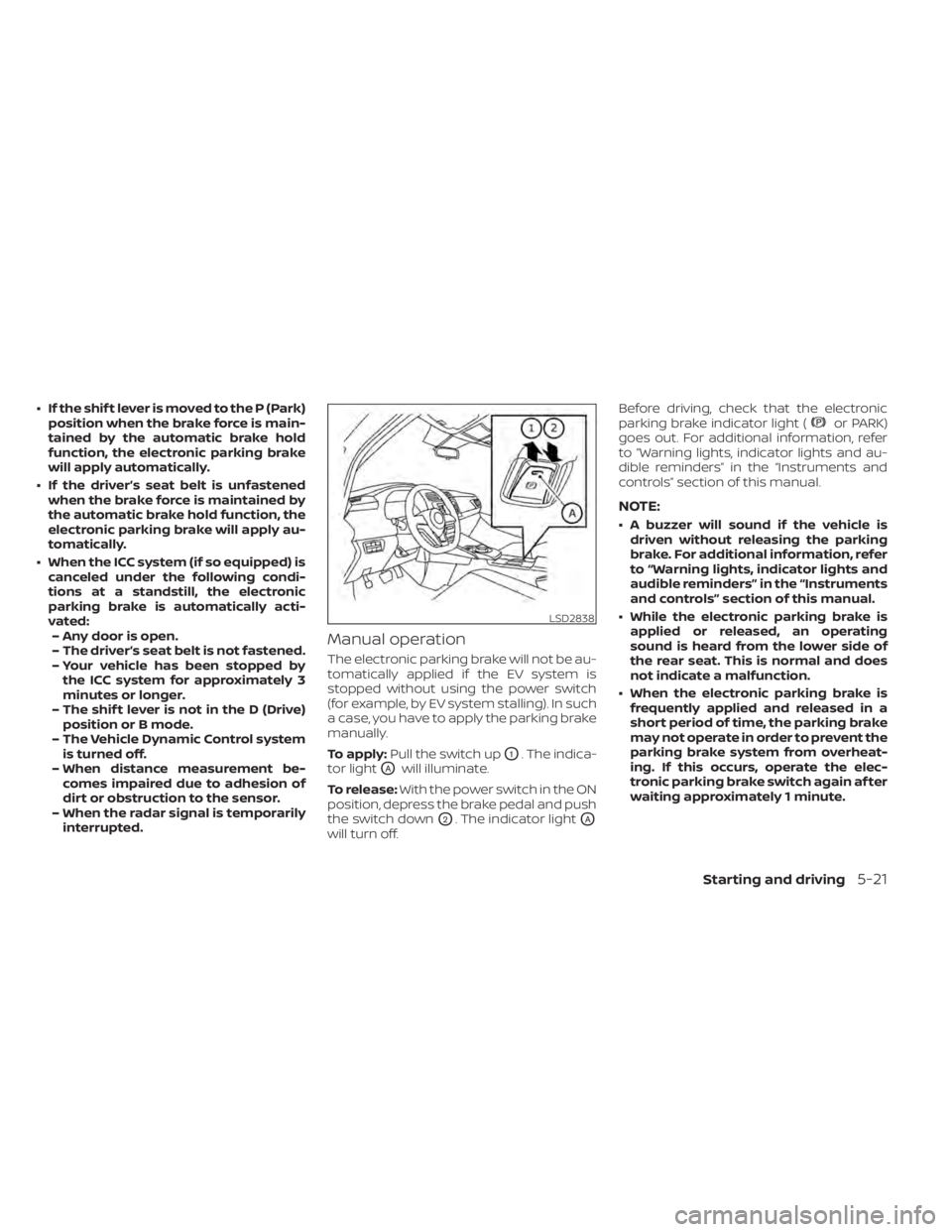
To apply: Pull the switch up
O1. The indica-
tor light
OAwill illuminate.
To release: With the power switch in the ON
position, depress the brake pedal and push
the switch down
O2. The indicator lightOA
will turn off. Before driving, check that the electronic
parking brake indicator light (
or PARK)
goes out. For additional information, refer
to “Warning lights, indicator lights and au-
dible reminders” in the “Instruments and
controls” section of this manual.
NOTE:
• A buzzer will sound if the vehicle is driven without releasing the parking
brake. For additional information, refer
to “Warning lights, indicator lights and
audible reminders” in the “Instruments
and controls” section of this manual.
• While the electronic parking brake is applied or released, an operating
sound is heard from the lower side of
the rear seat. This is normal and does
not indicate a malfunction.
• When the electronic parking brake is frequently applied and released in a
short period of time, the parking brake
may not operate in order to prevent the
parking brake system from overheat-
ing. If this occurs, operate the elec-
tronic parking brake switch again af ter
waiting approximately 1 minute.
LSD2838
Starting and driving5-21