charging NISSAN LEAF 2020 Owner´s Manual
[x] Cancel search | Manufacturer: NISSAN, Model Year: 2020, Model line: LEAF, Model: NISSAN LEAF 2020Pages: 596, PDF Size: 4.33 MB
Page 184 of 596
![NISSAN LEAF 2020 Owner´s Manual How to read the display:
The displayed charging time is calculated
based on the electrical (supplied to the
charger), which is selected in the [Charge
Time Screen] setting under the EV Settings
menu.](/img/5/40305/w960_40305-183.png "NISSAN LEAF 2020 Owner´s Manual How to read the display:
The displayed charging time is calculated
based on the electrical (supplied to the
charger), which is selected in the [Charge
Time Screen] setting under the EV Settings
menu.")
How to read the display:
The displayed charging time is calculated
based on the electrical (supplied to the
charger), which is selected in the [Charge
Time Screen] setting under the EV Settings
menu. The display shows:
O1The currently remaining Li-ion battery
charge level.
O2The estimated charging time to reach
each percentage (25%, 50%, 75%, 100%) of
the Li-ion battery level.
• If the estimated charging time is longer than 24 hours, [Over 24hr] is displayed. • When the currently remaining Li-ion bat-
tery level exceeds each percentage level,
the charging time will be displayed as
[---].
• When the Li-ion battery was fully charge, all the charging time information will be
displayed as [---].O3The currently selected electrical power
(supplied to the charger).
O4The estimated charge level of the Li-ion
battery to be reached when the remaining
charging time has passed.
O5The electrical power that is actually sup-
plied while quick charging.
O6The remaining charging time before the
quick charger is shut off.
When charging is not performed, pushing
the
switch the display to the [Charge Time
Screen]. Select the electrical power that
you wish to show in the Estimated Charge
Time display.
NOTE:
• While charging, the estimated charg- ing time is calculated based on the
electrical power that is currently being
supplied to the charger.
• The electrical power for the normal charging is displayed at a fixed value.
Therefore, the displayed electrical
power may differ from the one that is
actually supplied.
• For the quick charging, the electrical power display will change to the actual
electrical power while charging. If the
charging is stopped or the power sup-
ply is stopped (unplugged, etc.), the
displayed electrical power returns to
the selected electrical power.
LIC4288
Not charging
LIC4177
While charging (quick charge [if so equipped])
Instruments and controls2-11
Page 185 of 596
• The displayed charging time on eachpercentage level is the current estima-
tion, and the actual charging time will
vary depending on the conditions of
the vehicle or the state of charge.
• Right af ter starting of stopping charge, the estimated charging time
may differ from the actual charging
time. The actual charging time will be
displayed af ter a period of time.
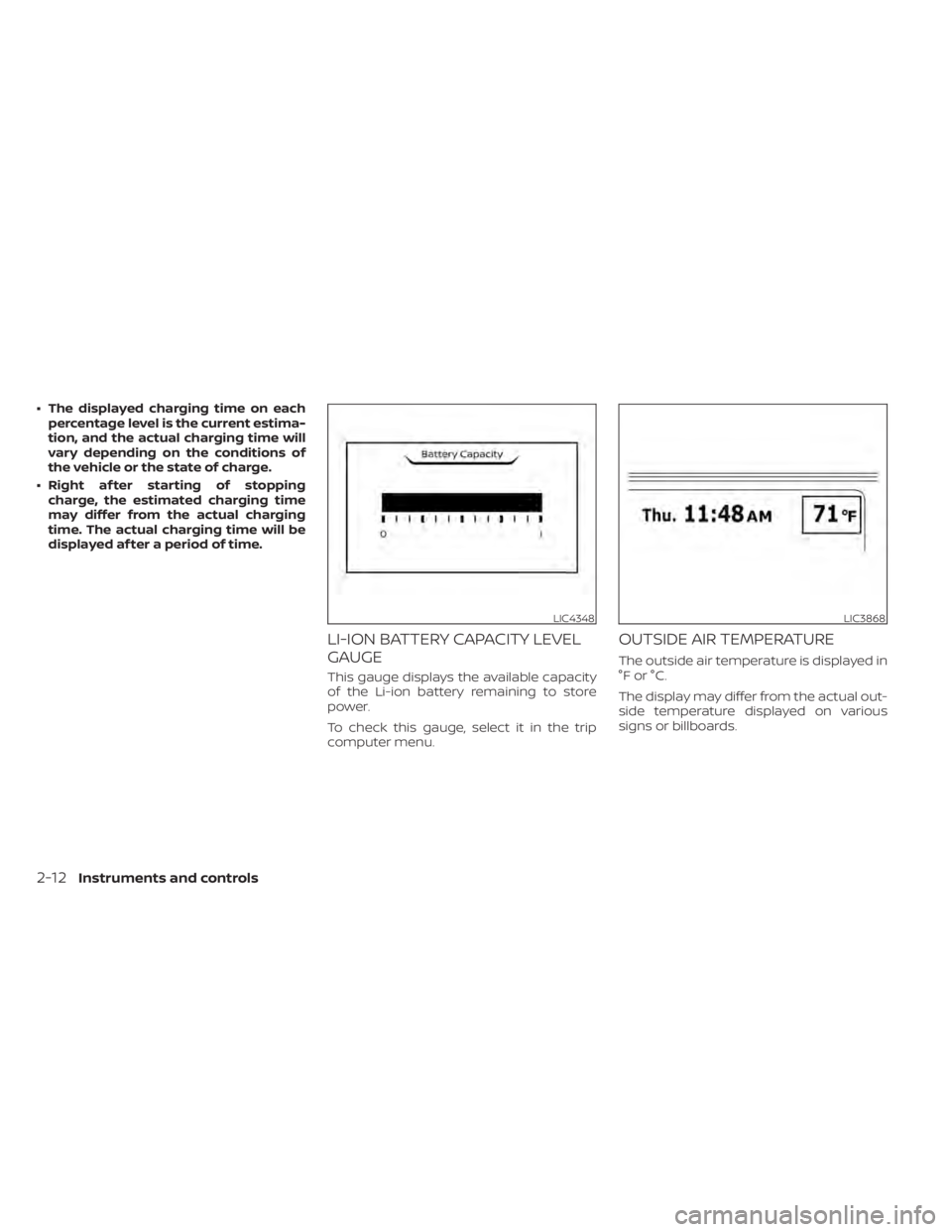
LI-ION BATTERY CAPACITY LEVEL
GAUGE
This gauge displays the available capacity
of the Li-ion battery remaining to store
power.
To check this gauge, select it in the trip
computer menu.
OUTSIDE AIR TEMPERATURE
The outside air temperature is displayed in
°F or °C.
The display may differ from the actual out-
side temperature displayed on various
signs or billboards.
LIC4348LIC3868
2-12Instruments and controls
Page 196 of 596
Plug-in
indicator light
This light illuminates when the charge con-
nector is connected to the vehicle and
blinks during charging.
NOTE:
If the charge connector is connected to
the vehicle, the power switch cannot be
placed in the READY to drive position.
Power limitation
indicator light
When the power limitation indicator light is
illuminated, the power provided to the trac-
tion motor is reduced. Therefore the ve-
hicle is not as responsive when the accel-
erator is depressed while the power
limitation light is illuminated.
When this light comes on, the warning dis-
play appears within the vehicle information
display. Follow the instructions provided on
the vehicle information display.
This light illuminates in the following condi-
tions.
• Li-ion battery available charge is ex-tremely low • Li-ion battery temperature is very low
(approximately −4°F (−20°C)
• When the temperature of the EV system is high (motor, inverter, coolant system,
Li-ion battery etc.)
• When the EV system has a malfunction.
If the low battery charge indicator is illumi-
nated, charge the Li-ion battery as soon as
possible.
If this indicator illuminates because the Li-
ion battery is cold due to low outside tem-
peratures, move the vehicle to a warmer
location. The Li-ion battery temperature
may be increased by charging the Li-ion
battery.
If the light illuminates when the EV system
becomes hot due to continuous hill climb-
ing, either continue driving at a slower safe
speed or stop the vehicle in a safe location.
If this indicator does not turn off, have the
system checked. It is recommended that
you visit a NISSAN certified LEAF dealer for
this service.
The indicator illuminates when a part in the
EV system has malfunctioned. If the indica-
tor illuminates in a situation other than
those described above, or if it does not turn
off, there may be a system malfunction.
Have the system checked. It is recom- mended that you visit a NISSAN certified
LEAF dealer for this service.
WARNING
Power limitation mode can result in re-
duced power and vehicle speed. The re-
duced speed may be lower than other
traffic, which could increase the chance
of a collision. Be especially careful
when driving. If the vehicle cannot
maintain a safe driving speed, pull to
the side of the road in a safe area.
Charge the Li-ion battery if the charge
is low or allow the Li-ion battery to cool.
NOTE:
You can reduce charging time and keep
the Li-ion battery temperature lower if
you:
• Charge more frequently in smaller amounts, and
• Keep the battery at a higher level of charge.
READY to drive
indicator light
The READY to drive indicator light illumi-
nates when the EV system is powered and
the vehicle may be driven.
Instruments and controls2-23
Page 204 of 596
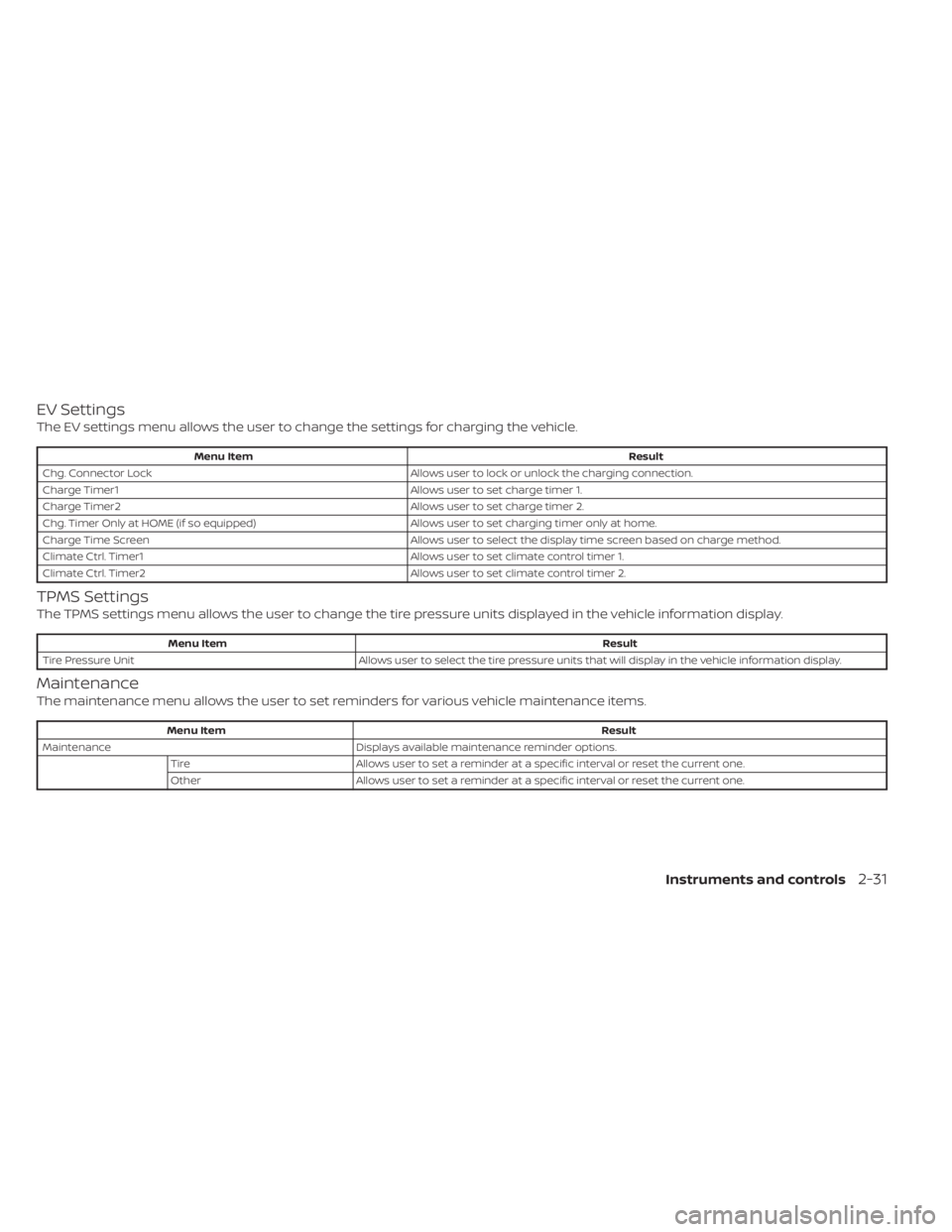
EV Settings
The EV settings menu allows the user to change the settings for charging the vehicle.
Menu ItemResult
Chg. Connector Lock Allows user to lock or unlock the charging connection.
Charge Timer1 Allows user to set charge timer 1.
Charge Timer2 Allows user to set charge timer 2.
Chg. Timer Only at HOME (if so equipped) Allows user to set charging timer only at home.
Charge Time Screen Allows user to select the display time screen based on charge method.
Climate Ctrl. Timer1 Allows user to set climate control timer 1.
Climate Ctrl. Timer2 Allows user to set climate control timer 2.
TPMS Settings
The TPMS settings menu allows the user to change the tire pressure units displayed in the vehicle information display.
Menu Item Result
Tire Pressure Unit Allows user to select the tire pressure units that will display in the vehicle information display.
Maintenance
The maintenance menu allows the user to set reminders for various vehicle maintenance items.
Menu Item Result
Maintenance Displays available maintenance reminder options.
Tire Allows user to set a reminder at a specific interval or reset the current one.
Other Allows user to set a reminder at a specific interval or reset the current one.
Instruments and controls2-31
Page 216 of 596
![NISSAN LEAF 2020 Owner´s Manual that warns the driver that the Li-ion battery
power level is low.
1. The notification is displayed on the up-per lef t side of the STATUS screen. Touch
[Show] to display the screen showing
detailed in](/img/5/40305/w960_40305-215.png "NISSAN LEAF 2020 Owner´s Manual that warns the driver that the Li-ion battery
power level is low.
1. The notification is displayed on the up-per lef t side of the STATUS screen. Touch
[Show] to display the screen showing
detailed in")
that warns the driver that the Li-ion battery
power level is low.
1. The notification is displayed on the up-per lef t side of the STATUS screen. Touch
[Show] to display the screen showing
detailed information.
2. The system displays a message screen and announces the contents of the
message to warn that the Li-ion battery
power level is low. Check the message
displayed on the screen.
Touch [YES] to search for charging sta-
tions within the estimated driving range.
3. Touch
or push the MAPbutton to
return to the vehicle location screen.
NOTE:
• The low battery warning can be set to off. For additional information, refer to
the NissanConnect® Manual for Leaf.
• When the battery power level is low, the system automatically obtains
charging station information. Your vehicle has two types of security sys-
tems, as follows:
• Vehicle security system
• NISSAN Vehicle Immobilizer System
The security status is shown by the secu-
rity indicator light.
VEHICLE SECURITY SYSTEM
The vehicle security system provides visual
and audio alarm signals if someone opens
the doors or rear hatch when the system is
armed. It is not, however, a motion detec-
tion type system that activates when a ve-
hicle is moved or when a vibration occurs. The system helps deter vehicle thef t but
cannot prevent it, nor can it prevent the
thef t of interior or exterior vehicle compo-
nents in all situations. Always secure your
vehicle even if parking for a brief period.
Never leave your keys in the vehicle, and
always lock it when it is lef t unattended. Be
aware of your surroundings, and park in
secure, well-lit areas whenever possible.
Many devices offering additional protec-
tion, such as component locks, identifica-
tion markers, and tracking systems, are
available at auto supply stores and spe-
cialty shops. A NISSAN certified LEAF dealer
may also offer such equipment. Check with
your insurance company to see if you may
be eligible for discounts for various thef t
protection features.
How to arm the vehicle security
system
1. Close all windows.
The system can be armed even if the
windows are open.
2. Place the power switch in the LOCK or OFF position and remove the Intelligent
Key from the vehicle.
JVC0067X
SECURITY SYSTEMS
Instruments and controls2-43
Page 231 of 596
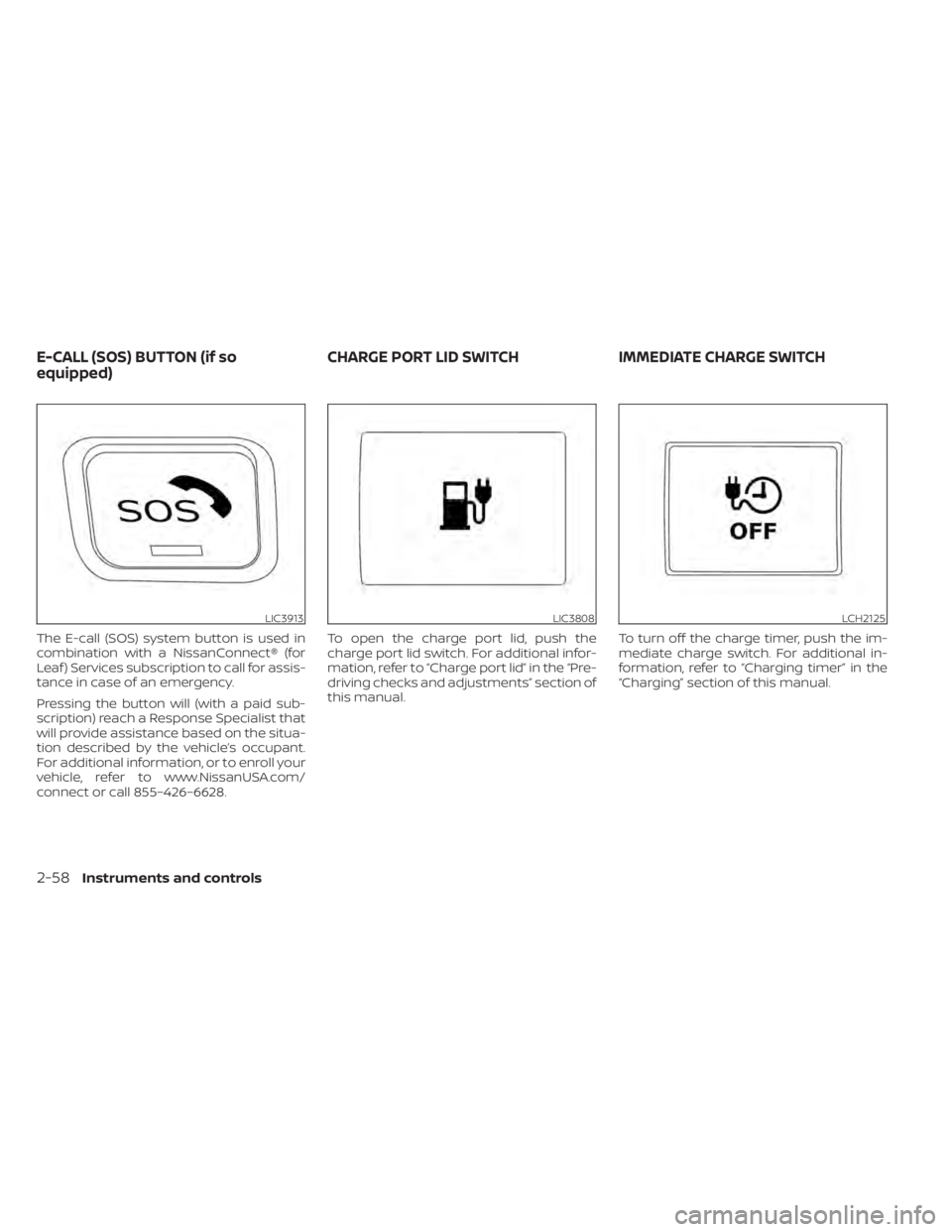
The E-call (SOS) system button is used in
combination with a NissanConnect® (for
Leaf ) Services subscription to call for assis-
tance in case of an emergency.
Pressing the button will (with a paid sub-
scription) reach a Response Specialist that
will provide assistance based on the situa-
tion described by the vehicle’s occupant.
For additional information, or to enroll your
vehicle, refer to www.NissanUSA.com/
connect or call 855–426–6628.To open the charge port lid, push the
charge port lid switch. For additional infor-
mation, refer to “Charge port lid” in the “Pre-
driving checks and adjustments” section of
this manual.
To turn off the charge timer, push the im-
mediate charge switch. For additional in-
formation, refer to “Charging timer” in the
“Charging” section of this manual.
LIC3913LIC3808LCH2125
E-CALL (SOS) BUTTON (if so
equipped)
CHARGE PORT LID SWITCH IMMEDIATE CHARGE SWITCH
2-58Instruments and controls
Page 234 of 596

CAUTION
• The outlet and plug may be hot dur-
ing or immediately af ter use.
• Do not use with accessories that ex-
ceed a 12-volt, 120W (10A) power
draw.
• Do not use double adapters or more
than one electrical accessory.
• Use the power outlet with the power
switch is in the ON or READY to Drive
position to avoid discharging the 12-
volt battery. •
Avoid using the power outlet when
the air conditioner, headlights or rear
window defroster are on.
• This power outlet is not designed for
use with a cigarette lighter unit.
• Push the plug in as far as it will go. If
good contact is not made, the plug
may overheat or the internal tem-
perature fuse may open.
• Before inserting or disconnecting a
plug, make sure that the electrical
accessory being used is turned OFF.
• When not in use, be sure to close the
cap. Do not allow water to contact
the outlet.SEATBACK POCKET
The seatback pockets may be located on
the driver’s and/or passenger seat. The
pocket can be used to store maps.
LIC4291LIC0016
POWER OUTLET STORAGE
Instruments and controls2-61
Page 271 of 596
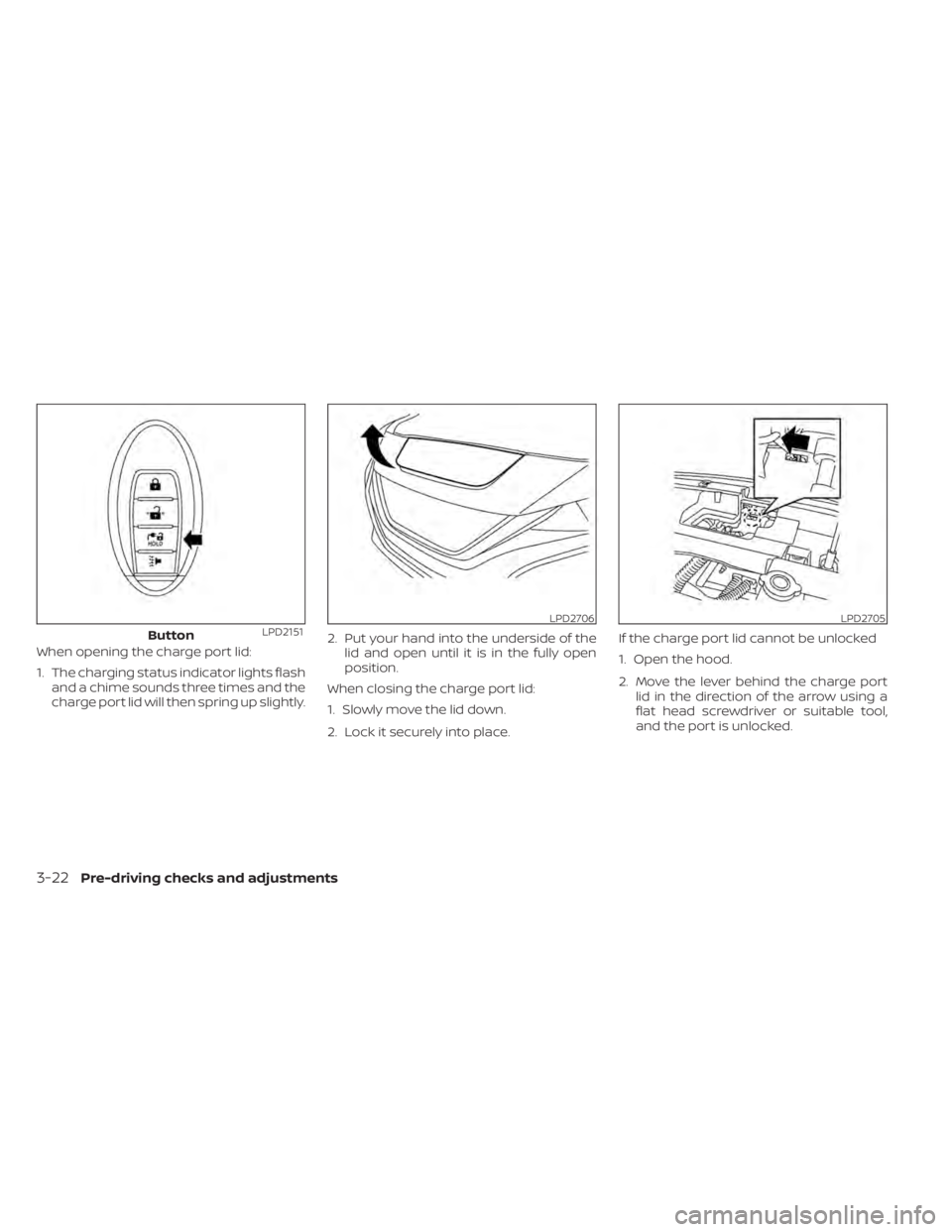
When opening the charge port lid:
1. The charging status indicator lights flashand a chime sounds three times and the
charge port lid will then spring up slightly. 2. Put your hand into the underside of the
lid and open until it is in the fully open
position.
When closing the charge port lid:
1. Slowly move the lid down.
2. Lock it securely into place. If the charge port lid cannot be unlocked
1. Open the hood.
2. Move the lever behind the charge port
lid in the direction of the arrow using a
flat head screwdriver or suitable tool,
and the port is unlocked.
ButtonLPD2151LPD2706LPD2705
3-22Pre-driving checks and adjustments
Page 272 of 596
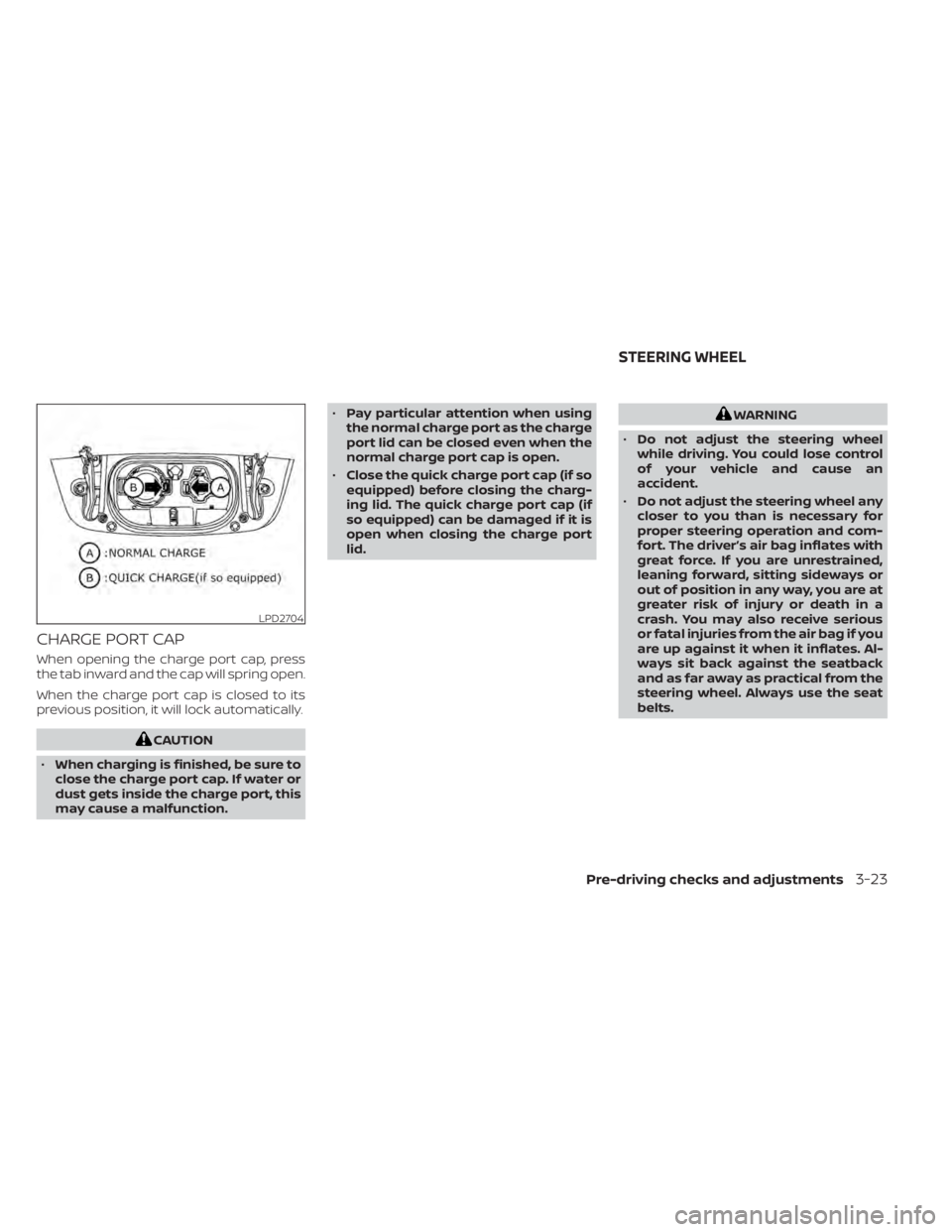
CHARGE PORT CAP
When opening the charge port cap, press
the tab inward and the cap will spring open.
When the charge port cap is closed to its
previous position, it will lock automatically.
CAUTION
• When charging is finished, be sure to
close the charge port cap. If water or
dust gets inside the charge port, this
may cause a malfunction. •
Pay particular attention when using
the normal charge port as the charge
port lid can be closed even when the
normal charge port cap is open.
• Close the quick charge port cap (if so
equipped) before closing the charg-
ing lid. The quick charge port cap (if
so equipped) can be damaged if it is
open when closing the charge port
lid.
WARNING
• Do not adjust the steering wheel
while driving. You could lose control
of your vehicle and cause an
accident.
• Do not adjust the steering wheel any
closer to you than is necessary for
proper steering operation and com-
fort. The driver’s air bag inflates with
great force. If you are unrestrained,
leaning forward, sitting sideways or
out of position in any way, you are at
greater risk of injury or death in a
crash. You may also receive serious
or fatal injuries from the air bag if you
are up against it when it inflates. Al-
ways sit back against the seatback
and as far away as practical from the
steering wheel. Always use the seat
belts.
LPD2704
STEERING WHEEL
Pre-driving checks and adjustments3-23
Page 278 of 596
4 Monitor, climate, audio, phone and
voice recognition systems
NissanConnect® Manual (for Leaf )...............4-2
RearView Monitor (if so equipped) ...............4-3
RearView Monitor system operation ..........4-4
How to read the displayed lines ..............4-5
Difference between predicted and
actual distances .............................4-5
How to park with predictive course
lines ..........................................4-7
Adjusting the screen .........................4-8
How to turn on and off predictive
course lines ..................................4-9
RearView Monitor system limitations .........4-9
System maintenance ....................... 4-10
Intelligent Around View Monitor
(if so equipped) .................................. 4-11
Intelligent Around View Monitor system
operation ................................... 4-12
Difference between predicted and
actual distances ............................ 4-15
How to park with predictive course
lines ......................................... 4-17
How to switch the display ...................4-18
Adjusting the screen ........................ 4-19
Intelligent Around View Monitor system
limitations .................................. 4-19System maintenance
....................... 4-21
Moving Object Detection (MOD)
(if so equipped) ................................. 4-22
MOD system operation ......................4-23
Turning MOD ON and OFF ...................4-25
MOD system limitations .....................4-25
System maintenance .......................4-26
Vents .......................................... 4-27
Heater and air conditioner (automatic) .........4-28
Displaying climate control system
status screen (models with navigation
system) ..................................... 4-30
Operating tips ............................... 4-30
In-cabin microfilter .......................... 4-31
Automatic climate control
(models without Navigation System) ........4-32
Automatic climate control
(models with Navigation System) ............4-35
Climate ctrl. timer ........................... 4-38
USB/iPod® charging ports ......................4-43
Antenna ........................................ 4-43
Car phone or CB radio .......................... 4-44
iPod®/iPhone® ................................. 4-44