turn signal NISSAN LEAF 2020 Owner´s Manual
[x] Cancel search | Manufacturer: NISSAN, Model Year: 2020, Model line: LEAF, Model: NISSAN LEAF 2020Pages: 596, PDF Size: 4.33 MB
Page 12 of 596
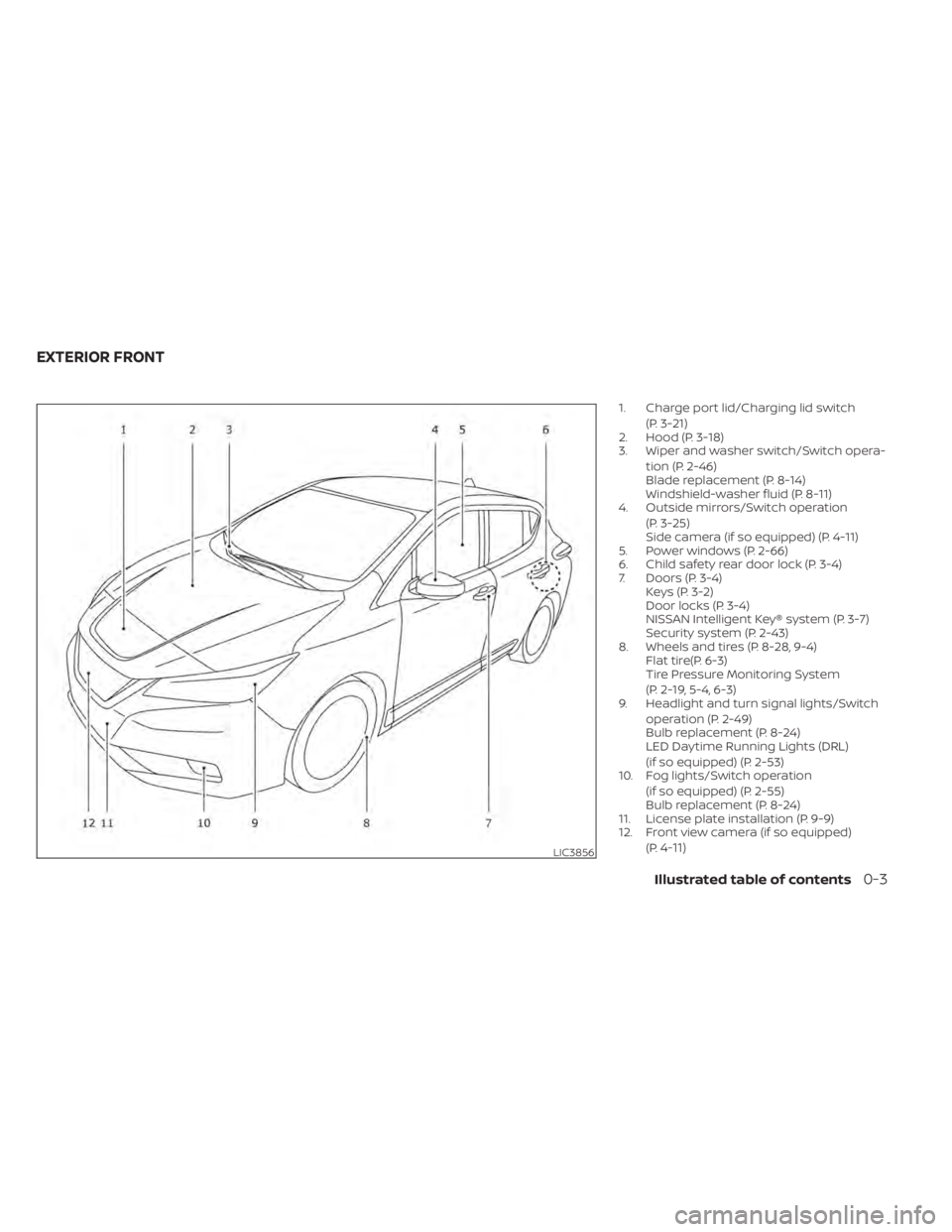
1. Charge port lid/Charging lid switch(P. 3-21)
2. Hood (P. 3-18)
3. Wiper and washer switch/Switch opera-
tion (P. 2-46)
Blade replacement (P. 8-14)
Windshield-washer fluid (P. 8-11)
4. Outside mirrors/Switch operation
(P. 3-25)
Side camera (if so equipped) (P. 4-11)
5. Power windows (P. 2-66)
6. Child safety rear door lock (P. 3-4)
7. Doors (P. 3-4) Keys (P. 3-2)
Door locks (P. 3-4)
NISSAN Intelligent Key® system (P. 3-7)
Security system (P. 2-43)
8. Wheels and tires (P. 8-28, 9-4) Flat tire(P. 6-3)
Tire Pressure Monitoring System
(P. 2-19, 5-4, 6-3)
9. Headlight and turn signal lights/Switch
operation (P. 2-49)
Bulb replacement (P. 8-24)
LED Daytime Running Lights (DRL)
(if so equipped) (P. 2-53)
10. Fog lights/Switch operation
(if so equipped) (P. 2-55)
Bulb replacement (P. 8-24)
11. License plate installation (P. 9-9)
12. Front view camera (if so equipped)
(P.
4-11)LIC3856
EXTERIOR FRONT
Illustrated table of contents0-3
Page 15 of 596
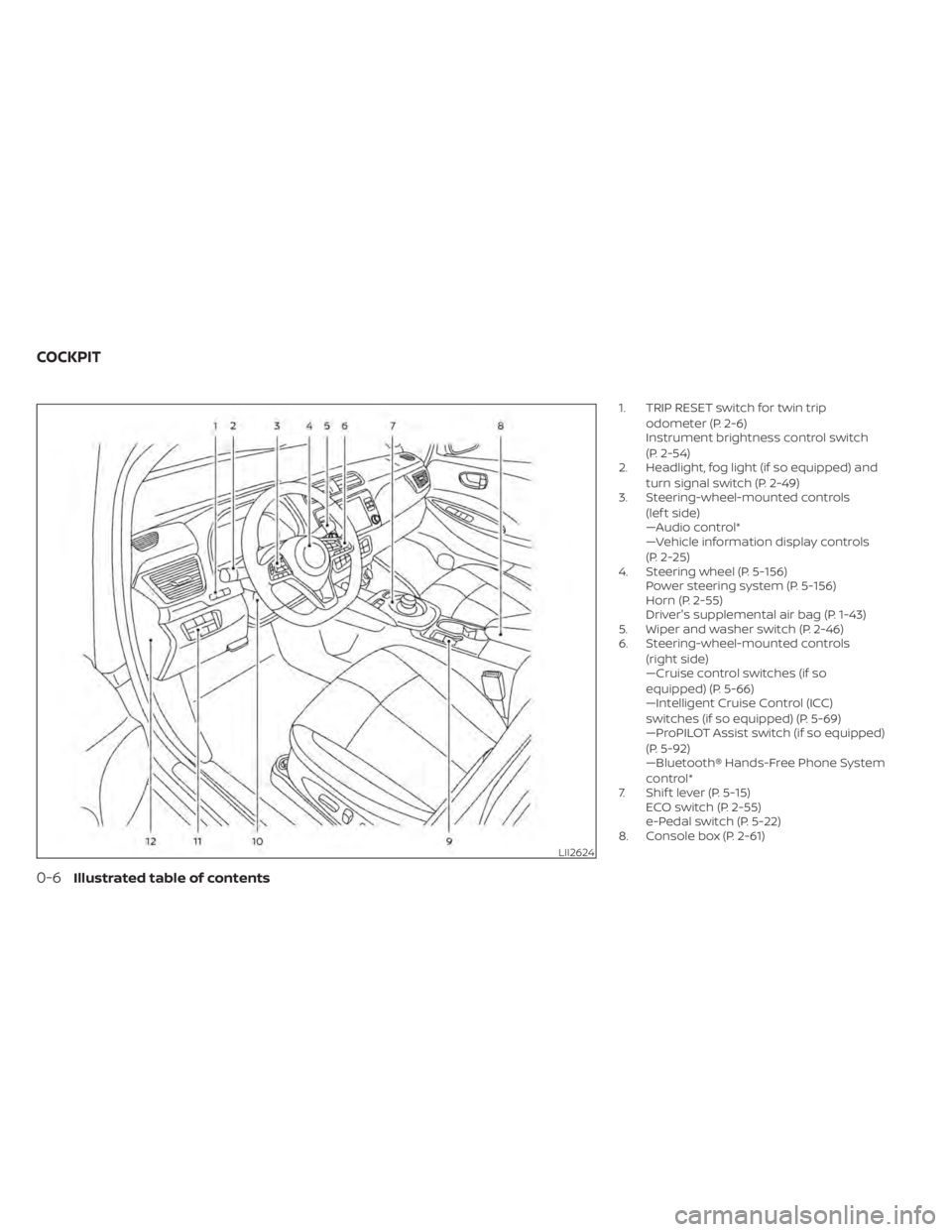
1. TRIP RESET switch for twin tripodometer (P. 2-6)
Instrument brightness control switch
(P. 2-54)
2. Headlight, fog light (if so equipped) and
turn signal switch (P. 2-49)
3. Steering-wheel-mounted controls
(lef t side)
—Audio control*
—Vehicle information display controls
(P. 2-25)
4. Steering wheel (P. 5-156) Power steering system (P. 5-156)
Horn (P. 2-55)
Driver's supplemental air bag (P. 1-43)
5. Wiper and washer switch (P. 2-46)
6. Steering-wheel-mounted controls
(right side)
—Cruise control switches (if so
equipped) (P. 5-66)
—Intelligent Cruise Control (ICC)
switches (if so equipped) (P. 5-69)
—ProPILOT Assist switch (if so equipped)
(P. 5-92)
—Bluetooth® Hands-Free Phone System
control*
7. Shif t lever (P. 5-15) ECO switch (P. 2-55)
e-Pedal switch (P. 5-22)
8. Console box (P. 2-61)
LII2624
COCKPIT
0-6Illustrated table of contents
Page 18 of 596
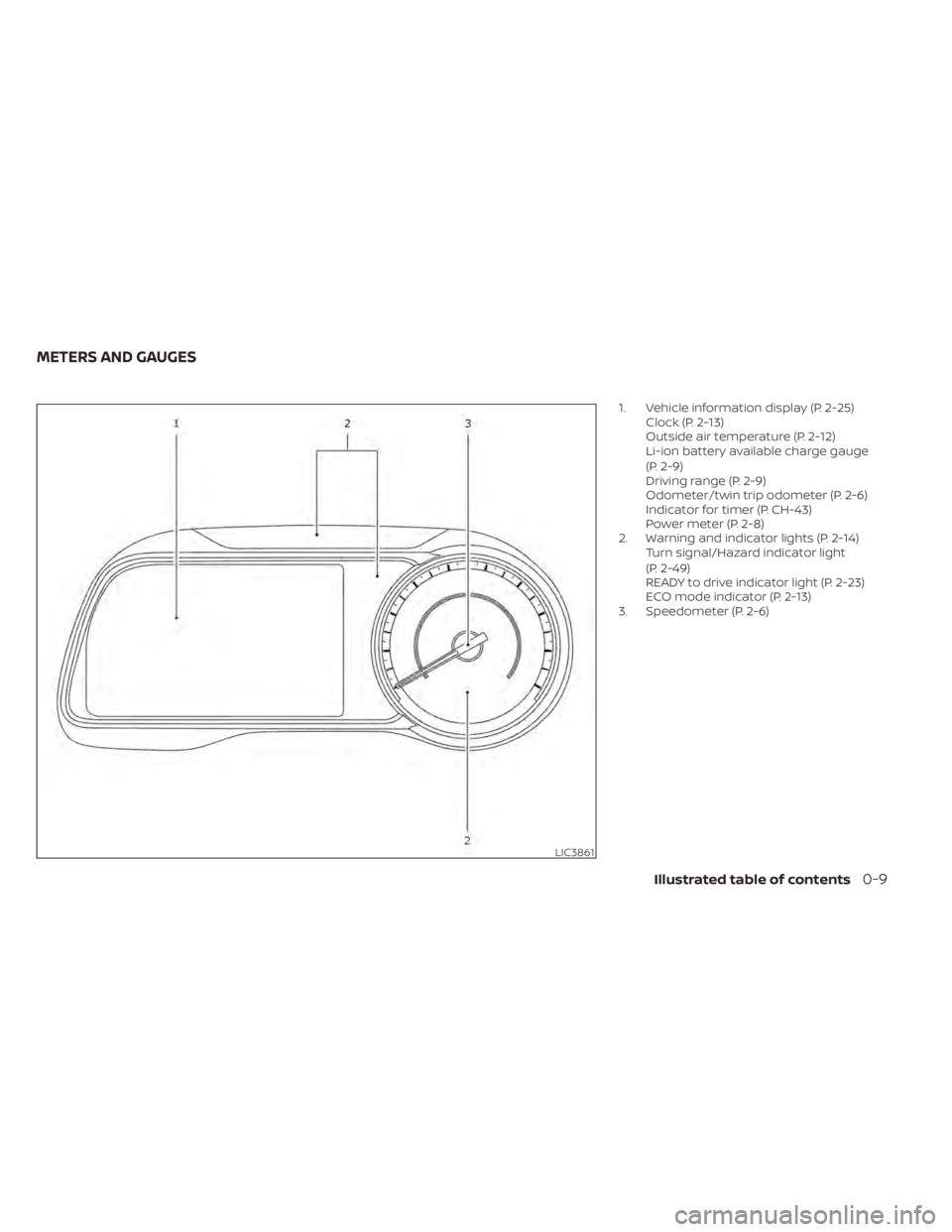
1. Vehicle information display (P. 2-25)Clock (P. 2-13)
Outside air temperature (P. 2-12)
Li-ion battery available charge gauge
(P. 2-9)
Driving range (P. 2-9)
Odometer/twin trip odometer (P. 2-6)
Indicator for timer (P. CH-43)
Power meter (P. 2-8)
2. Warning and indicator lights (P. 2-14) Turn signal/Hazard indicator light
(P. 2-49)
READY to drive indicator light (P. 2-23)
ECO mode indicator (P. 2-13)
3. Speedometer (P. 2-6)
LIC3861
METERS AND GAUGES
Illustrated table of contents0-9
Page 21 of 596
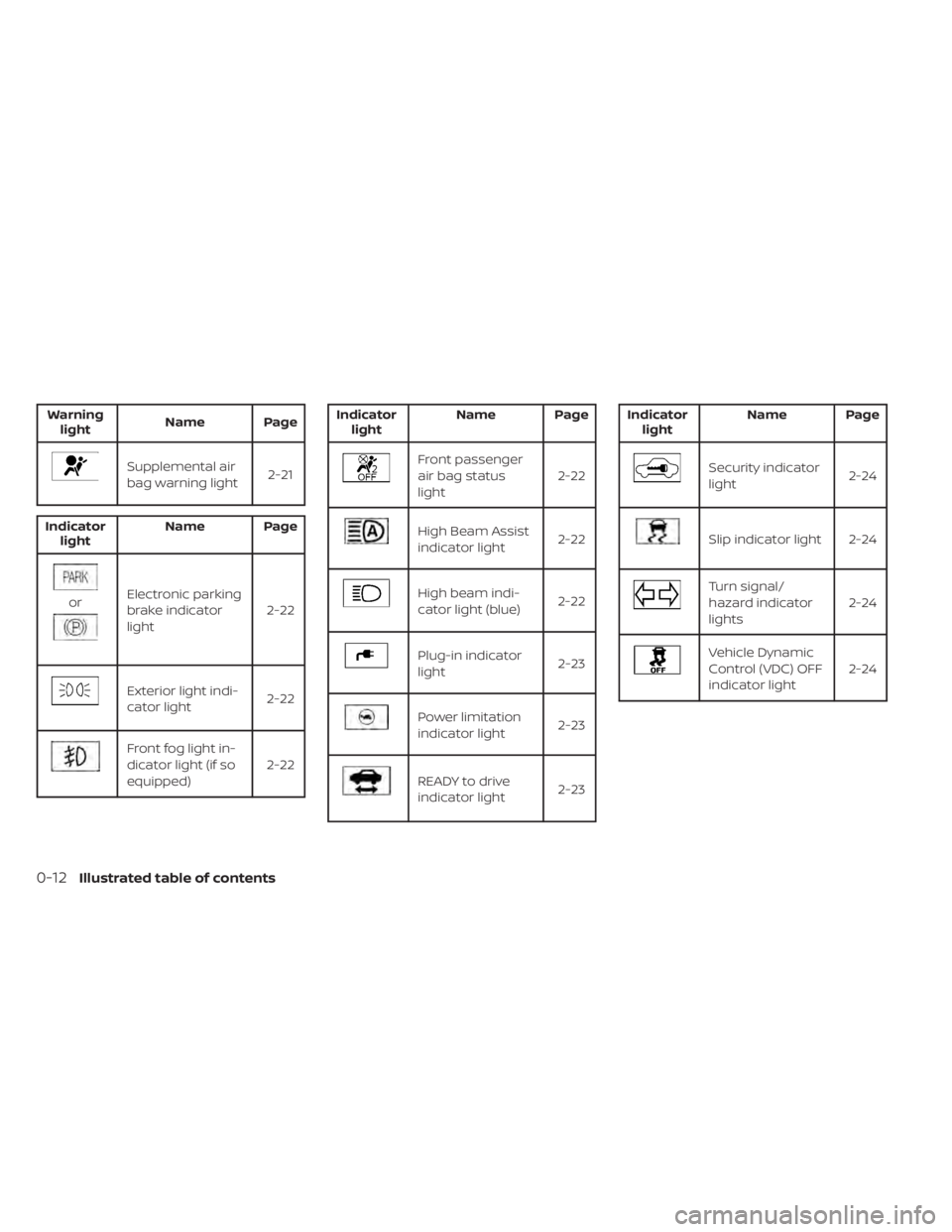
Warninglight Name Page
Supplemental air
bag warning light 2-21
Indicator
light Name Page
orElectronic parking
brake indicator
light 2-22
Exterior light indi-
cator light
2-22
Front fog light in-
dicator light (if so
equipped)2-22
Indicator
light Name Page
Front passenger
air bag status
light 2-22
High Beam Assist
indicator light
2-22
High beam indi-
cator light (blue)2-22
Plug-in indicator
light 2-23
Power limitation
indicator light2-23
READY to drive
indicator light2-23
Indicator
light Name Page
Security indicator
light
2-24
Slip indicator light 2-24
Turn signal/
hazard indicator
lights2-24
Vehicle Dynamic
Control (VDC) OFF
indicator light2-24
0-12Illustrated table of contents
Page 173 of 596
2 Instruments and controls
Cockpit.........................................2-2
Instrument Panel ................................2-4
Meters and Gauges .............................2-5
Speedometer and odometer .................2-6
Li-ion battery temperature gauge ............ 2-7
Power meter .................................2-8
Driving range .................................2-9
Li-ion battery available charge gauge ........2-9
Li-ion battery capacity level gauge ..........2-12
Outside air temperature .....................2-12
Clock ........................................ 2-13
ECO mode indicator ......................... 2-13
e-Pedal system indicator ....................2-13
Warning lights, indicator lights and audible
reminders ...................................... 2-14
Checking lights .............................. 2-15
Warning lights ............................... 2-15
Indicator lights .............................. 2-22
Audible reminders ........................... 2-24
Vehicle information display .....................2-25
How to use the vehicle information
display ...................................... 2-26
Startup display .............................. 2-26
Settings ..................................... 2-26
Vehicle information display warnings
and indicators ............................... 2-33Warning information displays (MODELS
WITH A NAVIGATION SYSTEM)
................2-42
Security systems ............................... 2-43
Vehicle security system .....................2-43
NISSAN Vehicle Immobilizer System .........2-44
Wiper and washer switch .......................2-46
Washer operation ...........................2-47
Rear wiper operation ........................2-47
Rear window and outside mirror
(if so equipped) defroster switch ...............2-48
Headlight and turn signal switch ...............2-49
Headlight switch ............................ 2-49
LED Daytime Running Lights (DRL)
system (if so equipped) ......................2-53
Instrument brightness control ..............2-54
Turn signal switch ........................... 2-54
Fog light switch (if so equipped) ................2-55
Horn ........................................... 2-55
EC
O switch ..................................... 2-55
Heated seat switches (if so equipped) ..........2-56
Heated steering wheel switch (if so equipped) . . 2-57
E-call (SOS) button (if so equipped) .............2-58
Charge port lid switch .......................... 2-58
Immediate Charge switch ......................2-58
Page 175 of 596
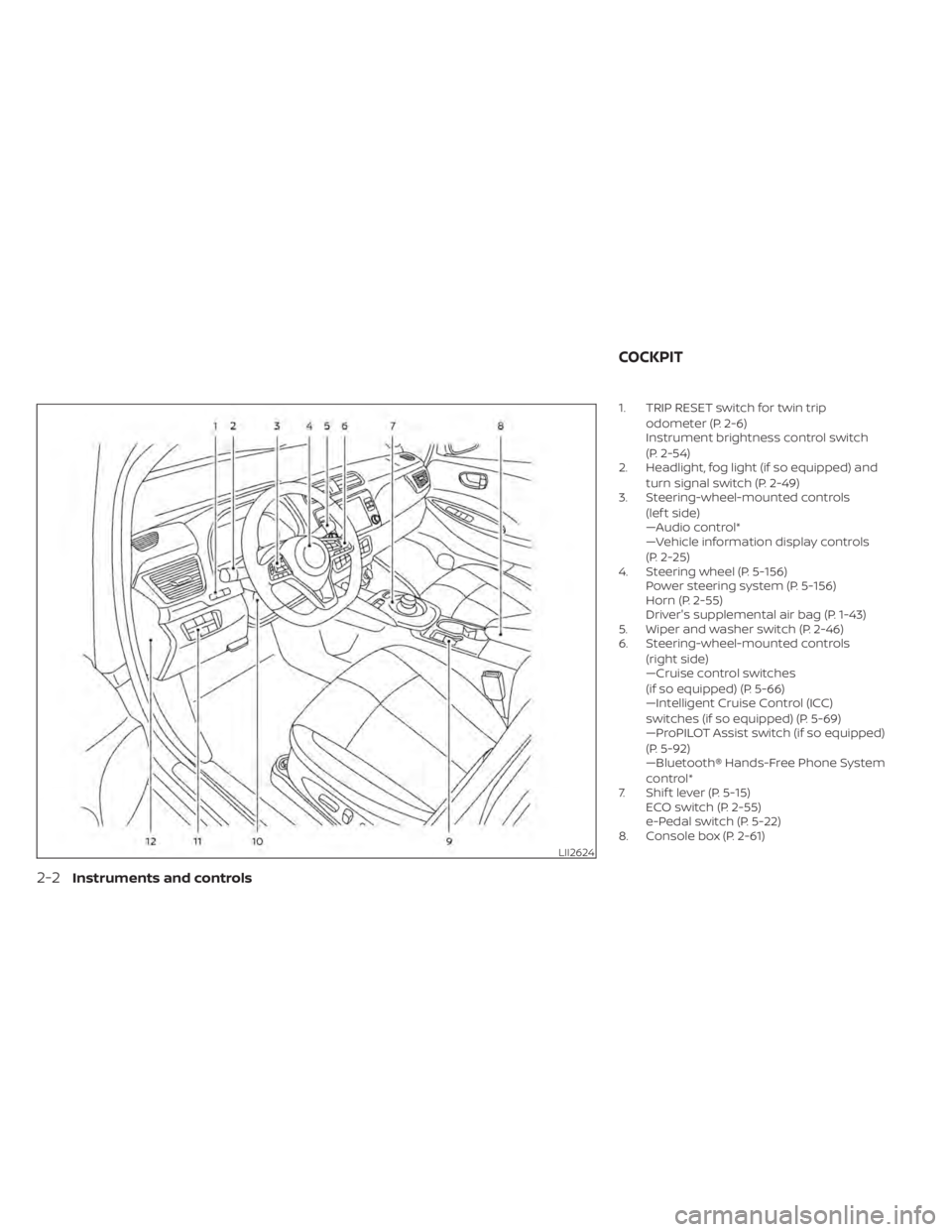
1. TRIP RESET switch for twin tripodometer (P. 2-6)
Instrument brightness control switch
(P. 2-54)
2. Headlight, fog light (if so equipped) and
turn signal switch (P. 2-49)
3. Steering-wheel-mounted controls
(lef t side)
—Audio control*
—Vehicle information display controls
(P. 2-25)
4. Steering wheel (P. 5-156) Power steering system (P. 5-156)
Horn (P. 2-55)
Driver's supplemental air bag (P. 1-43)
5. Wiper and washer switch (P. 2-46)
6. Steering-wheel-mounted controls
(right side)
—Cruise control switches
(if so equipped) (P. 5-66)
—Intelligent Cruise Control (ICC)
switches (if so equipped) (P. 5-69)
—ProPILOT Assist switch (if so equipped)
(P. 5-92)
—Bluetooth® Hands-Free Phone System
control*
7. Shif t lever (P. 5-15) ECO switch (P. 2-55)
e-Pedal switch (P. 5-22)
8. Console box (P. 2-61)
LII2624
COCKPIT
2-2Instruments and controls
Page 178 of 596
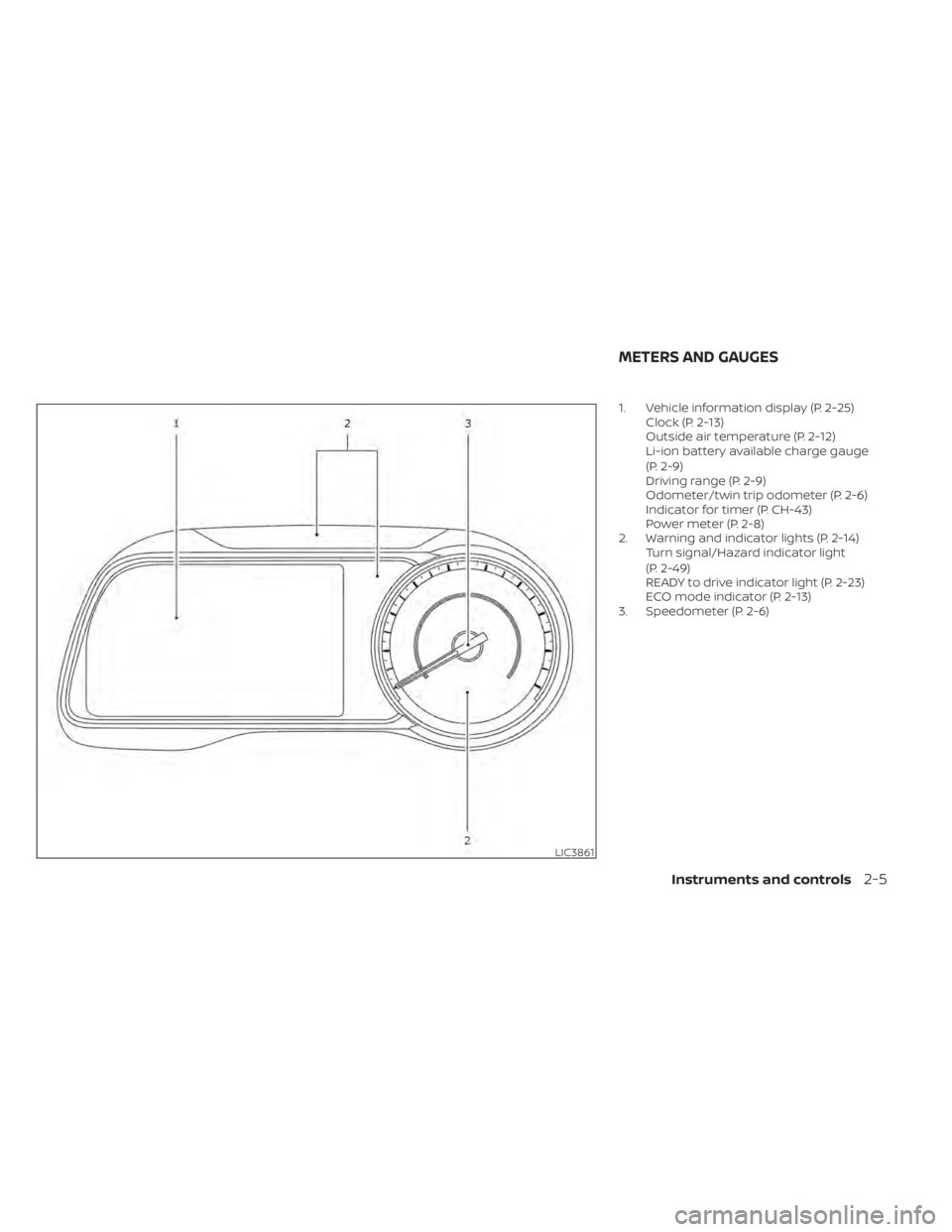
1. Vehicle information display (P. 2-25)Clock (P. 2-13)
Outside air temperature (P. 2-12)
Li-ion battery available charge gauge
(P. 2-9)
Driving range (P. 2-9)
Odometer/twin trip odometer (P. 2-6)
Indicator for timer (P. CH-43)
Power meter (P. 2-8)
2. Warning and indicator lights (P. 2-14) Turn signal/Hazard indicator light
(P. 2-49)
READY to drive indicator light (P. 2-23)
ECO mode indicator (P. 2-13)
3. Speedometer (P. 2-6)
LIC3861
METERS AND GAUGES
Instruments and controls2-5
Page 187 of 596
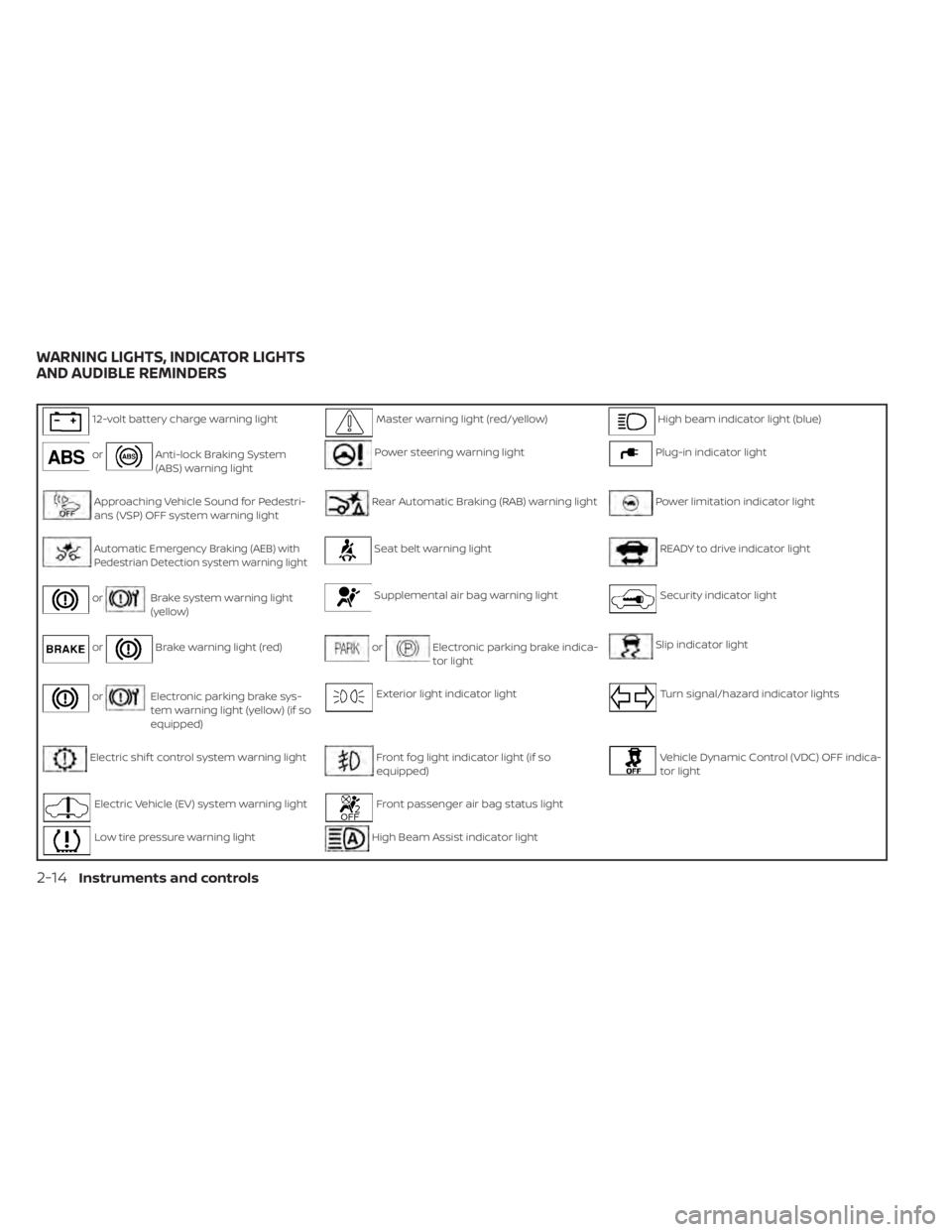
12-volt battery charge warning lightMaster warning light (red/yellow)High beam indicator light (blue)
orAnti-lock Braking System
(ABS) warning lightPower steering warning lightPlug-in indicator light
Approaching Vehicle Sound for Pedestri-
ans (VSP) OFF system warning lightRear Automatic Braking (RAB) warning lightPower limitation indicator light
Automatic Emergency Braking (AEB) withPedestrian Detection system warning lightSeat belt warning lightREADY to drive indicator light
orBrake system warning light
(yellow)Supplemental air bag warning lightSecurity indicator light
orBrake warning light (red)orElectronic parking brake indica-
tor lightSlip indicator light
orElectronic parking brake sys-
tem warning light (yellow) (if so
equipped)Exterior light indicator lightTurn signal/hazard indicator lights
Electric shif t control system warning lightFront fog light indicator light (if so
equipped)Vehicle Dynamic Control (VDC) OFF indica-
tor light
Electric Vehicle (EV) system warning lightFront passenger air bag status light
Low tire pressure warning lightHigh Beam Assist indicator light
WARNING LIGHTS, INDICATOR LIGHTS
AND AUDIBLE REMINDERS
2-14Instruments and controls
Page 197 of 596
The READY to drive indicator light will turn
off in the following conditions.
• Certain EV system malfunctions.
• The READY to drive indicator light turnsoff immediately before the Li-ion battery
is completely discharged. If the Li-ion bat-
tery becomes completely discharged,
the vehicle must be charged in order to
be driven. For additional information, re-
fer to “Low battery charge indicator” in
this section.
Security
indicator light
This light blinks when the power switch is in
the ACC, OFF or LOCK position. This func-
tion indicates the security system
equipped on the vehicle is operational.
If the security system is malfunctioning,
this light will remain on while the power
switch is in the ON position. For additional
information, refer to “Security systems” in
this section.
Slip indicator light
This indicator light will blink when the VDC
system or the traction control system is
operating, thus alerting that the vehicle is nearing its traction limits. The road surface
may be slippery.
You may feel or hear the system working;
this is normal. The light will blink for a few
seconds af ter the VDC system stops limit-
ing wheel spin.
The indicator light also comes on when
you place the power switch in the ON posi-
tion.
The light will turn off af ter approximately 2
seconds if the system is operational. If the
light does not come on, have the system
checked. It is recommended that you visit a
NISSAN certified LEAF dealer for this ser-
vice.
Turn signal/hazard
indicator lights
This light flashes when the turn signal
switch lever or hazard switch is turned on.
Vehicle Dynamic Control
(VDC) OFF indicator light
This light illuminates when the Vehicle Dy-
namic Control (VDC) is turned off in the
vehicle information display. This indicates
that the VDC system is not operating. For
additional information, refer to “Vehicle Dy-namic Control (VDC) system” in the “Start-
ing and driving” section of this manual.
AUDIBLE REMINDERS
Brake pad wear warning
The disc brake pads have audible wear
warnings. When a brake pad requires re-
placement, it will make a high pitched
scraping sound when the vehicle is in mo-
tion. This scraping sound will first occur
only when the brake pedal is depressed.
Af ter more wear of the brake pad, the
sound will always be heard even if the
brake pedal is not depressed. Have the
brakes checked as soon as possible if the
warning sound is heard.
Electric shif t control system
reminder chime
If an improper shif t operation is performed,
for safety reasons a chime will sound and
at the same time, depending on the condi-
tions, the operation will be canceled or the
shif t position will switch to the N (Neutral)
position.
For additional information, refer to “Driving
the vehicle” in the “Starting and driving” sec-
tion of this manual.
2-24Instruments and controls
Page 216 of 596
![NISSAN LEAF 2020 Owner´s Manual that warns the driver that the Li-ion battery
power level is low.
1. The notification is displayed on the up-per lef t side of the STATUS screen. Touch
[Show] to display the screen showing
detailed in](/img/5/40305/w960_40305-215.png "NISSAN LEAF 2020 Owner´s Manual that warns the driver that the Li-ion battery
power level is low.
1. The notification is displayed on the up-per lef t side of the STATUS screen. Touch
[Show] to display the screen showing
detailed in")
that warns the driver that the Li-ion battery
power level is low.
1. The notification is displayed on the up-per lef t side of the STATUS screen. Touch
[Show] to display the screen showing
detailed information.
2. The system displays a message screen and announces the contents of the
message to warn that the Li-ion battery
power level is low. Check the message
displayed on the screen.
Touch [YES] to search for charging sta-
tions within the estimated driving range.
3. Touch
or push the MAPbutton to
return to the vehicle location screen.
NOTE:
• The low battery warning can be set to off. For additional information, refer to
the NissanConnect® Manual for Leaf.
• When the battery power level is low, the system automatically obtains
charging station information. Your vehicle has two types of security sys-
tems, as follows:
• Vehicle security system
• NISSAN Vehicle Immobilizer System
The security status is shown by the secu-
rity indicator light.
VEHICLE SECURITY SYSTEM
The vehicle security system provides visual
and audio alarm signals if someone opens
the doors or rear hatch when the system is
armed. It is not, however, a motion detec-
tion type system that activates when a ve-
hicle is moved or when a vibration occurs. The system helps deter vehicle thef t but
cannot prevent it, nor can it prevent the
thef t of interior or exterior vehicle compo-
nents in all situations. Always secure your
vehicle even if parking for a brief period.
Never leave your keys in the vehicle, and
always lock it when it is lef t unattended. Be
aware of your surroundings, and park in
secure, well-lit areas whenever possible.
Many devices offering additional protec-
tion, such as component locks, identifica-
tion markers, and tracking systems, are
available at auto supply stores and spe-
cialty shops. A NISSAN certified LEAF dealer
may also offer such equipment. Check with
your insurance company to see if you may
be eligible for discounts for various thef t
protection features.
How to arm the vehicle security
system
1. Close all windows.
The system can be armed even if the
windows are open.
2. Place the power switch in the LOCK or OFF position and remove the Intelligent
Key from the vehicle.
JVC0067X
SECURITY SYSTEMS
Instruments and controls2-43