tow NISSAN LEAF 2021 Owner´s Manual
[x] Cancel search | Manufacturer: NISSAN, Model Year: 2021, Model line: LEAF, Model: NISSAN LEAF 2021Pages: 602, PDF Size: 4.22 MB
Page 256 of 602
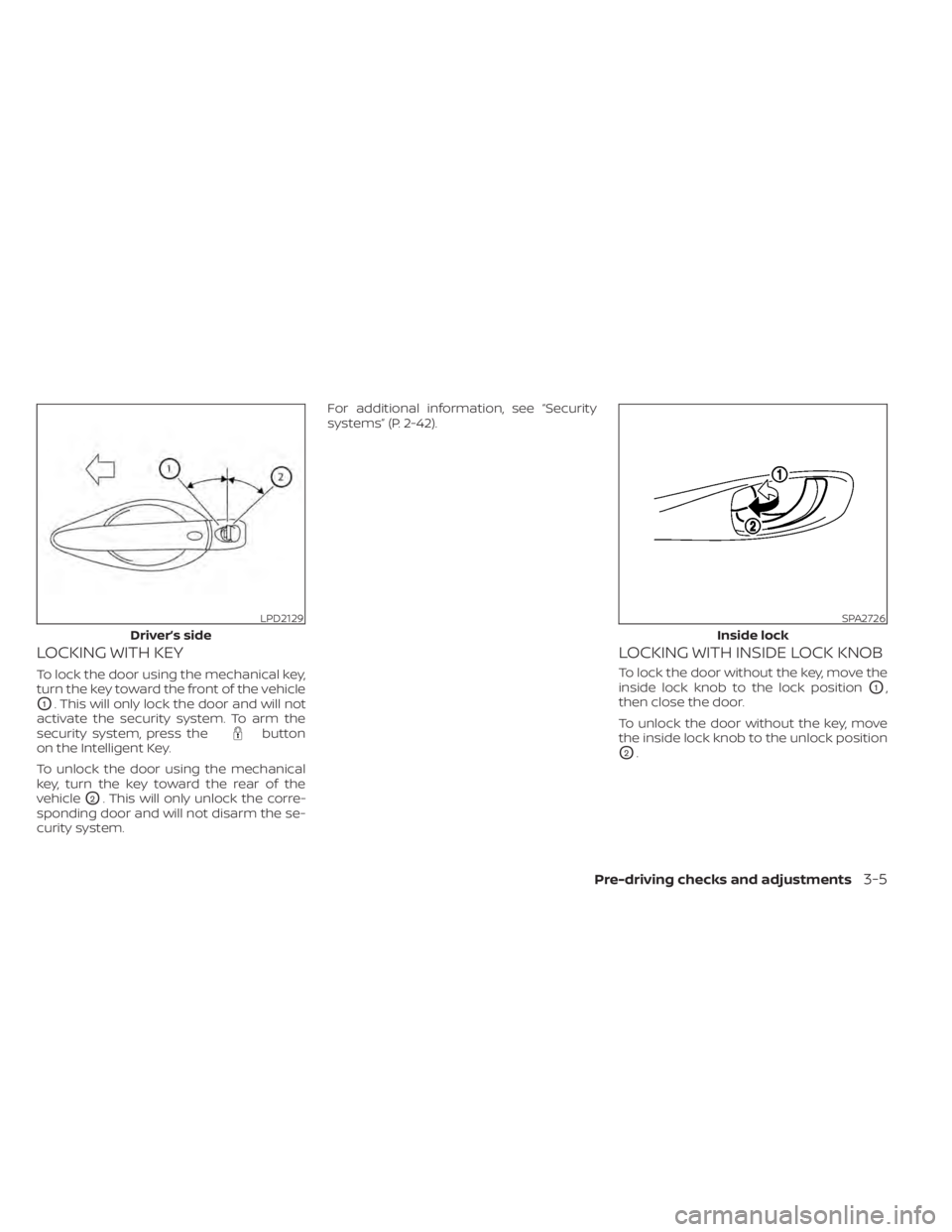
LOCKING WITH KEY
To lock the door using the mechanical key,
turn the key toward the front of the vehicle
O1. This will only lock the door and will not
activate the security system. To arm the
security system, press the
button
on the Intelligent Key.
To unlock the door using the mechanical
key, turn the key toward the rear of the
vehicle
O2. This will only unlock the corre-
sponding door and will not disarm the se-
curity system. For additional information, see “Security
systems” (P. 2-42).
LOCKING WITH INSIDE LOCK KNOB
To lock the door without the key, move the
inside lock knob to the lock position
O1,
then close the door.
To unlock the door without the key, move
the inside lock knob to the unlock position
O2.
LPD2129
Driver’s side
SPA2726
Inside lock
Pre-driving checks and adjustments3-5
Page 258 of 602
WARNING
• Radio waves could adversely affect
electric medical equipment. Those
who use a pacemaker should contact
the electric medical equipment
manufacturer for the possible influ-
ences before use.
• The Intelligent Key transmits radio
waves when the buttons are pressed.
The FAA advises the radio waves may
affect aircraf t navigation and com-
munication systems. Do not operate
the Intelligent Key while on an air-
plane. Make sure the buttons are not
operated unintentionally when the
unit is stored for a flight.
• Never leave the Intelligent Key in the
vehicle when you leave the vehicle.
The Intelligent Key system can operate all
the door locks using the remote control
function or pushing the request switch on
the vehicle without taking the key out from
a pocket or purse. The operating environ-
ment and/or conditions may affect the In-
telligent Key system operation.
Be sure to read the following before using
the Intelligent Key system.CAUTION
Be sure to carry the Intelligent Key with
you when operating the vehicle.
The Intelligent Key is capable of receiving
and transmitting radio waves. The Intelli-
gent Key system transmits weak radio
waves from various distances. Environ-
mental conditions may interfere with the
operation of the Intelligent Key system un-
der the following operating conditions:
• When operating near a location where strong radio waves are transmitted, such
as a TV tower, power station and broad-
casting station.
• When in possession of wireless equip- ment, such as a cellular telephone, trans-
ceiver or a CB radio.
• When the Intelligent Key is in contact with or covered by metallic materials.
• When any type of radio wave remote con- trol is used nearby.
• When the Intelligent Key is placed near an electric appliance such as a personal
computer.
• When the vehicle is parked near a parking meter. In such cases, correct the operating condi-
tions before using the Intelligent Key func-
tion or use the mechanical key.
Although the life of the battery varies de-
pending on the operating conditions, the
battery’s life is approximately two years. If
the battery is discharged, replace it with a
new one.
When the Intelligent Key battery is low, the
“Key Battery Low” indicator illuminates in
the vehicle information display. For addi-
tional information, see “Key Battery Low”
(P. 2-34).
Since the Intelligent Key is capable of re-
ceiving radio waves, if the key is lef t near
equipment which transmits strong radio
waves, such as signals from a TV and per-
sonal computer, the battery life may be-
come shorter.
For additional information, see “NISSAN In-
telligent Key® battery replacement” (P. 8-19).
Pay special attention that the vehicle bat-
tery is not completely discharged.
NISSAN INTELLIGENT KEY® SYSTEM
Pre-driving checks and adjustments3-7
Page 277 of 602
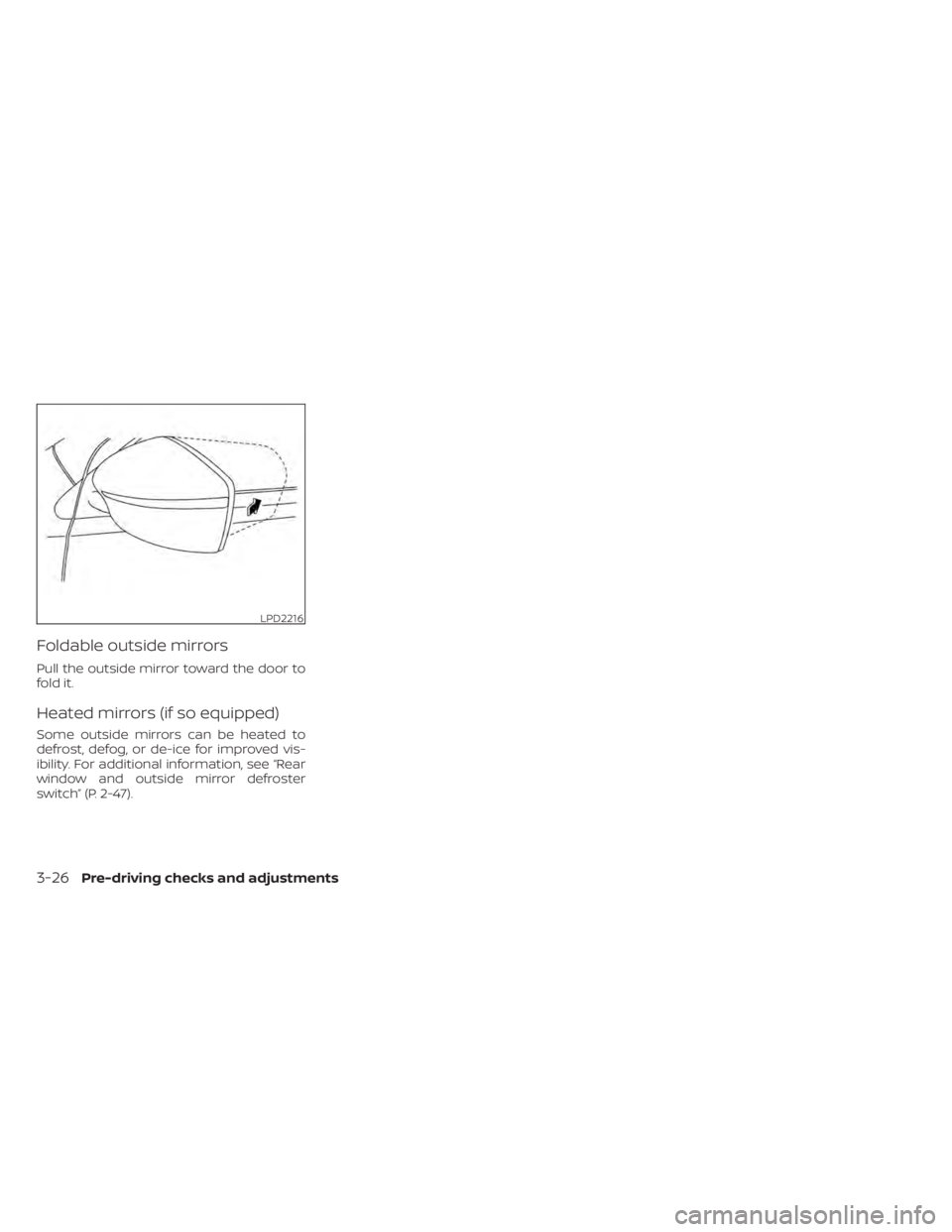
Foldable outside mirrors
Pull the outside mirror toward the door to
fold it.
Heated mirrors (if so equipped)
Some outside mirrors can be heated to
defrost, defog, or de-ice for improved vis-
ibility. For additional information, see “Rear
window and outside mirror defroster
switch” (P. 2-47).
LPD2216
3-26Pre-driving checks and adjustments
Page 299 of 602
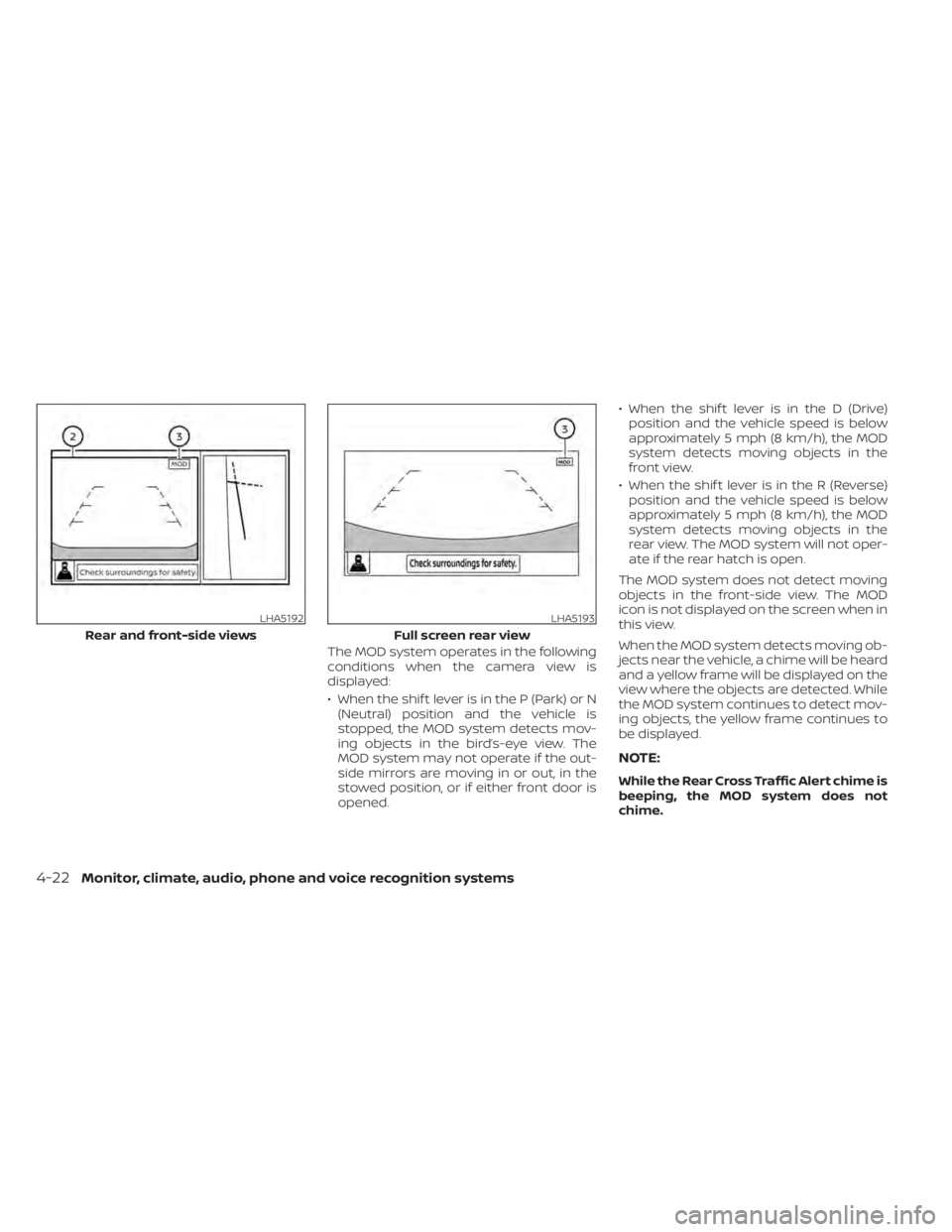
The MOD system operates in the following
conditions when the camera view is
displayed:
• When the shif t lever is in the P (Park) or N(Neutral) position and the vehicle is
stopped, the MOD system detects mov-
ing objects in the bird’s-eye view. The
MOD system may not operate if the out-
side mirrors are moving in or out, in the
stowed position, or if either front door is
opened. • When the shif t lever is in the D (Drive)
position and the vehicle speed is below
approximately 5 mph (8 km/h), the MOD
system detects moving objects in the
front view.
• When the shif t lever is in the R (Reverse) position and the vehicle speed is below
approximately 5 mph (8 km/h), the MOD
system detects moving objects in the
rear view. The MOD system will not oper-
ate if the rear hatch is open.
The MOD system does not detect moving
objects in the front-side view. The MOD
icon is not displayed on the screen when in
this view.
When the MOD system detects moving ob-
jects near the vehicle, a chime will be heard
and a yellow frame will be displayed on the
view where the objects are detected. While
the MOD system continues to detect mov-
ing objects, the yellow frame continues to
be displayed.
NOTE:
While the Rear Cross Traffic Alert chime is
beeping, the MOD system does not
chime.
LHA5192
Rear and front-side views
LHA5193
Full screen rear view
4-22Monitor, climate, audio, phone and voice recognition systems
Page 343 of 602
E-PEDAL SYSTEM LIMITATIONS
WARNING
Listed below are the system limitations
for the e-Pedal system. Failure to oper-
ate the vehicle in accordance with
these system limitations could result in
serious injury or death.
• If the “Press brake pedal to prevent
rolling” warning message appears in
the vehicle information display, de-
press the brake pedal. The vehicle
may start moving.
• If the deceleration force provided by
the e-Pedal system is not sufficient,
depress the brake pedal.
• If the vehicle starts to move while it is
stopped by the e-Pedal system, de-
press the brake pedal immediately.
• Under the following conditions, place
the vehicle in the P (Park) position
and make sure the parking brake is
securely applied. The vehicle may
start moving suddenly.
– When getting in and out of the
vehicle
– When loading and unloading the
vehicle –
When stopping the vehicle for a
long period of time
• Under the following conditions, the
e-Pedal system may not decelerate
or stop the vehicle sufficiently. De-
press the brake pedal whenever
necessary.
– When excessively heavy baggage
is loaded in the vehicle
– When driving on steep downhill
roads
– When driving on icy roads
• On a slope, the e-Pedal system may
not stop the vehicle completely or
may not keep the vehicle stopped.
Depress the brake pedal whenever
necessary.
CAUTION
• Turn the e-Pedal system off and
place the vehicle in the N (Neutral)
position under the following conditions:
– When the vehicle enters an auto-
matic car wash
– When the vehicle is towed
• Be careful not to operate the e-Pedal
switch mistakenly or unintentionally.
SYSTEM MALFUNCTION
If the e-Pedal system malfunctions, the “e-
Pedal system failure! Press brake pedal to
slow or stop” warning message appears in
the vehicle information display. When the
warning message appears, the e-Pedal
system will be turned off automatically.
Have the system checked as soon as pos-
sible. It is recommended that you visit a
NISSAN certified LEAF dealer for this
service.
5-24Starting and driving
Page 455 of 602
•Once the automatic brake control
operates, it does not operate again if
the vehicle approaches the same
obstacle.
• The automatic brake control can only
operate for a short period of time.
Therefore, the driver must depress
the brake pedal.
• In the following situations, the RAB
system may not operate properly or
may not function sufficiently:
– The vehicle is driven in bad
weather (rain, fog, snow, etc.).
– The vehicle is driven on a steep
hill.
– The vehicle’s posture is changed
(e.g., when driving over a bump).
– The vehicle is driven on a slippery
road.
– The vehicle is turned sharply by
turning the steering wheel fully.
– Snow chains are used.
– Wheels or tires other than NISSAN
recommended are used.
– The brakes are cold at low ambi-
ent temperatures or immediately
af ter driving has started. –
The braking force becomes poor
due to wet brakes af ter driving
through a puddle or washing the
vehicle.
• Turn the RAB system off in the follow-
ing conditions to prevent the occur-
rence of an unexpected accident re-
sulting from sudden system
operation:
– The vehicle is towed.
– The vehicle is carried on a flatbed
truck.
– The vehicle is on the chassis
dynamometer.
– The vehicle drives on an uneven
road surface.
– Suspension parts other than
those designated as Genuine
NISSAN parts are used. (If the ve-
hicle height or the vehicle body in-
clination is changed, the system
may not detect an obstacle
correctly.)
• Excessive noise (e.g., audio system
volume, an open vehicle window) will
interfere with the chime sound, and it
may not be heard.SYSTEM MALFUNCTION
If the RAB system malfunctions, it will be
turned off automatically, the RAB system
warning light will illuminate, and the “Mal-
function: See Owner’s Manual” warning
message will appear in the vehicle infor-
mation display.
Action to take
If the warning light illuminates, park the ve-
hicle in a safe location, turn the EV system
off, and restart the EV system. If the warn-
ing light continues to illuminate, have the
RAB system checked. It is recommended
that you visit a NISSAN certified LEAF dealer
for this service.
NOTE:
If the RAB system cannot be operated
temporarily, the RAB system warning
light blinks.
5-136Starting and driving
Page 461 of 602
WARNING
Listed below are the system limitations
for the I-FCW system. Failure to operate
the vehicle in accordance with these
system limitations could result in seri-
ous injury or death.
• The I-FCW system cannot detect all
vehicles under all conditions.
• The radar sensor does not detect the
following objects:
– Pedestrians, animals or obstacles
in the roadway.
– Oncoming vehicles. –
Crossing vehicles.
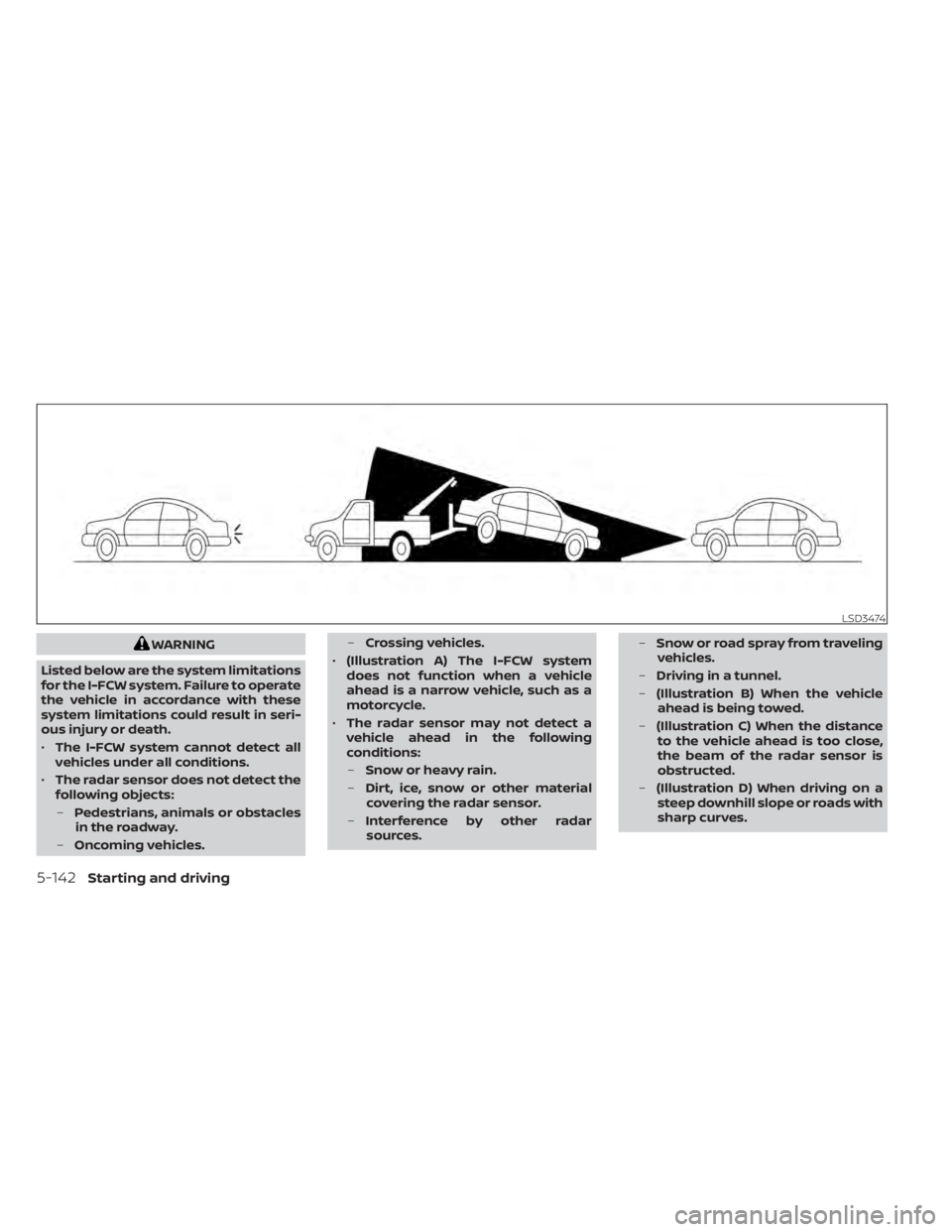
• (Illustration A) The I-FCW system
does not function when a vehicle
ahead is a narrow vehicle, such as a
motorcycle.
• The radar sensor may not detect a
vehicle ahead in the following
conditions:
– Snow or heavy rain.
– Dirt, ice, snow or other material
covering the radar sensor.
– Interference by other radar
sources. –
Snow or road spray from traveling
vehicles.
– Driving in a tunnel.
– (Illustration B) When the vehicle
ahead is being towed.
– (Illustration C) When the distance
to the vehicle ahead is too close,
the beam of the radar sensor is
obstructed.
– (Illustration D) When driving on a
steep downhill slope or roads with
sharp curves.
LSD3474
5-142Starting and driving
Page 474 of 602
•To help avoid risk of injury or death
through unintended operation of the
vehicle and/or its systems, do not
leave children, people who require
the assistance of others or pets unat-
tended in your vehicle. Additionally,
the temperature inside a closed ve-
hicle on a warm day can quickly be-
come high enough to cause a signifi-
cant risk of injury or death to people
and pets.
1. Firmly apply the parking brake.
2. Push the P (Park) position switch on theshif t lever.
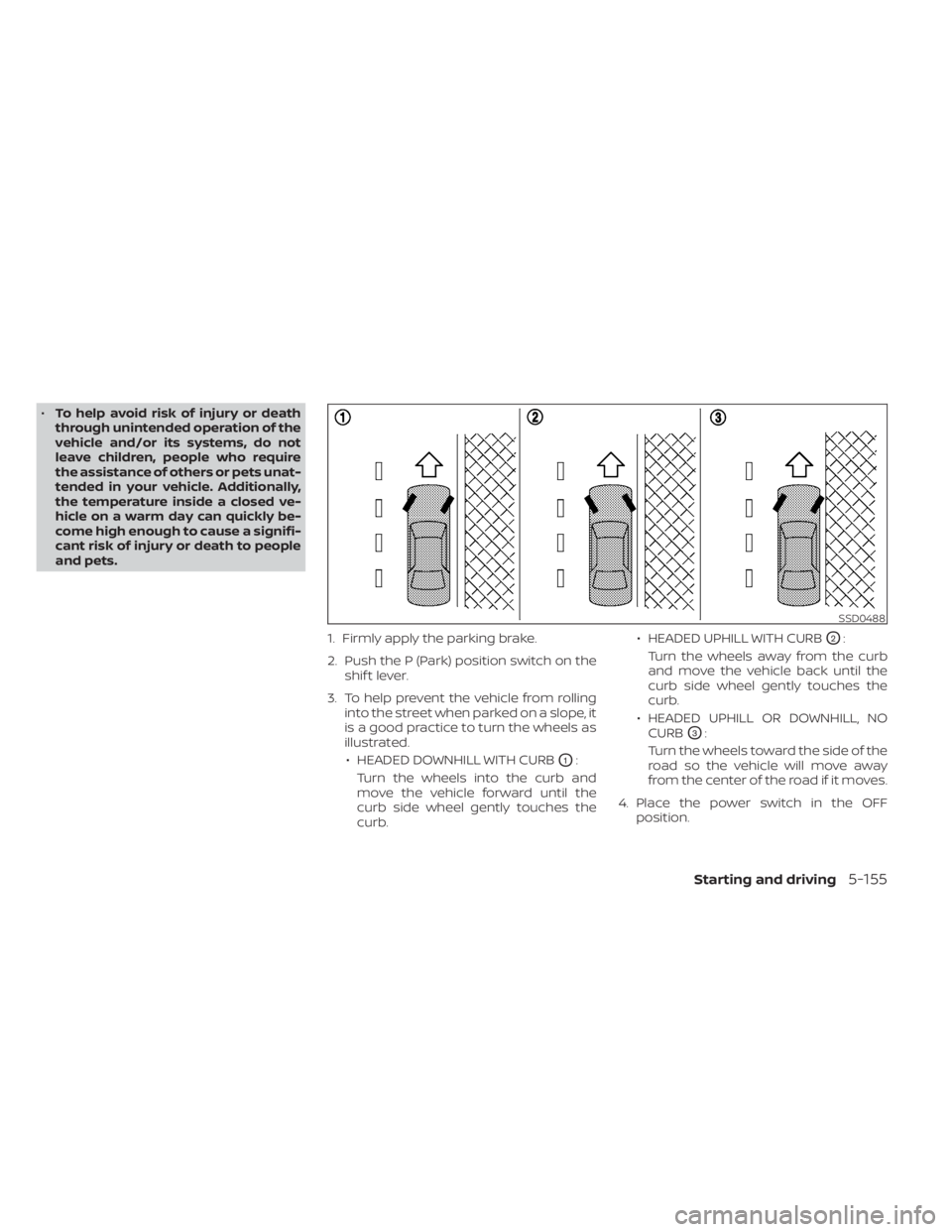
3. To help prevent the vehicle from rolling into the street when parked on a slope, it
is a good practice to turn the wheels as
illustrated.
• HEADED DOWNHILL WITH CURB
O1:
Turn the wheels into the curb and
move the vehicle forward until the
curb side wheel gently touches the
curb. • HEADED UPHILL WITH CURB
O2:
Turn the wheels away from the curb
and move the vehicle back until the
curb side wheel gently touches the
curb.
• HEADED UPHILL OR DOWNHILL, NO CURB
O3:
Turn the wheels toward the side of the
road so the vehicle will move away
from the center of the road if it moves.
4. Place the power switch in the OFF position.
SSD0488
Starting and driving5-155
Page 490 of 602
6 In case of emergency
Hazard warning flasher switch..................6-2
Roadside assistance program ...................6-2
Emergency EV (Electric Vehicle) shut off .........6-3
Flat tire ..........................................6-3
Tire Pressure Monitoring System
(TPMS) .......................................6-3
Repairing flat tire .............................6-4
Jump starting .................................. 6-10If the Li-ion battery becomes completely
discharged
..................................... 6-12
Push starting ................................... 6-13
Towing your vehicle ............................ 6-13
Towing recommended by NISSAN ...........6-14
Vehicle recovery
(freeing a stuck vehicle) .....................6-15
Page 493 of 602
•When using a wheel without the
TPMS such as the spare tire, the TPMS
will not function and the low tire
pressure warning light will flash for
approximately 1 minute. The light will
remain on af ter 1 minute. Have your
tires replaced and/or TPMS system
reset as soon as possible. It is recom-
mended that you visit a NISSAN cer-
tified LEAF dealer for these services.
• Replacing tires with those not origi-
nally specified by NISSAN could af-
fect the proper operation of the
TPMS.
• The Genuine NISSAN Emergency Tire
Repair Sealant or equivalent can be
used for temporarily repairing a tire.
Do not inject any other tire liquid or
aerosol tire sealant into the tires, as
this may cause a malfunction of tire
pressure sensors. •
NISSAN recommends using only
Genuine NISSAN Emergency Tire
Sealant provided with your vehicle.
Other tire sealants may damage the
valve stem seal which can cause the
tire to lose air pressure. It is recom-
mended that you visit a NISSAN cer-
tified LEAF dealer as soon as possible
af ter using tire repair sealant (for
models equipped with the emer-
gency tire puncture repair kit).
REPAIRING FLAT TIRE
WARNING
• Af ter using Genuine NISSAN Emer-
gency Tire Sealant to repair a minor
tire puncture, do not drive the vehicle
at speeds faster than 50 mph (80
km/h).
• Immediately af ter using the Genuine
NISSAN Emergency Tire Sealant to
repair a minor tire puncture, it is rec-
ommended that you visit a NISSAN
certified LEAF dealer. The Genuine
NISSAN Emergency Tire Sealant can-
not permanently seal a punctured
tire. Continuing operation of the ve-
hicle without a permanent tire repair
can lead to a crash. •
If you used the Genuine NISSAN
Emergency Tire Sealant to repair a
minor tire puncture, it is recom-
mended that you visit a NISSAN cer-
tified LEAF dealer to replace the
TPMS sensor in addition to repairing
or replacing the tire.
• NISSAN recommends using only
Genuine NISSAN Emergency Tire
Sealant provided with your vehicle.
Other tire sealants may damage the
valve stem seal which can cause the
tire to lose air pressure.
This vehicle does not have a spare tire. The
emergency tire puncture repair kit (Genu-
ine NISSAN Emergency Tire Sealant) is sup-
plied with the vehicle instead of a spare tire.
It can be used to temporarily repair minor
tire punctures.
If possible, have the vehicle towed to a fa-
cility that can repair or replace the flat tire.
Using the emergency tire puncture repair
kit may cause a malfunction of the tire
pressure sensor and cause the low tire
pressure warning light to illuminate.
6-4In case of emergency