cruise control NISSAN LEAF 2021 Owner´s Manual
[x] Cancel search | Manufacturer: NISSAN, Model Year: 2021, Model line: LEAF, Model: NISSAN LEAF 2021Pages: 602, PDF Size: 4.22 MB
Page 13 of 602
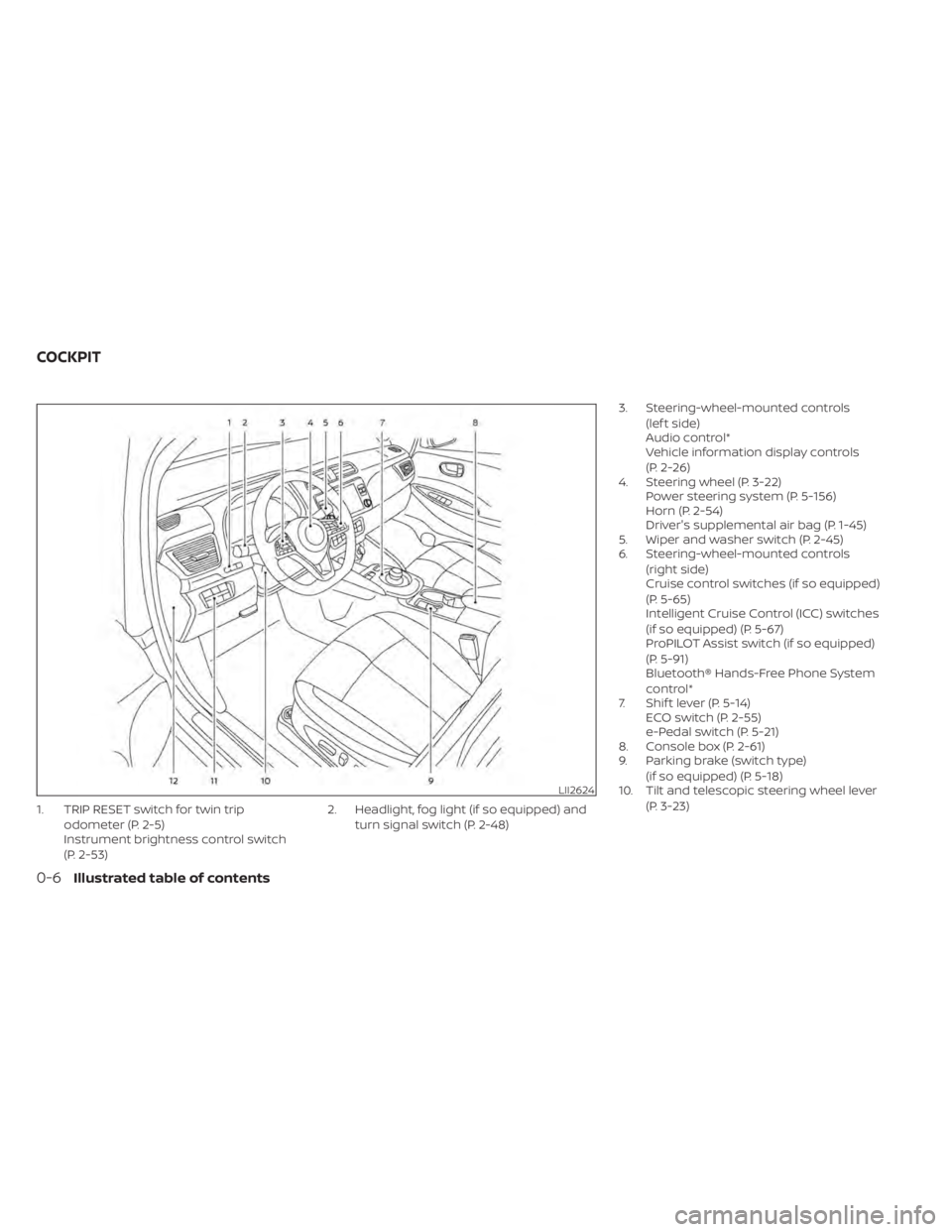
1. TRIP RESET switch for twin tripodometer (P. 2-5)
Instrument brightness control switch
(P. 2-53) 2. Headlight, fog light (if so equipped) and
turn signal switch (P. 2-48) 3. Steering-wheel-mounted controls
(lef t side)
Audio control*
Vehicle information display controls
(P. 2-26)
4. Steering wheel (P. 3-22) Power steering system (P. 5-156)
Horn (P. 2-54)
Driver's supplemental air bag (P. 1-45)
5. Wiper and washer switch (P. 2-45)
6. Steering-wheel-mounted controls
(right side)
Cruise control switches (if so equipped)
(P. 5-65)
Intelligent Cruise Control (ICC) switches
(if so equipped) (P. 5-67)
ProPILOT Assist switch (if so equipped)
(P. 5-91)
Bluetooth® Hands-Free Phone System
control*
7. Shif t lever (P. 5-14) ECO switch (P. 2-55)
e-Pedal switch (P. 5-21)
8. Console box (P. 2-61)
9. Parking brake (switch type)
(if so equipped) (P. 5-18)
10. Tilt and telescopic steering wheel lever
(P. 3-23)
LII2624
COCKPIT
0-6Illustrated table of contents
Page 43 of 602
RANGE
The distance you can drive the vehicle
(range) varies considerably depending
upon available charge, weather, tempera-
ture, usage, battery age, topography, and
driving style.
Refer to the Monroney label (window
sticker) for the official EPA range. Your ac-
tual range will vary and could be signifi-
cantly less, either initially or as the battery
ages and with use over time. For additional
information, see “Improve driving range”
(P. EV-22) for information on the factors that
affect vehicle range and how to use the
vehicle to maximize vehicle range.
IMPROVE DRIVING RANGE
Vehicle range depends on a number of
factors.
Actual vehicle range will vary depending
upon:
• Speed,
• Vehicle load,
• Electrical load from vehicle accessories,
• Traffic and road conditions,
• Distance driven without stopping,
• Usage,
• Driving style,• Battery age,
• Weather or temperature,
• Topography,
• Charging habits.
NISSAN recommends the following driv-
ing habits to help maximize vehicle
range:
Before driving:
• Follow recommended periodic
maintenance.
• Keep tires inflated to correct pressure.
• Keep wheels in correct alignment.
• Pre-heat or pre-cool the interior cabin while the vehicle is charging.
• Remove unnecessary cargo from the vehicle.
While driving:
• Drive in ECO mode –– The ECO mode helps reduce power
consumption by reducing acceleration
when compared to the same accelera-
tor pedal position in the D (Drive) posi-
tion (normal mode).
• Drive at a constant speed. Maintain cruis- ing speeds with constant accelerator po-
sitions or by using cruise control when
appropriate. • Accelerate slowly and smoothly. Gently
press and release the accelerator pedal
for acceleration and deceleration.
• Drive at moderate speeds on the highway.
• Avoid extending highway driving with multiple quick charges.
• Avoid frequent stopping and braking. Maintain a safe distance behind other
vehicles.
• Turn off the air conditioner/heater when it is not necessary.
• Select a moderate temperature setting for heating or cooling to help reduce
power consumption.
• Use the air conditioner/heater and close windows to reduce drag when cruising at
highway speed.
• Vehicle range may be substantially re- duced in extremely cold conditions (for
example, -4°F (-20°C)).
• Using the climate control system to heat the cabin when the outside temperature
is below 32°F (0°C) uses more electricity
and affects vehicle range more than
when using the heater when the tem-
perature is above 32°F (0°C).
EFFICIENT USE OF YOUR VEHICLE
EV-22EV Overview
Page 179 of 602
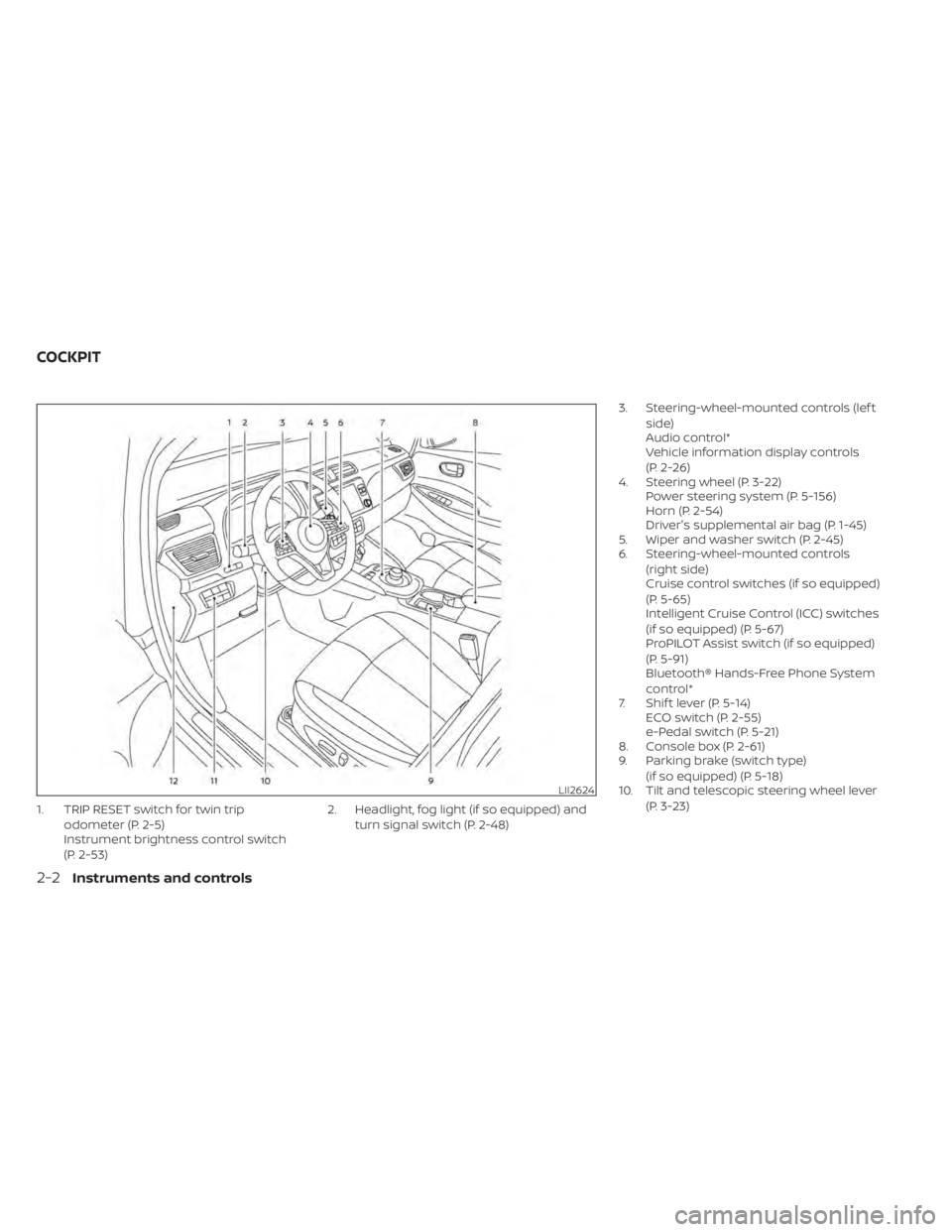
1. TRIP RESET switch for twin tripodometer (P. 2-5)
Instrument brightness control switch
(P. 2-53) 2. Headlight, fog light (if so equipped) and
turn signal switch (P. 2-48) 3. Steering-wheel-mounted controls (lef t
side)
Audio control*
Vehicle information display controls
(P. 2-26)
4. Steering wheel (P. 3-22) Power steering system (P. 5-156)
Horn (P. 2-54)
Driver's supplemental air bag (P. 1-45)
5. Wiper and washer switch (P. 2-45)
6. Steering-wheel-mounted controls
(right side)
Cruise control switches (if so equipped)
(P. 5-65)
Intelligent Cruise Control (ICC) switches
(if so equipped) (P. 5-67)
ProPILOT Assist switch (if so equipped)
(P. 5-91)
Bluetooth® Hands-Free Phone System
control*
7. Shif t lever (P. 5-14) ECO switch (P. 2-55)
e-Pedal switch (P. 5-21)
8. Console box (P. 2-61)
9. Parking brake (switch type)
(if so equipped) (P. 5-18)
10. Tilt and telescopic steering wheel lever
(P. 3-23)
LII2624
COCKPIT
2-2Instruments and controls
Page 203 of 602
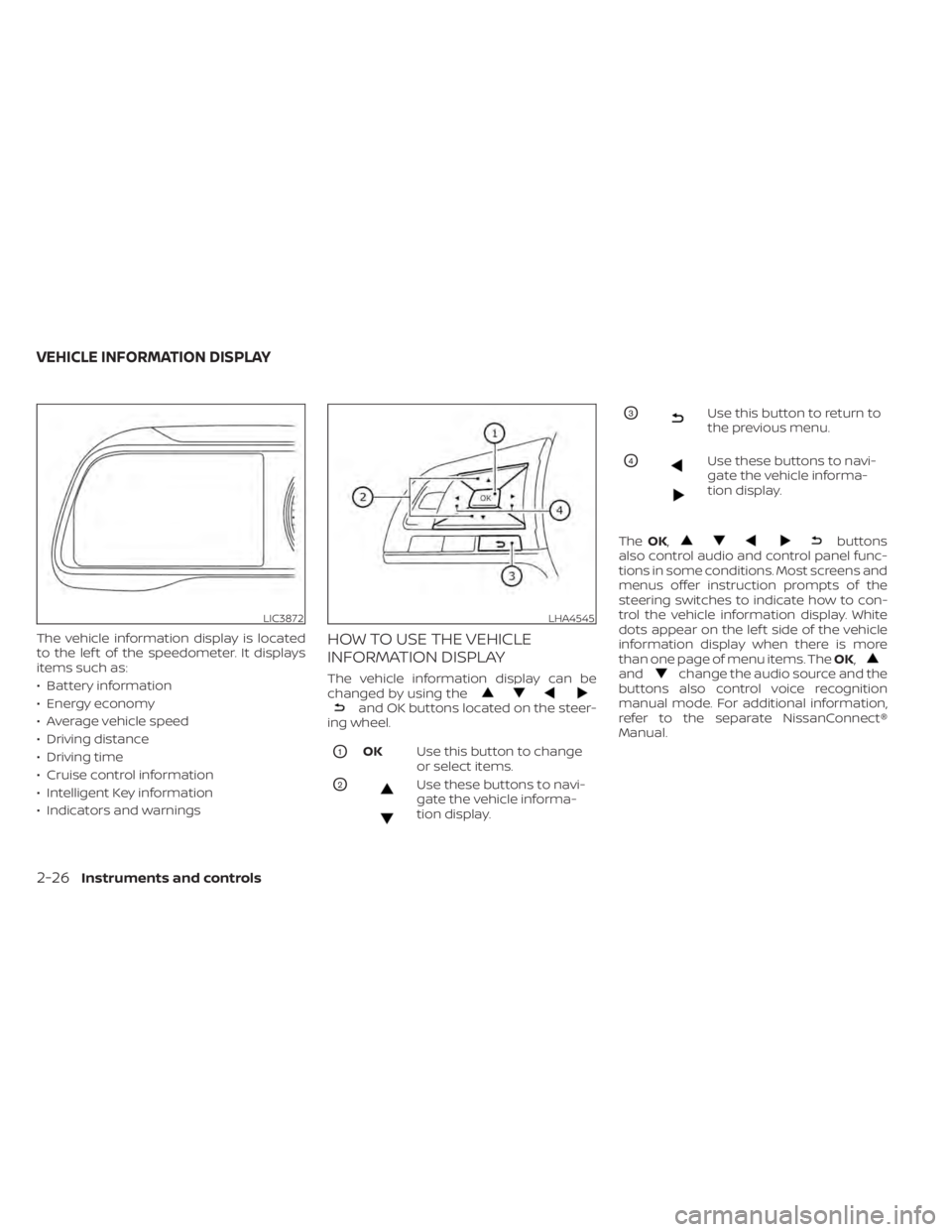
The vehicle information display is located
to the lef t of the speedometer. It displays
items such as:
• Battery information
• Energy economy
• Average vehicle speed
• Driving distance
• Driving time
• Cruise control information
• Intelligent Key information
• Indicators and warningsHOW TO USE THE VEHICLE
INFORMATION DISPLAY
The vehicle information display can be
changed by using the
and OK buttons located on the steer-
ing wheel.
O1OK Use this button to change
or select items.
O2Use these buttons to navi-
gate the vehicle informa-
tion display.
O3Use this button to return to
the previous menu.
O4Use these buttons to navi-
gate the vehicle informa-
tion display.
The OK,
buttons
also control audio and control panel func-
tions in some conditions. Most screens and
menus offer instruction prompts of the
steering switches to indicate how to con-
trol the vehicle information display. White
dots appear on the lef t side of the vehicle
information display when there is more
than one page of menu items. The OK,
andchange the audio source and the
buttons also control voice recognition
manual mode. For additional information,
refer to the separate NissanConnect®
Manual.
LIC3872LHA4545
VEHICLE INFORMATION DISPLAY
2-26Instruments and controls
Page 207 of 602
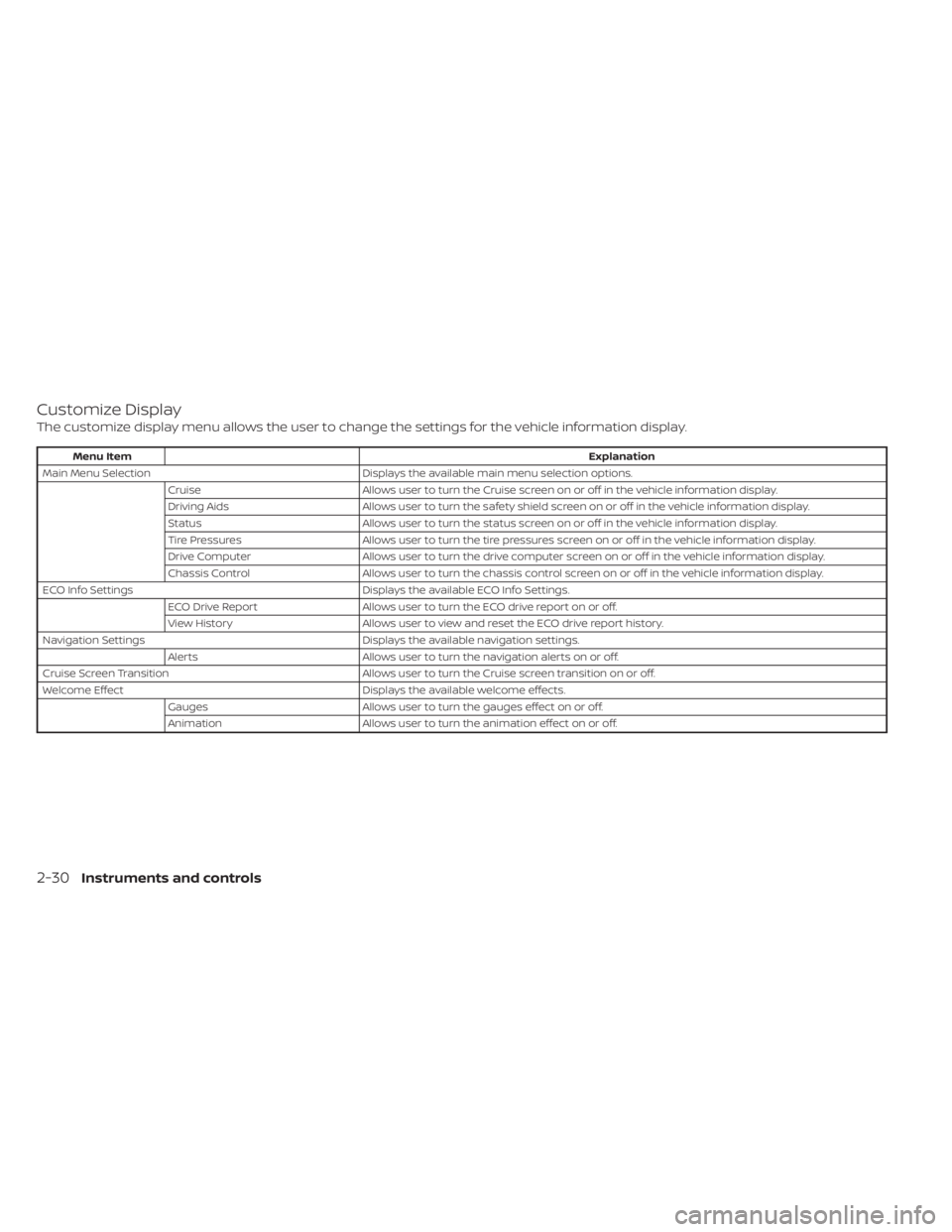
Customize Display
The customize display menu allows the user to change the settings for the vehicle information display.
Menu ItemExplanation
Main Menu Selection Displays the available main menu selection options.
Cruise Allows user to turn the Cruise screen on or off in the vehicle information display.
Driving Aids Allows user to turn the safety shield screen on or off in the vehicle information display.
Status Allows user to turn the status screen on or off in the vehicle information display.
Tire Pressures Allows user to turn the tire pressures screen on or off in the vehicle information display.
Drive Computer Allows user to turn the drive computer screen on or off in the vehicle information display.
Chassis Control Allows user to turn the chassis control screen on or off in the vehicle information display.
ECO Info Settings Displays the available ECO Info Settings.
ECO Drive Report Allows user to turn the ECO drive report on or off.
View History Allows user to view and reset the ECO drive report history.
Navigation Settings Displays the available navigation settings.
Alerts Allows user to turn the navigation alerts on or off.
Cruise Screen Transition Allows user to turn the Cruise screen transition on or off.
Welcome Effect Displays the available welcome effects.
Gauges Allows user to turn the gauges effect on or off.
Animation Allows user to turn the animation effect on or off.
2-30Instruments and controls
Page 215 of 602
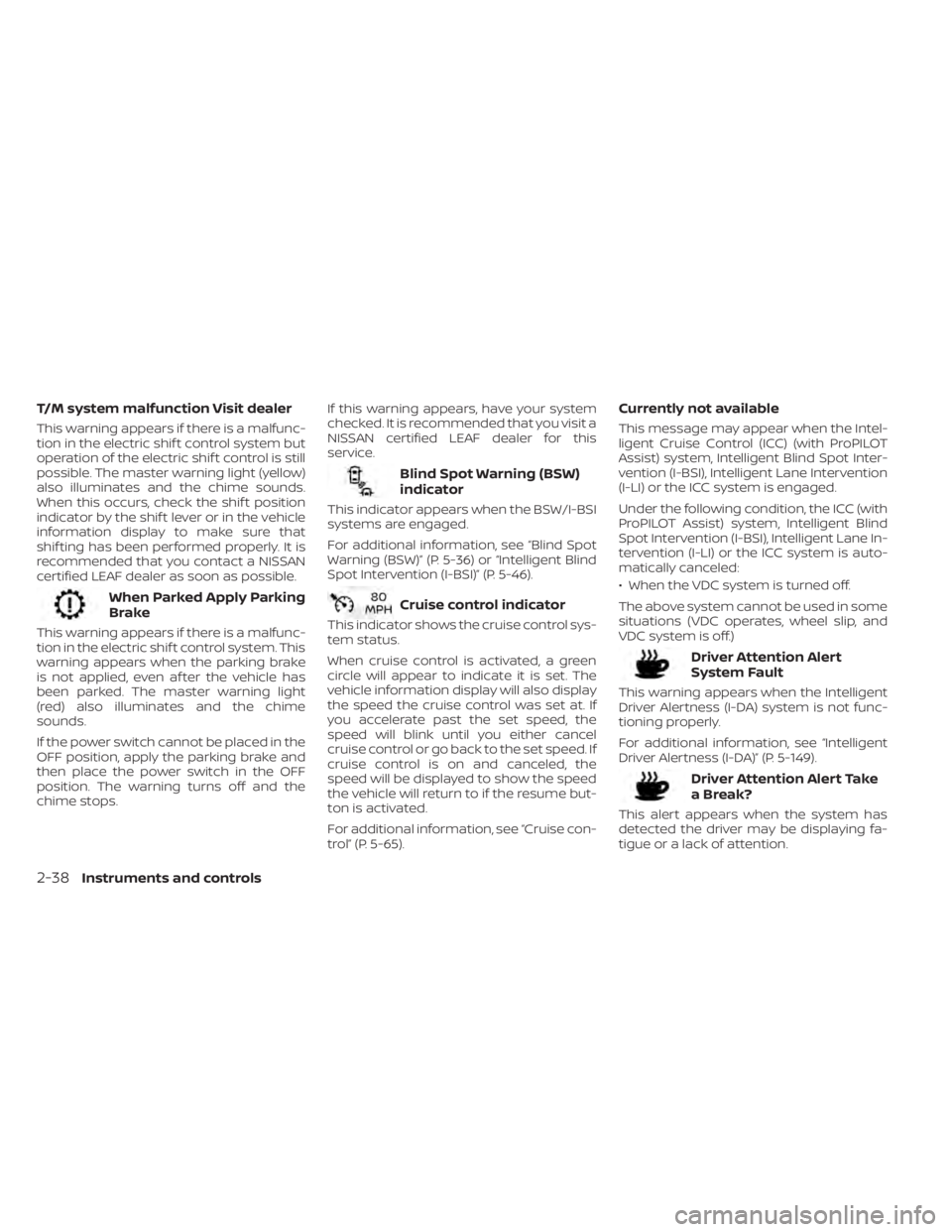
T/M system malfunction Visit dealer
This warning appears if there is a malfunc-
tion in the electric shif t control system but
operation of the electric shif t control is still
possible. The master warning light (yellow)
also illuminates and the chime sounds.
When this occurs, check the shif t position
indicator by the shif t lever or in the vehicle
information display to make sure that
shif ting has been performed properly. It is
recommended that you contact a NISSAN
certified LEAF dealer as soon as possible.
When Parked Apply Parking
Brake
This warning appears if there is a malfunc-
tion in the electric shif t control system. This
warning appears when the parking brake
is not applied, even af ter the vehicle has
been parked. The master warning light
(red) also illuminates and the chime
sounds.
If the power switch cannot be placed in the
OFF position, apply the parking brake and
then place the power switch in the OFF
position. The warning turns off and the
chime stops.If this warning appears, have your system
checked. It is recommended that you visit a
NISSAN certified LEAF dealer for this
service.
Blind Spot Warning (BSW)
indicator
This indicator appears when the BSW/I-BSI
systems are engaged.
For additional information, see “Blind Spot
Warning (BSW)” (P. 5-36) or “Intelligent Blind
Spot Intervention (I-BSI)” (P. 5-46).
Cruise control indicator
This indicator shows the cruise control sys-
tem status.
When cruise control is activated, a green
circle will appear to indicate it is set. The
vehicle information display will also display
the speed the cruise control was set at. If
you accelerate past the set speed, the
speed will blink until you either cancel
cruise control or go back to the set speed. If
cruise control is on and canceled, the
speed will be displayed to show the speed
the vehicle will return to if the resume but-
ton is activated.
For additional information, see “Cruise con-
trol” (P. 5-65).
Currently not available
This message may appear when the Intel-
ligent Cruise Control (ICC) (with ProPILOT
Assist) system, Intelligent Blind Spot Inter-
vention (I-BSI), Intelligent Lane Intervention
(I-LI) or the ICC system is engaged.
Under the following condition, the ICC (with
ProPILOT Assist) system, Intelligent Blind
Spot Intervention (I-BSI), Intelligent Lane In-
tervention (I-LI) or the ICC system is auto-
matically canceled:
• When the VDC system is turned off.
The above system cannot be used in some
situations (VDC operates, wheel slip, and
VDC system is off.)
Driver Attention Alert
System Fault
This warning appears when the Intelligent
Driver Alertness (I-DA) system is not func-
tioning properly.
For additional information, see “Intelligent
Driver Alertness (I-DA)” (P. 5-149).
Driver Attention Alert Take
a Break?
This alert appears when the system has
detected the driver may be displaying fa-
tigue or a lack of attention.
2-38Instruments and controls
Page 216 of 602
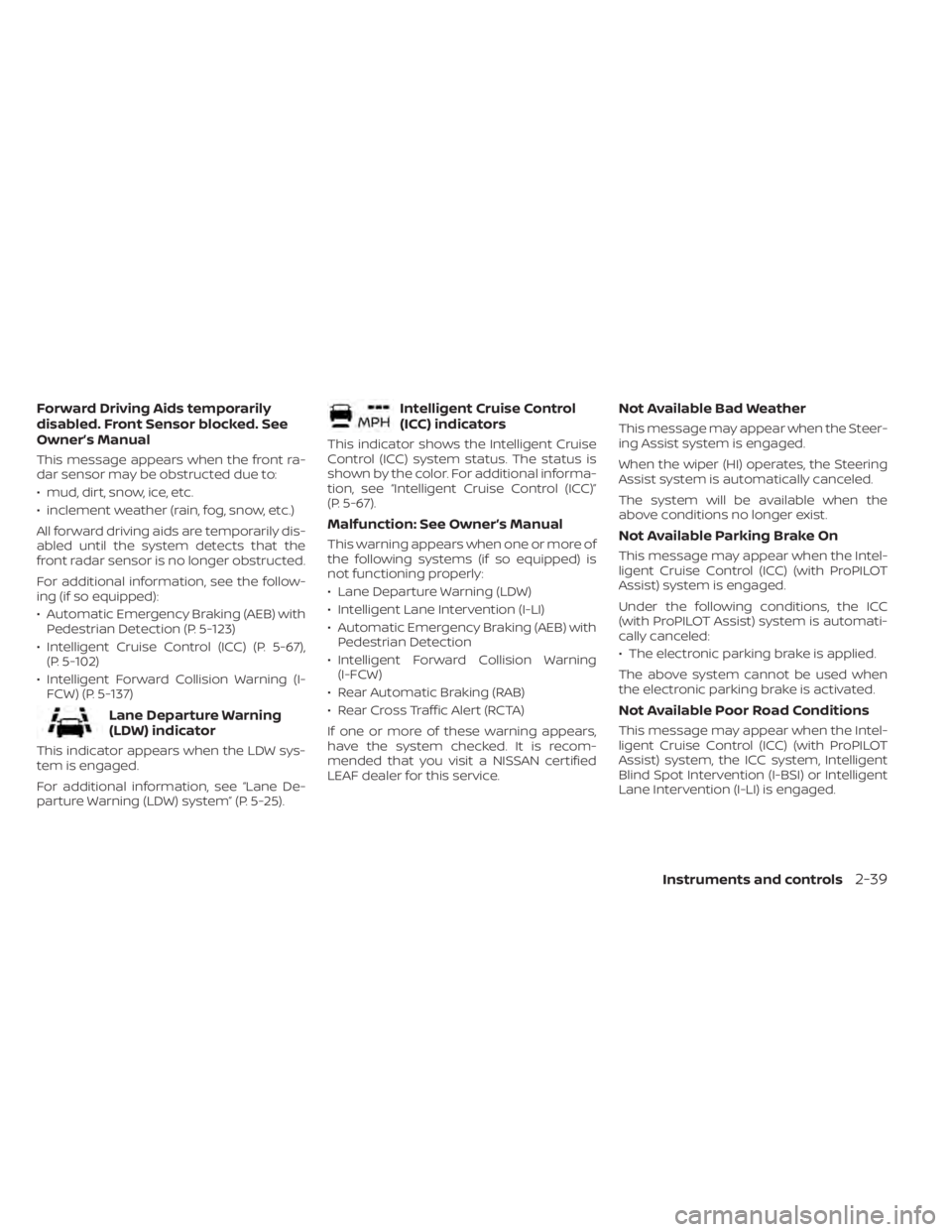
Forward Driving Aids temporarily
disabled. Front Sensor blocked. See
Owner’s Manual
This message appears when the front ra-
dar sensor may be obstructed due to:
• mud, dirt, snow, ice, etc.
• inclement weather (rain, fog, snow, etc.)
All forward driving aids are temporarily dis-
abled until the system detects that the
front radar sensor is no longer obstructed.
For additional information, see the follow-
ing (if so equipped):
• Automatic Emergency Braking (AEB) withPedestrian Detection (P. 5-123)
• Intelligent Cruise Control (ICC) (P. 5-67), (P. 5-102)
• Intelligent Forward Collision Warning (I- FCW) (P. 5-137)
Lane Departure Warning
(LDW) indicator
This indicator appears when the LDW sys-
tem is engaged.
For additional information, see “Lane De-
parture Warning (LDW) system” (P. 5-25).
Intelligent Cruise Control
(ICC) indicators
This indicator shows the Intelligent Cruise
Control (ICC) system status. The status is
shown by the color. For additional informa-
tion, see “Intelligent Cruise Control (ICC)”
(P. 5-67).
Malfunction: See Owner’s Manual
This warning appears when one or more of
the following systems (if so equipped) is
not functioning properly:
• Lane Departure Warning (LDW)
• Intelligent Lane Intervention (I-LI)
• Automatic Emergency Braking (AEB) withPedestrian Detection
• Intelligent Forward Collision Warning (I-FCW)
• Rear Automatic Braking (RAB)
• Rear Cross Traffic Alert (RCTA)
If one or more of these warning appears,
have the system checked. It is recom-
mended that you visit a NISSAN certified
LEAF dealer for this service.
Not Available Bad Weather
This message may appear when the Steer-
ing Assist system is engaged.
When the wiper (HI) operates, the Steering
Assist system is automatically canceled.
The system will be available when the
above conditions no longer exist.
Not Available Parking Brake On
This message may appear when the Intel-
ligent Cruise Control (ICC) (with ProPILOT
Assist) system is engaged.
Under the following conditions, the ICC
(with ProPILOT Assist) system is automati-
cally canceled:
• The electronic parking brake is applied.
The above system cannot be used when
the electronic parking brake is activated.
Not Available Poor Road Conditions
This message may appear when the Intel-
ligent Cruise Control (ICC) (with ProPILOT
Assist) system, the ICC system, Intelligent
Blind Spot Intervention (I-BSI) or Intelligent
Lane Intervention (I-LI) is engaged.
Instruments and controls2-39
Page 217 of 602
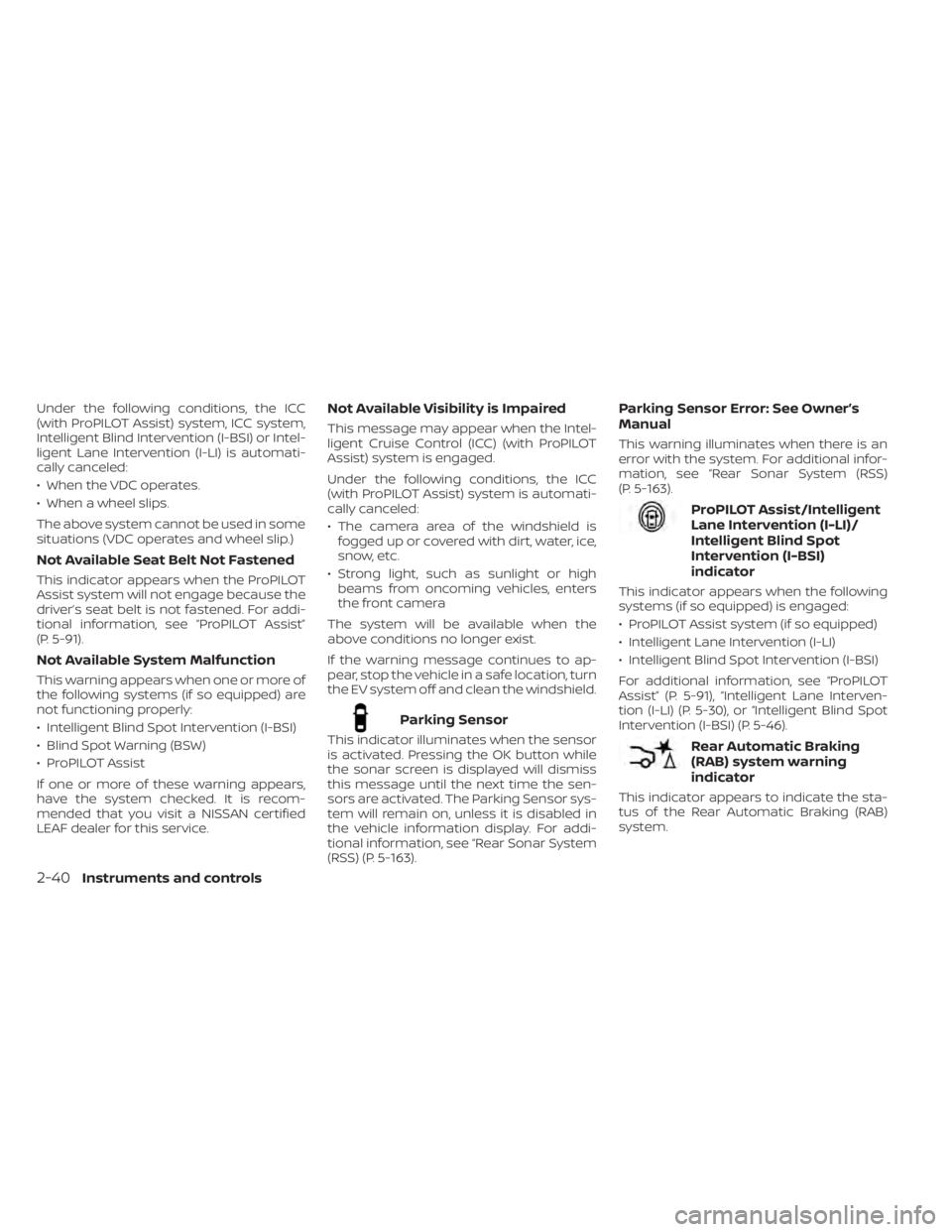
Under the following conditions, the ICC
(with ProPILOT Assist) system, ICC system,
Intelligent Blind Intervention (I-BSI) or Intel-
ligent Lane Intervention (I-LI) is automati-
cally canceled:
• When the VDC operates.
• When a wheel slips.
The above system cannot be used in some
situations (VDC operates and wheel slip.)
Not Available Seat Belt Not Fastened
This indicator appears when the ProPILOT
Assist system will not engage because the
driver’s seat belt is not fastened. For addi-
tional information, see “ProPILOT Assist”
(P. 5-91).
Not Available System Malfunction
This warning appears when one or more of
the following systems (if so equipped) are
not functioning properly:
• Intelligent Blind Spot Intervention (I-BSI)
• Blind Spot Warning (BSW)
• ProPILOT Assist
If one or more of these warning appears,
have the system checked. It is recom-
mended that you visit a NISSAN certified
LEAF dealer for this service.
Not Available Visibility is Impaired
This message may appear when the Intel-
ligent Cruise Control (ICC) (with ProPILOT
Assist) system is engaged.
Under the following conditions, the ICC
(with ProPILOT Assist) system is automati-
cally canceled:
• The camera area of the windshield isfogged up or covered with dirt, water, ice,
snow, etc.
• Strong light, such as sunlight or high beams from oncoming vehicles, enters
the front camera
The system will be available when the
above conditions no longer exist.
If the warning message continues to ap-
pear, stop the vehicle in a safe location, turn
the EV system off and clean the windshield.
Parking Sensor
This indicator illuminates when the sensor
is activated. Pressing the OK button while
the sonar screen is displayed will dismiss
this message until the next time the sen-
sors are activated. The Parking Sensor sys-
tem will remain on, unless it is disabled in
the vehicle information display. For addi-
tional information, see “Rear Sonar System
(RSS) (P. 5-163).
Parking Sensor Error: See Owner’s
Manual
This warning illuminates when there is an
error with the system. For additional infor-
mation, see “Rear Sonar System (RSS)
(P. 5-163).
ProPILOT Assist/Intelligent
Lane Intervention (I-LI)/
Intelligent Blind Spot
Intervention (I-BSI)
indicator
This indicator appears when the following
systems (if so equipped) is engaged:
• ProPILOT Assist system (if so equipped)
• Intelligent Lane Intervention (I-LI)
• Intelligent Blind Spot Intervention (I-BSI)
For additional information, see “ProPILOT
Assist” (P. 5-91), “Intelligent Lane Interven-
tion (I-LI) (P. 5-30), or “Intelligent Blind Spot
Intervention (I-BSI) (P. 5-46).
Rear Automatic Braking
(RAB) system warning
indicator
This indicator appears to indicate the sta-
tus of the Rear Automatic Braking (RAB)
system.
2-40Instruments and controls
Page 320 of 602
I-BSI system limitations.....................5-49
I-BSI driving situations .......................5-50
System temporarily unavailable .............5-55
System malfunction ......................... 5-55
System maintenance .......................5-56
RearCrossTrafficAlert(RCTA) .................. 5-58
RCTA system operation .....................5-58
How to enable/disable the RCTA
system ...................................... 5-60
RCTA system limitations .....................5-61
System temporarily unavailable .............5-62
System maintenance .......................5-63
Cruise control (if so equipped) ..................5-65
Precautions on cruise control ...............5-65
Cruise control operations ...................5-65
Intelligent Cruise Control (ICC) (for vehicles
without ProPILOT Assist) (if so equipped) .......5-67
How to select the cruise control mode ......5-69
Vehicle-to-vehicle distance control
mode ....................................... 5-69
Vehicle-to-vehicle distance control
mode operation ............................. 5-70
Vehicle-to-vehicle distance control
mode switches ............................. 5-72Vehicle-to-vehicle distance control
mode limitations
............................ 5-79
System temporarily unavailable .............5-83
System maintenance .......................5-85
Conventional (fixed speed) cruise
control mode ............................... 5-86
ProPILOT Assist (if so equipped) ................5-91
ProPILOT Assist system operation ...........5-93
Turning the conventional (fixed speed)
cruise control mode on .....................5-96
Operating ProPILOT Assist ...................5-97
How to enable/disable the Steering
Assist ...................................... 5-101
Intelligent Cruise Control (ICC)
(for vehicles with ProPILOT Assist) ..........5-102
Steering Assist ............................. 5-112
Conventional (fixed speed) cruise
control mode .............................. 5-119
Automatic Emergency Braking (AEB) with
Pedestrian Detection .......................... 5-123
AEB with Pedestrian Detection system
operation .................................. 5-124
Turning the AEB with Pedestrian
Detection
system on/off ................... 5-126
Page 342 of 602
The e-Pedal system provides the following
driving features:
When driving and stopping the vehicle:
• Depressing or returning the acceleratorpedal changes the degree of accelera-
tion and deceleration accordingly.
• Returning the accelerator pedal gener- ates more deceleration than normal. (The
maximum deceleration changes accord-
ing to the vehicle speed.)
• Releasing (taking your foot off ) the accel- erator pedal reduces the vehicle speed
until the vehicle comes to a stop.
• The vehicle’s brake lights illuminate when the deceleration level reaches an ordi-
nary braking operation.
If the deceleration is not sufficient when the
accelerator pedal is returned or released,
depress the brake pedal. The brake pedal
can be operated to reduce the vehicle
speed in the same way as normal even
when the e-Pedal system is activated.
When restarting the vehicle:
• Af ter the vehicle comes to a stop by the e-Pedal system function, the vehicle re-
mains at a stop as long as the accelerator
pedal is released. • The vehicle’s brake lights remain illumi-
nated when the vehicle is stopped by the
e-Pedal system.
• Depress the accelerator pedal to start the vehicle again from a stop.
When the vehicle needs to be stopped for a
certain period of time, place the vehicle in
the P (Park) position and apply the parking
brake.
CAUTION
When the e-Pedal system is turned off,
remember to depress the brake pedal
firmly to prevent the vehicle from mov-
ing with the shif t lever in any position
other than P (Park).
When backing up the vehicle:
• With the shif t lever in the R (Reverse) po- sition, operating the accelerator pedal
adjusts the vehicle speed (acceleration,
deceleration, or stopping) in the same
way as the D (Drive) position. Other driving tips for the e-Pedal
system:
• For smooth deceleration when the
e-Pedal system is activated, it is recom-
mended that you adjust the accelerator
pedal by either depressing or returning,
not releasing, the pedal.
• Moving the shif t lever from D (Drive) to B mode or from B mode to D (Drive) does
not affect the e-Pedal system feature.
• The e-Pedal system does not function under the following conditions:– When the vehicle is placed in the P (Park) or N (Neutral) position
– When cruise control (if so equipped), ProPILOT Assist (if so equipped), or Au-
tomatic Emergency Braking with Pe-
destrian Detection operates
Starting and driving5-23