cruise control NISSAN LEAF 2021 Owner´s Manual
[x] Cancel search | Manufacturer: NISSAN, Model Year: 2021, Model line: LEAF, Model: NISSAN LEAF 2021Pages: 602, PDF Size: 4.22 MB
Page 406 of 602
–On winding or hilly roads
– On slippery roads (rain, snow, ice,
etc.)
– In very windy areas
• Doing so could cause a loss of vehicle
control and result in an accident.
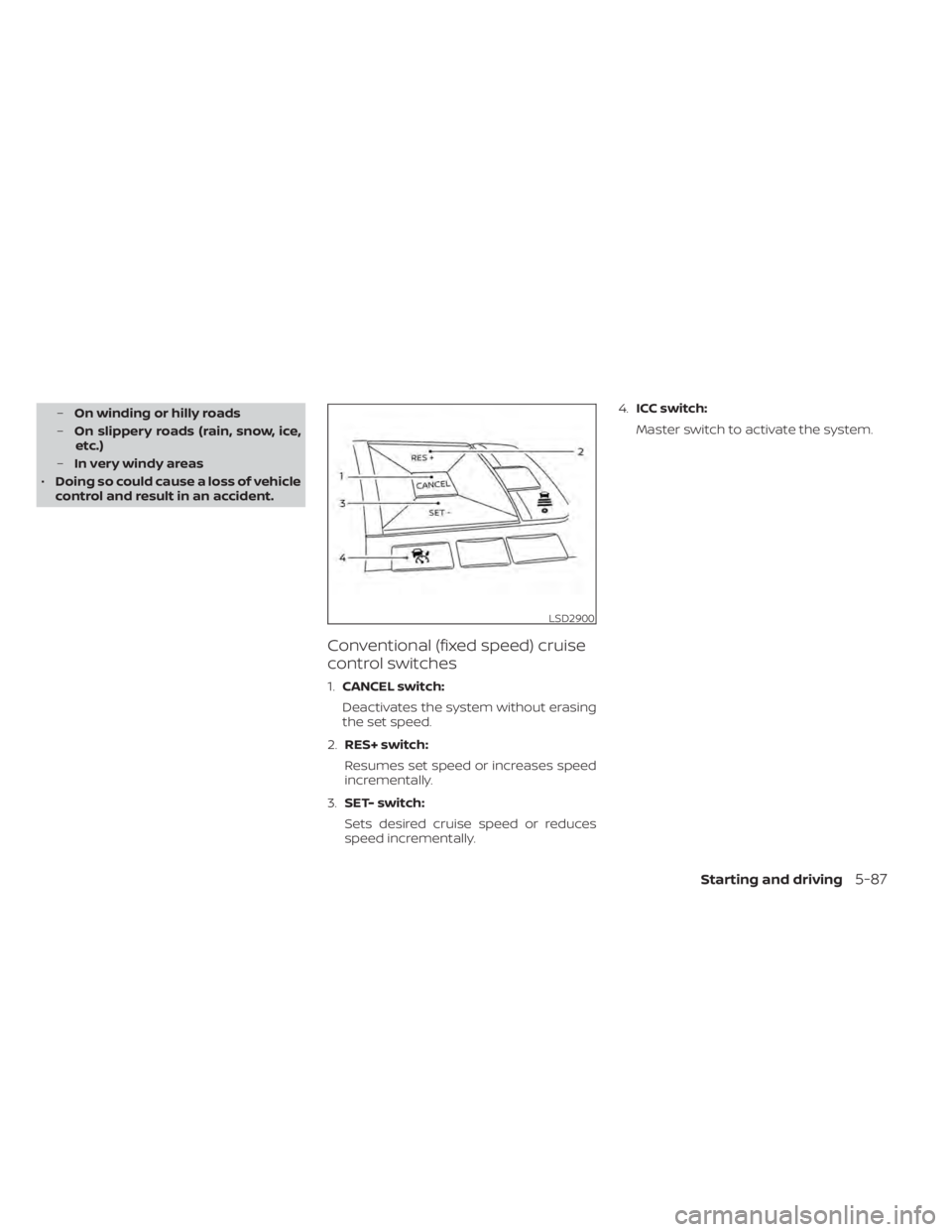
Conventional (fixed speed) cruise
control switches
1. CANCEL switch:
Deactivates the system without erasing
the set speed.
2. RES+ switch:
Resumes set speed or increases speed
incrementally.
3. SET- switch:
Sets desired cruise speed or reduces
speed incrementally. 4.
ICC switch:
Master switch to activate the system.
LSD2900
Starting and driving5-87
Page 407 of 602
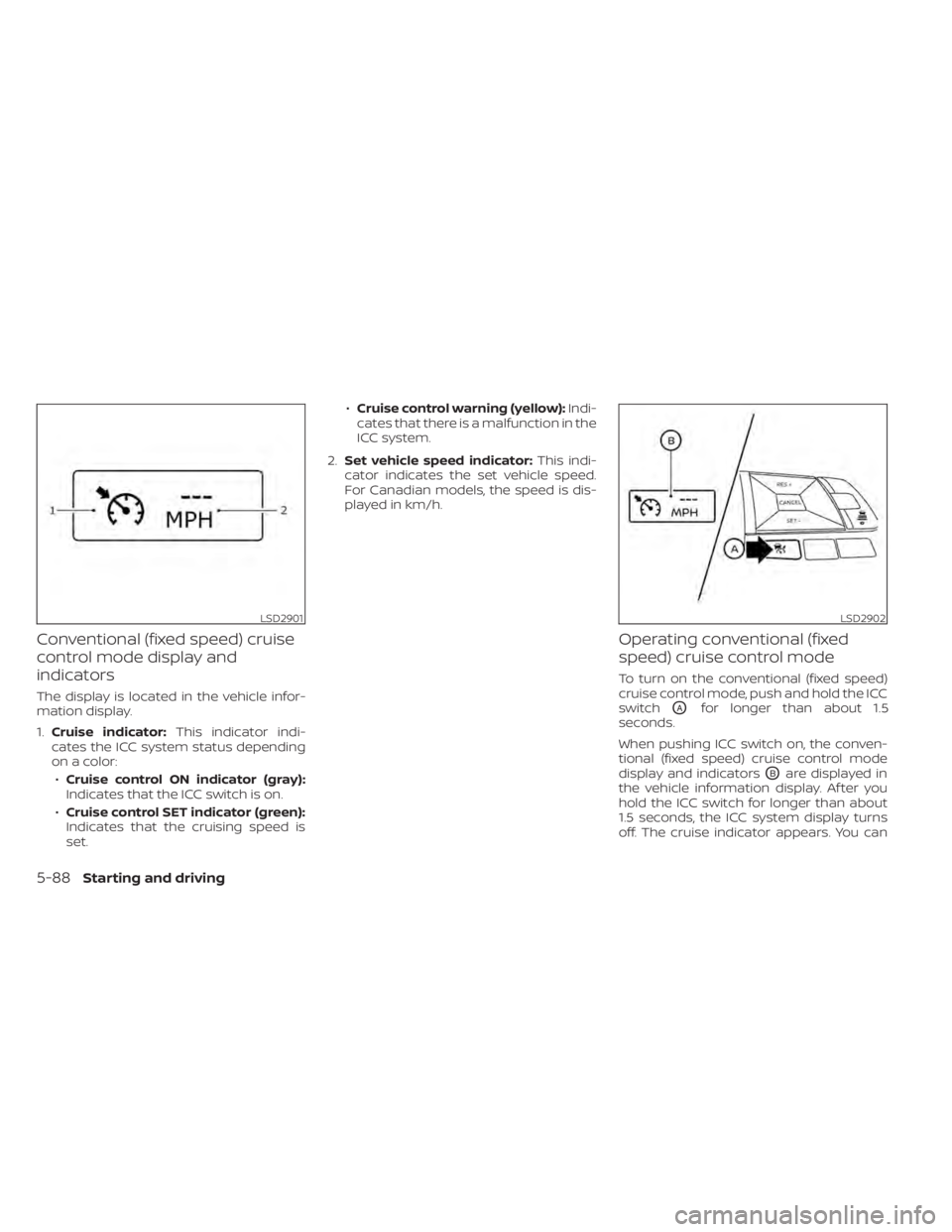
Conventional (fixed speed) cruise
control mode display and
indicators
The display is located in the vehicle infor-
mation display.
1.Cruise indicator: This indicator indi-
cates the ICC system status depending
on a color:
• Cruise control ON indicator (gray):
Indicates that the ICC switch is on.
• Cruise control SET indicator (green):
Indicates that the cruising speed is
set. •
Cruise control warning (yellow): Indi-
cates that there is a malfunction in the
ICC system.
2. Set vehicle speed indicator: This indi-
cator indicates the set vehicle speed.
For Canadian models, the speed is dis-
played in km/h.
Operating conventional (fixed
speed) cruise control mode
To turn on the conventional (fixed speed)
cruise control mode, push and hold the ICC
switch
OAfor longer than about 1.5
seconds.
When pushing ICC switch on, the conven-
tional (fixed speed) cruise control mode
display and indicators
OBare displayed in
the vehicle information display. Af ter you
hold the ICC switch for longer than about
1.5 seconds, the ICC system display turns
off. The cruise indicator appears. You can
LSD2901LSD2902
5-88Starting and driving
Page 408 of 602
now set your desired cruising speed. Push-
ing the ICC switch again will turn the sys-
tem completely off. When the power switch
is placed in the OFF position, the system is
also automatically turned off.
To use the ICC system again, quickly push
and release the ICC switch (vehicle-to ve-
hicle distance control mode) or push and
hold it (conventional cruise control mode)
again to turn it on.
CAUTION
To avoid accidentally engaging cruise
control, make sure to turn the ICC
switch off when not using the ICC
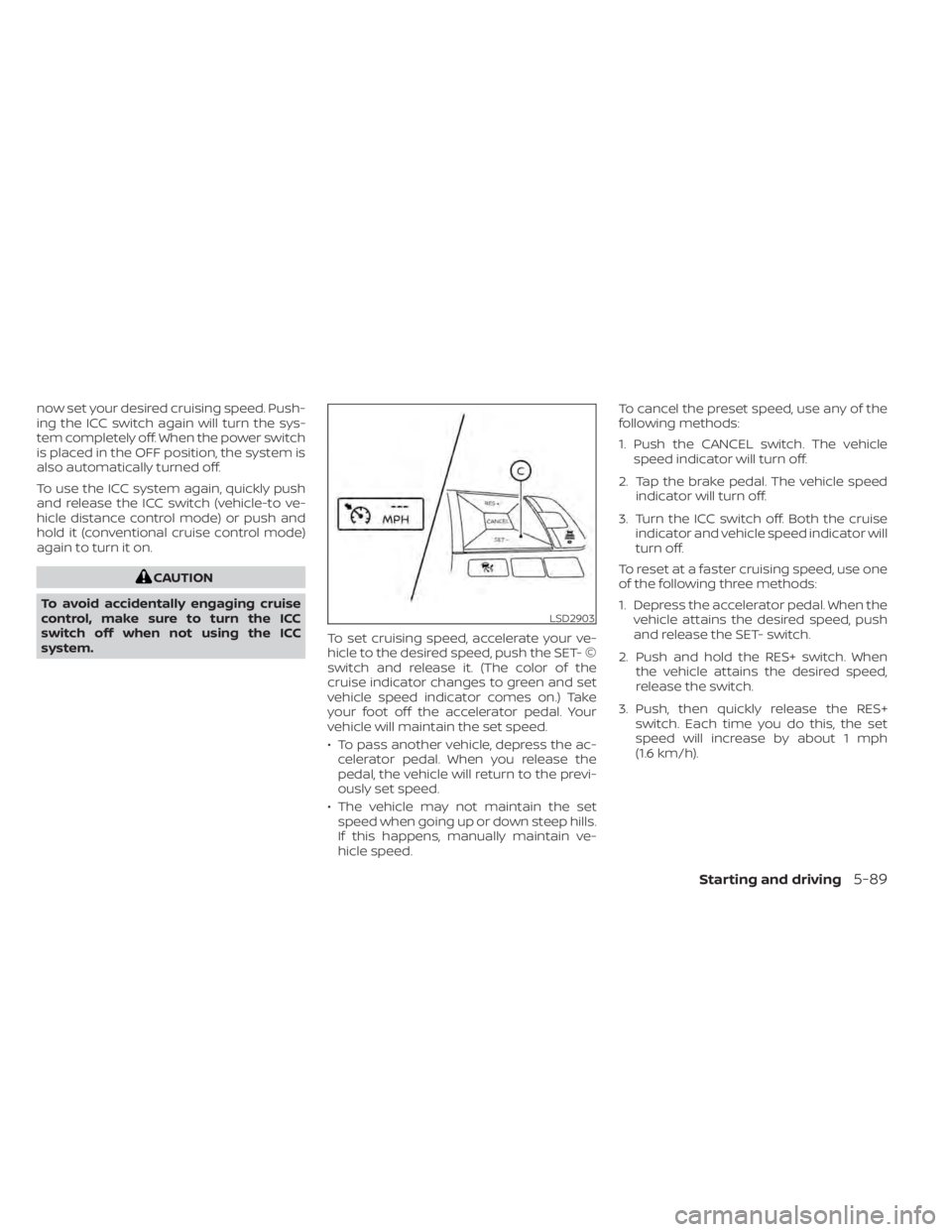
system. To set cruising speed, accelerate your ve-
hicle to the desired speed, push the SET- ©
switch and release it. (The color of the
cruise indicator changes to green and set
vehicle speed indicator comes on.) Take
your foot off the accelerator pedal. Your
vehicle will maintain the set speed.
• To pass another vehicle, depress the ac-
celerator pedal. When you release the
pedal, the vehicle will return to the previ-
ously set speed.
• The vehicle may not maintain the set speed when going up or down steep hills.
If this happens, manually maintain ve-
hicle speed. To cancel the preset speed, use any of the
following methods:
1. Push the CANCEL switch. The vehicle
speed indicator will turn off.
2. Tap the brake pedal. The vehicle speed indicator will turn off.
3. Turn the ICC switch off. Both the cruise indicator and vehicle speed indicator will
turn off.
To reset at a faster cruising speed, use one
of the following three methods:
1. Depress the accelerator pedal. When the vehicle attains the desired speed, push
and release the SET- switch.
2. Push and hold the RES+ switch. When the vehicle attains the desired speed,
release the switch.
3. Push, then quickly release the RES+ switch. Each time you do this, the set
speed will increase by about 1 mph
(1.6 km/h).
LSD2903
Starting and driving5-89
Page 410 of 602
• When the parking brake is applied
• When the VDC operates (including thetraction control system)
• When a wheel slips
When the system is not operating properly,
the chime sounds and the color of the
cruise indicator will change to orange.
Action to take
If the color of the cruise indicator changes
to orange, stop the vehicle in a safe place
and place the shif t lever in the P (Park) po-
sition. Turn the EV system off, restart the EV
system, resume driving, and then perform
the setting again.
If it is not possible to set or the indicator
stays on, it may indicate that the system
is malfunctioning. Although the vehicle
is still drivable under normal conditions,
have the vehicle checked. It is recom-
mended that you visit a NISSAN certified
LEAF dealer for this service.WARNING
Failure to follow the warnings and in-
structions for proper use of the ProPI-
LOT Assist system could result in seri-
ous injury or death.
• ProPILOT Assist is not a self-driving
system. Within the limits of its capa-
bilities, as described in this manual, it
helps the driver with certain driving
activities.
• The ProPILOT Assist system is not a
replacement for proper driving pro-
cedures and is not designed to cor-
rect careless, inattentive or absent-
minded driving. ProPILOT Assist will
not always steer the vehicle to keep it
in the lane. The ProPILOT Assist sys-
tem is not designed to prevent loss of
control. It is the driver’s responsibility
to stay alert, drive safely, keep the
vehicle in the traveling lane, and be in
control of the vehicle at all times. •
There are limitations to the ProPILOT
Assist system capability. The ProPI-
LOT Assist system does not function
in all driving, traffic, weather, and
road conditions. It is the driver’s re-
sponsibility to stay alert, drive safely,
keep the vehicle in the traveling lane,
and be in control of the vehicle at all
times.
• The ProPILOT Assist system is only an
aid to assist the driver and is not a
collision warning or avoidance
device.
• The ProPILOT Assist system is for
highway use only and is not intended
for city driving. Failure to apply the
brake or steer the vehicle when nec-
essary may result in a serious
accident.
• Always observe posted speed limits
and do not set the speed over them.
• Never take your hands off the steer-
ing wheel when driving. Always keep
your hands on the steering wheel
and drive your vehicle safely.
• Never unfasten your safety belt
when using ProPILOT Assist. Doing so
automatically cancels the ProPILOT
Assist system.
PROPILOT ASSIST (if so equipped)
Starting and driving5-91
Page 412 of 602
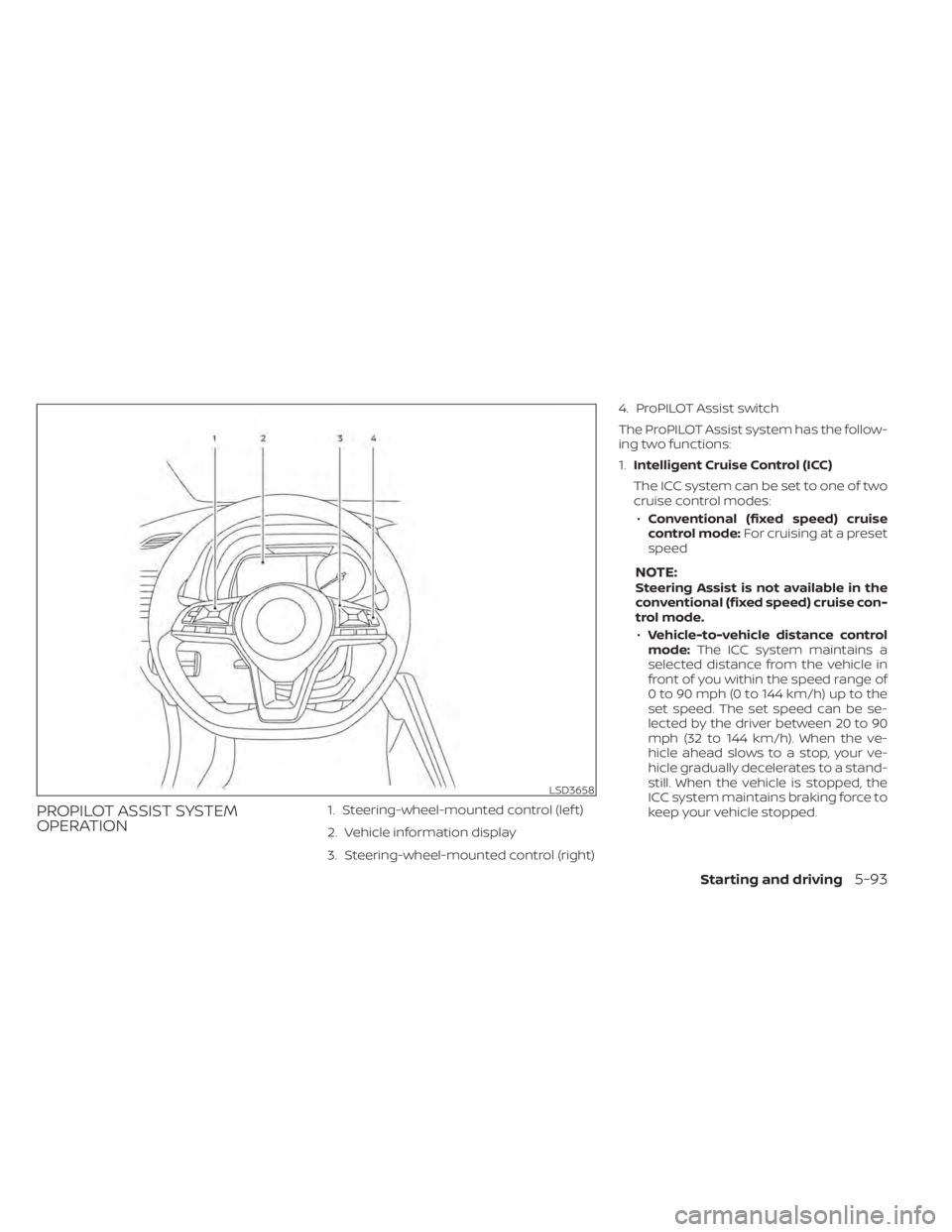
PROPILOT ASSIST SYSTEM
OPERATION1. Steering-wheel-mounted control (lef t)
2. Vehicle information display
3. Steering-wheel-mounted control (right)4. ProPILOT Assist switch
The ProPILOT Assist system has the follow-
ing two functions:
1.
Intelligent Cruise Control (ICC)
The ICC system can be set to one of two
cruise control modes: • Conventional (fixed speed) cruise
control mode: For cruising at a preset
speed
NOTE:Steering Assist is not available in the
conventional (fixed speed) cruise con-
trol mode.
• Vehicle-to-vehicle distance control
mode: The ICC system maintains a
selected distance from the vehicle in
front of you within the speed range of
0 to 90 mph (0 to 144 km/h) up to the
set speed. The set speed can be se-
lected by the driver between 20 to 90
mph (32 to 144 km/h). When the ve-
hicle ahead slows to a stop, your ve-
hicle gradually decelerates to a stand-
still. When the vehicle is stopped, the
ICC system maintains braking force to
keep your vehicle stopped.
LSD3658
Starting and driving5-93
Page 415 of 602
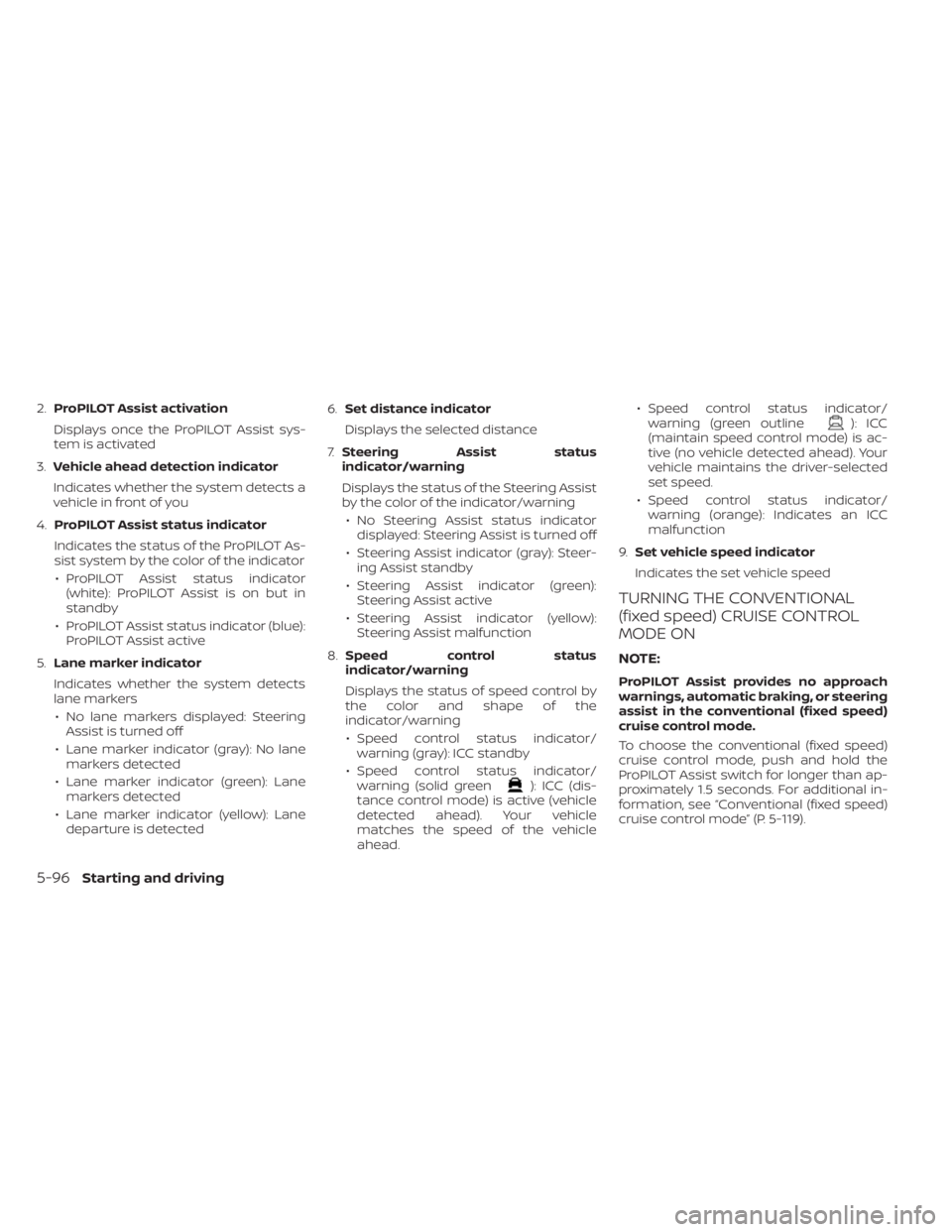
2.ProPILOT Assist activation
Displays once the ProPILOT Assist sys-
tem is activated
3. Vehicle ahead detection indicator
Indicates whether the system detects a
vehicle in front of you
4. ProPILOT Assist status indicator
Indicates the status of the ProPILOT As-
sist system by the color of the indicator • ProPILOT Assist status indicator (white): ProPILOT Assist is on but in
standby
• ProPILOT Assist status indicator (blue): ProPILOT Assist active
5. Lane marker indicator
Indicates whether the system detects
lane markers • No lane markers displayed: Steering Assist is turned off
• Lane marker indicator (gray): No lane markers detected
• Lane marker indicator (green): Lane markers detected
• Lane marker indicator (yellow): Lane departure is detected 6.
Set distance indicator
Displays the selected distance
7. Steering Assist status
indicator/warning
Displays the status of the Steering Assist
by the color of the indicator/warning
• No Steering Assist status indicator displayed: Steering Assist is turned off
• Steering Assist indicator (gray): Steer- ing Assist standby
• Steering Assist indicator (green): Steering Assist active
• Steering Assist indicator (yellow): Steering Assist malfunction
8. Speed control status
indicator/warning
Displays the status of speed control by
the color and shape of the
indicator/warning
• Speed control status indicator/ warning (gray): ICC standby
• Speed control status indicator/ warning (solid green
): ICC (dis-
tance control mode) is active (vehicle
detected ahead). Your vehicle
matches the speed of the vehicle
ahead. • Speed control status indicator/
warning (green outline
): ICC
(maintain speed control mode) is ac-
tive (no vehicle detected ahead). Your
vehicle maintains the driver-selected
set speed.
• Speed control status indicator/ warning (orange): Indicates an ICC
malfunction
9. Set vehicle speed indicator
Indicates the set vehicle speed
TURNING THE CONVENTIONAL
(fixed speed) CRUISE CONTROL
MODE ON
NOTE:
ProPILOT Assist provides no approach
warnings, automatic braking, or steering
assist in the conventional (fixed speed)
cruise control mode.
To choose the conventional (fixed speed)
cruise control mode, push and hold the
ProPILOT Assist switch for longer than ap-
proximately 1.5 seconds. For additional in-
formation, see “Conventional (fixed speed)
cruise control mode” (P. 5-119).
5-96Starting and driving
Page 421 of 602
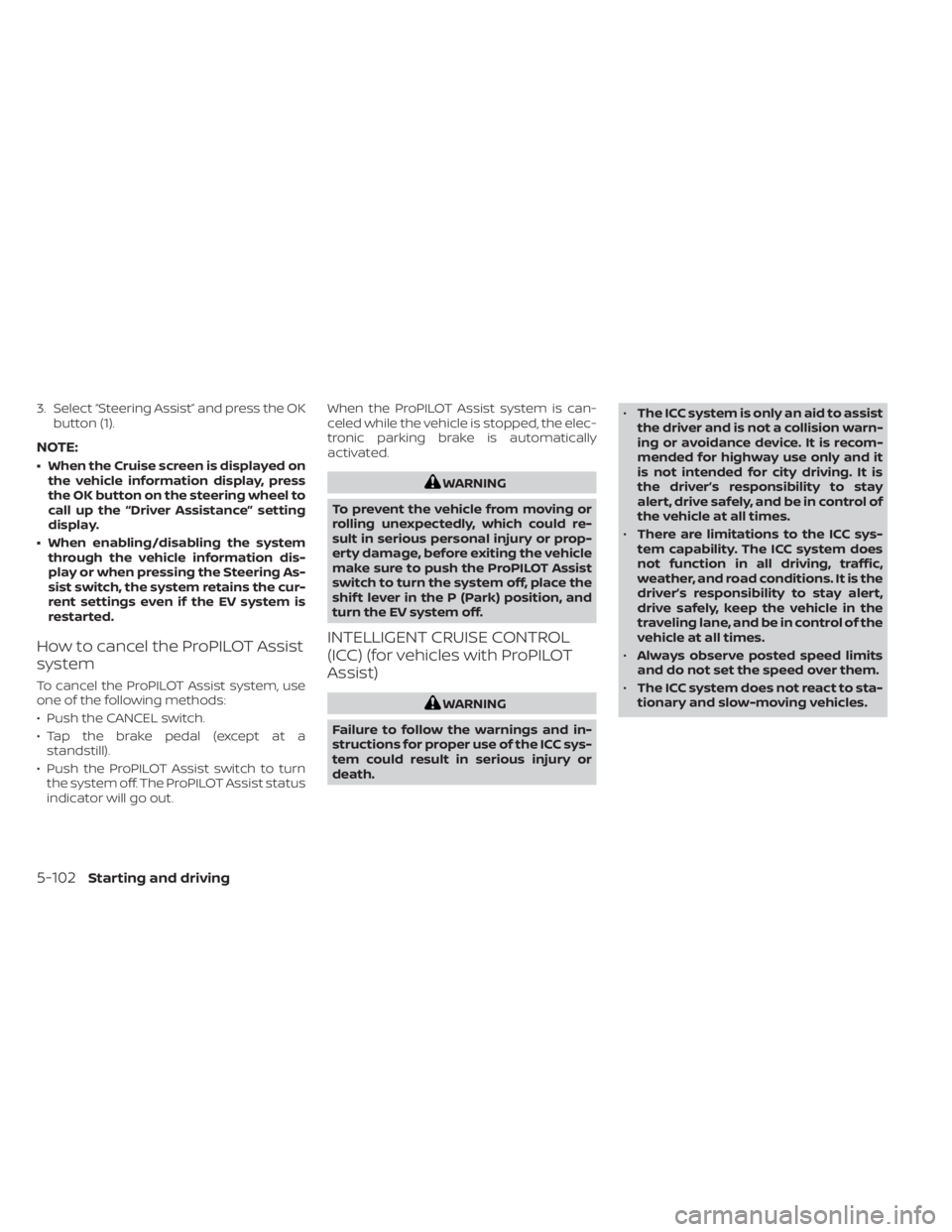
3. Select “Steering Assist” and press the OKbutton (1).
NOTE:
• When the Cruise screen is displayed onthe vehicle information display, press
the OK button on the steering wheel to
call up the “Driver Assistance” setting
display.
• When enabling/disabling the system through the vehicle information dis-
play or when pressing the Steering As-
sist switch, the system retains the cur-
rent settings even if the EV system is
restarted.
How to cancel the ProPILOT Assist
system
To cancel the ProPILOT Assist system, use
one of the following methods:
• Push the CANCEL switch.
• Tap the brake pedal (except at astandstill).
• Push the ProPILOT Assist switch to turn the system off. The ProPILOT Assist status
indicator will go out. When the ProPILOT Assist system is can-
celed while the vehicle is stopped, the elec-
tronic parking brake is automatically
activated.
WARNING
To prevent the vehicle from moving or
rolling unexpectedly, which could re-
sult in serious personal injury or prop-
erty damage, before exiting the vehicle
make sure to push the ProPILOT Assist
switch to turn the system off, place the
shif t lever in the P (Park) position, and
turn the EV system off.
INTELLIGENT CRUISE CONTROL
(ICC) (for vehicles with ProPILOT
Assist)
WARNING
Failure to follow the warnings and in-
structions for proper use of the ICC sys-
tem could result in serious injury or
death. •
The ICC system is only an aid to assist
the driver and is not a collision warn-
ing or avoidance device. It is recom-
mended for highway use only and it
is not intended for city driving. It is
the driver’s responsibility to stay
alert, drive safely, and be in control of
the vehicle at all times.
• There are limitations to the ICC sys-
tem capability. The ICC system does
not function in all driving, traffic,
weather, and road conditions. It is the
driver’s responsibility to stay alert,
drive safely, keep the vehicle in the
traveling lane, and be in control of the
vehicle at all times.
• Always observe posted speed limits
and do not set the speed over them.
• The ICC system does not react to sta-
tionary and slow-moving vehicles.
5-102Starting and driving
Page 423 of 602
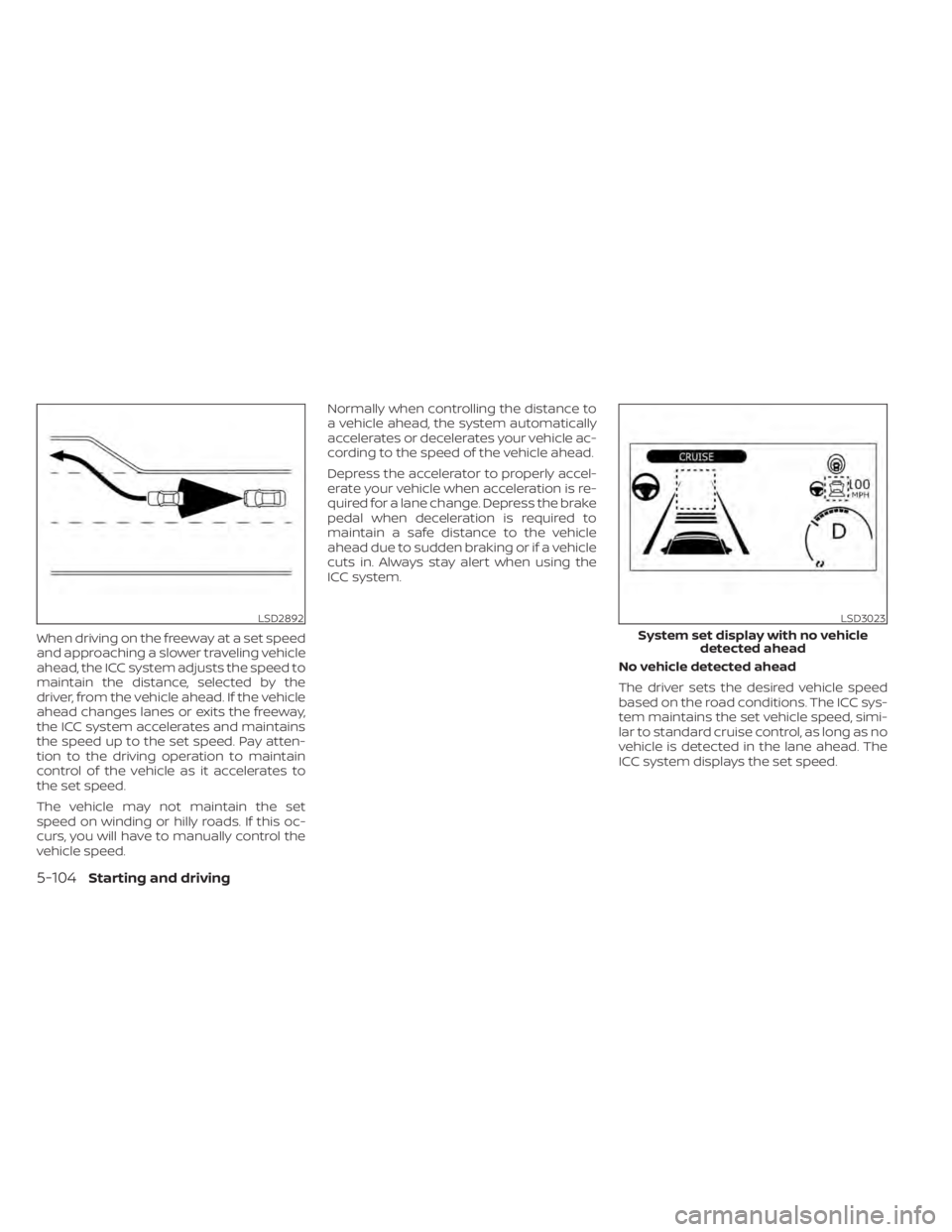
When driving on the freeway at a set speed
and approaching a slower traveling vehicle
ahead, the ICC system adjusts the speed to
maintain the distance, selected by the
driver, from the vehicle ahead. If the vehicle
ahead changes lanes or exits the freeway,
the ICC system accelerates and maintains
the speed up to the set speed. Pay atten-
tion to the driving operation to maintain
control of the vehicle as it accelerates to
the set speed.
The vehicle may not maintain the set
speed on winding or hilly roads. If this oc-
curs, you will have to manually control the
vehicle speed.Normally when controlling the distance to
a vehicle ahead, the system automatically
accelerates or decelerates your vehicle ac-
cording to the speed of the vehicle ahead.
Depress the accelerator to properly accel-
erate your vehicle when acceleration is re-
quired for a lane change. Depress the brake
pedal when deceleration is required to
maintain a safe distance to the vehicle
ahead due to sudden braking or if a vehicle
cuts in. Always stay alert when using the
ICC system.
No vehicle detected ahead
The driver sets the desired vehicle speed
based on the road conditions. The ICC sys-
tem maintains the set vehicle speed, simi-
lar to standard cruise control, as long as no
vehicle is detected in the lane ahead. The
ICC system displays the set speed.
LSD2892LSD3023
System set display with no vehicledetected ahead
5-104Starting and driving
Page 432 of 602
•The Steering Assist only steers the
vehicle to maintain its position in the
center of a lane. The vehicle will not
steer to avoid objects in the road in
front of the vehicle or to avoid a ve-
hicle moving into your lane.
• It is the driver’s responsibility to stay
alert, drive safely, keep the vehicle in
the traveling lane, and be in control of
the vehicle at all times. Never take
your hands off the steering wheel
when driving. Always keep your
hands on the steering wheel and
drive your vehicle safely.
• Always drive carefully and atten-
tively when using the Steering Assist.
Read and understand the Owner’s
Manual thoroughly before using the
Steering Assist. To avoid serious in-
jury or death, do not rely on the sys-
tem to prevent accidents or to con-
trol the vehicle’s speed in emergency
situations. Do not use the Steering
Assist except in appropriate road and
traffic conditions.Steering Assist operation
The Steering Assist controls the steering
system to help keep your vehicle near the
center of the lane when driving. The Steer-
ing Assist is combined with the Intelligent
Cruise Control (ICC) system. For additional
information, see “Intelligent Cruise Control
(ICC) (with ProPILOT Assist)” (P. 5-102).
The Steering Assist can be activated when
the following conditions are met:
• The ICC system is activated.
• Lane markers on both sides are clearly detected.
• A vehicle ahead is detected (when the vehicle is driven at speeds under 37 mph
[60 km/h]).
• The driver grips the steering wheel.
• The vehicle is driven at the center of the lane.
• The turn signals are not operated.
• The windshield wiper is not operated in the high (HI) speed operation (the steer-
ing assist function is disabled af ter the
wiper operates for approximately 10
seconds).
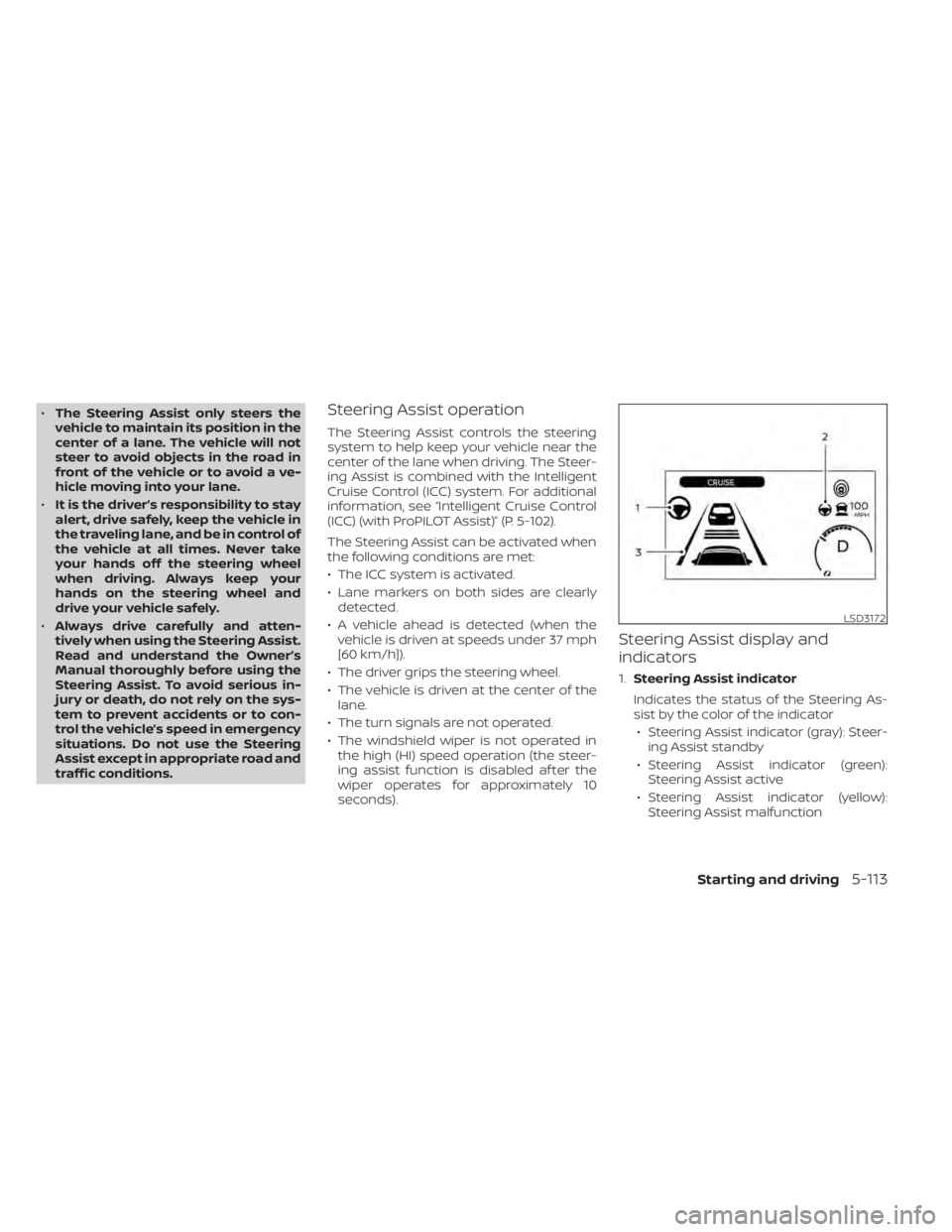
Steering Assist display and
indicators
1. Steering Assist indicator
Indicates the status of the Steering As-
sist by the color of the indicator • Steering Assist indicator (gray): Steer- ing Assist standby
• Steering Assist indicator (green): Steering Assist active
• Steering Assist indicator (yellow): Steering Assist malfunction
LSD3172
Starting and driving5-113
Page 438 of 602
Le present appareil est conforme aux CNR
d’Industrie Canada applicables aux appar-
eils radio exempts de licence. L’exploitation
est autorisee aux deux conditions
suivantes:
1. L’appareil ne doit pas produire de brouil-lage, et
2. L’utilisateur de l’appareil doit accepter tout brouillage radioelectrique subi,
meme si le brouillage est susceptible
d’en compromettre le fonctionnement.
Radio Frequency Radiation Exposure
Information:
This equipment complies with FCC radia-
tion exposure limits set forth for an uncon-
trolled environment.
This equipment should be installed and
operated with minimum distance of 30 cm
between the radiator and your body.
The transmitter must not be co-located or
operating in conjunction with any other an-
tenna or transmitter.
Cet equipement est conforme aux limites
d’exposition aux rayonnements IC etablies
pour un environnement non controle. Cet
equipement doit etre installe et utilise avec un minimum de 30 cm de distance entre la
source de rayonnement et votre corps.
FCC Notice
Changes or modifications not expressly
approved by the party responsible for
compliance could void the user’s authority
to operate the equipment.
CONVENTIONAL (fixed speed)
CRUISE CONTROL MODE
NOTE:
ProPILOT Assist provides no approach
warnings, automatic braking, or steering
assist in the conventional (fixed speed)
cruise control mode.
This mode allows driving at a speed be-
tween 25 to 90 mph (40 to 144 km/h) with-
out keeping your foot on the accelerator
pedal.
WARNING
• In the conventional (fixed speed)
cruise control mode, a warning
chime does not sound to warn you if
you are too close to the vehicle
ahead, as neither the presence of the
vehicle ahead nor the vehicle-to-
vehicle distance is detected. •
Pay special attention to the distance
between your vehicle and the vehicle
ahead of you or a collision could
occur.
• Always confirm the setting in the ICC
system display.
• Do not use the conventional (fixed
speed) cruise control mode when
driving under the following
conditions:
– When it is not possible to keep the
vehicle at a set speed
– In heavy traffic or in traffic that
varies in speed
– On winding or hilly roads
– On slippery roads (rain, snow, ice,
etc.)
– In very windy areas
• Doing so could cause a loss of vehicle
control and result in an accident.
Starting and driving5-119