headlight NISSAN LEAF 2021 Owner´s Manual
[x] Cancel search | Manufacturer: NISSAN, Model Year: 2021, Model line: LEAF, Model: NISSAN LEAF 2021Pages: 602, PDF Size: 4.22 MB
Page 528 of 602
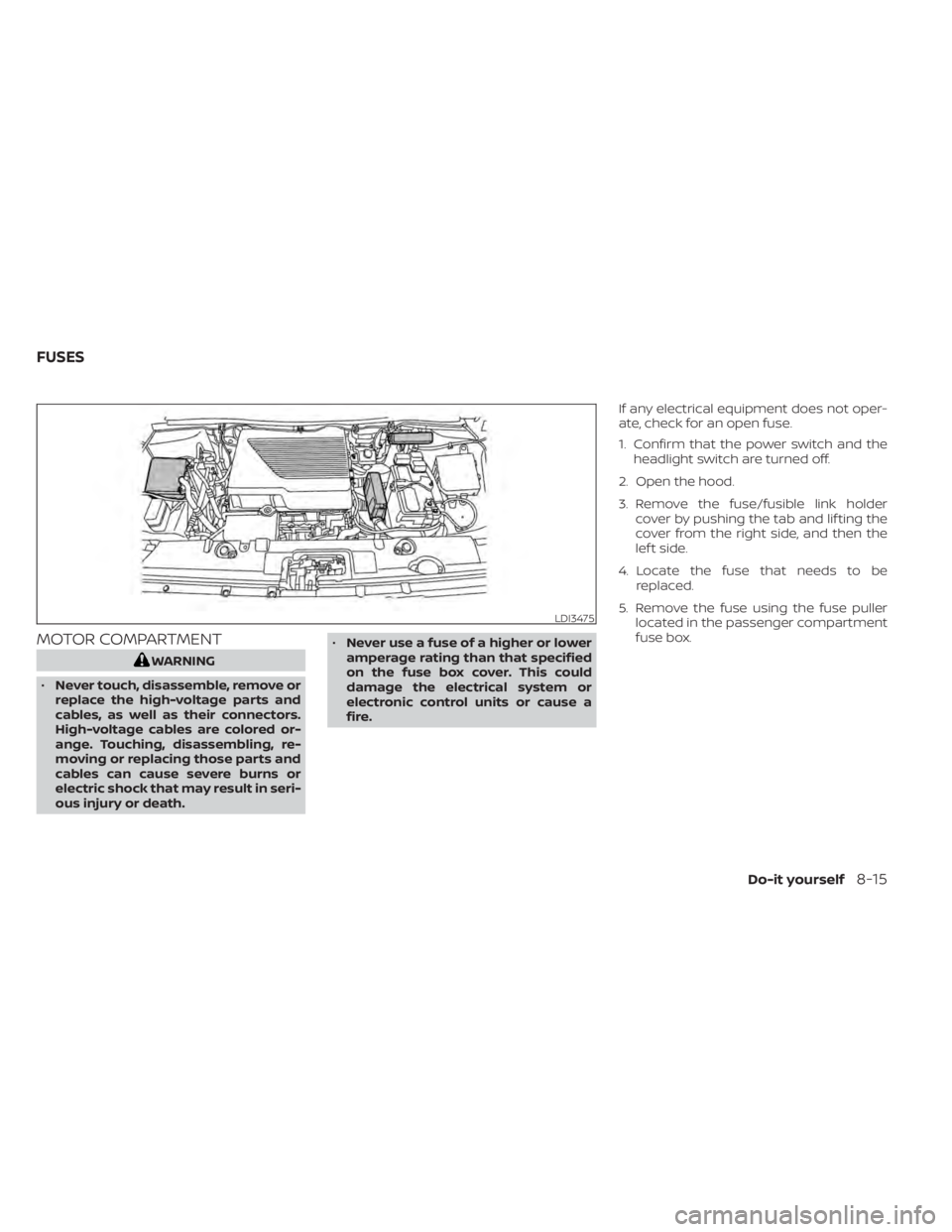
MOTOR COMPARTMENT
WARNING
• Never touch, disassemble, remove or
replace the high-voltage parts and
cables, as well as their connectors.
High-voltage cables are colored or-
ange. Touching, disassembling, re-
moving or replacing those parts and
cables can cause severe burns or
electric shock that may result in seri-
ous injury or death. •
Never use a fuse of a higher or lower
amperage rating than that specified
on the fuse box cover. This could
damage the electrical system or
electronic control units or cause a
fire. If any electrical equipment does not oper-
ate, check for an open fuse.
1. Confirm that the power switch and the
headlight switch are turned off.
2. Open the hood.
3. Remove the fuse/fusible link holder cover by pushing the tab and lif ting the
cover from the right side, and then the
lef t side.
4. Locate the fuse that needs to be replaced.
5. Remove the fuse using the fuse puller located in the passenger compartment
fuse box.
LDI3475
FUSES
Do-it yourself8-15
Page 531 of 602
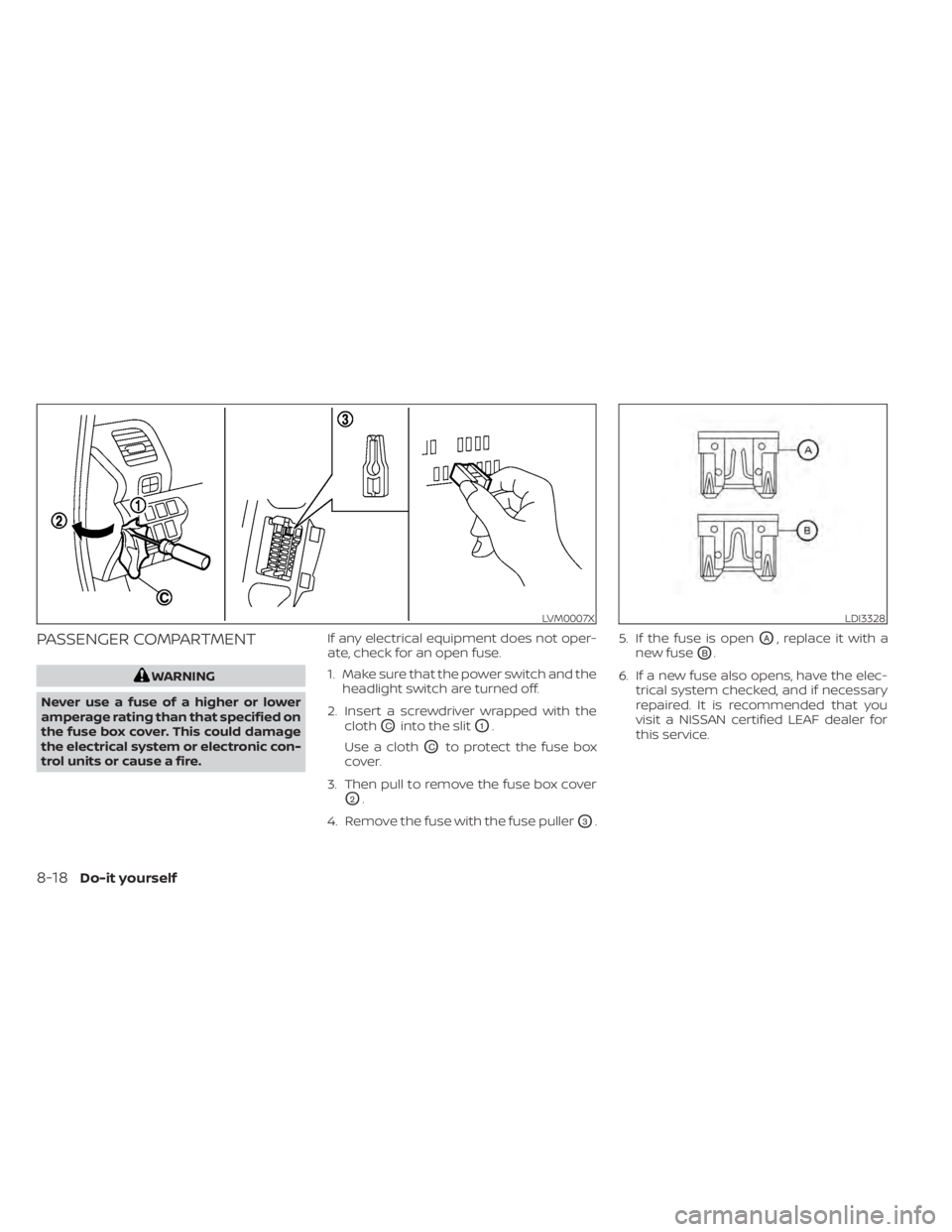
PASSENGER COMPARTMENT
WARNING
Never use a fuse of a higher or lower
amperage rating than that specified on
the fuse box cover. This could damage
the electrical system or electronic con-
trol units or cause a fire. If any electrical equipment does not oper-
ate, check for an open fuse.
1. Make sure that the power switch and the
headlight switch are turned off.
2. Insert a screwdriver wrapped with the cloth
OCinto the slitO1.
Use a cloth
OCto protect the fuse box
cover.
3. Then pull to remove the fuse box cover
O2.
4. Remove the fuse with the fuse puller
O3. 5. If the fuse is open
OA, replace it with a
new fuse
OB.
6. If a new fuse also opens, have the elec- trical system checked, and if necessary
repaired. It is recommended that you
visit a NISSAN certified LEAF dealer for
this service.
LVM0007XLDI3328
8-18Do-it yourself
Page 532 of 602
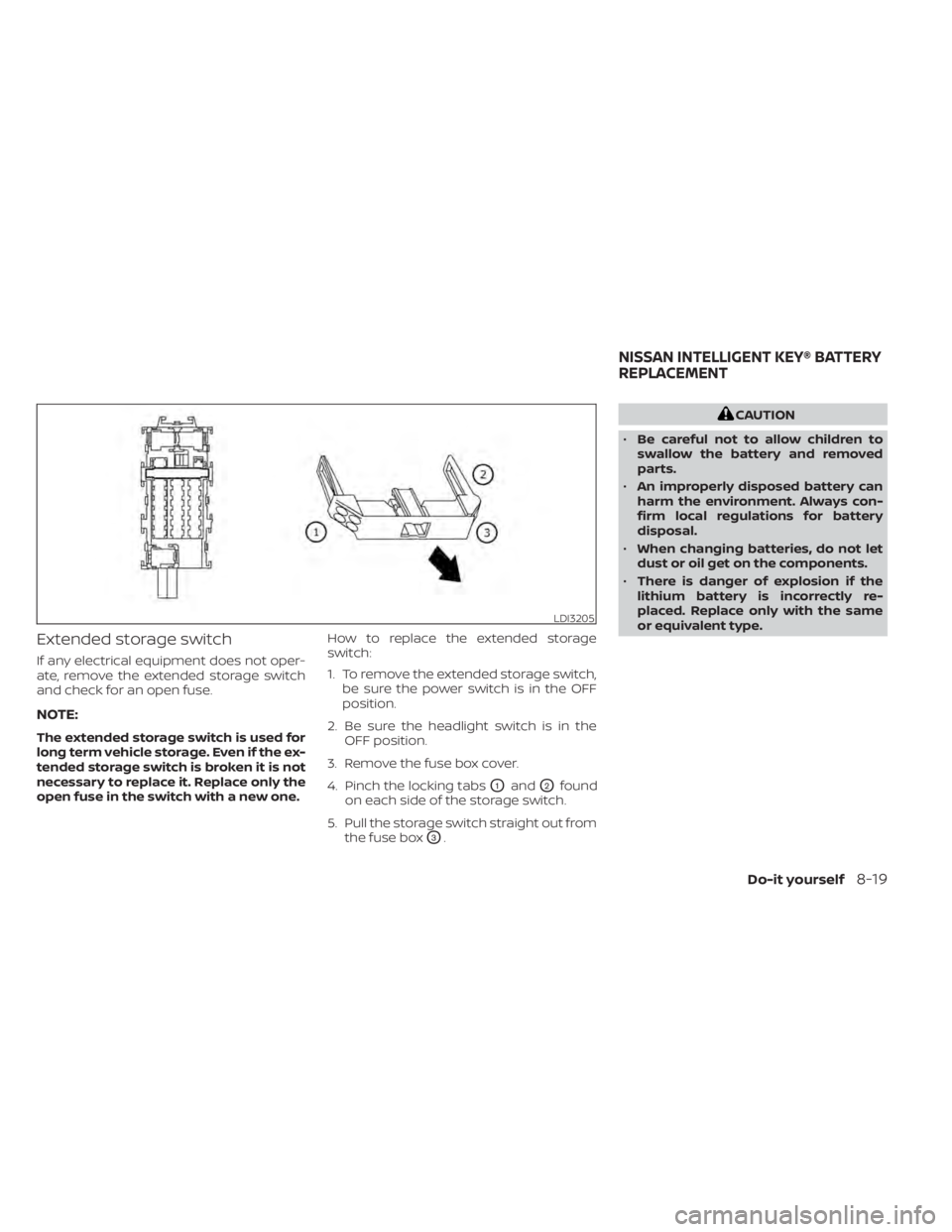
Extended storage switch
If any electrical equipment does not oper-
ate, remove the extended storage switch
and check for an open fuse.
NOTE:
The extended storage switch is used for
long term vehicle storage. Even if the ex-
tended storage switch is broken it is not
necessary to replace it. Replace only the
open fuse in the switch with a new one.How to replace the extended storage
switch:
1. To remove the extended storage switch,
be sure the power switch is in the OFF
position.
2. Be sure the headlight switch is in the OFF position.
3. Remove the fuse box cover.
4. Pinch the locking tabs
O1andO2found
on each side of the storage switch.
5. Pull the storage switch straight out from the fuse box
O3.
CAUTION
• Be careful not to allow children to
swallow the battery and removed
parts.
• An improperly disposed battery can
harm the environment. Always con-
firm local regulations for battery
disposal.
• When changing batteries, do not let
dust or oil get on the components.
• There is danger of explosion if the
lithium battery is incorrectly re-
placed. Replace only with the same
or equivalent type.
LDI3205
NISSAN INTELLIGENT KEY® BATTERY
REPLACEMENT
Do-it yourself8-19
Page 534 of 602
FCC Notice:
For USA:
This device complies with Part 15 of the
FCC Rules. Operation is subject to the fol-
lowing two conditions: (1) This device
may not cause harmful interference, and
(2) this device must accept any interfer-
ence received, including interference
that may cause undesired operation.
NOTE:
Changes or modifications not expressly
approved by the party responsible for
compliance could void the user’s author-
ity to operate the equipment.
For Canada:
This device complies with Industry
Canada licence-exempt RSS standard(s).
Operation is subject to the following two
conditions: (1) this device may not cause
interference, and (2) this device must ac-
cept any interference, including interfer-
ence that may cause undesired opera-
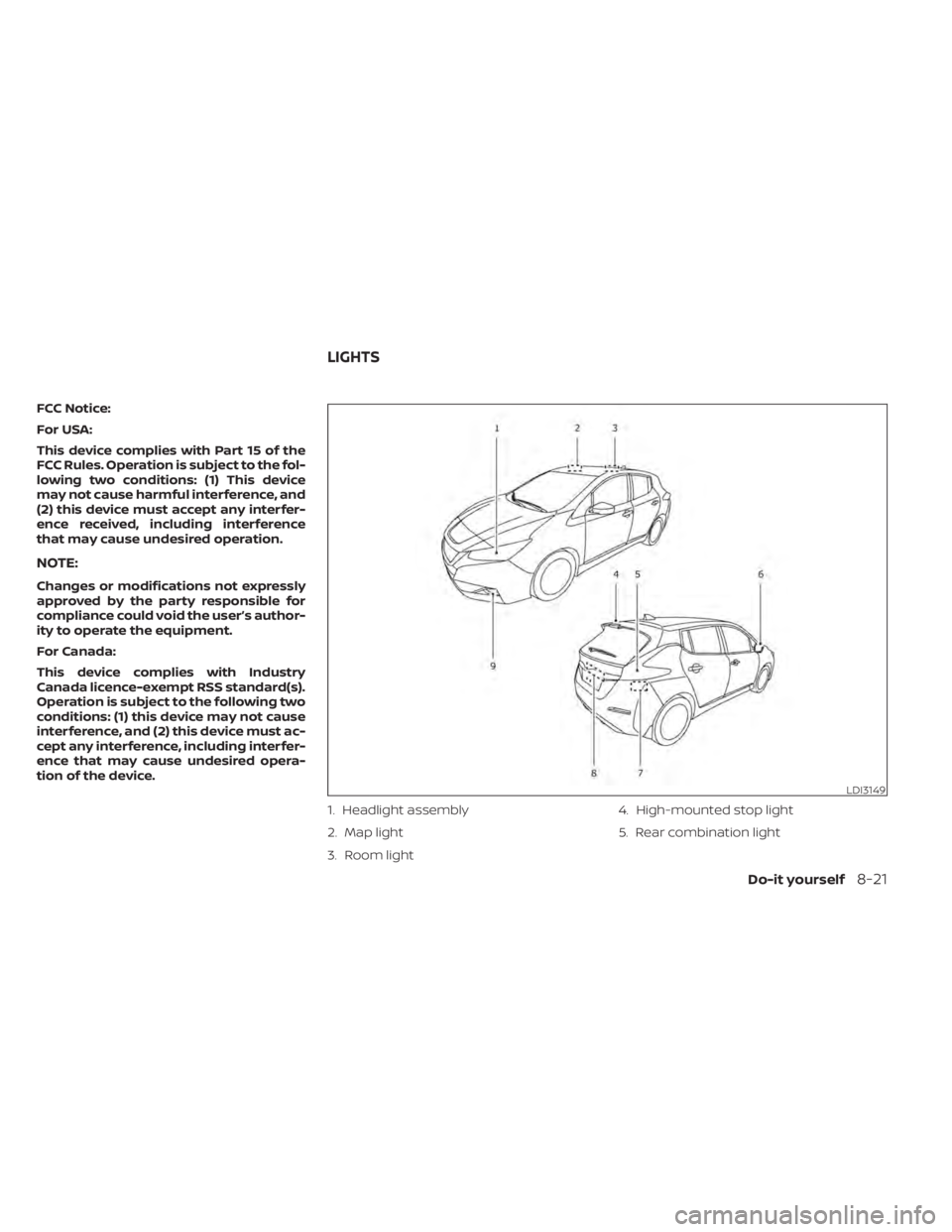
tion of the device.1. Headlight assembly
2. Map light
3. Room light4. High-mounted stop light
5. Rear combination light
LDI3149
LIGHTS
Do-it yourself8-21
Page 535 of 602
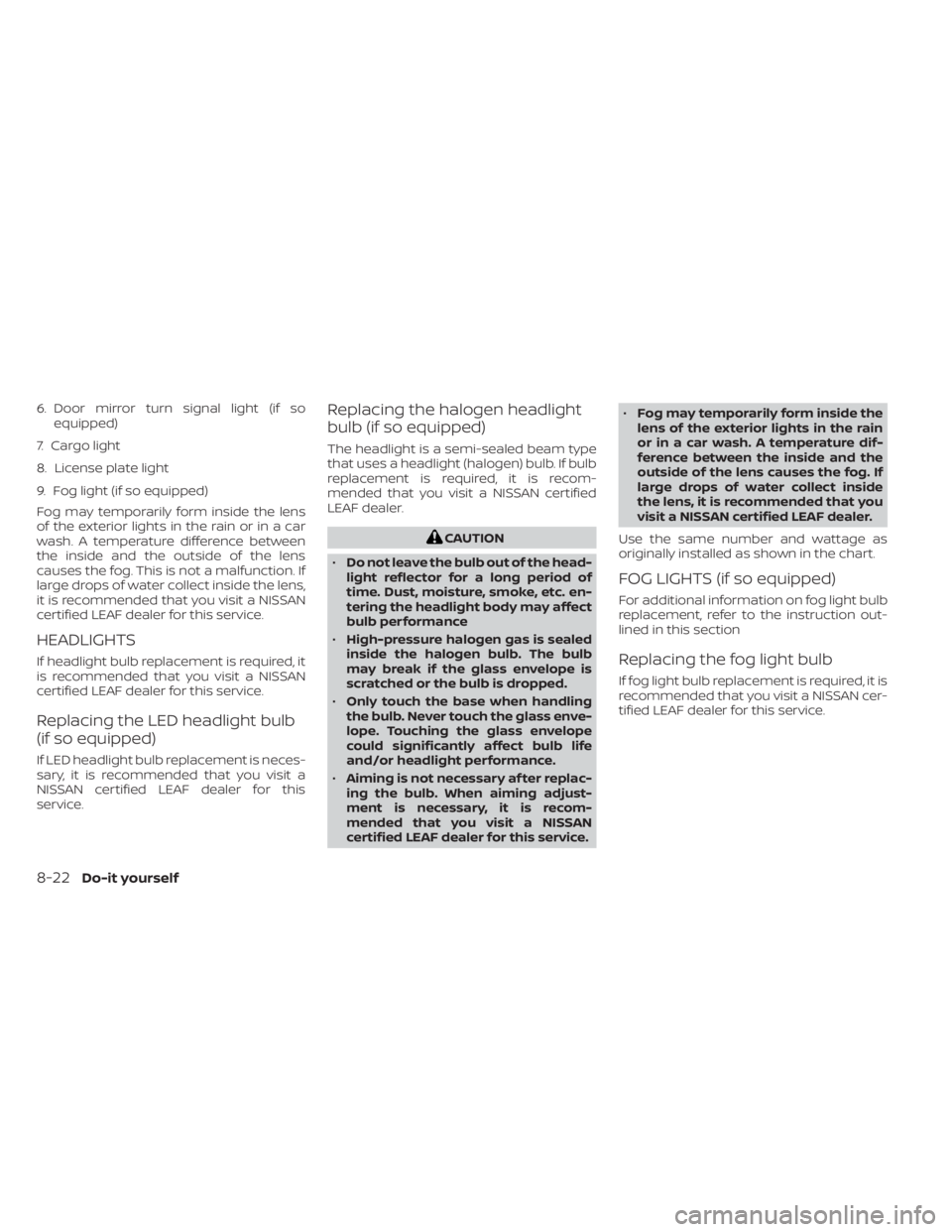
6. Door mirror turn signal light (if soequipped)
7. Cargo light
8. License plate light
9. Fog light (if so equipped)
Fog may temporarily form inside the lens
of the exterior lights in the rain or in a car
wash. A temperature difference between
the inside and the outside of the lens
causes the fog. This is not a malfunction. If
large drops of water collect inside the lens,
it is recommended that you visit a NISSAN
certified LEAF dealer for this service.
HEADLIGHTS
If headlight bulb replacement is required, it
is recommended that you visit a NISSAN
certified LEAF dealer for this service.
Replacing the LED headlight bulb
(if so equipped)
If LED headlight bulb replacement is neces-
sary, it is recommended that you visit a
NISSAN certified LEAF dealer for this
service.
Replacing the halogen headlight
bulb (if so equipped)
The headlight is a semi-sealed beam type
that uses a headlight (halogen) bulb. If bulb
replacement is required, it is recom-
mended that you visit a NISSAN certified
LEAF dealer.
CAUTION
• Do not leave the bulb out of the head-
light reflector for a long period of
time. Dust, moisture, smoke, etc. en-
tering the headlight body may affect
bulb performance
• High-pressure halogen gas is sealed
inside the halogen bulb. The bulb
may break if the glass envelope is
scratched or the bulb is dropped.
• Only touch the base when handling
the bulb. Never touch the glass enve-
lope. Touching the glass envelope
could significantly affect bulb life
and/or headlight performance.
• Aiming is not necessary af ter replac-
ing the bulb. When aiming adjust-
ment is necessary, it is recom-
mended that you visit a NISSAN
certified LEAF dealer for this service. •
Fog may temporarily form inside the
lens of the exterior lights in the rain
or in a car wash. A temperature dif-
ference between the inside and the
outside of the lens causes the fog. If
large drops of water collect inside
the lens, it is recommended that you
visit a NISSAN certified LEAF dealer.
Use the same number and wattage as
originally installed as shown in the chart.
FOG LIGHTS (if so equipped)
For additional information on fog light bulb
replacement, refer to the instruction out-
lined in this section
Replacing the fog light bulb
If fog light bulb replacement is required, it is
recommended that you visit a NISSAN cer-
tified LEAF dealer for this service.
8-22Do-it yourself
Page 536 of 602
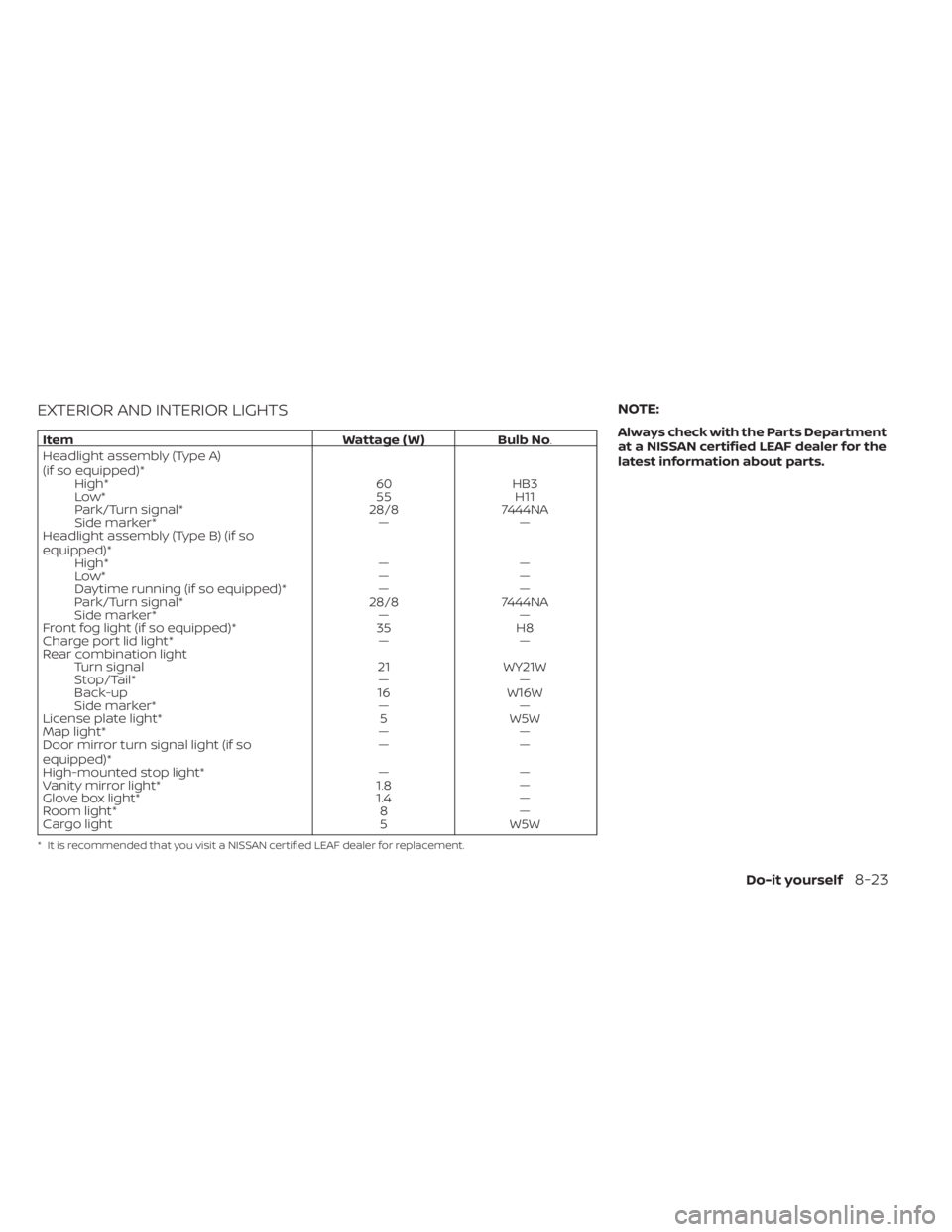
EXTERIOR AND INTERIOR LIGHTS
ItemWattage ( W )Bulb No.
Headlight assembly (Type A)
(if so equipped)* High* 60HB3
Low* 55H11
Park/Turn signal* 28/87444NA
Side marker* ——
Headlight assembly (Type B) (if so
equipped)* High* ——
Low* ——
Daytime running (if so equipped)* ——
Park/Turn signal* 28/87444NA
Side marker* ——
Front fog light (if so equipped)* 35H8
Charge port lid light* ——
Rear combination light Turn signal 21WY21W
Stop/Tail* ——
Back-up 16W16W
Side marker* ——
License plate light* 5W5W
Map light* ——
Door mirror turn signal light (if so
equipped)* ——
High-mounted stop light* ——
Vanity mirror light* 1.8—
Glove box light* 1.4—
Room light* 8—
Cargo light 5W5W
* It is recommended that you visit a NISSAN certified LEAF dealer for replacement.
NOTE:
Always check with the Parts Department
at a NISSAN certified LEAF dealer for the
latest information about parts.
Do-it yourself8-23
Page 548 of 602
WARNING
•Tires should be periodically in-
spected for wear, cracking,
bulging or objects caught in
the tread. If excessive wear,
cracks, bulging or deep cuts
are found, the tire(s) should be
replaced.
• The original tires have built-in
tread wear indicators. When
wear indicators are visible, the
tire(s) should be replaced.
• Tires degrade with age and
use. Have tires, over 6 years old
checked by a qualified techni-
cian, because some tire dam-
age may not be obvious. Re-
place the tires as necessary to
prevent tire failure and pos-
sible personal injury. •
For additional information re-
garding tires, refer to “Impor-
tant Tire Safety Information”
(US) or “Tire Safety Informa-
tion” (Canada) in the Warranty
Information Booklet.
Replacing wheels and tires
When replacing a tire, use the same size,
tread design, speed rating and load carry-
ing capacity as originally equipped. For ad-
ditional information, see “Specifications”
(P. 10-4) for recommended types and sizes
of tires and wheels.
WARNING
• The use of tires other than those rec-
ommended or the mixed use of tires
of different brands, construction
(bias, bias-belted or radial), or tread
patterns can adversely affect the
ride, braking, handling, Vehicle Dy-
namic Control (VDC) system, ground
clearance, body-to-tire clearance,
tire chain clearance, speedometer
calibration, headlight aim and bum-
per height. Some of these effects
may lead to accidents and could re-
sult in serious personal injury.
• If your vehicle was originally
equipped with four tires that were
the same size and you are only re-
placing two of the four tires, install
the new tires on the rear axle. Placing
new tires on the front axle may cause
loss of vehicle control in some driving
conditions and cause an accident
and personal injury.
Do-it yourself8-35
Page 554 of 602
Outside the vehicle
The maintenance items listed here should
be performed from time to time, unless
otherwise specified.
Doors and motor hood:
Check that the
doors and motor hood operate properly.
Also ensure that all latches lock securely. Lu-
bricate hinges, latches, latch pins, rollers and
links if necessary. Make sure that the sec-
ondary latch keeps the motor hood from
opening when the primary latch is released.
When driving in areas using road salt or
other corrosive materials, check lubrica-
tion frequently.
Check that the gas stays or struts properly
and securely hold the hood, trunk, or rear
hatch fully open. If the hood, trunk, or rear
hatch is not held open, have the gas stays
or struts replaced.
Lights*: Clean the headlights on a regular
basis. Make sure that the headlights, stop
lights, tail lights, turn signal lights, and other
lights are all operating properly and in-
stalled securely. Also check headlight aim.
Road wheel nuts (lug nuts)*: When check-
ing the tires, make sure no wheel nuts are
missing, and check for any loose wheel
nuts. Tighten if necessary. Tire rotation*:
Rotate tires at the specified
interval shown in the maintenance
schedule.
Tires*: Check the pressure with a gauge
of ten and always prior to long distance
trips. If necessary, adjust the pressure in all
tires, to the pressure specified. Check care-
fully for damage, cuts or excessive wear.
Tire Pressure Monitoring System (TPMS)
transmitter components: Replace the
TPMS transmitter grommet seal, valve core
and cap when the tires are replaced due to
wear or age.
Wheel alignment and balance: If the ve-
hicle pulls to either side while driving on a
straight and level road, or if you detect un-
even or abnormal tire wear, there may be a
need for wheel alignment.
If the steering wheel or seat vibrates at
normal highway speeds, wheel balancing
may be needed.
For additional information regarding tires,
refer to “Important Tire Safety Information”
(US) or “Tire Safety Information” (Canada) in
the Warranty Information Booklet.
Windshield: Clean the windshield on a
regular basis. Check the windshield at least
every six months for cracks or other dam- age. Have a damaged windshield repaired
by a qualified repair facility. It is recom-
mended that you have a damaged wind-
shield repaired by a NISSAN certified LEAF
dealer, or a NISSAN Certified Collision Cen-
ter. To locate a collision center in your area,
refer to http://collision.nissanusa.com.
Windshield wiper blades*:
Check for
cracks or wear if they do not wipe properly.
Inside the vehicle
The maintenance items listed here should
be checked on a regular basis, such as
when performing scheduled maintenance,
cleaning the vehicle, etc.
Accelerator pedal: Check the pedal for
smooth operation and make sure the
pedal does not catch or require uneven
effort. Keep the floor mat away from the
pedal.
Brake pedal: Check the pedal for smooth
operation. If the brake pedal suddenly goes
down further than normal, the pedal feels
spongy or the vehicle seems to take longer
to stop, it is recommended that you visit a
NISSAN certified LEAF dealer immediately.
Keep the floor mat away from the pedal.
Brakes: Check that the brakes do not pull
the vehicle to one side when applied.
Maintenance and schedules9-3
Page 584 of 602
In addition to Event Data Recorders (EDRs)
mentioned in this Owner's Manual, this ve-
hicle is equipped with electronic modules
that monitor, control and record data con-
cerning various vehicle systems, including
the motor, batteries, braking and electrical
systems. Other electronic modules record
information concerning driving conditions,
including idling, braking, acceleration, trip
and other related data, information about
your use of the car and its features such as
air conditioner or headlight usage, diag-
nostic trouble codes, vehicle charging, ve-
hicle speed, direction and/or location.
Some of this data is stored by the vehicle
for use during vehicle servicing. Other data
concerning your vehicle's operation and
performance is wirelessly transmitted by
cellular connection through the vehicle on-
board telematics system upon vehicle
start-up or at other intervals to NISSAN.
This data may be used by NISSAN for vari-
ous purposes, including: to provide you
with NissanConnect® EV & Services or
NissanConnect® EV with Services powered
by SiriusXM® (For additional information, re-
fer to “NissanConnect® Manual”); trouble-
shooting; evaluation of your vehicle's qual-
ity, functionality and performance; analysis
and research by NISSAN designed to,
among other things, optimize perfor-mance of future electric vehicles including
improvements in future battery life; to offer
you new or additional products or services;
and as otherwise may be required by law.
Such data may be shared with NISSAN's
parents, subsidiaries, affiliates, successors
or assignees; authorized NISSAN certified
LEAF dealers; NISSAN's marketing part-
ners; your fleet company, if your vehicle is a
fleet vehicle; your rental company, if your
vehicle is a rental vehicle; and third party
service providers such as cellular, informa-
tion systems and data management
providers.
State and provincial laws allow access and
use of data recorded by vehicle devices
with the consent of the vehicle owner or
pursuant to subscription agreement. While
you are not required to allow such access
and use, if you do not so agree NISSAN may
be unable under applicable law to activate
the vehicle telematics system in your ve-
hicle, and certain features of your vehicle
which are dependent on vehicle telematics
will not operate as intended or designed.
These may include features such as auto-
matic charging station map updates, re-
mote battery state of charge check, charg-
ing complete notice, remote plug in
reminder, remote charging on, remote cli-
mate control on, drive route planning, driv-ing tips to improve range, driving history,
billing simulation, ECO ranking, ECO forest,
maintenance reminders, etc. Other fea-
tures that may be developed and offered
by NISSAN in the future may also not func-
tion without telematics data transmission.
NissanConnect® EV with Services powered
by SiriusXM® are provided by NISSAN pur-
suant to a subscription services agree-
ment covering your vehicle. This agree-
ment is necessary for all owners. This
agreement, and an explanation of its terms
and conditions, can be found at the NISSAN
Owner’s Portal webpage. Further, the op-
erator of the vehicle must also touch [OK]
on the Navi screen to indicate assent each
time he or she starts the car. If you decide
at any time that you do not want your ve-
hicle to transmit data to NISSAN, you can
deactivate the telematics account associ-
ated with this vehicle by canceling the sub-
scription services agreement by visiting
the NISSAN Owner’s Portal Webpage or
calling NISSAN at 1-877-NOGASEV (1-877-
664-2738). The service can be reactivated
later upon request if you choose. Simply
visit the same website or call the number
above. Alternatively, you can turn off the
transmission of certain categories of data
through the use of settings found in the
navigation system under Menu,
TELEMATICS OVERVIEW (models
with Navigation System)
Technical and consumer information10-17
Page 594 of 602
Emergency charge.............CH-11Emergency EV (Electric Vehicle)
shut off...................5-12,6-3Emergency shutoff system........EV-10Emission control information label. . . .10-8EV Characteristics..............EV-11EV system...................EV-2EV unique information...........EV-24Event Data recorders............10-20EVSE
(Electric Vehicle Supply Equipment). . .CH-11Explanation of maintenance items.....9-2Explanation of scheduled maintenance
items...................... .9-5Extended storage switch..........8-19
F
F.M.V.S.S./C.M.V.S.S. certification label. . .10-8Flashers (See hazard warning flasher
switch)......................6-2Flat tire......................6-3Flat towing...................10-14Floor mat cleaning...............7-5Fluid
Brake fluid...................8-7Capacities and recommended
fuel/lubricants...............10-2Coolant................... .8-5Reduction gear fluid............8-7Windshield-washer fluid..........8-8Fog light switch................2-54
Fog lights
Bulb replacement.............8-22Front and rear sonar system.......5-163Front passenger air bag status
light................... .1-56, 1-58Front-seat mounted side-impact
supplemental air bag system........1-62Fuses.......................8-15Fusible links...................8-17
G
Garage door opener, HomeLink® Universal
Transceiver.........2-69, 2-70, 2-72, 2-73Gauge
Driving range................ .2-8Li-ion battery available charge
gauge.................... .2-9Li-ion battery temperature gauge. . . .2-7Odometer...................2-5Power meter.................2-7Speedometer................2-5General maintenance.............9-2Glove box................... .2-62
H
Hazard warning flasher switch........6-2Head restraints
Headrests...................1-7Headlights...................8-22Bulb replacement.............8-22Headlight switch..............2-48
Heated seat switches............2-55Heated seats................. .2-55Heated steering wheel............2-56Heated steering wheel switch.......2-56Heater......................4-26High voltage precautions..........EV-8Hill start....................5-168Hill start assist................5-168Home charge.................CH-9HomeLink® Universal
Transceiver.........2-69, 2-70, 2-72, 2-73Hood.......................3-18Horn...................... .2-54How to normal charge...........CH-9How to quick charge.......CH-35, CH-38How to trickle charge............CH-11
I
If the Li-ion battery becomes completely
discharged...................6-12Immediate charge.........CH-48, 2-58Immediate charge switch.....CH-48, 2-58Immobilizer system..............5-13Indicator lights.................2-24Indicator lights and audible reminders
(See warning/indicator lights and audible
reminders)
...................2-14Indicators for maintenance.........2-36Indicators for operation...........2-34Infants......................1-20Inside automatic anti-glare mirror. . . .3-24Instrument brightness control.......2-53
11-3