belt NISSAN LEAF 2021 Owner´s Manual
[x] Cancel search | Manufacturer: NISSAN, Model Year: 2021, Model line: LEAF, Model: NISSAN LEAF 2021Pages: 602, PDF Size: 4.22 MB
Page 174 of 602
pretensioner systems. The monitored cir-
cuits include air bag systems, pretension-
er(s) and all related wiring.
When the power switch is in the ON posi-
tion, the supplemental air bag warning
light illuminates for about 7 seconds and
then turns off. This means the system is
operational.
If any of the following conditions occur, the
front air bag, side air bag, curtain air bag,
knee air bag and pretensioner systems
need servicing:
• The supplemental air bag warning lightremains on af ter approximately 7
seconds.
• The supplemental air bag warning light flashes intermittently.
• The supplemental air bag warning light does not come on at all.
Under these conditions, the front air bag,
side air bag, curtain air bag, knee air bag
and pretensioner systems may not oper-
ate properly. They must be checked and
repaired. It is recommended that you visit
the nearest NISSAN certified LEAF dealer
for this service.WARNING
If the supplemental air bag warning
light is on, it could mean that the front
air bag, side air bag, curtain air bag,
knee air bag and/or pretensioner sys-
tems will not operate in an accident. To
help avoid injury to yourself or others,
have your vehicle checked as soon as
possible. It is recommended that you
visit a NISSAN certified LEAF dealer for
this service.
Repair and replacement
procedure
The front air bags, side air bags, curtain air
bags, knee air bags and pretensioner(s) are
designed to activate on a one-time-only
basis. As a reminder, unless it is damaged,
the supplemental air bag warning light will
remain illuminated af ter inflation has oc-
curred. These systems should be repaired
and/or replaced as soon as possible. It is
recommended that you visit a NISSAN cer-
tified LEAF dealer for this service.
When maintenance work is required on the
vehicle, the front air bags, side air bags,
curtain air bags, knee air bags and preten-
sioner(s) and related parts should be
pointed out to the person performing the maintenance. The power switch should al-
ways be in the LOCK position when work-
ing under the hood or inside the vehicle.
WARNING
• Once a front air bag, side air bag, cur-
tain air bag or knee air bag has in-
flated, the air bag module will not
function again and must be replaced.
Additionally, the activated preten-
sioner(s) must also be replaced. The
air bag module and pretensioner(s)
should be replaced. It is recom-
mended that you visit a NISSAN cer-
tified LEAF dealer for this service. The
air bag modules and pretensioner
system cannot be repaired.
• The front air bag, side air bag, curtain
air bag and knee air bag systems,
and pretensioner system should be
inspected if there is any damage to
the front end or side portion of the
vehicle. It is recommended that you
visit a NISSAN certified LEAF dealer
for this service.
Safety–Seats, seat belts and supplemental restraint system1-67
Page 175 of 602
•If you need to dispose of a supple-
mental air bag or pretensioner sys-
tem or scrap the vehicle, it is recom-
mended that you visit a NISSAN
certified LEAF dealer for this service.
Correct supplemental air bag and
pretensioner system disposal proce-
dures are set forth in the appropriate
NISSAN Service Manual. Incorrect
disposal procedures could cause
personal injury.
• If there is an impact to your vehicle
from any direction, your Occupant
Classification Sensor (OCS) should be
checked. It is recommended that you
visit a NISSAN certified LEAF dealer to
verif y it is still functioning correctly.
The OCS should be checked even if no
air bags deploy as a result of the im-
pact. Failure to verif y proper OCS
function may result in an improper
air bag deployment resulting in in-
jury or death.
1-68Safety–Seats, seat belts and supplemental restraint system
Page 176 of 602

MEMO
Safety–Seats, seat belts and supplemental restraint system1-69
Page 191 of 602
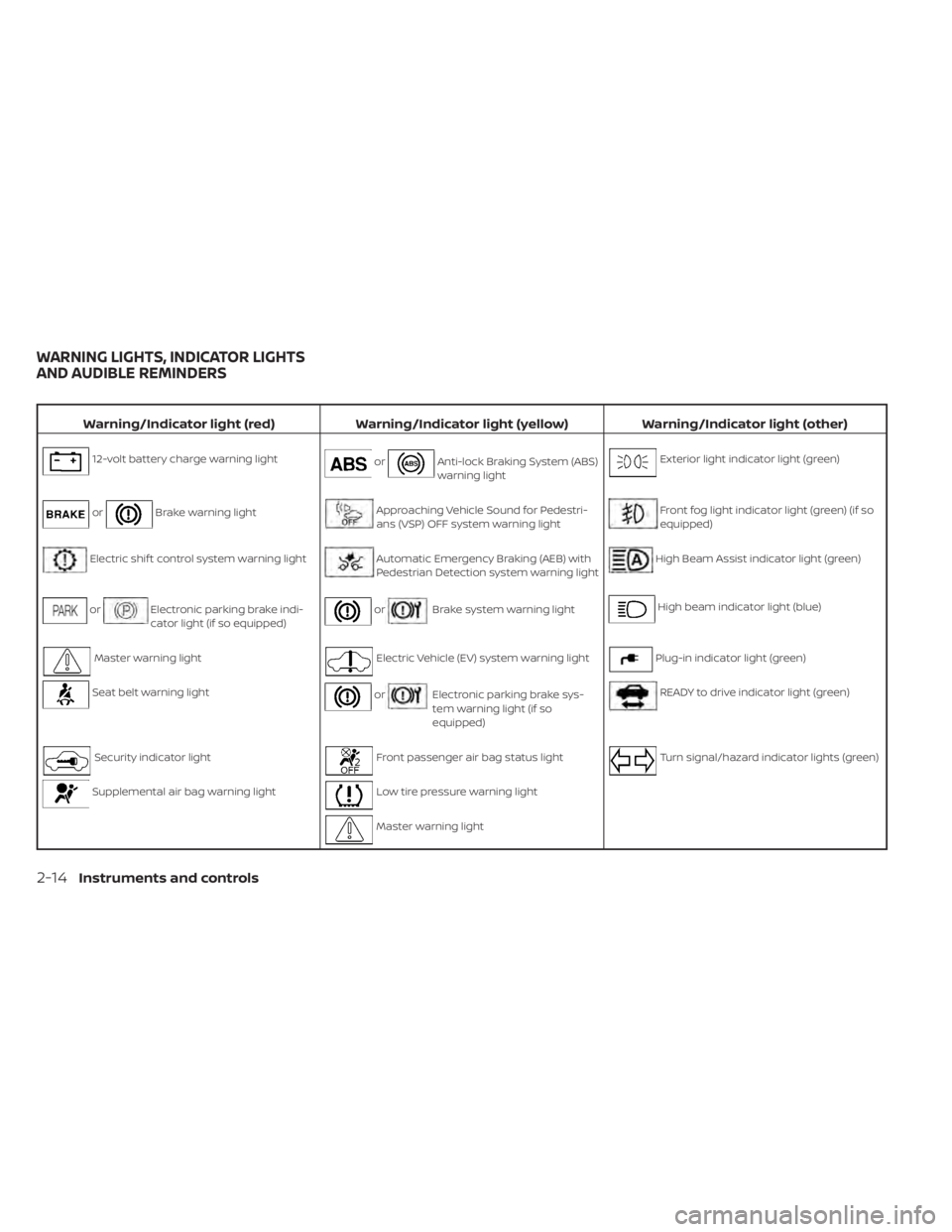
Warning/Indicator light (red)Warning/Indicator light (yellow) Warning/Indicator light (other)
12-volt battery charge warning lightorAnti-lock Braking System (ABS)
warning lightExterior light indicator light (green)
orBrake warning lightApproaching Vehicle Sound for Pedestri-
ans (VSP) OFF system warning lightFront fog light indicator light (green) (if so
equipped)
Electric shif t control system warning lightAutomatic Emergency Braking (AEB) with
Pedestrian Detection system warning lightHigh Beam Assist indicator light (green)
orElectronic parking brake indi-
cator light (if so equipped)orBrake system warning lightHigh beam indicator light (blue)
Master warning lightElectric Vehicle (EV) system warning lightPlug-in indicator light (green)
Seat belt warning lightorElectronic parking brake sys-
tem warning light (if so
equipped)READY to drive indicator light (green)
Security indicator lightFront passenger air bag status lightTurn signal/hazard indicator lights (green)
Supplemental air bag warning lightLow tire pressure warning light
Master warning light
WARNING LIGHTS, INDICATOR LIGHTS
AND AUDIBLE REMINDERS
2-14Instruments and controls
Page 192 of 602
Warning/Indicator light (red)Warning/Indicator light (yellow) Warning/Indicator light (other)
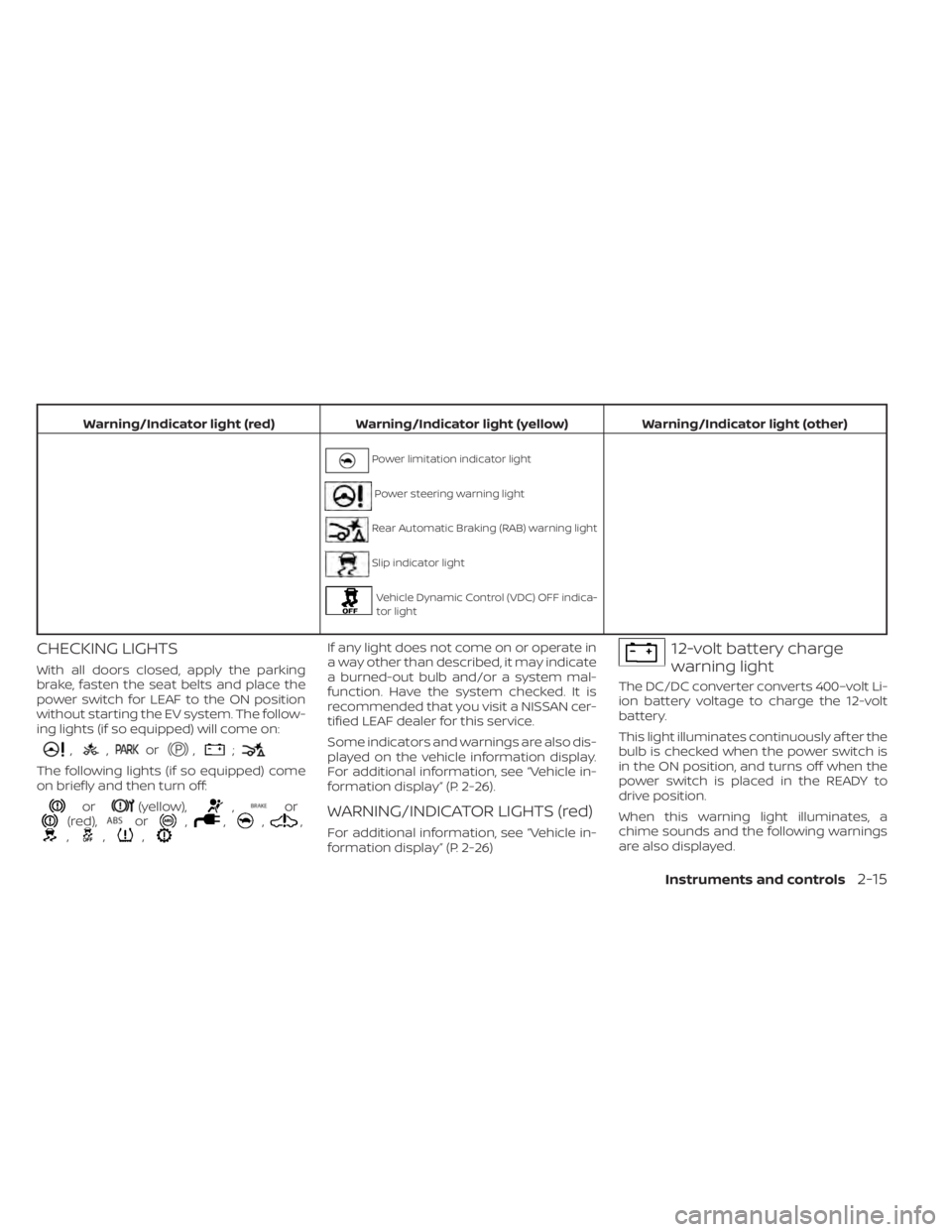
Power limitation indicator light
Power steering warning light
Rear Automatic Braking (RAB) warning light
Slip indicator light
Vehicle Dynamic Control (VDC) OFF indica-
tor light
CHECKING LIGHTS
With all doors closed, apply the parking
brake, fasten the seat belts and place the
power switch for LEAF to the ON position
without starting the EV system. The follow-
ing lights (if so equipped) will come on:
,,or,;
The following lights (if so equipped) come
on briefly and then turn off:
or(yellow),,or(red),or,,,,,,,
If any light does not come on or operate in
a way other than described, it may indicate
a burned-out bulb and/or a system mal-
function. Have the system checked. It is
recommended that you visit a NISSAN cer-
tified LEAF dealer for this service.
Some indicators and warnings are also dis-
played on the vehicle information display.
For additional information, see “Vehicle in-
formation display” (P. 2-26).
WARNING/INDICATOR LIGHTS (red)
For additional information, see “Vehicle in-
formation display” (P. 2-26)
12-volt battery charge
warning light
The DC/DC converter converts 400–volt Li-
ion battery voltage to charge the 12-volt
battery.
This light illuminates continuously af ter the
bulb is checked when the power switch is
in the ON position, and turns off when the
power switch is placed in the READY to
drive position.
When this warning light illuminates, a
chime sounds and the following warnings
are also displayed.
Instruments and controls2-15
Page 195 of 602
Master warning light
There are two types of master warning
lights: yellow and red. These lights illumi-
nate if any warning lights or indicator lights
are illuminated or if various vehicle infor-
mation warnings appear in the vehicle in-
formation display.
This light illuminates when a red warning
light within the vehicle information display
is illuminated or when a warning is dis-
played on the vehicle information display.
Seat belt
warning light
The light and chime remind you to fasten
the driver and passenger seat belts.
For additional information, see “Seat belts”
(P. 1-11) for precautions on seat belt usage.
Security
indicator light
This light blinks when the power switch is in
the ACC, OFF or LOCK position. This func-
tion indicates the security system
equipped on the vehicle is operational.If the security system is malfunctioning,
this light will remain on while the power
switch is in the ON position. For additional
information, see “Security systems” (P. 2-42).
Supplemental air bag
warning light
Af ter turning the power switch to the ON
position, the supplemental air bag warning
light will illuminate. The supplemental air
bag warning light will turn off af ter about 7
seconds if the supplemental front air bag
and supplemental side air bag, curtain
side-impact air bag systems and/or pre-
tensioner seat belt are operational.
If any of the following conditions occur, the
front air bag, side air bag, curtain air bag
and pretensioner systems need servicing
and your vehicle must be taken to your
nearest NISSAN certified LEAF dealer.
• The supplemental air bag warning light
remains on af ter approximately 7
seconds.
• The supplemental air bag warning light flashes intermittently.
• The supplemental air bag warning light does not illuminate at all. Unless checked and repaired, the Supple-
mental Restraint Systems and/or the pre-
tensioners may not function properly.
For additional information, see “Supple-
mental restraint system (SRS)” (P. 1-45).
WARNING
If the supplemental air bag warning
light is on, it could mean that the front
air bag, side air bag, curtain air bag
and/or pretensioner systems will not
operate in an accident. To help avoid
injury to yourself or others, have your
vehicle checked. It is recommended
that you visit a NISSAN certified LEAF
dealer as soon as possible for this
service.
WARNING/INDICATOR LIGHTS
(yellow)
For additional information, see “Vehicle in-
formation display” (P. 2-26)
2-18Instruments and controls
Page 217 of 602
Under the following conditions, the ICC
(with ProPILOT Assist) system, ICC system,
Intelligent Blind Intervention (I-BSI) or Intel-
ligent Lane Intervention (I-LI) is automati-
cally canceled:
• When the VDC operates.
• When a wheel slips.
The above system cannot be used in some
situations (VDC operates and wheel slip.)
Not Available Seat Belt Not Fastened
This indicator appears when the ProPILOT
Assist system will not engage because the
driver’s seat belt is not fastened. For addi-
tional information, see “ProPILOT Assist”
(P. 5-91).
Not Available System Malfunction
This warning appears when one or more of
the following systems (if so equipped) are
not functioning properly:
• Intelligent Blind Spot Intervention (I-BSI)
• Blind Spot Warning (BSW)
• ProPILOT Assist
If one or more of these warning appears,
have the system checked. It is recom-
mended that you visit a NISSAN certified
LEAF dealer for this service.
Not Available Visibility is Impaired
This message may appear when the Intel-
ligent Cruise Control (ICC) (with ProPILOT
Assist) system is engaged.
Under the following conditions, the ICC
(with ProPILOT Assist) system is automati-
cally canceled:
• The camera area of the windshield isfogged up or covered with dirt, water, ice,
snow, etc.
• Strong light, such as sunlight or high beams from oncoming vehicles, enters
the front camera
The system will be available when the
above conditions no longer exist.
If the warning message continues to ap-
pear, stop the vehicle in a safe location, turn
the EV system off and clean the windshield.
Parking Sensor
This indicator illuminates when the sensor
is activated. Pressing the OK button while
the sonar screen is displayed will dismiss
this message until the next time the sen-
sors are activated. The Parking Sensor sys-
tem will remain on, unless it is disabled in
the vehicle information display. For addi-
tional information, see “Rear Sonar System
(RSS) (P. 5-163).
Parking Sensor Error: See Owner’s
Manual
This warning illuminates when there is an
error with the system. For additional infor-
mation, see “Rear Sonar System (RSS)
(P. 5-163).
ProPILOT Assist/Intelligent
Lane Intervention (I-LI)/
Intelligent Blind Spot
Intervention (I-BSI)
indicator
This indicator appears when the following
systems (if so equipped) is engaged:
• ProPILOT Assist system (if so equipped)
• Intelligent Lane Intervention (I-LI)
• Intelligent Blind Spot Intervention (I-BSI)
For additional information, see “ProPILOT
Assist” (P. 5-91), “Intelligent Lane Interven-
tion (I-LI) (P. 5-30), or “Intelligent Blind Spot
Intervention (I-BSI) (P. 5-46).
Rear Automatic Braking
(RAB) system warning
indicator
This indicator appears to indicate the sta-
tus of the Rear Automatic Braking (RAB)
system.
2-40Instruments and controls
Page 255 of 602
Vehicle Immobilizer System keys that you
have to the NISSAN certified LEAF dealer for
registration. This is because the registra-
tion process will erase the memory of all
key codes previously registered into the
NISSAN Vehicle Immobilizer System. Af ter
the registration process, these compo-
nents will only recognize keys coded into
the NISSAN Vehicle Immobilizer System
during registration. Any key that is not
given to the dealer at the time of registra-
tion will no longer be able to start your
vehicle.
CAUTION
Do not allow the immobilizer system
key, which contains an electrical tran-
sponder, to come into contact with wa-
ter or salt water. This could affect sys-
tem function. When the doors are locked using one of the
following methods, the doors cannot be
opened using the inside or outside door
handles. The doors must be unlocked to
open the doors.
WARNING
• Always have the doors locked while
driving. Along with the use of seat
belts, this provides greater safety in
the event of an accident by helping to
prevent persons from being thrown
from the vehicle. This also helps keep
children and others from uninten-
tionally opening the doors, and will
help keep out intruders.
• Before opening any door, always look
for and avoid oncoming traffic. •
To help avoid risk of injury or death
through unintended operation of the
vehicle and/or its systems, including
entrapment in windows or inadver-
tent door lock activation, do not
leave children, people who require
the assistance of others or pets unat-
tended in your vehicle. Additionally,
the temperature inside a closed ve-
hicle on a warm day can quickly be-
come high enough to cause a signifi-
cant risk of injury or death to people
and pets.
DOORS
3-4Pre-driving checks and adjustments
Page 273 of 602
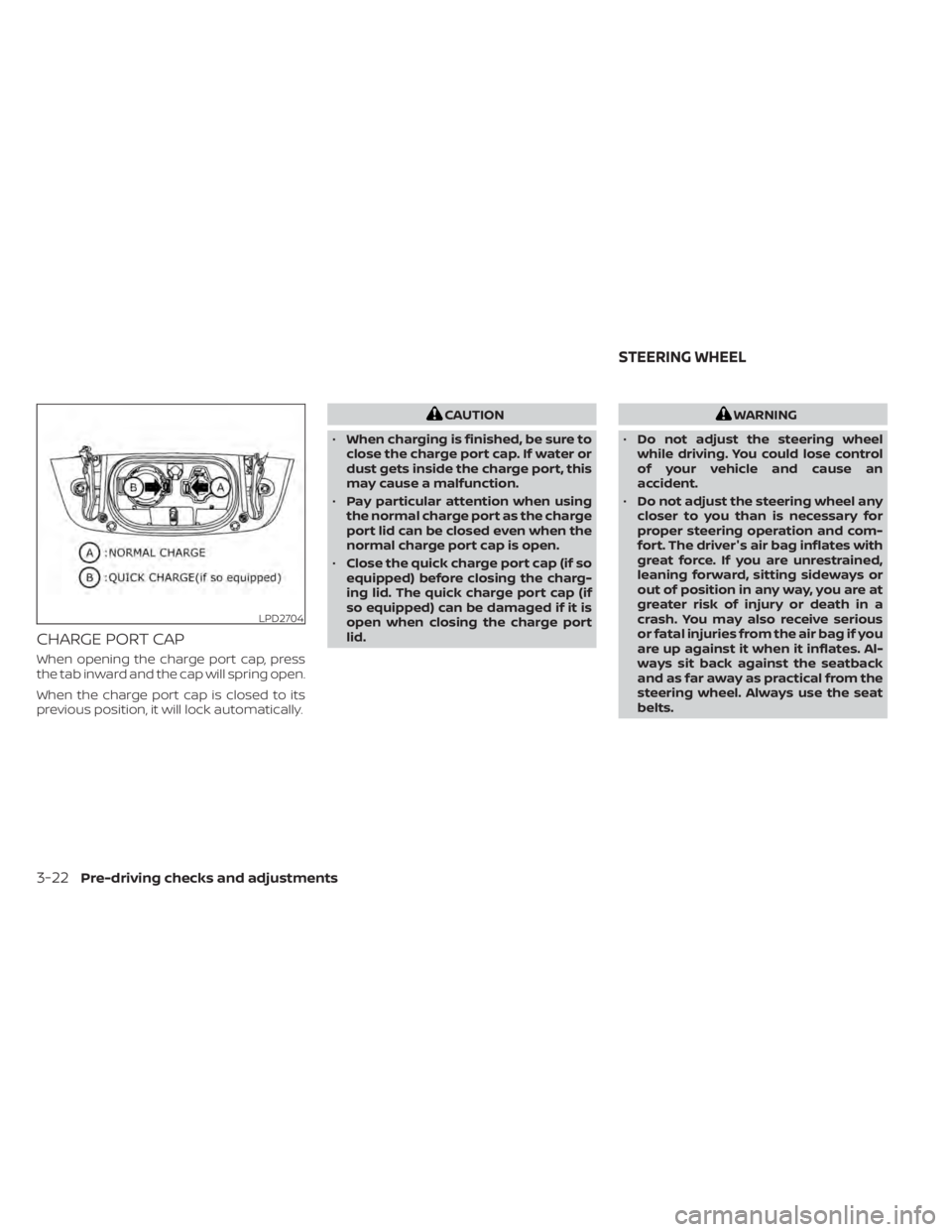
CHARGE PORT CAP
When opening the charge port cap, press
the tab inward and the cap will spring open.
When the charge port cap is closed to its
previous position, it will lock automatically.
CAUTION
• When charging is finished, be sure to
close the charge port cap. If water or
dust gets inside the charge port, this
may cause a malfunction.
• Pay particular attention when using
the normal charge port as the charge
port lid can be closed even when the
normal charge port cap is open.
• Close the quick charge port cap (if so
equipped) before closing the charg-
ing lid. The quick charge port cap (if
so equipped) can be damaged if it is
open when closing the charge port
lid.WARNING
• Do not adjust the steering wheel
while driving. You could lose control
of your vehicle and cause an
accident.
• Do not adjust the steering wheel any
closer to you than is necessary for
proper steering operation and com-
fort. The driver's air bag inflates with
great force. If you are unrestrained,
leaning forward, sitting sideways or
out of position in any way, you are at
greater risk of injury or death in a
crash. You may also receive serious
or fatal injuries from the air bag if you
are up against it when it inflates. Al-
ways sit back against the seatback
and as far away as practical from the
steering wheel. Always use the seat
belts.
LPD2704
STEERING WHEEL
3-22Pre-driving checks and adjustments
Page 326 of 602
TPMS with Easy-Fill Tire Alert
When tire pressure is low, the low tire pres-
sure warning light illuminates.
This vehicle provides visual and audible
signals to help you inflate the tires to the
recommended COLD tire pressure.
Vehicle set-up:
1. Park the vehicle in a safe and level place.
2. Apply the parking brake and push the P(Park) position switch on the shif t lever.
3. Place the power switch in the ON posi- tion. Do not place in the READY to drive
mode.
Operation:
1. Add air to the tire.
2. Af ter a few seconds, the hazard indica- tors will start flashing.
3. When the designated pressure is reached, the horn beeps once and the
hazard indicators stop flashing.
4. Perform the above steps for each tire. • If the tire is over-inflated more thanapproximately 4 psi (30 kPa), the horn
beeps and the hazard indicators flash
three times. To correct the pressure,
push the core of the valve stem on the tire briefly to release pressure. When
the pressure reaches the designated
pressure, the horn beeps once.
• If the hazard indicator does not flash within approximately 15 seconds af ter
starting to inflate the tire, it indicates
that the Easy-Fill Tire Alert is not
operating.
• The TPMS will not activate the Easy-Fill
Tire Alert under the following conditions:– If there is interference from an exter- nal device or transmitter.
– The air pressure from the inflation device is not sufficient to inflate the
tire, such as those using a power
socket.
– If electrical equipment is being used in or near the vehicle.
– There is a malfunction in the TPMS.
– There is a malfunction in the horn or hazard indicators.
– If the Easy-Fill Tire Alert does not op- erate due to TPMS interference,
move the vehicle about 3 f t (1 m)
backward or forward and try again.
If the Easy-Fill Tire Alert is not working, use a
tire pressure gauge.
AVOIDING COLLISION AND
ROLLOVER
WARNING
Failure to operate this vehicle in a safe
and prudent manner may result in loss
of control or an accident.
Be alert and drive defensively at all times.
Obey all traffic regulations. Avoid excessive
speed, high speed cornering, or sudden
steering maneuvers because these driving
practices could cause you to lose control of
your vehicle. As with any vehicle, a loss of
control could result in a collision with
other vehicles or objects or cause the ve-
hicle to rollover, particularly if the loss of
control causes the vehicle to slide side-
ways. Be attentive at all times, and avoid
driving when tired. Never drive when under
the influence of alcohol or drugs (including
prescription or over-the-counter drugs
which may cause drowsiness). Always
wear your seat belt as outlined in “Seat
belts” (P. 7-6), and also instruct your passen-
gerstodoso.
Seat belts help reduce the risk of injury in col-
lisions and rollovers. In a rollover crash, an
unbelted person is significantly more likely
to die than a person wearing a seat belt.
Starting and driving5-7