climate settings NISSAN LEAF 2021 Owner´s Manual
[x] Cancel search | Manufacturer: NISSAN, Model Year: 2021, Model line: LEAF, Model: NISSAN LEAF 2021Pages: 602, PDF Size: 4.22 MB
Page 42 of 602
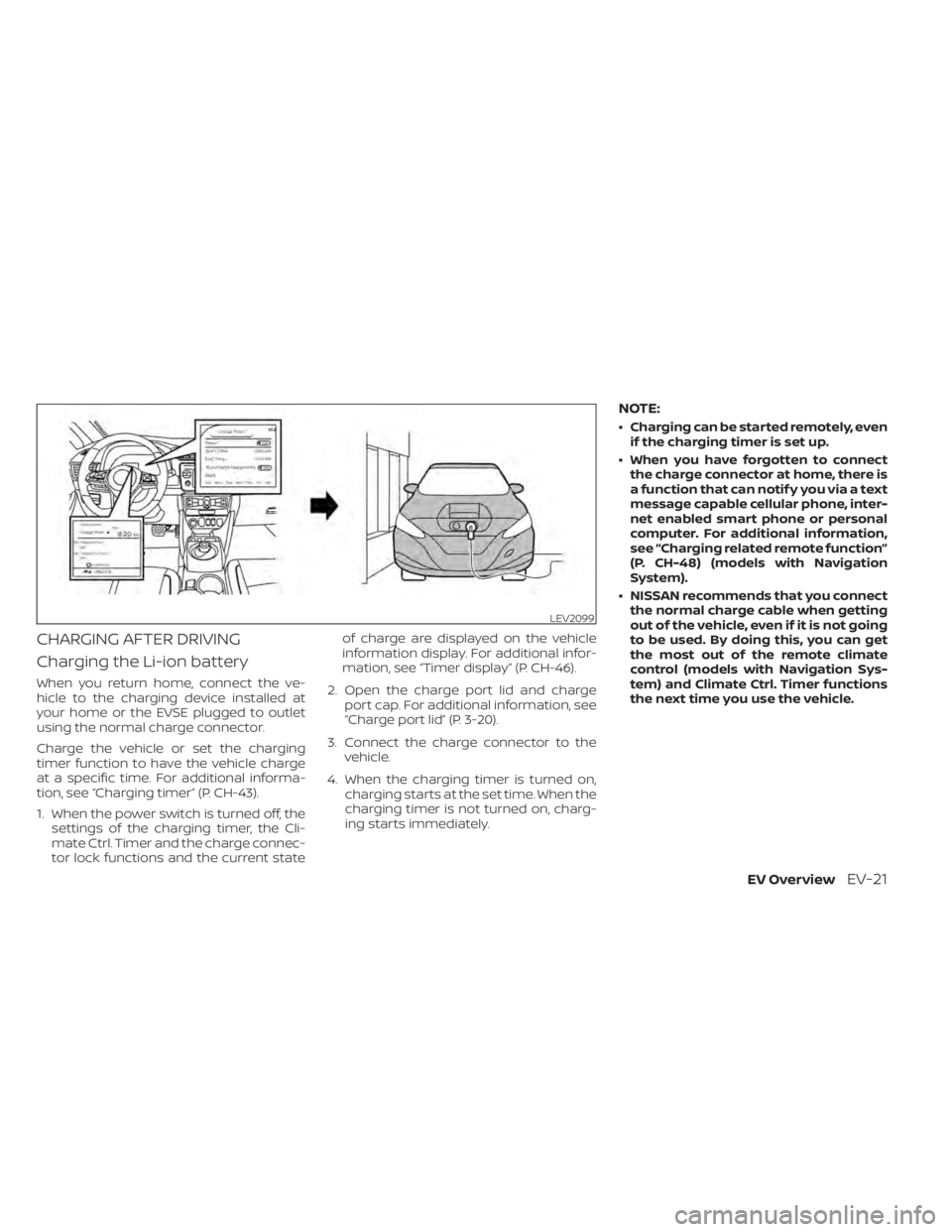
CHARGING AFTER DRIVING
Charging the Li-ion battery
When you return home, connect the ve-
hicle to the charging device installed at
your home or the EVSE plugged to outlet
using the normal charge connector.
Charge the vehicle or set the charging
timer function to have the vehicle charge
at a specific time. For additional informa-
tion, see “Charging timer” (P. CH-43).
1. When the power switch is turned off, thesettings of the charging timer, the Cli-
mate Ctrl. Timer and the charge connec-
tor lock functions and the current state of charge are displayed on the vehicle
information display. For additional infor-
mation, see “Timer display” (P. CH-46).
2. Open the charge port lid and charge port cap. For additional information, see
“Charge port lid” (P. 3-20).
3. Connect the charge connector to the vehicle.
4. When the charging timer is turned on, charging starts at the set time. When the
charging timer is not turned on, charg-
ing starts immediately.
NOTE:
• Charging can be started remotely, evenif the charging timer is set up.
• When you have forgotten to connect the charge connector at home, there is
a function that can notif y you via a text
message capable cellular phone, inter-
net enabled smart phone or personal
computer. For additional information,
see “Charging related remote function”
(P. CH-48) (models with Navigation
System).
• NISSAN recommends that you connect the normal charge cable when getting
out of the vehicle, even if it is not going
to be used. By doing this, you can get
the most out of the remote climate
control (models with Navigation Sys-
tem) and Climate Ctrl. Timer functions
the next time you use the vehicle.
LEV2099
EV OverviewEV-21
Page 92 of 602
NOTE:
• Depending on the charging station, thelock mechanism established by local
standards may not be compatible with
your vehicle. It may not be possible for
the charge connector to lock to your
vehicle.
• When the power source is cut off while charging in AUTO mode, the connector
will be continuously locked for 5 min-
utes, then it will be released.
• When timer charging is set with AUTO mode, the connector will not lock until
charging is started.
• When the following system(s) are oper- ated individually or the 12-volt battery
is being charged, the charging connec-
tor lock will not lock:– Climate Ctrl. Timer
– Remote climate control (if so equipped)
– Li-ion battery warmer (if so equipped)
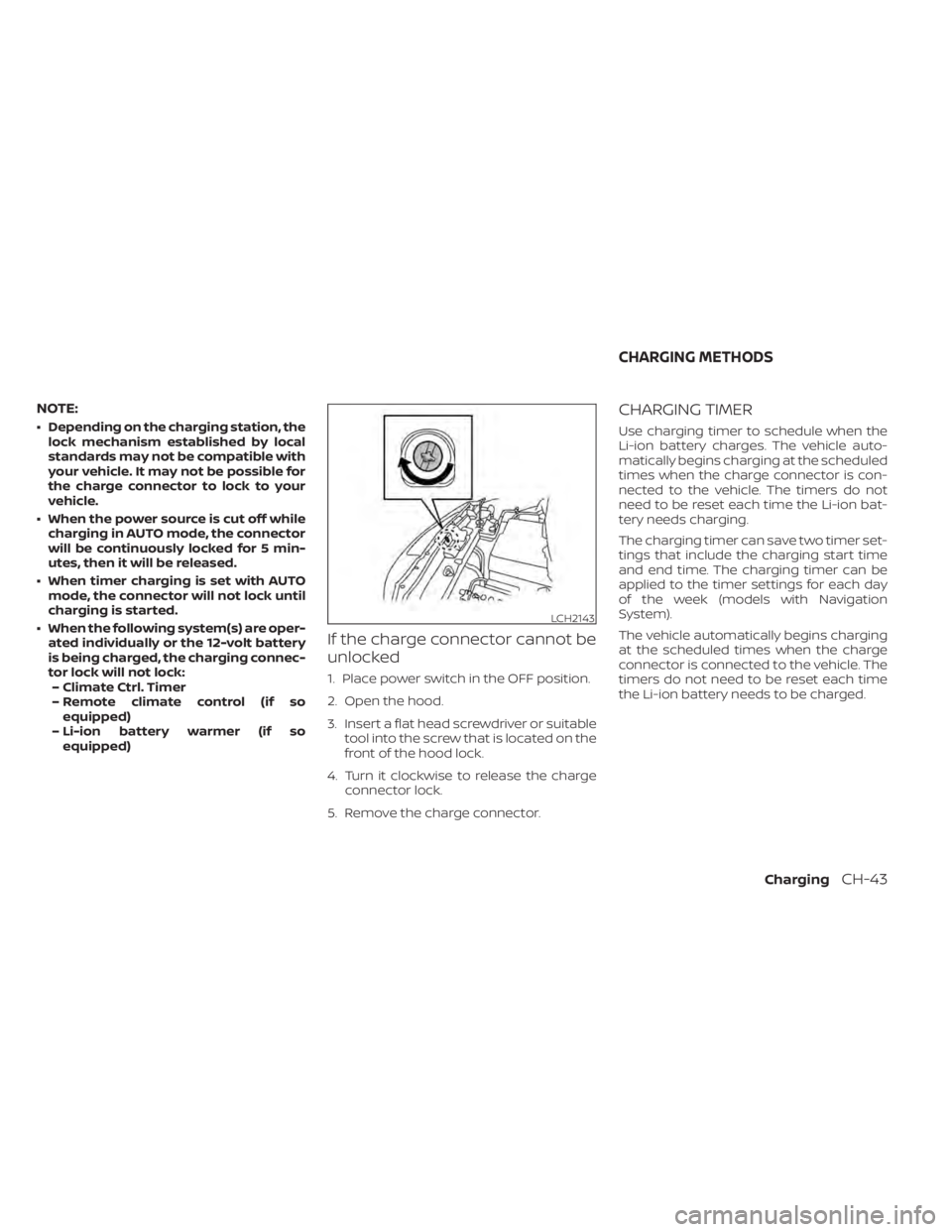
If the charge connector cannot be
unlocked
1. Place power switch in the OFF position.
2. Open the hood.
3. Insert a flat head screwdriver or suitable tool into the screw that is located on the
front of the hood lock.
4. Turn it clockwise to release the charge connector lock.
5. Remove the charge connector.
CHARGING TIMER
Use charging timer to schedule when the
Li-ion battery charges. The vehicle auto-
matically begins charging at the scheduled
times when the charge connector is con-
nected to the vehicle. The timers do not
need to be reset each time the Li-ion bat-
tery needs charging.
The charging timer can save two timer set-
tings that include the charging start time
and end time. The charging timer can be
applied to the timer settings for each day
of the week (models with Navigation
System).
The vehicle automatically begins charging
at the scheduled times when the charge
connector is connected to the vehicle. The
timers do not need to be reset each time
the Li-ion battery needs to be charged.
LCH2143
CHARGING METHODS
ChargingCH-43
Page 96 of 602
The current mode of the charge connector
lock (AUTO, LOCK or UNLOCK) is displayed.
For additional information, see “Charge
connector lock system” (P. CH-41).
When the OK button on the steering wheel
is pressed, the display will be switched to
the “EV Settings” menu. In the EV Settings,
the setting of the charging timer, Climate
Ctrl. timer and charge connector lock
mode can be changed. For additional infor-
mation, see “Vehicle information display”
(P. 2-26).
When the
button on the steering
wheel is pressed while the timer display is
shown, the display is switched to the ECO
Drive Report (if the vehicle was driven).
Either display will continue to be displayed
for another 30 seconds when the button is
operated. If the doors are locked af ter the
power switch was placed in the OFF posi-
tion, the display will turn off before the pre-
set time.
For models with Navigation System, the
day of the week is displayed with the time
(hour and minute) in each information
O1–
O3.
In addition to the above, note the following
conditions for the charging time
O1infor-
mation: • The charging time is displayed by the 10
minutes. If the estimated charging time is
longer than 24 hours, “Over 24h” is
displayed.
• When the charging is set to start imme- diately af ter connecting the charge con-
nector to the vehicle, the start time is
displayed as “Charge Now”.
• While being charged, the time when the charging has actually started is displayed
as the start time. The end time is dis-
played according to the estimated
charging time that was calculated based
on the electrical power being supplied.
• For models with Li-ion battery warmer, the charging system calculates the elec-
trical power used by the battery warmer
when the Li-ion battery temperature is
low, and longer charging time will be
displayed.
• When “Chg. Timer Only at HOME” is set to ON (models with Navigation System) in
the EV Settings, the start time is displayed
only when the power switch is placed in
the OFF position at home. If the power
switch is placed in the OFF position other
than at home, the immediate charge
mode is selected and “Charge Now” will
appear as the start time. • When “Full charge has priority” is set to ON
in the EV Settings and the Li-ion battery
cannot be charged to a full level within
the hours between the scheduled start
time and end time of the charging timer,
the charging time shows the time that
exceeds the scheduled hours in the
charging timer.
• If you need to confirm the estimated charging time depending on the avail-
able electrical power (supplied to the
charger), see the Estimated Charge Time
display. For additional information, see
“Meters and gauges” (P. 2-5).
NOTE:
• The displayed end time of charging is an estimation. The Li-ion battery may
not be charged to a full level by the
estimated end time.
• If the charging timer and the Climate Ctrl. timer are set to operate at the
same time, longer charging time will be
displayed or the Li-ion battery may not
be charged to a full level at the sched-
uled end time.
ChargingCH-47
Page 209 of 602
EV Settings
The EV settings menu allows the user to change the settings for charging the vehicle.
Some menu items shown below may not be equipped on your vehicle.
Menu ItemExplanation
Chg. Connector Lock Allows user to lock or unlock the charging connection.
Charge Timer1 Allows user to set charge timer 1.
Charge Timer2 Allows user to set charge timer 2.
Chg. Timer Only at HOME Allows user to set charging timer only at home.
Charge Time Screen Allows user to select the display time screen based on charge method.
Climate Ctrl. Timer1 Allows user to set climate control timer 1.
Climate Ctrl. Timer2 Allows user to set climate control timer 2.
TPMS Settings
The TPMS settings menu allows the user to change the tire pressure units displayed in the vehicle information display.
Menu Item Explanation
Tire Pressure Unit Allows user to select the tire pressure units that will display in the vehicle information display.
Maintenance
The maintenance menu allows the user to set reminders for various vehicle maintenance items.
Menu Item Explanation
Maintenance Displays available maintenance reminder options.
Tire Allows user to set a reminder at a specific interval or reset the current one.
Other Allows user to set a reminder at a specific interval or reset the current one.
2-32Instruments and controls
Page 279 of 602

Refer to the NissanConnect® Manual that
includes the following information.
• EV-Specific functions
• Audio
• Hands-Free Phone
• NissanConnect® EV & Services (if soequipped)
• Apple CarPlay®
• Android Auto™
• Navigation (if so equipped)
• Voice recognition
• Information and settings viewable on the system
NISSANCONNECT® MANUAL
4-2Monitor, climate, audio, phone and voice recognition systems
Page 285 of 602
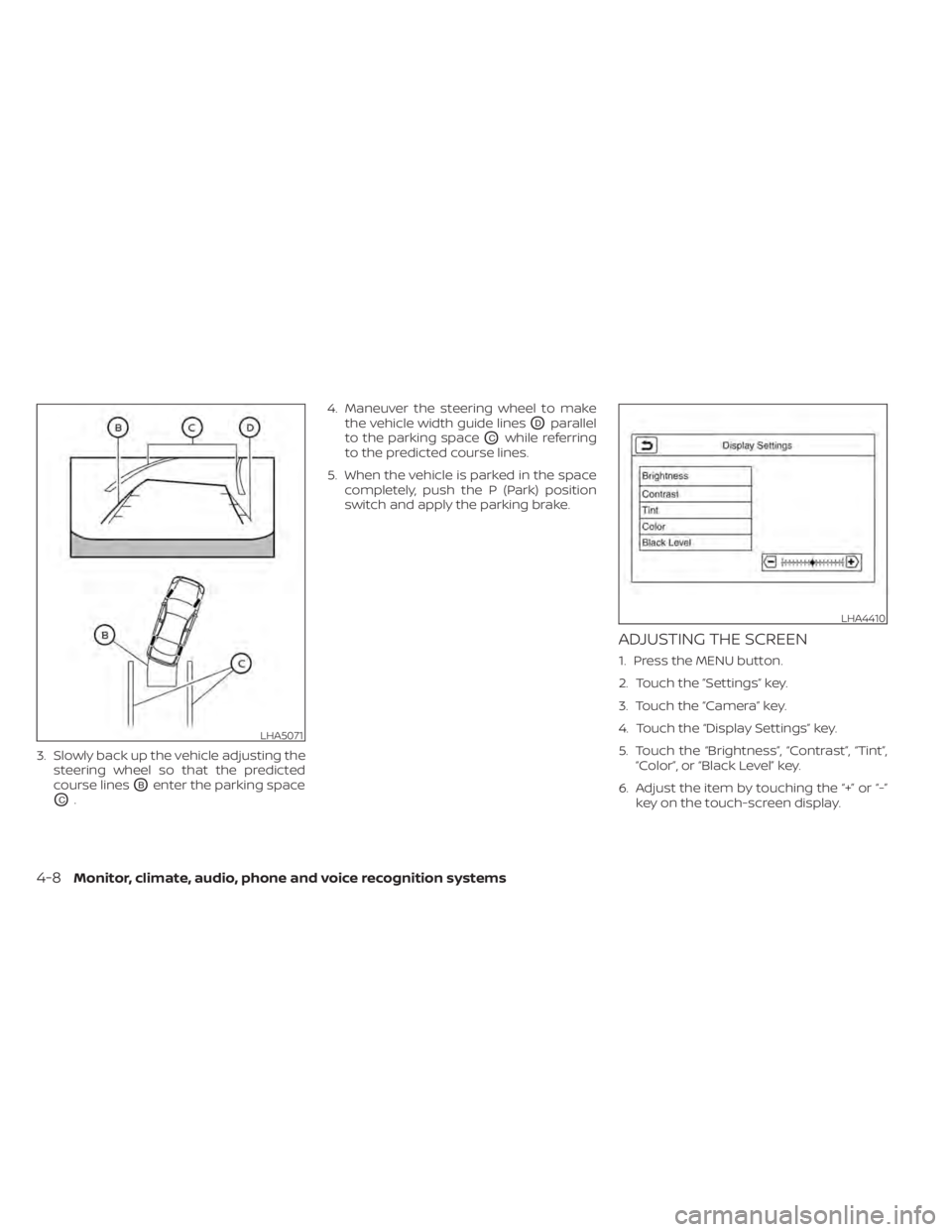
3. Slowly back up the vehicle adjusting thesteering wheel so that the predicted
course lines
OBenter the parking space
OC. 4. Maneuver the steering wheel to make
the vehicle width guide lines
ODparallel
to the parking space
OCwhile referring
to the predicted course lines.
5. When the vehicle is parked in the space completely, push the P (Park) position
switch and apply the parking brake.
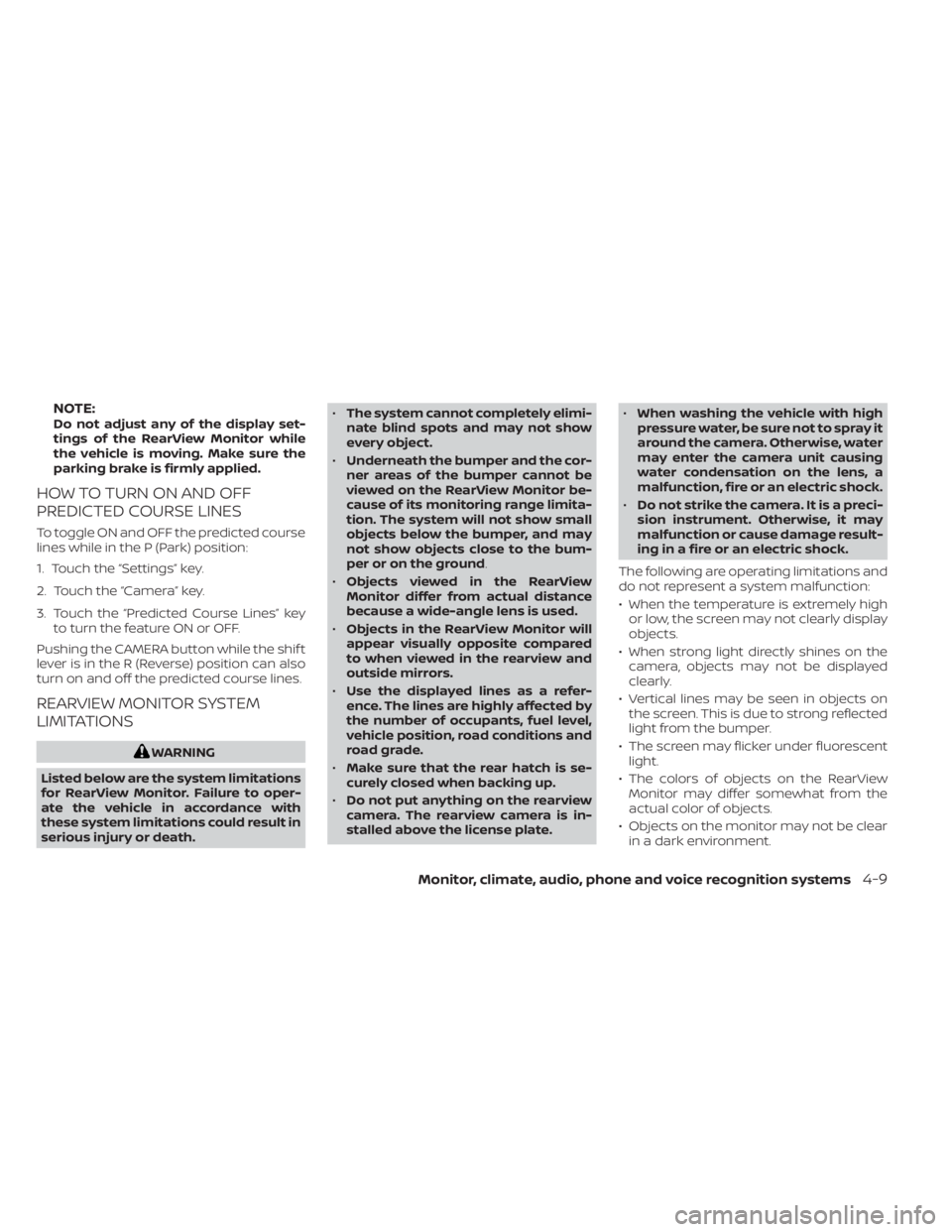
ADJUSTING THE SCREEN
1. Press the MENU button.
2. Touch the ”Settings” key.
3. Touch the “Camera” key.
4. Touch the “Display Settings” key.
5. Touch the “Brightness”, “Contrast”, “Tint”,“Color”, or “Black Level” key.
6. Adjust the item by touching the “+” or “-” key on the touch-screen display.
LHA5071
LHA4410
4-8Monitor, climate, audio, phone and voice recognition systems
Page 286 of 602
NOTE:Do not adjust any of the display set-
tings of the RearView Monitor while
the vehicle is moving. Make sure the
parking brake is firmly applied.
HOW TO TURN ON AND OFF
PREDICTED COURSE LINES
To toggle ON and OFF the predicted course
lines while in the P (Park) position:
1. Touch the “Settings” key.
2. Touch the “Camera” key.
3. Touch the “Predicted Course Lines” keyto turn the feature ON or OFF.
Pushing the CAMERA button while the shif t
lever is in the R (Reverse) position can also
turn on and off the predicted course lines.
REARVIEW MONITOR SYSTEM
LIMITATIONS
WARNING
Listed below are the system limitations
for RearView Monitor. Failure to oper-
ate the vehicle in accordance with
these system limitations could result in
serious injury or death. •
The system cannot completely elimi-
nate blind spots and may not show
every object.
• Underneath the bumper and the cor-
ner areas of the bumper cannot be
viewed on the RearView Monitor be-
cause of its monitoring range limita-
tion. The system will not show small
objects below the bumper, and may
not show objects close to the bum-
per or on the ground.
• Objects viewed in the RearView
Monitor differ from actual distance
because a wide-angle lens is used.
• Objects in the RearView Monitor will
appear visually opposite compared
to when viewed in the rearview and
outside mirrors.
• Use the displayed lines as a refer-
ence. The lines are highly affected by
the number of occupants, fuel level,
vehicle position, road conditions and
road grade.
• Make sure that the rear hatch is se-
curely closed when backing up.
• Do not put anything on the rearview
camera. The rearview camera is in-
stalled above the license plate. •
When washing the vehicle with high
pressure water, be sure not to spray it
around the camera. Otherwise, water
may enter the camera unit causing
water condensation on the lens, a
malfunction, fire or an electric shock.
• Do not strike the camera. It is a preci-
sion instrument. Otherwise, it may
malfunction or cause damage result-
ing in a fire or an electric shock.
The following are operating limitations and
do not represent a system malfunction:
• When the temperature is extremely high or low, the screen may not clearly display
objects.
• When strong light directly shines on the camera, objects may not be displayed
clearly.
• Vertical lines may be seen in objects on the screen. This is due to strong reflected
light from the bumper.
• The screen may flicker under fluorescent light.
• The colors of objects on the RearView Monitor may differ somewhat from the
actual color of objects.
• Objects on the monitor may not be clear in a dark environment.
Monitor, climate, audio, phone and voice recognition systems4-9
Page 293 of 602
If the shif t lever is in the P (Park) and D
(Drive) position, the available views are:
• Front view/bird’s-eye view split screen
• Front view/front-side view split screen
The display will switch from the Intelligent
Around View Monitor screen when:
• The shif t lever is in the D (Drive) positionand the vehicle speed increases above
approximately 6 mph (10 km/h).
• A different screen is selected.
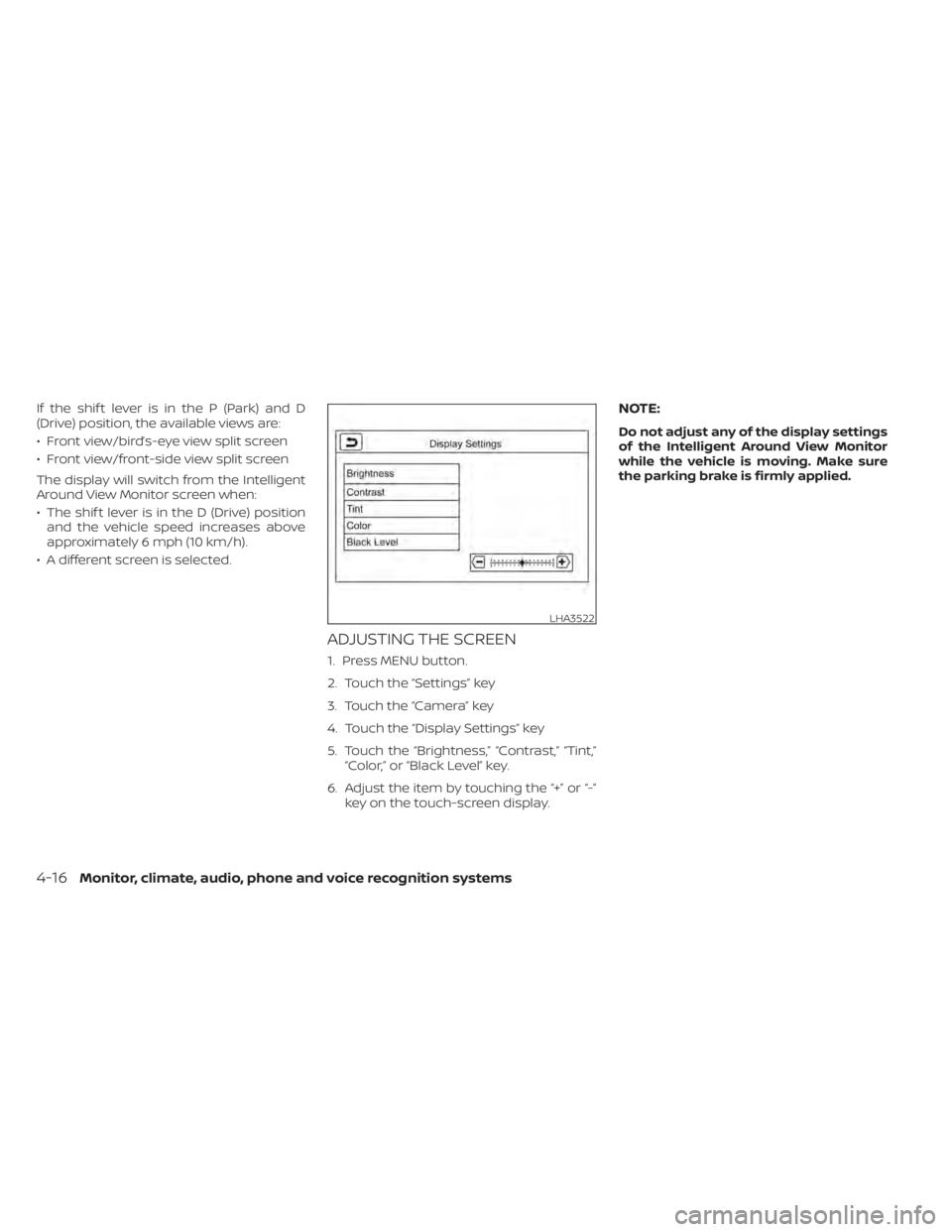
ADJUSTING THE SCREEN
1. Press MENU button.
2. Touch the “Settings” key
3. Touch the “Camera” key
4. Touch the “Display Settings” key
5. Touch the “Brightness,” “Contrast,” “Tint,” “Color,” or “Black Level” key.
6. Adjust the item by touching the “+” or “-” key on the touch-screen display.
NOTE:
Do not adjust any of the display settings
of the Intelligent Around View Monitor
while the vehicle is moving. Make sure
the parking brake is firmly applied.
LHA3522
4-16Monitor, climate, audio, phone and voice recognition systems
Page 300 of 602
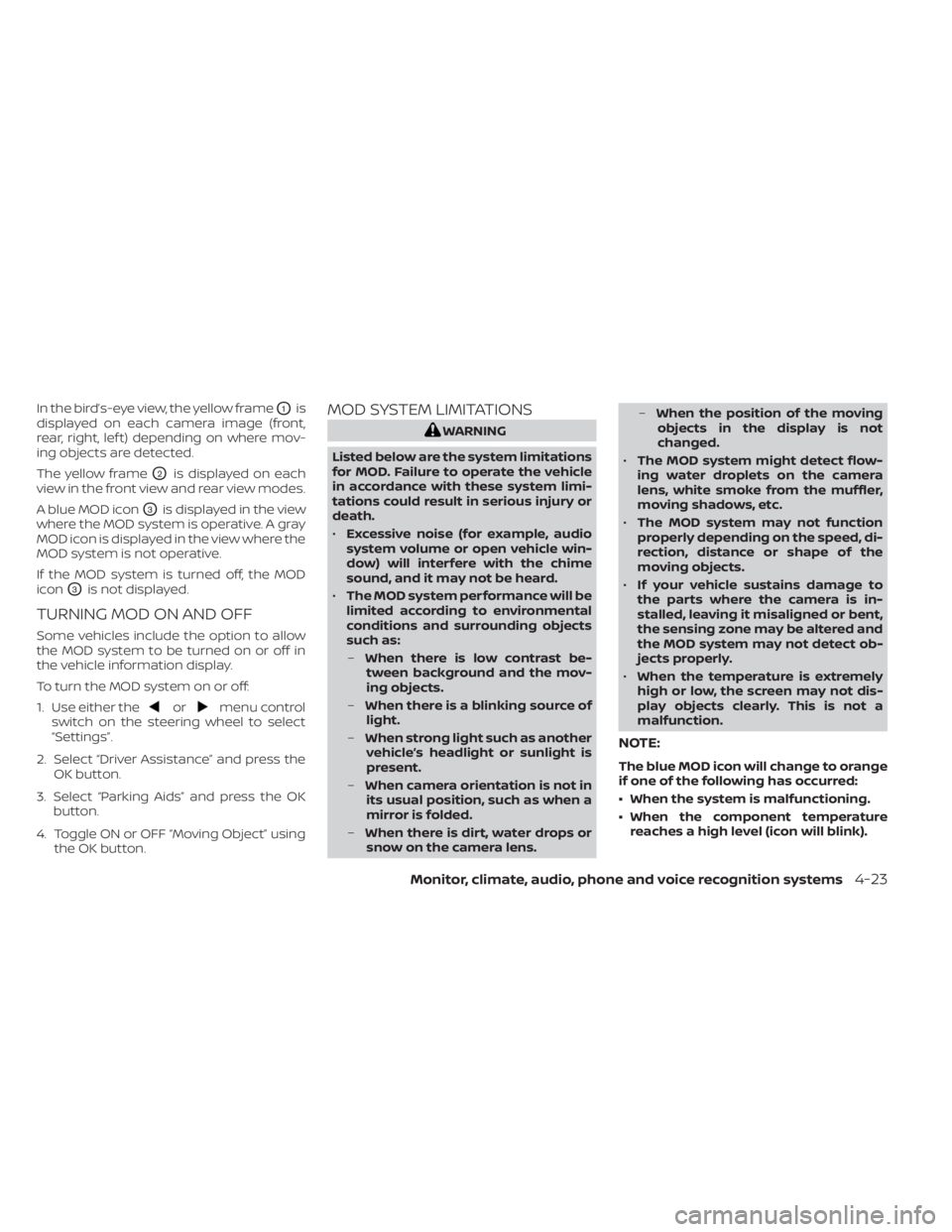
In the bird’s-eye view, the yellow frameO1is
displayed on each camera image (front,
rear, right, lef t) depending on where mov-
ing objects are detected.
The yellow frame
O2is displayed on each
view in the front view and rear view modes.
A blue MOD icon
O3is displayed in the view
where the MOD system is operative. A gray
MOD icon is displayed in the view where the
MOD system is not operative.
If the MOD system is turned off, the MOD
icon
O3is not displayed.
TURNING MOD ON AND OFF
Some vehicles include the option to allow
the MOD system to be turned on or off in
the vehicle information display.
To turn the MOD system on or off:
1. Use either the
ormenu control
switch on the steering wheel to select
“Settings”.
2. Select “Driver Assistance” and press the OK button.
3. Select “Parking Aids” and press the OK button.
4. Toggle ON or OFF “Moving Object” using the OK button.
MOD SYSTEM LIMITATIONS
WARNING
Listed below are the system limitations
for MOD. Failure to operate the vehicle
in accordance with these system limi-
tations could result in serious injury or
death.
• Excessive noise (for example, audio
system volume or open vehicle win-
dow) will interfere with the chime
sound, and it may not be heard.
• The MOD system performance will be
limited according to environmental
conditions and surrounding objects
such as:
– When there is low contrast be-
tween background and the mov-
ing objects.
– When there is a blinking source of
light.
– When strong light such as another
vehicle’s headlight or sunlight is
present.
– When camera orientation is not in
its usual position, such as when a
mirror is folded.
– When there is dirt, water drops or
snow on the camera lens. –
When the position of the moving
objects in the display is not
changed.
• The MOD system might detect flow-
ing water droplets on the camera
lens, white smoke from the muffler,
moving shadows, etc.
• The MOD system may not function
properly depending on the speed, di-
rection, distance or shape of the
moving objects.
• If your vehicle sustains damage to
the parts where the camera is in-
stalled, leaving it misaligned or bent,
the sensing zone may be altered and
the MOD system may not detect ob-
jects properly.
• When the temperature is extremely
high or low, the screen may not dis-
play objects clearly. This is not a
malfunction.
NOTE:
The blue MOD icon will change to orange
if one of the following has occurred:
• When the system is malfunctioning.
• When the component temperature reaches a high level (icon will blink).
Monitor, climate, audio, phone and voice recognition systems4-23
Page 312 of 602
Temperature control
Press the temperature control buttons to
set the desired temperature.
Air recirculation
Press the
intake air control button to
change the air circulation mode. When the
indicator light illuminates, the flowing air is
recirculated inside the vehicle.
When the outside temperature exceeds
70°F (21°C) the air conditioning system may
default to air recirculation mode automati-
cally to reduce overall power consumption.
To exit air recirculation mode, deselect the
air recirculation button (indicator will turn
off ) to enter fresh mode.
Outside air circulation
Press the
intake air control button to
change the air circulation mode. When the
indicator light does not illuminate, the flow-
ing air is drawn from outside the vehicle.
Automatic air intake control
In the AUTO mode, the intake air will be
controlled automatically. When the outside
temperature exceeds 70°F (21°C), the air
conditioning system may default to air re-
circulation mode automatically to reduce
overall power consumption. To set the automatic control mode, press
and hold the
intake air control button.
The indicator light will blink twice and the
inside/outside circulation will then be con-
trolled automatically. When in automatic
mode, the indicator light will come on when
inside air recirculation is active.
Rear window and outside mirror (if so
equipped) defroster switch
For additional information, see “Rear win-
dow and outside mirror (if so equipped)
defroster switch” (P. 2-47).
To turn the system off
To turn off the climate control, press the
Climate control system ON·OFF button.
The same operating mode (Heater or A/C)
that was active when the system is turned
off is active when system is turned back on.
CLIMATE CTRL. TIMER
This function pre-heats or pre-cools the
passenger compartment of the vehicle to
the temperature before driving. This helps
reduce power consumption from the Li-ion
battery.
The Climate Ctrl. Timer operates the air
conditioner using power from the charger
or the Li-ion battery. While the charging connector is connected to the vehicle,
electric power from the Li-ion battery is not
used.
The Climate Ctrl. Timer function allows two
timer settings.
Once the Climate Ctrl. Timer is set, it will
complete air conditioning by the time that
is set. It is not necessary to set the Climate
Ctrl. Timer every day.
WARNING
Even if the Climate Ctrl. Timer is set, the
temperature in the passenger com-
partment may become high or low if
the system automatically stops. Do not
leave children or adults who would nor-
mally require the support of others
alone in your vehicle. Pets should not
be lef t alone either. On hot, sunny days,
temperatures in a closed vehicle could
quickly become high enough to cause
severe or possibly fatal injuries to
people or animals. Also on cold days,
temperature in a vehicle could become
low enough to cause severe or possible
fatal injuries to people or animals.
Monitor, climate, audio, phone and voice recognition systems4-35