glove box NISSAN LEAF 2021 Owner´s Manual
[x] Cancel search | Manufacturer: NISSAN, Model Year: 2021, Model line: LEAF, Model: NISSAN LEAF 2021Pages: 602, PDF Size: 4.22 MB
Page 15 of 602
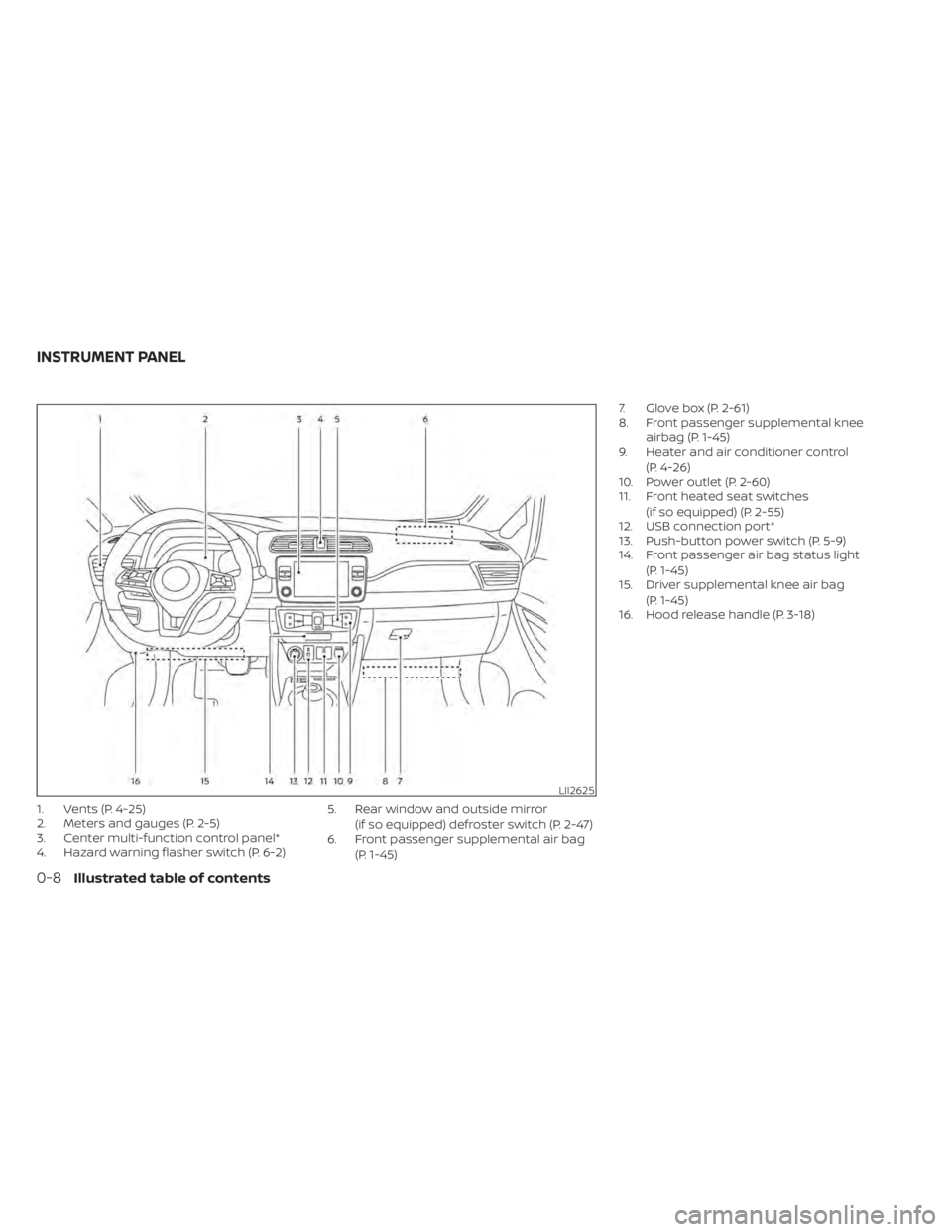
1. Vents (P. 4-25)
2. Meters and gauges (P. 2-5)
3. Center multi-function control panel*
4. Hazard warning flasher switch (P. 6-2)5. Rear window and outside mirror
(if so equipped) defroster switch (P. 2-47)
6. Front passenger supplemental air bag
(P. 1-45) 7. Glove box (P. 2-61)
8. Front passenger supplemental knee
airbag (P. 1-45)
9. Heater and air conditioner control
(P. 4-26)
10. Power outlet (P. 2-60)
11. Front heated seat switches
(if so equipped) (P. 2-55)
12. USB connection port*
13. Push-button power switch (P. 5-9)
14. Front passenger air bag status light
(P. 1-45)
15. Driver supplemental knee air bag
(P. 1-45)
16. Hood release handle (P. 3-18)
LII2625
INSTRUMENT PANEL
0-8Illustrated table of contents
Page 161 of 602
WARNING
To ensure proper operation of the front
passenger’s NISSAN Advanced Air Bag
System, please observe the following
items.
• Do not allow a passenger in the rear
seat to push or pull on the seatback
pocket (if so equipped).
• Do not place heavy loads heavier
than 9.1 lbs. (4 kg) on the seatback,
head restraint/headrest or in the
seatback pocket (if so equipped).
• Make sure that there is nothing
pressing against the rear of the seat-
back, such as a child restraint in-
stalled in the rear seat or an object
stored on the floor.
• Make sure that there is no object
placed under the front passenger
seat.
• Make sure that there is no object
placed between the seat cushion and
center console or between the seat
cushion and the door. •
If a forward-facing child restraint is
installed in the front passenger seat,
do not position the front passenger
seat so the child restraint contacts
the instrument panel. If the child re-
straint does contact the instrument
panel, the system may determine the
seat is occupied and the passenger
air bag and front passenger supple-
mental knee air bag may deploy in a
collision. Also, the front passenger air
bag status light may not illuminate.
For additional information, see “Child
restraints” (P. 1-22).
• Confirm the operating condition with
the front passenger air bag status
light.
• If you notice that the front passenger
air bag status light is not operating
as described in this section, get the
occupant classification system
checked. It is recommended that you
visit a NISSAN certified LEAF dealer
for this service.
• Until you have confirmed with a
dealer that your passenger seat oc-
cupant classification system is work-
ing properly, position the occupants
in the rear seating positions. •
Do not position the front passenger
seat so it contacts the rear seat. If the
front seat does contact the rear seat,
the air bag system may determine a
sensor malfunction has occurred
and the front passenger air bag sta-
tus light may illuminate and the
supplemental air bag warning light
may flash.
This vehicle is equipped with the NISSAN
Advanced Air Bag System for the driver and
front passenger seats. This system is de-
signed to meet certification requirements
under U.S. regulations. It is also permitted in
Canada. All of the information, cautions
and warnings in this manual apply and
must be followed.
The driver supplemental front-impact air
bag is located in the center of the steering
wheel. The front passenger supplemental
front-impact air bag is mounted in the in-
strument panel above the glove box. The
front air bags are designed to inflate in
higher severity frontal collisions, although
they may inflate if the forces in another
type of collision are similar to those of a
higher severity frontal impact. They may
not inflate in certain frontal collisions. Ve-
hicle damage (or lack of it) is not always an
indication of proper front air bag operation.
1-54Safety–Seats, seat belts and supplemental restraint system
Page 178 of 602
Dynamic driver assistance switch (for
vehicles without ProPILOT Assist) (if so
equipped)...................................... 2-58
Steering Assist switch (for models with
ProPILOT Assist) (if so equipped) ................2-59
Rear Door Alert ................................. 2-59
Power outlet ................................... 2-60
Storage ........................................ 2-61
Seatback Pocket (if so equipped) ............2-61
Storagetray................................. 2-61
Glovebox ................................... 2-62
Console box ................................. 2-62
Overhead sunglasses storage ...............2-62
Cup holders ................................. 2-63
Tonneau cover (if so equipped) ..............2-64
Stowing golf bags ........................... 2-65
Windows ....................................... 2-65
Power windows ............................. 2-65Interior lights
................................... 2-68
Console light (if so equipped) ................2-68
Map lights ................................... 2-68
Room light .................................. 2-69
Cargo light .................................. 2-69
HomeLink® Universal Transceiver (if so
equipped) ...................................... 2-69
Programming HomeLink® ...................2-70
Programming HomeLink® for Canadian
customers and gate openers ...............2-72
Operating the HomeLink® Universal
Transceiver .................................. 2-72
Programming trouble-diagnosis ............2-72
Clearing the programmed information ......2-73
Reprogramming a single HomeLink®
button ...................................... 2-73
If your vehicle is stolen ......................2-73
Page 181 of 602
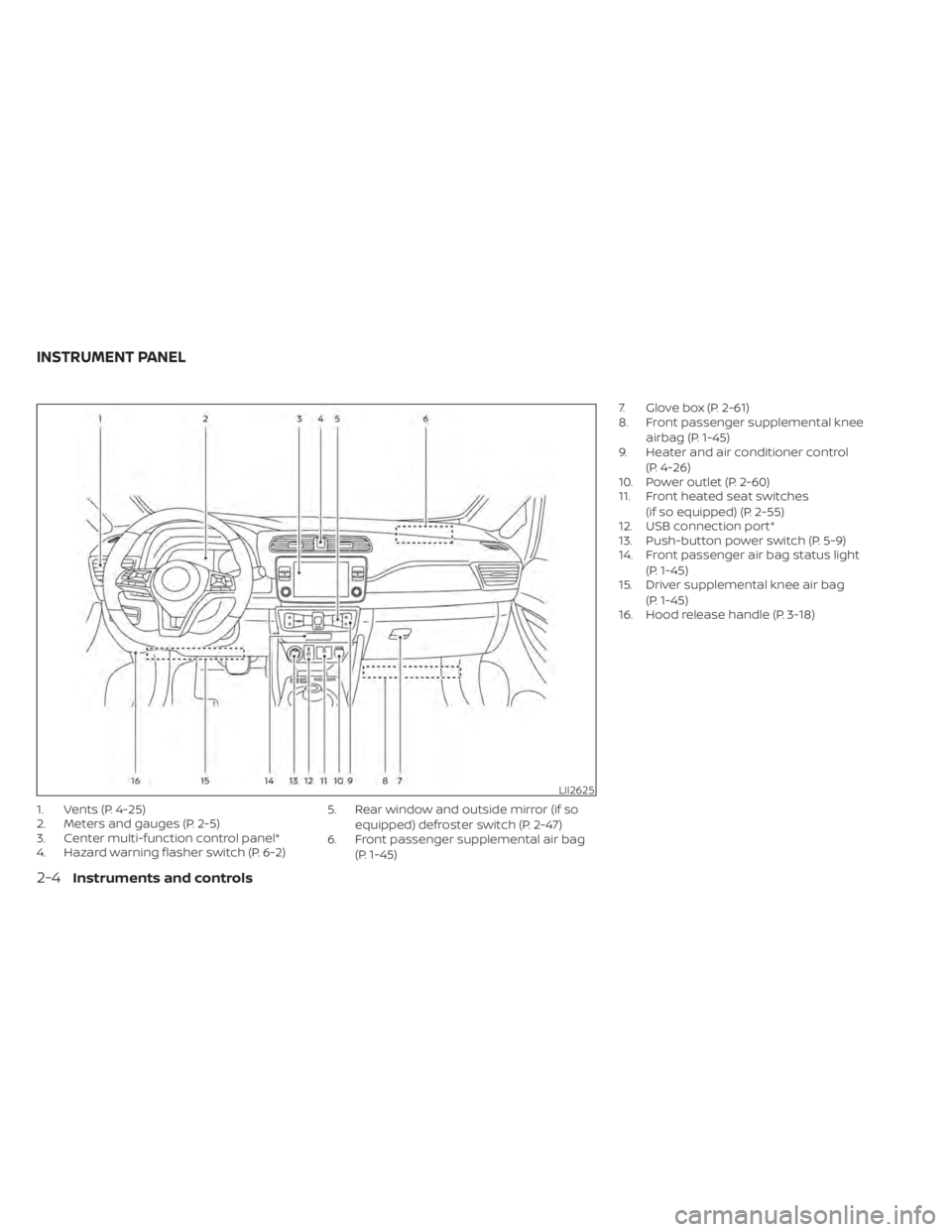
1. Vents (P. 4-25)
2. Meters and gauges (P. 2-5)
3. Center multi-function control panel*
4. Hazard warning flasher switch (P. 6-2)5. Rear window and outside mirror (if so
equipped) defroster switch (P. 2-47)
6. Front passenger supplemental air bag
(P. 1-45) 7. Glove box (P. 2-61)
8. Front passenger supplemental knee
airbag (P. 1-45)
9. Heater and air conditioner control
(P. 4-26)
10. Power outlet (P. 2-60)
11. Front heated seat switches
(if so equipped) (P. 2-55)
12. USB connection port*
13. Push-button power switch (P. 5-9)
14. Front passenger air bag status light
(P. 1-45)
15. Driver supplemental knee air bag
(P. 1-45)
16. Hood release handle (P. 3-18)
LII2625
INSTRUMENT PANEL
2-4Instruments and controls
Page 239 of 602
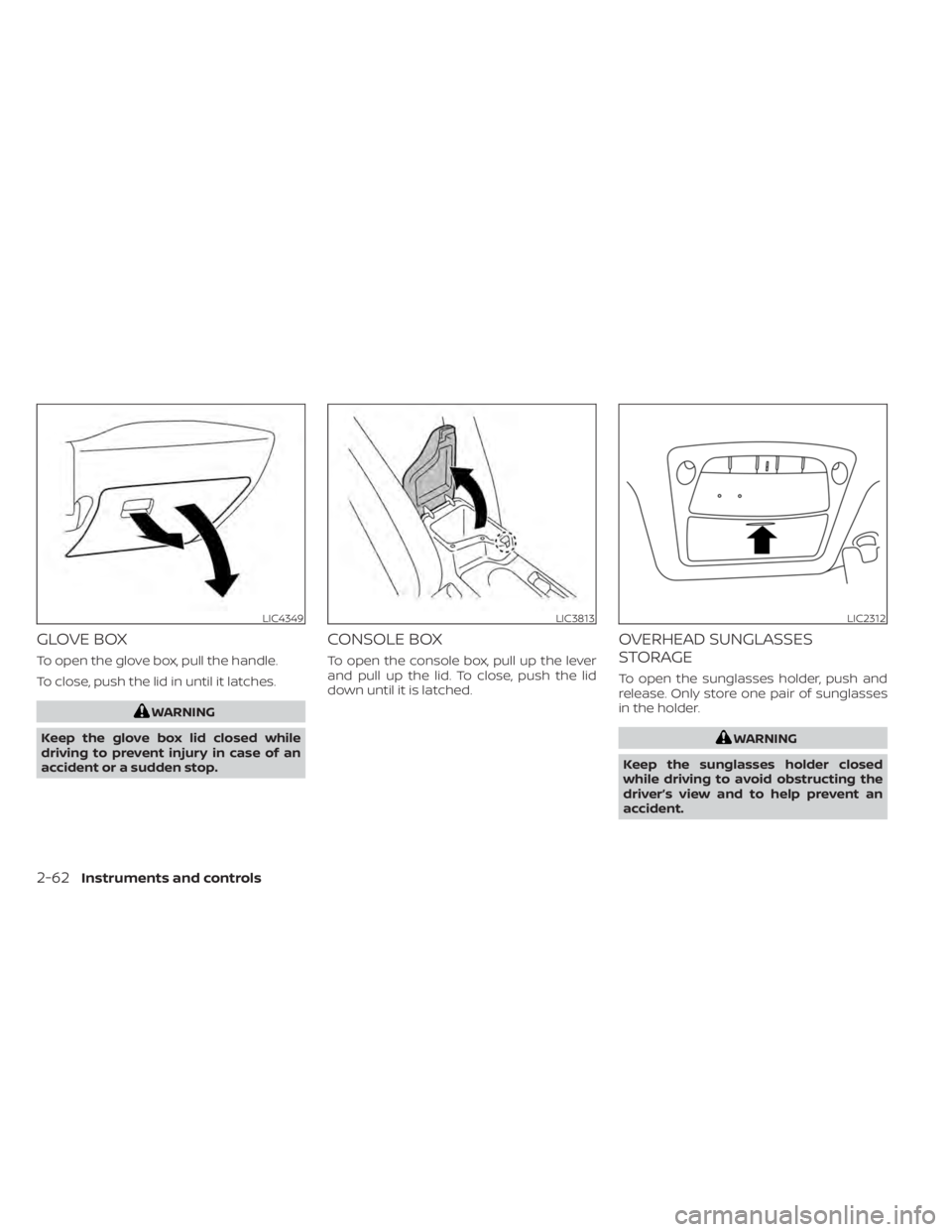
GLOVE BOX
To open the glove box, pull the handle.
To close, push the lid in until it latches.
WARNING
Keep the glove box lid closed while
driving to prevent injury in case of an
accident or a sudden stop.
CONSOLE BOX
To open the console box, pull up the lever
and pull up the lid. To close, push the lid
down until it is latched.
OVERHEAD SUNGLASSES
STORAGE
To open the sunglasses holder, push and
release. Only store one pair of sunglasses
in the holder.
WARNING
Keep the sunglasses holder closed
while driving to avoid obstructing the
driver’s view and to help prevent an
accident.
LIC4349LIC3813LIC2312
2-62Instruments and controls
Page 262 of 602
Lockout protection
To prevent the Intelligent Key from being
accidentally locked in the vehicle, lockout
protection is equipped with the Intelligent
Key system.
When the driver’s side door is open, the
doors are locked, then the Intelligent Key is
lef t inside the vehicle and the door is
closed, all doors will unlock automatically.
NOTE:
The doors may not lock when the Intelli-
gent Key is in the same hand that is op-
erating the request switch to lock the
door. Put the Intelligent Key in a purse,
pocket or your other hand.
CAUTION
The lockout protection may not func-
tion under the following conditions:
• When the Intelligent Key is placed on
top of the instrument panel.
• When the Intelligent Key is placed in-
side the glove box or a storage bin.
• When the Intelligent Key is placed in-
side the door pockets.
• When the Intelligent Key is placed in-
side or near metallic materials.
Unlocking doors
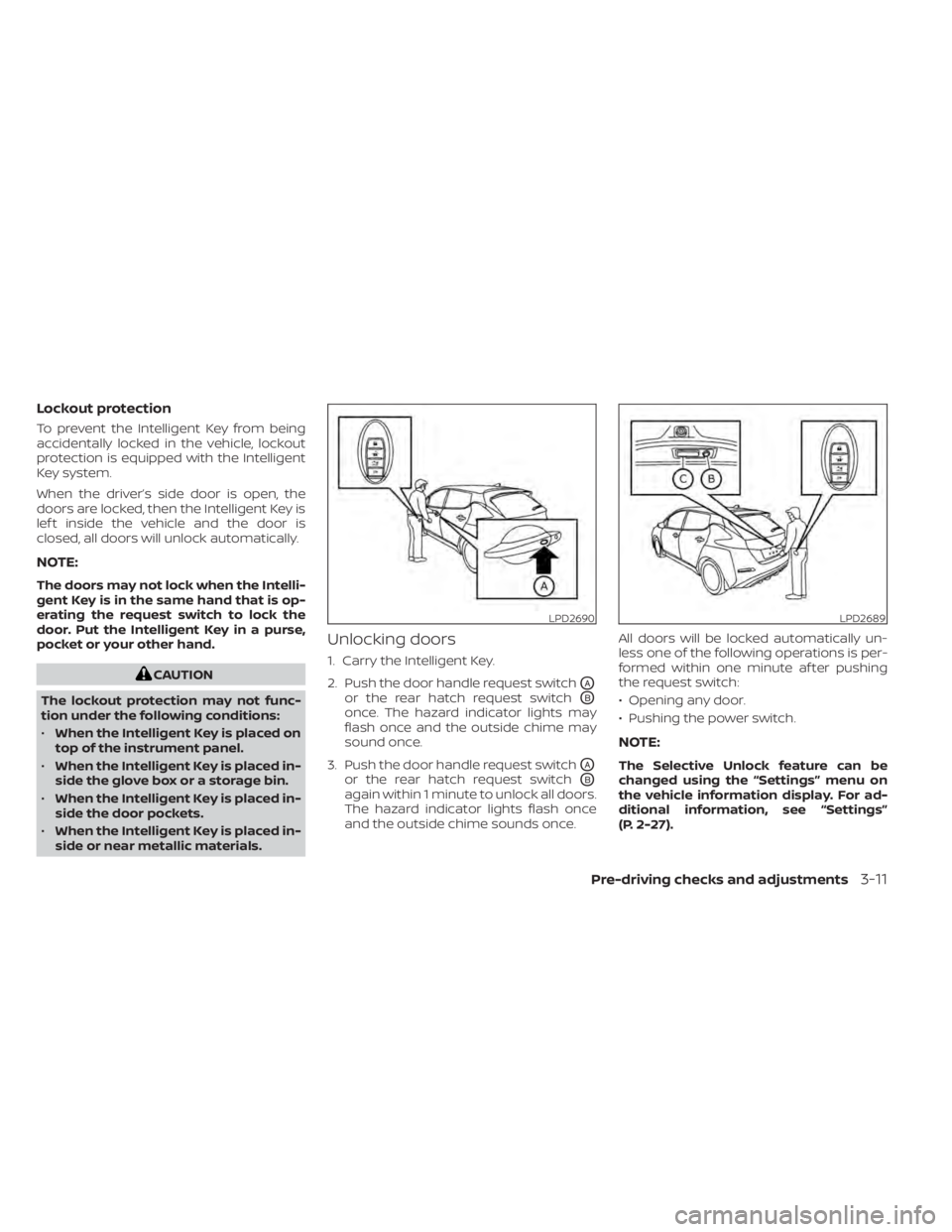
1. Carry the Intelligent Key.
2. Push the door handle request switch
OA
or the rear hatch request switchOB
once. The hazard indicator lights may
flash once and the outside chime may
sound once.
3. Push the door handle request switch
OA
or the rear hatch request switchOB
again within 1 minute to unlock all doors.
The hazard indicator lights flash once
and the outside chime sounds once. All doors will be locked automatically un-
less one of the following operations is per-
formed within one minute af ter pushing
the request switch:
• Opening any door.
• Pushing the power switch.
NOTE:
The Selective Unlock feature can be
changed using the “Settings” menu on
the vehicle information display. For ad-
ditional information, see “Settings”
(P. 2-27).
LPD2690LPD2689
Pre-driving checks and adjustments3-11
Page 329 of 602
NISSAN INTELLIGENT KEY®
SYSTEM
The Intelligent Key system allows the driver
to start the EV system without taking the
key out of a pocket or purse. The operating
environment and/or conditions may affect
Intelligent Key system operation.
Some indicators and warnings for opera-
tion are displayed on the vehicle informa-
tion display. For additional information, see
“Vehicle information display” (P. 2-26).
CAUTION
• Be sure to carry the Intelligent Key
with you when operating the vehicle.
• Never leave the Intelligent Key inside
the vehicle when you leave the
vehicle.
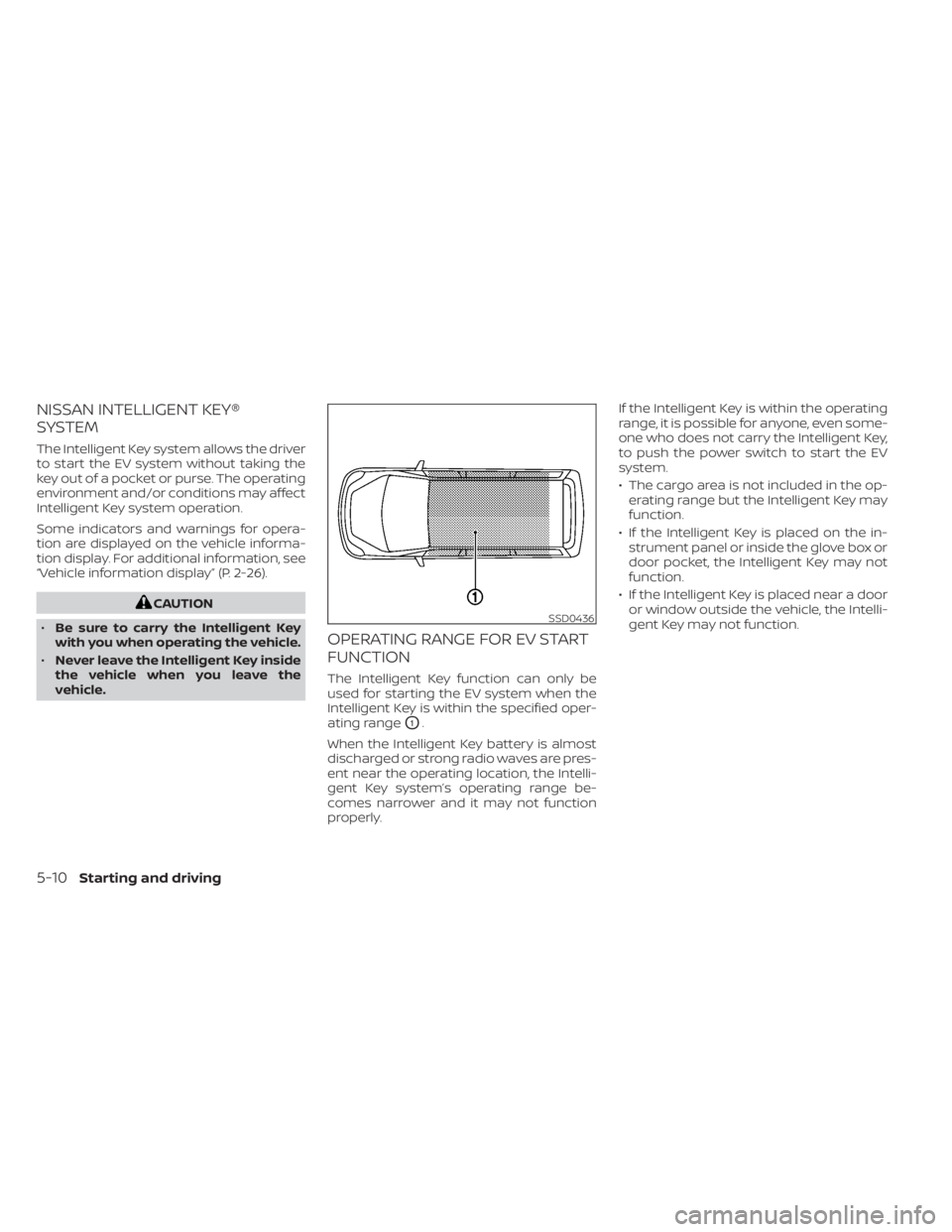
OPERATING RANGE FOR EV START
FUNCTION
The Intelligent Key function can only be
used for starting the EV system when the
Intelligent Key is within the specified oper-
ating range
O1.
When the Intelligent Key battery is almost
discharged or strong radio waves are pres-
ent near the operating location, the Intelli-
gent Key system’s operating range be-
comes narrower and it may not function
properly. If the Intelligent Key is within the operating
range, it is possible for anyone, even some-
one who does not carry the Intelligent Key,
to push the power switch to start the EV
system.
• The cargo area is not included in the op-
erating range but the Intelligent Key may
function.
• If the Intelligent Key is placed on the in- strument panel or inside the glove box or
door pocket, the Intelligent Key may not
function.
• If the Intelligent Key is placed near a door or window outside the vehicle, the Intelli-
gent Key may not function.
SSD0436
5-10Starting and driving
Page 536 of 602
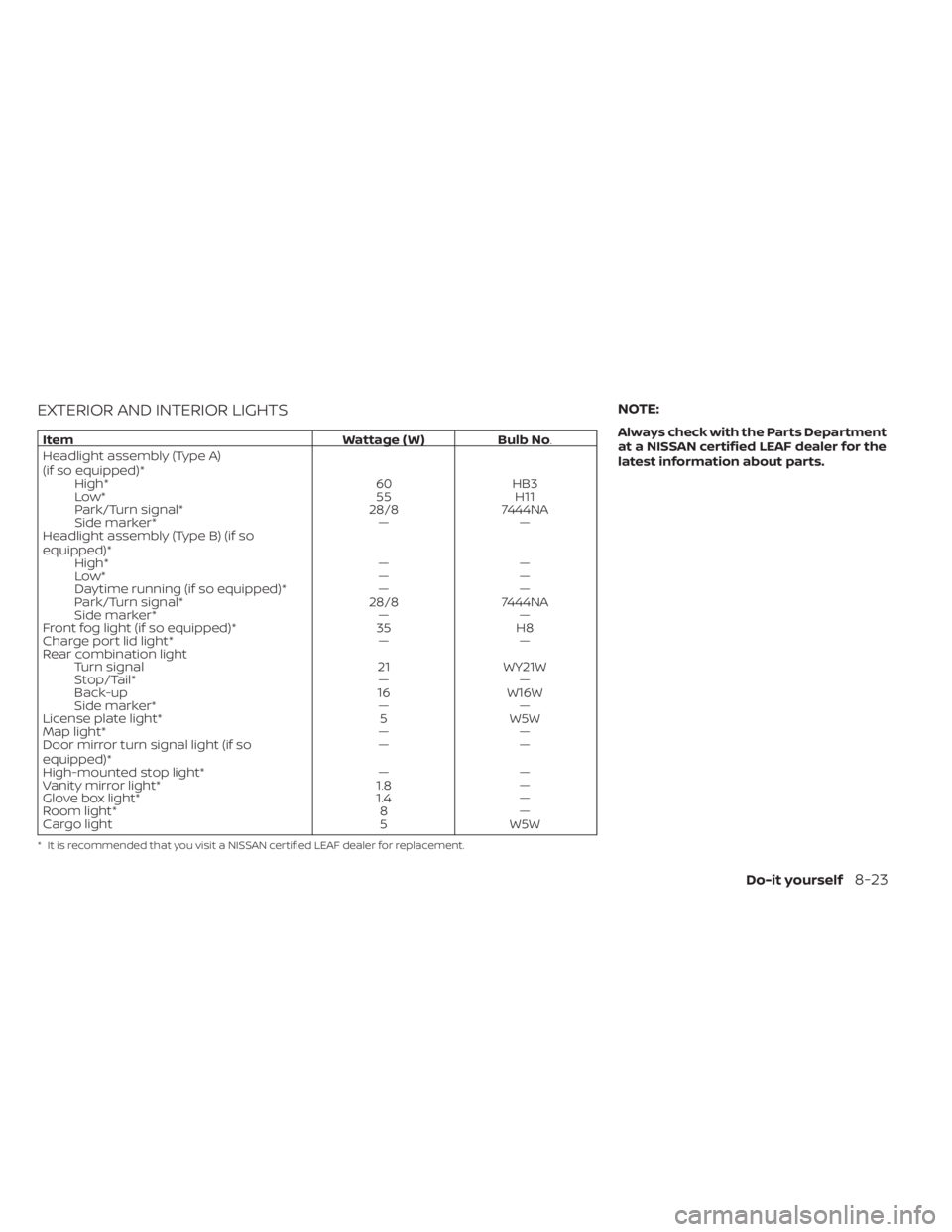
EXTERIOR AND INTERIOR LIGHTS
ItemWattage ( W )Bulb No.
Headlight assembly (Type A)
(if so equipped)* High* 60HB3
Low* 55H11
Park/Turn signal* 28/87444NA
Side marker* ——
Headlight assembly (Type B) (if so
equipped)* High* ——
Low* ——
Daytime running (if so equipped)* ——
Park/Turn signal* 28/87444NA
Side marker* ——
Front fog light (if so equipped)* 35H8
Charge port lid light* ——
Rear combination light Turn signal 21WY21W
Stop/Tail* ——
Back-up 16W16W
Side marker* ——
License plate light* 5W5W
Map light* ——
Door mirror turn signal light (if so
equipped)* ——
High-mounted stop light* ——
Vanity mirror light* 1.8—
Glove box light* 1.4—
Room light* 8—
Cargo light 5W5W
* It is recommended that you visit a NISSAN certified LEAF dealer for replacement.
NOTE:
Always check with the Parts Department
at a NISSAN certified LEAF dealer for the
latest information about parts.
Do-it yourself8-23
Page 594 of 602
Emergency charge.............CH-11Emergency EV (Electric Vehicle)
shut off...................5-12,6-3Emergency shutoff system........EV-10Emission control information label. . . .10-8EV Characteristics..............EV-11EV system...................EV-2EV unique information...........EV-24Event Data recorders............10-20EVSE
(Electric Vehicle Supply Equipment). . .CH-11Explanation of maintenance items.....9-2Explanation of scheduled maintenance
items...................... .9-5Extended storage switch..........8-19
F
F.M.V.S.S./C.M.V.S.S. certification label. . .10-8Flashers (See hazard warning flasher
switch)......................6-2Flat tire......................6-3Flat towing...................10-14Floor mat cleaning...............7-5Fluid
Brake fluid...................8-7Capacities and recommended
fuel/lubricants...............10-2Coolant................... .8-5Reduction gear fluid............8-7Windshield-washer fluid..........8-8Fog light switch................2-54
Fog lights
Bulb replacement.............8-22Front and rear sonar system.......5-163Front passenger air bag status
light................... .1-56, 1-58Front-seat mounted side-impact
supplemental air bag system........1-62Fuses.......................8-15Fusible links...................8-17
G
Garage door opener, HomeLink® Universal
Transceiver.........2-69, 2-70, 2-72, 2-73Gauge
Driving range................ .2-8Li-ion battery available charge
gauge.................... .2-9Li-ion battery temperature gauge. . . .2-7Odometer...................2-5Power meter.................2-7Speedometer................2-5General maintenance.............9-2Glove box................... .2-62
H
Hazard warning flasher switch........6-2Head restraints
Headrests...................1-7Headlights...................8-22Bulb replacement.............8-22Headlight switch..............2-48
Heated seat switches............2-55Heated seats................. .2-55Heated steering wheel............2-56Heated steering wheel switch.......2-56Heater......................4-26High voltage precautions..........EV-8Hill start....................5-168Hill start assist................5-168Home charge.................CH-9HomeLink® Universal
Transceiver.........2-69, 2-70, 2-72, 2-73Hood.......................3-18Horn...................... .2-54How to normal charge...........CH-9How to quick charge.......CH-35, CH-38How to trickle charge............CH-11
I
If the Li-ion battery becomes completely
discharged...................6-12Immediate charge.........CH-48, 2-58Immediate charge switch.....CH-48, 2-58Immobilizer system..............5-13Indicator lights.................2-24Indicator lights and audible reminders
(See warning/indicator lights and audible
reminders)
...................2-14Indicators for maintenance.........2-36Indicators for operation...........2-34Infants......................1-20Inside automatic anti-glare mirror. . . .3-24Instrument brightness control.......2-53
11-3