belt NISSAN LEAF 2022 Owner´s Manual
[x] Cancel search | Manufacturer: NISSAN, Model Year: 2022, Model line: LEAF, Model: NISSAN LEAF 2022Pages: 618, PDF Size: 4.3 MB
Page 437 of 618
• When the radar signal is temporarilyinterrupted.
Action to take:
When the conditions listed above are no
longer present, turn the system off using
the ProPILOT Assist switch. Turn the ProPI-
LOT Assist system back on to use the
system.
NOTE:
When the ICC system is canceled under
the following conditions at a standstill,
the electronic parking brake is auto-
matically activated:
• Any door is open.
• The driver’s seat belt is not fastened.
• Your vehicle has been stopped by the ICC system for approximately 3 min-
utes or longer.
• The shif t lever is not in the D (Drive) position or B mode.
• The VDC system is turned off.
• When distance measurement be- comes impaired due to adhesion of dirt
or obstruction to the sensor.
• When the radar signal is temporarily interrupted. Condition B
When there is inclement weather (rain, fog,
snow, etc.) blocking the front radar sensor,
the ICC system will automatically be can-
celed, the chime will sound and the "For-
ward Driving Aids Temporarily Disabled
Front Sensor Blocked See Owner’s Manual"
warning message will appear in the vehicle
information display.
Action to take:
When the conditions listed above are no
longer present, the warning message will
no longer be available in the vehicle infor-
mation display and the system will operate
normally. If the "Forward Driving Aids Tem-
porarily Disabled Front Sensor Blocked See
Owner’s Manual" warning message con-
tinues to be displayed, have the system
checked. It is recommended that you visit a
NISSAN dealer for this service.
Condition C
When the radar sensor of the front bumper
is covered with dirt or is obstructed, the ICC
system will automatically be canceled.
The chime will sound and the "Forward
Driving Aids Temporarily Disabled Front
Sensor Blocked See Owner’s Manual"
warning message will appear in the vehicle
information display.
Action to take:
If the warning message appears, stop the
vehicle in a safe place, place the shif t lever
in the P (Park) position, and turn the EV
system off. When the radar signal is tempo-
rarily interrupted, clean the sensor area of
the front bumper and restart the EV sys-
tem. If the "Forward Driving Aids Temporar-
ily Disabled Front Sensor Blocked See Own-
er’s Manual" warning message continues
to be displayed, have the system checked.
It is recommended that you visit a NISSAN
dealer for this service.
Condition D
When driving on roads with limited road
structures or buildings (for example, long
bridges, deserts, snow fields, driving next to
long walls), the system may illuminate the
system warning light and display the "For-
ward Driving Aids Temporarily Disabled
Front Sensor Blocked See Owner’s Manual"
warning message.
5-112Starting and driving
Page 518 of 618
7 Appearance and care
Cleaning exterior................................ 7-2
Washing ..................................... 7-2
Waxing ....................................... 7-3
Removing spots .............................. 7-3
Underbody ................................... 7-3
Glass ......................................... 7-3
Wheels ....................................... 7-3
Aluminum alloy wheels (if so equipped) ....... 7-4
Chromeparts................................ 7-4
Tire dressing ................................. 7-4
Cleaning interior ................................ 7-4 Air fresheners
................................ 7-5
Floor mats (if so equipped) ................... 7-5
Seatbelts ....................................7-6
Corrosion protection ............................ 7-7
Most common factors contributing to
vehicle corrosion ............................. 7-7
Environmental factors influence the
rate of corrosion ............................. 7-7
Protect your vehicle from corrosion .......... 7-7
Page 523 of 618
•Properly position the mats in the
floorwell using the floor mat posi-
tioning hook. For additional informa-
tion, see "Floor mat installation"
(P. 7-6).
• Make sure the floor mat does not in-
terfere with pedal operation.
• Periodically check the floor mats to
make sure they are properly
installed.
• Af ter cleaning the vehicle interior,
check the floor mats to make sure
they are properly installed.
The use of Genuine NISSAN floor mats can
extend the life of your vehicle carpet and
make it easier to clean the interior. Mats
should be maintained with regular clean-
ing and replaced if they become exces-
sively worn.
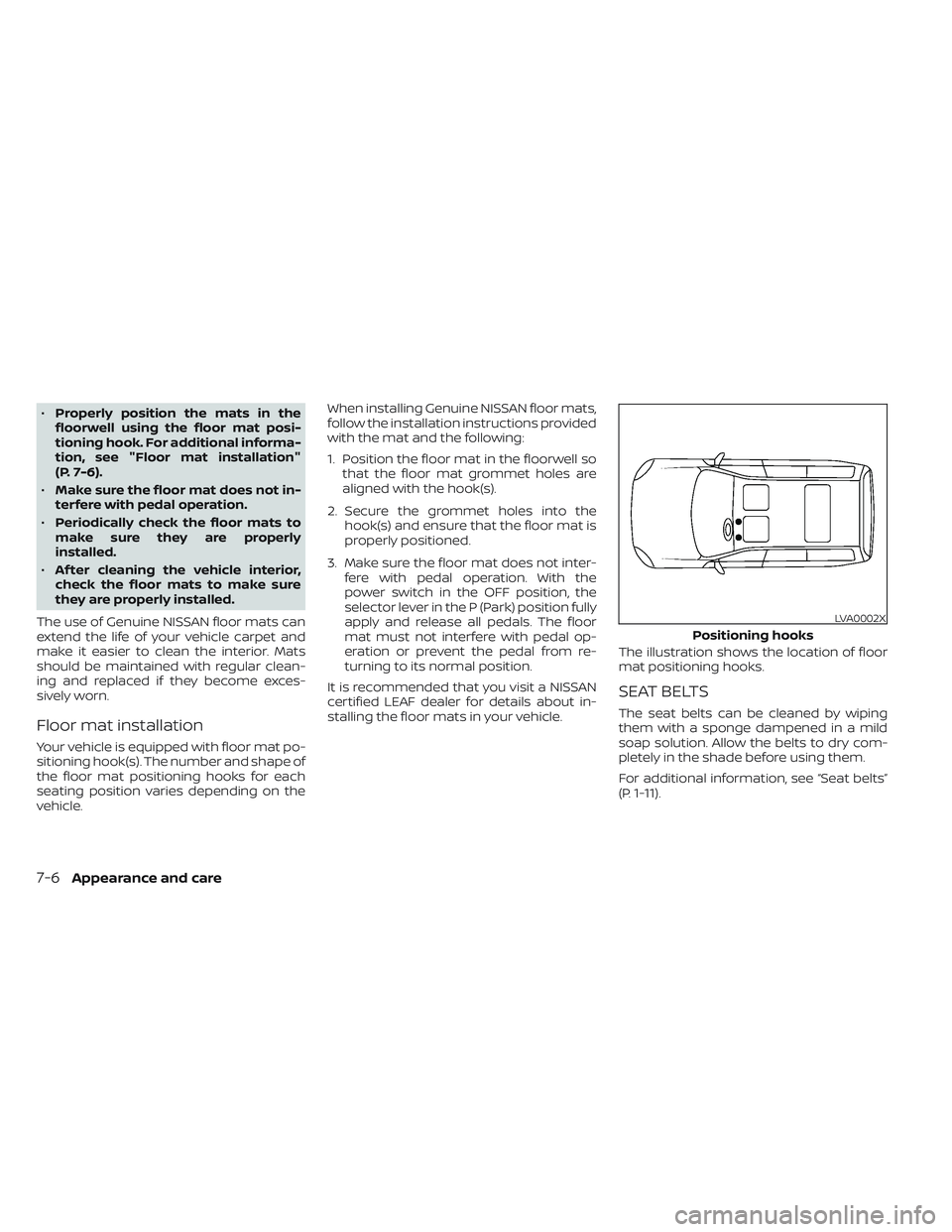
Floor mat installation
Your vehicle is equipped with floor mat po-
sitioning hook(s). The number and shape of
the floor mat positioning hooks for each
seating position varies depending on the
vehicle. When installing Genuine NISSAN floor mats,
follow the installation instructions provided
with the mat and the following:
1. Position the floor mat in the floorwell so
that the floor mat grommet holes are
aligned with the hook(s).
2. Secure the grommet holes into the hook(s) and ensure that the floor mat is
properly positioned.
3. Make sure the floor mat does not inter- fere with pedal operation. With the
power switch in the OFF position, the
selector lever in the P (Park) position fully
apply and release all pedals. The floor
mat must not interfere with pedal op-
eration or prevent the pedal from re-
turning to its normal position.
It is recommended that you visit a NISSAN
certified LEAF dealer for details about in-
stalling the floor mats in your vehicle. The illustration shows the location of floor
mat positioning hooks.
SEAT BELTS
The seat belts can be cleaned by wiping
them with a sponge dampened in a mild
soap solution. Allow the belts to dry com-
pletely in the shade before using them.
For additional information, see “Seat belts”
(P. 1-11).
LVA0002X
Positioning hooks
7-6Appearance and care
Page 524 of 618
WARNING
Do not allow wet seat belts to roll up in
the retractor. NEVER use bleach, dye, or
chemical solvents to clean the seat
belts, since these materials may se-
verely weaken the seat belt webbing.MOST COMMON FACTORS
CONTRIBUTING TO VEHICLE
CORROSION
• The accumulation of moisture-retaining dirt and debris in body panel sections,
cavities, and other areas.
• Damage to paint and other protective coatings caused by gravel and stone
chips or minor traffic accidents.
ENVIRONMENTAL FACTORS
INFLUENCE THE RATE OF
CORROSION
Moisture
Accumulation of sand, dirt and water on
the vehicle body underside can accelerate
corrosion. Wet floor coverings will not dry
completely inside the vehicle, and should
be removed for drying to avoid floor panel
corrosion.
Relative humidity
Corrosion will be accelerated in areas of
high relative humidity, especially those ar-
eas where the temperatures stay above
freezing, where atmospheric pollution ex-
ists, or where road salt is used.
Temperature
A temperature increase will accelerate the
rate of corrosion to those parts which are
not well ventilated.
Air pollution
Industrial pollution, the presence of salt in
the air in coastal areas, or heavy road salt
use will accelerate the corrosion process.
Road salt will also accelerate the disinte-
gration of paint surfaces.
PROTECT YOUR VEHICLE FROM
CORROSION
• Wash and wax your vehicle of ten to keepthe vehicle clean.
• Always check for minor damage to the paint and repair it as soon as possible.
• Keep drain holes at the bottom of the doors open to avoid water accumulation.
• Check the underbody for accumulation of sand, dirt or salt. If present, wash with
water as soon as possible.
CORROSION PROTECTION
Appearance and care7-7
Page 560 of 618
WARNING
•Tires should be periodically in-
spected for wear, cracking,
bulging or objects caught in
the tread. If excessive wear,
cracks, bulging or deep cuts
are found, the tire(s) should be
replaced.
• The original tires have built-in
tread wear indicators. When
wear indicators are visible, the
tire(s) should be replaced.
• Tires degrade with age and
use. Have tires, over 6 years old
checked by a qualified techni-
cian, because some tire dam-
age may not be obvious. Re-
place the tires as necessary to
prevent tire failure and pos-
sible personal injury. •
For additional information re-
garding tires, refer to “Impor-
tant Tire Safety Information”
(US) or “Tire Safety Informa-
tion” (Canada) in the Warranty
Information Booklet.
Replacing wheels and tires
When replacing a tire, use the same size,
tread design, speed rating and load carry-
ing capacity as originally equipped. For ad-
ditional information, see “Wheels and tires”
(P. 10-5) for recommended types and sizes
of tires and wheels.
WARNING
• The use of tires other than those rec-
ommended or the mixed use of tires
of different brands, construction
(bias, bias-belted or radial), or tread
patterns can adversely affect the
ride, braking, handling, Vehicle Dy-
namic Control (VDC) system, ground
clearance, body-to-tire clearance,
tire chain clearance, speedometer
calibration, headlight aim and bum-
per height. Some of these effects
may lead to accidents and could re-
sult in serious personal injury.
• If your vehicle was originally
equipped with four tires that were
the same size and you are only re-
placing two of the four tires, install
the new tires on the rear axle. Placing
new tires on the front axle may cause
loss of vehicle control in some driving
conditions and cause an accident
and personal injury.
Do-it yourself8-35
Page 567 of 618
Electric shif t P (Park) position mecha-
nism:On a steep hill check that the vehicle
is held securely while the vehicle is in the P
(Park) position without applying any
brakes.
Parking brake: Check the parking brake
operation regularly. The vehicle should be
securely held on a steep hill with only the
parking brake applied. If the parking brake
cannot keep a vehicle position, it is recom-
mended that you visit a NISSAN certified
LEAF dealer for this service.
Seats: Check seat position controls such
as seat adjusters, seatback recliner, etc., to
ensure they operate smoothly and all
latches lock securely in every position.
Check that the head restraints/headrests
move up and down smoothly and the locks
(if so equipped) hold securely in all latched
positions.
Seat belts: Check that all parts of the seat
belt system (for example, buckles, anchors,
adjusters and retractors) operate properly
and smoothly, and are installed securely.
Check the belt webbing for cuts, fraying,
wear or damage. Steering wheel:
Check for changes in the
steering conditions, such as excessive free
play, hard steering or strange noises.
Warning lights and chimes: Make sure all
warning lights and chimes are operating
properly.
Windshield defroster: Check that the air
emits from the defroster outlets properly
and in sufficient quantity when operating
the heater or air conditioner.
Windshield wiper and washer*: Check
that the wipers and washer operate prop-
erly and that the wipers do not streak.
Under the hood and vehicle
The maintenance items listed here should
be checked periodically.
12–volt battery (except for maintenance
free batteries)*: Check the fluid level in
each cell. The fluid should be at the bottom
of the filler opening. Vehicles operated in
high temperatures or under severe condi-
tions require frequent checks of the 12–volt
battery fluid level.
NOTE:
Care should be taken to avoid situations
that can lead to potential battery dis-
charge and potential no-start conditions
such as:
1. Installation or extended use of elec- tronic accessories that consume bat-
tery power when the EV system is not
running (Phone chargers, GPS, DVD
players, etc.)
2. Vehicle is not driven regularly and/or only driven short distances.
In these cases, the battery may need to
be charged to maintain battery health
Brake fluid level*: Make sure that the brake
fluid levels are between the MAX and MIN
lines on the reservoir.
Coolant level*: Check the coolant level
when the high voltage parts are cold. Make
sure that the coolant level is between the
MAX and MIN lines on the reservoir.
Fluid leaks: Check under the vehicle for
water or other fluid leaks af ter the vehicle
has been parked for a while. Water dripping
from the air conditioner af ter use is normal.
If you should notice any leaks, check for
cause and have it corrected immediately.
9-4Maintenance and schedules
Page 590 of 618
WARNING
•
It is extremely dangerous to
ride in the cargo area inside the
vehicle. In a collision, people
riding in these areas are more
likely to be seriously injured or
killed.
•Do not allow people to ride in
any area of your vehicle that is
not equipped with seats and
seat belts.
•Be sure everyone in your ve-
hicle is in a seat and using a
seat belt properly.
TERMS
It is important to familiarize yourself
with the following terms before
loading your vehicle:
• Curb Weight (actual weight of your vehicle) - vehicle weight including:
standard and optional equipment,
fluids and emergency tools. This
weight does not include passen-
gers and cargo.
• GVW (Gross Vehicle Weight) - curb weight plus the combined weight
of passengers and cargo.
•
GVWR (Gross Vehicle Weight Rating)
- maximum total combined weight
of the unloaded vehicle, passen-
gers, cargo, hitch, trailer tongue load
and any other optional equipment.
This information is located on the
F.M.V.S.S./C.M.V.S.S. label.
• GAWR (Gross Axle Weight Rating) - maximum weight (load) limit
specified for the front or rear axle.
This information is located on the
F.M.V.S.S./C.M.V.S.S. label. • GCWR (Gross Combined Weight
Rating) - The maximum total
weight rating of the vehicle, pas-
sengers, cargo, and trailer.
• Vehicle Capacity Weight, Load limit, Total load capacity - maximum to-
tal weight limit specified of the load
(passengers and cargo) for the ve-
hicle. This is the maximum com-
bined weight of occupants and
cargo that can be loaded into the
vehicle. If the vehicle is used to tow
a trailer, the trailer tongue weight
must be included as part of the
cargo load. This information is lo-
cated on the Tire and Loading In-
formation label.
• Cargo capacity - permissible weight of cargo, the subtracted
weight of occupants from the load
limit.
VEHICLE LOADING INFORMATION
Technical and consumer information10-11
Page 600 of 618
This vehicle is equipped with an Event Data
Recorder (EDR). The main purpose of an
EDR is to record, in certain crash or near
crash-like situations, such as an air bag
deployment or hitting a road obstacle, data
that will assist in understanding how a ve-
hicle’s systems performed. The EDR is de-
signed to record data related to vehicle dy-
namics and safety systems for a short
period of time, typically 30 seconds or less.
The EDR in this vehicle is designed to re-
cord such data as:
• How various systems in your vehicle wereoperating;
• Whether or not the driver and passenger safety belts were buckled/fastened;
• How far (if at all) the driver was depress- ing the accelerator and/or brake pedal;
and,
• How fast the vehicle was traveling.
• Sounds are not recorded.
These data can help provide a better un-
derstanding of the circumstances in which
crashes and injuries occur. NOTE: EDR data
are recorded by your vehicle only if a non-
trivial crash situation occurs; no data are
recorded by the EDR under normal driving
conditions and no personal data (e.g.,
name, gender, age, and crash location) are
recorded. However, other parties, such as law enforcement, could combine the EDR
data with the type of personally identif ying
data routinely acquired during a crash
investigation.
To read data recorded by an EDR, special
equipment is required, and access to the
vehicle or the EDR is needed. In addition to
the vehicle manufacturer and NISSAN cer-
tified LEAF dealer, other parties, such as law
enforcement, that have the special equip-
ment, can read the information if they have
access to the vehicle or the EDR.
EDR data will only be accessed with the
consent of the vehicle owner or lessee or
as otherwise required or permitted by law.
ADDITIONAL DATA RECORDING (on
vehicles equipped with optional
ProPILOT Assist)
If your vehicle is equipped with the optional
ProPILOT Assist, it will also be equipped
with a supplemental vehicle data record-
ing function.
The data recording function is designed to
record such data as:
• Driver operational status of accelerator,
brakes, steering, etc.
• Detection status of a vehicle ahead and lane markers • Vehicle information including distance to
vehicle ahead and lateral position
• Information on the operation of the Pro- PILOT Assist and other crash avoidance
features
• ProPILOT Assist malfunction diagnosis information
• External images from multi-sensing front camera (Available only when SRS air bag
or AEB with Pedestrian Detection system
is activated)
ProPILOT Assist does not record conversa-
tions, sounds or images of the inside of the
vehicle.
To read this vehicle data, special equip-
ment is required and access to the vehicle
or the recording unit is needed. This vehicle
data will only be accessed with the consent
of the vehicle owner or lessee or as other-
wise required or permitted by law.
If downloaded, NISSAN may use the data
recorded for the purpose of improving
NISSAN's vehicle safety performance.
NISSAN will not disclose/provide the re-
corded data to a third party except:
• With the consent of the vehicle owner or with the consent of the lessee
EVENT DATA RECORDERS (EDR)
Technical and consumer information10-21
Page 609 of 618
Intelligent Key systemKey operating range............3-8Key operation................3-9Mechanical key................3-3Remote keyless entry operation. . . .3-12Troubleshooting guide..........3-16Warning signals...............3-16Intelligent Lane Intervention (I-LI).....5-30Intelligent Ride Control...........5-166Intelligent Trace Control..........5-166Interior light replacement..........8-23Interior lights................. .2-69ISOFIX child restraints.............1-24
J
Jump starting.................6-10
K
Key.........................3-2Key fob battery replacement........8-19Keyless entry
With Intelligent Key system
(See Intelligent Key system)
.......3-12KeysNISSAN Intelligent Key®........3-2,3-6
L
LabelsAir bag warning labels..........1-66
Air conditioner specification label. . .10-9Emission control information label. . .10-8F.M.V.S.S./C.M.V.S.S. certification label. .10-8Motor serial number...........10-8Tire and Loading Information
label..................8-28, 10-9Vehicle identification number (VIN)
plate..................... .10-7Lane Departure Warning (LDW).......5-25LATCH (Lower Anchors and Tethers for
CHildren) System...............1-24Li-ion battery...............EV-2, 2-7Li-ion battery available charge gauge. . .2-9Li-ion battery status check........CH-48Li-ion battery temperature gauge......2-7Li-ion battery warmer............EV-5License plate, Installing front license
plate......................10-10Light
Air bag warning light........1-66, 2-18Bulb replacement..........8-21,8-22Ceiling light.................2-70Fog light bulb replacement.......8-22Fog light switch..............2-55Headlight switch..............2-48Headlights..................8-22Headlights bulb replacement......8-22Indicator lights...............2-24Interior lights................2-69Low tire pressure warning light.....2-20Map lights..................2-70Warning lights............2-15,2-18Warning/indicator lights and audible
reminders..................2-14
Lights, Exterior and interior light
replacement..................8-23Loading information (Refer to vehicle
loading information).............10-11LockAutomatic door lock............3-6Child safety rear door lock.........3-6Door locks................. .3-4Power door locks..............3-5Low tire pressure warning light......2-20Low tire pressure warning system
(Refer to Tire Pressure Monitoring System
(TPMS))
..................... .5-4
M
Maintenance
12-volt battery................8-9General maintenance...........9-2Indicators for maintenance.......2-36Inside the vehicle..............9-3Maintenance precautions.........8-2Outside the vehicle.............9-3Seat belt maintenance..........1-19Under the hood and vehicle.......9-4Maintenance requirements..........9-2Maintenance schedules............9-6Map lights....................2-70Meters and gaugesInstrument brightness control.....2-54MirrorAutomatic anti-glare inside mirror. . .3-24Outside mirrors..............3-25
11-4
Page 610 of 618
Rearview...................3-24Vanity mirror................3-24Mirrors......................3-24Motor......................10-5Before starting system..........5-13Starting the traction motor.......5-14Motor compartment..............8-4Motor serial number.............10-8Moving Object Detection (MOD)......4-23
N
NISSAN Intelligent Key®..........3-2,3-6NISSAN Intelligent Key® system.......5-10NissanConnectOwner's Manual.......4-2Normal charge................CH-9Home charge...............CH-9Occasional charge............CH-9Public charge...............CH-9
O
Occasional charge..............CH-9Odometer....................2-5Off-road recovery................5-8Oil
Capacities and recommended
fuel/lubricants
...............10-2Outside air temperature...........2-12Outside mirrors................3-25Owner's manual/service manual order
information................. .10-22
P
Parking..................5-18,5-19Parking brake operation.........5-19Parking/parking on hills.........5-159Parking brake.................5-18Parking brake break-in...........5-163Power
Power door locks..............3-5Power outlet................ .2-61Powerrearwindows...........2-68Power steering system.........5-161Power windows..............2-67Rear power windows...........2-68Power economy...............5-157Power meter...................2-7Power outlet................. .2-61Power steering................5-161Power switch...............5-9, 5-11Precautions
Brake precautions............5-161Charging................. .CH-2Cruise control...............5-65High voltage precautions........EV-8Maintenance precautions.........8-2Precautions on booster seats......1-22Precautions on child restraints.....1-22Precautions on seat belt usage.....1-11Precautions on supplemental restraint
system................... .1-45Precautions when starting and
driving.................... .5-4Road accident precautions.......EV-9ProPILOT Assist................5-92
Public charge.................CH-9Push starting..................6-13
Q
Quick charge............CH-35, CH-38
R
Radio
Car phone or CB radio..........4-43Radio frequency remote controlWarning signals...............3-16Rapid air pressure loss............5-8Rear Automatic Braking (RAB).......5-136Rear center seat belt.............1-18Rear Cross Traffic Alert (RCTA).......5-58Rear Door Alert................2-60Rear hatch...................3-19Rear power windows.............2-68Rear window and outside mirror defroster
switch..................... .2-47Rear window wiper and washer
switches....................2-46Rearview mirror................3-24RearView Monitor................4-3Recorders
Event Data................ .10-21Reduction gear fluid..............8-7Registering a vehicle in another
country..................... .10-7Remote charge...............CH-48Remote climate control...........4-41
11-5