charge NISSAN LEAF 2022 Owner´s Manual
[x] Cancel search | Manufacturer: NISSAN, Model Year: 2022, Model line: LEAF, Model: NISSAN LEAF 2022Pages: 618, PDF Size: 4.3 MB
Page 335 of 618
NISSAN INTELLIGENT KEY®
SYSTEM
The Intelligent Key system allows the driver
to start the EV system without taking the
key out of a pocket or purse. The operating
environment and/or conditions may affect
Intelligent Key system operation.
Some indicators and warnings for opera-
tion are displayed on the vehicle informa-
tion display. For additional information, see
“Vehicle information display” (P. 2-26).
CAUTION
• Be sure to carry the Intelligent Key
with you when operating the vehicle.
• Never leave the Intelligent Key inside
the vehicle when you leave the
vehicle.
OPERATING RANGE FOR EV START
FUNCTION
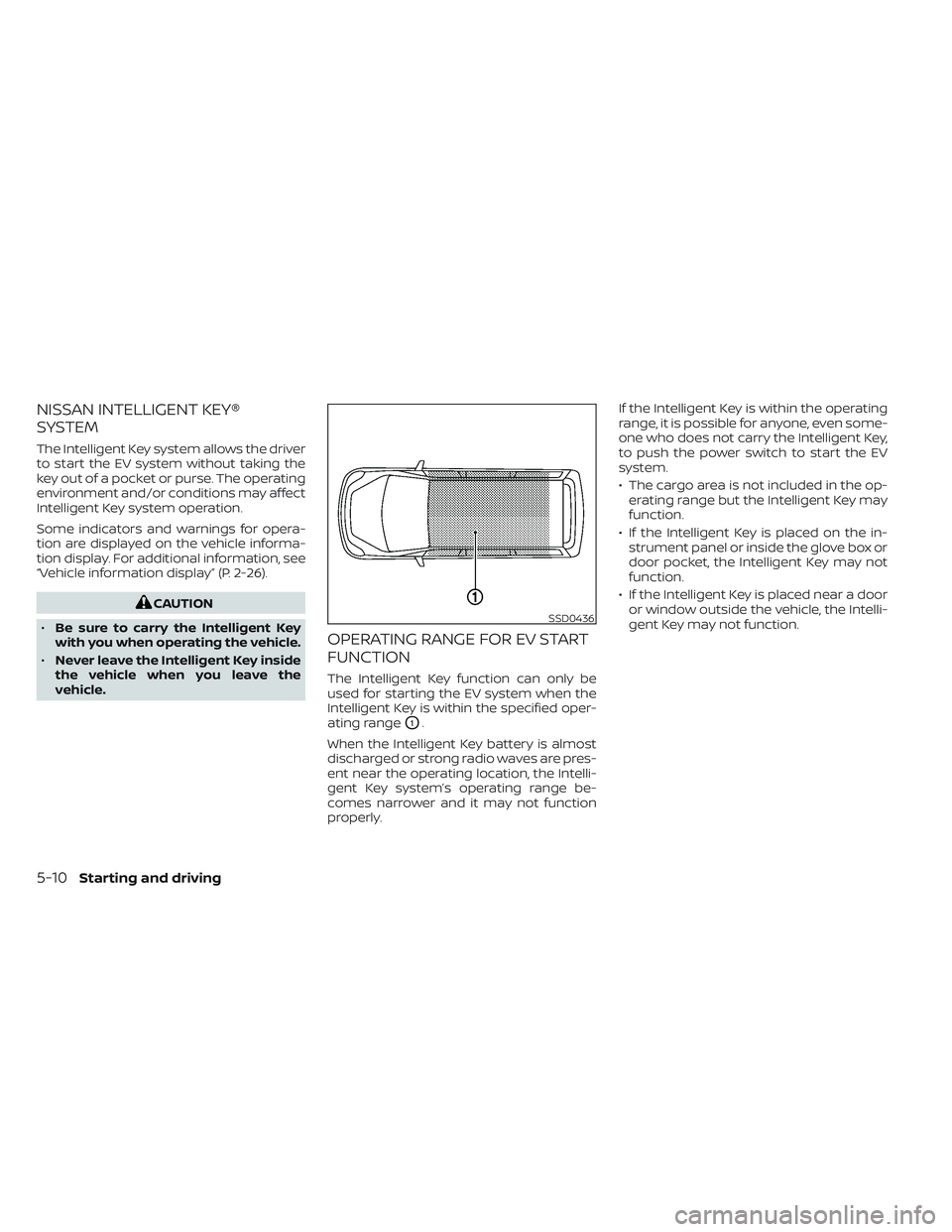
The Intelligent Key function can only be
used for starting the EV system when the
Intelligent Key is within the specified oper-
ating range
O1.
When the Intelligent Key battery is almost
discharged or strong radio waves are pres-
ent near the operating location, the Intelli-
gent Key system’s operating range be-
comes narrower and it may not function
properly. If the Intelligent Key is within the operating
range, it is possible for anyone, even some-
one who does not carry the Intelligent Key,
to push the power switch to start the EV
system.
• The cargo area is not included in the op-
erating range but the Intelligent Key may
function.
• If the Intelligent Key is placed on the in- strument panel or inside the glove box or
door pocket, the Intelligent Key may not
function.
• If the Intelligent Key is placed near a door or window outside the vehicle, the Intelli-
gent Key may not function.
SSD0436
5-10Starting and driving
Page 337 of 618
POWER SWITCH POSITIONS
LOCK (Normal parking position)
The power switch can only be locked in this
position.
The power switch will be unlocked when it
is placed in the ACC position while the
driver is carrying the Intelligent Key.
ACC (Accessories)
This position activates electrical accesso-
ries, such as the radio, when the EV system
is off.
ON
This position turns on the EV system and
electrical accessories.
READY (Normal operating
position)
This position turns on the EV system and
electrical accessories and the vehicle can
be driven.
OFF
This position turns off the EV system.The power switch cannot be placed in the
LOCK position until the vehicle is in the P
(Park) position.
CAUTION
Do not leave the vehicle with the power
switch in the ACC position for an ex-
tended period of time. This can dis-
charge the 12-volt battery.
NOTE:
If the power switch is pushed quickly or
is pushed twice quickly, the switch may
not function even if a chime sound is
heard. Push the switch again more
slowly.
EMERGENCY EV SHUT OFF
To shut off the EV system in an emergency
situation while driving, perform the follow-
ing procedure:
• Rapidly push the power switch three con- secutive times in less than 1.5 seconds, or
• Push and hold the power switch for more than 2 seconds.
NISSAN INTELLIGENT KEY®
BATTERY DISCHARGE
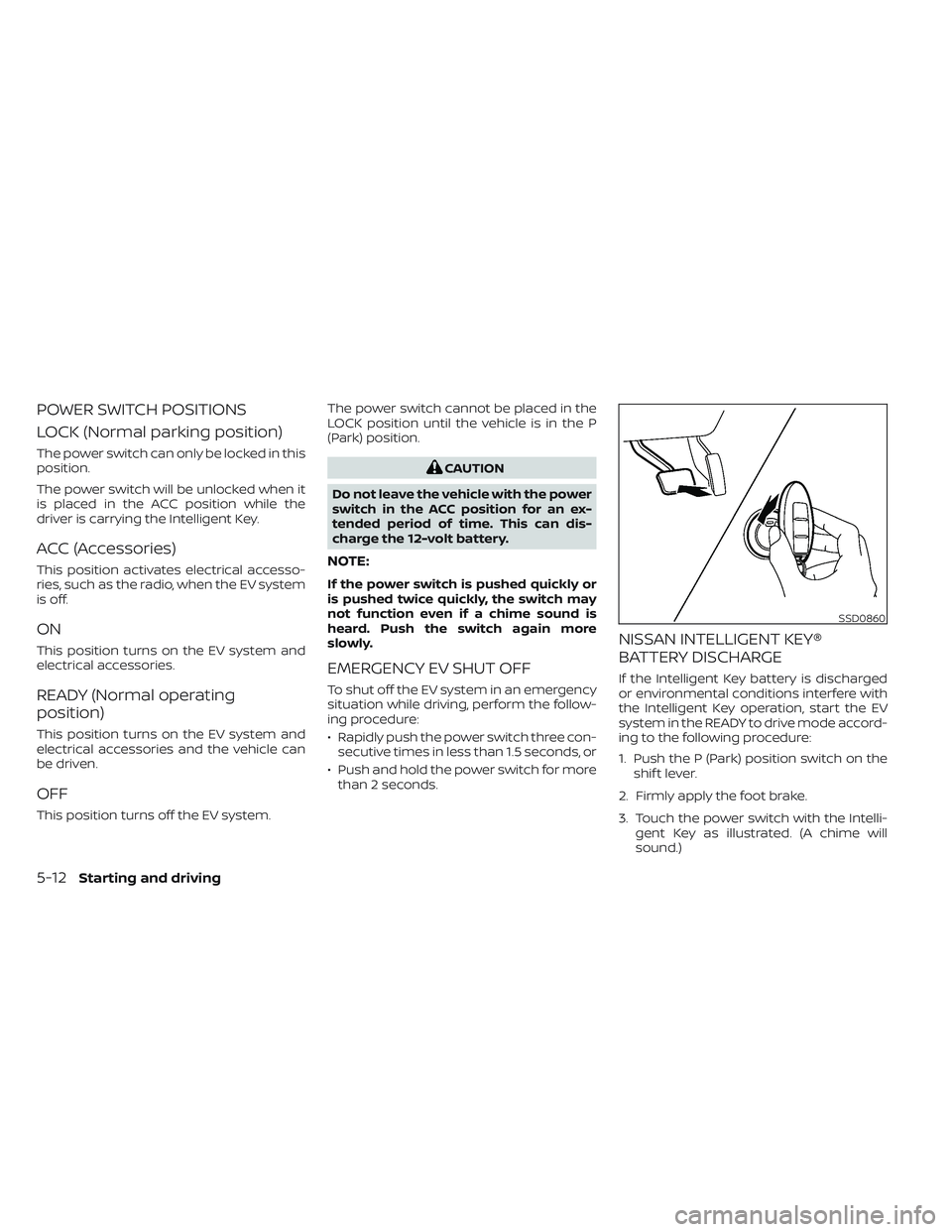
If the Intelligent Key battery is discharged
or environmental conditions interfere with
the Intelligent Key operation, start the EV
system in the READY to drive mode accord-
ing to the following procedure:
1. Push the P (Park) position switch on the shif t lever.
2. Firmly apply the foot brake.
3. Touch the power switch with the Intelli- gent Key as illustrated. (A chime will
sound.)
SSD0860
5-12Starting and driving
Page 338 of 618
4. Push the power switch while depressingthe brake pedal within 10 seconds af ter
the chime sounds. The power switch
position changes to the READY to drive
mode.
Af ter step 3 is performed, if the power
switch is pushed without depressing the
brake pedal, the power switch position will
change to ACC.
NOTE:
• When the power switch is placed in the ACC or ON position or READY to drive
mode by the above procedure, the EV
system operation for discharged Intel-
ligent Key system indicator appears on
the vehicle information display even if
the Intelligent Key is inside the vehicle.
This is not a malfunction. To stop the
warning indicator from blinking, touch
the power switch with the Intelligent
Key again.
• If the Intelligent Key battery discharge indicator appears on the vehicle infor-
mation display, replace the battery as
soon as possible. For additional infor-
mation, see “NISSAN Intelligent Key®
battery replacement” (P. 8-19).
NISSAN VEHICLE IMMOBILIZER
SYSTEM
The NISSAN Vehicle Immobilizer System
will not allow the power switch to be placed
in the READY to drive position without the
use of the registered key.
If the power switch fails to place the vehicle
into the READY to drive position using the
registered key, it may be due to interfer-
ence caused by another registered key, an
automated toll road device or automated
payment device on the key ring. Restart the
EV system using the following procedure:
1. Leave the power switch in the ON posi- tion for approximately 5 seconds.
2. Place the power switch in the OFF posi- tion and wait approximately 10 seconds.
3. Repeat steps 1 and 2 again.
4. Place the power switch in the READY to drive position while holding the device
(which may have caused the interfer-
ence) separate from the registered key.
If this procedure allows the power
switch to be placed in the READY to drive
mode, NISSAN recommends placing the
registered key on a separate key ring to
avoid interference from other devices. • Make sure that the area around the ve-
hicle is clear.
• Check fluid levels such as coolant, brake fluid, and windshield-washer fluid as fre-
quently as possible.
• Check that all windows and lights are clean.
• Visually inspect tires for their appearance and condition. Also check tires for proper
inflation.
• Check that all doors are closed.
• Position the seat and adjust the head restraints/headrests.
• Adjust the inside and outside mirrors.
• Fasten seat belts and ask all passengers to do likewise.
• Check the operation of the warning lights when the power switch is pushed to the
ON position. For additional information,
see “Warning lights, indicator lights and
audible reminders” (P. 2-14).
BEFORE STARTING THE EV SYSTEM
Starting and driving5-13
Page 339 of 618
1. Confirm the parking brake is applied.
2. Confirm that the vehicle is in the P (Park)position.
When the power switch is placed in the
ON position, the EV is designed not to
operate unless the shif t lever is in the P
(Park) or N (Neutral) position.
The Intelligent Key must be carried
with you when operating the power
switch.
3. Depress the brake pedal and push the power switch to place the EV system in
the READY to drive position.
To place the vehicle in the READY to drive
position immediately, push and release
the power switch while depressing the
brake pedal with the power switch in any
position. The READY to drive indicator
light
in the meter illuminates.
4. To stop the EV system, push the P (Park) position switch on the shif t lever, and
place the power switch in the OFF
position.
NOTE:
Care should be taken to avoid situations
that can lead to potential battery dis-
charge and potential no-start conditions
such as:
1. Installation or extended use of elec-tronic accessories that consume bat-
tery power when the EV system is not
running (phone chargers, GPS, DVD
players, etc.).
2. The vehicle is not driven regularly and/or only driven short distances.
In these cases, the battery may need to
be charged to maintain battery health.
ELECTRIC SHIFT CONTROL
SYSTEM
This vehicle is electronically controlled to
produce maximum available power and
smooth operation.
The recommended operating procedures
for this vehicle are shown on the following
pages.
Starting the vehicle
1. Af ter placing the vehicle in the READY to drive position, fully depress the foot
brake pedal before moving the shif t lever
to the D (Drive) position.
The shif t lever of this vehicle is de-
signed so that the foot brake pedal
must be depressed before shif ting
from the P (Park) position to any driv-
ing position while the power switch is
in the ON position.
The shif t lever cannot be moved out of
the P (Park) position and into any of
the other positions if the power switch
is placed in the LOCK, OFF or ACC posi-
tion or if the Intelligent Key is
removed.
STARTING THE EV SYSTEM DRIVING THE VEHICLE
5-14Starting and driving
Page 345 of 618
NOTE:
• If a malfunction occurs in the elec-tronic parking brake system (for ex-
ample, due to battery discharge), it is
recommended that you visit a NISSAN
certified LEAF dealer.
• When the ICC system (if so equipped) is canceled under the following condi-
tions at a standstill, the electronic
parking brake is automatically
activated:– Any door is open.
– The driver’s seat belt is not fastened.
– Your vehicle has been stopped by the ICC system for approximately 3
minutes or longer.
– The shif t lever is not in the D (Drive) position or B mode.
– The Vehicle Dynamic Control system is turned off.
– When distance measurement be- comes impaired due to adhesion of
dirt or obstruction to the sensor.
– When the radar signal is temporarily interrupted.
Manual operation
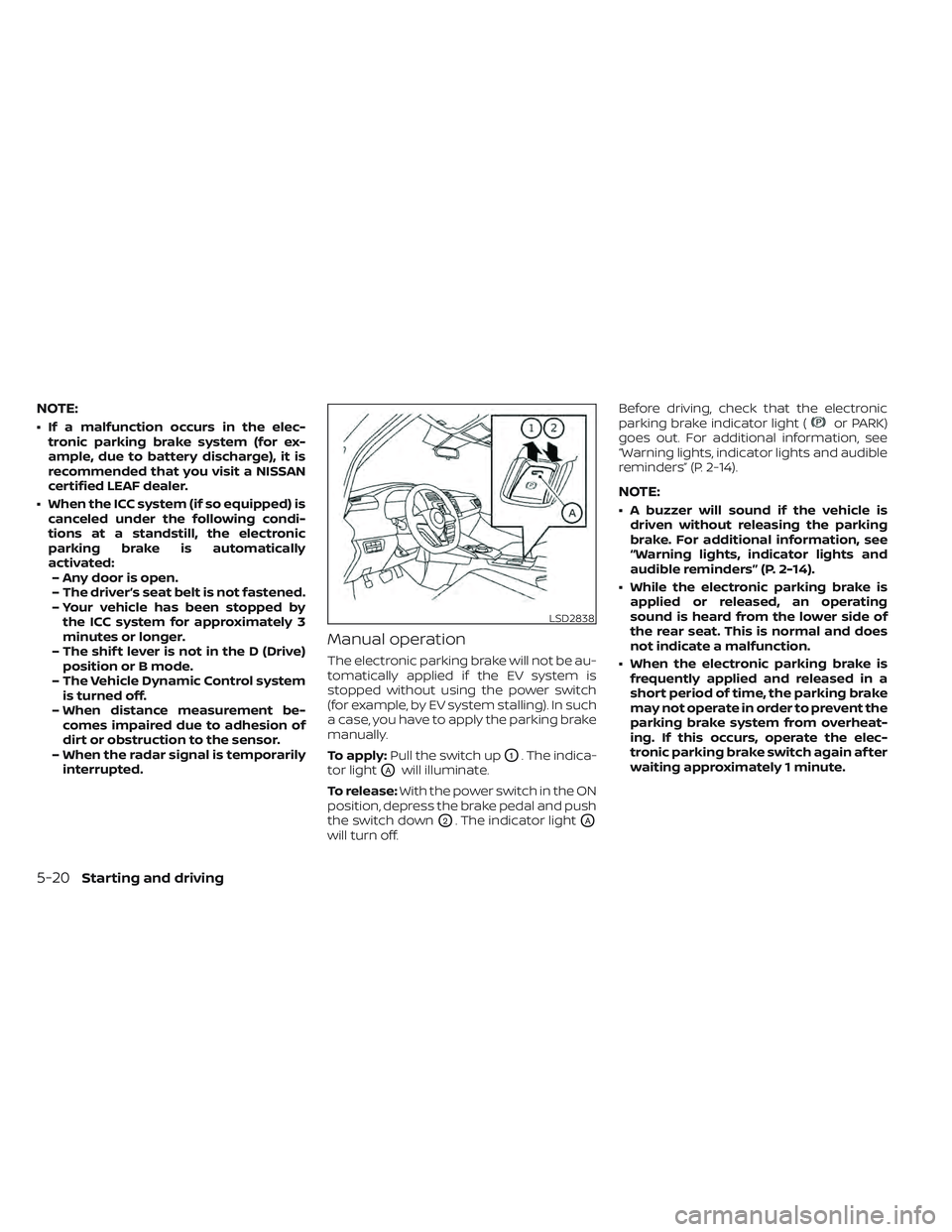
The electronic parking brake will not be au-
tomatically applied if the EV system is
stopped without using the power switch
(for example, by EV system stalling). In such
a case, you have to apply the parking brake
manually.
To apply: Pull the switch up
O1. The indica-
tor light
OAwill illuminate.
To release: With the power switch in the ON
position, depress the brake pedal and push
the switch down
O2. The indicator lightOA
will turn off. Before driving, check that the electronic
parking brake indicator light (
or PARK)
goes out. For additional information, see
“Warning lights, indicator lights and audible
reminders” (P. 2-14).
NOTE:
• A buzzer will sound if the vehicle is driven without releasing the parking
brake. For additional information, see
“Warning lights, indicator lights and
audible reminders” (P. 2-14).
• While the electronic parking brake is applied or released, an operating
sound is heard from the lower side of
the rear seat. This is normal and does
not indicate a malfunction.
• When the electronic parking brake is frequently applied and released in a
short period of time, the parking brake
may not operate in order to prevent the
parking brake system from overheat-
ing. If this occurs, operate the elec-
tronic parking brake switch again af ter
waiting approximately 1 minute.
LSD2838
5-20Starting and driving
Page 483 of 618

• Drive at a constant speed. Maintain cruis-ing speeds with a constant accelerator
position or by using cruise control when
appropriate.
• Accelerate slowly and smoothly. Gently press and release the accelerator pedal
for acceleration and deceleration.
• Drive at moderate speeds on the highway.
• Avoid frequent stopping and braking. Maintain a safe distance behind other
vehicles.
• Turn off the air conditioner/heater when it is not necessary.
• Select a moderate temperature setting for heating or cooling to help reduce
power consumption.
• Use the air conditioner/heater and close windows to reduce drag when cruising at
a highway speed. • Release the accelerator pedal to slow
down and do not apply the brakes when
traffic and road conditions allow.– This vehicle is equipped with a regen- erative brake system. The primary pur-
pose of the regenerative brake system
is to provide some power to recharge
the Li-ion battery and extend driving
range. A secondary benefit is “engine
braking” that operates based on Li-ion
battery conditions. In the D (Drive) posi-
tion, when the accelerator pedal is re-
leased, the regenerative brake system
provides some deceleration and some
power to the Li-ion battery. The ECO Drive Report appears for approxi-
mately 30 seconds af ter placing the power
switch in the OFF position, driving the ve-
hicle for more than 0.3 miles (500 m), and
pressing the
button on the steering
wheel.
ECO DRIVE REPORT
5-158Starting and driving
Page 486 of 618
WARNING
• If the READY to drive indicator light is
off while driving, the power assist for
the steering will not work. Steering
will be harder to operate.
• When the power steering warning
light illuminates while the READY to
drive indicator light is on, the power
assist for the steering will cease op-
eration. You will still have control of
the vehicle but the steering will be
harder to operate.
The power steering system is designed to
provide power assistance while driving to
operate the steering wheel with less effort.
When the steering wheel is operated re-
peatedly or continuously while parking or
driving at a very low speed, the power as-
sist for the steering wheel will be reduced.
This is to prevent overheating of the power
steering system and help protect it from
getting damaged. When the power assis-
tance is reduced, steering wheel operation
will become harder. When the temperature
of the power steering system goes down,
the power assistance level will return to
normal. Avoid repeating such steering
wheel operations that could cause the
power steering system to overheat. You may hear a noise when the steering
wheel is operated quickly. However, this is
not a malfunction.
If the power steering warning light
illuminates while the READY to drive indica-
tor light is on, it may indicate the power
steering system is not functioning properly
and may need servicing. Have the power
steering system checked. It is recom-
mended that you visit a NISSAN certified
LEAF dealer for this service. For additional
information, see “Power steering warning
light” (P. 2-23).
The power assist for steering stops operat-
ing when both the power steering warning
light and READY to drive indicator light are
illuminated. You will still have control of the
vehicle. However, greater steering effort is
needed, especially in sharp turns and at
low speeds.
BRAKE PRECAUTIONS
This vehicle is equipped with two braking
systems:
1. Hydraulic brake system
2. Regenerative brake system
Hydraulic brake system
The hydraulic brake system is similar to the
brakes used on conventional vehicles.
The brake system has two separate hy-
draulic circuits. If one circuit malfunctions,
you will still have braking at two wheels.
Regenerative brake system
The primary purpose of the regenerative
brake system is to provide some power to
help recharge the Li-ion battery and ex-
tend driving range. A secondary benefit is
“engine braking” that operates based on
battery conditions.
In the D (Drive) range, when the accelerator
is released, the regenerative brake system
provides some deceleration and gener-
ates power for the Li-ion battery. Power is
also generated when the brake pedal is
applied.
POWER STEERING SYSTEM
BRAKE SYSTEM
Starting and driving5-161
Page 487 of 618
When you put the shif t lever in the B mode
and take your foot off the accelerator
pedal, more regenerative brake is applied
than in the D (Drive) position. However, dur-
ing high-speed driving you may feel that
regenerative brake provides less decelera-
tion than the engine braking in an ordinary
vehicle. This is normal.
Less deceleration is provided by the regen-
erative brake system when the Li-ion bat-
tery is fully charged. Regenerative brake is
automatically reduced when the Li-ion
battery is fully charged to prevent the Li-ion
battery from becoming overcharged. Re-
generative brake is also automatically re-
duced when the battery temperature is
high/low (indicated by the red/blue zones
on the battery temperature gauge) to pre-
vent Li-ion battery damage.
The brake pedal should be used to slow or
stop the vehicle depending on traffic or
road conditions. The vehicle brakes are not
affected by regenerative brake system
operation.NOTE:
• When applying the regenerativebrakes, you may hear a sound coming
from the regenerative brake system.
This is a normal operating characteris-
tic of an EV.
• If the power switch position is in a po- sition other than ON or READY to drive,
you can stop the vehicle by depressing
the brake pedal. However, greater foot
pressure on the brake pedal will be re-
quired to stop the vehicle, and the
stopping distance will be longer.
• When depressing the brake pedal, the brake pedal feel will not be smooth or
may change when the cooperative re-
generative brake system activates.
However, the electronically controlled
brake system is operating normally
and this does not indicate a
malfunction.
Using the brakes
Avoid resting your foot on the brake pedal
while driving. This will cause overheating of
the brakes, wearing out of the brake pads
and shoes faster, and will reduce driving
range. To help reduce brake wear, and to prevent
the brakes from overheating, reduce speed
and select B mode before going down a
slope or long grade. Overheated brakes
may reduce braking performance and
could result in loss of vehicle control.
WARNING
• While driving on a slippery surface,
be careful when braking or accelerat-
ing. Abrupt braking or accelerating
could cause the wheels to skid, which
could result in an accident.
• If the brake pedal is depressed with
the EV system OFF, you may feel an
increased brake pedal effort and a
decreased pedal stroke. If the BRAKE
warning light does not illuminate
and the brake pedal feels like it has
returned to its normal state af ter the
EV system is started, this indicates
that there is no malfunction and the
vehicle can be operated normally.
Wet brakes
When the vehicle is washed or driven
through water, the brakes may get wet. As
a result, the braking distance will be longer
and the vehicle may pull to one side during
braking.
5-162Starting and driving
Page 498 of 618
The hill start assist system automatically
keeps the brakes applied to help prevent
the vehicle from rolling backwards in the
time it takes the driver to release the brake
pedal and apply the accelerator when the
vehicle is stopped on a hill.
Hill start assist will operate automatically
under the following conditions:
• The shif t lever is placed in the D (Drive), Bmode, or R (Reverse) position.
• The vehicle is stopped completely on a hill by applying the brake.
The maximum holding time is 2 seconds.
Af ter 2 seconds the vehicle will begin to roll
back and hill start assist will stop operating
completely.
Hill start assist will not operate when the
shif t lever is placed in the N (Neutral) or P
(Park) position or on a flat and level road.CAUTION
To prevent damage to the Li-ion bat-
tery: Do not store the vehicle in tem-
peratures below -13°F (-25°C) for over
seven days. If the outside temperature
is -13°F (-25°C) or less, the Li-ion battery
may freeze and it cannot be charged or
provide power to run the vehicle. Move
the vehicle to a warm location.
NOTE:
• Connect the charger to the vehicle and place the power switch in the OFF po-
sition when parking the vehicle if tem-
peratures may go below -4°F (-20°C).
For models with 40 kWh battery
model, this provides external power to
the Li-ion battery warmer (if so
equipped) when it operates and does
not discharge the Li-ion battery. Ve-
hicle driving range is reduced if the Li-
ion battery warmer (if so equipped) op-
erates (Li-ion battery temperature
approximately -4°F (-20°C) or colder)
while driving the vehicle. You may need
to charge the Li-ion battery sooner
than in warmer temperatures.
• The Li-ion battery requires more time to charge when the Li-ion battery
warmer (if so equipped) operates. • The predicted charging time displayed
on the meter and navigation system (if
so equipped) increases when the Li-ion
battery warmer (if so equipped)
operates.
• Vehicle range may be substantially re- duced in extremely cold conditions (for
example under -4°F (-20°C)).
• Using the climate control system to heat the cabin when outside tempera-
ture is below 32°F (0°C) uses more elec-
tricity and affects vehicle range more
than when using the heater when the
temperature is above 32°F (0°C).
• Climate control performance is re- duced when using the Climate Ctrl.
Timer or Remote Climate Control while
the Li-ion battery warmer (if so
equipped) operates (for models with
40 kWh battery model). Set only the
charging timer [End Time] when charg-
ing in cold weather. The vehicle auto-
matically determines when to start
charging to fully charge the Li-ion bat-
tery, even if the Li-ion battery warmer
operates. Charging ends before the set
end time if the Li-ion battery is fully
charged.
COLD WEATHER DRIVING
Starting and driving5-173
Page 499 of 618
FREEING A FROZEN DOOR LOCK
To prevent a door lock from freezing, apply
deicer through the key hole. If the lock be-
comes frozen, heat the key before inserting
it into the key hole or use the remote key-
less entry key fob.
ANTIFREEZE
In the winter when it is possible that the
outside temperature will drop below 32°F
(0°C), check the antifreeze to ensure proper
winter protection. For additional informa-
tion, see “Cooling system” (P. 8-5).
12-VOLT BATTERY
If the 12-volt battery is not fully charged
during extremely cold weather conditions,
the 12-volt battery fluid may freeze and
damage the 12-volt battery. To maintain
maximum efficiency, the 12-volt battery
should be checked regularly. For additional
information, see “12-volt battery” (P. 8-9).
DRAINING OF COOLANT WATER
If the vehicle is to be lef t outside without
antifreeze, drain the cooling system. Refill
before operating the vehicle. For additional
information, see “Cooling system” (P. 8-5).
TIRE EQUIPMENT
SUMMER tires have a tread designed to
provide superior performance on dry
pavement. However, the performance of
these tires will be substantially reduced in
snowy and icy conditions. If you operate
your vehicle on snowy or icy roads, NISSAN
recommends the use of MUD & SNOW or
ALL SEASON tires on all four wheels. It is
recommended that you visit a NISSAN cer-
tified LEAF dealer for the tire type, size,
speed rating and availability information.
For additional traction on icy roads, stud-
ded tires may be used. However, some U.S.
states and Canadian provinces prohibit
their use. Check local, state and provincial
laws before installing studded tires.
Skid and traction capabilities of studded
snow tires, on wet or dry surfaces, may
be poorer than that of non-studded
snow tires.
Tire chains may be used. For additional in-
formation, see “Tire chains” (P. 8-33).
SPECIAL WINTER EQUIPMENT
It is recommended that the following items
be carried in the vehicle during winter:
• A scraper and stiff-bristled brush to re-move ice and snow from the windows
and wiper blades.
• A shovel to dig the vehicle out of snow-drif ts.
• Extra windshield-washer fluid to refill the reservoir tank.
DRIVING ON SNOW OR ICE
WARNING
• Wet ice (32°F, 0°C and freezing rain),
very cold snow or ice can be slick and
very hard to drive on. The vehicle will
have much less traction or “grip” un-
der these conditions. Try to avoid
driving on wet ice until the road is
salted or sanded.
• Whatever the conditions, drive with
caution. Accelerate and slow down
with care. If accelerating too fast, the
drive wheels will lose even more
traction.
5-174Starting and driving