warning NISSAN LEAF 2022 Owner´s Manual
[x] Cancel search | Manufacturer: NISSAN, Model Year: 2022, Model line: LEAF, Model: NISSAN LEAF 2022Pages: 618, PDF Size: 4.3 MB
Page 380 of 618
• If the driver activates the turn signalbefore a vehicle enters the detection
zone, the side indicator light will flash
but no chime will sound when the
other vehicle is detected.
• I-BSI will not operate or will stop oper- ating and only a warning chime will
sound under the following conditions:– When the brake pedal is depressed.
– When the vehicle is accelerated dur- ing I-BSI system operation.
– When steering quickly.
– When the ICC, I-FCW or AEB with Pe- destrian Detection warnings sound.
– When the hazard warning flashers are operated.
– When driving on a curve at a high speed.
SYSTEM TEMPORARILY
UNAVAILABLE
Under the following conditions, a chime will
sound, the following message will appear
in the vehicle information display and the
I-BSI system will be turned off automati-
cally. The I-BSI system will not be available
until the conditions no longer exist.
• “Not available Poor Road Conditions”
• When the VDC system (except TCS func-tion) or ABS operates. • “Currently not available”
• When the VDC system is turned off.
Action to take:
When the above conditions no longer exist,
push the ProPILOT Assist switch (models
with ProPILOT Assist) or the dynamic driver
assistance switch (models without ProPI-
LOT Assist) again to turn the I-BSI system
back on.
When radar blockage is detected, the I-BSI
system will be turned off automatically, a
chime will sound and the “Unavailable: Side
Radar Obstruction” warning message will
appear in the vehicle information display.
The I-BSI system is not available until the
conditions no longer exist. For additional
information, see “System maintenance”
(P. 5-56).
Action to take:
When the above conditions no longer exist,
turn the I-BSI system on again. If the “Un-
available: Side Radar Obstruction” warning
message appears even af ter the I-BSI sys-
tem is turned on again, stop the vehicle in a
safe location, place the vehicle in the P
(Park) position and turn the EV system off.
Check for and remove objects obscuring
the radar sensors on the rear bumper, and
restart the EV system.
If the vehicle is parked in direct sunlight
under high temperature conditions (over
approximately 104°F (40°C)) and then the
I-BSI system is turned on, the I-BSI system
may be deactivated automatically. The
“Unavailable: High Cabin Temperature”
warning message will appear in the vehicle
information display.
Action to take:
When the interior temperature is reduced,
push the ProPILOT Assist switch (models
with ProPILOT Assist) or the dynamic driver
assistance switch (models without ProPI-
LOT Assist) again to turn the I-BSI system
back on.
SYSTEM MALFUNCTION
When the I-BSI system malfunctions, it will
be turned off automatically, a chime will
sound, and the “Not available System Mal-
function” warning message with the BSW
indicator (orange) will appear in the vehicle
information display.
Starting and driving5-55
Page 381 of 618
Action to take:
Stop the vehicle in a safe location, place the
vehicle in the P (Park) position, turn the EV
system off and restart the EV system. If the
“Not available System Malfunction” warning
message with the BSW indicator (orange)
continues to be displayed, have the I-BSI
system checked. It is recommended you
visit a NISSAN certified LEAF dealer for this
service.
SYSTEM MAINTENANCE
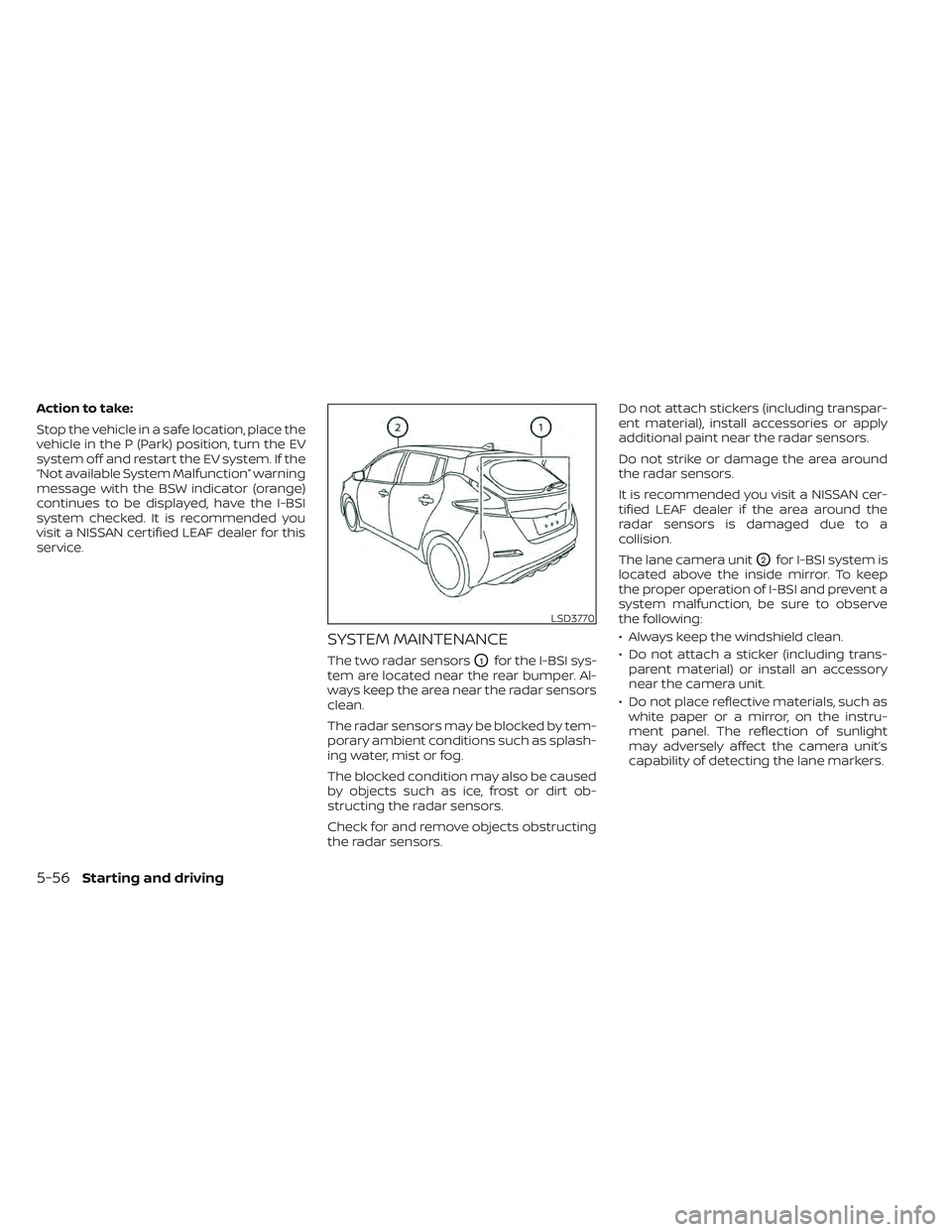
The two radar sensorsO1for the I-BSI sys-
tem are located near the rear bumper. Al-
ways keep the area near the radar sensors
clean.
The radar sensors may be blocked by tem-
porary ambient conditions such as splash-
ing water, mist or fog.
The blocked condition may also be caused
by objects such as ice, frost or dirt ob-
structing the radar sensors.
Check for and remove objects obstructing
the radar sensors. Do not attach stickers (including transpar-
ent material), install accessories or apply
additional paint near the radar sensors.
Do not strike or damage the area around
the radar sensors.
It is recommended you visit a NISSAN cer-
tified LEAF dealer if the area around the
radar sensors is damaged due to a
collision.
The lane camera unit
O2for I-BSI system is
located above the inside mirror. To keep
the proper operation of I-BSI and prevent a
system malfunction, be sure to observe
the following:
• Always keep the windshield clean.
• Do not attach a sticker (including trans- parent material) or install an accessory
near the camera unit.
• Do not place reflective materials, such as white paper or a mirror, on the instru-
ment panel. The reflection of sunlight
may adversely affect the camera unit’s
capability of detecting the lane markers.
LSD3770
5-56Starting and driving
Page 382 of 618
• Do not strike or damage the areasaround the camera unit. Do not touch the
camera lens or remove the screw located
on the camera unit. It is recommended
that you contact a NISSAN certified LEAF
dealer if the camera unit is damaged due
to an accident.
Radio frequency statement
(Type A) (if so equipped)
For USA
FCC : OAYSRR3B
This device complies with part 15 of the
FCC Rules. Operation is subject to the fol-
lowing two conditions:
(1) This device may not cause harmful
interference, and (2) this device must ac-
cept any interference received, including
interference that may cause undesired
operation.
FCC Warning
Changes or modifications not expressly
approved by the party responsible for
compliance could void the user’s author-
ity to operate the equipment. For Canada
Applicable law: Canada 310
This device complies with Industry
Canada licence-exempt RSS standard(s).
Operation is subject to the following two
conditions: (1) This device may not cause
interference, and (2) This device must ac-
cept any interference, including interfer-
ence that may cause undesired opera-
tion of the device.
Frequency bands: 24.05–24.25GHz
Output power: less than 20 milliwatts
Radio frequency statement
(Type B) (if so equipped)
For USA
FCC : OAYSRR3B
This device complies with part 15 of the
FCC Rules. Operation is subject to the fol-
lowing two conditions:
(1) This device may not cause harmful
interference, and (2) this device must ac-
cept any interference received, including
interference that may cause undesired
operation.FCC Warning
Changes or modifications not expressly
approved by the party responsible for
compliance could void the user’s author-
ity to operate the equipment.
For Canada
Applicable law: Canada 310
This device contains licence-exempt
transmitter(s)/receiver(s) that comply
with Innovation, Science and Economic
Development Canada’s licence-exempt
RSS(s). Operation is subject to the fol-
lowing two conditions:
1. This device may not cause
interference.
2. This device must accept any interfer-
ence, including interference that may
cause undesired operation of the device.
Radiofrequency radiation exposure in-
formation: This equipment complies
with radiation exposure limits set forth
for an uncontrolled environment. This
equipment should be installed and oper-
ated with minimum distance of 20 cm
between the radiator and your body.
Starting and driving5-57
Page 383 of 618
WARNING
Failure to follow the warnings and in-
structions for proper use of the RCTA
system could result in serious injury or
death.
• The RCTA system is not a replace-
ment for proper driving procedures
and is not designed to prevent con-
tact with vehicles or objects. When
backing out of a parking space, al-
ways use the side and rear mirrors
and turn and look in the direction
your vehicle will move. Never rely
solely on the RCTA system.
The RCTA system will assist you when
backing out from a parking space. When
the vehicle is in reverse, the system is de-
signed to detect other vehicles approach-
ing from the right or lef t of the vehicle. If the
system detects cross traffic, it will alert you.
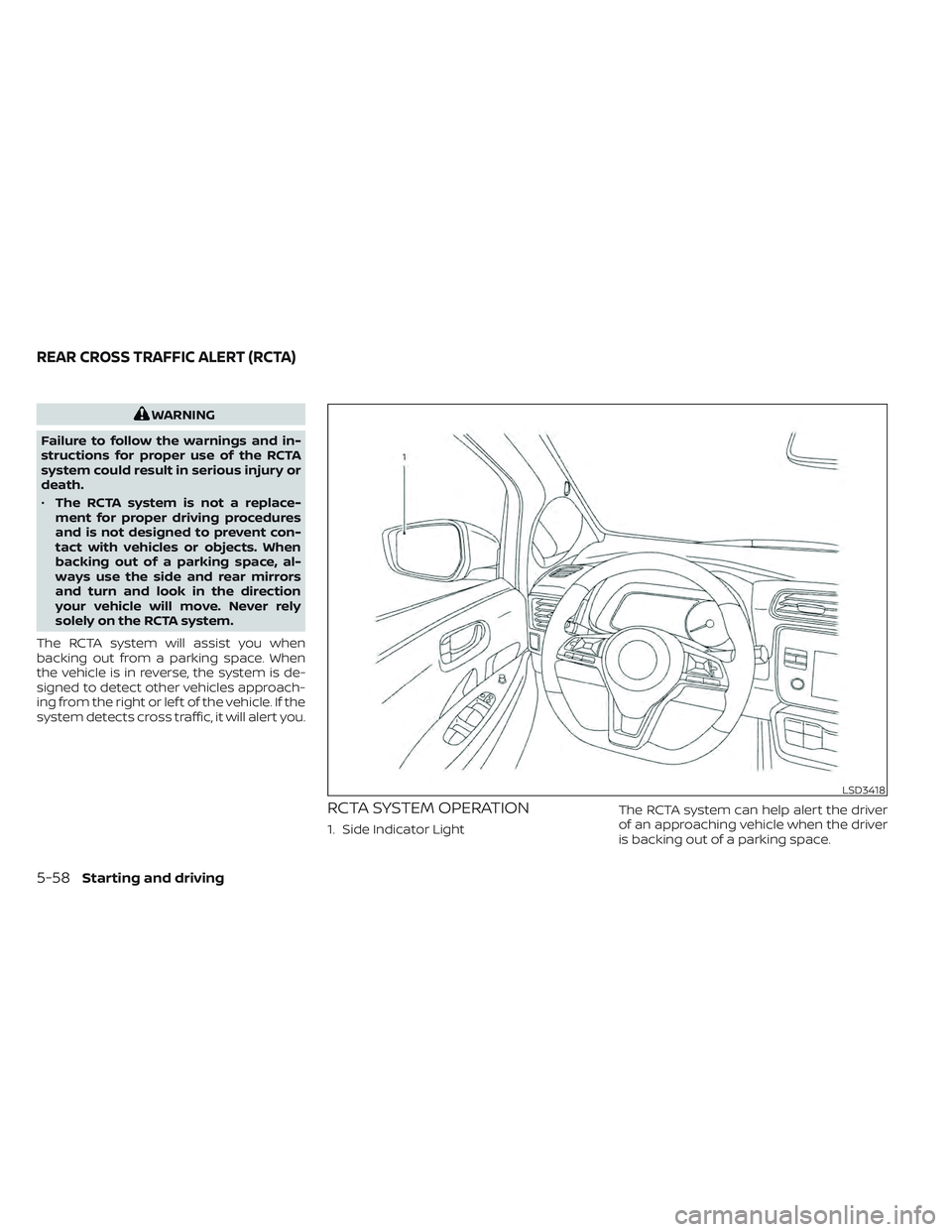
RCTA SYSTEM OPERATION
1. Side Indicator Light The RCTA system can help alert the driver
of an approaching vehicle when the driver
is backing out of a parking space.
LSD3418
REAR CROSS TRAFFIC ALERT (RCTA)
5-58Starting and driving
Page 386 of 618
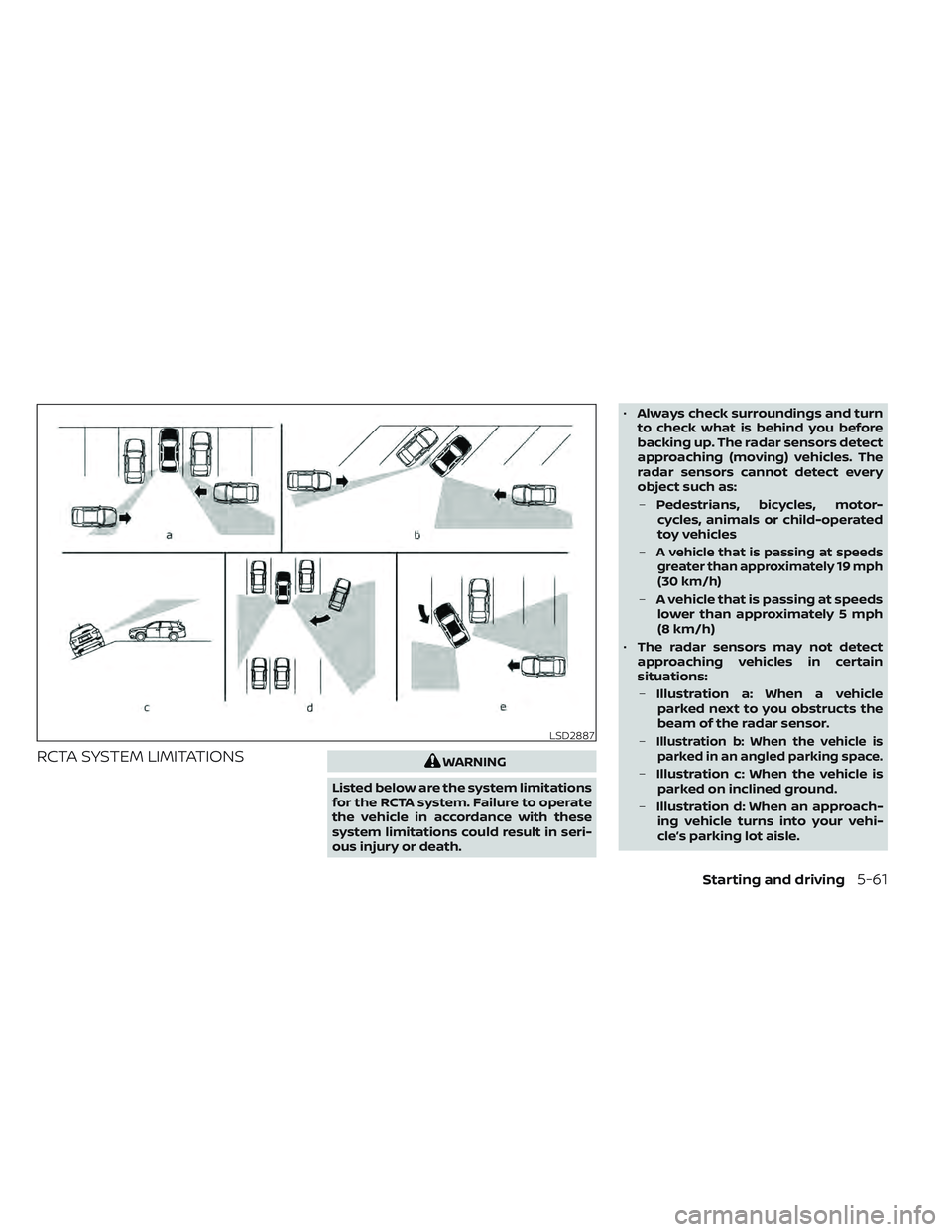
RCTA SYSTEM LIMITATIONSWARNING
Listed below are the system limitations
for the RCTA system. Failure to operate
the vehicle in accordance with these
system limitations could result in seri-
ous injury or death. •
Always check surroundings and turn
to check what is behind you before
backing up. The radar sensors detect
approaching (moving) vehicles. The
radar sensors cannot detect every
object such as:
– Pedestrians, bicycles, motor-
cycles, animals or child-operated
toy vehicles
–
A vehicle that is passing at speeds greater than approximately 19 mph
(30 km/h)
– A vehicle that is passing at speeds
lower than approximately 5 mph
(8 km/h)
• The radar sensors may not detect
approaching vehicles in certain
situations:
– Illustration a: When a vehicle
parked next to you obstructs the
beam of the radar sensor.
–
Illustration b: When the vehicle is parked in an angled parking space.
– Illustration c: When the vehicle is
parked on inclined ground.
– Illustration d: When an approach-
ing vehicle turns into your vehi-
cle’s parking lot aisle.
LSD2887
Starting and driving5-61
Page 388 of 618
The radar sensors may be blocked by tem-
porary ambient conditions such as splash-
ing water, mist or fog.
The blocked condition may also be caused
by conditions such as ice, snow, frost or dirt
obstructing the radar sensors.
NOTE:
If the BSW system stops working, the
RCTA system will also stop working.
Action to take
When the above conditions no longer exist,
the system will resume automatically.
Malfunction
When the RCTA system malfunctions, it will
turn off automatically. The “Malfunction:
See Owner’s Manual” warning message will
appear.
NOTE:
If the BSW system stops working, the
RCTA system will also stop working.Action to take
Stop the vehicle in a safe location, place the
vehicle in the P (Park) position, turn the EV
system off and restart the EV system. If the
system does not resume automatically,
have the system checked. It is recom-
mended that you visit a NISSAN certified
LEAF dealer for this service.
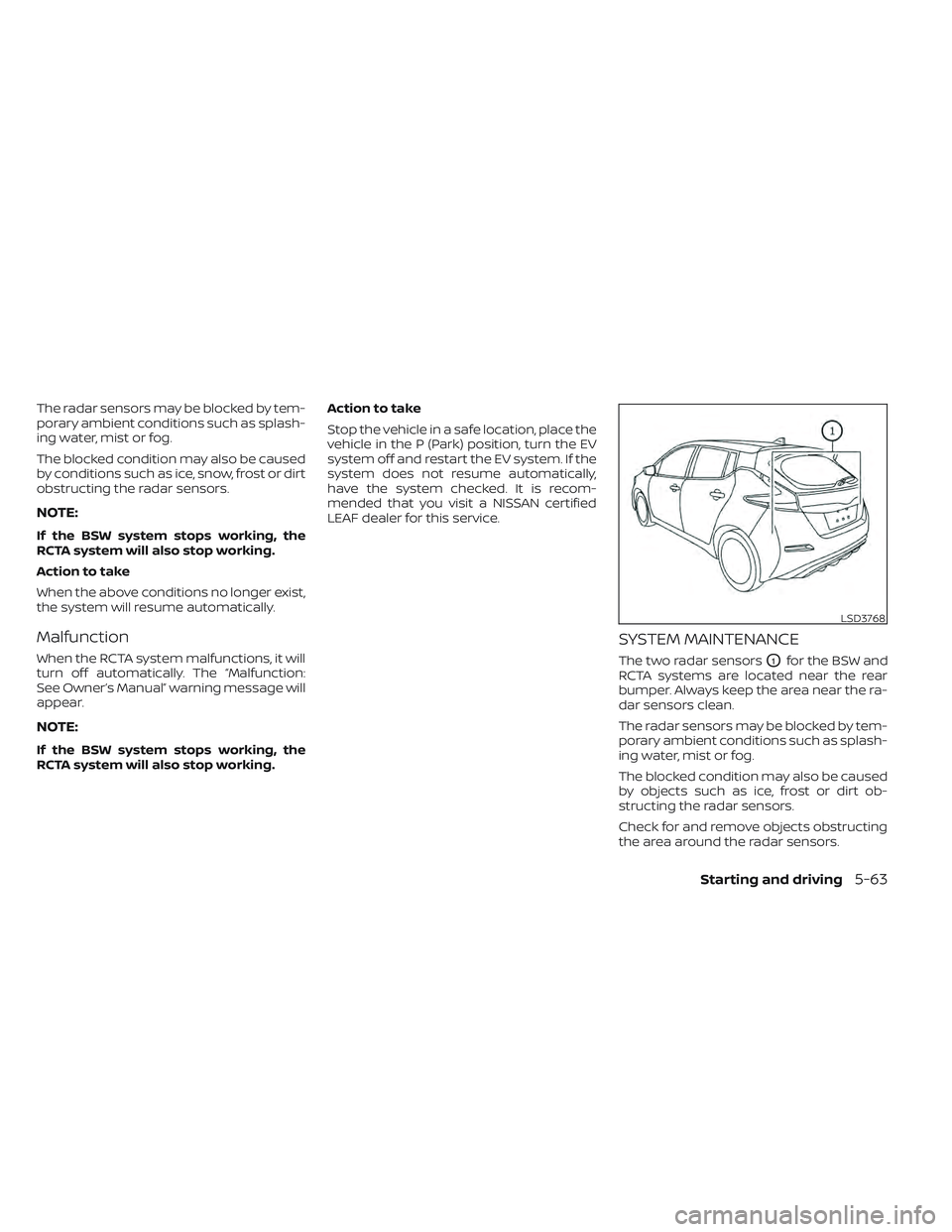
SYSTEM MAINTENANCE
The two radar sensorsO1for the BSW and
RCTA systems are located near the rear
bumper. Always keep the area near the ra-
dar sensors clean.
The radar sensors may be blocked by tem-
porary ambient conditions such as splash-
ing water, mist or fog.
The blocked condition may also be caused
by objects such as ice, frost or dirt ob-
structing the radar sensors.
Check for and remove objects obstructing
the area around the radar sensors.
LSD3768
Starting and driving5-63
Page 389 of 618
Do not attach stickers (including transpar-
ent material), install accessories or apply
additional paint near the radar sensors.
Do not strike or damage the area around
the radar sensors. It is recommended that
you visit a NISSAN certified LEAF dealer if
the area around the radar sensors is dam-
aged due to a collision.
Radio frequency statement
(Type A) (if so equipped)
For USA
FCC : OAYSRR3B
This device complies with part 15 of the
FCC Rules. Operation is subject to the fol-
lowing two conditions:
(1) This device may not cause harmful
interference, and (2) this device must ac-
cept any interference received, including
interference that may cause undesired
operation.
FCC Warning
Changes or modifications not expressly
approved by the party responsible for
compliance could void the user’s author-
ity to operate the equipment.For Canada
Applicable law: Canada 310
This device complies with Industry
Canada licence-exempt RSS standard(s).
Operation is subject to the following two
conditions: (1) This device may not cause
interference, and (2) This device must ac-
cept any interference, including interfer-
ence that may cause undesired opera-
tion of the device.
Frequency bands: 24.05–24.25GHz
Output power: less than 20 milliwatts
Radio frequency statement
(Type B) (if so equipped)
For USA
FCC : OAYSRR3B
This device complies with part 15 of the
FCC Rules. Operation is subject to the fol-
lowing two conditions:
(1) This device may not cause harmful
interference, and (2) this device must ac-
cept any interference received, including
interference that may cause undesired
operation.
FCC Warning
Changes or modifications not expressly
approved by the party responsible for
compliance could void the user’s author-
ity to operate the equipment.
For Canada
Applicable law: Canada 310
This device contains licence-exempt
transmitter(s)/receiver(s) that comply
with Innovation, Science and Economic
Development Canada’s licence-exempt
RSS(s). Operation is subject to the fol-
lowing two conditions:
1. This device may not cause
interference.
2. This device must accept any interfer-
ence, including interference that may
cause undesired operation of the device.
Radiofrequency radiation exposure in-
formation: This equipment complies
with radiation exposure limits set forth
for an uncontrolled environment. This
equipment should be installed and oper-
ated with minimum distance of 20 cm
between the radiator and your body.
5-64Starting and driving
Page 390 of 618
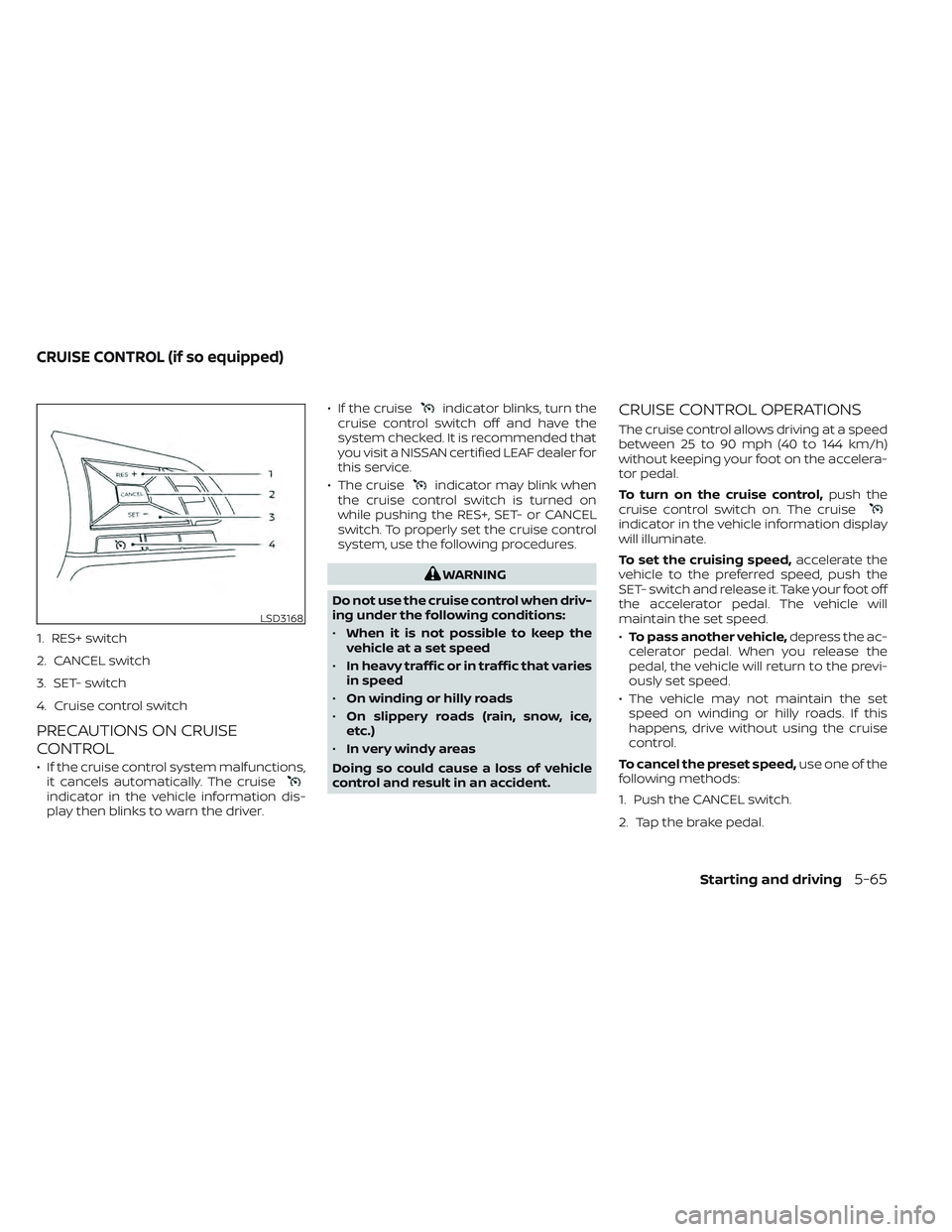
1. RES+ switch
2. CANCEL switch
3. SET- switch
4. Cruise control switch
PRECAUTIONS ON CRUISE
CONTROL
• If the cruise control system malfunctions,it cancels automatically. The cruise
indicator in the vehicle information dis-
play then blinks to warn the driver. • If the cruise
indicator blinks, turn the
cruise control switch off and have the
system checked. It is recommended that
you visit a NISSAN certified LEAF dealer for
this service.
• The cruise
indicator may blink when
the cruise control switch is turned on
while pushing the RES+, SET- or CANCEL
switch. To properly set the cruise control
system, use the following procedures.
WARNING
Do not use the cruise control when driv-
ing under the following conditions:
• When it is not possible to keep the
vehicle at a set speed
• In heavy traffic or in traffic that varies
in speed
• On winding or hilly roads
• On slippery roads (rain, snow, ice,
etc.)
• In very windy areas
Doing so could cause a loss of vehicle
control and result in an accident.
CRUISE CONTROL OPERATIONS
The cruise control allows driving at a speed
between 25 to 90 mph (40 to 144 km/h)
without keeping your foot on the accelera-
tor pedal.
To turn on the cruise control, push the
cruise control switch on. The cruise
indicator in the vehicle information display
will illuminate.
To set the cruising speed, accelerate the
vehicle to the preferred speed, push the
SET- switch and release it. Take your foot off
the accelerator pedal. The vehicle will
maintain the set speed.
• To pass another vehicle, depress the ac-
celerator pedal. When you release the
pedal, the vehicle will return to the previ-
ously set speed.
• The vehicle may not maintain the set speed on winding or hilly roads. If this
happens, drive without using the cruise
control.
To cancel the preset speed, use one of the
following methods:
1. Push the CANCEL switch.
2. Tap the brake pedal.
LSD3168
CRUISE CONTROL (if so equipped)
Starting and driving5-65
Page 392 of 618
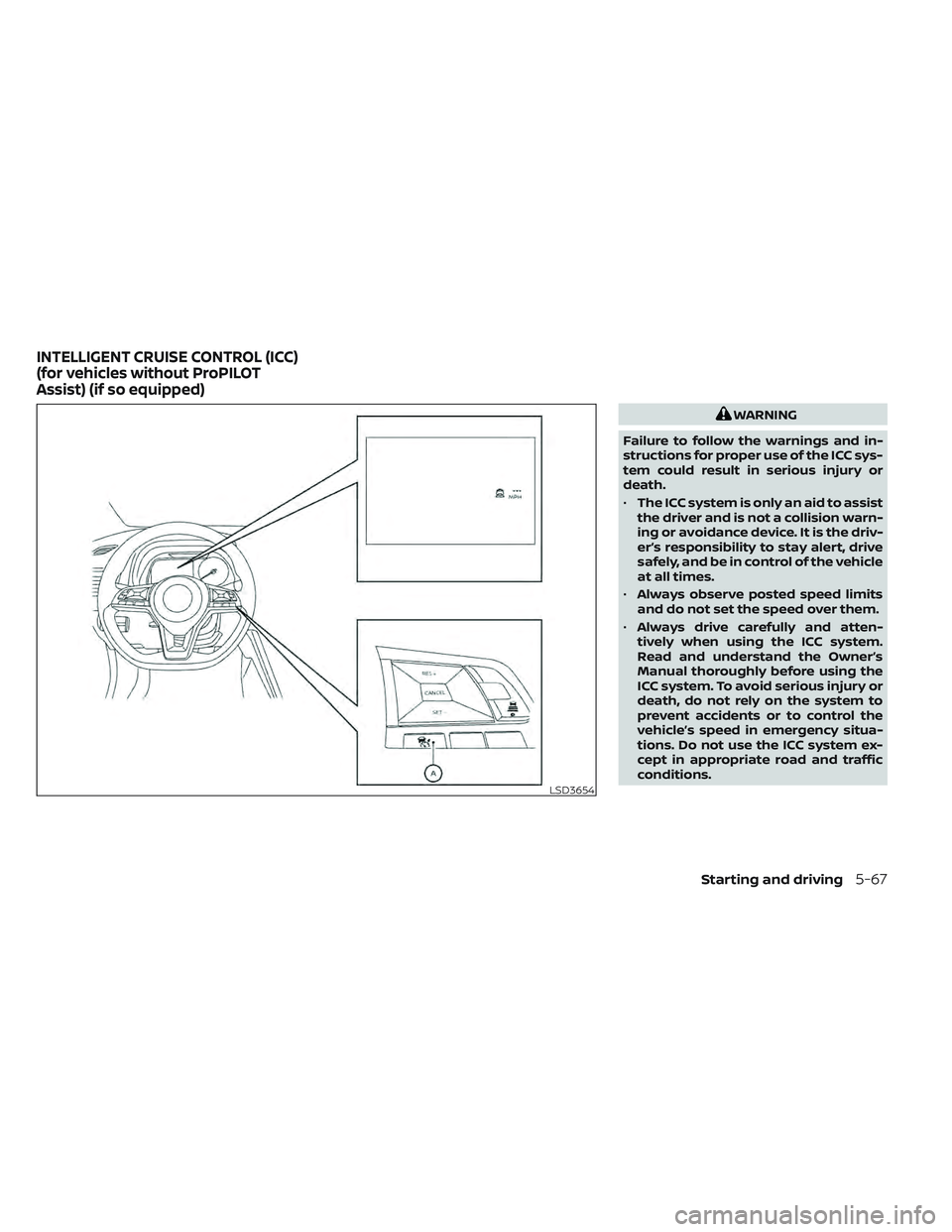
WARNING
Failure to follow the warnings and in-
structions for proper use of the ICC sys-
tem could result in serious injury or
death.
• The ICC system is only an aid to assist
the driver and is not a collision warn-
ing or avoidance device. It is the driv-
er’s responsibility to stay alert, drive
safely, and be in control of the vehicle
at all times.
• Always observe posted speed limits
and do not set the speed over them.
• Always drive carefully and atten-
tively when using the ICC system.
Read and understand the Owner’s
Manual thoroughly before using the
ICC system. To avoid serious injury or
death, do not rely on the system to
prevent accidents or to control the
vehicle’s speed in emergency situa-
tions. Do not use the ICC system ex-
cept in appropriate road and traffic
conditions.
LSD3654
INTELLIGENT CRUISE CONTROL (ICC)
(for vehicles without ProPILOT
Assist) (if so equipped)
Starting and driving5-67
Page 393 of 618
•In the conventional (fixed speed)
cruise control mode, a warning
chime will not sound to warn you if
you are too close to the vehicle
ahead. Pay special attention to the
distance between your vehicle and
the vehicle ahead of you or a collision
could occur
NOTE:
For vehicles equipped with ProPILOT As-
sist, see “ProPILOT Assist (P. 5-92)
The ICC system maintains a selected dis-
tance from the vehicle in front of you within
the speed range of 0 to 90 mph (0 to 144
km/h) up to the set speed. The set speed
can be selected by the driver between 20 to
90 mph (32 to 144 km/h).
The vehicle travels at a set speed when the
road ahead is clear.
The ICC system can be set to one of two
cruise control modes:
• Vehicle-to-vehicle distance control
mode: For maintaining a selected dis-
tance between your vehicle and the ve-
hicle in front of you up to the present
speed •
Conventional (fixed speed) cruise con-
trol mode: For cruising at a preset speed
Push the ICC switch
OAto choose the
cruise control mode between the vehicle-
to-vehicle distance control mode and the
conventional (fixed speed) cruise control
mode.
Once a control mode is activated, it cannot
be changed to the other cruise control
mode. To change the mode, push the ICC
switch
OAonce to turn the system off. Then
push the ICC switch
OAagain to turn the
system back on and select the desired
cruise control mode.
Always confirm the setting in the ICC sys-
tem display.
For the vehicle-to-vehicle distance control
mode, see “Vehicle-to-vehicle distance
control mode” (P. 5-69).
For the conventional (fixed speed) cruise
control mode, see “Conventional (fixed
speed) cruise control mode” (P. 5-87).
5-68Starting and driving