hatch NISSAN LEAF 2023 User Guide
[x] Cancel search | Manufacturer: NISSAN, Model Year: 2023, Model line: LEAF, Model: NISSAN LEAF 2023Pages: 612, PDF Size: 7.42 MB
Page 250 of 612
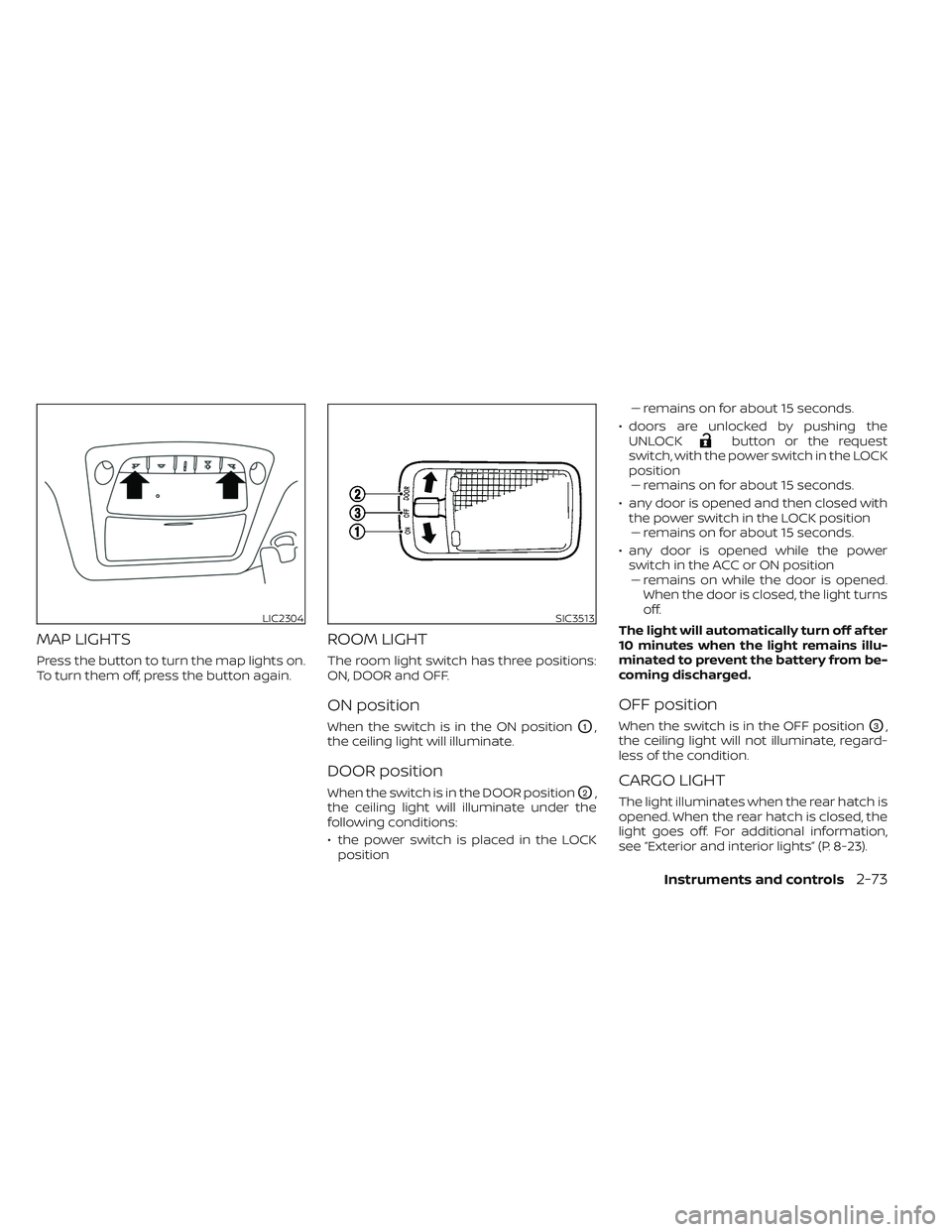
MAP LIGHTS
Press the button to turn the map lights on.
To turn them off, press the button again.
ROOM LIGHT
The room light switch has three positions:
ON, DOOR and OFF.
ON position
When the switch is in the ON positionO1,
the ceiling light will illuminate.
DOOR position
When the switch is in the DOOR positionO2,
the ceiling light will illuminate under the
following conditions:
• the power switch is placed in the LOCK position –– remains on for about 15 seconds.
• doors are unlocked by pushing the UNLOCK
button or the request
switch, with the power switch in the LOCK
position –– remains on for about 15 seconds.
• any door is opened and then closed with the power switch in the LOCK position–– remains on for about 15 seconds.
• any door is opened while the power switch in the ACC or ON position– – remains on while the door is opened.
When the door is closed, the light turns
off.
The light will automatically turn off af ter
10 minutes when the light remains illu-
minated to prevent the battery from be-
coming discharged.
OFF position
When the switch is in the OFF positionO3,
the ceiling light will not illuminate, regard-
less of the condition.
CARGO LIGHT
The light illuminates when the rear hatch is
opened. When the rear hatch is closed, the
light goes off. For additional information,
see “Exterior and interior lights” (P. 8-23).
LIC2304SIC3513
Instruments and controls2-73
Page 252 of 612
3 Pre-driving checks and adjustments
Keys.............................................3-2NISSAN Intelligent Key® .......................3-2
NISSAN Vehicle Immobilizer System
keys..........................................3-3
Doors ...........................................3-4
Locking with key .............................3-5
Locking with inside lock knob ................3-5
Locking with power door lock switch .........3-5
Automatic door locks ........................3-6
Child safety rear door lock ....................3-6
NISSAN Intelligent Key® system ..................3-6
Operating range .............................3-8
Door locks/unlocks precaution ...............3-8
NISSAN Intelligent Key® Operation ............3-9
How to use the remote keyless entry
function ..................................... 3-12
12-volt battery saver system ................3-16
Warning signals ............................. 3-16Troubleshooting guide
......................3-16
Hood ........................................... 3-18
Rear hatch ..................................... 3-19
Secondary rear hatch release ...............3-19
Charge port lid ................................. 3-20
Opening charge port lid .....................3-20
Charge port cap ............................ 3-22
Steering wheel ................................. 3-22
Tilt and telescopic operation ................3-23
Sun visors ...................................... 3-23
Vanity mirrors ............................... 3-24
Mirrors ......................................... 3-24
Manual anti-glare rearview mirror
(if so equipped) .............................. 3-24
Automatic anti-glare rearview mirror ........3-24
Outside mirrors ............................. 3-25
Page 259 of 612
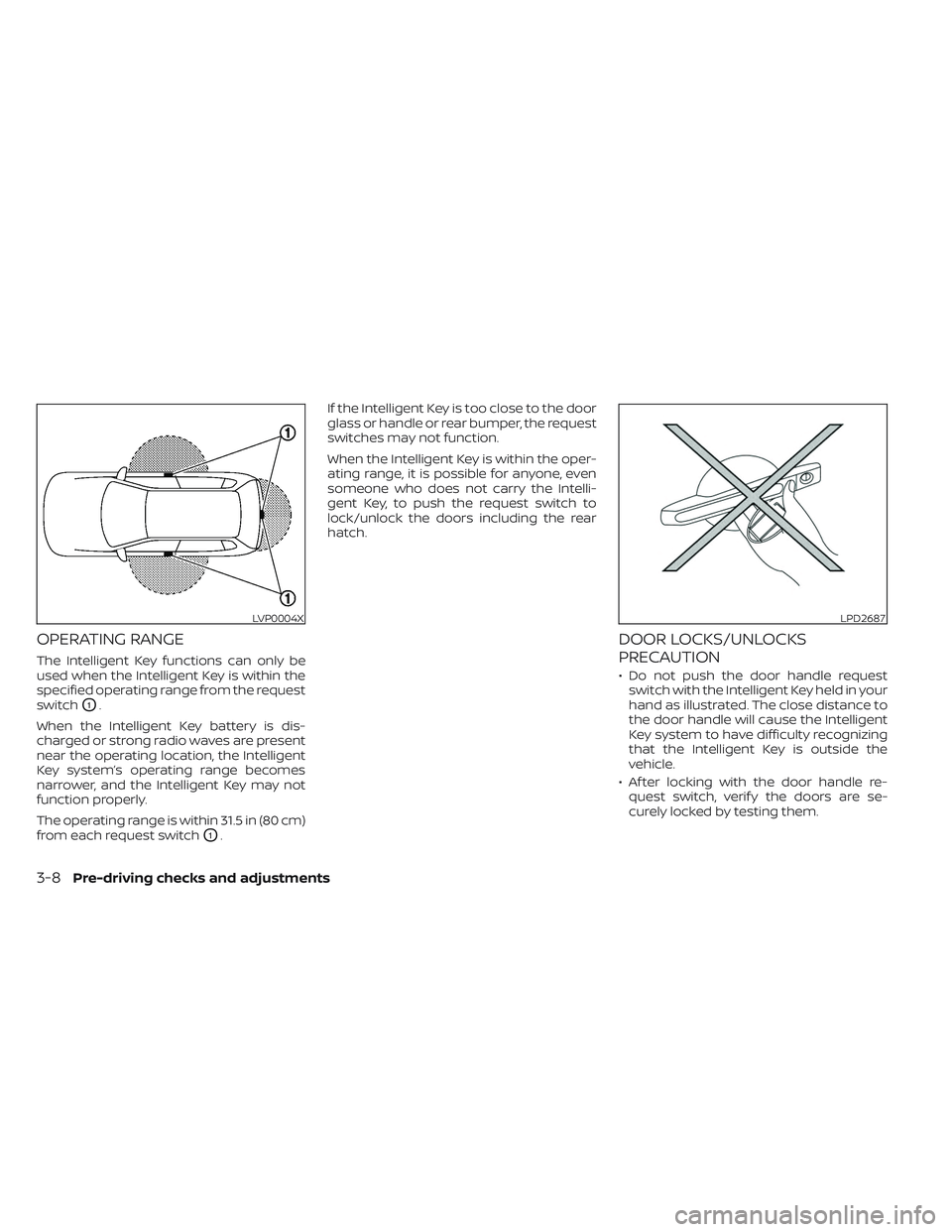
OPERATING RANGE
The Intelligent Key functions can only be
used when the Intelligent Key is within the
specified operating range from the request
switch
O1.
When the Intelligent Key battery is dis-
charged or strong radio waves are present
near the operating location, the Intelligent
Key system’s operating range becomes
narrower, and the Intelligent Key may not
function properly.
The operating range is within 31.5 in (80 cm)
from each request switch
O1. If the Intelligent Key is too close to the door
glass or handle or rear bumper, the request
switches may not function.
When the Intelligent Key is within the oper-
ating range, it is possible for anyone, even
someone who does not carry the Intelli-
gent Key, to push the request switch to
lock/unlock the doors including the rear
hatch.
DOOR LOCKS/UNLOCKS
PRECAUTION
• Do not push the door handle request
switch with the Intelligent Key held in your
hand as illustrated. The close distance to
the door handle will cause the Intelligent
Key system to have difficulty recognizing
that the Intelligent Key is outside the
vehicle.
• Af ter locking with the door handle re- quest switch, verif y the doors are se-
curely locked by testing them.
LVP0004XLPD2687
3-8Pre-driving checks and adjustments
Page 260 of 612
• To prevent the Intelligent Key from beinglef t inside the vehicle, make sure you
carry the Intelligent Key with you and then
lock the doors.
• Do not pull the door handle before push- ing the door handle request switch. The
door will be unlocked but will not open.
Release the door handle once and pull it
again to open the door.
NISSAN INTELLIGENT KEY®
OPERATION
You can lock or unlock the doors without
taking the Intelligent Key out of your pocket
or bag.
When you carry the Intelligent Key with you,
you can lock or unlock all doors by pushing
the door handle request switch within the
range of operation.
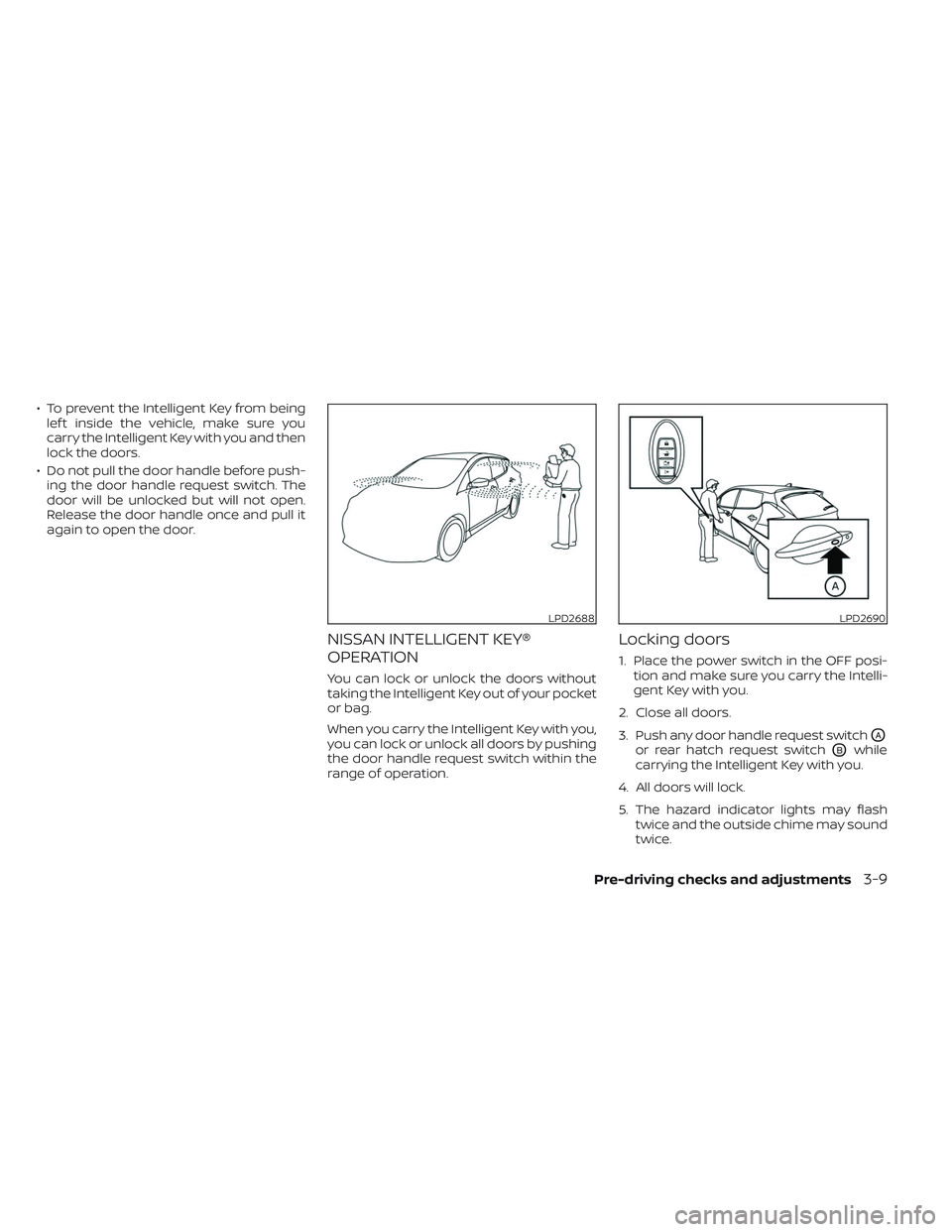
Locking doors
1. Place the power switch in the OFF posi- tion and make sure you carry the Intelli-
gent Key with you.
2. Close all doors.
3. Push any door handle request switch
OA
or rear hatch request switchOBwhile
carrying the Intelligent Key with you.
4. All doors will lock.
5. The hazard indicator lights may flash twice and the outside chime may sound
twice.
LPD2688LPD2690
Pre-driving checks and adjustments3-9
Page 261 of 612
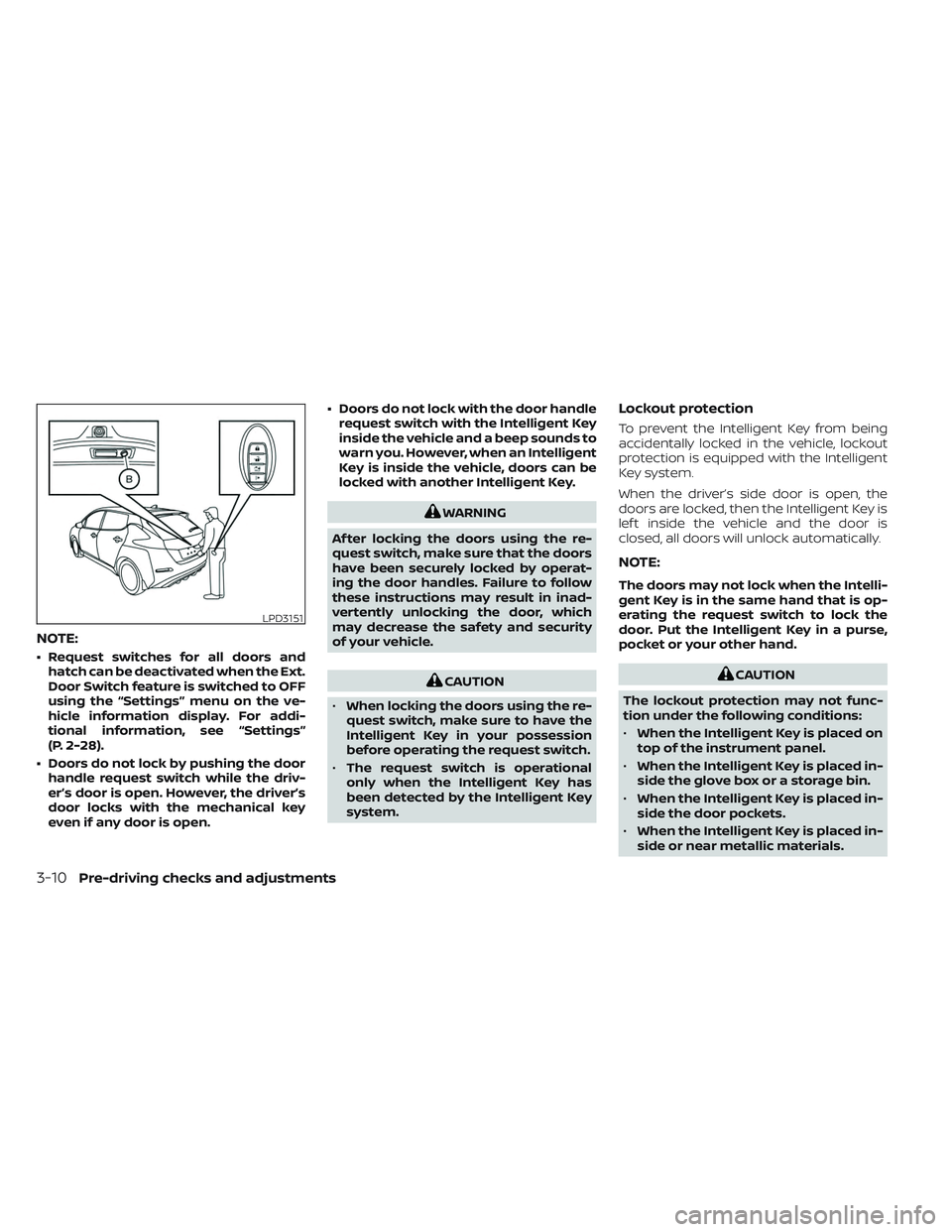
NOTE:
• Request switches for all doors andhatch can be deactivated when the Ext.
Door Switch feature is switched to OFF
using the “Settings” menu on the ve-
hicle information display. For addi-
tional information, see “Settings”
(P. 2-28).
• Doors do not lock by pushing the door handle request switch while the driv-
er’s door is open. However, the driver’s
door locks with the mechanical key
even if any door is open. • Doors do not lock with the door handle
request switch with the Intelligent Key
inside the vehicle and a beep sounds to
warn you. However, when an Intelligent
Key is inside the vehicle, doors can be
locked with another Intelligent Key.
WARNING
Af ter locking the doors using the re-
quest switch, make sure that the doors
have been securely locked by operat-
ing the door handles. Failure to follow
these instructions may result in inad-
vertently unlocking the door, which
may decrease the safety and security
of your vehicle.
CAUTION
• When locking the doors using the re-
quest switch, make sure to have the
Intelligent Key in your possession
before operating the request switch.
• The request switch is operational
only when the Intelligent Key has
been detected by the Intelligent Key
system.
Lockout protection
To prevent the Intelligent Key from being
accidentally locked in the vehicle, lockout
protection is equipped with the Intelligent
Key system.
When the driver’s side door is open, the
doors are locked, then the Intelligent Key is
lef t inside the vehicle and the door is
closed, all doors will unlock automatically.
NOTE:
The doors may not lock when the Intelli-
gent Key is in the same hand that is op-
erating the request switch to lock the
door. Put the Intelligent Key in a purse,
pocket or your other hand.
CAUTION
The lockout protection may not func-
tion under the following conditions:
• When the Intelligent Key is placed on
top of the instrument panel.
• When the Intelligent Key is placed in-
side the glove box or a storage bin.
• When the Intelligent Key is placed in-
side the door pockets.
• When the Intelligent Key is placed in-
side or near metallic materials.
LPD3151
3-10Pre-driving checks and adjustments
Page 262 of 612
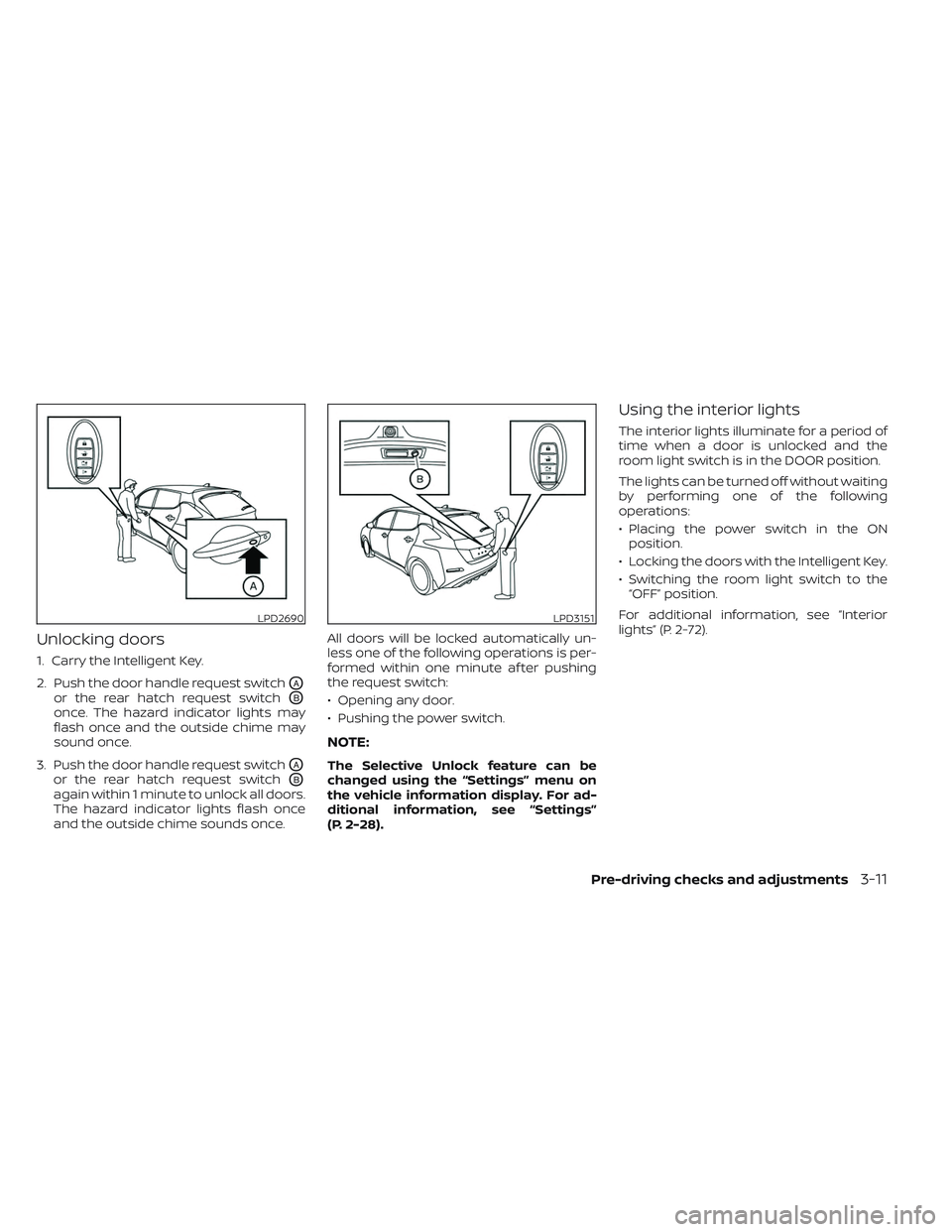
Unlocking doors
1. Carry the Intelligent Key.
2. Push the door handle request switch
OA
or the rear hatch request switchOB
once. The hazard indicator lights may
flash once and the outside chime may
sound once.
3. Push the door handle request switch
OA
or the rear hatch request switchOB
again within 1 minute to unlock all doors.
The hazard indicator lights flash once
and the outside chime sounds once. All doors will be locked automatically un-
less one of the following operations is per-
formed within one minute af ter pushing
the request switch:
• Opening any door.
• Pushing the power switch.
NOTE:
The Selective Unlock feature can be
changed using the “Settings” menu on
the vehicle information display. For ad-
ditional information, see “Settings”
(P. 2-28).
Using the interior lights
The interior lights illuminate for a period of
time when a door is unlocked and the
room light switch is in the DOOR position.
The lights can be turned off without waiting
by performing one of the following
operations:
• Placing the power switch in the ON
position.
• Locking the doors with the Intelligent Key.
• Switching the room light switch to the “OFF” position.
For additional information, see “Interior
lights” (P. 2-72).
LPD2690LPD3151
Pre-driving checks and adjustments3-11
Page 263 of 612
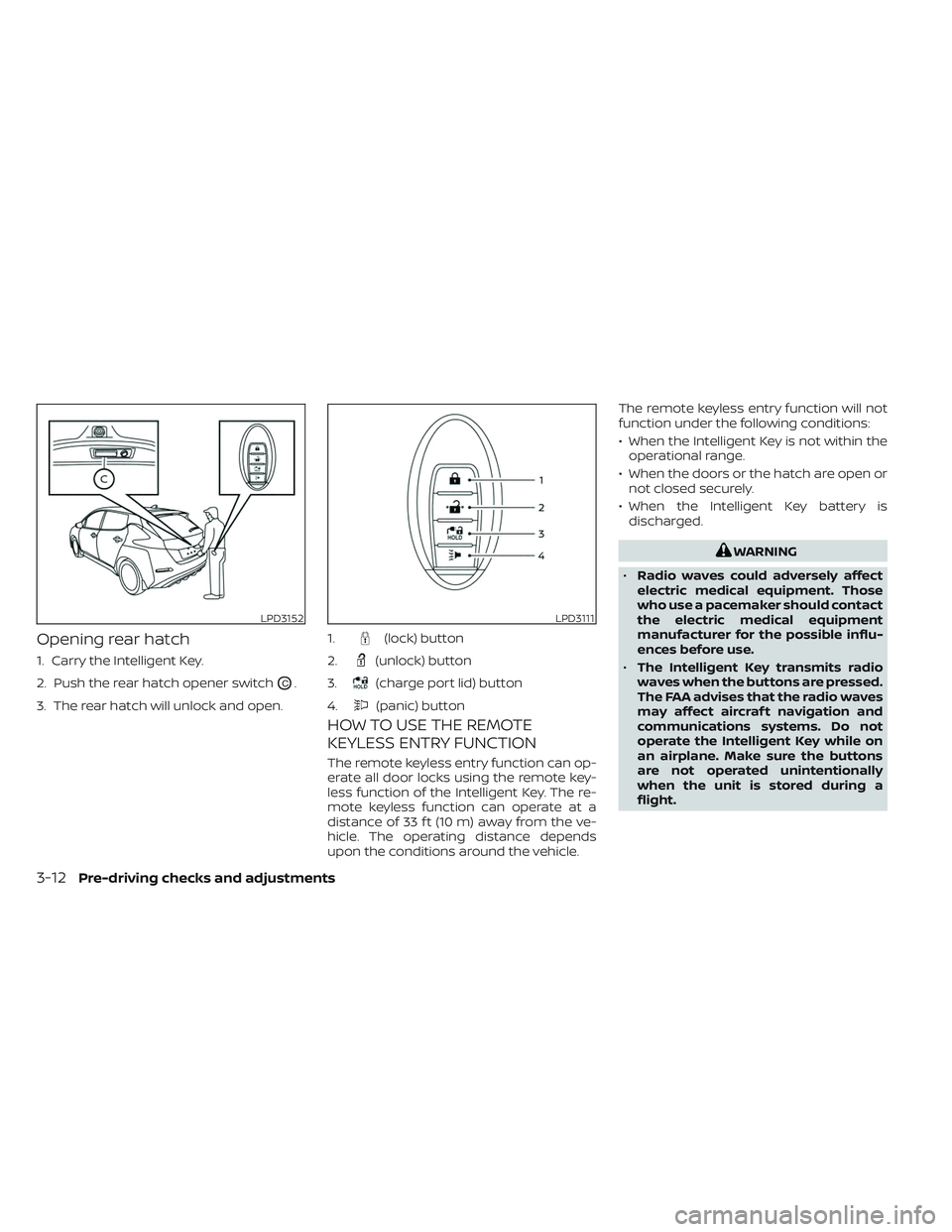
Opening rear hatch
1. Carry the Intelligent Key.
2. Push the rear hatch opener switch
OC.
3. The rear hatch will unlock and open.
HOW TO USE THE REMOTE
KEYLESS ENTRY FUNCTION
The remote keyless entry function can op-
erate all door locks using the remote key-
less function of the Intelligent Key. The re-
mote keyless function can operate at a
distance of 33 f t (10 m) away from the ve-
hicle. The operating distance depends
upon the conditions around the vehicle. The remote keyless entry function will not
function under the following conditions:
• When the Intelligent Key is not within the
operational range.
• When the doors or the hatch are open or not closed securely.
• When the Intelligent Key battery is discharged.
WARNING
• Radio waves could adversely affect
electric medical equipment. Those
who use a pacemaker should contact
the electric medical equipment
manufacturer for the possible influ-
ences before use.
• The Intelligent Key transmits radio
waves when the buttons are pressed.
The FAA advises that the radio waves
may affect aircraf t navigation and
communications systems. Do not
operate the Intelligent Key while on
an airplane. Make sure the buttons
are not operated unintentionally
when the unit is stored during a
flight.
LPD3152LPD3111
1.(lock) button
2.
(unlock) button
3.
(charge port lid) button
4.
(panic) button
3-12Pre-driving checks and adjustments
Page 264 of 612
CAUTION
• Do not allow the Intelligent Key,
which contains electrical compo-
nents, to come into contact with wa-
ter or salt water. This could affect the
system function.
• Do not drop the Intelligent Key.
• Do not strike the Intelligent Key
sharply against another object.
• Do not change or modif y the Intelli-
gent Key.
• Wetting may damage the Intelligent
Key. If the Intelligent Key gets wet,
immediately wipe until it is com-
pletely dry.
• Do not place the Intelligent Key for an
extended period in an area where
temperatures exceed 140°F (60°C).
• Do not attach the Intelligent Key with
a key holder that contains a magnet.
• Do not place the Intelligent Key near
equipment that produces a magnetic
field, such as a TV, audio equipment,
personal computers or cellular
phone.
• When locking the doors using the In-
telligent Key, be sure not to leave the
key in the vehicle.Locking doors
1. Place the power switch in the LOCK position.
2. Close all doors.
3. Press the
button on the Intelli-
gent Key.
4. The hazard indicator lights flash twice and the horn beeps once.
5. All doors and the rear hatch will be locked.
WARNING
Af ter locking the doors using the Intel-
ligent Key, be sure that the doors have
been securely locked by operating the
door handles. Failure to follow these in-
structions may result in inadvertently
unlocking the doors, which may de-
crease the safety and security of your
vehicle.
Unlocking doors
1. Press thebutton on the Intelligent
Key to unlock the driver’s door.
2. The hazard indicator lights flash once.
3.
Press thebutton again within 1 min-
ute to unlock all doors and rear hatch.
All doors and rear hatch will be locked au-
tomatically unless one of the following op-
erations is performed within 1 minute af ter
pressing the
button:
• Opening any doors or rear hatch.
• Pushing the power switch.
Using the interior lights
The interior lights illuminate for a period of
time when a door is unlocked and the
room light switch is in the DOOR position.
The lights can be turned off without waiting
by performing one of the following
operations:
• Placing the power switch in the ON position.
• Locking the doors with the Intelligent Key.
• Switching the room light switch to the “OFF” position.
For additional information, see “Interior
lights” (P. 2-72).
Pre-driving checks and adjustments3-13
Page 266 of 612
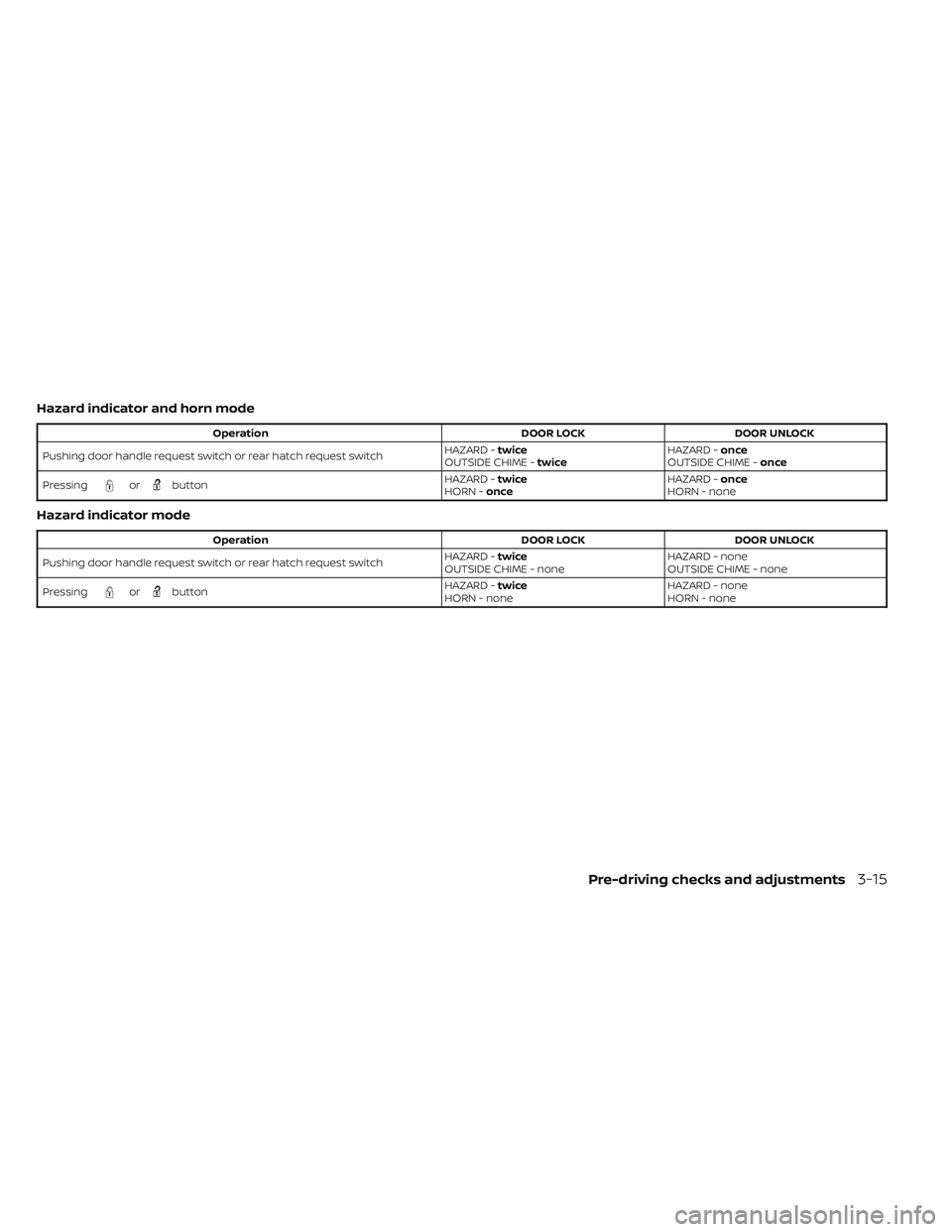
Hazard indicator and horn mode
OperationDOOR LOCKDOOR UNLOCK
Pushing door handle request switch or rear hatch request switch HAZARD -
twice
OUTSIDE CHIME - twice HAZARD -
once
OUTSIDE CHIME - once
Pressing
orbutton HAZARD -
twice
HORN - once HAZARD -
once
HORN - none
Hazard indicator mode
Operation DOOR LOCKDOOR UNLOCK
Pushing door handle request switch or rear hatch request switch HAZARD -
twice
OUTSIDE CHIME - none HAZARD - none
OUTSIDE CHIME - none
Pressing
orbutton HAZARD -
twice
HORN - none HAZARD - none
HORN - none
Pre-driving checks and adjustments3-15
Page 270 of 612
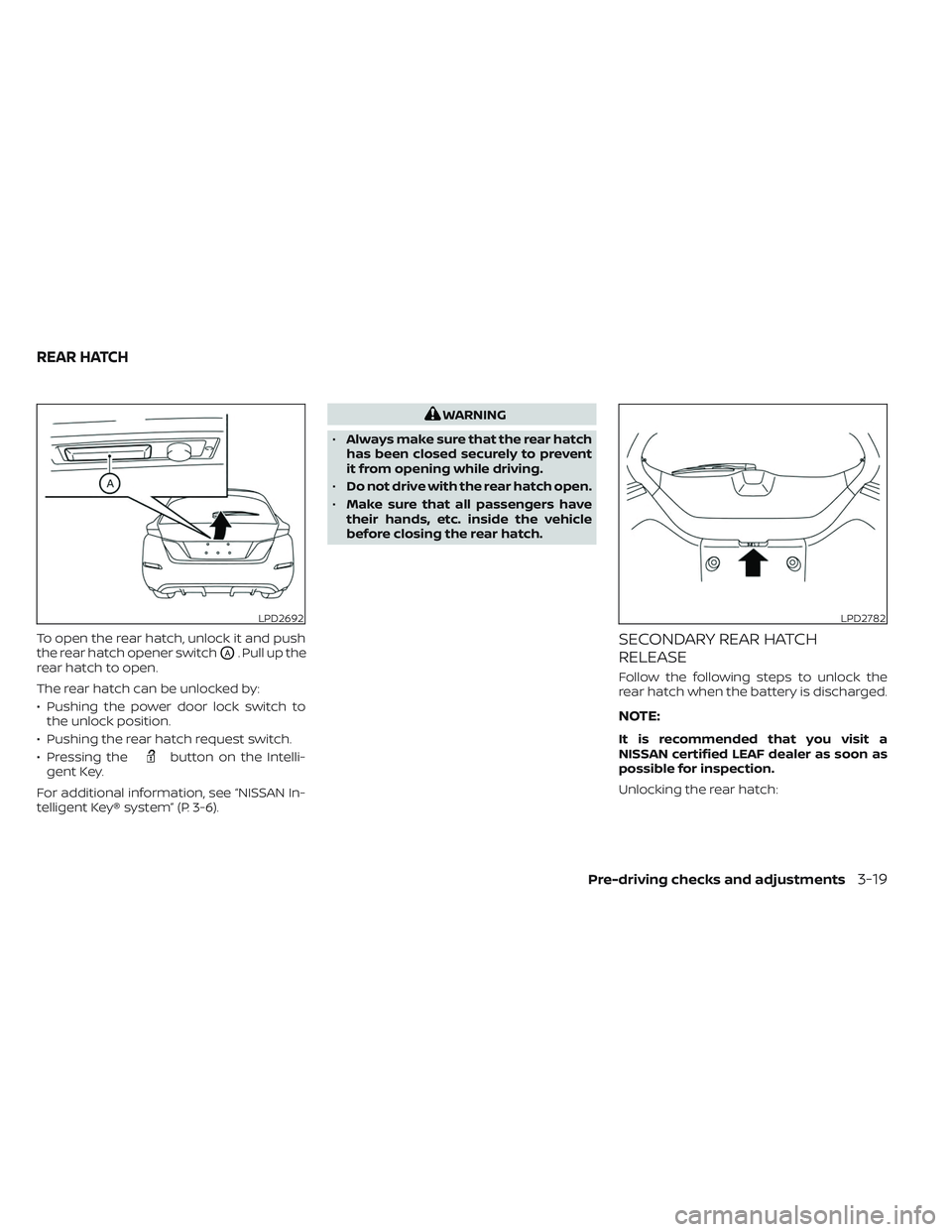
To open the rear hatch, unlock it and push
the rear hatch opener switch
OA. Pull up the
rear hatch to open.
The rear hatch can be unlocked by:
• Pushing the power door lock switch to the unlock position.
• Pushing the rear hatch request switch.
• Pressing the
button on the Intelli-
gent Key.
For additional information, see “NISSAN In-
telligent Key® system” (P. 3-6).
WARNING
• Always make sure that the rear hatch
has been closed securely to prevent
it from opening while driving.
• Do not drive with the rear hatch open.
• Make sure that all passengers have
their hands, etc. inside the vehicle
before closing the rear hatch.
SECONDARY REAR HATCH
RELEASE
Follow the following steps to unlock the
rear hatch when the battery is discharged.
NOTE:
It is recommended that you visit a
NISSAN certified LEAF dealer as soon as
possible for inspection.
Unlocking the rear hatch:
LPD2692LPD2782
REAR HATCH
Pre-driving checks and adjustments3-19