lock NISSAN LEAF 2023 Workshop Manual
[x] Cancel search | Manufacturer: NISSAN, Model Year: 2023, Model line: LEAF, Model: NISSAN LEAF 2023Pages: 612, PDF Size: 7.42 MB
Page 195 of 612
•If the brake fluid level is below the
minimum or MIN mark on the brake
fluid reservoir, do not drive until the
brake system has been checked. It is
recommended that you visit a
NISSAN certified LEAF dealer for this
service.
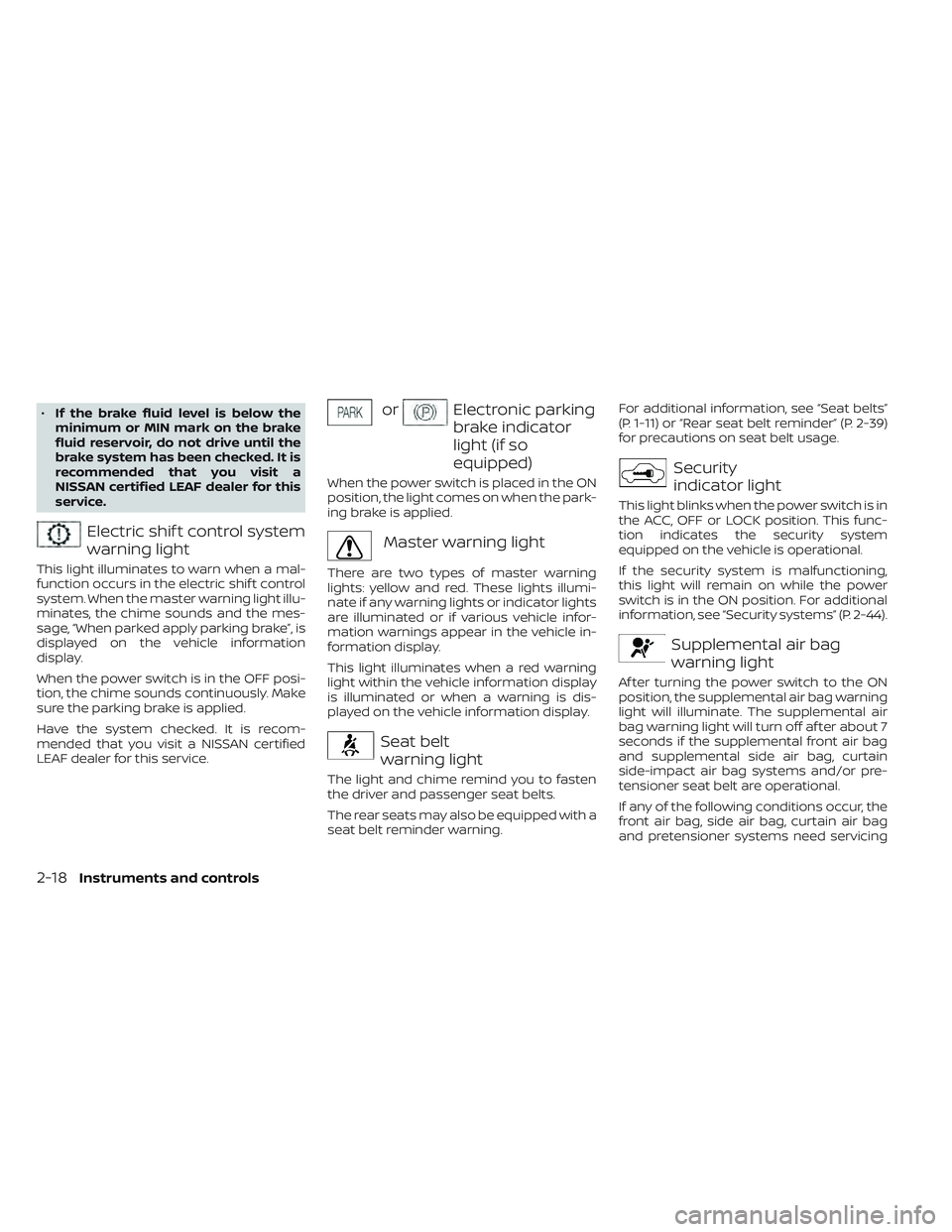
Electric shif t control system
warning light
This light illuminates to warn when a mal-
function occurs in the electric shif t control
system. When the master warning light illu-
minates, the chime sounds and the mes-
sage, “When parked apply parking brake”, is
displayed on the vehicle information
display.
When the power switch is in the OFF posi-
tion, the chime sounds continuously. Make
sure the parking brake is applied.
Have the system checked. It is recom-
mended that you visit a NISSAN certified
LEAF dealer for this service.
orElectronic parking
brake indicator
light (if so
equipped)
When the power switch is placed in the ON
position, the light comes on when the park-
ing brake is applied.
Master warning light
There are two types of master warning
lights: yellow and red. These lights illumi-
nate if any warning lights or indicator lights
are illuminated or if various vehicle infor-
mation warnings appear in the vehicle in-
formation display.
This light illuminates when a red warning
light within the vehicle information display
is illuminated or when a warning is dis-
played on the vehicle information display.
Seat belt
warning light
The light and chime remind you to fasten
the driver and passenger seat belts.
The rear seats may also be equipped with a
seat belt reminder warning. For additional information, see “Seat belts”
(P. 1-11) or “Rear seat belt reminder” (P. 2-39)
for precautions on seat belt usage.
Security
indicator light
This light blinks when the power switch is in
the ACC, OFF or LOCK position. This func-
tion indicates the security system
equipped on the vehicle is operational.
If the security system is malfunctioning,
this light will remain on while the power
switch is in the ON position. For additional
information, see “Security systems” (P. 2-44).
Supplemental air bag
warning light
Af ter turning the power switch to the ON
position, the supplemental air bag warning
light will illuminate. The supplemental air
bag warning light will turn off af ter about 7
seconds if the supplemental front air bag
and supplemental side air bag, curtain
side-impact air bag systems and/or pre-
tensioner seat belt are operational.
If any of the following conditions occur, the
front air bag, side air bag, curtain air bag
and pretensioner systems need servicing
2-18Instruments and controls
Page 196 of 612
and your vehicle must be taken to your
nearest NISSAN certified LEAF dealer.
• The supplemental air bag warning lightremains on af ter approximately 7
seconds.
• The supplemental air bag warning light flashes intermittently.
• The supplemental air bag warning light does not illuminate at all.
Unless checked and repaired, the Supple-
mental Restraint Systems and/or the pre-
tensioners may not function properly.
For additional information, see “Supple-
mental restraint system (SRS)” (P. 1-44).
WARNING
If the supplemental air bag warning
light is on, it could mean that the front
air bag, side air bag, curtain air bag
and/or pretensioner systems will not
operate in an accident. To help avoid
injury to yourself or others, have your
vehicle checked. It is recommended
that you visit a NISSAN certified LEAF
dealer as soon as possible for this
service.
WARNING/INDICATOR LIGHTS
(yellow)
For additional information, see “Vehicle in-
formation display” (P. 2-26)
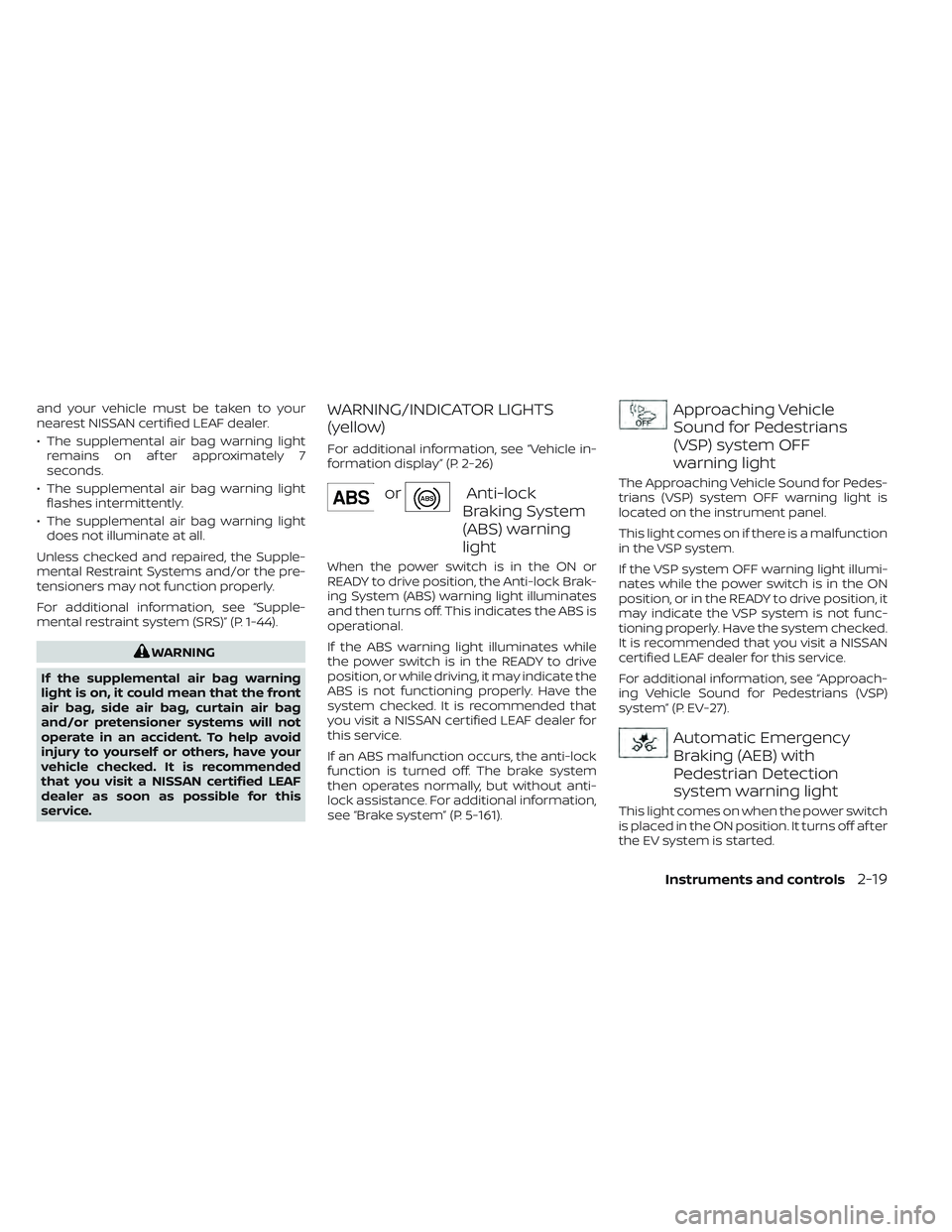
orAnti-lock
Braking System
(ABS) warning
light
When the power switch is in the ON or
READY to drive position, the Anti-lock Brak-
ing System (ABS) warning light illuminates
and then turns off. This indicates the ABS is
operational.
If the ABS warning light illuminates while
the power switch is in the READY to drive
position, or while driving, it may indicate the
ABS is not functioning properly. Have the
system checked. It is recommended that
you visit a NISSAN certified LEAF dealer for
this service.
If an ABS malfunction occurs, the anti-lock
function is turned off. The brake system
then operates normally, but without anti-
lock assistance. For additional information,
see “Brake system” (P. 5-161).
Approaching Vehicle
Sound for Pedestrians
(VSP) system OFF
warning light
The Approaching Vehicle Sound for Pedes-
trians (VSP) system OFF warning light is
located on the instrument panel.
This light comes on if there is a malfunction
in the VSP system.
If the VSP system OFF warning light illumi-
nates while the power switch is in the ON
position, or in the READY to drive position, it
may indicate the VSP system is not func-
tioning properly. Have the system checked.
It is recommended that you visit a NISSAN
certified LEAF dealer for this service.
For additional information, see “Approach-
ing Vehicle Sound for Pedestrians (VSP)
system” (P. EV-27).
Automatic Emergency
Braking (AEB) with
Pedestrian Detection
system warning light
This light comes on when the power switch
is placed in the ON position. It turns off af ter
the EV system is started.
Instruments and controls2-19
Page 202 of 612
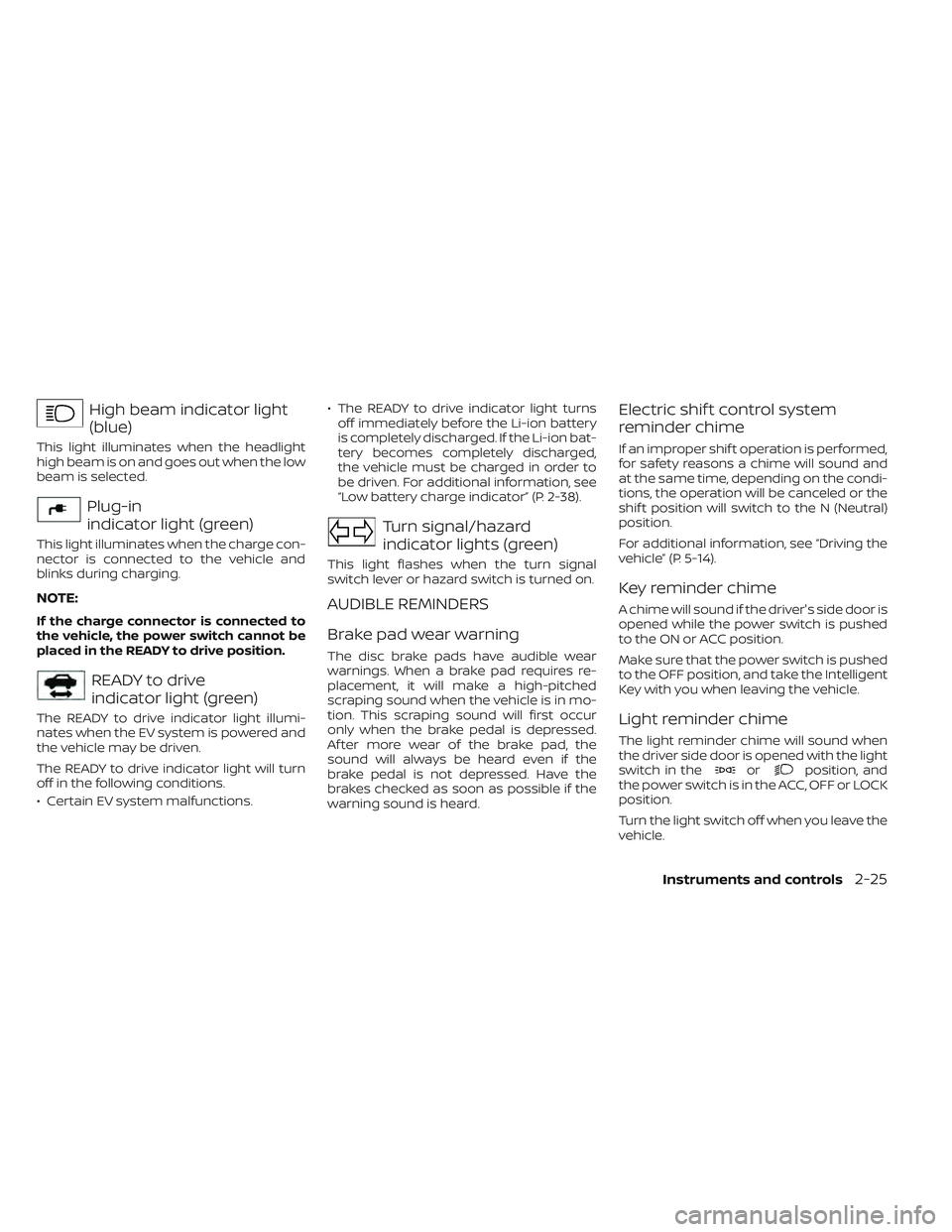
High beam indicator light
(blue)
This light illuminates when the headlight
high beam is on and goes out when the low
beam is selected.
Plug-in
indicator light (green)
This light illuminates when the charge con-
nector is connected to the vehicle and
blinks during charging.
NOTE:
If the charge connector is connected to
the vehicle, the power switch cannot be
placed in the READY to drive position.
READY to drive
indicator light (green)
The READY to drive indicator light illumi-
nates when the EV system is powered and
the vehicle may be driven.
The READY to drive indicator light will turn
off in the following conditions.
• Certain EV system malfunctions.• The READY to drive indicator light turns
off immediately before the Li-ion battery
is completely discharged. If the Li-ion bat-
tery becomes completely discharged,
the vehicle must be charged in order to
be driven. For additional information, see
“Low battery charge indicator” (P. 2-38).
Turn signal/hazard
indicator lights (green)
This light flashes when the turn signal
switch lever or hazard switch is turned on.
AUDIBLE REMINDERS
Brake pad wear warning
The disc brake pads have audible wear
warnings. When a brake pad requires re-
placement, it will make a high-pitched
scraping sound when the vehicle is in mo-
tion. This scraping sound will first occur
only when the brake pedal is depressed.
Af ter more wear of the brake pad, the
sound will always be heard even if the
brake pedal is not depressed. Have the
brakes checked as soon as possible if the
warning sound is heard.
Electric shif t control system
reminder chime
If an improper shif t operation is performed,
for safety reasons a chime will sound and
at the same time, depending on the condi-
tions, the operation will be canceled or the
shif t position will switch to the N (Neutral)
position.
For additional information, see “Driving the
vehicle” (P. 5-14).
Key reminder chime
A chime will sound if the driver's side door is
opened while the power switch is pushed
to the ON or ACC position.
Make sure that the power switch is pushed
to the OFF position, and take the Intelligent
Key with you when leaving the vehicle.
Light reminder chime
The light reminder chime will sound when
the driver side door is opened with the light
switch in the
orposition, and
the power switch is in the ACC, OFF or LOCK
position.
Turn the light switch off when you leave the
vehicle.
Instruments and controls2-25
Page 205 of 612
SETTINGS
The settings mode allows you to change
the information displayed in the vehicle in-
formation display as well as enable and
disable various vehicle features and sys-
tems. The settings include:
• VDC Setting
• Driver Assistance
• Customize Display
• Vehicle Settings
• EV Settings
• TPMS Settings
• Maintenance
• Clock
• Unit/Language
• Factory Reset
2-28Instruments and controls
Page 209 of 612
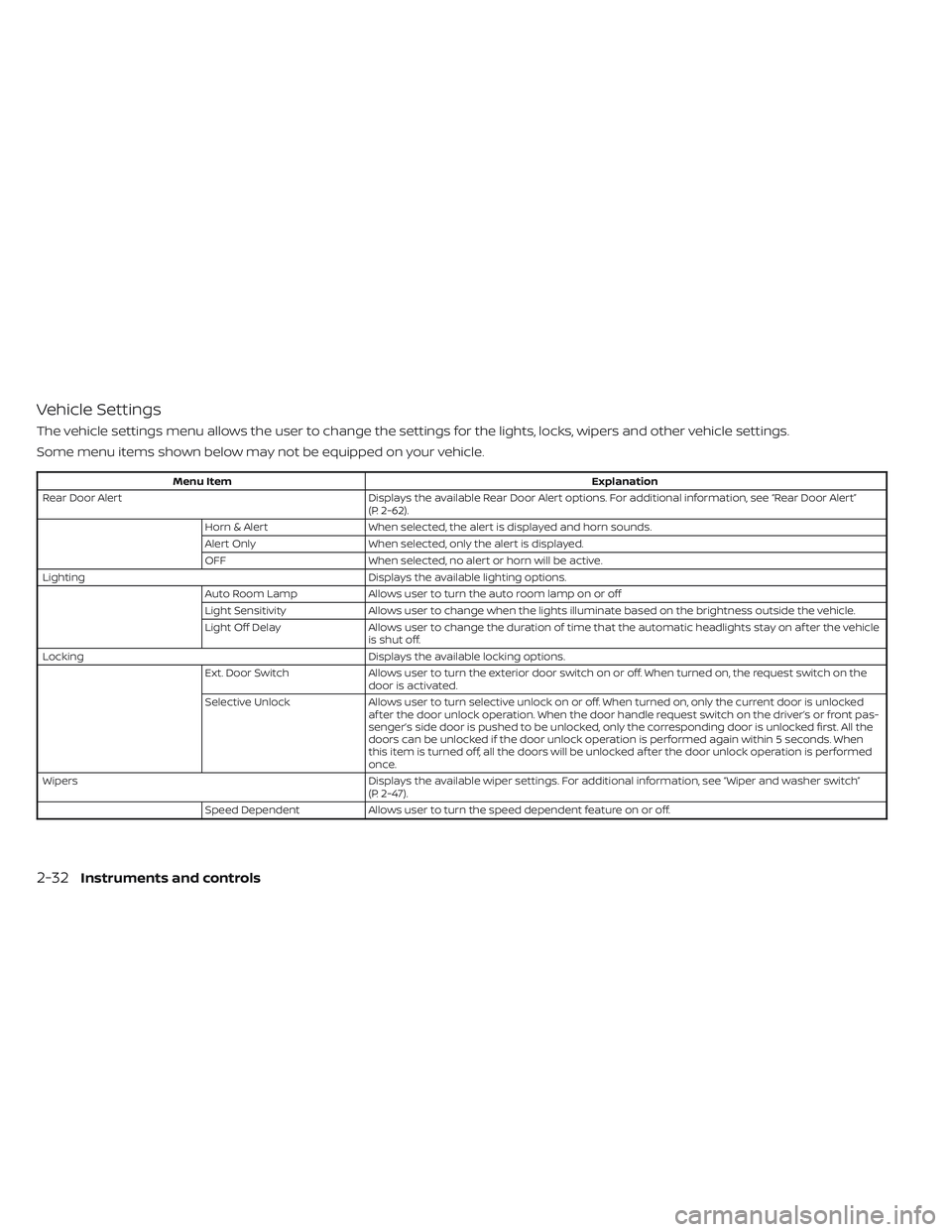
Vehicle Settings
The vehicle settings menu allows the user to change the settings for the lights, locks, wipers and other vehicle settings.
Some menu items shown below may not be equipped on your vehicle.
Menu ItemExplanation
Rear Door Alert Displays the available Rear Door Alert options. For additional information, see “Rear Door Alert”
(P. 2-62).
Horn & Alert When selected, the alert is displayed and horn sounds.
Alert Only When selected, only the alert is displayed.
OFF When selected, no alert or horn will be active.
Lighting Displays the available lighting options.
Auto Room Lamp Allows user to turn the auto room lamp on or off
Light Sensitivity Allows user to change when the lights illuminate based on the brightness outside the vehicle.
Light Off Delay Allows user to change the duration of time t hat the automatic headlights stay on af ter the vehicle
is shut off.
Locking Displays the available locking options.
Ext. Door Switch Allows user to turn the exterior door switch on or off. When turned on, the request switch on the
door is activated.
Selective Unlock Allows user to turn selective unlock on or off. When turned on, only the current door is unlocked
af ter the door unlock operation. When the door handle request switch on the driver’s or front pas-
senger’s side door is pushed to be unlocked, only the corresponding door is unlocked first. All the
doors can be unlocked if the door unlock operation is performed again within 5 seconds. When
this item is turned off, all the doors will be unlocked af ter the door unlock operation is performed
once.
Wipers Displays the available wiper settings. For additional information, see “Wiper and washer switch”
(P. 2-47).
Speed Dependent Allows user to turn the speed dependent feature on or off.
2-32Instruments and controls
Page 210 of 612
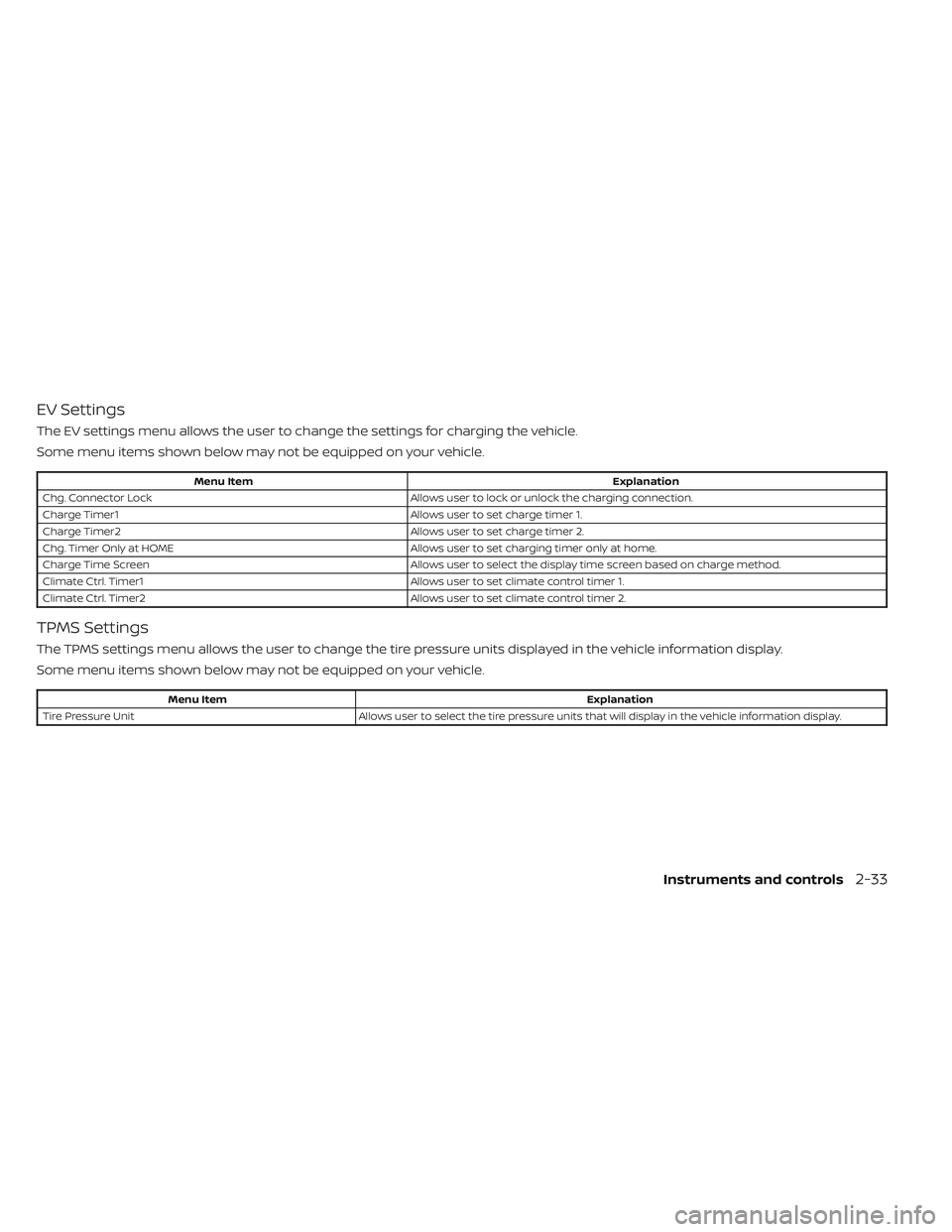
EV Settings
The EV settings menu allows the user to change the settings for charging the vehicle.
Some menu items shown below may not be equipped on your vehicle.
Menu ItemExplanation
Chg. Connector Lock Allows user to lock or unlock the charging connection.
Charge Timer1 Allows user to set charge timer 1.
Charge Timer2 Allows user to set charge timer 2.
Chg. Timer Only at HOME Allows user to set charging timer only at home.
Charge Time Screen Allows user to select the display time screen based on charge method.
Climate Ctrl. Timer1 Allows user to set climate control timer 1.
Climate Ctrl. Timer2 Allows user to set climate control timer 2.
TPMS Settings
The TPMS settings menu allows the user to change the tire pressure units displayed in the vehicle information display.
Some menu items shown below may not be equipped on your vehicle.
Menu Item Explanation
Tire Pressure Unit Allows user to select the tire pressure units that will display in the vehicle information display.
Instruments and controls2-33
Page 211 of 612
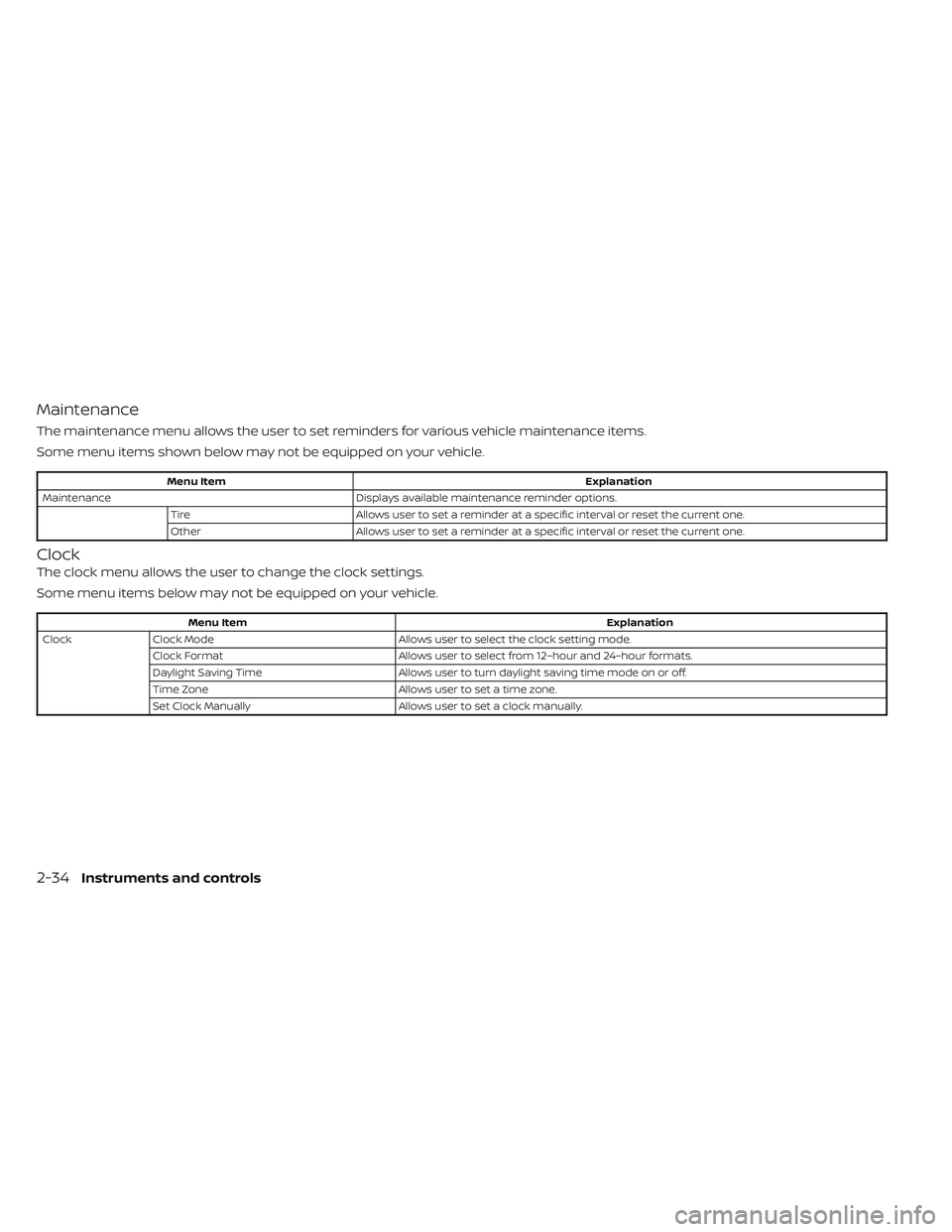
Maintenance
The maintenance menu allows the user to set reminders for various vehicle maintenance items.
Some menu items shown below may not be equipped on your vehicle.
Menu ItemExplanation
Maintenance Displays available maintenance reminder options.
Tire Allows user to set a reminder at a specific interval or reset the current one.
Other Allows user to set a reminder at a specific interval or reset the current one.
Clock
The clock menu allows the user to change the clock settings.
Some menu items below may not be equipped on your vehicle.
Menu Item Explanation
Clock Clock Mode Allows user to select the clock setting mode.
Clock Format Allows user to select from 12–hour and 24–hour formats.
Daylight Saving Time Allows user to turn daylight saving time mode on or off.
Time Zone Allows user to set a time zone.
Set Clock Manually Allows user to set a clock manually.
2-34Instruments and controls
Page 218 of 612
cruise control or go back to the set speed. If
cruise control is on and canceled, the
speed will be displayed to show the speed
the vehicle will return to if the resume but-
ton is activated.
For additional information, see “Cruise con-
trol” (P. 5-65).
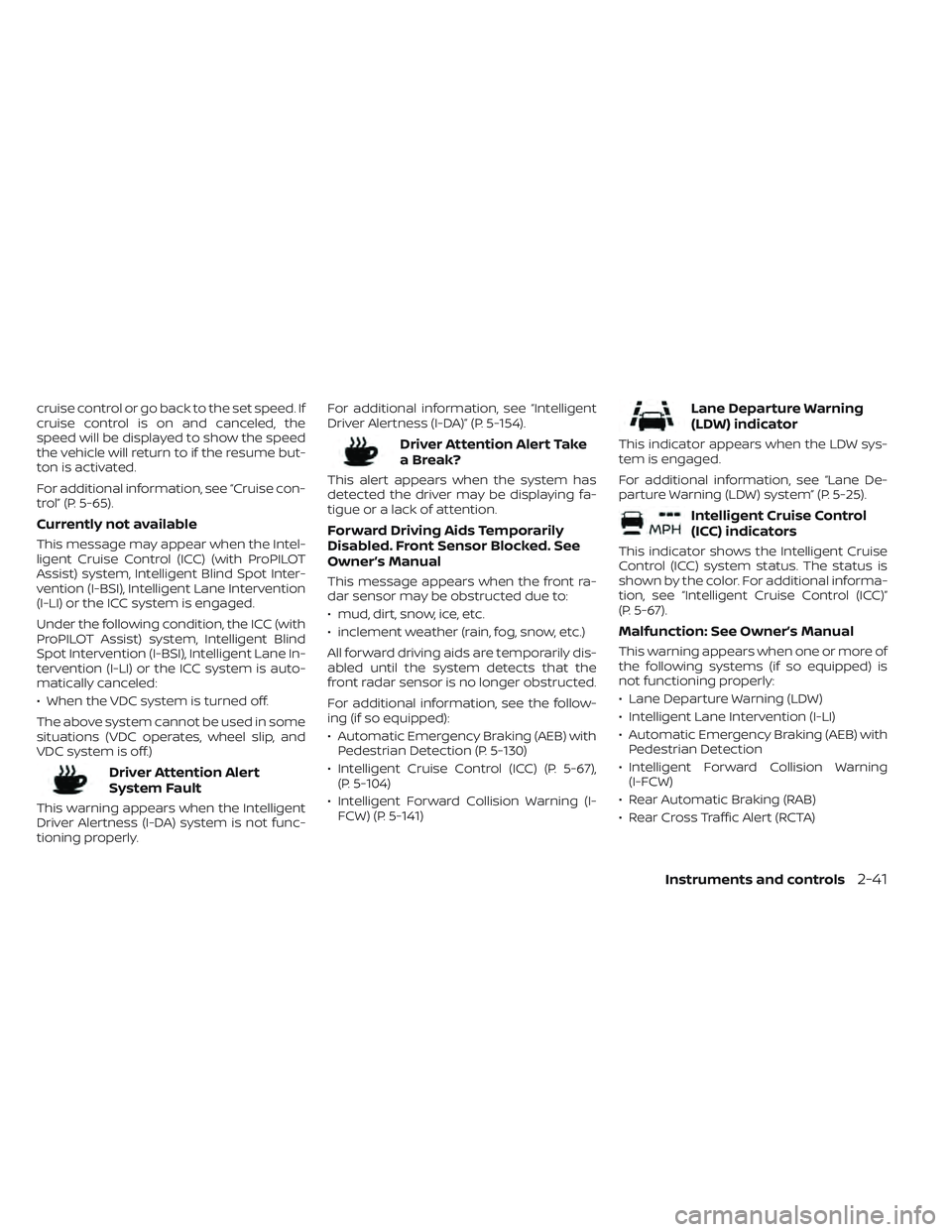
Currently not available
This message may appear when the Intel-
ligent Cruise Control (ICC) (with ProPILOT
Assist) system, Intelligent Blind Spot Inter-
vention (I-BSI), Intelligent Lane Intervention
(I-LI) or the ICC system is engaged.
Under the following condition, the ICC (with
ProPILOT Assist) system, Intelligent Blind
Spot Intervention (I-BSI), Intelligent Lane In-
tervention (I-LI) or the ICC system is auto-
matically canceled:
• When the VDC system is turned off.
The above system cannot be used in some
situations (VDC operates, wheel slip, and
VDC system is off.)
Driver Attention Alert
System Fault
This warning appears when the Intelligent
Driver Alertness (I-DA) system is not func-
tioning properly.For additional information, see “Intelligent
Driver Alertness (I-DA)” (P. 5-154).
Driver Attention Alert Take
a Break?
This alert appears when the system has
detected the driver may be displaying fa-
tigue or a lack of attention.
Forward Driving Aids Temporarily
Disabled. Front Sensor Blocked. See
Owner’s Manual
This message appears when the front ra-
dar sensor may be obstructed due to:
• mud, dirt, snow, ice, etc.
• inclement weather (rain, fog, snow, etc.)
All forward driving aids are temporarily dis-
abled until the system detects that the
front radar sensor is no longer obstructed.
For additional information, see the follow-
ing (if so equipped):
• Automatic Emergency Braking (AEB) with
Pedestrian Detection (P. 5-130)
• Intelligent Cruise Control (ICC) (P. 5-67), (P. 5-104)
• Intelligent Forward Collision Warning (I- FCW) (P. 5-141)
Lane Departure Warning
(LDW) indicator
This indicator appears when the LDW sys-
tem is engaged.
For additional information, see “Lane De-
parture Warning (LDW) system” (P. 5-25).
Intelligent Cruise Control
(ICC) indicators
This indicator shows the Intelligent Cruise
Control (ICC) system status. The status is
shown by the color. For additional informa-
tion, see “Intelligent Cruise Control (ICC)”
(P. 5-67).
Malfunction: See Owner’s Manual
This warning appears when one or more of
the following systems (if so equipped) is
not functioning properly:
• Lane Departure Warning (LDW)
• Intelligent Lane Intervention (I-LI)
• Automatic Emergency Braking (AEB) withPedestrian Detection
• Intelligent Forward Collision Warning (I-FCW)
• Rear Automatic Braking (RAB)
• Rear Cross Traffic Alert (RCTA)
Instruments and controls2-41
Page 220 of 612
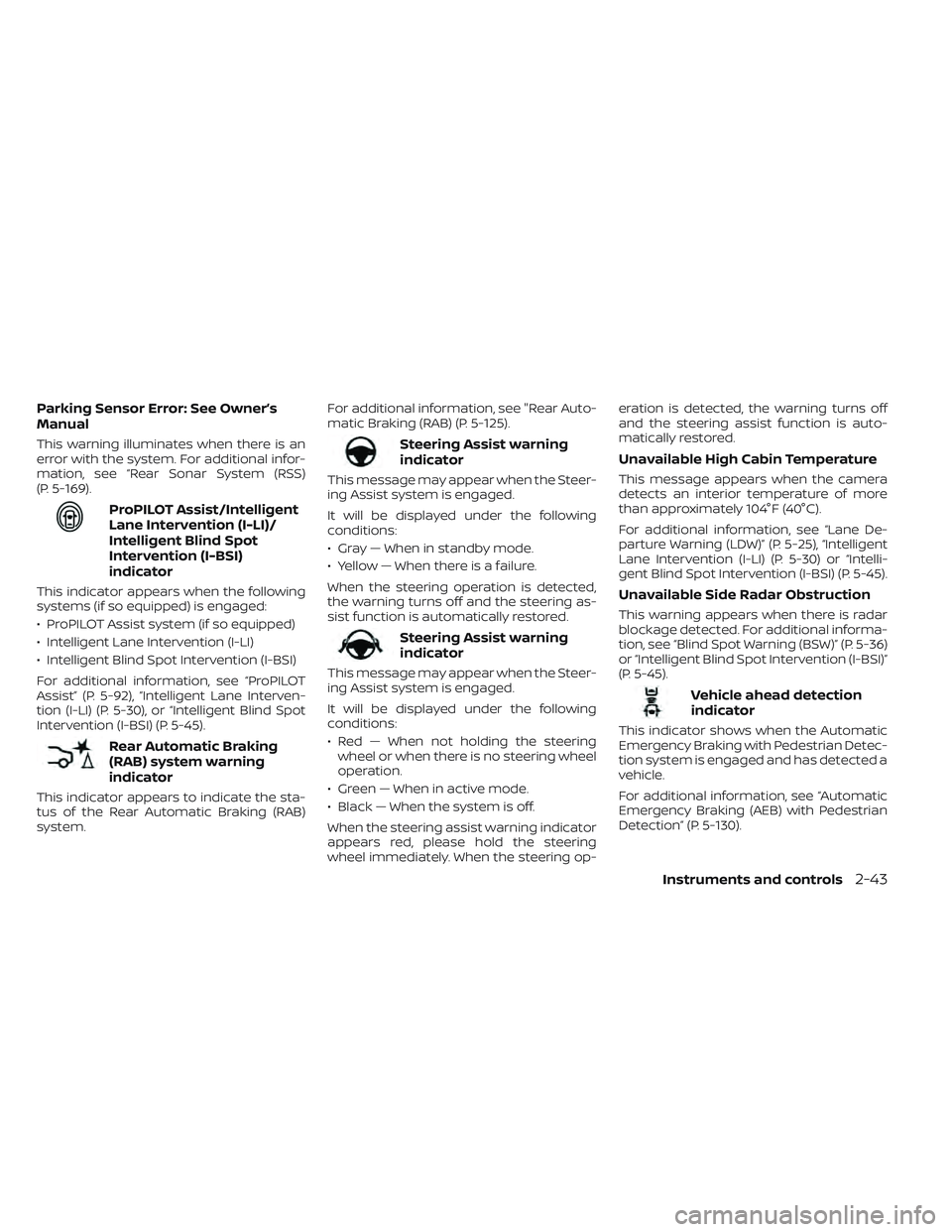
Parking Sensor Error: See Owner’s
Manual
This warning illuminates when there is an
error with the system. For additional infor-
mation, see “Rear Sonar System (RSS)
(P. 5-169).
ProPILOT Assist/Intelligent
Lane Intervention (I-LI)/
Intelligent Blind Spot
Intervention (I-BSI)
indicator
This indicator appears when the following
systems (if so equipped) is engaged:
• ProPILOT Assist system (if so equipped)
• Intelligent Lane Intervention (I-LI)
• Intelligent Blind Spot Intervention (I-BSI)
For additional information, see “ProPILOT
Assist” (P. 5-92), “Intelligent Lane Interven-
tion (I-LI) (P. 5-30), or “Intelligent Blind Spot
Intervention (I-BSI) (P. 5-45).
Rear Automatic Braking
(RAB) system warning
indicator
This indicator appears to indicate the sta-
tus of the Rear Automatic Braking (RAB)
system.For additional information, see "Rear Auto-
matic Braking (RAB) (P. 5-125).
Steering Assist warning
indicator
This message may appear when the Steer-
ing Assist system is engaged.
It will be displayed under the following
conditions:
• Gray — When in standby mode.
• Yellow — When there is a failure.
When the steering operation is detected,
the warning turns off and the steering as-
sist function is automatically restored.
Steering Assist warning
indicator
This message may appear when the Steer-
ing Assist system is engaged.
It will be displayed under the following
conditions:
• Red — When not holding the steering
wheel or when there is no steering wheel
operation.
• Green — When in active mode.
• Black — When the system is off.
When the steering assist warning indicator
appears red, please hold the steering
wheel immediately. When the steering op- eration is detected, the warning turns off
and the steering assist function is auto-
matically restored.
Unavailable High Cabin Temperature
This message appears when the camera
detects an interior temperature of more
than approximately 104°F (40°C).
For additional information, see “Lane De-
parture Warning (LDW)” (P. 5-25), “Intelligent
Lane Intervention (I-LI) (P. 5-30) or “Intelli-
gent Blind Spot Intervention (I-BSI) (P. 5-45).
Unavailable Side Radar Obstruction
This warning appears when there is radar
blockage detected. For additional informa-
tion, see “Blind Spot Warning (BSW)” (P. 5-36)
or “Intelligent Blind Spot Intervention (I-BSI)”
(P. 5-45).
Vehicle ahead detection
indicator
This indicator shows when the Automatic
Emergency Braking with Pedestrian Detec-
tion system is engaged and has detected a
vehicle.
For additional information, see “Automatic
Emergency Braking (AEB) with Pedestrian
Detection” (P. 5-130).
Instruments and controls2-43
Page 222 of 612
The system helps deter vehicle thef t but
cannot prevent it, nor can it prevent the
thef t of interior or exterior vehicle compo-
nents in all situations. Always secure your
vehicle even if parking for a brief period.
Never leave your keys in the vehicle, and
always lock it when it is lef t unattended. Be
aware of your surroundings, and park in
secure, well-lit areas whenever possible.
Many devices offering additional protec-
tion, such as component locks, identifica-
tion markers, and tracking systems, are
available at auto supply stores and spe-
cialty shops. A NISSAN certified LEAF dealer
may also offer such equipment. Check with
your insurance company to see if you may
be eligible for discounts for various thef t
protection features.
How to arm the vehicle security
system
1. Close all windows.The system can be armed even if the
windows are open.
2. Place the power switch in the LOCK or OFF position and remove the Intelligent
Key from the vehicle. 3. Close all doors. Lock all doors. The doors
can be locked with:
• the LOCK
button on the Intelli-
gent Key
• any request switch
• the power door lock switch
4. Confirm that the security indicator light illuminates. The security indicator light
stays on for about 30 seconds. The ve-
hicle security system is now pre-armed.
Af ter about 30 seconds the vehicle se-
curity system automatically shif ts into
the armed phase. The security light be-
gins to flash once every approximately 3
seconds. If, during this 30-second pre-
arm time period, the door is unlocked, or
the power switch is placed in the ACC or
ON position, the system will not arm.
Even when the driver and/or passengers
are in the vehicle, the system will acti-
vate with all doors locked and the power
switch in the OFF position. When placing
the power switch to the ACC or ON posi-
tion, the system will be released.
Vehicle security system activation
The vehicle security system will give the
following alarm:
• The headlights blink and the horn sounds intermittently.
• The alarm automatically turns off af ter approximately 50 seconds. However, the
alarm reactivates if the vehicle is tam-
pered with again.
The alarm is activated by:
• Unlocking the door without using the In- telligent Key or the request switch. (Even if
the door is opened by releasing the door
inside lock knob, the alarm will activate.)
• Opening the hood.
How to stop an activated alarm
The alarm will stop when a door is un-
locked by pushing the UNLOCKbut-
ton on the Intelligent Key, door handle re-
quest switch, or when the power switch is
pushed in the ACC or ON position.
If the system does not operate as de-
scribed above, have it checked. It is rec-
ommended that you visit a NISSAN certi-
fied LEAF dealer for this service.
Instruments and controls2-45